-
Visible in Renderer with Filament renders
Filament is a Viewport drawstyle rather than a full renderer, so that is why the settings is ignored.
Using the methods shown in these scripts http://docs.daz3d.com/doku.php/public/software/dazstudio/4/referenceguide/scripting/api_reference/samples/start#elements it may be possible to link the non-animating visible in Viewport property to an animatable property to make the visibility controllable.
Visible in Renderer with Filament rendersHi folks,
Any idea why the "Visible in Render" parameter is ignored when rendering an animation with Engine set to Viewport and the Viewport on Filament?
Not being able to animate the Visible in Viewport parameter as a workaround seems to make it impossible to render Filament animations with dynamic visibility which...isn't great.
Does DAZ3d has something like UE render engine?James said:
I guess, what I'm looking for is fake iray, like evvee.
--------------
What? render In filament? really? It looks bad.
I mean for viewport that's ok. But for end result?
You may just need good shaders when rendering with filament in Viewport. I only played with Filatoon shaders which was great. But I don't know other shaders with it.
For PR and NPR, I only render with Iray Engine.
However, if you like Eevee, you can send Daz assets to Blender to render, by using for instance, Diffeomorphic Daz Importer.... or if you play UE, send Daz assets there with DTU bridge.
Does DAZ3d has something like UE render engine?I guess, what I'm looking for is fake iray, like evvee.
--------------
What? render In filament? really? It looks bad.
I mean for viewport that's ok. But for end result?
Does DAZ3d has something like UE render engine?Sort of real-time engine ? Nope... there's no such engine in DS. What do you want to do ?
Some folks make animations with filament drawstyle becaust if has faster performance in both viewport and rendering.
FilaToon / Cell shaded rendering with Filamentbarbult said:
Ride Envy
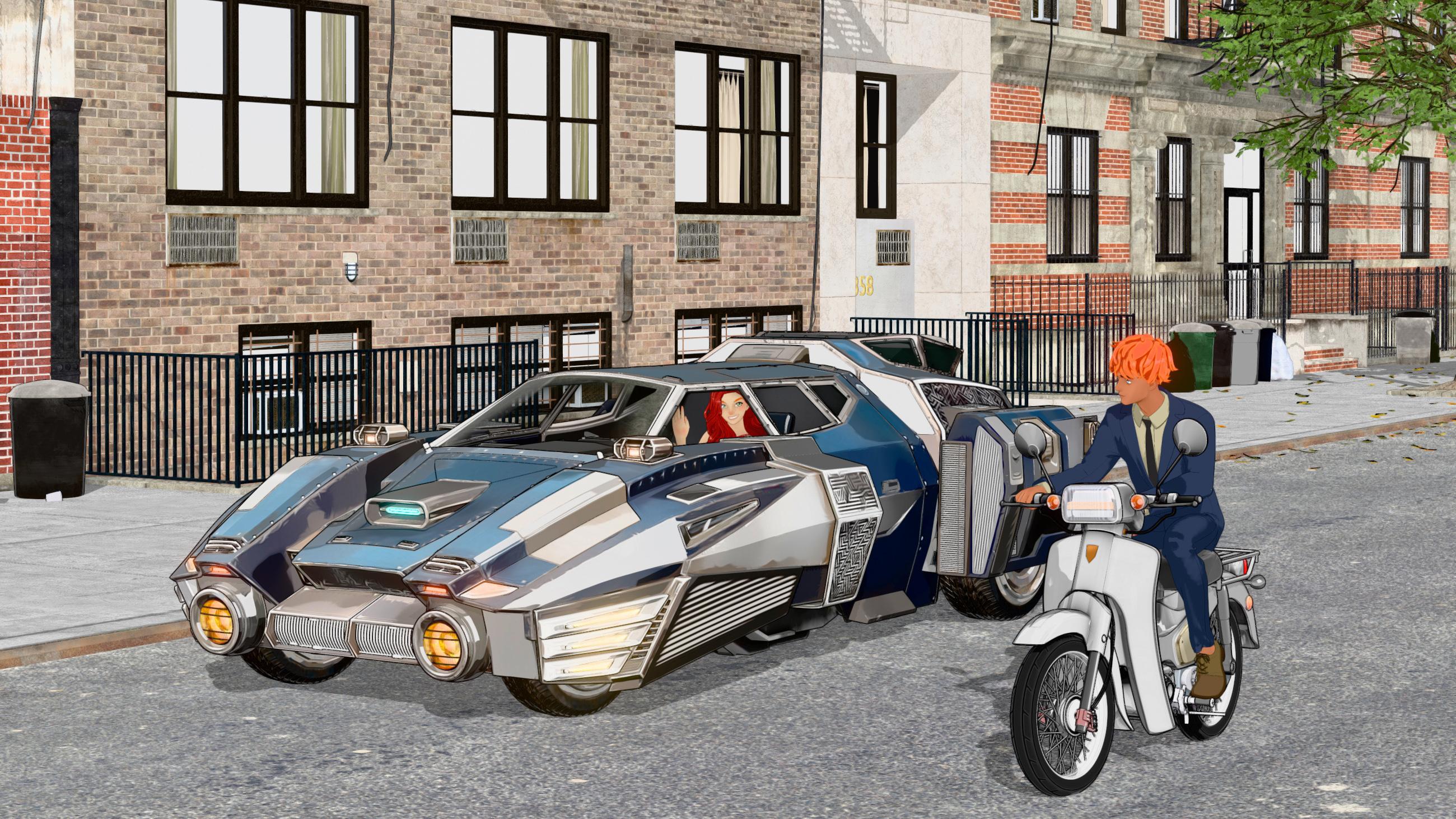
Lighting is tricky with Filament, imo, but you're nailing it! Nicely done!
FilaToon / Cell shaded rendering with FilamentGRFK DSGN Unlimited said:
3Diva said:
GRFK DSGN Unlimited said:
Can someone please point me in the right direction for tutorials about Bloom and Emissives related to FilaToon? I may have some uses for the effects but I'm unclear as to how they work or setting them up.
You'll need a Filament Draw Options Node in the scene (you can add it by going to "Create" >> "New Filamant Draw Options Node").
Then you'll need to select the Draw Options Node in the Scene Tab...
...then go to the Parameters Tab and select "Bloom" and turn the Bloom Strength up and adjust those settings to your liking.
You'll also need to make sure there is an emissive surface in the scene as well (though sometimes even just light/white surfaces will show up in blooms).
That's helpful, but I was looking for how to set up an emissive material so that it shows up in a bloom. I think I understand it but I feel like I may be missing key ingredients in order to get it to work properly. I have all of the things you mentioned above in my scene.
Select the item in the scene tab that you want to glow and then select it's surface in the surfaces tab. Find where it says "Emission Color" and make that anything other than black. Then increase the "Luminance" until it glows. Also make sure you're using the latest or second to the latest version of Daz Studio, as I think that blooms in Filament are a relatively new thing and older versions won't do it.
FilaToon / Cell shaded rendering with Filament3Diva said:
GRFK DSGN Unlimited said:
Can someone please point me in the right direction for tutorials about Bloom and Emissives related to FilaToon? I may have some uses for the effects but I'm unclear as to how they work or setting them up.
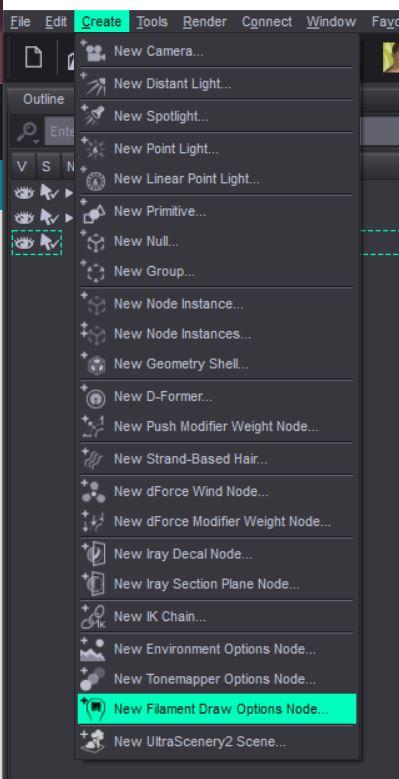
You'll need a Filament Draw Options Node in the scene (you can add it by going to "Create" >> "New Filamant Draw Options Node").
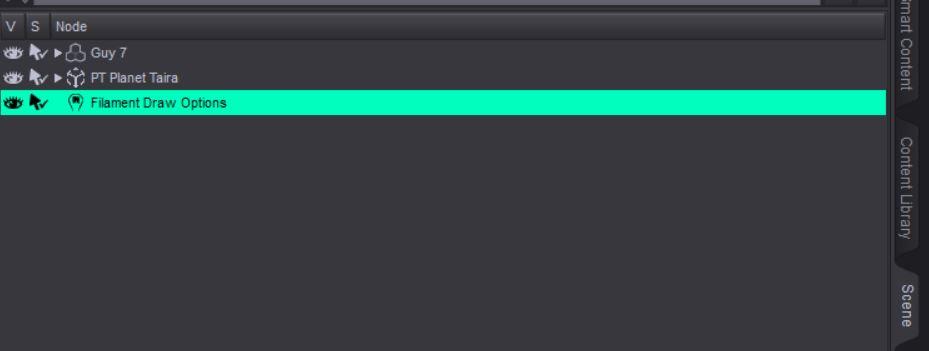
Then you'll need to select the Draw Options Node in the Scene Tab...
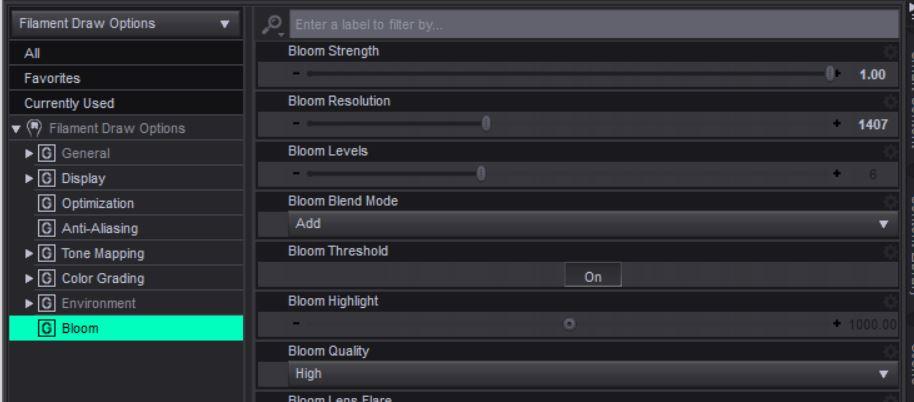
...then go to the Parameters Tab and select "Bloom" and turn the Bloom Strength up and adjust those settings to your liking.
You'll also need to make sure there is an emissive surface in the scene as well (though sometimes even just light/white surfaces will show up in blooms).
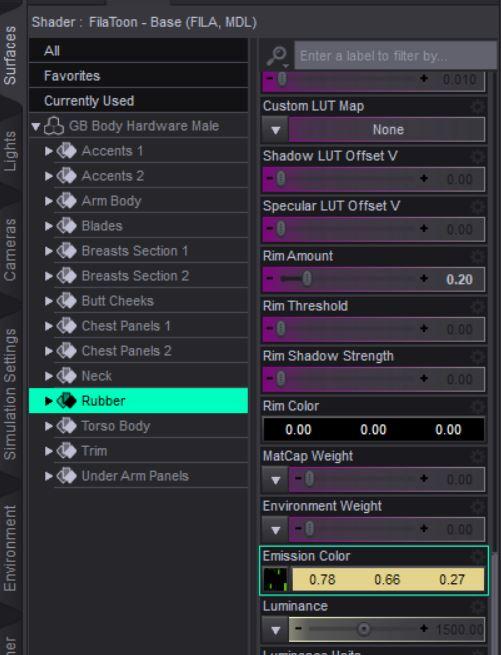
That's helpful, but I was looking for how to set up an emissive material so that it shows up in a bloom. I think I understand it but I feel like I may be missing key ingredients in order to get it to work properly. I have all of the things you mentioned above in my scene.
FilaToon / Cell shaded rendering with FilamentRichard Haseltine said:
barbult said:
3Diva said:
Oso3D said:
I'm working on some Iray/FilaToon products and man, when I have to do Iray promos I'm like... bleeeeeh.
Takes so looooooong. ;)
I know, right? I've been working with Filament and Filatoon for the majority of my renders lately and when I'm trying to render in Iray it's like 'oh man, I forgot how slow this was'. lol Do be fair, it's much faster than 3Delight (at least the few times I've tried to use 3Delight I noticed it was much slower than Iray). But you really can't beat one second renders. lol Filament and Filatoon is so awesome!
I'm glad Daz incorporated it before they started making new stuff like the Auto Save be Premier only.
It was about the same time as, or even a bit after. Auto-save may be Premier exclusive, but some of the other new stuff is Premier-preview - sugesting that it will be for all once released.
I don't want Daz Studio to become essentially subscription software, by making new features Premier only. So I am glad to hear that at least some features will be released to all (maybe).
FilaToon / Cell shaded rendering with Filamentbarbult said:
3Diva said:
Oso3D said:
I'm working on some Iray/FilaToon products and man, when I have to do Iray promos I'm like... bleeeeeh.
Takes so looooooong. ;)
I know, right? I've been working with Filament and Filatoon for the majority of my renders lately and when I'm trying to render in Iray it's like 'oh man, I forgot how slow this was'. lol Do be fair, it's much faster than 3Delight (at least the few times I've tried to use 3Delight I noticed it was much slower than Iray). But you really can't beat one second renders. lol Filament and Filatoon is so awesome!
I'm glad Daz incorporated it before they started making new stuff like the Auto Save be Premier only.
It was about the same time as, or even a bit after. Auto-save may be Premier exclusive, but some of the other new stuff is Premier-preview - sugesting that it will be for all once released.
FilaToon / Cell shaded rendering with FilamentGRFK DSGN Unlimited said:
Can someone please point me in the right direction for tutorials about Bloom and Emissives related to FilaToon? I may have some uses for the effects but I'm unclear as to how they work or setting them up.
You'll need a Filament Draw Options Node in the scene (you can add it by going to "Create" >> "New Filamant Draw Options Node").
Then you'll need to select the Draw Options Node in the Scene Tab...
...then go to the Parameters Tab and select "Bloom" and turn the Bloom Strength up and adjust those settings to your liking.
You'll also need to make sure there is an emissive surface in the scene as well (though sometimes even just light/white surfaces will show up in blooms).
FilaToon / Cell shaded rendering with Filament3Diva said:
Oso3D said:
I'm working on some Iray/FilaToon products and man, when I have to do Iray promos I'm like... bleeeeeh.
Takes so looooooong. ;)
I know, right? I've been working with Filament and Filatoon for the majority of my renders lately and when I'm trying to render in Iray it's like 'oh man, I forgot how slow this was'. lol Do be fair, it's much faster than 3Delight (at least the few times I've tried to use 3Delight I noticed it was much slower than Iray). But you really can't beat one second renders. lol Filament and Filatoon is so awesome!
I'm glad Daz incorporated it before they started making new stuff like the Auto Save be Premier only.
FilaToon / Cell shaded rendering with FilamentOso3D said:
I'm working on some Iray/FilaToon products and man, when I have to do Iray promos I'm like... bleeeeeh.
Takes so looooooong. ;)
I know, right? I've been working with Filament and Filatoon for the majority of my renders lately and when I'm trying to render in Iray it's like 'oh man, I forgot how slow this was'. lol Do be fair, it's much faster than 3Delight (at least the few times I've tried to use 3Delight I noticed it was much slower than Iray). But you really can't beat one second renders. lol Filament and Filatoon is so awesome!
super-sample option for filament in viewport(s)That is what super sampling is and it is a common technique in many games that allow you to render the game in 200% resolution (for example) and then it is scaled down to your monitor resolution. You can find details via google.
This is the best way to achieve perfect anti-aliasing compared to other methods, but it is the most gpu intensive also. In older games, or games with lightweight graphics it often is not issue if you have a modern card.
filament is also so lightweight i dont think it would be an issue.tldr, the tech itself is very common in many applications and games. Whether filament or daz could do it, is another question.
(also Nvidia supports this even on driver level, called Dynamic Super Resolution or DSR, but for desktop apps it often means ui's get scaled wrong, so its mostly for games)
https://en.wikipedia.org/wiki/Spatial_anti-aliasing#Super_sampling_/_full-scene_anti-aliasing
Full-scene anti-aliasing by super-sampling usually means that each full frame is rendered at double (2x) or quadruple (4x) the display resolution, and then down-sampled
Filament RendersI used to see Filament as a joke. Not any more.
Filament Rendersmindsong said:
Do I recall correctly that the DAZ Default Resources package needs to be updated as well?
And I believe the FilaToon capability was added to the existing filament render engine (along with the mentioned shaders/settings) in DAZ Studio 4.23.0.1 (the most recent Public Release). It's a very recent update feature.
cheers,
--ms
Yes
super-sample option for filament in viewport(s)If so, no way... as Viewport just has the same resolution of your monitor... even if you resize it, you can't get a 200%x size ~~
Why not directly render a high K image with Viewport Engine... even if rendering a 16K image of a big scene with Filament, it may just take 1 or 2 minutes at most... because of OpenGL.
Filament RendersDo I recall correctly that the DAZ Default Resources package needs to be updated as well?
And I believe the FilaToon capability was added to the existing filament render engine (along with the mentioned shaders/settings) in DAZ Studio 4.23.0.1 (the most recent Public Release). It's a very recent update feature.
cheers,
--ms
super-sample option for filament in viewport(s)I wonder if it would be possible to have filament views in daz to have "super sampled", ie, rendered in, for example 200% resolution to the viewport size (and then downscaled).
This would make it look in daz a lot better regarding anti-aliasing, which is especially noticeable with outlines.
As just simply "rendering" in very high res and then downscaling looks very sharp compared to how it looks in daz. Of course filament "rendering" is instant pretty much, but would still be nice if we could get even closer representation in daz itself.
FilaToon / Cell shaded rendering with FilamentI've found that Environment Weight is good to use if you want ambient occlusion. Turn it on slightly (about 0.2), bump up the strength of the ambient occlusion in Filament, and you can get a really nice effect like I managed to do with my pinup render down below.
TheNathanParable said:
scorpio said:
TheNathanParable said:
Loaded up an old Girl 6 scene I had lying around and used V3D's FilaToon converter to update it. <3
https://www.daz3d.com/gallery/user/6736226870624256#gallery=newest&page=1&image=1358107

Very nice, but how do you get those soft ground shadows
The ground is the multiplane cyclorama. Both the ground and the character use the "environment weight" option in the filatoon shader (ground is 0.2, character is 0.1). This not only means that they'll be affected *slightly* by the HDRI lighting, but it also means that the ambient occlusion shadows in Filament will actually appear on those surfaces (filament's AO seems to be directly tied to the HDRI). Bump up the strength a lot to make it more obvious without having to increase the environment weight, you get some nice soft AO shadows.
Daz 3D is part of

Connect
DAZ Productions, Inc.
7533 S Center View Ct #4664
West Jordan, UT 84084Licensing Agreement | Terms of Service | Privacy Policy | EULA
© 2026 Daz Productions Inc. All Rights Reserved.











