-
Built in Tutorial and other things that don't work for me
To keep this short I'll just present the problems I have and hope someone will know how to fix the problem(s)
1. The built in Tutorial #4 Posing, it's alright to begin with it ask to select a preset pose, the problem starts when it asks you to tweak the pose, First problem it want you to fix the facial features - the problem with the head is that face isn't facing you and it's no bigger than a nickel (i don't know about you but working on something that small is a pain and being that these tutorials are Scripts your're locked into them if you break out of them you have to start all over again from the top of the tutorial chain and work your way back and because it asks you to save after each lesson you basically have the same problem again and again , problem number two if you simply click on continue to go to the next step it'll let you but at the end of the lesson it will give you an error saying you didn't complete the lesson correctly or something to that effect, Again if they wanted you to do something in a certain order in a certain way it should be damn well written as such in the script.
Solution to this problem make the tutiorials somewhat less hand holdy put up cards but leave the rest unlocked so you can at least make adjustments or at least have control to alter things if the tutorial does something that incorrect. (ie choses something that isn't made for the figure ) btw Toulouse hair style is for version 1 or 2 of Genesis not version 8 if there is one for G8 you may need to adjust for that too.
2.several of older Content purchases are behaving weirdly IE double clicking on items in Studio brings up a script of some sort that opens a window that suppose to have either text or simular to ckick on in order to make a choice with the words under the window that says just that. the other problem i'm having is related to Victoria V4.x in thiis case almost everything in this content package installs but the base for Victoria , and with out this other items that i have for V4 that need that present will not work. Either the file that came down from Daz website is corrupted or else version 4.12.xx.x just doesn't like earlier content.
Sorry if this sounds like a rant but, it's hard as hell to fit something like this into a issue ticket. (i've never been good at Twitter)
Hip Bend Bug?Hey all, new user
Have just purchased Victoria 8 and have found what might be a bug using 'Hip Bend'. When the hip is bent and then character moved, the character rotation jumps to a new position. Very furstrating!
- Select pelvis
- Dial up hip bend
- Grab a handle in the main window to move character up or sideways
- As soon as object move handle for a body part is touched, character jumps to new rotation position
Anyone else experiencing this? rookie mistake? Is there a fix or workaround?
Tara 8: How does she compare?Thanks, watchdog79! That makes Tara's height 5' 11.6" and her other measurements 35.9" x 25.6" x37.8" based on a handy cm to in converter. And just out of curiousity I checked and found that there were five characters who hit the average height and who were not either a teen, elderly or fae: Alawa 8, Kayo 8, Khemsit 8, Mei Lin 8, and Twosret 8. Make of that what you will. :-)
Gabriela 8 is pretty much there too, at 5'5": https://www.daz3d.com/gabriela-8
I did a render of her next to Victoria 8 that I thought turned out kind of funny:
 When did Tara become Tara 8?
The big push for gen3 seems to have been to unify the UVs. Victoria, Aiko3, and Teen Laura were all different figures, but there were quite a few characters released for them who could wear each others skins. But their morphs were all incomptible.
Actually morphs were compatible between all female figures or all male figures, they were all based on the same mesh (the original unimesh). What was different beside the base shape was grouping between males and females, and of course rigging.
A3 and H3 even included a cr2 made to use SP3 or David morphs.
The big push for gen4 was to make all bases morphs of V4, M4 or K4. There were only three base meshes in the whole development period of gen4.
Again, V4, M4 and K4 were all based on the same mesh. There were 3 base figures though.
When did Tara become Tara 8?I've not been around from the beginning, but I've a reasonably good memory for what I've been told.
The big push for gen3 seems to have been to unify the UVs. Victoria, Aiko3, and Teen Laura were all different figures, but there were quite a few characters released for them who could wear each others skins. But their morphs were all incomptible.
The big push for gen4 was to make all bases morphs of V4, M4 or K4. There were only three base meshes in the whole development period of gen4. Victoria 4 was oh-but-definitely a "base" figure. As was Michael, and the Kids, once they finally showed up.
With G1 we went to weightmapping and *everything* was a morph of a single base mesh. So then we got lumbered with the proprietary UVs for each new "base". Probably in an attempt to differentiate between them. And, yes, there were extreme morphs which benefitted from that, but for the most part it was gratuitous and annoying.
But, yeah, the Elite series was clearly the marketing prototype for todays "core" figure releases. The morphs were very good indeed, and the skins really were superior to a lot of what was available at the time.
When did Tara become Tara 8?I think also to differentiate it from 'Tara & Sachra for V7' (https://www.daz3d.com/tara-sachra-hd-for-victoria-7) and 'Tara 2 for V7 & V8' (https://www.daz3d.com/tara-2-hd-for-victoria-7-victoria-8) Deamon models
Regards,
Richard.
Sales thread: Report Issues Here. & "There's Always Another Sale™"The carousel on the sale page still shows a ton of items as being part of the "Select Genesis, Michael 4 and Victoria 4 Items" but aren't discounting. The "wrong" items are still on the sale page and haven't been removed.
Sales thread: Report Issues Here. & "There's Always Another Sale™"The Morph Editor add-on for Mesh Grabber is here for Windows, at last! Thank you DAZ for a proper discount for previous owners this time! An extra 75% off the bundle for already owning the other two pieces effectively brings release day pricing for the Morph Editor add-on to $8.69 (nice) with another new item in the cart.
And there are all of the there-and-gone items from yesterday in today's PFAD. I wondered if that was what had happened.
So last night I had a purple banner giving me 75% off the Mesh Grabber Editor because I owned the first 2, today that banner is gone and its not in my messages, is this an error or has anyone else experienced this? Is the discount applied automatically and you don't need the banner? More questions on how things work here.....
Yes - this morning(UK) i had one for 50% off as have the main item but the banner has gone and isn't in my messages either, I was considering purchasing the bundle but I doubt now I will bother.
I would like to know though why it has now been removed
It's also gone from my messages, but the price in my cart hasn't gone up. I'm waiting to check out until we find out whether the "Select Genesis, Michael 4 and Victoria 4 Items" that are in the carrousel but not on the page (and are full price in the cart) are supposed to be part of today's offer or not.
This may turn out to be a very cheap day if I end up tossing half the cart...
Sales thread: Report Issues Here. & "There's Always Another Sale™"Tried this deal
TODAY'S DEALS
Buy any Debut or Still New Release to get Select Genesis, Michael 4 and Victoria 4 Items for just $2.99 each
* Items must be in cart simultaneously to apply.
Cannot be used to purchase Items already owned at a lower price.
Discount applies in cart.Added an item from sale page
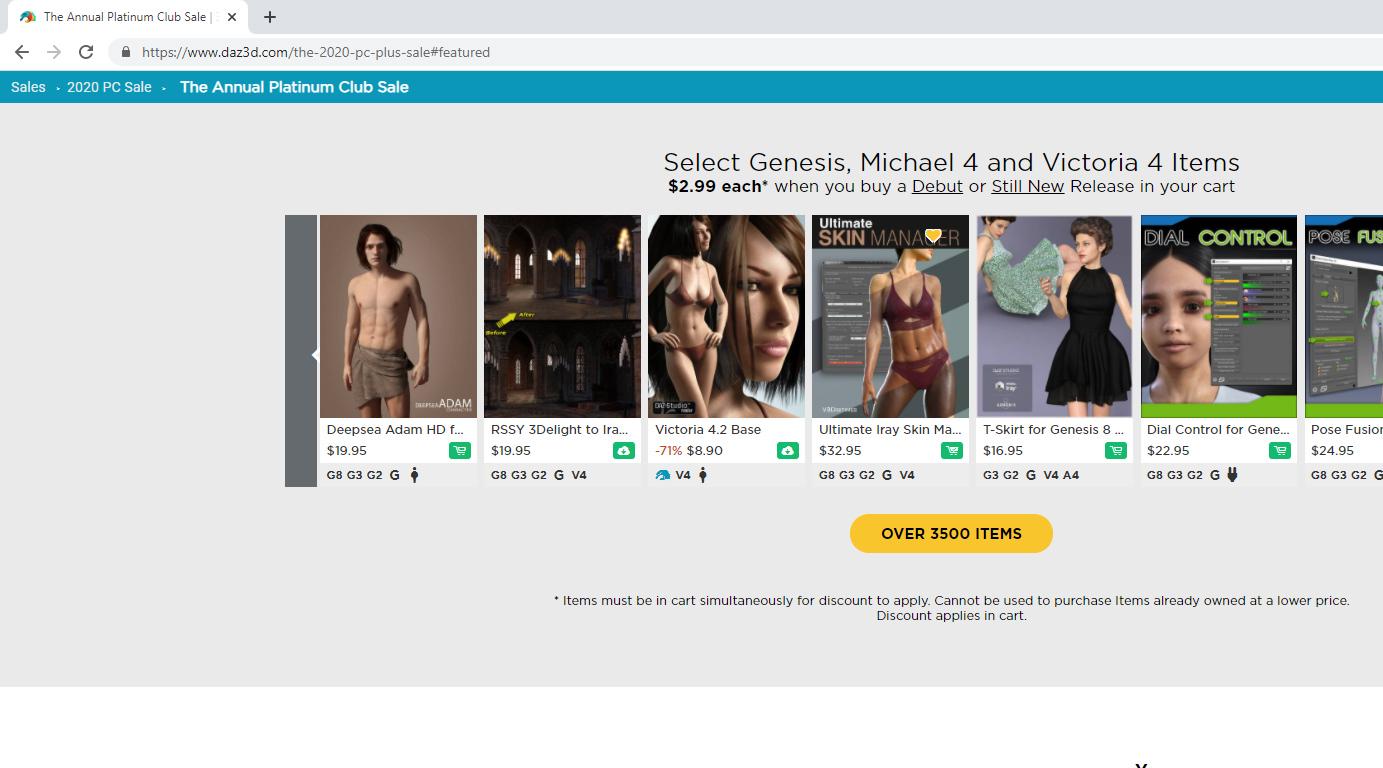
Cart is reluctant to change, update or modify price according to deal...
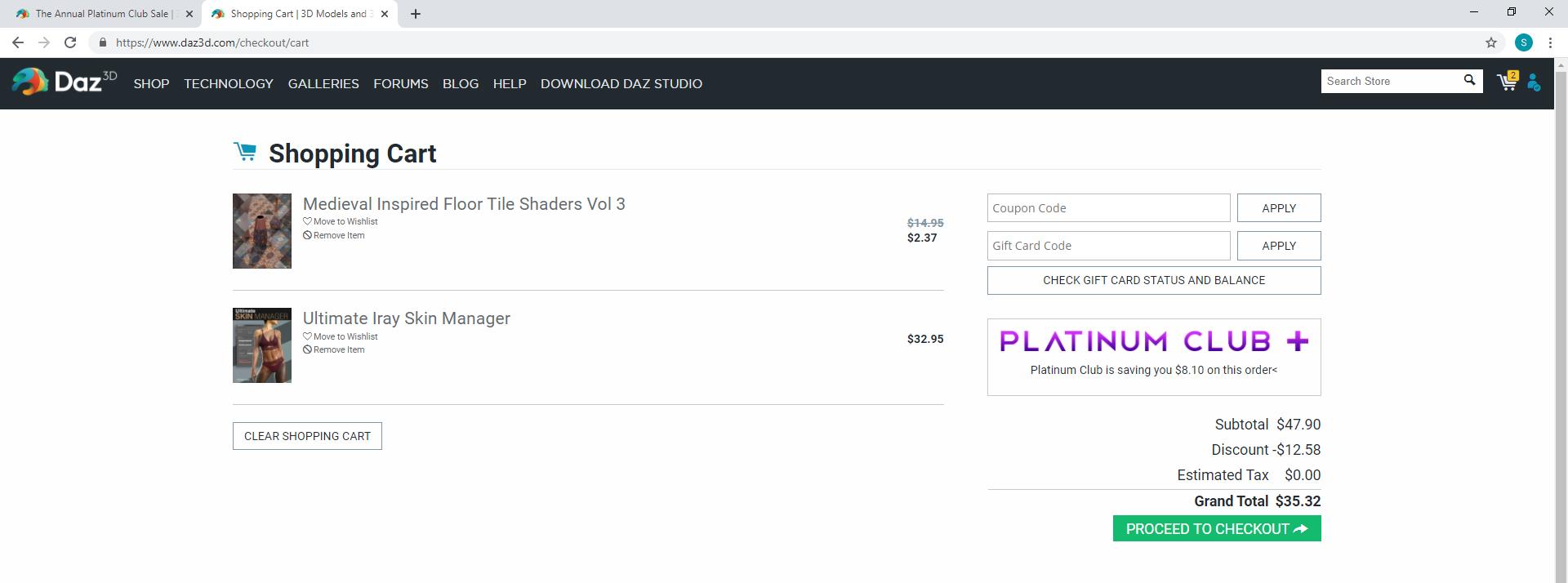 Sales thread: Report Issues Here. & "There's Always Another Sale™"
Select Genesis, Michael 4 and Victoria 4 Items
$2.99 each* when you buy a Debut or Still New Release in your cart
The scrolling part of the sale lists several items:
...
that do not discount in the cart and can't be found on the link( https://www.daz3d.com/michael-and-victoria-4-items-16979#index=0&order=popular^1&filtered=1)
Scroll up.
Have any of you tried Carrara?Daz Studio Page Quick Map
-
Daz Bridges - Maya, Blender, C4D, 3ds Max, Unreal and Unity
-
Daz Bridges How To - Steph, from Daz 3D, shows you how to use them
Carrara Info
Do it in Post
Sales thread: Report Issues Here. & "There's Always Another Sale™"Select Genesis, Michael 4 and Victoria 4 Items
$2.99 each* when you buy a Debut or Still New Release in your cart
The scrolling part of the sale lists several items:
...
that do not discount in the cart and can't be found on the link( https://www.daz3d.com/michael-and-victoria-4-items-16979#index=0&order=popular^1&filtered=1)
Materials not loadingAccording to your screenshot, you seem to have the Victoria 6 figure selected, not her hair. You need to go to the "Scene" tab and select Leyton Hair, then try applying the materials.
Hylas' corner
Is it time for another horny render? Why yes, it's always time for horny renders!
I've been in a spending mood and have bought so much stuff this last month or so. But I'm really happy because it's all really nice stuff!
So, here's Nefer pretty much out of the box. She is gorgeous. And since we're all doing Egyptian... wait, we've already moved on to Vikings? Oh man. I've... done an Egyptian render... *hangs head*
Freebie credits:
HDRI by Felldude: https://www.renderosity.com/mod/freestuff/hdr-lighting-from-fallout-4/82618
Water Texture by LowlyPoly: https://cubebrush.co/lowlypoly/products/kbmaiq/stylized-water-texture
Lotus by cgs3d: https://www.turbosquid.com/3d-models/free-max-model-flower/1116825
Flame by SquarePeg3D: https://www.renderosity.com/mod/freestuff/morphing-flame-for-iray---100-free/76201
Brazier by Ile Avalon: https://www.renderosity.com/mod/freestuff/mountain-of-the-serpent-divinity-for-poser/80639
Collar by Architect: https://www.renderosity.com/mod/freestuff/slave-collar-for-victoria-4-x/75321
Blindfold by Karth: https://www.sharecg.com/v/38701/gallery/11/Poser/M4-BlindFoldzz-+-Updatelink
Mango by Printable Models: https://free3d.com/3d-model/-mango--988240.html
Lime by Printable Models: https://free3d.com/3d-model/-lime--611628.html
Starfruit by Printable Models: https://free3d.com/3d-model/starfruit--892632.html
Tangerine by Printable Models: https://free3d.com/3d-model/fruit-v1--195897.html
Yellow Plum by Printable Models: https://free3d.com/3d-model/fruit-v1--559105.html
Bottle by Gadu: https://www.renderosity.com/mod/freestuff/bottles/75770
Bottle by Gadu: https://www.renderosity.com/mod/freestuff/bottles-3/76444
Bottle by RedPhantom: https://www.renderosity.com/mod/freestuff/magic-potions/85935
Bottle by Chaosqueens-world: https://www.renderosity.com/mod/freestuff/bottle-04/84007
Pose by Zeddicuss: https://www.zed3d.com/shop/sexy-poses-11-20-compiled-g3f/
Pose Converter by Agent Unawares: https://www.deviantart.com/agentunawares/art/G3F-to-G8F-World-s-Greatest-Pose-Converter-709591348Valiant and Courageous for G8?https://www.daz3d.com/rssy-clothing-converter-from-michael-4-to-genesis-8-male
https://www.daz3d.com/rssy-clothing-converter-from-victoria-4-to-genesis-8-female
V3/A3/GV3 Pose Transfer to G8FI think I misinterpreted your original message. When I saw V3 I was thinking G3/V7. Now I understand you mean the ancient Victoria 3. That's a whole different ballgame. Never mind!
 V3/A3/GV3 Pose Transfer to G8F
I see excessive modesty is not one of AgentUnawares' failings. 'World's Greatest .. ' Pffft.
Looks interesting though Barbult, thanks. May have to download and see for myself. I don't actually have a great deal of Victoria7/G3F material, having much more dating back to Victoria 3 days, which is why I came up with this relatively simple Victoria 3 conversion script.
I suspect that if I could work out how to reference two characters in the script, one V3, the other G8F, then nothing would be lost, because the twist data sent to the G8F bend bones (such as Right Shoulder Bend) wouldn't disappear before the script could re-direct it to the twist bone. However at my current early stage of knowledge, that's beyond me still.
Regards,
Richard.
[Released] Pose Randomizer Pro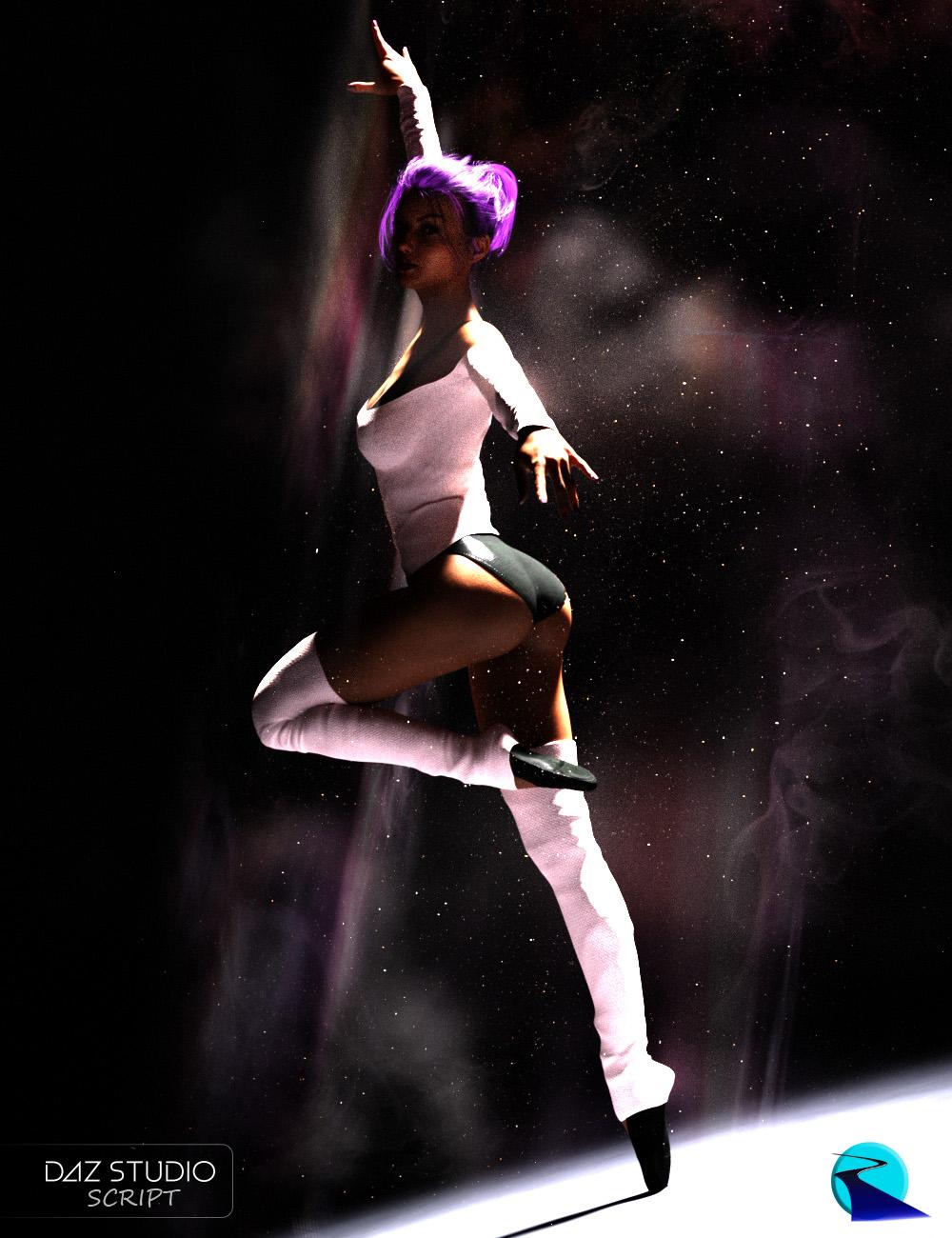 Unlock the infinite potential lurking inside your expensive pose collection! Pose Randomizer Pro takes the popular Pose Randomizer product and upgrades it with tons of new features.
Pose Randomizer Pro is a suite of scripts for creating new poses and enhancing existing ones. Pose Randomizer Pro works by selectively randomizing the bone orientations of your Figures and Characters.
It is designed to work with any character... from Victoria 4 to Genesis 8, from Horse to Dragon, Male or Female... anything with bones!
- Designed for any Character or Figure... from Victoria 4 to Genesis 8, from Horse to Dragon... anything with bones
- Works with entire figures or Sub-Trees of the bone hierarchy
- Create new looks for your poses with just one click
- Give just a hint of imperfection to your poses to make them look more realistic and less "posed." Life isn't perfect, your poses shouldn't be either
- Selectively control which parts of the body are affected (Designed for Michael 4/Victoria 4 - Genesis 8, though it may work with other characters)
- Settings are automatically saved and restored
Exclusive to Pose Randomizer Pro (!):
- Expands the original 2 Pose Randomizer scripts to a suite of 12 different scripts
- Multi-Level Undo and Redo
- Separate Perturbation Percentage sliders for Bend, Twist, and Side-Side
- Optional Unidirectional Perturbation (i.e., all bones are rotated in a positive or negative direction) and the ability to mirror Unidirectional Perturbation Left to Right (e.g., right arm and left arm will bend in the same direction regardless of slider setup, M4/V4 - G8 only)
- In-Dialog Camera
- Install as Custom Actions Script
Pose Randomizer is not required. No poses are included with the package.
What's Included and Features
- Pose Randomizer Pro (.DSE)
- 13 Scripts
- Pose Randomizer Pro Body Parts
- Pose Randomizer Pro Feet (feet and toes)
- Pose Randomizer Pro Figure (everything except expression)
- Pose Randomizer Pro Fingers (fingers excluding thumb)
- Pose Randomizer Pro Hands
- Pose Randomizer Pro Head (neck and head)
- Pose Randomizer Pro Lower Half (pelvis, legs, and feet)
- Pose Randomizer Pro Selected Only (Only actual selected nodes)
- Pose Randomizer Pro Selected (selected nodes and all children)
- Pose Randomizer Pro Toes
- Pose Randomizer Pro Upper Body (Upper body excluding neck and head)
- Pose Randomizer Pro Upper Half (upper body excluding expression)
- Install Custom Pose Randomizer Pro Actions script (to install to Favorite menu)
- Detailed User's Guide
Matter of oppinion Older Textures Vs NewerIs it just me or does it seem like many of the older model textures for outfits Feel like they are more detailed and intricate? Could it just be a trick of post work on image or just the nature of how the texture are handled by the models for example say Victoria 4 & Michael 4 models vs Genesis 8. I think there's a trade off some where between the two. While genesis 8 gets extreamly realistic they don't always feel as "real" maybe it's that "Uncanny valley" effect. While V4 & M4 items for the most part feel flat and outdated, they occationally bedazzle the eye. Maybe it's just artistic style has changed over time or perhaps due to newer editing tools? What do you guys think? I'll link some examples below:
V4 & M4
https://www.daz3d.com/the-timekeeper-for-hattie-madder https://www.daz3d.com/the-glacierqueen-outfit-for-victoria-4 https://www.daz3d.com/skadi-for-v4
https://www.daz3d.com/birdsongs https://www.daz3d.com/arissa-dress https://www.daz3d.com/the-qabbalah-aerandiel-interskeleton
https://www.daz3d.com/seafolk-mertails-and-fins-for-v4-and-a4 https://www.daz3d.com/victoria-4-dynamic-bodysuit https://www.daz3d.com/linkgear-dynamic-cape-for-michael-4
https://www.daz3d.com/musketeer-for-m4 https://www.daz3d.com/coalition-katana https://www.daz3d.com/seafolk-mertails-and-fins-for-m4-and-h4 https://www.daz3d.com/coalition-rapier-armor
https://www.daz3d.com/brotherhood-antiquities-bundle https://www.daz3d.com/shades-of-atlantis-cobalt-hierophant https://www.daz3d.com/major-cache
Just look up anything Genesis 8 for comparison.
Side note: In no way am I attempting to disparage anyone creators work, I'm just asking for a critique of visual presentation and detail.
Please tell me what you think.
Sincerely,
Jacob
SCI-FI CelebrationA re-visit to the first scene I ever used in Daz, Sci-Fi Bedroom by Stonemason. I have done a quick conversion of the materials to iRay and replaced the bedding with elements from dForce Squishy Mattress and populated it with the two most recent Victoria characters (7 & 8)

Looks great. I haven't tried a D-force blanket yet.
The mattress is the real skill, I love it, you can have a character indent it as much or little as you want, likewise the pillows, only done rude pictures so far apart from this one, will whomp up a couple of R rated shots. It has always been a pain for me that when you sit a character on a chair you have to try and make it look like the character is indenting it and deal with loose clothing that can sink into the cushion, these D force "pads" are going to really help generate believable scenes.
Daz 3D is part of

Connect
DAZ Productions, Inc.
7533 S Center View Ct #4664
West Jordan, UT 84084Licensing Agreement | Terms of Service | Privacy Policy | EULA
© 2026 Daz Productions Inc. All Rights Reserved.