-
Toon sale - THANK YOU!
I would have been excited for the sale if I didn't already own just about 80% of the list, already! XD
Yeah, I understand if you've been on this site for a while then you, like most longer term users, probably have almost everything in these sales. I'm personally just nearing my official two year anniversary date on DAZ as of November, so I basically joined the 'club' only prior to the release of Genesis 3 female and Iray. I had hardly began buying up the Legacy 5 & 6 models and all their morph thingys when DAZ first began releasing everything Legacy 7.
I was like, "Whoa, whoa! Wait a minute, DAZ!" Then, it's been all about Genesis 3 and Iray - and I don't care much for either except for a few models that are highly stylized, like SickleYield's SF Anime character and her ballpoint dolls (and Kenji 7 looks fantastic, but I just missed his release sale due to being broke that week).
So, yeah - I suppose I can see it from your perspective, but for me - finally purchasing those long awaited wishlist items is a wonderful thing, and I'm pretty thankful for the opportunity to carry it away today.
Post-Morph Loader Pro Fitting HelpThe only thing I can think of is that Auto Follow might be turned off for those morphs. I don't see why it would, though, since I'm pretty sure it gets turned on automatically if you use Morph Loader Pro. Maybe check every morph listed under Currently Used to make sure it's on. If it is for all morphs, then I don't see any reason for it not to fit.
For hair, though, it's often suggested to just adjust the scale and position of the hair figure, then parent it to the head. That wouldn't work for clothing, though.
Edit: I just thought of something else, though I don't know if it would affect how clothing fits. Did you do Adjust Rigging to Shape for each of the morphs you imported with MLP, and then ERC Freeze them into the morphs?
Nope, is that nesessery with MLP?
GenX2 Update / Genesis 3 Add-On [Commercial]TheKD: Do you have all the basic figures (i.e. Genesis, Genesis 2 F/M, and Genesis 3 F/M) installed? Because the clone morphs are defined only for the previous generation of figures, GenX needs them all to transfer from Poser figures to Genesis 3.
xyer0: Usually, all you have to do is to load the original M4 CR2 into GenX, and then apply the PZ2 that injects morphs and sets morph values. Saving as a new CR2 should be required only in rare cases (e.g. for binary morph injections, which are not supported by GenX).
Dialing the base morph (in your case M4) and the transferred morph to 1 should give you the closest result. Also, you need to start a new scene after transferring morphs, otherwise DS may use a cached version of the Genesis figure without looking for new morphs.
GoZ bridge not working since DS4.9.3.25 updateHere's another recurring Daz - GoZ - ZBrush weirdness, which could be solved fortunately.
Sometimes GoZ from DS alone will RESET CUSTOM UI!
After which, no Pref:Restore Custom UI will restore. Pref: clear cache also didn't do anything. Exiting ZBrush, relaunch ZBrush, will get back your custom UI. But as soon as you send something from Daz, custom UI is lost again!
Eventually I found a way to get it back: relaunch ZBrush, send something from ZBrush to Daz Studio. Then DS GoZ will stop resetting the custom UI.
EDIT [next day]
A better faster workaround is found.
So the custom UI random disable happened again during another mundane process.
I've made a prop then send from ZBrush to DS with no issue. Then I goZ a Genesis base to ZB (which is still opened). Custom UI/ hotkeys got disabled again.
I refuse to restart ZBrush just for another glitch. So I hit ZB's goZ and send the Genesis back to DS, which ask me if I want to load a morph. I just cancel. Go back to ZBrush, now the custom UI is back.
So it seems this is a faster way to get the custom UI back.
G3 Morphing Fibermesh Eyebrowshttp://www.sharecg.com/v/85718/view/5/3D-Model/G3-Morphing-Fibermesh-Eyebrows-and-Pubic-Hair
I made these. This is free to use and abuse as you see fit. I'm working on an update right now. One of them is fits for major Daz People. I need a list of Daz people that are popular with others. I'll see if I have them and if I do I'll make a Morph Fit and Brow texture FOR that particual model. I.E. Teen Josie 7 - Skyler - Snowflake for Aiko 7
Perplexed With Pegasus 3Perhaps you can try exporting your OBJ file from Daz Studio using the Poser Preset

When you have finished your morph and are importing it back to Daz you will need to import using the same preset values (Poser in this example) as you exported with.
Infinite Insanity - There's ALWAYS Another Sale! (Daily Sale Talk)I think I might be able to make it work okay for the Genesis sale to round out all of the morph packs and things I don't have, but I've already bought most of the higher price things you really want, and others from my wishlist aren't in the actual sale (single toon characters without their bundle items, etc.) so I'm not really sure. Will have to wait and see once I actually get paid~
Genesis 3 add on worth it?Are you asking for a pic of the Genesis 3 Base and the base with the Victoria morph dialed up? You have Genesis 3 Female, from what you said, so you know what that looks like. http://www.daz3d.com/media/catalog/product/cache/1/image/9df78eab33525d08d6e5fb8d27136e95/0/1/01-daz3d_victoria-7_.jpg is what the Victoria morph looks like. Were you looking for something else?
ZDG random Daz Studio discoveries and questions.DA is somewhat of a pay per MB site to an extent (last time I looked) and the Brazier zip was just about 20MB in size. Something of that size probably would be better to put up at a cloud-storage site, tho that still has some potential complications. The nagging doubt is the lack of a reason, how can you do good if you don't know what it was that you did bad.
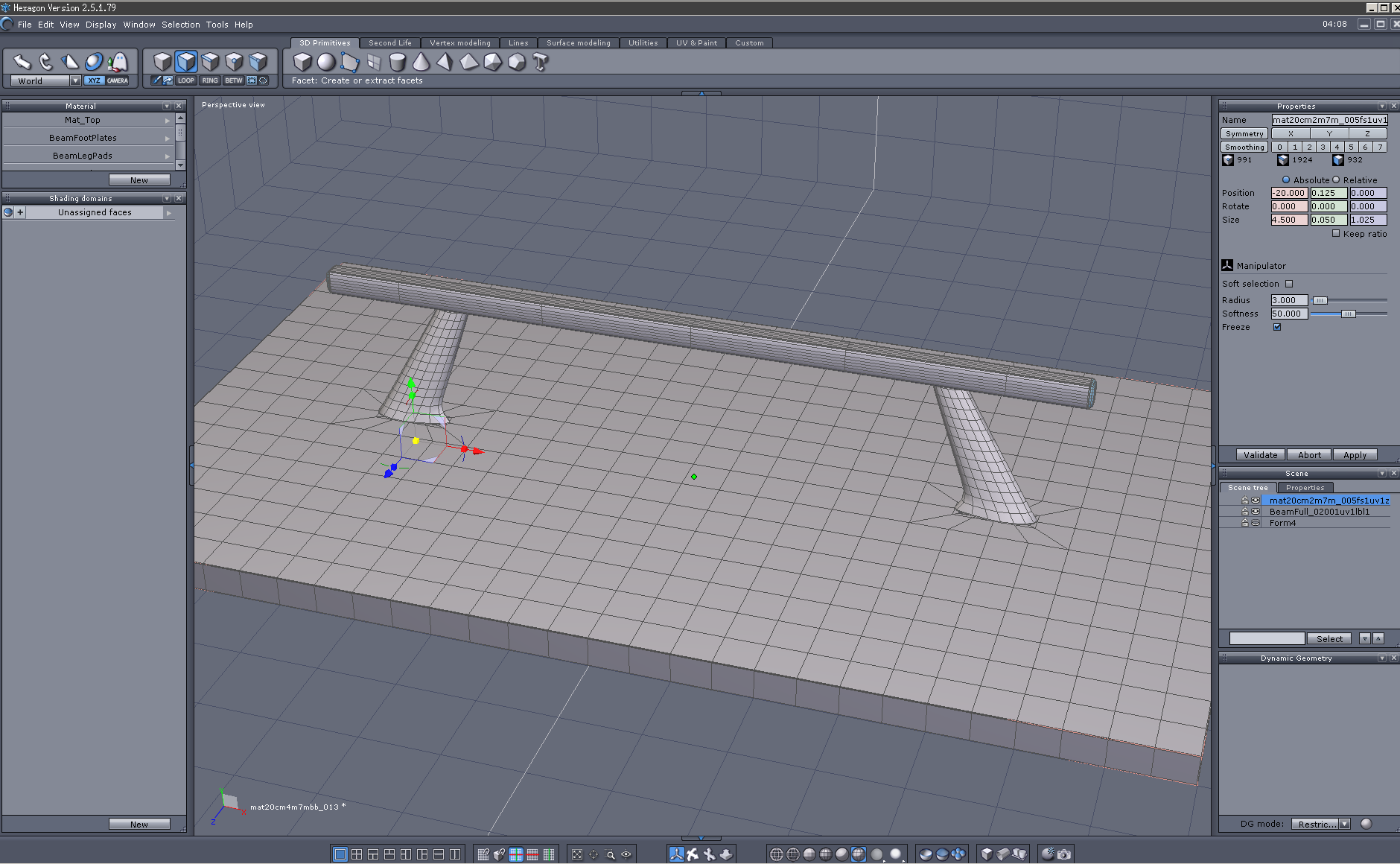
As for the morph, yea, I can understand how that can take a lot of time. I've been fussing with the Beam legs and the mat most of the day just getting them to match up for the most part. And I've had my share of working of figure shape dial mixes, lol.

I know, it need not be perfect, the actual mats have a bit of a gap there any way. I just want it to be close enough to look like it's meant to be that way.
BTW, DA is very clear on one thing, it must be explicitly your creation, and Fisty did do quite a bit on that set. So it is not strictly mine according to the DA upload TOS.
How to "steal" makeup (a tutorial)OK, I'm trying something else, and thought I was scaling back my ambitions. I am now transferring a tattoo from one G2F to another. Of course I would pick ones that used different UVs and had different sized image maps.

 That made it a little harder. I had to use map transfer again and adjust the scaling so that the images aligned properly in LIE. In the end, I think it was fairly successful. I transferred the torso tattoo from Kori (on viewers left) to Mauree. Both models were converted to Iray with the V3Digitimes converter. The tattoo on Kori looks a little reddish and on Mauree it looks a little greenish. Again, I blame Translucency settings. Things are simpler without Iray surfaces, I guess.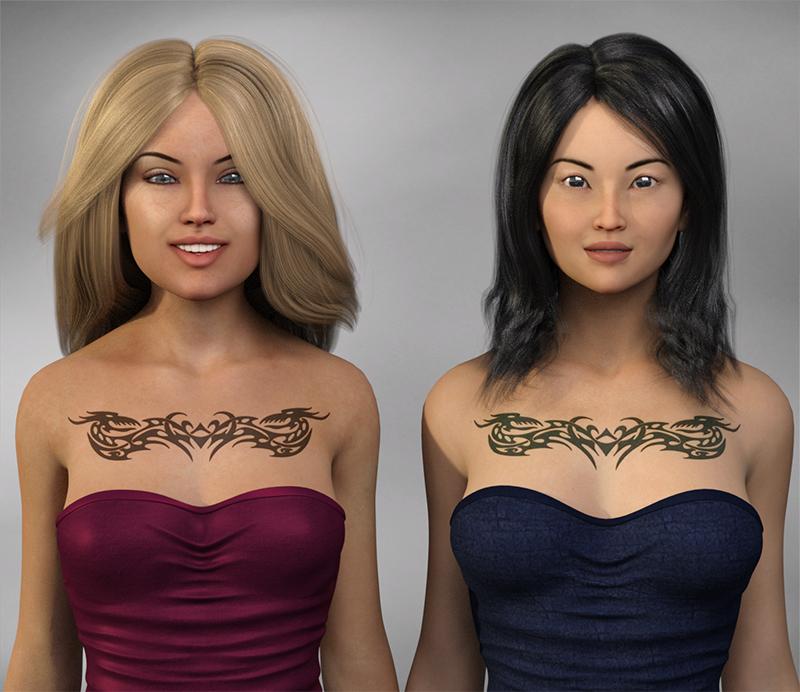
That looks good! Nicely done! :) Did you follow j cade's tutorial or is there an easier way you've found? The tutorial sounds a tad complicated to me. I will give it a try though to see if I can figure it out. :)
I followed the tutorial. It is very well written. It is not hard. You have to take into account differences in UV maps and differences in map sizing, but those can be overcome with Map Transfer and image scaling. The Iray Translucency Color is causing more trouble than anything else. I haven't mastered that yet.
How to "steal" makeup (a tutorial)OK, I'm trying something else, and thought I was scaling back my ambitions. I am now transferring a tattoo from one G2F to another. Of course I would pick ones that used different UVs and had different sized image maps.
That made it a little harder. I had to use map transfer again and adjust the scaling so that the images aligned properly in LIE. In the end, I think it was fairly successful. I transferred the torso tattoo from Kori (on viewers left) to Mauree. Both models were converted to Iray with the V3Digitimes converter. The tattoo on Kori looks a little reddish and on Mauree it looks a little greenish. Again, I blame Translucency settings. Things are simpler without Iray surfaces, I guess.That looks good! Nicely done! :) Did you follow j cade's tutorial or is there an easier way you've found? The tutorial sounds a tad complicated to me. I will give it a try though to see if I can figure it out. :)
How to "steal" makeup (a tutorial)OK, I'm trying something else, and thought I was scaling back my ambitions. I am now transferring a tattoo from one G2F to another. Of course I would pick ones that used different UVs and had different sized image maps.
That made it a little harder. I had to use map transfer again and adjust the scaling so that the images aligned properly in LIE. In the end, I think it was fairly successful. I transferred the torso tattoo from Kori (on viewers left) to Mauree. Both models were converted to Iray with the V3Digitimes converter. The tattoo on Kori looks a little reddish and on Mauree it looks a little greenish. Again, I blame Translucency settings. Things are simpler without Iray surfaces, I guess.virtual penny 4 yor carrara thoughts ?thinkin, need to spend a lil time learning how to do morphs and loading morph targets.
i've done em in poser, imagining the concepts should be the same
Show Us Your Iray Renders. Part VMy latest Iray render. Sort of my own character from mixing morph dials. Bethany 7 skin. I was having a little fun with the morphs for the JeanZ for Genesis 3 that I picked up this week. I love the new Bobbity Hair as it has some nice morphs with it.

Darn if that isn't how i look in the moring trying to get my jeans on..lol
Show Us Your Iray Renders. Part Vhttp://www.daz3d.com/gallery/images/194676/
My newest closeup. Was playing around with some different hairs and hair styles and this one fit perfectly for the look.
very nice work! love the face morph and that hair is perfect for her.
How to "steal" makeup (a tutorial)I'm working on this, but I'm finding that the different ways artists are handling Translucency Color is causing me problems.
I started with Teen Josie 7 materials. I went through the Photoshop saving of the dark and light diffuse images and map transfer to Base Female UV. I then tried to apply the makeup files with LIE to Amandla. The resulting makeup on Amandla had discolored areas that should have been black. I blame the different handling of Translucency. Teen Josie 7's makeup face uses a dark red Translucency Color map with green areas by the eye makeup. Amandla uses gray Translucency Color maps with saturated color in the color picker area. This will take some more thought...
I find the easiest way to "steal makeup" is just to find a lovely high res makeup photo and cut it out. I use a layer mask to do it in Photoshop but an eraser works too, you just have to be careful.
Start out with the photo:
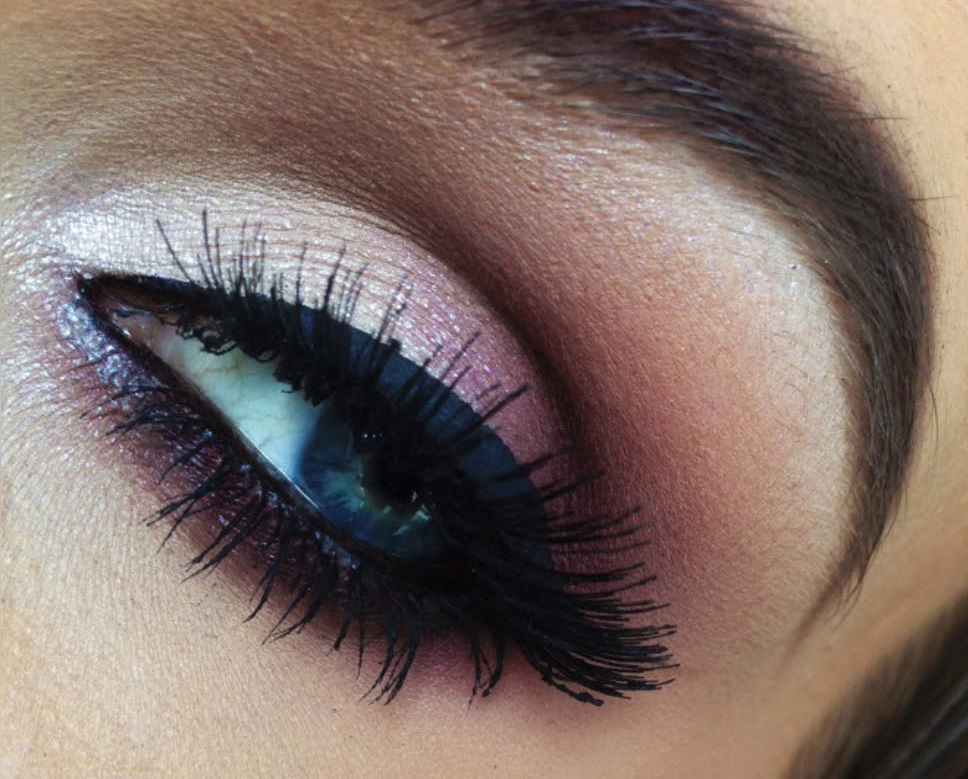
Cut it out:
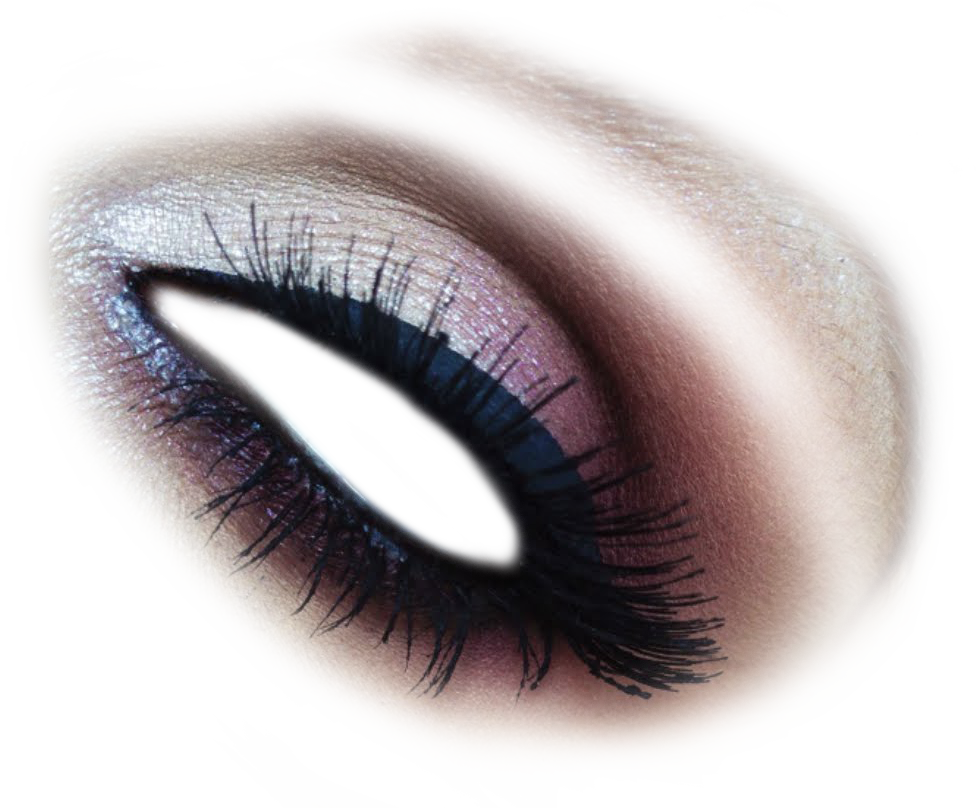
Position it over your face texture map over one eye - you'll need to use warp and/or transform to get it to line up with the eye of your face texture map. Once you have it in place and the way you like it make a copy of it and flip it horizontally and place that copy over the other eye. Merge the two cut out eyes to one layer then paint small black dots in the four corners of that layer (this will help Layered Image Editor place it correctly) then save it as a PNG with no background.

And there you go - new makeup. :D You're welcome to use it if you'd like - click on it for the high res file. Feel free to use it as it is or edit the color/shape/etc in Gimp or Photoshop.\
Here it is on G3F and V7:
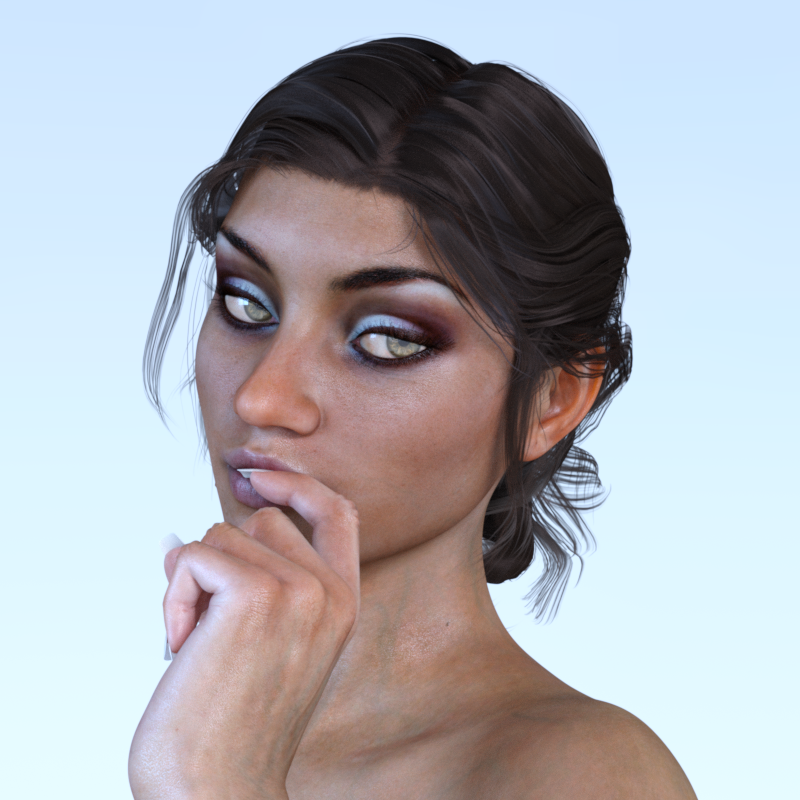
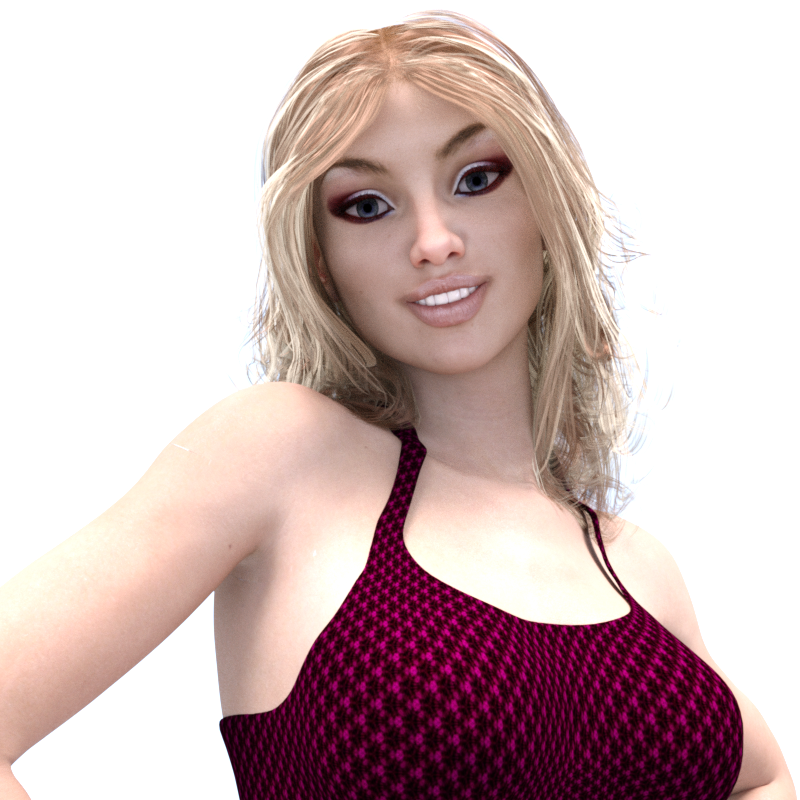
I suppose it would be even easier to "steal" the makeup from already made face textures of your other characters. Just cut out the makeup from that texture, paint four dots in the corners of the layer that has the cut out makeup, and save it as a PNG with no background. You can then use L.I.E. to place it over the face texture of any of your other characters.
The Slim Man [commercial]This is the series the Slender Man comes from: https://www.youtube.com/user/MarbleHornets
Can anyone who gets the product show how well it transfers to G2M?
Not exactly. Slender Man originates from the Something Awful forums. It was created by Eric Knudsen when the forums were prompted to come up with a modern myth to terrify people.
As for the second part, the HD aspects won't transfer well, of course, but neither will the geografts.
How to "steal" makeup (a tutorial)I'm working on this, but I'm finding that the different ways artists are handling Translucency Color is causing me problems.
I started with Teen Josie 7 materials. I went through the Photoshop saving of the dark and light diffuse images and map transfer to Base Female UV. I then tried to apply the makeup files with LIE to Amandla. The resulting makeup on Amandla had discolored areas that should have been black. I blame the different handling of Translucency. Teen Josie 7's makeup face uses a dark red Translucency Color map with green areas by the eye makeup. Amandla uses gray Translucency Color maps with saturated color in the color picker area. This will take some more thought...
Yeah, this tutorial is so old it predates all those Iray translucency maps. (Just for fun, I absolutely hate those red translucency makeup maps, they make it an absolute PITA to change to my preferred skin settings. So I have been slowly going through and converting the maps to kill the red, I haven't figured out a 100% foolproof method yet though. Currently its a bit more artistic and less scientific, but it actually uses some of the same methods as the makeup stealing)
How to "steal" makeup (a tutorial)I'm working on this, but I'm finding that the different ways artists are handling Translucency Color is causing me problems.
I started with Teen Josie 7 materials. I went through the Photoshop saving of the dark and light diffuse images and map transfer to Base Female UV. I then tried to apply the makeup files with LIE to Amandla. The resulting makeup on Amandla had discolored areas that should have been black. I blame the different handling of Translucency. Teen Josie 7's makeup face uses a dark red Translucency Color map with green areas by the eye makeup. Amandla uses gray Translucency Color maps with saturated color in the color picker area. This will take some more thought...
RenderGuyNY's Freebies (latest freebie updated 5-24-20)Here Comes Dennis!!!
Dennis is a new character based on the G3M UVs. He's not perfect, but he's a fun addition to any collection. He comes with 4 eye colors, 1 morph, full texture set (with bump and displacement maps), and 10 L.I.E. tattoo options. The L.I.E. tattoos can be used on any G3M character. I learned a lot working on him, so happy to share him with the world.


Daz 3D is part of

Connect
DAZ Productions, Inc.
7533 S Center View Ct #4664
West Jordan, UT 84084Licensing Agreement | Terms of Service | Privacy Policy | EULA
© 2026 Daz Productions Inc. All Rights Reserved.