-
Runtime DNA Merges With Daz 3D
Given this month is the Platinum Club promotional sale, now would be a logical time for LittleFox's and Capsces' "Furries for..." morph and texture add-on sets for Melody and Micah to finally appear in the store. The base figures were placed in the Plat' Club section, so logically, the follow-up package would also be similarly categorized.
Agaim, I purchased the entire collection when they resided at RDNA, so it's no skin off my nose. I just want others to enjoy the masterful design concepts of Melody and Micah!
Sincerely,
Bill
Lavinia -- yay corpse-like, rotten texture! Boo no 3Delight mats!Seems to work ok. G3F + Morph pack + Lavinia skin. I couldn't really find anything wrong, even the ears looked good, I think anyway.
This is straight out of the box so to speak, no skin optimization, and the default hdri so one can see it very generically, general results right out of the box.Thanks HorusRa. If its not to much trouble can you post a couple picks using the zombie morphs?
No one asked me - Diomede screenshots on whatever - Warning AI Discussion OKCreating and Saving a Carrara Skin Shader from a Studio Character
Here is how I set up a newly acquired G2F character for future use in Carrara. There was a recent Published Artist discount so I am now the proud owner of Valerie, a G2F character preset by PA addy. http://www.daz3d.com/valerie
The following is NOT the best way. It is my way, which may or not may not be useful for others.
Some of the issues that I try to address are
1st - top priority - numero uno *** Do I want a Poser CR2 version of this G2F available for the Poser cloth room? (because I have V-that which will not be named -plugin, the answer to ths is usually "no" now). Given that I don't care about a Poser CR2, my preference is for setting up and saving as much as possibe in Carrara for direct future use.
OK, whatever the answer to the Poser CR2 issue, have to address the following.
- Which maps does the character come with? Where are they located? Which shading domains in Carrara can make best use of them? Which shading domains share the same maps?
- Do I have the correct UVs available for the G2F in my scene?
- Am I doing a dial morph?
- How do I want to save?
Material preset did not apply texture appropriately -- now what?Modern Wizard, there is more than one way to do similar functions, so use the way that is best for you. Dart and many others recommend setting up characters in Daz Studio first and then exporting. I prefer to load and set up in Carrara as much as possible.
RE: the black outcome when initially applying a material preset - it does not necessarily mean that the skin map did not load in the color channel. It could easily be that something is going on in a reflection channel or a SSS channel that is appearing black in an empty Carrara scene.
This is how I set up a character for G2F. It is not the best way, just my way. Some of the issues that I try to address are
1st - top priority - numero uno *** Do I want a Poser CR2 version of this G2F available for the Poser cloth room? (because I have V-that which will not be named -plugin, the answer to ths is usually "no" now). Given that I don't care bout a Poser CR2, my preference is for setting up and saving as much as possibe in Carrara for direct future use.
OK, whatever the answer to the Poser CR2 issue, have to address the following.
- Which maps does the character come with? Where are they located? Which shading domains in Carrara can make bes use of them? Which shading domains share the same maps?
- Do I have the correct UVs available for the G2F in my scene?
- Am I doing a dial morph?
- How do I want to save?
Lavinia -- yay corpse-like, rotten texture! Boo no 3Delight mats!Has anyone tried Lavina's skin on the Undead Creature Creator HD Morph Pack yet?
Material preset did not apply texture appropriately -- now what?Hi all! Thanks for pitching in with responses. A few points of clarification, in chronological order:
Diomede, my base is G2F with V5 UVs. Material preset was a custom skin I made with Zev0 and DraagonStorm's Skin Builder Basic. Given that he's all flat black, I'd say all the diffuses failed to load at the very least.Thanks for your details about applying textures. This gives me a little more to go on.
Dartanbeck, can you give me some details on your custom character import stuff?
It sounds like you're saying the following:
1. Set up custom character in Daz Studio with morphs, textures, clothes, and hair.
2. Save character in your Daz Library.
3. Now that Carrara sees the character in My Content, you can open the duf in Carrara and stand a better chance of getting the materials imported correctly.
Is that correct? If so, in step 2, should the character be saved as a scene, scene subset, or character preset?
UnifiedBrain, here's some more detail about what I was doing.
The first step, actually, was to port my character morphs down from their current G3F bases. That means I used GenX2 or whatever it's called these days to transfer the character morphs from G3F to G2F with the standard process: Morph Loader Pro, rigging adjustment, ERC freeze, saving, etc.
Then I saved a G2F base as a native car file, closed scene, then created a new one and loaded native car G2F. I dialed up one of my character's morphs and posed him.
Then I tried to put textures on him by using a material preset duf that I had made [in Daz Studio, obviously] of all his surfaces. The material preset seems to have brought some of the necessary files in, but not all. I am now trying to figure out the best way to put his textures on correctly.
Tango Alpha, thanks for the info on where My Objects is hiding. Now I can create an organized runtime with subfolders in My Objects.
Re docking panes in other places, I just reread the whole chapter in the C7 manual on Setting Up Carrara. I didn't see anything about customizing the screen layout. :(
Yay, more homework after I leave work!!
--MW
Battle Bundle - VikingsHey all... *waves*
After loooads of Confusion, all 10 products are in the Bundle, the only reason they are not listed is because the seperate packs by Anna,Dave and Loraly have not yet gone live in the store from the transfer over from DNA..
Our 5 packs are in it, plus
Deerstalker (27)
Hinterland (52)
Skuldelevery (14)
Sojourner (54)
Valborg (100)This huge bundle originally released at RuntimeDNA, which is why the original artworks are in place with the old dates, but at $4 only I'm sure you'll forgive Daz for not changing that :D
Sorry it caused confusion folks
Big Hugs
Tracey and Andrew
x
Can you rename your characters to help editing scenes?FYI, parenting wigs to the head without 'fitting to' can sort of bypass some of the issues that happen with hair when the character has elf ears. You have to position it globally and then parent when you have it in place.
Or you can conform it as normal, turn on show hidden in the parameters tab, and dial off the ear morph in the hair that gets automatically copied over.
Tiny Petite G3Fs?...Steph 4 was one of my favourites as she loaded in at something like 5' 4" or so. Her physique was more reasonable as well. She filled a nice gap from the mid teens (as there was no Gen4 teen figure), to adult and the NPM breast morphs gave more range in being able to adjust breast sizes.
The Gen5 version of her seemed to lose the "petite" element as it had three shapes, the Base - which was small in stature but more stocky than the Gen4 version, Curvy - which was a bit taller and more voluptuous like a "pinup" girl, and Fashion Model - which was taller and more"leggy".
Steph 6 had a slightly a more lithe physique, especially with the Slender Steph morph add on. However, she also had competition from Gieslle 6 which while a fey based figure, worked pretty well for a slender more petite character with the proper morphing..
As to a Gen7 version, it's anybody's guess.
Tiny Petite G3Fs?My shortest "adult" character is my namesake at 4'11" with a gymnast's physique. She is still G2F based (Mei Lin 6) until I can get the Face Morph resource kits that are on my wishlist and Skin Builder Pro 3 comes out (she's an albino).
I have an albino character I made using Brooklyn HD skin texture and a blond shader for the eyelashes. So, when you switch to G3F, you may want to try her out. And this will give you a close approximation of Mei Lin 6 on G3F.
Material preset did not apply texture appropriately -- now what?In my slow progress toward actually doing something in Carrara, I have saved a G2F base as a native car file and ported my character morphs down. Fired up Carrara, loaded car native G2F, applied character morph and pose, then applied material preset. As expected, it did not apply correctly. My question is -- how do I fix that? I have been looking at Diomede's basic scene setup tutorial, but that does not really help me. My character's materials are not standard out-of-the-box ones from any Daz character base, and he certainly didn't come with any Carrara shaders, which was very inconsiderate of him.
Hi MW. I obviously don't have the experience here to help. But I'm trying to follow along, and wonder if you can help me. Can you give the details of exactly what you did again? For example, I don't know what you mean by "ported my character morphs down," or if you are talking about losing material presets on clothing, skin, or both.
In more general questions, is it possible to dock tabs in other places besides their defaults? I'm used to a three column layout with content [=browser] on the left, scene in the middle, and parameters over to the right. Thus I would love to dock the browser/sequencer where all the little arrows are and move the little arrows either up to the horizontal menu bar at the top or over to the right. Is that possible?
You've just asked one of my questions as well. I've seem discussion of using multiple monitors in Carrara, but nothing about undocking and relocating panes. Hope someone addresses this.
Product Updates: DIM Zips starting July 2013Updated October 19, 2016
Potting Shed and Tools DS 9/17/2013 convert to .duf, add metadata (DS4.5+ only) Potting Shed and Tools DS 10/25/2013 update metadata, add legacy files Silence DS 1/31/2014 convert to .duf, add metadata (DS4.5+ only) Silence DS 5/5/2014 metadata update only Anamnesis DS 10/30/2014 update to .duf, update metadata Gateway DS 10/31/2014 convert to .duf, add metadata (DS4.5+ only) Fontaine DS 11/1/2014 convert to .duf, update metadata (DS4.5+ only) Hemlock Folly Ca 8/15/2016 content updates (Carrara 8+) Old West Undertakers DS 8/31/2016 updated to .duf, updated metadata (DS4.5+ only) Old West Undertakers Ps 8/31/2016 no change (all except DS4.5+) Potting Shed and Tools DS 8/31/2016 update metadata, remove legacy installer (DS4.5+ only) Gateway DS 8/31/2016 update metadata, remove StudioCF (DS4.5+ only) Silence DS 9/6/2016 update paths & metadata, remove legacy files (DS4.5+ only) Old West Mercantile DS 9/6/2016 updated to .duf, updated metadata (DS4.5+ only) Old West Mercantile Ps 9/6/2016 no change (all except DS4.5+) Old West Sheriffs Office DS 9/6/2016 updated to .duf, updated metadata (DS4.5+ only) Old West Sheriffs Office Ps 9/6/2016 no change (all except DS4.5+) Iyeyasus Tomb DS 9/27/2016 made doors openable The Sorceress Ps 9/27/2016 replace zero-byte file The Sorceress StudioCF 9/27/2016 .duf version w/missing mat & metadata (DS4.5+ only, for older versions of DS keep previous zip) Scarlet Textures 9/27/2016 replace bad texture jpg West Park Day Room DS 9/27/2016 path/filename/metadata update, no content change (DS4.5+ only) West Park Day Room Ps 9/27/2016 filename change, no content change (DO NOT DOWNLOAD IF USING DS3/DS4.0) The Filing Room 9/27/2016 path update (Props > Environments) Archaic Ruins Ps 9/27/2016 no change Scarlet Textures 9/28/2016 no change Tween Ryan 7 9/28/2016 corrected head morph grouping, added Iray legacy mats Brow Remover for Daz Studio 9/28/2016 bug fixes and enhancements Body Board DS 9/30/2016 no change Gem for V5 9/30/2016 metadata update only Body Board DS 10/3/2016 no change Sci-fi Rover trailer Ps 10/6/2016 replace wrong zip Sci-fi Rover trailer Ps 10/11/2016 add missing .obj's, move Materials to correct path Iyeyasus Tomb DS 10/13/2016 correct floor position in Preload Old West Mercantile DS 10/13/2016 made doors openable Iyeyasus Tomb DS 10/14/2016 raise floor level some more Old West Mercantile DS 10/14/2016 preload updated to make doors openable Space Shuttle 10/17/2016 cr2 updates, add metadata, remove P4 versions, convert rsr's to png's, path changes Kids Toys DS 10/17/2016 add metadata, replace zero-byte files (DS) Kids Toys Ps 10/17/2016 replace zero-byte files (Poser) Props Pack - Morphing Grassy Outcropping 10/17/2016 no change Opal for Genesis 3 Female 10/17/2016 removed references to Victoria 7 Tiny Petite G3Fs?Technically, all the characters are just morphs...some sculpted, some dial spun, some scaling...and most a combination of all the above. The solutions here are how to 'roll your own', in absence of a ready-made one.
A character, usually is a morph + texture set sold together.
Right, which is what I have been doing up to this point but wondering if there were characters for sale because it would be cool to start from a petite character not just a 'young' looking child to make morphs but it pretty much confirms from the answers that there aren't many petite women characters right off the bat like a Stephy model so it looks like I will have to continue with my various workarounds until she comes out.
Tiny Petite G3Fs?...I tend to use varying degrees of the Growing Up shape morphs along with adjusting head propagation. Julie may be 5'4" but she is somewhat "leggy". To counter this I add a bit of the "Youth Body Shape" morph to balance out the proportions.
My shortest "adult" character is my namesake at 4'11" with a gymnast's physique. She is still G2F based (Mei Lin 6) until I can get the Face Morph resource kits that are on my wishlist and Skin Builder Pro 3 comes out (she's an albino).
Attached below are G3F versions of Leela and her best friend Tracey. Leela is 5' 2" and Tracey 5' 1" (I have a height scale prop I use).
Tiny Petite G3Fs?Thanks everyone, it souns like it's more a morph solution from what I am seeing in the replies as opposed to buying an adult character that happens to be 5'4". I can't seem to find any until a Stephy 7 equivalent comes out i guess. I will chek out LY Fallon as well...
Technically, all the characters are just morphs...some sculpted, some dial spun, some scaling...and most a combination of all the above. The solutions here are how to 'roll your own', in absence of a ready-made one.
A character, usually is a morph + texture set sold together.
Tiny Petite G3Fs?Thanks everyone, it souns like it's more a morph solution from what I am seeing in the replies as opposed to buying an adult character that happens to be 5'4". I can't seem to find any until a Stephy 7 equivalent comes out i guess. I will chek out LY Fallon as well...
Material preset did not apply texture appropriately -- now what?Here's one of those situations that Unified Brain has been mentioning in which we Daz users, who are new to Carrara, come across something that has us going, "HUH?" because it's recognizable, but also different enough to appear baffling. My overarching question is about the texture room, as well as shaders and textures in general.
In my slow progress toward actually doing something in Carrara, I have saved a G2F base as a native car file and ported my character morphs down. Fired up Carrara, loaded car native G2F, applied character morph and pose, then applied material preset. As expected, it did not apply correctly. My question is -- how do I fix that? I have been looking at Diomede's basic scene setup tutorial, but that does not really help me. My character's materials are not standard out-of-the-box ones from any Daz character base, and he certainly didn't come with any Carrara shaders, which was very inconsiderate of him.
I know what shading domains are [=materials], but how do global shaders and top shaders play into this? Furthermore, I can see that some materials have correctly been identified as "AoA Subsurface." How does that affect global shaders and top shaders? How do I make sure that the right maps are in the right place? Can I save the materials as a preset? If so, how?
In more general questions, is it possible to dock tabs in other places besides their defaults? I'm used to a three column layout with content [=browser] on the left, scene in the middle, and parameters over to the right. Thus I would love to dock the browser/sequencer where all the little arrows are and move the little arrows either up to the horizontal menu bar at the top or over to the right. Is that possible?
Also I would like to make subfolders under My Objects, but I can't figure out where My Objects lives on my hard drive. It's not on the C drive where I installed the base program. It's not on the D drive where I have my content runtimes. Maybe I'm missing something?
--MW
Teen Princess Leila for G3F (commercial)@xyer0 I posted this in my thread last week (with the vendor's permission. I was showcasing her as a little girl, as seen a few posts back in this thread.)
Her skin is really easy to light and render, and it's very, very pretty. What you'll like about her is she isn't a "botox babe," she has a unique look, versatile.
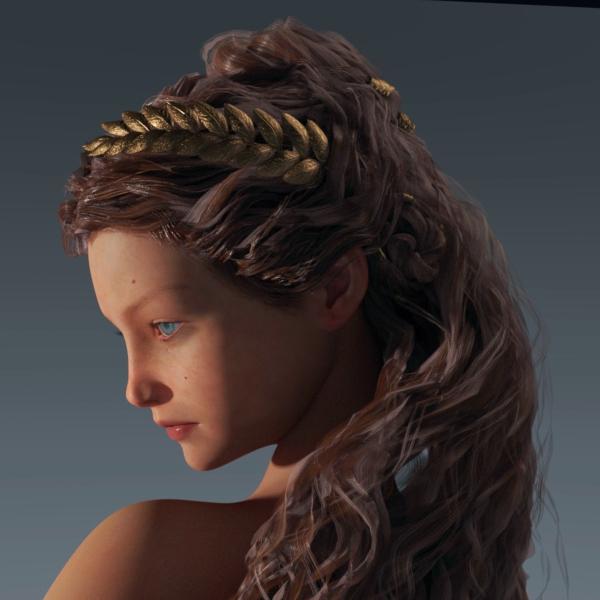
Thank you, Novica. That's helpful information. I am more interested in the skin than the morph since I always change the morphs anyway.
Fresh Daz Install QuestionsI’m going to be building a new computer and will be installing a fresh copy of Daz v4.9 (x64) but would like to retain my settings, viewport layout etc. I know you can save a profile so you can revert to your favourite layout if it ever resets or changes, but where are these files located? Is it simply a matter of copying them over into the new install?
Also, my current version was done as a 4.7 install, updated to 4.8 then updated to v4.9. It works fine, kept all my configuration settings etc. However, on my workstation at work, my fresh v4.9 install constantly gets the Stopped Working (see attached) message when I exit the program. Every… single… time… My upgraded version at home never gets this. Would it be advisable to install v4.7, then run the upgrade to v4.8 then the v4.9 installer (I have all three of these downloaded)?
Are there any other items I should remember to do when I transfer to my new system? I hate the Out-Of-Box layout with v4.9 and definitely want my current layout, so those configurations are pretty important to me to retain.
Suggestions appreciated.
Genesis (3) morphs made in hexagon distorting in studioHowdy folks,
I followed a nice tutorial on making Genesis morphs in Hexagon. WInterbros- Morphing Genesis with DAZ Studio and Hexagon
(I'd link, but looks like it's not in the store anymore. Maybe not a good sign.)
Then spent a few hours gettnig all the vertices just where I wanted them. Then I brought the morph back into Studio and whaaaa! The nearly perfect lines I made for a skull-surgery morph were al out of alignment.
Oddly enough, the morph looks fine in Studio until I let go of the slider, then something happens to it- perhaps weights or poly creasing calculated? Are the angles I used to disappear the top of the skull too sharp? Something new with Genesis 3?
The morph looks nothing like it did in Hexagon.
Wahhh! What a baby...
Can anyone tell me what I'm missing?
-John
Daz 3D is part of

Connect
DAZ Productions, Inc.
7533 S Center View Ct #4664
West Jordan, UT 84084Licensing Agreement | Terms of Service | Privacy Policy | EULA
© 2026 Daz Productions Inc. All Rights Reserved.