-
Baseball Uniform
I was modeling a baseball uniform to fit G2M Garen character. It is not finished on a lot of dimensions (wrinkles, folds, transfer utility,JCMs, etc.). You would have to texture the uniform yourself. It was originally done with a procedural shader in Carrara. With the Cubs advancing to the World Series, thought a few people from America's heartland might want it even in its present state. I won't finish before the World Series. If you have G2M Garen, you can use the transfer utility to work it back to G2M, and then if you have clones, you can convert to other figures.
I may update if I get the chance, but no promises.
Hunt or be Hunted Bundle... Wow!Here's a closer render of Gwenbleiz in the mountains... this is the scar version, with normal eyes. I'm currently rendering the version without the scars. For some reason, the shape morphs for "scars off" and "eyes back to normal" don't seem to work for me and I have to manually dial them back. Does anyone else have that problem? Using 4.8 here.
The Scar and the eyes are Linked to the head morph (same for the body). I will do an update to correct that. Sorry if you encounter issues
Thank you for looking into this! For some reason, the separat "Remove" icons don't work when using on the pre-loaded character. I haven't tried using them on the character if I used the insert morphs before on a "neutral" G3M.
This is really a beautiful character, and ´versatile clothing set.

I have submit the corrections to DAZ, just have to wait until they release the patch.
Yes, if you use a neutral G3M the inj and the remove works without trouble :)
Looking for a Baseball UniformI started to make one for G2M. It is just an obj right now. It does not have socks or shoes. It does not have shaders. If you don't mind using the transfer utility yourself, I can post the mesh as a freebie.
EDIT: Note - it is modeled to Garen's G2M shape.
EDIT2 - I posted a G2M base compatible file in the freebies thread. Linked in post below.
3D Art Freebie Challenge -- October: Double Bubble Toil and Trouble -- Entries ThreadToil and Trouble
Not counting: Genesis Child, Sally Mae Hair, Michael 4 (x2), Victoria 4, RDNA Scatters, Shrunken Head
# = requires free registration
1) Zelte und Rucksack (campfire) #
2) Rose's Western V4/A4/S4 #
3) Western Textures Set 2 For Rose's Western V4 #
4) Witch Hat #
5) Monster High Edition for Vic4 (witch's skin) #
6) d-jpp-morphing baton #
7) Old Trees for Daz 4.6 and Poser 10 #
8) F3D_Ruins Elven Portal #
9) Shadow Serpent Figure (2nd item from the top)
10) Stonehenge #
11) Disparate Morphing Broom #
12) Pumpkin Free #
13) A Skeleton #
14) Shape Magic Halloween Kit (cauldron) #
15) SCoM #
16) faerie door #
17) FX Daz Studio #
18) Fennja's Mushrooms #
19) Skull #
20) AAL Plasmaball #
21) Love Fairy Outfit #
22) Love Fairy V4 #
23) Wrist-Neck Restraints #
24) 10ft Easy Pose Chain #
25) Second Earth Ogre #
26) Ogre's Club #
27) AllenArt Drinking Glass prop for Iray with shaders (bubbles prop was used) #
28) Witchy Face Morph For V4 #
29) Indian outfit for M2 (ogres' loincloth) #Paid:
* Millennium Cat #
* Liquid Pack #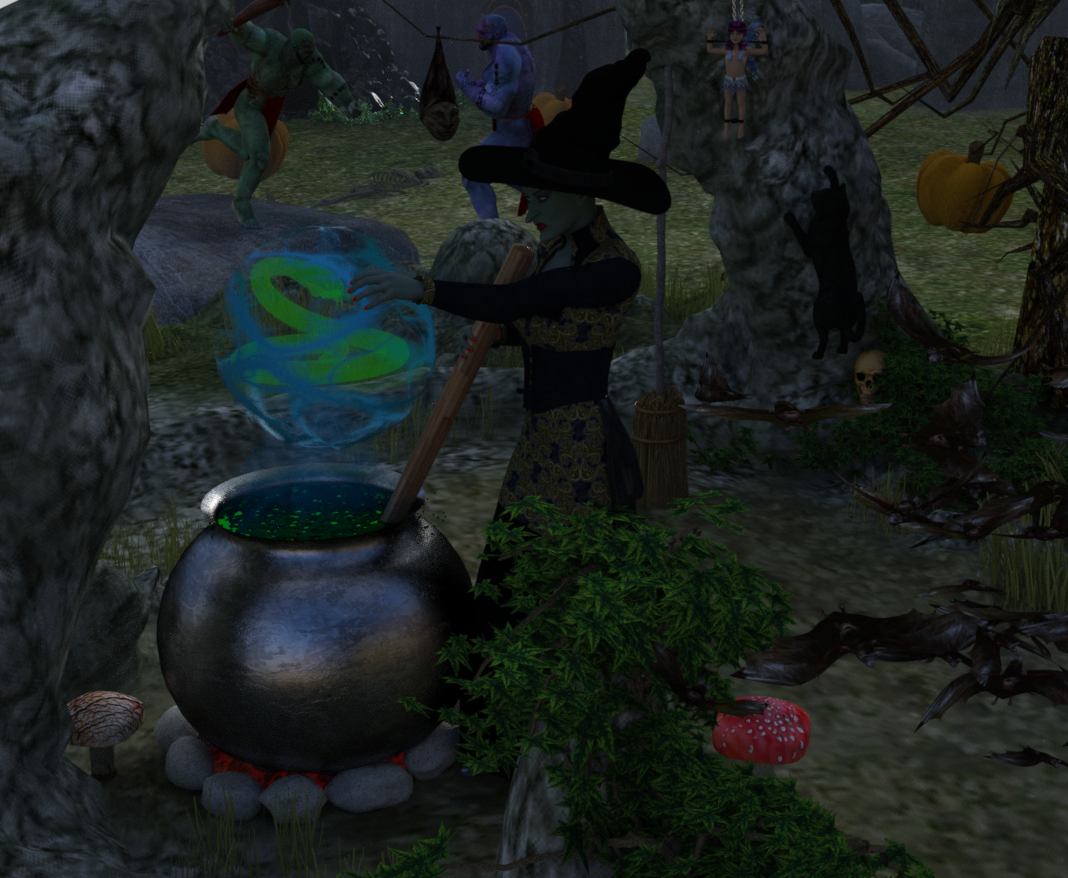 Hunt or be Hunted Bundle... Wow!
Here's a closer render of Gwenbleiz in the mountains... this is the scar version, with normal eyes. I'm currently rendering the version without the scars. For some reason, the shape morphs for "scars off" and "eyes back to normal" don't seem to work for me and I have to manually dial them back. Does anyone else have that problem? Using 4.8 here.
The Scar and the eyes are Linked to the head morph (same for the body). I will do an update to correct that. Sorry if you encounter issues
Thank you for looking into this! For some reason, the separat "Remove" icons don't work when using on the pre-loaded character. I haven't tried using them on the character if I used the insert morphs before on a "neutral" G3M.
This is really a beautiful character, and ´versatile clothing set.
virtual penny 4 yor carrara thoughts ?Oh I found the clothes match the maps but not the figures and there is lots of duplicate mesh, the witcher 2 model converter does not export all the shading domains.
I can clean it up so only the clothes remain.
Not sure where I am going though as limited use for fan art anyway but could prob use transfer utility and fit that to a DAZ figure after using temp bones in Carrara to tpose it.
A list of celebrity morphs for v4/m4, Soon more updates and w.i.p's !!!Hi and thank you so much for all your wonderful morphs.
I seem to remember you did a really good morph of Misha Collins (Castiel off Supernatural ) a while back.... Is it still available?
If requests/suggestions are still open can I request
Castiel - Supernatural
Dean - Supernatural
Spike - Buffy the Vampire Slayer
Thank you
 3Dcoat Sculpt gen3mesh in voxel room + snap Retopo work as morph!!
 Gwenbleiz's Eyes
I just bought Gwenbleiz, who looks amazing, but I wish the eyes didn't default to the cat-eye pupils. I'd rather apply those slit pupils when I want to use them, but I'd rather they defaulted to normal, round pupils. No matter what I do, I can't make the slit pupils change to round ones. The pupil remove morph doens't work. I think the cat eyes look great for certain types of characters, but I want to use this charater in other ways, and I don't want the cat eyes on him. Is there a bug in the shaping morphs that isn't working properly? Selecting the eyes also doesn't work. I've tried everything, but nothing changes them. The ad shows a view of him with regular round eyes. What am I doing wrong?
The Scar and the eyes are Linked to the head morph (same for the body). I will do an update to correct that. Sorry if you encounter issues
Hunt or be Hunted Bundle... Wow!Here's a closer render of Gwenbleiz in the mountains... this is the scar version, with normal eyes. I'm currently rendering the version without the scars. For some reason, the shape morphs for "scars off" and "eyes back to normal" don't seem to work for me and I have to manually dial them back. Does anyone else have that problem? Using 4.8 here.
The Scar and the eyes are Linked to the head morph (same for the body). I will do an update to correct that. Sorry if you encounter issues
Animation Club for Carrara , Week #2 - Spooky Hollow. Ready To watch..Had a few snags but thought I would try to post the base files. I have included the main witch mesh file and the morphs and templates in a zip file. The main witch file is called "Witch Figure Animation Club.car". The witch is actually several different meshes (Witch, EyeL, EyeR, Dress, Belt, and Boots). Each mesh has at least one morph area and one morph so it can be modeled in the posed position. Let me know if you want expression morphs. Right now the eyes move left/right/up/down and the face canopen/close the mouth and open/close the eyes. Each mesh has a template for its current uvmaps. I have constructed a skeleton but it is not attached yet. I was having a lot of trouble saving the skeelon to my browser. When retrieved, the skeleton was all distorted and the wrong scale. I thought it prudent to post the current status before something bad happens. However, the animators should be able to download the zip, open the main file, and select the meshes and the hip and use attach skeleton to get started. Or, redo the shaders, or redo the uvmaps, all of which are very simple.
gen4 face emotions to genesis?yagakisan said:
Thank you a lot for this step by step tutorial, but for what I can see this is the procedure I use for the single morphs.
In the oldest tutorial you talked about going on Preset tab and selecting all the morphs from there, then "c. Back to the Presets tab, change Figure to Michael 4.": did you meant "back to Transfer tab" instead?I'm just rendering a scene then I'll give a try :)
If you don't want to transfer all of the V4 Base morphs, just transfer all of the Expression morphs in the Head section, or make of the list of the missing expression morphs when you apply the converted .fc2 files and only transfer those V4 expression morphs.
Edit: eh.. I just checked the morphs that came with V4 base and they are all Expression morphs with the exception of 2 body morph, so you might as well just send them all over to Genesis, or uncheck the two morphs showing under Body if you don't want to transfer those. You're call.
Toon style baby monsters kids book (completed)Not sure if you can use him...but I dusted off one of my old Genesis morphs I never completed and did a little more work on him. I still have the eyes and teeth to finish along with the texture (mostly done) and to package him...if you do want him, I can try and finish him up over the weekend.
He's really a morph for the Genesis Basic Child. One advantage is a very large wardrobe...
Wow, that's extremely nice of you. He looks great. I don't think I can use him but if you can do the texture for the little bit character it would be perfect. Not sure if that's possible.
I did pick up the Bbay Zomb (actually at vanishing point's own site for a pretty good deal) and she does work in Daz studio. I have everything except the final werewolf character. Here are a couple of pages to introduce the characters.
I love your descriptions and the book seems like it will be really fun! I checked out your author site and see you have several books for sale. I was going to PM you some questions but thought others might be interested in the answers as well... I was thinking of doing a children's book too and wondering if you went through an agent and publisher or are self publishing? And if you are self publishing, is it hard to format picture books for Kindle? I heard it was pretty complicated...
Thank you. I'm self published. Started about two years ago after discovering daz studio. I've always had stories in my head but my drawing skills, well, we will just say they're lacking. Formatting the books is a little diffucult, sometimes a trial and error thing. It's no worse than learning new ticks with Daz or poser though. I've used Comic Life 3 on a couple of my full illustrated page books and a program called ultimate ebook creator on others. I still learn something new everytime I publish. Most of the self publised author groups are like people here, very helpful and willing to give advice. I don't make a lot of money but it's fun, I get my stories out enjoy the process.
3D Art Freebie Challenge -- October: Double Bubble Toil and Trouble -- Main ThreadToil and Trouble
Not counting: Genesis Child, Sally Mae Hair, Michael 4 (x2), Victoria 4, RDNA Scatters, Shrunken Head
# = requires free registration
1) Zelte und Rucksack (campfire) #
2) Rose's Western V4/A4/S4 #
3) Western Textures Set 2 For Rose's Western V4 #
4) Witch Hat #
5) Monster High Edition for Vic4 (witch's skin) #
6) d-jpp-morphing baton #
7) Old Trees for Daz 4.6 and Poser 10 #
8) F3D_Ruins Elven Portal #
9) Shadow Serpent Figure (2nd item from the top)
10) Stonehenge #
11) Disparate Morphing Broom #
12) Pumpkin Free #
13) A Skeleton #
14) Shape Magic Halloween Kit (cauldron) #
15) SCoM #
16) faerie door #
17) FX Daz Studio #
18) Fennja's Mushrooms #
19) Skull #
20) AAL Plasmaball #
21) Love Fairy Outfit #
22) Love Fairy V4 #
23) Wrist-Neck Restraints #
24) 10ft Easy Pose Chain #
25) Second Earth Ogre #
26) Ogre's Club #
27) AllenArt Drinking Glass prop for Iray with shaders (bubbles prop was used) #
28) Witchy Face Morph For V4 #
29) Indian outfit for M2 (ogres' loincloth) #Paid:
* Millennium Cat #
* Liquid Pack #Ahhh!!! She's brewed up a radioactive snake! Good job!
Dana
gen4 face emotions to genesis?Thank you a lot for this step by step tutorial, but for what I can see this is the procedure I use for the single morphs.
In the oldest tutorial you talked about going on Preset tab and selecting all the morphs from there, then "c. Back to the Presets tab, change Figure to Michael 4.": did you meant "back to Transfer tab" instead?I'm just rendering a scene then I'll give a try :)
EDIT:
Nothing, it doesn't work.
Toon style baby monsters kids book (completed)Not sure if you can use him...but I dusted off one of my old Genesis morphs I never completed and did a little more work on him. I still have the eyes and teeth to finish along with the texture (mostly done) and to package him...if you do want him, I can try and finish him up over the weekend.
He's really a morph for the Genesis Basic Child. One advantage is a very large wardrobe...
Wow, that's extremely nice of you. He looks great. I don't think I can use him but if you can do the texture for the little bit character it would be perfect. Not sure if that's possible.
I did pick up the Bbay Zomb (actually at vanishing point's own site for a pretty good deal) and she does work in Daz studio. I have everything except the final werewolf character. Here are a couple of pages to introduce the characters.
I love your descriptions and the book seems like it will be really fun! I checked out your author site and see you have several books for sale. I was going to PM you some questions but thought others might be interested in the answers as well... I was thinking of doing a children's book too and wondering if you went through an agent and publisher or are self publishing? And if you are self publishing, is it hard to format picture books for Kindle? I heard it was pretty complicated...
gen4 face emotions to genesis?Here is a Step by Step on Step 1, Transfer V4 base morphs to Genesis:
1. Open GenX2
2. Click on Load Figure, select Victoria 4.2.cr2 in Figures>DAZ People
3. Click on Apply Pose, select INJ Base V4.pz2 in Pose>DAZ's Victoria 4>Morph Injections.
4. Mode: Selected morphs then go to Select Button: Select: Transfer: All On
5. Shape: Victoria 4
6. Target: Genesis
7. Output folder: enable the check box
8. Click on the Path and select your Genesis' morph folder. Mine is: E:/DAZ 3D/Studio/My Library/data/DAZ 3D/Genesis/Base/Morphs/D3D Gen XTransfer to a folder within the data/DAZ 3D/Genesis/Base/Morphs folder as it's easier to remove them if you need to remove some or all of the transferred morphs.
9. I leave everything else at the default setting. See attached pic.
10. Finally click the Tranfsfer button.
11. Now load a FRESH Genesis figure (not a pre-saved figure).
12. To check for the transferred expression morphs,
Select Genesis, go to the Parameters tab and select Actor>Head>Generation X>Victoria 4 and you should see lots of morphs.
13. Now try your converted to Genesis .fc2 presets on Genesis.gen4 face emotions to genesis?Sorry I don't have :(
At this point my questions are two:
- is my workflow ok? I still didn't understant what the 1 step of your tutorial means...
- why I get that error exporting the files? I searched for those names without success, but I don't know why if I transfer a single expression it works...
gen4 face emotions to genesis?I checked the readme's for those two products and they only require V4 Base. I checked and it does include morph files. I would apply the Pose>DAZ's Victoria 4>Morph Injections>INJ Base V4.pz2 and transfer all of them over to Genesis.
After they are transferred, I would expect your Rendo expression product's Genesis converted .fc2 files should work.
gen4 face emotions to genesis?I've tried with "catfight" and "i13 emotional".
Single transfer OK, if I select even one item in Preset tab I get the error.Daz 3D is part of

Connect
DAZ Productions, Inc.
7533 S Center View Ct #4664
West Jordan, UT 84084Licensing Agreement | Terms of Service | Privacy Policy | EULA
© 2026 Daz Productions Inc. All Rights Reserved.