-
Issue with Santa Beard for Genesis 3 Male(s)
I have a tutorial on how to make old facial hair follow expressions on G3F/G3M http://oddpla.net/tacky/2016/07/06/rigging-old-facial-hair-in-ds-4-8-for-g3fg3m/ , but you can use the same principles to make G3F/G3M facial hair follow expressions for G3F/G3M. You follow basically the same steps with the Transfer Utility with a few exceptions:
For the Source Scene Item Shape, do NOT use a clone shape; just use Default.
When you are selecting Projection Template Options, you do NOT need to select Reverse Source Shape from Target.
Note that, if you install any custom expression controls after you do this, you will have to rerig the facial hair so that it follows the new expressions.
--MW
Thank you, MW. That tutorial looks very useful. Downloading it now.
FWSA Narkissa HD for Genesis 3 Female(s)@algovincian Sweet! I'm really looking forward to seeing your renders with it!
Have you, or anybody else for that matter, been able to get a morph transferred to G1/G2 yet?
- Greg
Not I. Sadly I don't know how to do that.
FWSA Narkissa HD for Genesis 3 Female(s)@algovincian Sweet! I'm really looking forward to seeing your renders with it!
Have you, or anybody else for that matter, been able to get a morph transferred to G1/G2 yet?
- Greg
Issue with Santa Beard for Genesis 3 Male(s)I have a tutorial on how to make old facial hair follow expressions on G3F/G3M http://oddpla.net/tacky/2016/07/06/rigging-old-facial-hair-in-ds-4-8-for-g3fg3m/ , but you can use the same principles to make G3F/G3M facial hair follow expressions for G3F/G3M. You follow basically the same steps with the Transfer Utility with a few exceptions:
For the Source Scene Item Shape, do NOT use a clone shape; just use Default.
When you are selecting Projection Template Options, you do NOT need to select Reverse Source Shape from Target.
Note that, if you install any custom expression controls after you do this, you will have to rerig the facial hair so that it follows the new expressions.
--MW
FWSA Narkissa HD for Genesis 3 Female(s)The Narkissa character is amazing! Thank you so much FWSA! You guys have really gone above and beyond with this character!
I'm having so much fun dialing her into other characters and creating new characters with her - she's really cool! Particularly her shape morphs! She's definitely one of my favorite purchase I've made here at Daz! :D
I just wanted to show some love, and show my thanks for creating such a great character!

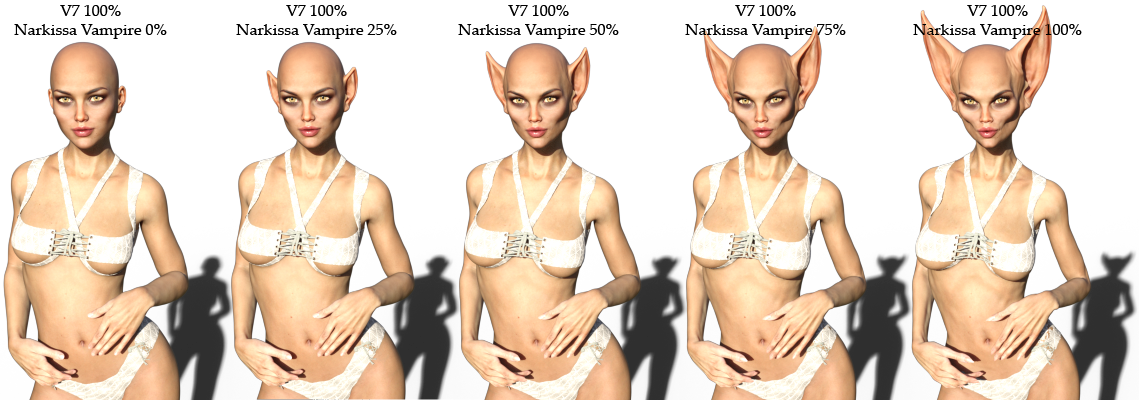
Here I've dialed her full body morph into Victoria 7 (she also comes with a separate vampire head morph if you just want to dial in the head alone).
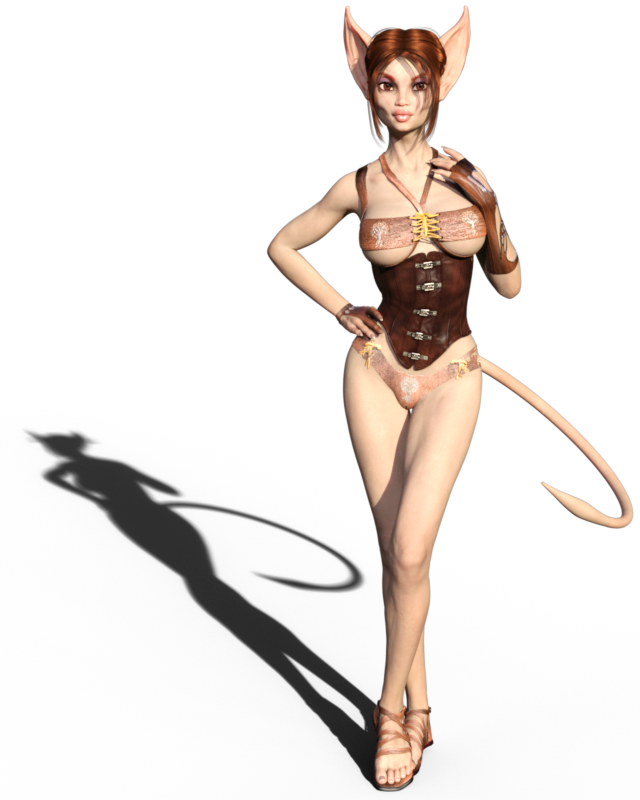
I also played with adding a tail and some other morphs and made her into a cat girl. lol :)
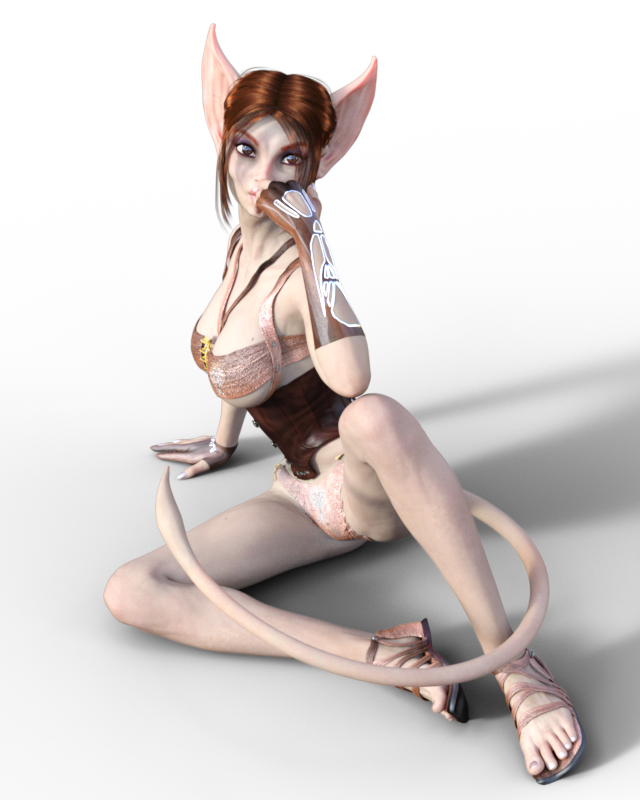
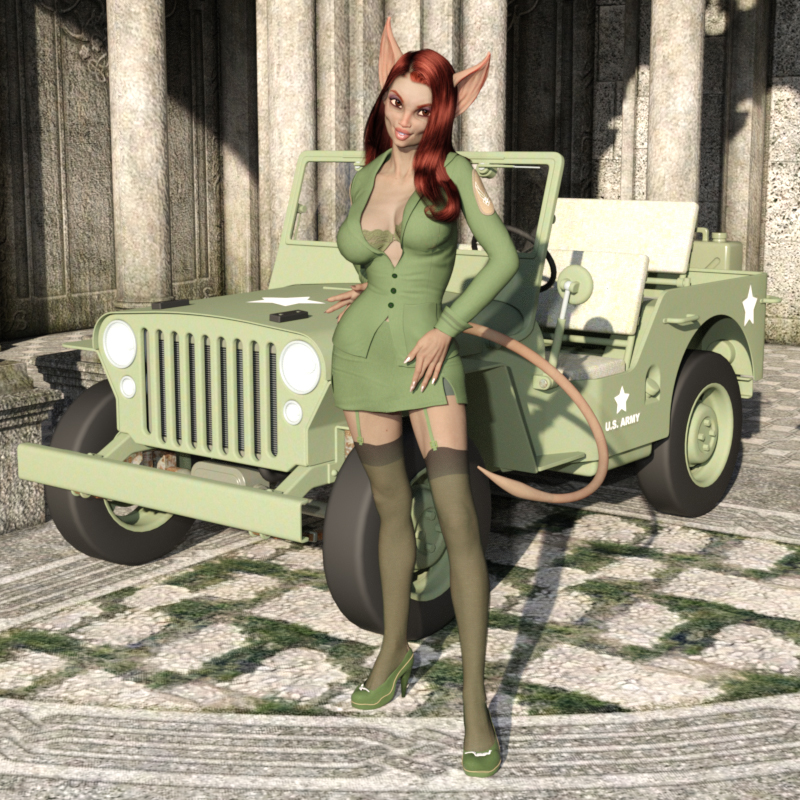
She's definitely one of my favorite purchases so far! Thank you, FWSA, for the great character! :D I love her and hope to see more like her in the future!
Awesome stuff, Diva! Ended up picking her up so I can add her to my gene pool. Already have a concept for a render in mind . . .
- Greg
FWSA Narkissa HD for Genesis 3 Female(s)@scorpio Oh nice! The head morph looks awesome on a male too. Very cool! Great render!
N.G.S. Anagenessis II - Revolution [Commercial]This is the render I was working on, I stopped it at 40%. I just loaded up a Render Studio scene preset, loaded V4, applied a free bella morph inj, then added some hair!
Great Render! Excellent!
Did you make any tweaks on surfaces or clean NGS2 presets?
N.G.S. Anagenessis II - Revolution [Commercial]This is the render I was working on, I stopped it at 40%. I just loaded up a Render Studio scene preset, loaded V4, applied a free bella morph inj, then added some hair!
FWSA Narkissa HD for Genesis 3 Female(s)The Narkissa character is amazing! Thank you so much FWSA! You guys have really gone above and beyond with this character!
I'm having so much fun dialing her into other characters and creating new characters with her - she's really cool! Particularly her shape morphs! She's definitely one of my favorite purchase I've made here at Daz! :D
I just wanted to show some love, and show my thanks for creating such a great character!
Here I've dialed her full body morph into Victoria 7 (she also comes with a separate vampire head morph if you just want to dial in the head alone).
I also played with adding a tail and some other morphs and made her into a cat girl. lol :)
She's definitely one of my favorite purchases so far! Thank you, FWSA, for the great character! :D I love her and hope to see more like her in the future!
ZBrush For Beginners- Notes And AssistanceHere's some work I did recently in ZBrush, morph is a custom one I did for the new Sora character and painting is mine. Still need to do the displacement/normals for this.
That is absolutely stunning!!!!
ZBrush For Beginners- Notes And AssistanceGreat work Novica, I haven't tried creating an eye from scratch. I do have some links in my pinterest account for creating eyes in Zbrush.
I have 8 boards for Zbrush which I've organised to suit me but if anyone is looking for a tutorial on something you would be likely to find it here
https://au.pinterest.com/pendraia/
There are some great tutorials around for free and also some great stuff through Pixologic's website and also Youtube.
One of the tutorials I did through Ryan Kingsalien mentioned this site http://www.surfacemimic.com/gallery/gallery.php?mode=gallery&id=47&page=1 ;
They sell some great alphas there I've bought a couple of skin ones for the face and they are really useful.
Here's some work I did recently in ZBrush, morph is a custom one I did for the new Sora character and painting is mine. Still need to do the displacement/normals for this.
Babes on a BudgetI love your 'cutie toon'. :) Those glasses really sell her look and I'm happy to see you did that in all of her pictures. As for you cat ears, did you do those yourself or is that a product somewhere? Those are awesome ears!
Thank you, KM!! :D Yeah, I decided to make a near-sighted character. She also doesn't like to wear contacts so she has to wear the glasses or she's blind as a bat. lol
The ears are a great head morph that comes with the Narkissa character. It's a wonderful character that I definitely recommend for anyone wanting a creature type character in their G3F character gene pool. :)
Babes on a BudgetI'm really loving the new character Narkissa! She's really cool. I've not had a character before that is kind of a creature type character, but I've been wanting a cat girl character for quite a while. So when I saw her I was like - 'OHHHH SWEET! She might make a good cat girl!'. And sure enough, with a few morphs, a few tweaks, and a tail, she makes a cute cat girl, imo. LOL Leave it to me to see a creepy bat-creature type character and think "Oh oh! Let's make her a pin-up cat girl!". lol
That shadow is awesome in the first render! You know I like the beasties. Question about the character - are the ears a morph, or geograft? If a morph, I would love to get that morph transferred into the Genesis gene pool.
- Greg
Thank you, Greg! :D As for the ears - it's a full head morph. The Narkissa character has a regular head and the Vampire head with the ears. You can dial the head with the ear morphs in by either dialing in the full Narkissa Vampire body morph or just dial in the head which has a separate head morph option.
I did some quick renders to show Narkissa Vampire (the full body morph, not just the head morph) dialed into Victoria 7 in increments of 25%:
And, of course, the head can be dialed in separately from the body. :) She's really an awesome character. I'm usually not a fan of creature characters but I absolutely love her! :)
daz studio to hexagon - .obj export/import versus 'send to hexagon'...etcWhen sending to ZBrush groups and surfaces are not carried over, so it would not be surprsising if the same were true of sending to Hexagon. If you need groups or surfaces you probably need to use OBJ, though you could certainly make a feature request for an option to include groups and/or surfaces http://www.daz3d.com/help/help-contact-us However, you don't need either for morph creation. As for shortening the robe, a transparency map might be better - no distortion of the mapping as there would be with a morph nor problems with the rigging, and no loss of morph compatibility as there would be with removing some mesh.
thanks, richard...
i was thinking that editing the mesh would be a simple way to preserve edging and hem details. the possible drawbacks you point out here totally hadn't occurred to me. so i'll try the transparency map approach. doesn't look like the robe has one yet--those are purely black and white, right, with no greyscale tones?--so i'll try making one, and migrate the garment edge details elsewise.
advice appreciated! thanks--
j
How to make one charactter look like a diffrent characteri'm not too keen on buying anything if the program can't do anything. And instead of buying 500 packs for this for a couple grand iclone has an addon for 60 bucks that does exactly what i'm asking for and way more. what you showed me is partially what i was asking for, a way to turn a female human into a catgirl. (they are not bad looking tho, i'll save that link.) How do i do anything remotely like that?
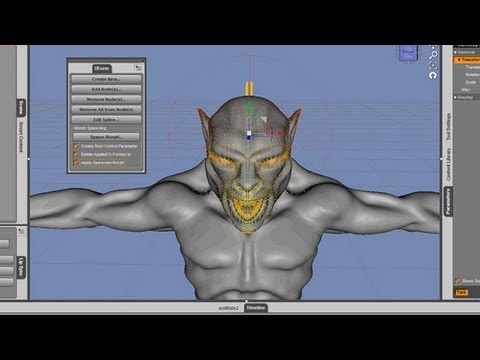
You need to export the base model to a modelling program (Zbrush, Blender, etc) and sculpt what you want then reimport it to Studio as a morph.
How to make one charactter look like a diffrent characterThe point is, if the morphs do not already exist, they need to be made from the base character, exported to a modelling program and then reimported as a morph. So you need to start with a rigged figure and work from there.
No, there are plenty of add on morphs...both free and paid for which have already gone through that process. But you can't grab an arbitrary model, like Heminio's fembot and use it to create a morph. Firstly, it's geometry does not match the Studio base figures so it would be rejected.
 How to make one charactter look like a diffrent character
In order to create a morph slider, either you or someone else would need to have created an alternate shape for the item.
Forum and now site unsubscribed??!!Apparently we will need to file a help ticket. Explain that you unsubscribed form the Morph 3D newsletter that arrived unsolicited, and that unsubscribing from it also unsubscribed you from the normal DAZ 3D mailings as it unsubscribes form all mail emanating from Daz Productions, Inc.
The new Centaur 'n stuff thread - reloadedCongrats Hemii and an early wedding blessing
May God be with you and bless you;May you see your children's children.May you be poor in misfortune,Rich in blessings,May you know nothing but happiness From this day forward.
Thank you very much, this is really touching.
I have uploaded the MillCentaurV4 to ShareCG. I packed the version 2 of my morphs in the ZIP, so can someone check if the instructions make any sense?
Can I post a link to my files on ShareCG or does this violate any rules here in the forum?
Yes, posting links to ShareCG is allowed...
Great, here's the link:
https://www.sharecg.com/v/86470/browse/11/Poser/Centaur-Morph-for-DAZ-MillHorse-SR1-Victoria-4.2
daz studio to hexagon - .obj export/import versus 'send to hexagon'...etcWhen sending to ZBrush groups and surfaces are not carried over, so it would not be surprsising if the same were true of sending to Hexagon. If you need groups or surfaces you probably need to use OBJ, though you could certainly make a feature request for an option to include groups and/or surfaces http://www.daz3d.com/help/help-contact-us However, you don't need either for morph creation. As for shortening the robe, a transparency map might be better - no distortion of the mapping as there would be with a morph nor problems with the rigging, and no loss of morph compatibility as there would be with removing some mesh.
Daz 3D is part of

Connect
DAZ Productions, Inc.
7533 S Center View Ct #4664
West Jordan, UT 84084Licensing Agreement | Terms of Service | Privacy Policy | EULA
© 2026 Daz Productions Inc. All Rights Reserved.