-
has anyone started a carrara wiki we can all write to?Emailed the CC staff about the wiki idea...
Thanks for that!

That is a great idea to have a Carrara Wiki page. However to me wiki pages seems pretty much the same thing as forum pages. Like we used to have on Carrara Cafe Legacy forum
http://carraracafe.com/forum-2/
If that would fit the goal, we could use the current Carrara Cafe forum to post material that I could then turn into Carrara Cafe pages so it would be easy to find the content. Carrara Cafe has search tools for topics and tags, Carrara Cafe started as a central place for everything related to Carrara and we hoped to become an easy to use knowledge base for Carrara users. I will also look into what kind of Wiki tools we could implement to Carrara Cafe.
Thanks Danas! You ROCK!!! I think that's (Carrara Cafe forum idea) a great idea! And it would make it much easier for you to get it in working order into the Cafe! Brilliant!
would be good to have it centralized.
i cry tears thinking of all that was lost when the forum migrated. screenshots were lost.
and tutorials vanich from you tube.
Me too. We had such a great resource that just disappeared. DT, Tim Payne, well... all of us... we lost a LOT of great material.
I second the carrara-cafe idea. severely under-utilized resource, and so nicely put together. (Carrarators too, sigh).
tnx JB-D2!
--ms
Too true, my friend! I don't get a whole lot of internet time these days, but I still try to frequent the Cafe when I can. I love that place!
So... with JetBird's idea, we'd need to write articles in the forum, correct?
has anyone started a carrara wiki we can all write to?Hello!
that is a great idea to have a Carrara Wiki page. However to me wiki pages seems pretty much the same thing as forum pages. Like we used to have on Carrara Cafe Legacy forum
http://carraracafe.com/forum-2/
If that would fit the goal, we could use the current Carrara Cafe forum to post material that I could then turn into Carrara Cafe pages so it would be easy to find the content. Carrara Cafe has search tools for topics and tags, Carrara Cafe started as a central place for everything related to Carrara and we hoped to become an easy to use knowledge base for Carrara users. I will also look into what kind of Wiki tools we could implement to Carrara Cafe.
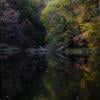
Llola Lane’s RENDER A MONTH Challenge 2019 CLOSEDI haven't decided on a title for this image yet. It's in the galleries as simply "Family"…
I rendered this image very large, at 2K pixels high. I'm afraid the compression necessary to keep it under 2MB for the galleries would degrade the image too much, so I sized it down by 50% for here. You can visit the gallery page here and see the image larger, but if you've registered at PFDLives, you can see the original size image in The Big Picture Thread here. With all the detail in this image, it's really worth seeing full-size.
ETA: This render is 100% 3D. The sky is an HDRI; The set is the Mallard Pond, resource intensive but well worth the wait. (This question came up in The Big Picture Thread.)
WOW... L'Adair... that is the most beautiful landscape I've seen in ages :) I wanna go hiking there... lol. Thanks for sharing! Hugzzzzzzzzzz
Thank you, Llola. Hubby looked over my shoulder as it was rendering and said it looks like the Deschutes River. Because you can't see the ends of the pond, it does look like running water. The Deschutes is pretty big, so I'm thinking it reminded him of a specific spot, probably somewhere he went fishing regularly when he still lived in Central Oregon. (Some 50 or so years ago!)
I looked up Deschutes River in the Wiki... it does look like it! Hubby and I love to hike... specially quiet out of the way places like your artwork. I myself spend most of the time taking pictures of the flowers... fawna... etc... It is nice to get away.... All that is missing in your artwork is our A-frame camper.... LOL Thanks again for sharing.
Llola Lane’s RENDER A MONTH Challenge 2019 CLOSEDI haven't decided on a title for this image yet. It's in the galleries as simply "Family"…
I rendered this image very large, at 2K pixels high. I'm afraid the compression necessary to keep it under 2MB for the galleries would degrade the image too much, so I sized it down by 50% for here. You can visit the gallery page here and see the image larger, but if you've registered at PFDLives, you can see the original size image in The Big Picture Thread here. With all the detail in this image, it's really worth seeing full-size.
ETA: This render is 100% 3D. The sky is an HDRI; The set is the Mallard Pond, resource intensive but well worth the wait. (This question came up in The Big Picture Thread.)
WOW... L'Adair... that is the most beautiful landscape I've seen in ages :) I wanna go hiking there... lol. Thanks for sharing! Hugzzzzzzzzzz
Thank you, Llola. Hubby looked over my shoulder as it was rendering and said it looks like the Deschutes River. Because you can't see the ends of the pond, it does look like running water. The Deschutes is pretty big, so I'm thinking it reminded him of a specific spot, probably somewhere he went fishing regularly when he still lived in Central Oregon. (Some 50 or so years ago!)
I Forgot What My Complaint Was - Complaint ThreadI have a complaint. That is all.
Here's a cat.

What's up with the animals lately? Are they evoving? I've seen a lot of videos of cats, sometimes dogs, standing upright like humans. Maybe they're getting ready to take over after we mess up really bad.
Dana
Have you people not been listening to me for years?...
Geez, these are public service announcements.
Its the squirrels and the penguins that are behind it all... the cats (mostly the Cat Mafia) are just opportunists waiting for their moment. All those anthropomorphic cats you see on YouTube are the careless ones who blow their cover because they are mad or distracted by a bird.
The dogs are on mankind’s side... mostly through bad judgment and because they lack the dexterity to drive pickup trucks (Toyota nailed it in the 90s with that commercial)...
The squirrels and the penguins... that’s a story as old as time... well, as old as penguins and squirrels....
Both once ruled vast empires across the galaxy... Well, not this galaxy, another one that was really similar, except it smelled a lot more like fermented Kiwi & Banana Snapple that had been sitting open on the dashboard of a late 80s Buick LeSaber that was parked in the sun in southern New Jersey for way too long... if you know what I mean...
Actually, it was really a parallel universe, hence the fermented Kiwi & Banana Snapple smell, but anyway... the Squirrels ruled the left half of the galaxy and the penguins the right half... they argued bitterly over this... not so much who ruled what, it was more about which side was the left and which the right... because in space there is really no “up” or “down” and without an up or down, left and right become pretty meaningless, especially when both sides couldn’t even agree on “my right or your right?”... Technically, millennia before, the Penguinian scientists established that the galaxy was moving away from a central origin point due to a big explosion they dubbed “The Really Large Kaboom” and therefore had established an reference point which they decided could be used to figure out up, down, left, right or sideways (very important, but extremely arbitrary direction in old fashioned hyperspatial travel). But the Squirrelish empire refused to accept their findings because it was too close to the weekend for them to look at the data and by Monday they forgot what the Penguins were talking about.
I’m sure everyone reading this is either bored or not reading this anymore because this is starting to sound like a history lesson and apparently only me and handful of possums that live in my yard seem to enjoy listening to historical accounts... and I’m not sure if the possums are listening or just feigning death when I start talking history.
Well, assuming you are not laying on the floor pretending to be dead, I’ll wrap this up by saying the Squirrel and Penguin War lasted many thousands of years... Mostly because the Penguins were more interested in eating fish and the squirrels are very easily distracted.
Eventually the “hostilities” culminated with the rest of the species in the galaxy getting fed up and exiling the squirrels and penguins to the stupidest planet in the most obscure and ridiculous galaxy in the multiverse.
That, obviously is this one... and ever since then, the squirrels and the penguins have been planning their revenge, longing to return to their own universe to extract their very not completely thought through plan for revenge.
They’ve been guiding mankind through secret organizations run by greedy humans human willing to sell out mankind for control of the world’s peanut butter supplies... their goal is to get mankind to move off of earth, at which point they’ll seize control of humanity’s space fleets and head off back to their home universe... but that part you are probably aware of and if you are complaining about holes in the story, you realize you are arguing with the logic of squirrels and penguins.
I hope.
I’m not going to get into the part about the cats, who are basically almost evenly split into “Earth Cats” and “Space Cats” nor am I going to get into why the Space cats are split into “Good Space Cats” who are trying to help mankind and guide them towards an enlightened future, and the “Evil Space Cats” who are just pissy and evil and looking to rule the universe for themselves... Mostly because I’m kind of insulted that most of you are laying on the floor pretending to be a rotting corpse.
That’s very rude and frankly it hurts my feelings... besides, it’s dangerous... what if you got real comfortable and fell asleep and someone buried you?
Trust me, imitating possums isn’t a great idea.
Anyway... don’t worry about the anthropomorphic cats and dogs, it won’t really be a big problem for at least another twenty years... unless I messed up my calculations... or there are some sort of unprecedented and ridiculous turns in world politics.
Even though I’m really bad at math, I put fresh batteries in my calculator, so the figures would have to be accurate... probably.
I lost the viewport in render modeHi, my name is Denis and i'm new to Daz3D.
I created a few scenes and was able ti render them just fine, I could see the scene in the central pane (the viewport) and make the necessary adjustments, like adjusting zoom and frame size etc.
But now, I don't know how it happened. When i click on "render" the viewport disappears. I am lest with a blang grey area.
How do I get back the preview zone ?Thanks... It's probably something I did, but since I don't know what, I cannot undo it.
General GPU/testing discussion from benchmark threadSome notes/clarifications regarding Iray's various modes of rendering operation (at least as currently implemented in Daz Studio.)
Iray actually has TWO distinct types of operational modes governing it's behavior while rendering a scene:
- Render Mode (controlled by Render Settings > Editor > Render Mode or Draw Settings (DrawStyle: NVIDIA Iray) > Drawing > Draw Mode), and
- Scheduling Mode (determined automatically by Daz Studio based on whether Iray is currently being used to drive a final render or just a viewport window.)
Render Mode (either "Photoreal" or "Interactive") determines the underlying algorithms used during a render, and is what ulrimately determines the visual quality of a given render. Scheduling Mode (either "Batch" or "Interactive" - yes, both parameters confusingly have an "Interactive" mode option) determines how iteration workloads are split up across enabled render devices, and how quickly intermediate updates get sent back to the central framebuffer for providing active visual feedback.
Each of these modes are usable across their various possible combinations (4 in total.) ie - in order of least to most responsive:
- Batch scheduling, Photoreal rendering mode - active if Render Settings > Render Mode = "Photoreal" and Render Settings > Render is selected
- Batch scheduling, Interactive rendering mode - active if Render Settings > Render Mode = "Interactive" and Render Settings > Render is selected
- Interactive scheduling, Photoreal rendering mode - active if Render Mode="Photoreal" and Viewport = "NVIDIA Iray" with Draw Settings > Drawing > Draw Mode = "Photoreal"
- Interactive scheduling, Interactive rendering mode - active if Render Mode="Interactive" and Viewport = "NVIDIA Iray" with Draw Settings > Drawing > Draw Mode = "Interactive"
For the people (eg. bluejaunte) describing little to no visual change between "Photoreal" and "Interactive" rendering mode, the reason for this is because you are mistaking going from Iray via the Render button ("Photoreal" rendering mode, "Batch" scheduling) to Iray via an active viewport (still "Photoreal" rendering mode, but with "Interactive" scheduling) as switching to "Interactive" rendering mode. Unless you go and explicitly change Render Settings > Editor > Render Mode to "Interactive", you are technically not using Interactive rendering mode.
For positive confirmation of which scheduling mode you're in, look for one of the following lines in your log file:
1. Batch scheduling, Photoreal rendering mode
2019-04-20 14:22:31.110 Iray INFO - module:category(IRAY:RENDER): 1.0 IRAY rend info : Using batch scheduling, caustic sampler disabled2. Batch scheduling, Interactive rendering mode
2019-04-20 17:23:51.932 Iray INFO - module:category(IRT:RENDER): 1.0 IRT rend info : Iray interactive running with 1 device:3. Interactive scheduling, Photoreal rendering mode
2019-04-20 13:05:00.290 Iray INFO - module:category(IRAY:RENDER): 1.0 IRAY rend info : Using interactive scheduling, architectural sampler unavailable, caustic sampler disabled4. Interactive scheduling, Interactive rendering mode
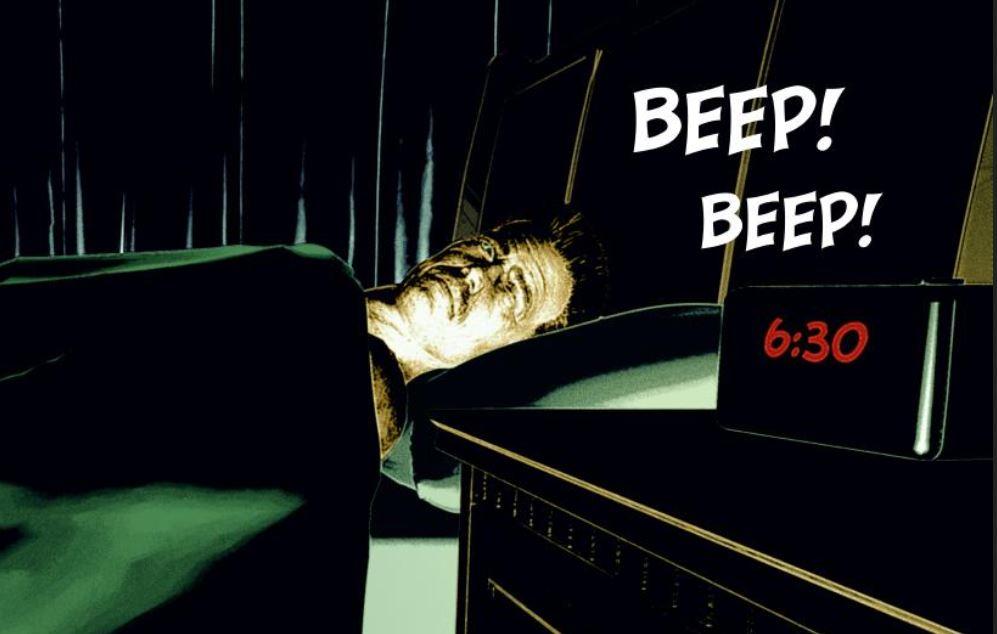
2019-04-20 17:07:23.486 Iray INFO - module:category(IRT:RENDER): 1.0 IRT rend info : Iray interactive running with 1 device:3D Comic Book Tips And PicturesI am playing around with the darker style and I think I quite like it. I have tried the same image in pure black and white, colour and then colour converted to black and white. I like the colour converted to black and white best. Let me know what you think.
Mmm... how to put this... I think the dark style works well when you look at the fully enlarged images. But when you have a comic, you are usually dealing with smaller panels, a lot of the detail gets lost and what remains is not telling your image's story.
If you look at how the reader will later see the panel, it will probably be in a size like this:
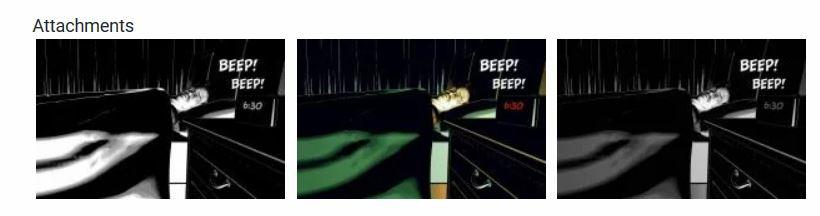
When you look at what you can actually see at this size, the eyes are drawn to the light coloured spaces.
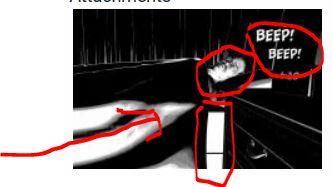
The largest light space is at the lower right corner, and while it points into the right direction (face), you have the much brighter and straight angled bed sheets section that distracts from the much smaller face. The face itself at this size is a dotted blob. I don't see that he's looking at ther clock or recognize actually that it's a face at all.
In the coloured version, the red time numbers works nicely, but my attention as a reader goes directly to the "Beep Beep". The face is a yellowish something without much detail.
Now, if you look at the same image in a screenshot taken from the original size, you can actually make out the details a lot better, but speaking in terms of "on page size", this panel would eat up a third of a page.
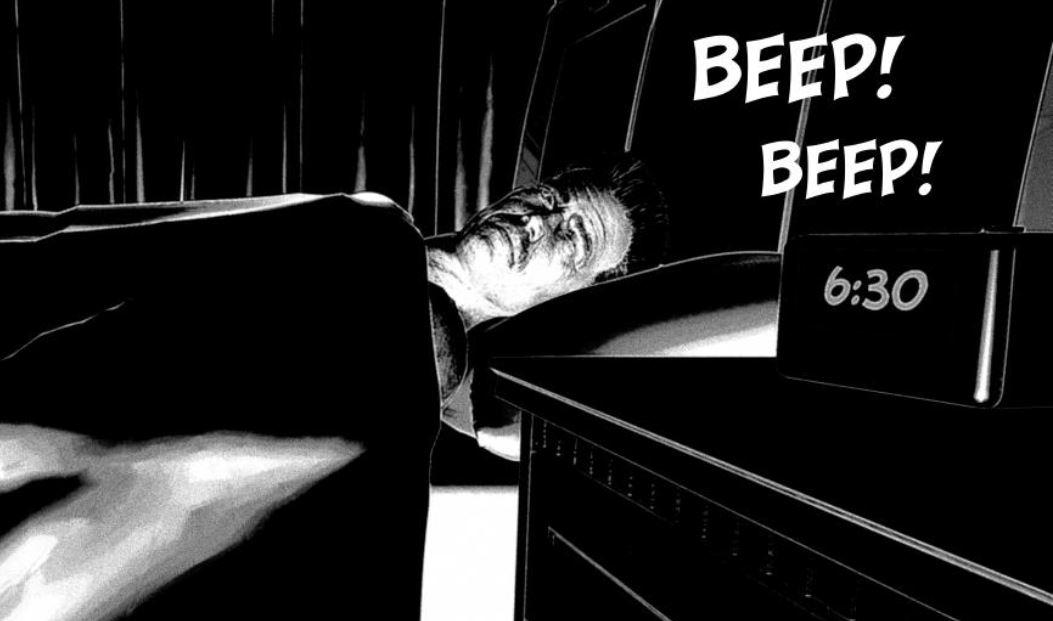
With the coloured version, it works better, because the greens don't drag as much attention to them as the white would do. I like the way the red of the numbers stands out, and his face gets more attention because it's lighter than the greens.
I'm no pro and just give this feedback based on my gut feeling/perception, so please take this feedback with a grain of salt.
Thanks for the feedback, this is really constructive.
I quite like the idea of a simple design where there are only blacks and whites, as a way to direct the readers attention to what you want. As you pointed out the largest area of white is what would be most obvious to the reader. I have to do a bit more work on this technique.
I have been experimenting with comic techniques since January this year and I have devised a few different techniques for creating different effects. I have gone with this style as it fits more with my story and the original design of my werewolf that is pretty much the central piece of the story.
I am finding it really interesting working just in black and white at the moment. I am using light to sculpt the objects, which hopefully creates some interesting aesthetic to the piece.
When I first started this journey into comic techniques I had a narrow vision about comic styles, however, after experimenting and coming on this forum I have gained extra appreciation for different forms and art styles for comic books. I now see the advantages of 3D art in comics and it's great that it lets each person express themselves creatively in their own way.
Thanks for all the feedback, I find it very useful.
Pete
Star Trek Builders Unite 8: THE REBOOT
Cool, I wasn't aware they filmed there, too.Chuckles.
You need to whisper in Ashley's ear about that.
I've been drooling at the shots and was in awe in the episode, but hot damn that's going to take awhile to model. I've given modeling Discovery-esque interiors for awhile now but that Bridge... hot damn.
Didn't they use reproductions of the buttons supplied from Phase II/New Voyages for that bridge too? There's a LOT to love in that bridge.
I believe the buttons came from Star Trek Set Tour people in Ticonderoga, NY. I live in upstate Central NY and went there a few years ago, they have done a great job recreating the Desilu set.Yup, same group. :)
Star Trek Builders Unite 8: THE REBOOTChuckles.
You need to whisper in Ashley's ear about that.
I've been drooling at the shots and was in awe in the episode, but hot damn that's going to take awhile to model. I've given modeling Discovery-esque interiors for awhile now but that Bridge... hot damn.
Didn't they use reproductions of the buttons supplied from Phase II/New Voyages for that bridge too? There's a LOT to love in that bridge.
I believe the buttons came from Star Trek Set Tour people in Ticonderoga, NY. I live in upstate Central NY and went there a few years ago, they have done a great job recreating the Desilu set.Yup, same group. :)
Star Trek Builders Unite 8: THE REBOOT
I believe the buttons came from Star Trek Set Tour people in Ticonderoga, NY. I live in upstate Central NY and went there a few years ago, they have done a great job recreating the Desilu set.Chuckles.
You need to whisper in Ashley's ear about that.
I've been drooling at the shots and was in awe in the episode, but hot damn that's going to take awhile to model. I've given modeling Discovery-esque interiors for awhile now but that Bridge... hot damn.
Didn't they use reproductions of the buttons supplied from Phase II/New Voyages for that bridge too? There's a LOT to love in that bridge.
I wish it had wings, but...https://www.daz3d.com/behemoth-hd-for-genesis-8-male
Holy moley that is an awesome demon. It's still in my cart, but judging by the promo images, it's one of the first products I've seen that looks like it come have come right off the featured images on Zbrush Central.
I Forgot What My Complaint Was - Complaint ThreadAn earthquake woke me up at 4:30 this morning. It was a very small quake (magnitude 2.7) but was less than two miles away. Gonna be crabby all day.
It was a crab related earthquake?... Sounds like the premise for a 50s Sci-fi movie... “Crabquake At Pincher Bay”
Wait... you probably meant that you are going to be feeling crabby because you woke up at 4:30 (I’m assuming A.M.)... I was thinking the earthquake released millions of angry mole crabs from the center of the earth and you were predicting it would be crabby today... like snowy, or foggy or kangarooy...
Crabs are fascinating creatures... most people don’t realize how intelligent and loving they can be... they only think of them steamed or baked...
Wait... that’s Gorillas... Gorillas are smart and loving... and armadillos are served baked or steamed... do they bake gorillas?... I wonder what baked gorilla tastes like... I’ve only ever known one gorilla and it wasn’t much of a relationship, we weren’t on a first name basis but if I waved he kinda gave me that chin nod “Yo, what’s up” thing gorillas do... I’m assuming he thought I was a gorilla too, because he didn’t do that to other people.
When I was a little kid, I went to the Central Park zoo a lot with my grandfather... one of the zookeepers was a friend of his and I got to go to places in the zoo most people didn’t get to see... it’s a small zoo, so that wasn’t a lot of places, but it was cool for a little kid who didn’t mind strong odors...
I can still remember the smells of so many different animal poops.
I’m not reminiscing, it’s just bonded permanently to my olfactory senses...
Anyway, sorry to hear about the crabquake... wait... was it crabquake or crabcake..? I seem to have forgotten what this reply was about and I’m too lazy to scroll up...
What kind of frosting goes on crab cake?... or is crab cake like Black Forest Cake and it doesn’t have any actual crab in it... I was disappointed to recently find out Black Forest Cake didn’t have any forest stuff in it... no logs, pine cones or bunnies... it’s not even made by Bavarian elves in secret cake workshops deep in the Black Forest... which isn’t even black... it’s actually really, really green with moss growing everywhere... it’s really such a misleading disappointment that whole cake imbroglio... or is that a fiasco...? Which one is the Italian car company, Fiasco or Fiat?... Fiasco 500... Fiat 500... Fiasco flows better, and the first manual transmission car I dove was a 500, and that definitely was a fiasco...
Anyway, sorry to hear about whatever it was that started me writing this and sorry to hear that I replied to whatever it was that you posted which I’m still too lazy to scroll up to look at.
Man... I’m really in the mood for baked gorilla, and I don’t know why...
Well, laterz!
...I would think that the frosting on a crab cake should be lobster bisque flavoured.
Pineapple upside down cake always got me. Is it actually made and baked "upside down?
Then there's Baked Alaska. Makes me wonder if they legalised cannabis there.
I was eating a bag of plantain chips upside down before, so it’s possible one could bake a cake upside down... don’t they bake everything upside down and counter clockwise up in Australia?... actually it’s “down”, but if you go to far north you either end up in space or down around Antarctica or Australia... wait, which way do toilets rotate in Australia?... clockwise or counter clockwise?... I’ll look that up...
Oh... it’s the water...
Now I don’t care which way it rotates... rotating toilets sounded like fun... or a challenge... either way it was something different... my friend has a toilet seat that randomly drops down when you are using it, which make it a challenge not to pee on the fancy lid cover... I have never lost so far... mostly because I cheat and just use the sink.
I need more caffeine... this is my life now... I’m Coffee-Man!
One of the places I worked at used to have a food service truck visit... not one of those fancy modern ones where they serve hot tacos, shawarma or baked gorilla, this was one of those old quilted steel ones without refrigeration, just ice and rotting egg salad sandwiches... god, I used to get so sick from that terrible food...I miss the 80s... anyway... the bookkeeper there used to always call out “Coffee man is here” when he’d show up and I’d always be disappointed that it wasn’t some coffee based superhero... so I’d just have a coffee and egg salad or tuna salad or month old fuzzy cheese danish, get sick and swear one day I’d become Coffee-Man!
I’m gonna do it... I’m gonna be Coffee-Man!
But first I have to go to Best Buy and see if they have a cheap hard drive that’s on sale....
Coffee Man awaaaaaaaay!
...you may be bordering on becoming "Too Much Coffee Man".
 I Forgot What My Complaint Was - Complaint Thread
An earthquake woke me up at 4:30 this morning. It was a very small quake (magnitude 2.7) but was less than two miles away. Gonna be crabby all day.
It was a crab related earthquake?... Sounds like the premise for a 50s Sci-fi movie... “Crabquake At Pincher Bay”
Wait... you probably meant that you are going to be feeling crabby because you woke up at 4:30 (I’m assuming A.M.)... I was thinking the earthquake released millions of angry mole crabs from the center of the earth and you were predicting it would be crabby today... like snowy, or foggy or kangarooy...
Crabs are fascinating creatures... most people don’t realize how intelligent and loving they can be... they only think of them steamed or baked...
Wait... that’s Gorillas... Gorillas are smart and loving... and armadillos are served baked or steamed... do they bake gorillas?... I wonder what baked gorilla tastes like... I’ve only ever known one gorilla and it wasn’t much of a relationship, we weren’t on a first name basis but if I waved he kinda gave me that chin nod “Yo, what’s up” thing gorillas do... I’m assuming he thought I was a gorilla too, because he didn’t do that to other people.
When I was a little kid, I went to the Central Park zoo a lot with my grandfather... one of the zookeepers was a friend of his and I got to go to places in the zoo most people didn’t get to see... it’s a small zoo, so that wasn’t a lot of places, but it was cool for a little kid who didn’t mind strong odors...
I can still remember the smells of so many different animal poops.
I’m not reminiscing, it’s just bonded permanently to my olfactory senses...
Anyway, sorry to hear about the crabquake... wait... was it crabquake or crabcake..? I seem to have forgotten what this reply was about and I’m too lazy to scroll up...
What kind of frosting goes on crab cake?... or is crab cake like Black Forest Cake and it doesn’t have any actual crab in it... I was disappointed to recently find out Black Forest Cake didn’t have any forest stuff in it... no logs, pine cones or bunnies... it’s not even made by Bavarian elves in secret cake workshops deep in the Black Forest... which isn’t even black... it’s actually really, really green with moss growing everywhere... it’s really such a misleading disappointment that whole cake imbroglio... or is that a fiasco...? Which one is the Italian car company, Fiasco or Fiat?... Fiasco 500... Fiat 500... Fiasco flows better, and the first manual transmission car I dove was a 500, and that definitely was a fiasco...
Anyway, sorry to hear about whatever it was that started me writing this and sorry to hear that I replied to whatever it was that you posted which I’m still too lazy to scroll up to look at.
Man... I’m really in the mood for baked gorilla, and I don’t know why...
Well, laterz!
...I would think that the frosting on a crab cake should be lobster bisque flavoured.
Pineapple upside down cake always got me. Is it actually made and baked "upside down?
Then there's Baked Alaska. Makes me wonder if they legalised cannabis there.
I was eating a bag of plantain chips upside down before, so it’s possible one could bake a cake upside down... don’t they bake everything upside down and counter clockwise up in Australia?... actually it’s “down”, but if you go to far north you either end up in space or down around Antarctica or Australia... wait, which way do toilets rotate in Australia?... clockwise or counter clockwise?... I’ll look that up...
Oh... it’s the water...
Now I don’t care which way it rotates... rotating toilets sounded like fun... or a challenge... either way it was something different... my friend has a toilet seat that randomly drops down when you are using it, which make it a challenge not to pee on the fancy lid cover... I have never lost so far... mostly because I cheat and just use the sink.
I need more caffeine... this is my life now... I’m Coffee-Man!
One of the places I worked at used to have a food service truck visit... not one of those fancy modern ones where they serve hot tacos, shawarma or baked gorilla, this was one of those old quilted steel ones without refrigeration, just ice and rotting egg salad sandwiches... god, I used to get so sick from that terrible food...I miss the 80s... anyway... the bookkeeper there used to always call out “Coffee man is here” when he’d show up and I’d always be disappointed that it wasn’t some coffee based superhero... so I’d just have a coffee and egg salad or tuna salad or month old fuzzy cheese danish, get sick and swear one day I’d become Coffee-Man!
I’m gonna do it... I’m gonna be Coffee-Man!
But first I have to go to Best Buy and see if they have a cheap hard drive that’s on sale....
Coffee Man awaaaaaaaay!
I Forgot What My Complaint Was - Complaint ThreadAn earthquake woke me up at 4:30 this morning. It was a very small quake (magnitude 2.7) but was less than two miles away. Gonna be crabby all day.
It was a crab related earthquake?... Sounds like the premise for a 50s Sci-fi movie... “Crabquake At Pincher Bay”
Wait... you probably meant that you are going to be feeling crabby because you woke up at 4:30 (I’m assuming A.M.)... I was thinking the earthquake released millions of angry mole crabs from the center of the earth and you were predicting it would be crabby today... like snowy, or foggy or kangarooy...
Crabs are fascinating creatures... most people don’t realize how intelligent and loving they can be... they only think of them steamed or baked...
Wait... that’s Gorillas... Gorillas are smart and loving... and armadillos are served baked or steamed... do they bake gorillas?... I wonder what baked gorilla tastes like... I’ve only ever known one gorilla and it wasn’t much of a relationship, we weren’t on a first name basis but if I waved he kinda gave me that chin nod “Yo, what’s up” thing gorillas do... I’m assuming he thought I was a gorilla too, because he didn’t do that to other people.
When I was a little kid, I went to the Central Park zoo a lot with my grandfather... one of the zookeepers was a friend of his and I got to go to places in the zoo most people didn’t get to see... it’s a small zoo, so that wasn’t a lot of places, but it was cool for a little kid who didn’t mind strong odors...
I can still remember the smells of so many different animal poops.
I’m not reminiscing, it’s just bonded permanently to my olfactory senses...
Anyway, sorry to hear about the crabquake... wait... was it crabquake or crabcake..? I seem to have forgotten what this reply was about and I’m too lazy to scroll up...
What kind of frosting goes on crab cake?... or is crab cake like Black Forest Cake and it doesn’t have any actual crab in it... I was disappointed to recently find out Black Forest Cake didn’t have any forest stuff in it... no logs, pine cones or bunnies... it’s not even made by Bavarian elves in secret cake workshops deep in the Black Forest... which isn’t even black... it’s actually really, really green with moss growing everywhere... it’s really such a misleading disappointment that whole cake imbroglio... or is that a fiasco...? Which one is the Italian car company, Fiasco or Fiat?... Fiasco 500... Fiat 500... Fiasco flows better, and the first manual transmission car I dove was a 500, and that definitely was a fiasco...
Anyway, sorry to hear about whatever it was that started me writing this and sorry to hear that I replied to whatever it was that you posted which I’m still too lazy to scroll up to look at.
Man... I’m really in the mood for baked gorilla, and I don’t know why...
Well, laterz!
...I would think that the frosting on a crab cake should be lobster bisque flavoured.
Pineapple upside down cake always got me. Is it actually made and baked "upside down?
Then there's Baked Alaska. Makes me wonder if they legalised cannabis there.
Pineapple upside down cake you put slices of pineapple in the bottom of the cake tin and sometime then put a cherry in each hole in the middle of the pineapple slices, then you pour the cake mixture in on top of the pineapple and bake it. WHen it is cooked you turn it upside and it slides (hopefully) out of the pan with the slices of pineapple now on the top of the cake.
Baked Alaska is actually quite nice if you do it right. Meringue cooks so quickly that the icecream is still cold inside You have to keep the completed cake frozen until you put it in the oven.
I Forgot What My Complaint Was - Complaint ThreadAn earthquake woke me up at 4:30 this morning. It was a very small quake (magnitude 2.7) but was less than two miles away. Gonna be crabby all day.
It was a crab related earthquake?... Sounds like the premise for a 50s Sci-fi movie... “Crabquake At Pincher Bay”
Wait... you probably meant that you are going to be feeling crabby because you woke up at 4:30 (I’m assuming A.M.)... I was thinking the earthquake released millions of angry mole crabs from the center of the earth and you were predicting it would be crabby today... like snowy, or foggy or kangarooy...
Crabs are fascinating creatures... most people don’t realize how intelligent and loving they can be... they only think of them steamed or baked...
Wait... that’s Gorillas... Gorillas are smart and loving... and armadillos are served baked or steamed... do they bake gorillas?... I wonder what baked gorilla tastes like... I’ve only ever known one gorilla and it wasn’t much of a relationship, we weren’t on a first name basis but if I waved he kinda gave me that chin nod “Yo, what’s up” thing gorillas do... I’m assuming he thought I was a gorilla too, because he didn’t do that to other people.
When I was a little kid, I went to the Central Park zoo a lot with my grandfather... one of the zookeepers was a friend of his and I got to go to places in the zoo most people didn’t get to see... it’s a small zoo, so that wasn’t a lot of places, but it was cool for a little kid who didn’t mind strong odors...
I can still remember the smells of so many different animal poops.
I’m not reminiscing, it’s just bonded permanently to my olfactory senses...
Anyway, sorry to hear about the crabquake... wait... was it crabquake or crabcake..? I seem to have forgotten what this reply was about and I’m too lazy to scroll up...
What kind of frosting goes on crab cake?... or is crab cake like Black Forest Cake and it doesn’t have any actual crab in it... I was disappointed to recently find out Black Forest Cake didn’t have any forest stuff in it... no logs, pine cones or bunnies... it’s not even made by Bavarian elves in secret cake workshops deep in the Black Forest... which isn’t even black... it’s actually really, really green with moss growing everywhere... it’s really such a misleading disappointment that whole cake imbroglio... or is that a fiasco...? Which one is the Italian car company, Fiasco or Fiat?... Fiasco 500... Fiat 500... Fiasco flows better, and the first manual transmission car I dove was a 500, and that definitely was a fiasco...
Anyway, sorry to hear about whatever it was that started me writing this and sorry to hear that I replied to whatever it was that you posted which I’m still too lazy to scroll up to look at.
Man... I’m really in the mood for baked gorilla, and I don’t know why...
Well, laterz!
...I would think that the frosting on a crab cake should be lobster bisque flavoured.
Pineapple upside down cake always got me. Is it actually made and baked "upside down?
Then there's Baked Alaska. Makes me wonder if they legalised cannabis there.
I Forgot What My Complaint Was - Complaint ThreadAn earthquake woke me up at 4:30 this morning. It was a very small quake (magnitude 2.7) but was less than two miles away. Gonna be crabby all day.
It was a crab related earthquake?... Sounds like the premise for a 50s Sci-fi movie... “Crabquake At Pincher Bay”
Wait... you probably meant that you are going to be feeling crabby because you woke up at 4:30 (I’m assuming A.M.)... I was thinking the earthquake released millions of angry mole crabs from the center of the earth and you were predicting it would be crabby today... like snowy, or foggy or kangarooy...
Crabs are fascinating creatures... most people don’t realize how intelligent and loving they can be... they only think of them steamed or baked...
Wait... that’s Gorillas... Gorillas are smart and loving... and armadillos are served baked or steamed... do they bake gorillas?... I wonder what baked gorilla tastes like... I’ve only ever known one gorilla and it wasn’t much of a relationship, we weren’t on a first name basis but if I waved he kinda gave me that chin nod “Yo, what’s up” thing gorillas do... I’m assuming he thought I was a gorilla too, because he didn’t do that to other people.
When I was a little kid, I went to the Central Park zoo a lot with my grandfather... one of the zookeepers was a friend of his and I got to go to places in the zoo most people didn’t get to see... it’s a small zoo, so that wasn’t a lot of places, but it was cool for a little kid who didn’t mind strong odors...
I can still remember the smells of so many different animal poops.
I’m not reminiscing, it’s just bonded permanently to my olfactory senses...
Anyway, sorry to hear about the crabquake... wait... was it crabquake or crabcake..? I seem to have forgotten what this reply was about and I’m too lazy to scroll up...
What kind of frosting goes on crab cake?... or is crab cake like Black Forest Cake and it doesn’t have any actual crab in it... I was disappointed to recently find out Black Forest Cake didn’t have any forest stuff in it... no logs, pine cones or bunnies... it’s not even made by Bavarian elves in secret cake workshops deep in the Black Forest... which isn’t even black... it’s actually really, really green with moss growing everywhere... it’s really such a misleading disappointment that whole cake imbroglio... or is that a fiasco...? Which one is the Italian car company, Fiasco or Fiat?... Fiasco 500... Fiat 500... Fiasco flows better, and the first manual transmission car I dove was a 500, and that definitely was a fiasco...
Anyway, sorry to hear about whatever it was that started me writing this and sorry to hear that I replied to whatever it was that you posted which I’m still too lazy to scroll up to look at.
Man... I’m really in the mood for baked gorilla, and I don’t know why...
Well, laterz!
Hell Creek Modules [Commercial]well smaker1 I would contact the creator, or whatever services they offer to help get you through it. I say this because it seems that the standalone version has a recognition problem, primarely (now not saying that you did), with the pirated version that is out there, seems the crack that is available is not as good as it was claimed it to be. Everything I found says that octane should be ran from daz's script anyway that way it will recognize the differences in the textures that you mentioned. Or you could just go into daz and rename the materials to trick octain into using the seperate textures. Or do what I do with 3ds max sometimes is I rebuild the texture that has a single name for two locations and make a central map that can be used with I presume octane.
I have an official license of Octane since beta version and I use it WITHOUT the DS4 plug-in. I imagine that the plug have no problem but I made my own workflow as I prefer to have some render cooking in Octane while I'm working on another scene in DS4. My graphic cards are old and limited so it's more efficient for me.
That's why I go through an obj export. If you have dinosaur queen outfit : do an export (top and panty) from DS4 with collecting maps and you will see that only one texture remain as in the exported "map" folder there are no subfolders (like in the runtime/texture used by DS4). I imagine that whatever the software you use for importing the obj object will have the same trouble as the mtl file link the same texture for top and panty in the exported map folder.
Again , I don't have any problem now as I found the origin and made the missing link manually!
Hell Creek Modules [Commercial]well smaker1 I would contact the creator, or whatever services they offer to help get you through it. I say this because it seems that the standalone version has a recognition problem, primarely (now not saying that you did), with the pirated version that is out there, seems the crack that is available is not as good as it was claimed it to be. Everything I found says that octane should be ran from daz's script anyway that way it will recognize the differences in the textures that you mentioned. Or you could just go into daz and rename the materials to trick octain into using the seperate textures. Or do what I do with 3ds max sometimes is I rebuild the texture that has a single name for two locations and make a central map that can be used with I presume octane.
Novica & Forum Members Tips & Product Reviews Pt 11...talking about products that pleasantly surprised--well, this is not a new/recent release but I don't recall anyone reviewing or discussing it in this thread and it IS ON SALE now in the MM artists catalogs: PINE GROVE by Andrey Pestryakov.
The trouble with densely vegetated realistic landscapes is all that messy green stuff is costly in resource-terms. And instancing is typically the antidote, but when people make these sets they don't always create the sets/presets in ways that are useful as might be to the user. Many sets let you turn off ALL of THIS TREE/PLANT or ALL of THAT TREE/PLANT or turn on/off all trees or all ground cover grasses or whatever-- but which diminishes the entire scene, when WHAT WOULD BE MOST USEFUL is the ability to turn off ONLY WHAT STUFF IS OUTSIDE YOUR CAMERA"s VIEW, or in quadrant x, say.
UGH, yes, you can delete ALL the instanced stuff and manually replant/instance the prop plants/trees that come with the product, or create scatter maps and use an instancing product if you have one of them, and then create your own presets. But hey, one of the points of buying a product is to not have to build --or rebuild--the environment yourself. :) I had a streak of landscape products I purchased that simply weren't useful for me for what I wanted to do without essentially stripping and rebuilding them-- so much time!-- so I was reluctant to buy Pine Grove until a while back when I really needed a pine-tree, scrubbly environment that I could emulate north east/central florida with. HAPPY I GAVE IN!
Andrey P 's PINE GROVE lets you toggle on/off 3 Levels of vegetation/trees, like some instancing-heavy sets do, to reduce preview lag and let you work in the scene easier with clear sightlines and more light, and then activate them again for rendertime. Andrey THOUGHTFULLY also added the instanced PINE TREES (and their costly needles, which can be separately toggled on/off!) in specific clusters grouped throughout the set. This means the dense and costly trees can be selected in small sets scattered through the landscapes and turned off or on-- instead of ALL ON or OFF. This made it possible to trim out a few trees in a scene I was working on to allow me to control the view, have space for other props, and manage my resources used by the scene, in just a few clicks, instead of having to remake the whole thing myself. That scene I was setting up was a night scene and the set looks beautiful at night with the reflections in the water....and I'll mention that the water seemed to hit a very nice balance in being rippled enough to make clear it is water, but not so rippled that it becomes obtrusive, and looks wonderful in my renders, day or night. So anyone needing a versatile landscape product with a river/stream feature, consider Pine Grove! EDITED TO ADD: PS: AP also added a meaningful detail in the set, answering one of my pet peeves with so many sets, in that the landscape on the paths and at shoreline becomes darker and muddy looking as it nears the water, like in real life.
~GenDaz 3D is part of

Connect
DAZ Productions, Inc.
7533 S Center View Ct #4664
West Jordan, UT 84084Licensing Agreement | Terms of Service | Privacy Policy | EULA
© 2026 Daz Productions Inc. All Rights Reserved.