-
Can't find my morphs
Look in the data folder in your library path (what's listed in the screenshot), under the figure it is for...
It should look something like this:
<drive>:/My Library/data/DAZ 3D/Genesis 3/Female/Morphs/mjc/<maybe subfolder>/<morph should be here>.dsf
Can't find my morphsHello everyone!
I created my morph in DAZ Studio (version 4.8.0.59) through d-former. Then I saved it: file - save as - support asset - morph asset(s). There I saw a window as on the attached pic. As I understand "Asset Directory" - is a location where I can find a directory named as "ant2505" with my morph "333" inside after saving it, but there is no directory named as "ant2505" there =( . So, my questions are:
- where is this morph physically on my computer?
- how to transfer this morph from PC to laptop?
- how to delete this morph?
By the way, the morph seems to be saved successfully, cause I can use it inside the programm.Questions about upgrading to a new computerThanks to everyone for the responses! That seems pretty straight forward. I'll give it a try later today and hopefully be able to transfer everything. I may have a few more questions afterward, so please bare with me, but I'll let you know how it goes.
Thanks again,
Mark
Why Is So Much Cool Stuff for Older Generation Figures?These two products work behind the scenes similarly to V4 for Genesis 2 Female (ONLY in autofitting clothing using clones to Genesis 3, NOT for texture/morph conversion). If you have both products installed, the pop-up autofit dialogue (What figure was the item originally designed for?) includes V4, M4, Genesis, G2F, G2M, & the opposite gender of the Genesis 3 you are autofitting.
How to avoid the collision control ?Thank you Richard. It is solved. Finally was as you said easier, and without shape as guide. The shell was idea from Pete, and seems interesting. The ZERO and character parented to other axis taked me to think in other ways because the fit/parent was running bad affacted by other morphs. And seems that certain morphs one over other and other, can sometimes create an unwanted lose of location.
Using your way, ( the way that I was using a lot of times in this figure ) I had to say to DAZ that must import the prop with "reverse deformations" = yes and "preserve existing deltas" = yes. Using the options "reverse deformations" = no and "preserve existing deltas" = yes, happens the lose of position again. Probably in certain time a modeled morph has been imported with something of this parameters bad, and from them all this.
I believe that this options need a doc easy to understand. Thank you for the help.
Javier
My Lease Is Nearly Up On The Complaint Threadhad a weird dream last night everyone was yelling at me to use a bump map, when i was looking for a morph.
i brushed my teeth, means no mars bar now
dreaming about my next pc, hexacore i7
 12 render buckets in rara
must have been some kind of bump displacement dream :)
Why Is So Much Cool Stuff for Older Generation Figures?That's exactly the reason why getting Victoria 4 for Genesis 2 was by far my best purchase to date. It lets you use V4 clothes on G2F (and if you save it as a wearable then you can have G3F wear it as well). And not only does it let you wear V4 clothes on G2F (and via autofit G3F) but it also lets you use V4 textures/skins on G2F as well. It's an awesome product that I can't recommend enough. :)
How well does this product work in practice? Do they need lots of tweaking to fit right?
There are indeed a lot of cool things for M/V4 that don't seem to have an equal. Its a bit irritating to me, especially when there are so many things that look strikingly similar to each other for newer generations (figures and clothes.)
It works pretty well, imo. Of the clothes I've transferred so far I've had to do little to no tweaking. At least for the clothes - shoes don't do as well as far as I can tell. I've never been able to get shoes to transfer well, regardless of product, sadly. Some shoes transfer better than others though. For the clothes transfer I give it an A to A-, for shoes I give it a B- to a C (but then I've never seen a product be able to transfer shoes well).
Here's G3F wearing V4 Future Cop:
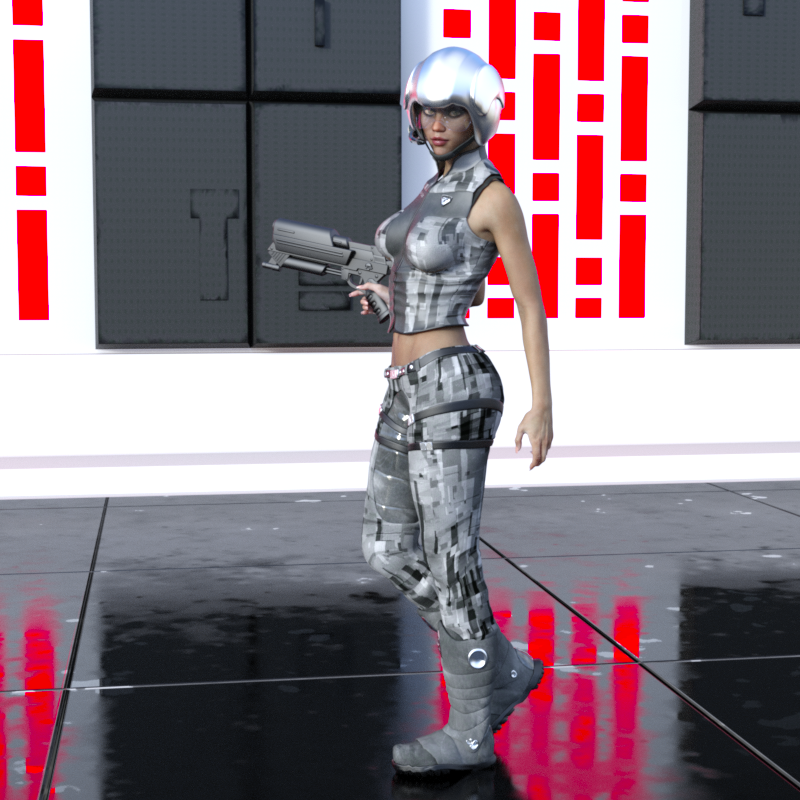
What I do is transfer it to G2F using the product, then save it as a "wearable". Then it goes on G3F pretty easy via the wearable preset. :)
Post Your Renders - Happy New Year yallAdded a few quick improvements getting him much better.
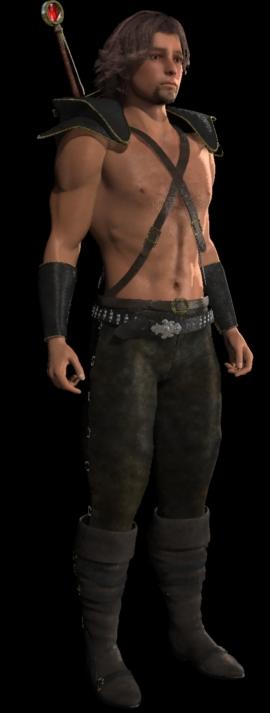 I actually wanted to try Arki's own custom textures for her EYEdeas models. Being that this in V4 with Male morphs, I decided to go with separate EYE figures for each side, so that I can scale and place them easier. I was right... these things are such a dream to work with! Her texture maps are really cool.
 For the main color of the Iris, I mixed two texture maps from her "Naturals" collection. I also blended a couple of her maps for the Whites.
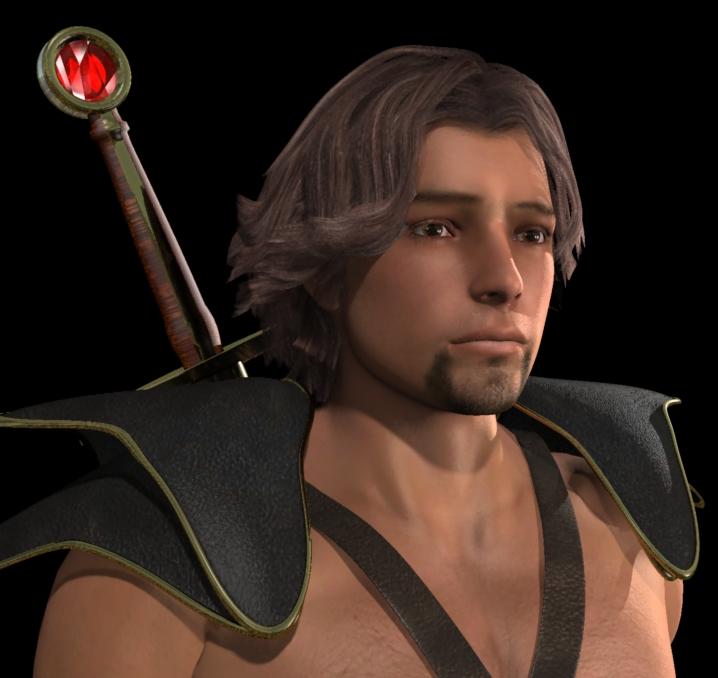
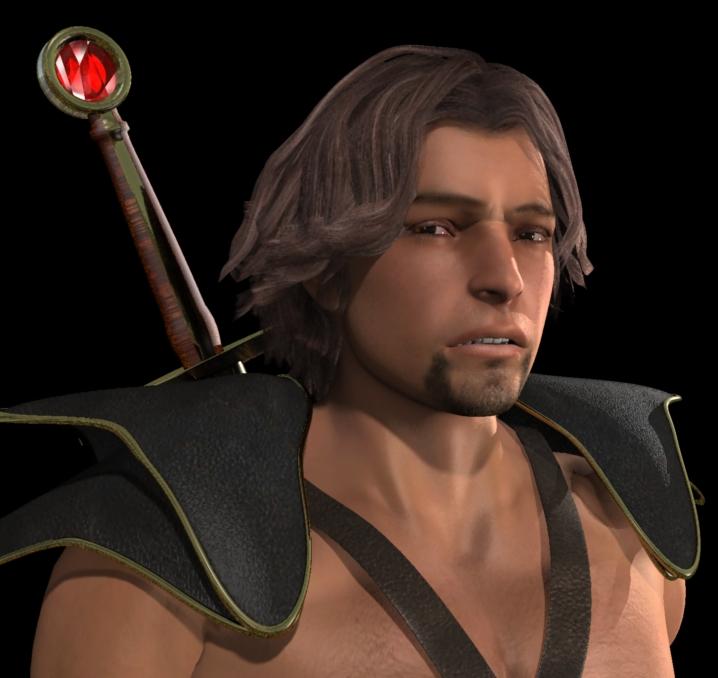
I've added some more Morphs++ to him making his eyes more the realistic Dart's eyes - and perhaps I'll now stylize them from here - perhaps leave them like this. But it's really cool how, when we see the eyes side-on, we see the refractive cornea bulge like real eyes! Now I have to tweak Rosie to have these, but with her colors.
I had a lot of fun designing my own shaders for Brass, Polished Steel, Ruby, Leather, as well as the other parts of the eyes. The sparkles in them occur without performing anything special - just picking up the environment map and the lights for the rest of the scene.
I painted the goatee to better match mine (extending further along the jaw and under the chin) and reshaped the brows a bit. The skin map has that amount of saturation after being rendered using Gamma Correction of 2.2
I purposely avoided any post work to show the resulting color.
I did a bit of extra texture map work for the bump for the skin, facial and body hair.
The Pants are from Raiver for V4, the rest of the outfit is Courageous for V4 with my own shader textures. I reworked the shoulder armor mesh's shape and tweaked the harness a bit. Both of those sets include morph support for the Male morph as well as the others I'm using.
During the Render Challenge I discovered how totally awesome Feral Fey's "MiLady's Blade for Genesis 2 Females" sword is. Every separate shape of the thing has its own material zone, making it a total blast to set up what the thing looks like. I just added the ruby prior to these renders. That part was the brass surrounded by platinum before, and the handle was all rosewood, which looked really nice too.
I'm still up-in-the-air about how I want the sword to look - but it might be there already. In the story it's a special blade, so it makes perfect sense to be brilliant and shiny.
Now as I continue to tweak this figure comes the all-important process of putting him through the hoops of animation tests - make sure he can pull his weight!
I like the speech morphs and added expression functionality a LOT! But if it doesn't work out, for some reason, I do really like my previous Dartan figure (M4). Just that some of the more common clothing looks a bit funny with the shoulders being so big - common to M4. I'm scouring my V4 clothing collection to see what works for males, and which have the Male morph support. I have "Miss Deanna Jones" already, which does support the morphs - so I'll be setting up that costume next.
Raiver for V4 has a really cool long coat which works really well with this Dart, along with the tank top and motocross-style boots and Goth accessories ;)
 Novica & Forum Members Tips & Product Reviews Pt 7
Knittingmommy- they certainly did get a different result, didn't they? I read over on your thread that you tried out all the morphs- all 200 of them. Wow! Take a break gal!
We had the neatest sunset/thunderstorm roll in, at the same time. I'll see if I can transfer a photo off my iphone and show you.
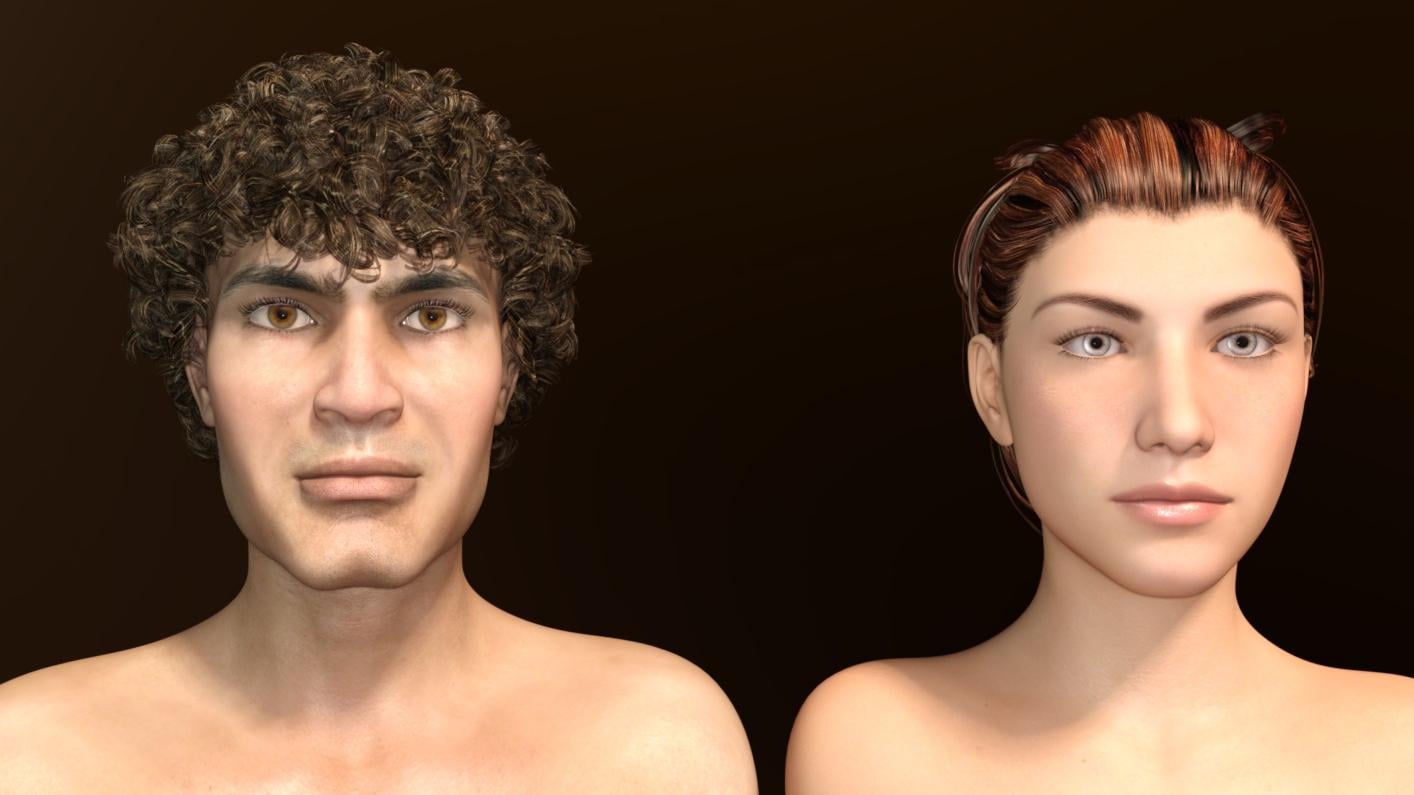
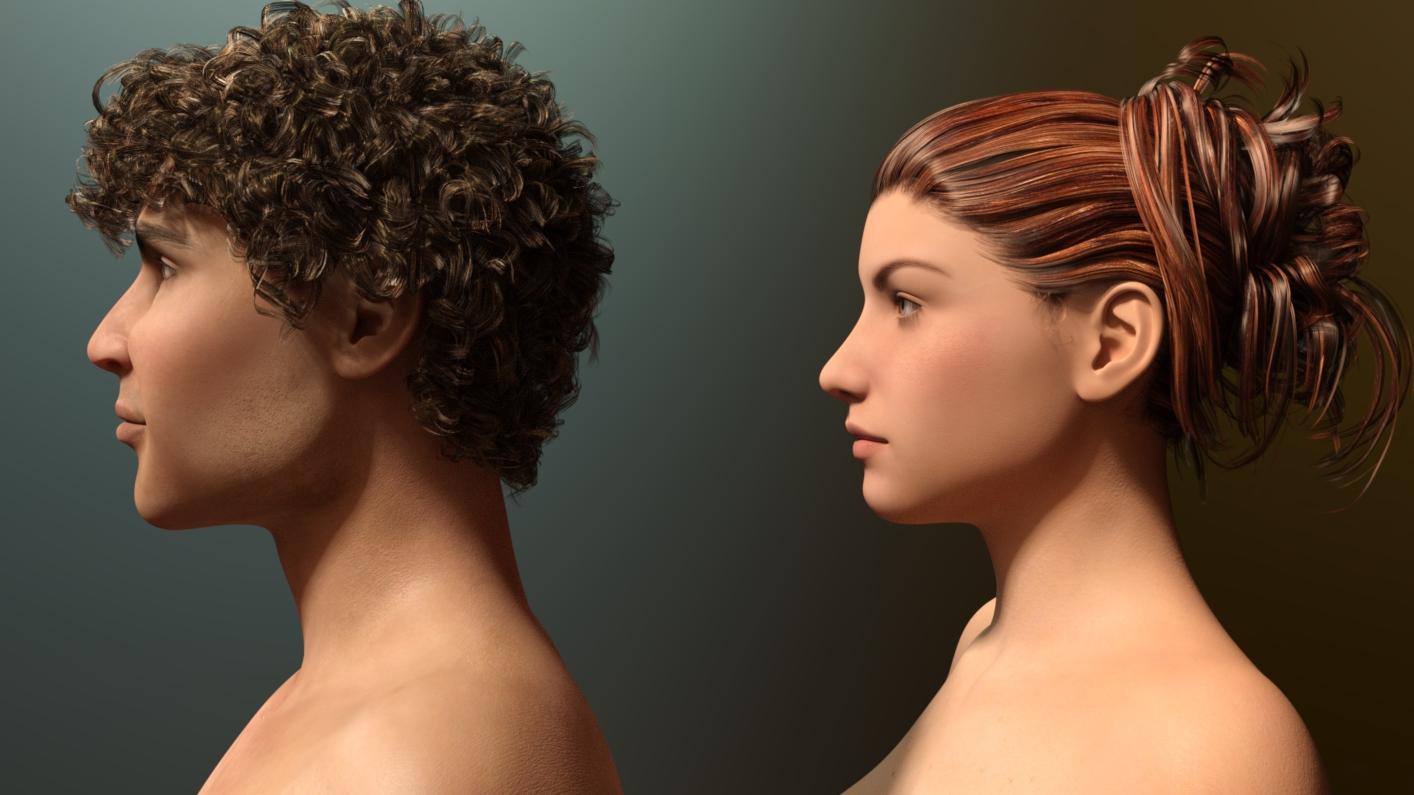
Novica & Forum Members Tips & Product Reviews Pt 7My project for the day ended up being the transfer of those 200 Plus Morphs for Genesis 3 Female to Genesis 3 Male using the GenX2 for Genesis 3 Addon. I transferred all of the morphs yesterday and then spent last night and today playing around with them. For all of the side by side comparison images that I did and more details go to my laboratory thread here. I thought I would post the side by side comparison I did of G3M and G3F with the exact same morphs dialed in on top of their respective base figures. I found that with the transfer the morphs acted in totally unexpected ways. The morphs are still a great addition to the G3M gene pool, but don't expect them to act exactly like they do on their G3F counterpart.
 Animators Club for Carrara wip thread . First animation, Week 1 . The Final Gesture.
Okay , here is the butterfly model . It has morph targets on the wings so they flap up and down.
Knittingmommy's LaboratoryOver in @Novica's thread Serene Knight had a great idea to transfer the 200 Plus Morphs for Genesis 3 Female by Dogz over to Genesis 3 Male with GenX2 AddOn for Genesis 3 by Dimension3D. That discussion starts here. Since I had 200 Plus Morphs, I thought I give it a try and see what happens. I opened GenX2 and found all of the morphs that said 200 Plus and transferred them to Genesis 3 Male. All of them. After I was done, I loaded up a the base Genesis 3 Male and used only those 200 Plus Morph sliders on the head and face. I got what I thought was an interesting character head and did some comparison renders of the G3M base with the new head that I morphed. The new head is on the left and the G3M Base is on the right. Both are wearing the Kyle HD for Michael 7 skin.
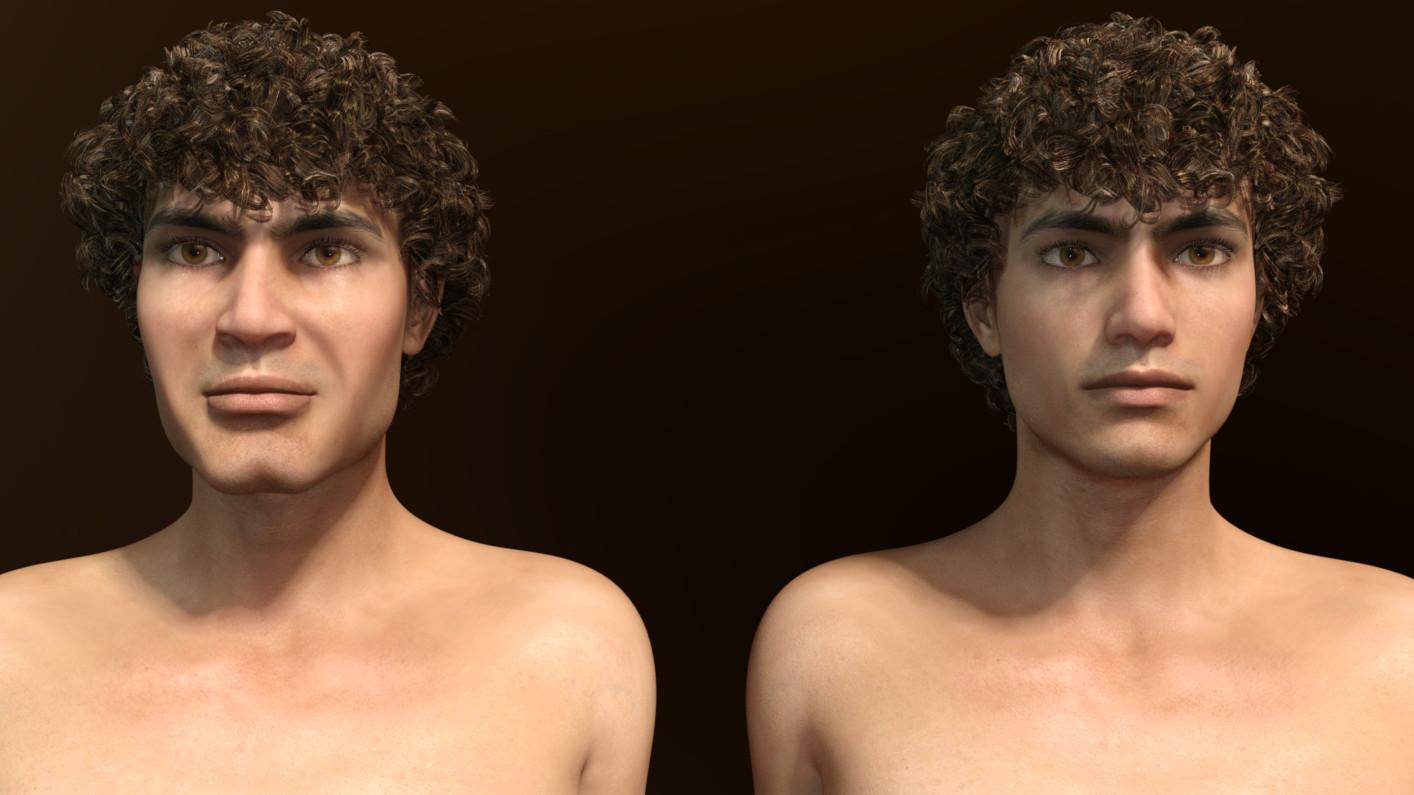
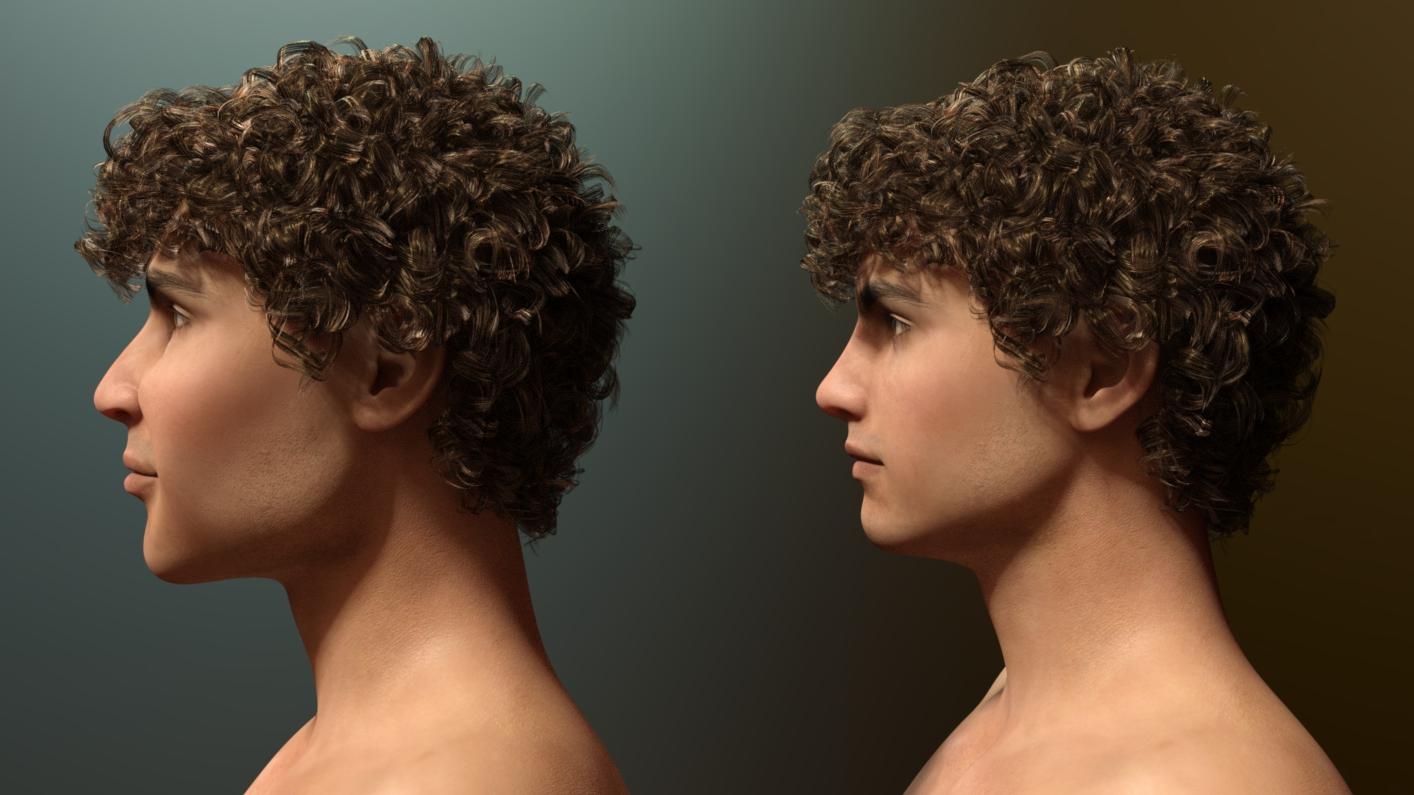
I was a little surprised by what I was able to to do because the few times I played with those morphs for G3F, I thought they were all very subtle morphs. Certainly nothing as dramatic as what I was able to get with G3M. Considering how drastic the changes were I thought I would see what those exact same morphs would look like on G3F. Again, the morphed head is on the left and the G3F Base is on the right. Both are wearing the Arianna for Karen 7 skin.
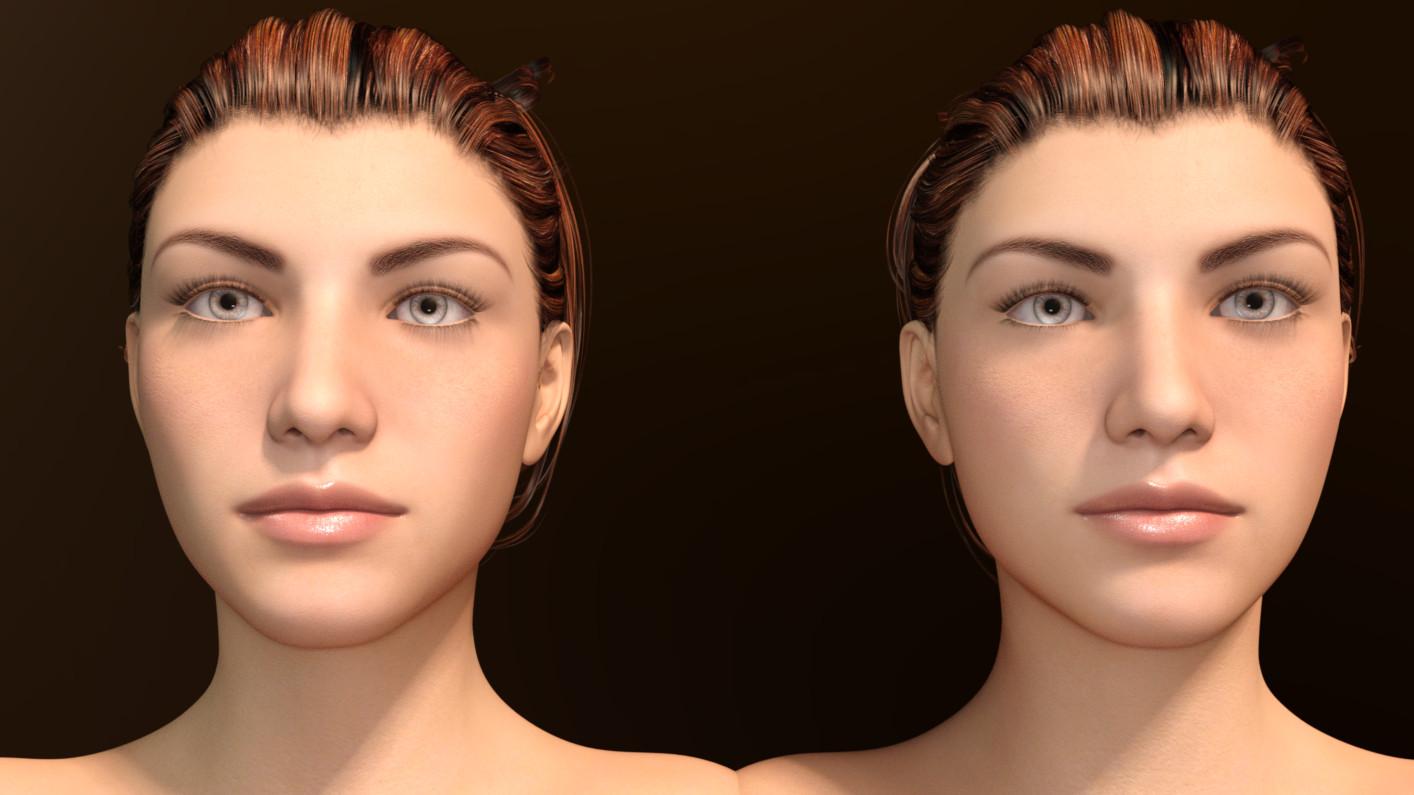
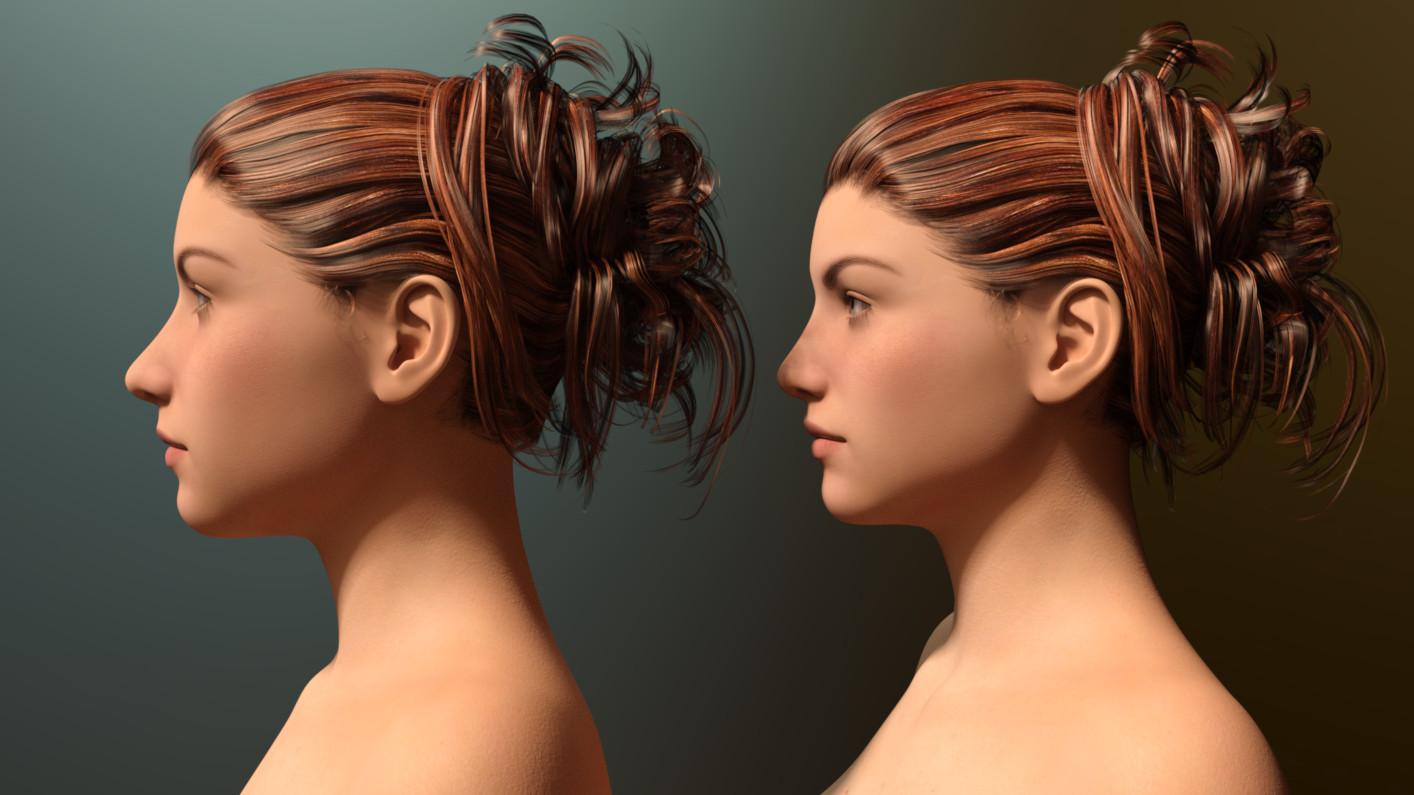
What I found is the those same changes are barely noticeable on G3F and you have to really look to see those differences. The differences are more noticeable on the side view than from the front. I'm not sure why there is such a big discrepancy, but my guess would be that I missed something in the transfer, possibly some hidden feature of the morphs that I missed. I was discussing this with another forumite and their thought was that there was a smoothing and resolution thing that GenX does. I'm not sure what the reason for the difference is. In the end, I ended up with some morphs that actually work well on G3M even if they don't work quite like they do on their original target figure.
Here is a side by side view of the two morphed characters together, both with the exact same morphs on top of their respective bases.
My Lease Is Nearly Up On The Complaint Threadhad a weird dream last night everyone was yelling at me to use a bump map, when i was looking for a morph.
i brushed my teeth, means no mars bar now
dreaming about my next pc, hexacore i7
12 render buckets in raraGenesis 3Full path? How do I search for that? And do you mean on my computer or in Daz?
I just don't understand why the mat files seem to work but the morph files refuse to. Even happened for the piece of clothing I bought for G3. The corset has a waist morph that does nothing when I click on it.
Questions about upgrading to a new computerTo transfer your custom categories or tags or metadata, on the old computer, from the Content Library options menu (rectasngle with horizontal lines in the upper corner of the pane) > Content DB Maintenance > Export User Data.
That will create a file named UserData_1.dsx (or multiple files if necessary) in the Runtime\Support folder of your first Daz Studio Format content folder.
Then move your whole content to the new computer (it doesn't have to be the same disk letter or path, since everything is relative to the base folder location).
Launch DS on the new computer and go to Content Library options menu > Content Directory Manager to set your content locations (don't forget to add the same path to Poser Formats as you do to Daz Studio Formats).
Then from the options menu Content DB Maintenance > Re-Import Metadata to add everything back to the database -- DS will look in the locations you set in Content Directory Manager to find the content's new location.
Questions about upgrading to a new computerHello,
I've been using DAZ Studio for about 2 years now, but this is my first time posting on the forums. I realize the subject of a PC transfer has been covered previously in other posts, but every one that I can find here on the site, or on the web in general, is written in a way that, unfortunately, is over my head when it comes to computer terminology, so I'll appologize up front for my lack of knowledge in this area...
I'm currently using DAZ 4.6 on a PC that's close to 8 years old (Running Windows 7) and is really not set up for such programs, in turn making it very slow. I also believe the old computer is on its last legs by some error messages I've received in the past few days, so I decided to upgrade to a new machine that's more suited to my needs. I realize I could simply download the most recent version of DAZ on the new computer and re-download my purchases, but if I can avoid that (time wise) it would great, but my main concern is some custom characters and other items that I created on the old machine, that took a lot of work and I would really hate to lose them!
It looks like all of the DAZ materials, runtime, etc., is under C drive on the old computer (The way they defaulted upon the original download, I assume) and I could simply copy those to an external hard drive and attempt to move to the new PC, but I have a feeling it's not quite that simple and I don't want to make a mistake that ends up causing this transition to be even more difficult, so if someone could please walk me through the process, step by step, using regular English, it would be GREATLY appreciated!!
Also, if it makes a difference, the new computer is Windows 10.
Thanks in Advance,
Mark
Crafted character shaped in Genesis to Genesis 3This is possible, it can be a somewhat involved process, but if all works well it should be relatively simple. You will need to use GenX2 available from the DAZ shop to make the transfer. There are several threads in the forums which give useful advice. Good luck and don't give up.
Crafted character shaped in Genesis to Genesis 3I have a character I have crafted using a Genesis(V5) figure (on left on image below).
All the shapes of the face and body are saved to this figure.
I now want to make a Genesis 3 figure(on right in image below) look like my Genesis(V5) figure (on the left).
I want this figure to have the same facial and body shape that I have morphed using the Genesis(V5) figure.
How do I transfer or send these modified morph settings that I have crafted on my Genesis(V5) figure onto a Genesis 3 figure?
In the attachment I want the figure on the right to look like the figure the figure on the left.
Thanks
P.S. I am adding another image to show the progress I have made so far.
The image on the left is the starting point and original character. The middle one is the progress so far but I do not have the shape transfering. And still have not been able to even get to the GF3.
Can somebody please explain what this means in the EULA?The part you have quoted comes from the Daz Commercial Real-time Addendum The terms of this addendum 3.0 are in force only when User has purchased a “Game Developer License” from the online Daz store. You only purchase a Game dev license if you are about to produce a new game.
You need to abide by the General usage section of the EULA.
The most important part of the General section is where it says
- Restrictions on Copying. The Content is provided for User's exclusive use. User does not have the right to provide the Content to others in any form or on any media except as set forth in this Agreement. The Content may be copied in whole or in part for User’s exclusive use. Specifically, User may copy the Content onto the storage device of an unlimited number of computers owned or controlled by User. The Content is for User’s exclusive use and no other individual or entity. Each individual must obtain his or her own license to use the Content.
- Terms of Use. Two Dimensional Works. Subject to the terms and conditions of this Agreement, User may (i) access, use, copy and modify the Content in the creation and presentation of two-dimensional animations and renderings, (ii) incorporate two dimensional images (including two dimensional images that simulate motion of three dimensional objects) derived by User from the Content in User’s other works, and (iii) publish, market, distribute, transfer, sell or sublicense User’s two-dimensional animations, renderings and other works; provided that User may not in any case publish, market, distribute, transfer, sell or sublicense any renderings, animations, software applications, data or any other product from which any Content, or any part thereof, or any substantially similar version of the Content can be separately exported, extracted or de-compiled into any re-distributable form or format.
Sharing shaping/morph presetsI'm finding it hard to track what is being discussed here. In general you may:
- distribute a preset that you dialed yourself setting other's morphs
- distribute a preset (optional) and a shape asset that you ERCed to control other's morphs (so you get a single slider to set the shape, but underneath it is still driving the third-party morphs)
- distribute a custom morph created by directly modifying the unmorphed mesh
- distribute a custom morph created by modifying the morphed mesh, then using Reverse Deformations to separate your changes from the rest and including that shape plus a preset or ERC control as in 1 or 2 to set the third-party morphs
Well in this case I load a character with morphs based on the DAZ G2 morphs, then I alter the settings for some of the morphs the artist has used plus some the artist hasn't used. I then save this as a shaping preset (intended to be used for the same character by others). That should fall under 1. above, right?
Daz 3D is part of

Connect
DAZ Productions, Inc.
7533 S Center View Ct #4664
West Jordan, UT 84084Licensing Agreement | Terms of Service | Privacy Policy | EULA
© 2026 Daz Productions Inc. All Rights Reserved.