-
How many people are still using Genesis 2?
I am using Genesis 1 to Genesis 8.
I am using Victoria 2/Michael 2 to Genesis 8 ... LOL
Hylas' corner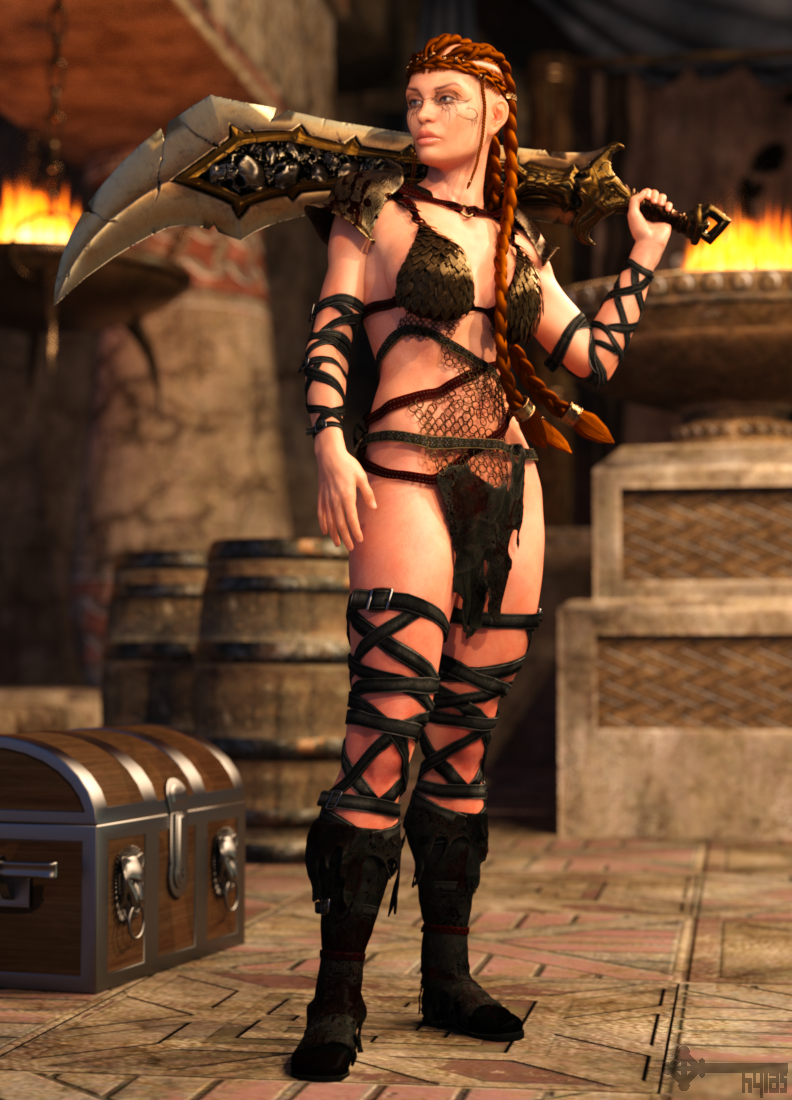
I'm very happy to have discovered 3DPoetry who has several amazing freebies over at Renderosity. I downloaded two V7 skins, one V4 skin, and an amazing braided hair piece. I tweaked the V7 skin settings extensively and the V4 skin of course needed converting to IRAY, but the maps are rock solid and that's what ultimately really matters. The above skin is Dragania for V7 and the RavenCrow hair piece.
Freebie Credits:
Skin by 3DPoetry: https://www.renderosity.com/rr/mod/freestuff/3dp-dragania-for-v7-g3/75877
Hair by 3DPoetry: https://www.renderosity.com/rr/mod/freestuff/ravencrow-character-and-hair-for-poser-victoria-4/76334
Morph by TastyMoonCheese: https://www.deviantart.com/succulentfruit13/art/Fitness-Model-Mia-Sand-Morph-For-Genesis-8-Female-830322600
Straps by Sedartonfokcaj: https://www.deviantart.com/sedartonfokcaj/art/Barbarian-Style-Straps-for-Genesis-432923796
Chest by Syntrifid: https://sharecg.com/v/12499/view/11/Poser/Posable-Treasure-Chest
Barrel by Summoner: https://fantasiesrealm.com/market/Designers/Summoner/Cellar-Exclusive?cPath=449&;
HDRI by Greg Zaal & HDRI Haven: https://hdrihaven.com/hdri/?c=indoor&h=mutianyuUsing Morphing Fantasy Dress with Genesis Males?Some historical background. Victoria 3 & 4 both included a male morph, sometimes called Vincent. (I was told it was due to the months-long lag between Victoria & Michael base releases.) Some MFD texture sets were made that had robe designs intended for Vincent, such as Once Upon a Time: Camelot (https://www.daz3d.com/once-upon-a-time-camelot) & the now unavailable On the Dark Side (http://docs.daz3d.com/doku.php/public/read_me/index/1301/start#product_notes)
I have been wondering how much work it would be to get the MFDs to fit Genesis Males (any generation), since I like the looks of those MFD textures. I do have the V3/4 autofit clones plus MFD for Gen3/4 & G1/2/3/8.
Genesis 9 delayed until at least 2020. Will you be buying it?I myself have put hundreds and hundreds of dollars into the different generations of figures and their clothing/accessories. While I would look forward to a G9, I really wish someone, or several someones would go back and create new clothing for the older characters such as M4/V4, M and V5, and G2 (for me personally, Medieval period stuff). I have invested in Marvelous Designer, because I know the stuff I really want, I will probably have to make myself, but that will be a while away, as it will probably take some time to learn to use it. It would be great if with the next generation of figures, stuff could be made to be fitted to any character, but that is probably way to much to ask.

There are clones and clothing converters for pretty much any to-from Genesis generation and also clones of Victoria 4/Michael 4, etc for the Genesis figures. The Wear Them All Expansion also has clones that allow Genesis 3 to wear clothing made for Victoria 3, Michael 3, Aiko 3, etc. But because Pre-Genesis figures like Victoria 4 and Victoria 3 are a different type of figure there's not really anything available that allows clothing made FOR Genesis figures to fit them, unfortunately.
How many people are still using Genesis 2?My introduction to DAZ was DAZ Studio 1, which came with DAZ Studio 2, which made different stuff. Ididn't really understand it. Kind of worked off what I knew from Bryce, which is how I ended up with DAZ. Then the human characters Victoria 3 and Michael 3 came along with more addons, and more versions of DAZ, with V4 and M4. I never got into the Davids, Hiros, and Stephanies.. I really liked Genesis 1 and I still use it. I didn't get much Gen 2, until recently, when I realized autofit would fit G3. Some of the recent DAZ store sales featured G2 products. I have the "make it Iray" shader, so the earlier G2 products can be updated. I happen to like several of the G3 female and male characters the best. They accept G1 and 2 wardrobe (well, shoes...not so much)pretty well, if the poses aren't too extreme. G2 hair was pretty good, and I use those. As other posters have mentioned, I might use different generations just because I don't want the hassle of poke through. If I want a close portrait, I use G3 mostly, and some G8. Otherwise, the earlier Generations work for me, too.
Poser Pro 11.3.818 DSON import issues - HELP!Until recently, I had no issues with DSON importing for Poser 11 running on Windows 10. After installing the most recent Poser Pro 11 update, my DSON content went haywire. I only have two DSON characters, a pair of running shoes and the VIctoria 5 Elite Ponytail. Both would load and I'd see the mesh, but the figure would be invisible upon rednering. I uninstalled both, and bot would now load...but there would be no figure in the scene. It showed in the menu, but there wasn't anything actually there.
To try to solve this, I did the following:- Uninstalled both figures with the Daz Install Manager and swept the runtime folder for remnants
- Uninstalled Poser completely, deleted all preference and installation folders, and cleaned the registry using CCleaner
- Uninstalled DAZ Install Manager and DSON Importer
- Downloaded latest versions of the above software
- Reinstalled everything
- Lied to DIM and told it I was using Poser Pro 2014
After doing this, the running shoes will load. The V5 Ponytail, however, still does the "phantom figure" thing. Furthermore, once this phantom ponytail figure loads, deleting it triggers a Poser crash. Trying to close down Poser after loading this figure also triggers a Poser crash.
I've looked everywhere trying to find a solution, but nothing seems to be the same as what I'm experiencing. Any advice is appreciated, since I used that hair exclusively on my main character in the setup scenes for the comic book I published and am having difficulty with them now due to this issue.
I'm also noting that Poser never actually seemed to do a true clean install, because it never asked me for the registration key again, it always just...had it. No matter how thoroughly I tried to clean it out.I had a similar issue recently. It turned out that some of the DS folders had been removed from Poser's library. Apparently, DSON requires those in order to find the geometry and morph files. Otherwise, you end up with a blank/broken item with aboultely no explanation of what happened. Even the log file will lie and say everything imported fine. The only inducation of a error is the fact that it says it impoted in 0 seconds.
My guess is you have another DS folder somewhere missing from Poser's library. Either go into Install Manger (Advanced Settings>Installation) or DS (Content Diretory Manger) to check where all of the content folders are and make sure they're in Poser's library.
Best of luck.LGBTQ* content appreciation thread!To anyone who's going to complain about these items solely because they are not the cisheteronormative content you're used to seeing here:
Representation matters.
In my opinion, having the widest possible choice of quality products is what matters.
I do have a use neither for the latest Cyberpunk stuff, nor for today's offers, but hey, some other artists may have shrugged and moved along when Steampunk themed stuff was on offer, while I was merrily throwing money at the screen. Perhaps today is their day for a spending spree. Maybe all of the aformentioned themes may have made some other artists happy (and their wallets weep). Everybody wins in the end, so fine with me.

While I don't disagree with your sentiment, I don't think you understand what I said.
Historically, the Daz/Poser markets have leaned heavily towards the demographics that are comprised of straight, white, and/or male people. This has been apparent up until Genesis 3, when they started to put more emphasis on ethnic diversity, which up to that point had sorely been lacking outside of a few PAs (and even then, any BIPOC PA characters typically looked like caucasian women with varying levels of a spray tan). It's only gotten better in that regard, and for that, I give Daz major props.
But when it came to LGBTQIA+ content, they were forced to describe themselves with coded names like "Sisterhood" or "Brotherhood", even though the poses themselves would come off as... questionable for actual familial relationships. Transgender content was typically regarded as either a joke or a fetish for certain other sites.
With Daz having openly released a Pride Parade package earlier this year and now this Transgender-focused bundle, they are acknowledging that the times -and demographics- since 'Victoria in a bikini with a sword and high heels' have changed, and that they are welcoming of those who are marginalized.
So yes, it's good to have variety. But the fact Daz is now recognizing certain communities is important and shows they are willing to evolve with the times, and that's to be commended, IMHO.
Well, I am a straight white male. This, of course, does influence my personal choice of products, as is expectable.
Nevertheless, it does in no way make me a bigot who would go dust off the good old pitchforks and torches anytime anyone mentions anything not aligning with my personal preferences. Not everyone in the same "demographics" is said bigot. That was my point. I may not spend money on todays products, as I have no use for them, but I am happy they are available for people who do have use for them. I am happy the artists who do need those products got the products, and, hopefully, in good quality. So, yay on all sides, I guess?
Oh, and I get to pretend to myself that I managed to cut my expenses on Daz by not spending money today too, because I am totally not going to spend said money on the next product I shall absolutely need as soon as it it pops up in the store.
 LGBTQ* content appreciation thread!
To anyone who's going to complain about these items solely because they are not the cisheteronormative content you're used to seeing here:
Representation matters.
In my opinion, having the widest possible choice of quality products is what matters.
I do have a use neither for the latest Cyberpunk stuff, nor for today's offers, but hey, some other artists may have shrugged and moved along when Steampunk themed stuff was on offer, while I was merrily throwing money at the screen. Perhaps today is their day for a spending spree. Maybe all of the aformentioned themes may have made some other artists happy (and their wallets weep). Everybody wins in the end, so fine with me.
While I don't disagree with your sentiment, I don't think you understand what I said.
Historically, the Daz/Poser markets have leaned heavily towards the demographics that are comprised of straight, white, and/or male people. This has been apparent up until Genesis 3, when they started to put more emphasis on ethnic diversity, which up to that point had sorely been lacking outside of a few PAs (and even then, any BIPOC PA characters typically looked like caucasian women with varying levels of a spray tan). It's only gotten better in that regard, and for that, I give Daz major props.
But when it came to LGBTQIA+ content, they were forced to describe themselves with coded names like "Sisterhood" or "Brotherhood", even though the poses themselves would come off as... questionable for actual familial relationships. Transgender content was typically regarded as either a joke or a fetish for certain other sites.
With Daz having openly released a Pride Parade package earlier this year and now this Transgender-focused bundle, they are acknowledging that the times -and demographics- since 'Victoria in a bikini with a sword and high heels' have changed, and that they are welcoming of those who are marginalized.
So yes, it's good to have variety. But the fact Daz is now recognizing certain communities is important and shows they are willing to evolve with the times, and that's to be commended, IMHO.
Movember UploadsThe entry form for the Movember contest should now be accepting mp4 and avi formats for animation.
What about jpeg picts? Yesterday my upload had an error msg. Asked me to try later. Is that fixed?
The jpeg format has now allowed. I have also upped the file limit to 20MB
As for the people still seeing issues with the uploaded can you give me your file information? Size? Format?
The info you are seeking -
I have two versions of jpeg format picts - 8mb and 12mb. (both do not upload)
What about social media info - I have a few -
https://www.instagram.com/aog.rai/
https://www.deviantart.com/aograi/art/Bearded-Lady-Women-In-Support-For-Movember20-861445004
I used software: Daz Studio4.14
Render engine - Iray
Products used:
Noemi HD & Smile HD Expression for Genesis 8 Female;
Hagar for Genesis 8 Female;
Spiky Hair for Genesis 3 and 8;
Ashan Beard for Genesis 8 Male;
String Bikini for Victoria 6.
Novica & Forum Members Tips & Product Reviews Pt 13I found an old V4 outfit which I really like. The Cargo for V4 has really good headgear and I like the high waisted pants. Unfortunately I don't have the converter to take it to G8. That outfit is in the featured stores in case you're doing those (with one of the required new releases they drop to 65%.)
XTransfer Module 1- Genesis 3 to Genesis 8 Morph Converter (Commercial)If I were to use this to transfer Lydia 7 https://www.daz3d.com/lydia-hd-for-victoria-7 to Genesis 8 Female, would there be any unforseen problems? I wouldn't transfer the HD, only the non-hd lydia.
error when downloading content from libraryHow old are those? I had to go back a way (25 pages) to find something from September, and that seems to be working OK. I was also able to download the old Victoria Clothing pack from 2001.
Newish stuff. Then again seems to have been temporarily (see my last post) - works again for me for all failed packages so far.
error when downloading content from libraryHow old are those? I had to go back a way (25 pages) to find something from September, and that seems to be working OK. I was also able to download the old Victoria Clothing pack from 2001.
Almost Starting OverThey skipped 3-7 so there wouldn't be confusion over Genesis 4 vs. the pre-Genesis Victoria/Michael 4.
My understanding is that G8 is similar to G3. I don't use it, as I still prefer to use DS 4.8 and mostly use Genesis 1. Pre-G8 products often go on steep sale. I also have tools to convert everything to Genesis 1.
Best Options for 1920's Wearif you don't mind converting:
https://www.daz3d.com/roaring-20s-gangster-set-for-m3-and-the-freak
https://www.daz3d.com/roaring-20s-flapper-dress-for-victoria-3Genesis in Carrara question-- Welcome Back! You have been missed. --
Could be a couple of different things, so I apologize for the parts of this that are unnecessary.
----- In Browser Tray ---- Under Content tab ----
1) Do not load Genesis figures from a 'runtime' folder or 'figures' folder. Yes, even though Genesis, Gensis 2 Female, Genesis 2 Male, etc may appear there, it is because there is a way to convert from there to Poser. Do NOT do it to load to Carrara.
2) Do load Genesis, Genesis 2 Female, Genesis 2 Male, etc. from content "My Daz3D Library" or "My Library" or something. I renamed mine and don't remember the default name but it does NOT have the word Runtime in it. Once inside 'My Daz3D Library' or whatever it is called, the subfolder is People \ Genesis for the default Genesis load. Or, see People \ Genesis \ Characters for the likes of Victoria 5 or Michael 5.
3) The items designed specifically for Genesis should appear in subfolders of the respective People Genesis folder. For example, hair designed for Genesis 1 would be in People \ Genesis \ Hair, while hair designed for the Genesis 2 Male would be in People \ Genesis 2 Male \ Hair.
The first page of the following should help. See posts # 2-5 or so on the first page of the thread to see where they have placed the default carrara shaders for Genesis. You can safely ignore the other 40 pages of the thread. https://www.daz3d.com/forums/discussion/119181/no-one-asked-me-diomede-posts-screenshots-on-whatever/p1
Holy Zowies! I never knew that! Thanks Diomede! I fell in love with the whole Genesis design during the 8.5 beta phase, and Spooky kinda told me what I needed to know, so never even checked a Runtime path for it!
Hey BooksbyDavid! Great seeing you again! Just seeing your name always reminds me of HeadWax's very first of the Carrara Challenges! That garden pool scene you dod was/is Su-freaking-perb!!!
Since you're looking to get invloved woth Genesis, I thought that I should let you know that I have a very Genesis-in-Carrara centric websire going at Dartanbeck.com
I even have a nice little freebie Character Template scene with video instructions
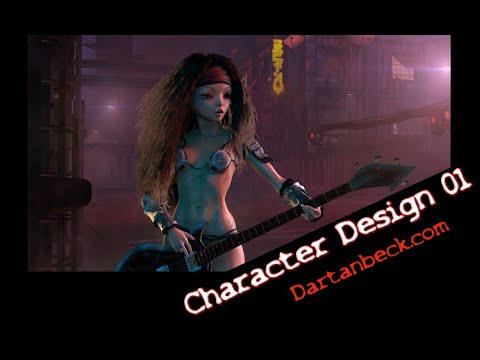
Here's a fun little intro to the character on the cover of that video
There's a lot of Genesis info in there. Have a poke around if you like ;)
Here are some quick links that may help:
Cheers! :)
Genesis in Carrara question-- Welcome Back! You have been missed. --
Could be a couple of different things, so I apologize for the parts of this that are unnecessary.
----- In Browser Tray ---- Under Content tab ----
1) Do not load Genesis figures from a 'runtime' folder or 'figures' folder. Yes, even though Genesis, Gensis 2 Female, Genesis 2 Male, etc may appear there, it is because there is a way to convert from there to Poser. Do NOT do it to load to Carrara.
2) Do load Genesis, Genesis 2 Female, Genesis 2 Male, etc. from content "My Daz3D Library" or "My Library" or something. I renamed mine and don't remember the default name but it does NOT have the word Runtime in it. Once inside 'My Daz3D Library' or whatever it is called, the subfolder is People \ Genesis for the default Genesis load. Or, see People \ Genesis \ Characters for the likes of Victoria 5 or Michael 5.
3) The items designed specifically for Genesis should appear in subfolders of the respective People Genesis folder. For example, hair designed for Genesis 1 would be in People \ Genesis \ Hair, while hair designed for the Genesis 2 Male would be in People \ Genesis 2 Male \ Hair.
The first page of the following should help. See posts # 2-5 or so on the first page of the thread to see where they have placed the default carrara shaders for Genesis. You can safely ignore the other 40 pages of the thread. https://www.daz3d.com/forums/discussion/119181/no-one-asked-me-diomede-posts-screenshots-on-whatever/p1
!! Store Issues - Known Problems - Please Read !!I know some folks have had issues with DIM and not seeing their products. I have a different one that started yesterday.
Products show up and download ok, but many of them (15 out the last 30 or so I have downloaded) fail to install. It appears the install process fails on the very first texture file in each product - not sure why - lots of space on the drive, and I can extract the files and install them manually outside of DIM.
DIM Log extract
2020-11-14 13:28:46.212 WARNING: QAccessibleWidget::rect: This implementation does not support subelements! (ID 3 unknown for QWidget)
2020-11-14 13:28:46.332 Installing: 51417-1 : Maria for Victoria 8
2020-11-14 13:28:52.930 Could not extract file: E:/DAZ/TryMeStudio/content/Runtime/Textures/Virtual_World/VWMaria/VWMaria_Arms_1004.jpg
2020-11-14 13:28:54.268 Install Failed: Maria for Victoria 8
2020-11-14 13:28:54.272 WARNING: QAccessibleWidget::rect: This implementation does not support subelements! (ID 2 unknown for QWidget)
2020-11-14 13:28:54.272 Install Queue Finished: 0 min 7.9 sec
2020-11-14 13:28:57.941 WARNING: QAccessibleWidget::rect: This implementation does not support subelements! (ID 6 unknown for QWidget)
2020-11-14 13:28:58.044 Installing: 64727-1 : The Colosseum
2020-11-14 13:29:29.210 Could not extract file: E:/DAZ/TryMeStudio/content/Runtime/Textures/Protozoon/Colosseum/Arch/Face_Bump.jpg
2020-11-14 13:29:32.217 Install Failed: The Colosseum
2020-11-14 13:29:32.226 WARNING: QAccessibleWidget::rect: This implementation does not support subelements! (ID 2 unknown for QWidget)
2020-11-14 13:29:32.226 Install Queue Finished: 0 min 34.1 sec
2020-11-14 13:34:25.583 WARNING: QAccessibleWidget::rect: This implementation does not support subelements! (ID 4 unknown for QWidget)
2020-11-14 13:34:25.667 Installing: 73417-1 : MMX Resource Saver Shaders Collection 2 for Iray
2020-11-14 13:34:40.651 WARNING: QAccessibleWidget::rect: This implementation does not support subelements! (ID 5 unknown for QWidget)
2020-11-14 13:34:55.642 Could not extract file: E:/DAZ/TryMeStudio/content/Runtime/Textures/Mattymanx/MMX-RSSCV2/MMX-RSSC2-G1-Eyes-01-D.png
2020-11-14 13:34:57.195 Install Failed: MMX Resource Saver Shaders Collection 2 for Iray
2020-11-14 13:34:57.199 WARNING: QAccessibleWidget::rect: This implementation does not support subelements! (ID 2 unknown for QWidget)
2020-11-14 13:34:57.200 Installing: 50863-1 : PS Onishi for Genesis 8 Female & Victoria 8
2020-11-14 13:35:00.740 Could not extract file: E:/DAZ/TryMeStudio/content/Runtime/Textures/Pixeluna/PS_Onishi/Fiber_Strand_Dif_00.jpg
2020-11-14 13:35:01.456 Install Failed: PS Onishi for Genesis 8 Female & Victoria 8
2020-11-14 13:35:01.458 Install Queue Finished: 0 min 35.7 sec
2020-11-14 13:35:13.948 WARNING: QAccessibleWidget::rect: This implementation does not support subelements! (ID 3 unknown for QWidget)Character skin seams.Oh hey, this is great! Thanks guys for checking.
Don't have Latonya nor Millawa.
So below are some of the other G8F characters.
I did update/merge menus and opened and closed several sessions. Just in case need to activate something in backend. Doubt it. But just to be safe. That said I still don't get the auto addition of Filament Draw Properties. So I added again via Create sumbmenu. When mipmaps is toggled, it redraws the filement preview every time. So it is recognizing it.Interestingly, Victoria 8 is pretty much without seams. Very hard to see. Freja & Josephine are the worst and very visible. Babina head is perfect without a seam, but arms have slight seams. I did disable skin normals maps for all, and standardized Skin Bump to 2.0 for all. And all these screenshots is with MipMaps off.
The stark difference in visibility of seams between these Das Originals would lead me to believe they likely have different UV padding values when they were baked. Did not look because, I have so much other stuff to do. But with you guys being here and testing stuff, I put my stuff aside so I could at least test too.
Any chance either of you have Freja or Josephine? And could test sometime?
!! Store Issues - Known Problems - Please Read !!Just for context, here's the list of store issues from April 2013, 11 months after the Magento site went live. I'm not excusing the problems from this new store, just noting that Magento was way worse and my estimate would be that the proportion of the major issues they've fixed in 12 days took months back then.
Operational issue:
1) Shopping cart display default option to open as a page and not a drop down
2) "You already purchase this item warning" not active (Might need a special Script, Most stores don't check for this)
3) "You are buying an item in your wishlist" (Okay this is a New Feature that was not in the old site, but I did suggest it.)
4) Correct Item classification - I was in the People/woman while I did find models Mods, I also found Hair, Hair textures, clothes.
One of the more interesting, I found several previous generation models under Genesis shapes, like V3 Base.5) Items appear multiple times in the displayed list of items.
-- -- Haven not seen this is a while, so I may be fixed
6) Vendor Stores, and Links from their other products.
-- -- ** Known Issue --"The shop by vendor is being worked on."
7) Sale termination date - The sale on this product ends on
-- -- ** Known Issue
8) No file sizes for products listed on both the product pages and download pages
9) Ability to see add-ons to a product ( Thank you a_silberman)
-- -- I have seen add-on's for new product come up in the 'You may also like' (Which just seemed to vanish with the latest Reboot) 5/31
10) Ability to view Wiki or Read Me file about the product - from (digitell
-- the Old Art Zone Wiki is still reachable and you can lookup the product.
11) Unstable Prices, system seems to forget the pricing on objects.
12) Items showing up multiple times with multiple Prices
-- This might be fixed between the time I saw it and when I went back to Double check.
13) Could we please have the "You may also like" under the Description or over the the right side? (i know minor)
Searching or Sorting:
1) Search Within - to narrow down the thousand of things that are for Victoria 4
-- -- If you want to find only V5 items, Type: "Victoria 5" with the quotes. Search is not looking for exact parse.
-- Well it worked earlier today when found it, but now it isn't working again.
2) On Sale Only - That was a nice little search
-- -- No solution yet
3) SORTING - Any where you have things in columns we should be able to sort by the column headings.
-- -- Wishlist Sorting
-- -- No solution yet
4) Search within -- (** The web group is aware.)
Itemized Order History
My Orders
My Wishlist
-- -- No solution yet
5) Sort by price range -- you can sort by price, so we are talking about a price range
-- -- The Catalog Advanced Search allows for a price range, still doesn't display it's results.
6) Hiding Mac / PC items during product download. **Known issue
7) Searching for anything is faster if you use Google or Bing, You will find what you want faster that way of you know something about it.Daz 3D is part of

Connect
DAZ Productions, Inc.
7533 S Center View Ct #4664
West Jordan, UT 84084Licensing Agreement | Terms of Service | Privacy Policy | EULA
© 2026 Daz Productions Inc. All Rights Reserved.