-
Ext3nd Studio Presents: Goblinette for Genesis 2 Female.
Great, will give me time to get the creature morphs so I can use the morph, which by the way I really like.
Dear Alessandro, What About the Rabbit? (Answered, Yay!)Dear @Alessandro Mastronardi, I really really don't mean to be a pain, please don't feel pressured in any way! But I just have to ask: What about the wonderful rabbit you teased us with a while ago and rendered such cute pictures of? In the comments, you said it would be ready in a few weeks, but we haven't seen anything yet, sadly. Is it still alive, the poor thing?
I also remember that maybe a year or even two ago, there also was a thread about your rabbit figure, and that it was basically done and ready for release back then, and you would give it to us soon. Soooooo ... I'd just like to know, is it still happening, are we gonna get the figure anytime in the near future? Or is the project cancelled or something? I would really love to have a realistic rabbit and/or hare, and in the thread as well as in the comments to the renders in gallery, many users expressed the same wish. So I thought it was very much worth asking.
Even if you don't feel you want to release it as a full product for whatever reason, I would love to throw my money at it as an add-on, morph, or in any other way, shape or form!
It would be lovely to hear from you on this.
Respectfully - Tina
Edit: I still can't figure out how to tag users with names with a space included, dang ... Hope it's still seen ...
Can't apply material to specific Wardrobe itemsChungdan explained (https://www.daz3d.com/forums/discussion/comment/5947171/#Comment_5947171) the need to load the Wearables to get the proper hierarchy. Hierarchical materials presets must absolutely follow the same structure as when they were saved, there is no way around it. You could save out individual material presets for each piece (after loading a full outfit).
You can load "MBR All" or, under Wearables, "MRB Boots", "MRB Coat" and/or "MRB Dress", while Genesis 8 or 8.1 is selected in the scene. Everything will be properly parented and fit to the target figure, and Hierarchical Materials will apply properly to the whole outfit, or the individual items.
If you want to try loading the individual pieces (MRB Smooth Morph Makers and the separate Wardrobe pieces) there is a slightly different workflow. Load the Smooth Morph Makers first, then for each one, add the corresponding Wardrobe item. They will initially look terrible, all wrinkly and distorted, but that can quickly be remedied.
The thing is, the Wardrobe item is being fit to the Smooth Morph Maker, but should be fit to the figure (G8F or G8.1F). However, they should remain *parented* to the Smooth Morph Maker. Doesn't seem intuitive, but that's how it works, otherwise the Hierarchical Materials presets will not work.
True, the individual parts are redundant if the Wearables set everything up properly, so just ignore them.
genesis 9 butt cheecksYou might have better luck looking at Renderotica for more morph packs. Be aware though, that site is INCREDIBLY nsfw.
Diffeo - Problem with ERC and G9, both new and old methodHello,
I'm importing G9 unbaked, load all the stuff, load the Nina9 head custom morph, yet the position of the eyes is wrong when i dial it in, with ERC in global settings set to translation (new method) and armature and then "morph armature" (old method).
I think i narrowed the culprit down to the "proportion head size" morph not moving the eyes (note the difference between armature and eyes). The "proportion head size" morph seems to be part of the nina9 morph?!?
I added the baked imported Nina to the image for reference. Any ideas?Problem with custom morph (Hands)I have a problem with my custom morphs. It comes from the fact that the hands have been edited to fit my character better.
My morph works fine otherwise, but the hands are a problem. I would really like to keep my custom hands. Is there any way I can fix this?

Thank you in adviceGenesis 9 female deform with most posesDid anyone have a solution for this. I'm having massive issues wth this right now, I think it must be a 3rd party morph problem but can work out which one is causing this issue. Obviously I can't show a screenshot of the area because of where it is but I have spent months building 100's of renders that I may be forced to through away if I can't figure out this issue as I'm moving onto the more adult scenes in my project. Can anyone point me in the direction of trouble shooting at least?
Royal Eastern Dragon 2 [commercial]Thanks for the new textures RawArt. I love it when PA's take customer suggestions to heart and create for us.
Do you know if you will be adding a morph package for this dragon in particular, to make it more cute or the parade version I mentioned.
morph loader pro options no longer selectableI have created a G9 morph with mesh grabber. I exported the base mesh with the deltas as an .obj file. Then I tried to use morph loader pro to load the mesh as a morph. It is necessary to select "reverse deformations" when loading it. But there is now no way that I can see to set that flag. "reverse deformations" is set to "no" and I cnnot change it to "yes." I could do that some time ago. Not now. How do I change the value of "reverse deformations" from "no" to "yes" In morph loader pro?
I an using Daz Studio 4.22.0.1 Pro Edition (64bit) Public Build on a widows 10 box.
It is maddening when something I used to do no longer works. Am I making a mistake somewhere?
Can't select or Deselect items in an environmentApparently, I had managed to delete unwanted items from the scene.
Today, I wanted to work and do the render, to my bad luck, the figure components are gone
 , I used Face Transfer 2, because this kind of render is for a family member.
I want to give a surprise with the polished result.
Now I have to go back to the drawing board and work my way from zero to hero.
Is there a way, to permanently save my work and use it again without any loss?
I need to to get it done by today if possible, I will be packing a present later and include the finished artwork.
I am going to use another environment I bought from the store, the other looked nice, but I need more room, also I am setting the image to about 6000 px if I increase more this will take more time to render, the idea is a crisp image output without sacrifying the quality. I am waiting for your reply, thanks!
No more "Young adult" shapes available for core figures...why???I wonder if "young adult" could be achieved by blending a small amount of teen in with the adult morph
Coming soon: Mesh Grabber 4.0 [Commercial]carrie58 said:
ManFriday said:
Elor said:
What was shown looks useful

A couple of questions:
- Will the tools added by the current version addons be included with Mesh Grabber 4 or will the addons still be required ?
- Are the changes created with the new version compatible with the current version ? I'm asking because I currently only have Mesh Grabber for Mac but I'm also using a Windows machine and I'm thinking about buying the new version for Windows initially, to get Mesh Grabber here too (right now, I'm using the saving morphs function to get the changes to the Windows machine).
The add-ons are going away. There will be only one Mesh Grabber product any more. It will include both the Mac and the Windows versions. (The only reason that they were separate is that when I made the original Mesh Grabber I didn't know how to make Mac plugins yet, so Mesh Grabber for Mac was added at a later time.)
The changes are compatible. The data format hasn't changed. All the changes are in the "tool" part of Mesh Grabber (how the vertex deltas are created: there are now new ways like a sculpting brush), but they are still saved to scene files the old way. And the Daz Studio morph data format hasn't changed either, of course.
So if I already have Mesh Grabber and the add-ons will this version replace it or work with it?
Both. Mesh Grabber 4.0 will replace the old and include all its features and the add-ons, and all the new things.
Recently upgraded to windows 11 and now it is "writing assets" when I load a sceneOld style .DAZ scene files explains a lot.
When you created those scene files DS added DSO (mesh), DSD (morph) and DSV (UV mapping) files to the "data" folder, and the scene file will load those files rather than use the original files, so losing those "data" folder files means the scenes wont load.
Late on in DS3's life they added a new system to the scene files, basically it recorded the original files pathway into the scene file, that way if you lost the "data" folder files then DS had a good chance to recreate them from the original files.
We still use a similar system in DS4.5+ when your saving scenes/subsets that have non DSON content in them.
And I suspect that is where your problem lies, DS is loading the .DAZ files and can't find the "data" folder files, so it's using the pathways to load the original files, problem is that DS4.0 was the last version of DS that created DSO, DSD and DSV files, so what's happening is DS is adding DSF files to the "data/auto_adapted" folder, which is where the writing assets is coming from.
The good news is that by the sounds of things your laptop still has all of the "data" folder files you need, the bad news is you have to figure out which files need to be copied over to the other system.
Is there a way to partially remove morphs from an item?I've been working on kitbashing together an ID badge, the kind you see at conferences and such.
I loaded it into Daz as an OBJ, then used Transfer Utility to get it to play nicely with Genesis 8. So far, so good! When the figure poses, the necklace/ID badge pose with her!
The downside is that the ID badge itself now deforms and bends like a flexible object, when in real life it would be the one part of the prop that remains rigid. Is there a way to select the badge itself through the Geometry Editor and change the properties just for that sub-mesh alone? Or would doing that cause the badge to behave independently from the rest of the prop when the figure moves (for example, the badge remaining in place or moving ten feet away when the figure bends over)?
I've attached some screenshots to give you the basic idea.
(1) Standard pose with badgefit to G8F figure
(2) G8F figure reposed; the chain part follows nicely, as desired;
(3) But the badge 'bends' and squishes as a resultG8F/M Pose Transfer to G9richardandtracy said:
As I said earlier, I am going to try to get G9-G8 working to keep G8 as 'current' as possible, but it's not going to be immediately. Regards, Richard.
Hey @richardandtracy - resurrecting this post, did you ever get G9 -> G8F pose transfer working? I use your script for the other way around a lot, but I recently found poses for G9 that I'd love to use with G8F and I can't figure out how to do it easily myself.
And if I didn't say thanks before, saying thanks again - this one and V4 -> G8F I use a lot!
Celebrity Look-a-Likes for 3D figures Part 4The TV series being referred to is https://www.imdb.com/title/tt0078659/?ref_=nv_sr_srsg_5_tt_8_nm_0_q_monkey%20magic about https://en.wikipedia.org/wiki/Monkey_King there have been many adaptations over the years. The character morph in question is good. The "muck rake" is great. The attached is my monkey statue. In the Chinese zodiac I am a monkey. I also own the full DVD box set for the TV series in the above link.
AIUTO...CHI CONOSCE L’ITALIANO? PARTE QUATTORDICIGrazie a tutti delle dritte, ragazzi, cercherò di farne tesoro.
Non mi ricordavo delle luci emissive, in effetti mi sembrano una soluzione interessante, sperimenterò.
@Crios Molto bello l'effetto di quei riflettori. Si potrebbe anche usare per la luna o il sole in certe condizioni, tipo con la nebbia. Mi hai dato una ottima suggestione.
Kainjy said:
1 - Per il colore di pelle ti consiglio di usare dei personaggi appositi.. ci sono in vendita molti personaggi di diverse gradazioni (ogni personaggio ha morph+materiali, a te serve solo i materiali). Per cui carichi il tuo G8 e poi applichi i soli materiali del personaggio comprato.
Si può anche modificare manualmente.. ma visto che non hai esperienza la cosa si fa un po' particolare.. riassumendo: più hai la pelle chiara e più la luce tende a viaggiare all'interno del corpo (mostrando vene, ecc..). Più la pelle è scura e meno c'è questo effetto. Dunque non basta cambiare solo colore di pelle ma bisognerebbe anche "aggiustare" come la luce viene assorbita e riflessa (pelli grasse sono più riflettenti). Se ti compri un personaggio di colore (a spendere poco oviamente) vedrai come a parità di materiali i settaggi sono diversi.
Nel pannello surface occhio a cosa selezioni.. ci sono diversi pezzi del corpo e i personaggi sono divisi in più parti (se ti si colora un occhio ha selezionato per sbaglio anche l'occhio)Wet & Tanned funziona coi G8.. dunque usa i G8 se vuoi usare il prodotto. Nella pagina dello store https://www.daz3d.com/wet-and-tanned-skins-for-genesis-8-females trovi dei video in basso: guardali che ti spiegano come usarli.
2 - Per la luce posta un'immagine così magari si capisce qualcosa in più... Comunque controlla che:
a. la serratura sia trasparente (e dunque possa passare luce)
b. la luce sia di adeguate dimensioni e collocata fuori dalla porta
c. che tipo di ombre vuoi ? Luci piccole e distanti creano ombre nette, luci grandi e vicine creano ombre morbide.
Sì, io uso praticamente solo i Genesis 8, ho strutturato tutto il parco dotazioni e personaggi su di loro.
Controllerò i tutorial di Wet and Tanned allora, perché il pdf l'avevo guardato ma non ci avevo capito nulla.
Allego invece un esempio di quel che intendevo sui personaggi "oscuri".
La prima vignetta è semplicemente uno screen di come appariva in fase di montaggio. Notare che c'è una luce perfetta che le illumina il viso in linea con l'apertura della porta, luce che io NON ho messo (quello scenario/stanza ha una illuminazione sua che non è modificabile, o comunque non ci sono proprio luci nella board!).
E' passato del tempo da quando ho creato quella scena a quando poi l'ho renderizzata. Quando ho riaperto quella scena e rimesso l'inquadratura sul personaggio, quella particolare luce tagliata era sparita, senza che io avessi toccato nulla. Da lì ho cominciato a cercare di ricrearla col poco che ne capisco, ma non c'è stato verso. Alla fine ho renderizzato piazzandole una pointlight da 15k di brillantezza direttamente sulla faccia, letteralmente nello spazio tra la porta e il viso, ma il risultato è poco più di una lumeggiatura sul naso.
Con questo personaggio in particolare succede spesso che sia mal illuminato, e da lì avevo il dubbio da neofita che fosse colpa delle texture magari, o che ne so.
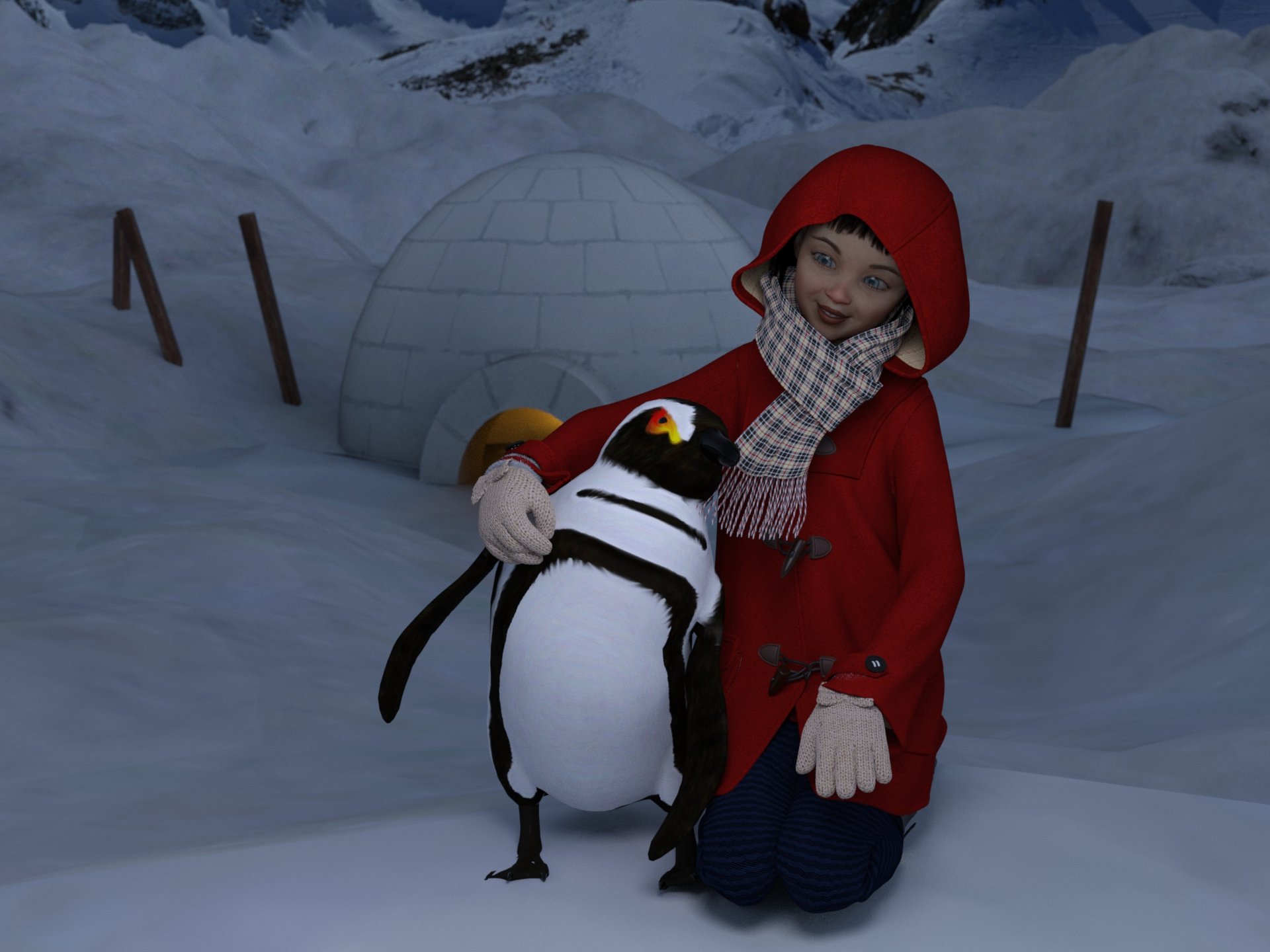
Freebie Challenge April/May 2024 - "Soft as Plush, Smooth as Silk" - Entries ThreadMy soft Penguin
My soft, fluffy and cuddly penguin is my best friend forever.
Freebies
Penguin (Daz freebie , may 2024)
https://www.daz3d.com/penguin"Toon-styled Igloo" (https://skfb.ly/oCopM) by OfficialBytes is licensed under Creative Commons Attribution (http://creativecommons.org/licenses/by/4.0/).
https://sketchfab.com/3d-models/toon-styled-igloo-0508e630619541919346d1baf9b1d5e7Snow Terrain For DAZ
https://www.renderhub.com/shredder/snow-terrain-for-dazhdri: sky0044.hdr
https://evermotion.org/articles/show/7928/free-hdri-cd-collection-from-evermotionNanami Genji
1 link
https://www.cgtrader.com/free-3d-models/character/fantasy-character/nanami-genji-anime-charachter-for-genesis-8-female
2 link
https://www.renderhub.com/humanxystudio/nanami-genji-anime-charahter-morph-for-genesis-8-femaleDuffle Coat for G8F
https://sharecg.com/v/94702/gallery/21/DAZ-Studio/Duffle-Coat-for-G8FUpdate Sailor Uniform Winter Set Part 1 (muffler)
https://sharecg.com/v/94617/gallery/21/DAZ-Studio/Update-Sailor-Uniform-Winter-Set-Part-1Xmas Bundle by Leilana (leggins)
https://www.renderosity.com/freestuff/items/84013/xmas-bundleFree: Bob haircut for Genesis 8 by perlk
https://www.deviantart.com/perlk/art/Free-Bob-haircut-for-Genesis-8-887913550Leather Boots for G8F by yomiuri
https://sharecg.com/v/94464/gallery/21/DAZ-Studio/Leather-Boots-for-G8FTwizted Character Creation Kit by TwiztedMetal
https://www.renderosity.com/freestuff/items/81217/twizted-character-creation-kitGenesis 8 Female Makeup Kit 1 - Lips and Eyeliner (Lips)
https://sharecg.com/v/92017/gallery/21/DAZ-Studio/Genesis-8-Female-Makeup-Kit-1-Lips-and-EyelinerGenesis 8 Female "Just Sitting" Pose 05 by BBarbs (adapted to the scene)
https://www.renderosity.com/freestuff/items/85472/genesis-8-female-just-sitting-pose-05Paid:
Iray Ghost Light Prop Kit
https://www.daz3d.com/iray-ghost-light-prop-kitFreebie Challenge April/May 2024 - "Soft as Plush, Smooth as Silk" - Main Threademanuela1 said:
My soft Penguin
My soft, fluffy and cuddly penguin is my best friend forever.
Freebies
Penguin (Daz freebie , may 2024)
https://www.daz3d.com/penguin"Toon-styled Igloo" (https://skfb.ly/oCopM) by OfficialBytes is licensed under Creative Commons Attribution (http://creativecommons.org/licenses/by/4.0/).
https://sketchfab.com/3d-models/toon-styled-igloo-0508e630619541919346d1baf9b1d5e7Snow Terrain For DAZ
https://www.renderhub.com/shredder/snow-terrain-for-dazhdri: sky0044.hdr
https://evermotion.org/articles/show/7928/free-hdri-cd-collection-from-evermotionNanami Genji
1 link
https://www.cgtrader.com/free-3d-models/character/fantasy-character/nanami-genji-anime-charachter-for-genesis-8-female
2 link
https://www.renderhub.com/humanxystudio/nanami-genji-anime-charahter-morph-for-genesis-8-femaleDuffle Coat for G8F
https://sharecg.com/v/94702/gallery/21/DAZ-Studio/Duffle-Coat-for-G8FUpdate Sailor Uniform Winter Set Part 1 (muffler)
https://sharecg.com/v/94617/gallery/21/DAZ-Studio/Update-Sailor-Uniform-Winter-Set-Part-1Xmas Bundle by Leilana (leggins)
https://www.renderosity.com/freestuff/items/84013/xmas-bundleFree: Bob haircut for Genesis 8 by perlk
https://www.deviantart.com/perlk/art/Free-Bob-haircut-for-Genesis-8-887913550Leather Boots for G8F by yomiuri
https://sharecg.com/v/94464/gallery/21/DAZ-Studio/Leather-Boots-for-G8FTwizted Character Creation Kit by TwiztedMetal
https://www.renderosity.com/freestuff/items/81217/twizted-character-creation-kitGenesis 8 Female Makeup Kit 1 - Lips and Eyeliner (Lips)
https://sharecg.com/v/92017/gallery/21/DAZ-Studio/Genesis-8-Female-Makeup-Kit-1-Lips-and-EyelinerGenesis 8 Female "Just Sitting" Pose 05 by BBarbs (adapted to the scene)
https://www.renderosity.com/freestuff/items/85472/genesis-8-female-just-sitting-pose-05Paid:
Iray Ghost Light Prop Kit
https://www.daz3d.com/iray-ghost-light-prop-kitEntry approved, please move to entries thread
About head and outfit combine (have picture)crosswind said:
Yes, normally the hood on such a garment has been rigged with the general weight of figure's head... If the hood is on the head, it'll move with the head node, but if the hood is down, it'll still move with the head. So that brings you such an issue.
Firstly, you may check if there's any "reset hood" or "move hood" morphs on this garment, then try dialing it...
If there's no such morphs, there're still some tricks to fix it but it'll depend on the surface definition of the hoodie garment. Which product is this garment ?
In general, you export the garment with default hood position to OBJ file. Then import the OBJ back to update the Hood surface (create a selection set for it if there's no separate Hood surface) with Attenuate as a "fix morph".
Yes this is the problem for sure , i try to enter the geometry tool but didnt really understand what to do there , i also dont have the Fix Hood tool in the right. Sorry if its easy type to do but never really use this option , i try one time but didnt understan it clearly. :)
Daz 3D is part of

Connect
DAZ Productions, Inc.
7533 S Center View Ct #4664
West Jordan, UT 84084Licensing Agreement | Terms of Service | Privacy Policy | EULA
© 2026 Daz Productions Inc. All Rights Reserved.