-
I Forgot What My Complaint Was - Complaint Thread
Complaint: Last week I related a story about being trapped in the wilds of central NY State with an unremovable gas cap, requiring a truck mechanic with big muscles and an array of sequentially bigger tools that eventually succeeded in completely destroying the gas cap but effectively removing it from my filling spout. Yay?
 After the fortuitous purchasing of a proper gas cap from a miraculously open auto supply store on a Sunday, I was on my way home and no longer fretting about having to have my car towed 100 miles because I couldn't remove the $###$%# gas cap!
It's been a week and I've been on a couple mini-adventures and my gas tank needed filling again today (can you see what's coming?)
I drove east to the Indian reservation to get my cheap (no tax) gasoline and at the pump a young guy came out (they don't let customers pump their own gas) and I relayed the story of the gas cap to him and warned him to be careful about making sure it was being inserted correctly and to not cross-thread it or miss the alignment key slots. So, after paying my bill inside the little store I returned to my car and drove off to have a most excellent lunch at Burger King 10 miles up the road. As I got out of the car at BK I said to myself, "Self, you better check that gas cap!" Sure enough, I could not for the life of me get that cap to unscrew. Now purple with rage I fumed all during my Whopper meal and planned my speech to the kid who had screwed me (pun intended) again. All sorts of mean things to say went through my mind but I finally decided on just driving in and asking him politely to remove my gas cap. And when he would fail I would have said "Remember me asking you to not force my gas cap? Did you think I was just some old fogey talking at you just to hear himself speak?"
 But, perhaps fortunately, the same kid was not there and an older guy was attending the pumps now but I politely relayed the story, using twenty-seven 8x10 color, glossy, photographs with circles and arrows on them and singing in three part harmony to him about the gas cap saga. This encouraged him so that with some effort he was able to finally get the cap off again and this time I watched him put it back on without having to force it. If it comes off easily the next time then I can be assured that it is the way that people jam it on that buggers it up, not the cap itself. Life is too short to be worrying about gas caps.
You seem technically/mechanically inclined, so I hesitate to mention this because some folks get annoyed when you suggest something they already know, but I also know you are kind and patient too... (okay, maybe... sort of... I think) but anyway... on some autolocomobiles, particularly ones made in the late 90s to early 00s, the gas caps have a stupid habit of failing. The gizmo inside that prevents you from over tightening the cap just falls apart... you probably noticed that the cap clicks and stops tightening after only a short twist, but will grab and start turning open in the other direction... Fords seem prone to having the (ratchet?) mechanism disintegrate making it spin in both directions resulting in a cap that is impossible to remove without 50 tools... Dodge/Chrysler seemed to have a flaw where the mechanism would freeze up resulting in a cap that could easily get stuck (not click, lock up)... and of course once you applied too much force, that would break resulting in an infernally spinning cap...
I think you said you have an early 00s Buick, and I’ve never helped anyone with a problem GM cap (other makes I’ve fixed though), but you might have some variation of that problem on your car... technically the cap on any late 80s to present vehicles should never be able to be over tightened because they all should have that feature where once it is sufficiently tight, the cap clicks and rotates without tightening. If it can be over tightened, it’s essentially broken and should be replaced...
I don’t remember what exact model you have, but a good online price for a 2004 Buick LeSabre ranges from $25 - $55... Amazon has one for $11, but the hell I’d trust that to work with the tank’s sensors... I’m not 100% sure, but gas caps might be universal... a few years back my friend’s old Ford F-150’s cap broke and I gave him a crappy old Toyota cap that worked for two weeks with no problems until a replacement arrived (well the filler door didn’t close perfectly). Don’t get a “universal” cap... I’m sure as an engineer you are familiar with “universal” fit... it universally fits nothing. The real problem with cheap caps or wrong caps is bad caps can trigger tank sensors on some cars that result in a “Check Engine” light going on that usually requires a trip to the mechanic to be reset (although some vehicles “fix” the problem on their own if the cap is replaced with a proper or new unit).
Pep Boys, Advance Auto Parts or Auto Zone should either carry the replacement cap or order it for you (or you can order it online)... the only difficulty in replacing a cap is the plastic rivet that holds the cap leash... Some of the auto parts places over here will do something like that for free or a minimum charge because it’s so easy... but it’s generally easy to break off the old rivet and pop in the new one.
I figure you know all this stuff, but just in case you are unaware, forgot or didn’t care to think about it until now, I figured I’d mention it... also I was bored and sitting in front of the air conditioner (which is a highly underrated machine in modern society), so I figured why not write a 10,000 word essay on gas caps...
It was gas caps or me writing about that kangaroo again... so... I chose gas caps because I’m pretty sure everyone is sick of that story by now.
I Forgot What My Complaint Was - Complaint ThreadComplaint: Last week I related a story about being trapped in the wilds of central NY State with an unremovable gas cap, requiring a truck mechanic with big muscles and an array of sequentially bigger tools that eventually succeeded in completely destroying the gas cap but effectively removing it from my filling spout. Yay?
After the fortuitous purchasing of a proper gas cap from a miraculously open auto supply store on a Sunday, I was on my way home and no longer fretting about having to have my car towed 100 miles because I couldn't remove the $###$%# gas cap!It's been a week and I've been on a couple mini-adventures and my gas tank needed filling again today (can you see what's coming?)
I drove east to the Indian reservation to get my cheap (no tax) gasoline and at the pump a young guy came out (they don't let customers pump their own gas) and I relayed the story of the gas cap to him and warned him to be careful about making sure it was being inserted correctly and to not cross-thread it or miss the alignment key slots. So, I watched him easily remove the gas cap that I had last installed a week ago then after paying my bill inside the little store I returned to my car and drove off to have a most excellent lunch at Burger King 10 miles up the road. As I got out of the car at BK I said to myself, "Self, you better check that gas cap!" Sure enough, I could not for the life of me get that cap to unscrew. Now purple with rage I fumed all during my Whopper meal and planned my speech to the kid who had screwed me (pun intended) again. All sorts of mean things to say went through my mind but I finally decided on just driving in and asking him politely to remove my gas cap. And when he would fail I would have said "Remember me asking you to not force my gas cap? Did you think I was just some old fogey talking at you just to hear himself speak?" But, perhaps fortunately, the same kid was not there and an older guy was attending the pumps now but I politely relayed the story, using twenty-seven 8x10 color, glossy, photographs with circles and arrows on them and singing in three part harmony to him about the gas cap saga. This encouraged him so that with some effort he was able to finally get the cap off again and this time I watched him put it back on without having to force it. If it comes off easily the next time then I can be assured that it is the way that people jam it on that buggers it up, not the cap itself. Life is too short to be worrying about gas caps.Please, DAZ... TELL US WHEN SALES END!They should, but they won't. Uncertainly is central to the customer psychology of the marketing playbook they follow. Keep us guessing, make us panic that we might miss the discount, so we don't stop and think long enough to decide to pass.
I disagree. If there is a sale going on at "that other content site" (where they helpfully post a countdown timer for sale items), I can budget "real life" expenses around the sale date. (Like, "I can skip Starbuck's tomorrow and get that lights set instead.") And it's not like we don't know that "flash" sales go fast (make up your mind fast or you miss it) and that pretty much all other sales tick past at midnight DAZ time according to the order of the sale banners on the store website. I can say with absolute certainty that DAZ has lost money from me as a result of their unposted end-of-sale times. If an item falls off the sale while in my cart, I'm going to remember how much I could have saved, if only I'd known I should postpone answering my phone or having a 3-minute conversation until AFTER I clicked through the payment method screen and I won't be buying it again until it hits that price point.
Please, DAZ... TELL US WHEN SALES END!They should, but they won't. Uncertainly is central to the customer psychology of the marketing playbook they follow. Keep us guessing, make us panic that we might miss the discount, so we don't stop and think long enough to decide to pass.
Studio Suddenly Slow and UnresponsiveHey all,
I've been working with Daz for sometime now with no issues. My desktop is a newer rig (specs below). After purchasing, downloading, and installing quite a bit of content today, I noticed that loading Ryker for Genesis 8 was taking an unusual amount of time; probably 30 or 40 seconds. Applying materials was taking equally as long. At times, the app would be become unresponsive and crash. Additionally, when I decided to work on a different character I've developed, I noticed when I attempted to load content, I'm getting messages that the content needed is not installed (human mat for Katarya elf).
I decided to uninstall and reinstall studio; no changes. I checked my windows updates, drivers, and they are all up-to-date. I checked my internet connection, which is stable.
Any thoughts or ideas on what the seemingly sudden glitch might be?
Any help is greatly appreciated.
(Specs below.)
Best,
Jason
OS Name Microsoft Windows 10 Home
Version 10.0.17763 Build 17763
Other OS Description Not Available
OS Manufacturer Microsoft Corporation
System Name DESKTOP-FSS75I7
System Manufacturer To Be Filled By O.E.M.
System Model To Be Filled By O.E.M.
System Type x64-based PC
System SKU To Be Filled By O.E.M.
Processor Intel(R) Core(TM) i9-9900K CPU @ 3.60GHz, 3600 Mhz, 8 Core(s), 16 Logical Processor(s)
BIOS Version/Date American Megatrends Inc. P1.40, 10/12/2018
SMBIOS Version 3.1
Embedded Controller Version 255.255
BIOS Mode UEFI
BaseBoard Manufacturer ASRock
BaseBoard Product Z390 Pro4
BaseBoard Version
Platform Role Desktop
Secure Boot State Off
PCR7 Configuration Binding Not Possible
Windows Directory C:\windows
System Directory C:\windows\system32
Boot Device \Device\HarddiskVolume2
Locale United States
Hardware Abstraction Layer Version = "10.0.17763.529"
User Name DESKTOP-FSS75I7\Jason
Time Zone Central Daylight Time
Installed Physical Memory (RAM) 8.00 GB
Total Physical Memory 7.92 GB
Available Physical Memory 5.33 GB
Total Virtual Memory 14.4 GB
Available Virtual Memory 9.13 GB
Page File Space 6.50 GB
Page File C:\pagefile.sys
Kernel DMA Protection Off
Virtualization-based security Not enabled
Device Encryption Support Reasons for failed automatic device encryption: TPM is not usable, PCR7 binding is not supported, Hardware Security Test Interface failed and device is not InstantGo, Un-allowed DMA capable bus/device(s) detected, TPM is not usable
Hyper-V - VM Monitor Mode Extensions Yes
Hyper-V - Second Level Address Translation Extensions Yes
Hyper-V - Virtualization Enabled in Firmware Yes
Hyper-V - Data Execution Protection Ye
Can we have a post of links to long-form graphic novels, comics and series created using daz studio?don't forget Carrara.
currently my book covers were done with poser,
updating with carrara renders.creating bookcovers with DS was confusing to me, there is no where to set dpi for printing.
the printer requires 300 dpi graphics. cover is 5.25 x8, the binding side is odd pixels, bleed area. woes.I realize bumping this after 2.5 years is a bit...inane...but I realized as I was perusing this thread that no one had ever mentioned a response to you. I've rendered in DAZ for print by simply making my resolution match whatever the 300 dpi equivalent would be, then resizing the image in Photoshop to actually BE print resolution.
As an example, your cover is 5.25x8...at 300 dpi, that'd be 1575 pixels x 2400 pixels. If you render at those dimensions in DAZ, you'd get a render that is that size in pixels, but at 96 dpi. That could then be resized in Photoshop (or an equivalent), by changing the Image Size in PS to 300 dpi, then telling the software to keep the width and height at 1575x2400. Play around with the different sampling options in the resize window to get the best results for your desired output.If you need to add bleed, it'd be an additional 1/8", or 75 pixels added to both height and width of your document. That would give you 1/8" of extra render at each edge, just make sure that you keep your image focal point somewhat central, so you don't cut off anything important. ;-)
This could also be done in GIMP, though I don't know that software well enough to explain the process, or which menu options you'd use.
Hope this (very) delayed response was helpful...or at least, not condescending and irrelevant.
Have a great day!
3Delight Laboratory Thread: tips, questions, experimentsIt is useful, but I don't actually use environment maps outside of test scenes. DAZ own' Environment Shader Builder macro relied on Nn/Nf vector manipulation for the lookup. When I was looking at Pixar's docs, they actually allow passing a matrix as 'envspace', but it seems 3delight devs didn't allow that with 3delight's trace ().
For the shadow catcher, you can get away with using environment (), but for a surface shader I don't think it will do. Environment () don't have parameters like brdf () and trace (), plus it doesn't do MIS, just plain importance sampling. To do proper MIS with it, you'll need to write your own importance sampling code, like PDFs and G masking/shadowing term, do the proper weighting necessary. I think Matt Ebb tried that once, though I think he was using gather (). He found 3delight's inbuilt trace () is just faster and easier to work with.
You miss the point. IS or MIS is not really important. I'm just saying that message passing as well as co-shader access and other RSL 2.0 avanced functionnallity are usefull. I'm the very lazy type that hates to do things twice when there is a way do prevent that.
You don't need to pass map right now because you use a solid sphere I got it. And that gives me the perfect example (or that's what I hope because I will not dig some archive) : If I remember correctely, Maya Sun and Sky use a combination of shaders that work together and I think they query informations that should be outside of the shader (the usual day/time/HH:MM:SS tranformed or not to suit the shaders). I don't have other Maya examples in head (and that's old story for me) but there are certainly other examples in the 3DL shader samples if you dig
Note : I dont think Matt Ebb used trace because it was faster. He just used the standard maya light that has trace but also PBGI, Occlusion, and photon mapping for the first version. The second version used advanced RSL 2.0 with coshader access to retrieve light infos and I don't remember there was any trace() used. I think there was rather a dumb shader to collect datas
Honestly, if DS have the same coordinate system as 3delight, then we won't have this problem.
What would be the ideal solution is for DS to have a functional viewport OpenGL environment sphere or sun/sky environment that it can pass to whatever renderer plugin is selected. But looking at 4.11, that doesn't exist (even with iray). That's a setup that's been available in Maya/Max/Houdini/C4D/Blender/Modo or even game engines like Unity and UE for ages.
Yes and no. Iray is a GPU renderer and the philosophy is to run a preview render so that you can have a better idea of the final output
3DL has the IPR. Having an OpenGL preview was good in the old times where CPU/GPU power was not like todays. That's just an old legacy
Even Pixar made a GPU real time preview tools for lightning purpose before rendering final frames
And really, there is an easy solution for the coordinate system. Since you speak of RIB export, you can simply export the RIB and call the 3DL renderer. It won't be done by DS but will be correct
You have to eventually pass the IBL sphere rotations to the light shader (after hiding the sphere at rendertime)
There is also the user friendliness factor where you could have a central panel with overview of many Quality/Tonemapping/Environment/User choices (ex AOV output) which centralize a bunch of common variables a bit like the Iray render panel. Instead of having to setup everything manually, for each shader, each shader instance will get the info from the central collecting point
Ex : you have three different specular models available in your shaders. Instead of going through each shader to set the specular model, you set it once in the central panel and every shader in the scene are updated
I actually agree. It would be best to have those all in one place, which is why I went and place some on a 'dumb' ambient light shader.
Since I wanted to allow viewport response when you shift the horizontal offset of the HDRI, message passing that offset was not doable. Well, technically you can setup a DS custom script on the light shader to fetch the offset parameter off the sphere, but I think that's prone to problems.
I don't really see the problem but well I don't have my head into it
You also need to keep in mind there are certain limitations in place (when doing it via pure RSL/RiSpec). For example, shutter time is controlled via Motion Blur settings in the renderer's option tab. Since it's a RiOption, light/surface shaders can only read this value, but can't change/write it. The only feasible solution is to 'split' the setting - one inside the light shader which can only affect scene exposure but have no effect on motion blur and vice versa, the one in the renderer's option which only affect motion blur but not scene exposure.
I don't understand where this subject comes from but OK. I don't understand where the problem is here either. Shaders mustn't write any renderer parameter. You do it via the renderer panel setting. The shaders only read datas at rendertime and these values won't change during render so I don't see why there would be a need for writing render settings from the shaders while rendering. I guess you want to implement a scene exposure somewhat and I still don't see the problem. Either you correct output values in linear space or you implement an imager shader (and I don't know if that workflow is correct) but that should work because you already read required datas at rendertime before the beginning of the rendering
AOV output is nice, but I think those should always be in the renderer's options. However, within the RSL framework, AOV output is at least two parts working together. Shaders need to be explicitly written to output AOV and identifier attributes. The second part is the RIB export and that means doing things via the render script. Currently, it doesn't have the code to export AOV (yet). Mustakettu's the one working on that, so you should ask her.
Not really, it's not a request. AOV is just one classical example that came to my mind and is not really difficult to implement. The only thing I will say is that if you plan to do AOV outputs, and think of making shadermixer blocks, think the strategy carefully
(BTW this discussion made me think of an old shader I wrote and could be usefull for Iray. So I'll certainly dig a bit of some old RSL)
As for BRDF choices, well, I think all other renderers put those in materials/shaders. There are overrides, but I think those mainly uses AOV and does not actually change the BRDF used by specular/reflection lobes.
This was just an example. It was because there are tons of shading models and I implemented them in the same one shader and I could easily switch between the models
Ultimately, what I'm saying is there's limitation in RSL/RiSpec and DS that makes certain things impossible or just downright hard.
Wildly thinking here, but the best thing would be a USD export for DS. It will literally open up a lot of possibilities. Renderer options for one. There's also easier lookdev/scene management, not to mention you can just have more memory to the USD standalone/renderer.
Expanding the render setting panel to add whatever options is doable. You may have more hard time with the shadermixer brick at the beginning
I was wildly thinking too. MDL is an other option but 3DL with RSL version (new version seems to only have OSL) is not supported and I don't know what would be needed for it
More Non-photorealisitic Renders (NPR II)Made some minor updates to the cover. Added more blood to the hands and removed it off his pants.
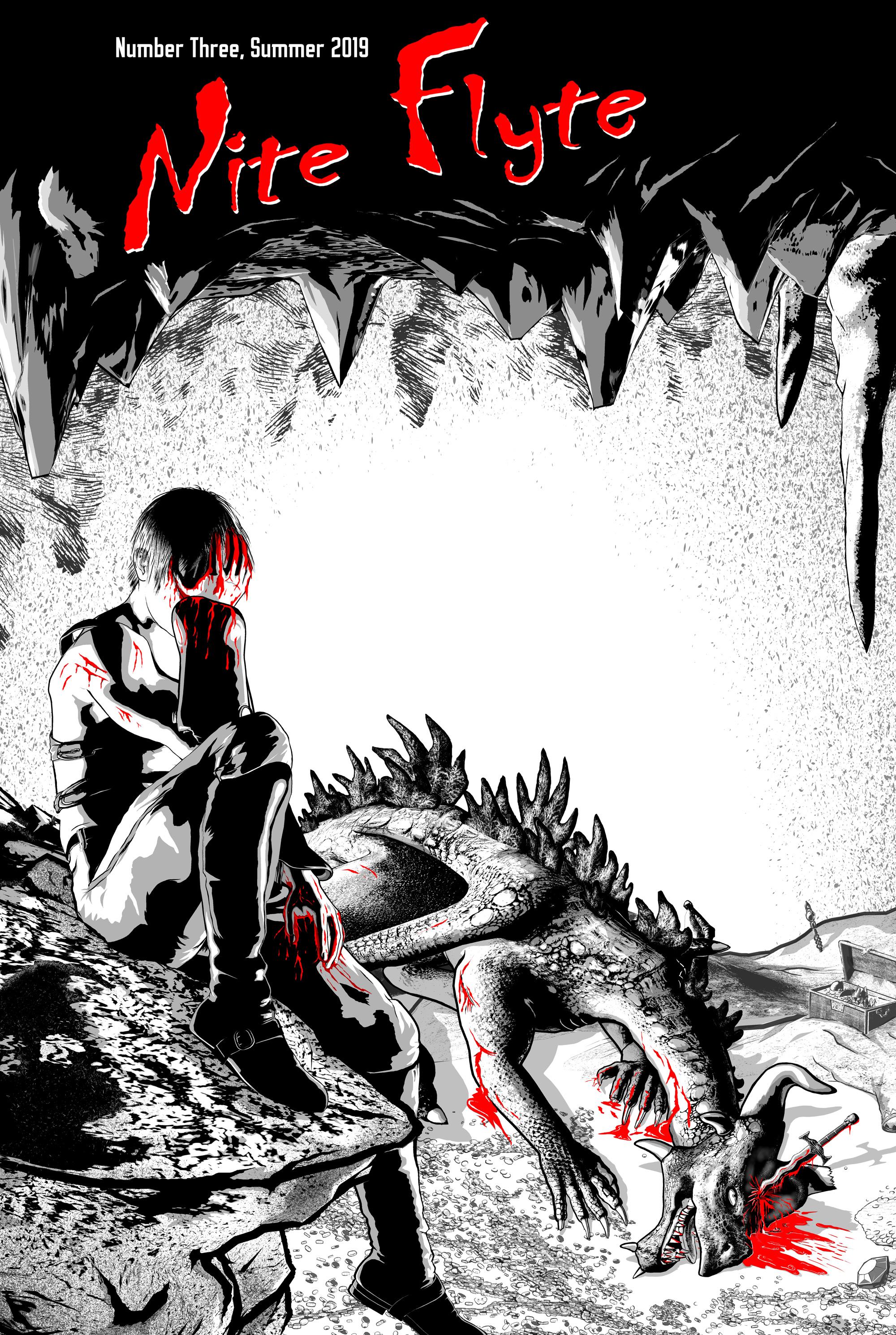
I really love how your work developed. It definitely has a much darker and emotional grab. It's great to see how the connection to the character and the story improved with the incremental tweaks. The title is although im curious, if the genre is to be portrayed along the lines of horror or thriller type.
How did you get the stalactites at toward the backside ceiling to sketch out like that, impressive work.
Ah, the title logo! That has no relationship to the content of my comic book story. Nite Flyte is the title of my contribution to a small APA, which is an Amateur Press Association. Four times a year we each create a small fanzine/newsletter, print out the appropriate copies (right now it's just 14) and then send them into a Central Mailer. The CM collects everyone's contributions and then combines them between two covers, adds a TOC and some other bookkeeping stuff, and then mails them back to us. This way, four times a year, we get to read about 50-70 pages of work by people who, like us, enjoy comics, fantasy, sci-fi and stuff like that. The name of this APA is Snicker Snack, and if you're ever interested in seeing a sample copy, let me know.
In this case, Nite Flyte is simply my contribution for the group. And in this case, with it being stark red against the strong black-and-white image, I can definitely see that the whole thing takes on a horror feel. But that's not my focus inside my 10-12 page contribution. The APA has been around for ages: next issue is #43. As you can see from my cover, this is just my third contribution.
I'm glad you like the effect on the stalactites. To create them, I took a texture from Clip Studio Paint that has a lot of sketchy lines in it (I think it's called MT Volcano). I placed it on a layer and then, using the lasso tool, just drew out the shapes I wanted and then created a layer mask so that only the areas I wanted to see were visible. I then moved the pattern around inside the layer mask until I found something I liked. I also did some touch-up work on the layer mask to keep the edges from being too crisp. Specifically, I go to the layer mask and edit it to extend a stroke here and there beyond the super-straight line created by the selection tool. I even add little twists and curls here and there to line ends to give a more hand-drawn look.
It's not a difficult process, but it does take a little time and attention to detail.
Thanks again for the feedback!
3Delight Laboratory Thread: tips, questions, experimentsIt's in the DS SDK. It's called curvebrick. You'll need Visual Studio 2010 compiler
I remember having also tried to directely create a brick inside DS and I think I got somewhat limited successfull results but don't really remember the details of what works and what doesn't. For the moment, let's just say that for complex shader bricks the DS SDK is the way.
It's a start in the right direction.
Message passing is usefull if you target performance at some point. Without environment lookup you don't have MIS for example.I know I made some complicated thing few years ago and in order to get some performance gain I remember I did not just pass environment maps. You may need to pass values and vectors
It is useful, but I don't actually use environment maps outside of test scenes. DAZ own' Environment Shader Builder macro relied on Nn/Nf vector manipulation for the lookup. When I was looking at Pixar's docs, they actually allow passing a matrix as 'envspace', but it seems 3delight devs didn't allow that with 3delight's trace ().
For the shadow catcher, you can get away with using environment (), but for a surface shader I don't think it will do. Environment () don't have parameters like brdf () and trace (), plus it doesn't do MIS, just plain importance sampling. To do proper MIS with it, you'll need to write your own importance sampling code, like PDFs and G masking/shadowing term, do the proper weighting necessary. I think Matt Ebb tried that once, though I think he was using gather (). He found 3delight's inbuilt trace () is just faster and easier to work with.
Honestly, if DS have the same coordinate system as 3delight, then we won't have this problem.
What would be the ideal solution is for DS to have a functional viewport OpenGL environment sphere or sun/sky environment that it can pass to whatever renderer plugin is selected. But looking at 4.11, that doesn't exist (even with iray). That's a setup that's been available in Maya/Max/Houdini/C4D/Blender/Modo or even game engines like Unity and UE for ages.
There is also the user friendliness factor where you could have a central panel with overview of many Quality/Tonemapping/Environment/User choices (ex AOV output) which centralize a bunch of common variables a bit like the Iray render panel. Instead of having to setup everything manually, for each shader, each shader instance will get the info from the central collecting point
Ex : you have three different specular models available in your shaders. Instead of going through each shader to set the specular model, you set it once in the central panel and every shader in the scene are updated
I actually agree. It would be best to have those all in one place, which is why I went and place some on a 'dumb' ambient light shader.
Since I wanted to allow viewport response when you shift the horizontal offset of the HDRI, message passing that offset was not doable. Well, technically you can setup a DS custom script on the light shader to fetch the offset parameter off the sphere, but I think that's prone to problems.
You also need to keep in mind there are certain limitations in place (when doing it via pure RSL/RiSpec). For example, shutter time is controlled via Motion Blur settings in the renderer's option tab. Since it's a RiOption, light/surface shaders can only read this value, but can't change/write it. The only feasible solution is to 'split' the setting - one inside the light shader which can only affect scene exposure but have no effect on motion blur and vice versa, the one in the renderer's option which only affect motion blur but not scene exposure.
AOV output is nice, but I think those should always be in the renderer's options. However, within the RSL framework, AOV output is at least two parts working together. Shaders need to be explicitly written to output AOV and identifier attributes. The second part is the RIB export and that means doing things via the render script. Currently, it doesn't have the code to export AOV (yet). Mustakettu's the one working on that, so you should ask her.
As for BRDF choices, well, I think all other renderers put those in materials/shaders. There are overrides, but I think those mainly uses AOV and does not actually change the BRDF used by specular/reflection lobes.
Ultimately, what I'm saying is there's limitation in RSL/RiSpec and DS that makes certain things impossible or just downright hard.
Wildly thinking here, but the best thing would be a USD export for DS. It will literally open up a lot of possibilities. Renderer options for one. There's also easier lookdev/scene management, not to mention you can just have more memory to the USD standalone/renderer.
3Delight Laboratory Thread: tips, questions, experimentsI doubt you'll have a lot of RSL expert to play with it. There is an example to build shadermixer block in the SDK. It would be more user friendly but requires more work
Can you point me to that example? Is it the DS script SDK or DS SDK?
Honestly though, outside of a shadow catcher, I don't see a lot of value for environment map lookups. I actually found out and fixed the issue with subsurface noise and HDRI lit scene while messing around with the new subsurface code. With the revised version, I'm still getting clean SSS even with just 256 samples and subsurface weight set to the bare minimum.
It's in the DS SDK. It's called curvebrick. You'll need Visual Studio 2010 compiler
I remember having also tried to directely create a brick inside DS and I think I got somewhat limited successfull results but don't really remember the details of what works and what doesn't. For the moment, let's just say that for complex shader bricks the DS SDK is the way.
Message passing is usefull if you target performance at some point. Without environment lookup you don't have MIS for example.I know I made some complicated thing few years ago and in order to get some performance gain I remember I did not just pass environment maps. You may need to pass values and vectors
There is also the user friendliness factor where you could have a central panel with overview of many Quality/Tonemapping/Environment/User choices (ex AOV output) which centralize a bunch of common variables a bit like the Iray render panel. Instead of having to setup everything manually, for each shader, each shader instance will get the info from the central collecting point
Ex : you have three different specular models available in your shaders. Instead of going through each shader to set the specular model, you set it once in the central panel and every shader in the scene are updated
Show Us Your Bryce Renders Part 10mermaid - thank you.
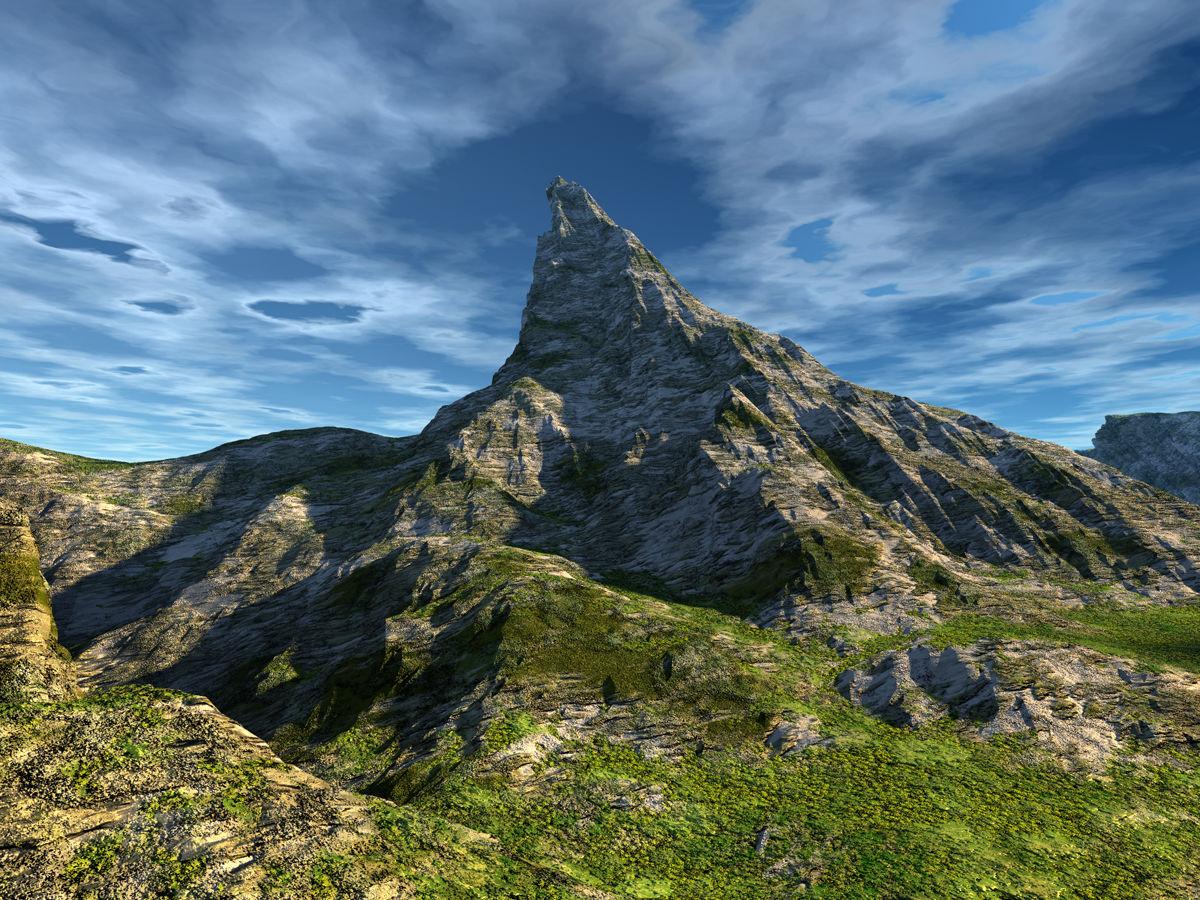
Just moved the camera nearer to the central mountain in the Lonesome Wanderer scene and changed textures on the terrain, created clouds with a texture and swapped the HDRI. Just to show Jay that I came back to earth and the mountain actually resembles the Matterhorn.
 I Forgot What My Complaint Was - Complaint Thread
The air conditioner is not blowing cold air. My dad should call the repair company to have someone look at the central heating unit and the fan soon.
Updating and adding new items to a exsisting product?If you right-click on the materials folder and select Create product, then give it the name of the existing product, I think that should work. You can then, if desired, right-click on the product folder and select Edit Metadata and use the first tab to add the non-user facing files (textures) by right-click in the central panel.
Thank you that worked, its just not intuitive. One thinks to themself that would overwrite the original product, but you get a pop-up window asking if you want to add them to the exisiting product.
I'm so glad i asked as this was really starting to fustrate me.
Updating and adding new items to a exsisting product?If you right-click on the materials folder and select Create product, then give it the name of the existing product, I think that should work. You can then, if desired, right-click on the product folder and select Edit Metadata and use the first tab to add the non-user facing files (textures) by right-click in the central panel.
I Forgot What My Complaint Was - Complaint ThreadNon-complaint" Wheee, what a beautiful day here in western & central NY State today. Warm but not hot, not muggy, partly cloudy. Twas brillig and the slithy toves did gyre and gymbol in the wabe. Made a spot decision at 6:00 AM to drive 220 miles to the Renaissance Faire at the eastern end of Lake Ontario (Sterling, NY) Blew my budget all to heck but it was a nice mini-adventure.
 Four hours driving, two hours dragging my body up and down dusty hills admiring armor, leather, feathers, tights, horses, comedians, jugglers and jousting. Eating a way overpriced fish & chips and a $3 bottle of water, and then four more hours driving home. But I lost an hour futzing around because I stopped to fill up on gasoline and couldn't get the gas cap off. It being Sunday, most real gas stations with mechanics were closed. I finally found a truckstop and had to sweet talk a burly truck mechanic to take pity on me and see if he could break it loose. He did. After much effort and bigger and bigger tools, he broke it right in half!
  Fortunately the auto supply shop nearby was open so I got it replaced. Strange happening. Never had a gas cap seize up and break before. I didn't have enough gas to make it home and was afraid I'd have to have my car towed a hundred miles just because I couldn't get the stupid gas cap off. Oy!
 Two hours of walking up and down hills at the Faire, just about killed me. Heart going pitty pat, knees screaming, feet screaming, After watching the jousting I needed shade so I stopped and rested by a Tum-Tum tree hoping for a Jabberwock to come whiffling by. And as in uffish thought I stood, two handsome costumed vendors that I was watching hawk their wares took pity on me and chased down my hat for me when it blew away, and took my empty water bottle to save me the 40 foot walk to the trash can. I must have looked pretty pitiful.
Nvidia GPU shopping tips for large scene Iray rendering.I use 2 titan x's with 12gb of vram and that is enough for my uses. If you have to do a large scene>> do the background in 3delight and the central charaters in Iray and composite in Photoshop or Gimp. I have stopped fighting the vram short comings of Iray in Daz Studio. I just composite. Oh I also use Mcasuals despecle script so I only render for a short while and remove the fireflies and I'm ready to go. It is just my opinion, but I think that new technology that has just come out is way over priced and a waste of money. Just wait and get it 2nd or 3rd gen card that fits your needs and don't get ripped off.
Problem with Maia HD for Ellithia 8https://www.daz3d.com/maia-hd-for-ellithia-8 by Hellboy
The Maia HD body morph loads at 100% for any Genesis 8 Female character. Problem is solved by either moving the Maia HD Body slider to 0% (Parameters / Actor/Full Body) or by uninstalling the product.
Help Ticket submitted, acknowledged by DAZ as of 1508 US Central Daylight time.
More Non-photorealisitic Renders (NPR II)This is very interesting. ZBrush has been on my list for a while now, and every time they have a sale I get really tempted (but the $800+ price tag keeps me at bay – at least until the end of the year when I have finished paying off my car and some other purchases). I'm very intrigued because it is supposed to integrate will with Manga Studio (in other words, you can use Manga Studio (Clip Studio Paint) to draw directly on the models).
So, can you pose the figures in ZBrush, or are you posing them in Daz Studio and then importing them as OBJs?
Have you seen this video on Cel Shading? https://www.youtube.com/watch?v=D4_Sc5NRUj0
I used Z brush years ago, and although it was great for sculpting I found it to be quite difficult to integrate with other software. The newer releases, such as R5 in the Youtube video, or 2018, 2019 versions make it so much easier to work with other software. The interface is still weird, but once you get used to it, I suppose it can be really helpful.
The new NPR shaders and blend styles are only available in the 2019 release. They are pretty good, and you can chnage the look of it through using various sliders.
I pose the models in Daz, which is still better than most software for posing and setting up stance positions for 3D models than most software. You have to export as an obj file to take into Z brush, and merge the UV maps down into a single image.
Posing in Z brush is quite difficult, as you are moving polygons through selections, it's much easier to reposition in Daz and re-export, but that's obviously time consuming.
You can use the polypaint tools in Z brush to paint materials, textures and height directly onto the model, which can give you some nice effects. The rendering is good and sharp. I am still evaluating it at the moment. It's got its pros and cons, but I've been wanting to learn Z brush for quite a while. The stuff the artists are designing over at Z brush Central is incredible.
If the results are better than what I can achieve in either Unity or Daz then I might seriously consider Z brush. I'll post more test renders when I produce them and let you know what I think.
Thank you very much for the info. The fact that it doesn't work with the rigging for poses is probably a good indication that this is not a tool I need to review at this time. At least not in the short term, because I already have tools I can use for sculpting the few props I need and I can use Blacksmith 3D for texturing (and since I work with simple b&w textures right now, it is more than adequate).
Still... I see some big new and shiny thing and I just want to have it!
But... I think I'll resist for now until I see it deliver something I really can't live without.
Thanks again.
More Non-photorealisitic Renders (NPR II)This is very interesting. ZBrush has been on my list for a while now, and every time they have a sale I get really tempted (but the $800+ price tag keeps me at bay – at least until the end of the year when I have finished paying off my car and some other purchases). I'm very intrigued because it is supposed to integrate will with Manga Studio (in other words, you can use Manga Studio (Clip Studio Paint) to draw directly on the models).
So, can you pose the figures in ZBrush, or are you posing them in Daz Studio and then importing them as OBJs?
Have you seen this video on Cel Shading? https://www.youtube.com/watch?v=D4_Sc5NRUj0
I used Z brush years ago, and although it was great for sculpting I found it to be quite difficult to integrate with other software. The newer releases, such as R5 in the Youtube video, or 2018, 2019 versions make it so much easier to work with other software. The interface is still weird, but once you get used to it, I suppose it can be really helpful.
The new NPR shaders and blend styles are only available in the 2019 release. They are pretty good, and you can chnage the look of it through using various sliders.
I pose the models in Daz, which is still better than most software for posing and setting up stance positions for 3D models than most software. You have to export as an obj file to take into Z brush, and merge the UV maps down into a single image.
Posing in Z brush is quite difficult, as you are moving polygons through selections, it's much easier to reposition in Daz and re-export, but that's obviously time consuming.
You can use the polypaint tools in Z brush to paint materials, textures and height directly onto the model, which can give you some nice effects. The rendering is good and sharp. I am still evaluating it at the moment. It's got its pros and cons, but I've been wanting to learn Z brush for quite a while. The stuff the artists are designing over at Z brush Central is incredible.
If the results are better than what I can achieve in either Unity or Daz then I might seriously consider Z brush. I'll post more test renders when I produce them and let you know what I think.
WIP Sci-Fi Starship BridgeYep, it looks a little empty. Additional (optional) objects are a very good idea.
Would it be possible to change the texture of the central floor to look a little more metallic and less plastic?
Would it be possible to add another hologram with enemy ships for example?
Daz 3D is part of

Connect
DAZ Productions, Inc.
7533 S Center View Ct #4664
West Jordan, UT 84084Licensing Agreement | Terms of Service | Privacy Policy | EULA
© 2026 Daz Productions Inc. All Rights Reserved.