-
Let's appreciate/discuss today's new releases - ongoinger still further thread
daveso said:
Sevenly HD looks nice but it appears there is no morph for realistic human ears?
https://www.daz3d.com/sevenly-hd-for-genesis-9I can confirm that, no ear morph and I couldn't find one in my morph library that would do it either.
Let's appreciate/discuss today's new releases - ongoinger still further threadSevenly HD looks nice but it appears there is no morph for realistic human ears?
https://www.daz3d.com/sevenly-hd-for-genesis-9Daz Studio 6.25[.0.x], General Release!AlienRenders said:
Richard Haseltine said:
AlienRenders said:
I tried DAZ 6. I was noticing my CPU kept going to 100%. You have to go in the hardware tab of the Render Settings tab and disable CPU rendering.
Yes, this is the first entry in a new release channel (DS 6 General reelase) so it has default settings.
Default shouldn't have CPU rendering enabled when GPU is also available. Should at least be one or the other. Also, how many reports of sluggishness are due to someone not knowing this setting even exists? It's quite well hidden.
Some people would probably complain if it wasn't the default. You are entitled to consider it a bad choice, but it isn't clear that this is a simple should do X and not Y situation.
I did notice that loading scenes and applying poses is instant. With DAZ 4, the more morphs you had, the slower the loading of poses got. DAZ 4 can take up to 10 minutes to apply a pose. DAZ 6 doesn't seem to care and is instant. For me, this is the biggest improvement.
Crashes every so often. And when it does, it forgets all changes to the scripts menu, render settings, tabs, layout, etc.
Close DS and reopen, or save the layout from Windows>Workspace. The session layout, with the current settngs, is written as part of an orderly shutdown so it doesn't happen in a crash.
Yeah, no. I'm a programmer. This is not an acceptable answer or behavior by the software.
Again, you are welcome to your view but it is not necessarily going to be universal. DS 4 did hae occasions when a bad thumbnail in the content pane would cause a crash, if the layout info was saved in mid-session that (or any other issue related to what was onscreen) would recur immediately on next launch, making it much harder for the user to extricate themselves (by deleting the session layout files or by using the command line switches). Constantly saving the layout would also potentially have a performance impact, at least if it counted a change in the active panes or a switch of content folder as a reason to save.
The select all bug in the scene tab still hasn't been fixed.
Which is?
When you click a node in the Scene tab. Everything (or almost everything) in the hierarchy will suddenly get selected for no reason. What you wanted to select often doesn't even get selected but it's random. The list moves and then wherever you clicked has a different node underneath it and you likely toggled a bone on/off somewhere completely unrelated. It's really annoying and it's existed for at least 10 years now. Probably past that, but I'm not aware how old this software is. It's always been there for as long as I've used DAZ Studio.
OK< that has been an intermittent issue for a long time. I was hoping it was Qt 4 and would go in DS 6 but I have had it happen a couple of times in the beta so apparently not.
Using iRay in the viewport causes SEVERE lag when rotating or moving the camera. What in the world is going on here? Did no one test it? I have a 5080.
edit: I'm not getting as much lag rotating and moving the camera in iray viewport anymore, but it's still way worse than DAZ4 was. I think most of the lag was when CPU rendering was on. But it's still impossible to change morph dials while in iray. It just locks up the render completely and won't update. When you let go the mouse, the dial is in a random position.
Anyone know if it's possible to get the update window back when rendering? Right now, it just does its thing and I have no idea where it's at. I liked seeing the progress.
You mean the progress bar? You need to drag it to somewhere it will be visible (switch to DS on top instead of the render window, it should stay there in future (as long as DS shuts down cleanly, at least)
I have no progress bar. There is no other window. In DAZ 4, there was a progress window with a big textbox that showed what iteration it was on. I get nothing, nada, zilch. You say "drag it" what is "it"? Where is "it"? I see nothing.
So if you alt-tab back to the main application window instead of the render you don't see the progress bar? It is there for me, and when loading content, and can be dragged off to oen side so it won't be covered by the render wndow. To see the log you will need to click the More button.
Let's appreciate/discuss today's new releases - ongoinger still further threadA couple of days ago I bought https://www.daz3d.com/dforce-2-in-1-ruffled-maxi-dress-for-genesis-9 and I wanted to point out that OOT has done a wonderful job on this. While I am not seeing a morph to release the string tie of the top, it still has the possibility to be an underdress for a nursing mother and 'maybe' pulling a side down for a baby to suckle in a historical render. I have not tried this but thought I would put this out here. Regardless it looks really well made in my Iray preview.
There's Always Another Sale Thread -- Discussions Only Pt 6I bought her and downloaded so I could look at what showed up. I could not find a way to shrink the elf/sci-fi ears to start with. Maybe someone with more skill changing those ears to human ears will have more luck. I have a lot of morph packages and tried many, just no luck. There are the four makeups, and a remove option. Two skin tones. I have a use for her, so I have no problem with the character.
New Year, New Sales Thread: Report Issues Here 4 "Reporting Only"Kinich said:
Can anyone explain why the new Genesis 9 Sit helper requires the Morphing Skull?
A simple mistake? A strange morph compatibility issue?
Or is this a more sinister plot to create sales of the aforementioned Morphing Skull?
Sounds like an error; will advise production.
Is it possible to "de-perfect-ify" a primitive?If you have Mesh Grabber or Geometry Sculptor, you can firstly create / load a primitive cube with more denser mesh so as to make the rough effect that you want from geometry perspective.
1. Ramdomly paint / drag on the surface of primitive by using Mesh Grabber or Geometry Sculptor. Then push or pull the gizmo to make bumpy effect (screenshot 1)
2. Like what I roughly made in (screenshot 2)Alternatively, you also can make the effect in some software like Blender, then create a Morph.
New Year, New Sales Thread: Report Issues Here 4 "Reporting Only"Can anyone explain why the new Genesis 9 Sit helper requires the Morphing Skull?
A simple mistake? A strange morph compatibility issue?
Or is this a more sinister plot to create sales of the aforementioned Morphing Skull?
Daz Studio 6.25[.0.x], General Release!Map Transfer - DAZ Studio 6 Final Release
The Bleed Factor in Map Transfer isn't working — see the screenshot.
I don't have any issues with this in DAZ Studio 4.
System: Mac Mini M4 base model, Tahoe 26.5.1
Daz Studio 6.25[.0.x], General Release!Richard Haseltine said:
AlienRenders said:
I tried DAZ 6. I was noticing my CPU kept going to 100%. You have to go in the hardware tab of the Render Settings tab and disable CPU rendering.
Yes, this is the first entry in a new release channel (DS 6 General reelase) so it has default settings.
Default shouldn't have CPU rendering enabled when GPU is also available. Should at least be one or the other. Also, how many reports of sluggishness are due to someone not knowing this setting even exists? It's quite well hidden.
I did notice that loading scenes and applying poses is instant. With DAZ 4, the more morphs you had, the slower the loading of poses got. DAZ 4 can take up to 10 minutes to apply a pose. DAZ 6 doesn't seem to care and is instant. For me, this is the biggest improvement.
Crashes every so often. And when it does, it forgets all changes to the scripts menu, render settings, tabs, layout, etc.
Close DS and reopen, or save the layout from Windows>Workspace. The session layout, with the current settngs, is written as part of an orderly shutdown so it doesn't happen in a crash.
Yeah, no. I'm a programmer. This is not an acceptable answer or behavior by the software.
The select all bug in the scene tab still hasn't been fixed.
Which is?
When you click a node in the Scene tab. Everything (or almost everything) in the hierarchy will suddenly get selected for no reason. What you wanted to select often doesn't even get selected but it's random. The list moves and then wherever you clicked has a different node underneath it and you likely toggled a bone on/off somewhere completely unrelated. It's really annoying and it's existed for at least 10 years now. Probably past that, but I'm not aware how old this software is. It's always been there for as long as I've used DAZ Studio.
Using iRay in the viewport causes SEVERE lag when rotating or moving the camera. What in the world is going on here? Did no one test it? I have a 5080.
edit: I'm not getting as much lag rotating and moving the camera in iray viewport anymore, but it's still way worse than DAZ4 was. I think most of the lag was when CPU rendering was on. But it's still impossible to change morph dials while in iray. It just locks up the render completely and won't update. When you let go the mouse, the dial is in a random position.
Anyone know if it's possible to get the update window back when rendering? Right now, it just does its thing and I have no idea where it's at. I liked seeing the progress.
You mean the progress bar? You need to drag it to somewhere it will be visible (switch to DS on top instead of the render window, it should stay there in future (as long as DS shuts down cleanly, at least)
I have no progress bar. There is no other window. In DAZ 4, there was a progress window with a big textbox that showed what iteration it was on. I get nothing, nada, zilch. You say "drag it" what is "it"? Where is "it"? I see nothing.
Daz Studio 6.25[.0.x], General Release!Richard Haseltine said:
Sunkissed Papayas said:
I'm not one bit impressed by this release at all. First things first, I actually purchased a newly released pose pack for expressions that claims its Compatible Software: Daz Studio 6.x, Daz Studio 4.24 It actually only works in 4.24, how's that work.
Is it plain poses or does it use scripts (check the file type listed on the product page, or in the info tab in a content pane with one of the psoe presets selected)?
I actually loaded up Victoria 9 in DAZ 6.X and she looks more like a dude than a female. You'd think that if a company is going to release a newer program that supposably better and faster than the previous, the things they sell in their store would work in the new release. I've purchased alot of stuff through DAZ in the past year and some of it works and some of it doesn't. So, if some of it works and some doesn't that means there is a way to design the program to use those previous versions of stuff without the creators having to redo their previous creations. I've checked alot of my Genesis 9 Cgaracters and they all seem to be the same way as to looking like a dude. Seems to be less options in the parameters tab for customizing the characters too.
That sounds like a plain content issue - a morph is loading with a non-zero value even though it isn't meant to be applied. Load the Genesis 9 Base, is it the same? If so does Edit>Figure>Zero>Zero Figure Shape fix it?
Now I will say I do like the speed that it loads up the characters and the speed that it renders them.
Makes me wonder if all the Genesis 9 characters purchased in the last year or longer are going to not work and now you have to start spending more to purchase ones developed in and for DAZ 6.x. I've looked at some of the ones created recently and am not impressed by them.
Think I'll keep using 4.24 until all the bugs are worked out of this supposably new and improved version.
Richard
I tried to zero the figure shape in DAZ 6 x like you said and nothing. I also deleted SAGA FOR SIGRID thinking she might be a problem again and that was a no. Seems like each one of my G9 Female figures has the same problems. attached a photo of the differences between versions. I used Amelia and Victoria.
The one with the Expressions is a one click file to load the pose. Works in DAZ 4.24 and not in DAZ 6. It's these poses---> Z Sensuous Expressions for Genesis 9 .
Going to uninstall daz 6 and try and reload. After uninstalling it twice and the reinstalling it again it is functioning correctly.
Daz Studio 6.25[.0.x], General Release!Richard Haseltine said:
Stezza said:
I can't find the transfer from triax to blended weight option... has Daz removed it or is it hidden somewhere in the bowels of this new version that no one knows about?

It does seem to be gone, I couldn't find it in Window>Workspace>Customise either. It might be worth reporting as a possible bug (Technical Support ticket) though it may have been removed as it can't be an exact conversion (which is why the later figures need twist and bend bones)
No relevant info. has been found in the change log but Victoria convincingly said the funcitons were removed "by design"... (if that was true ~~)
Product to duplicate G9 character proportions on a G8?Elor said:
You could create a morph of your Genesis 9 character for Genesis 8, then pose it as close as possible as the Genesis 9 version and try your idea with Thickener (of if you're close enough, mayble simply hidding Genesis 8 and setting Genesis 9 as the target of the smoothing modifier could be enough)
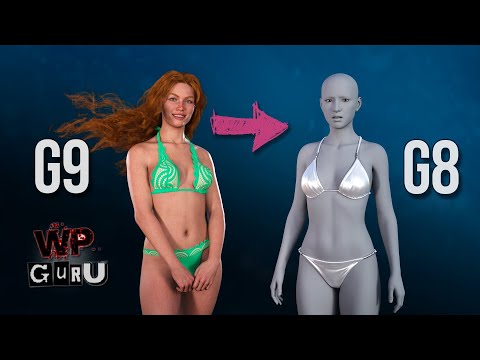
If it's to use fully simulated clothes, you can also fit them on Genesis 8, hide all bones except one on Genesis 8, make Genesis 9 the target of the clothes' smoothing modifier and simulate them: as long as the starting pose is the same (which isn't too hard to do) and as long as the final pose are reasonably close to each other, it should work.
It's the method I used to put a Genesis 9 pajamas on MSO Lacey in 'Morning Routine'.
It's possible it's overengineered (it's something I first tried at the end of 2024 and I rarely use it) but it does work.
You can read detailled explanation in the following message, with two examples: a Start from base pose example (I did it this way for Morning Routine) and a more complex one, using a timeline to go from Genesis 9 base shape on both Genesis 9 and 8, in the same base pose, to first the final shape (Olympia 9), then the final pose.
https://www.daz3d.com/forums/discussion/comment/9514446/#Comment_9514446
Oh hey, that video looks like the sort of solution I was after... I'm not against a little effort, I just didn't want to hand spin eveything if I could avoid it. Thank you.
Pocketing your other method as well. Thanks for that too!
Product to duplicate G9 character proportions on a G8?You could create a morph of your Genesis 9 character for Genesis 8, then pose it as close as possible as the Genesis 9 version and try your idea with Thickener (of if you're close enough, mayble simply hidding Genesis 8 and setting Genesis 9 as the target of the smoothing modifier could be enough)
If it's to use fully simulated clothes, you can also fit them on Genesis 8, hide all bones except one on Genesis 8, make Genesis 9 the target of the clothes' smoothing modifier and simulate them: as long as the starting pose is the same (which isn't too hard to do) and as long as the final pose are reasonably close to each other, it should work.
It's the method I used to put a Genesis 9 pajamas on MSO Lacey in 'Morning Routine'.
It's possible it's overengineered (it's something I first tried at the end of 2024 and I rarely use it) but it does work.
You can read detailled explanation in the following message, with two examples: a Start from base pose example (I did it this way for Morning Routine) and a more complex one, using a timeline to go from Genesis 9 base shape on both Genesis 9 and 8, in the same base pose, to first the final shape (Olympia 9), then the final pose.
https://www.daz3d.com/forums/discussion/comment/9514446/#Comment_9514446
Daz Studio 6.25[.0.x], General Release!Sunkissed Papayas said:
I'm not one bit impressed by this release at all. First things first, I actually purchased a newly released pose pack for expressions that claims its Compatible Software: Daz Studio 6.x, Daz Studio 4.24 It actually only works in 4.24, how's that work.
Is it plain poses or does it use scripts (check the file type listed on the product page, or in the info tab in a content pane with one of the psoe presets selected)?
I actually loaded up Victoria 9 in DAZ 6.X and she looks more like a dude than a female. You'd think that if a company is going to release a newer program that supposably better and faster than the previous, the things they sell in their store would work in the new release. I've purchased alot of stuff through DAZ in the past year and some of it works and some of it doesn't. So, if some of it works and some doesn't that means there is a way to design the program to use those previous versions of stuff without the creators having to redo their previous creations. I've checked alot of my Genesis 9 Cgaracters and they all seem to be the same way as to looking like a dude. Seems to be less options in the parameters tab for customizing the characters too.
That sounds like a plain content issue - a morph is loading with a non-zero value even though it isn't meant to be applied. Load the Genesis 9 Base, is it the same? If so does Edit>Figure>Zero>Zero Figure Shape fix it?
Now I will say I do like the speed that it loads up the characters and the speed that it renders them.
Makes me wonder if all the Genesis 9 characters purchased in the last year or longer are going to not work and now you have to start spending more to purchase ones developed in and for DAZ 6.x. I've looked at some of the ones created recently and am not impressed by them.
Think I'll keep using 4.24 until all the bugs are worked out of this supposably new and improved version.
Daz Studio 6.25[.0.x], General Release!AlienRenders said:
I tried DAZ 6. I was noticing my CPU kept going to 100%. You have to go in the hardware tab of the Render Settings tab and disable CPU rendering.
Yes, this is the first entry in a new release channel (DS 6 General reelase) so it has default settings.
I did notice that loading scenes and applying poses is instant. With DAZ 4, the more morphs you had, the slower the loading of poses got. DAZ 4 can take up to 10 minutes to apply a pose. DAZ 6 doesn't seem to care and is instant. For me, this is the biggest improvement.
Crashes every so often. And when it does, it forgets all changes to the scripts menu, render settings, tabs, layout, etc.
Close DS and reopen, or save the layout from Windows>Workspace. The session layout, with the current settngs, is written as part of an orderly shutdown so it doesn't happen in a crash.
The select all bug in the scene tab still hasn't been fixed.
Which is?
Using iRay in the viewport causes SEVERE lag when rotating or moving the camera. What in the world is going on here? Did no one test it? I have a 5080.
edit: I'm not getting as much lag rotating and moving the camera in iray viewport anymore, but it's still way worse than DAZ4 was. I think most of the lag was when CPU rendering was on. But it's still impossible to change morph dials while in iray. It just locks up the render completely and won't update. When you let go the mouse, the dial is in a random position.
Anyone know if it's possible to get the update window back when rendering? Right now, it just does its thing and I have no idea where it's at. I liked seeing the progress.
You mean the progress bar? You need to drag it to somewhere it will be visible (switch to DS on top instead of the render window, it should stay there in future (as long as DS shuts down cleanly, at least)
Daz Studio 6.25[.0.x], General Release!Stezza said:
I can't find the transfer from triax to blended weight option... has Daz removed it or is it hidden somewhere in the bowels of this new version that no one knows about?
It does seem to be gone, I couldn't find it in Window>Workspace>Customise either. It might be worth reporting as a possible bug (Technical Support ticket) though it may have been removed as it can't be an exact conversion (which is why the later figures need twist and bend bones)
What actually IS new in DAZ Studio 6?Richard Haseltine said:
Joe827 said:
Joe827 said:
Richard Haseltine said:
Joe827 said:
Richard Haseltine said:
Joe827 said:
Richard Haseltine said:
Use Mesh Grabber in DS 4, bake to morph (or raw geometry) and open in DS 6 if you need/want.
Today, I can use Mesh Grabber fix a pokethrough with hair or clothing in a few seconds. Your suggested workflow will take several minutes. We can use d-formers in place of Mesh Grabber, but they also take longer to use for quick fixes because you have to center the field of influence where you want it first, which isn't always easy. Mesh Grabber automatically centers the field of influence on the polygon you select. Or is there a way to automatically center the field of influence on a selected polygon for d-formers?
You could use a weghtmap instead of the field.
Painting a weightmap seems like it'd take just as long as manually centering the field, or is there a way to snap it to a polygon with a default falloff? The use cases I'm thinking of don't require a lot of detail - think about.moving a strand of hair aside or fixing socks poking through a pair of pants For those things, I just need a quick way to push/pull a group of polygons aside and then move on to more important things. With Mesh Grabber, I can do this in a few seconds, and I might do it a dozen or more times each day. So hopping back and forth between Daz 4.24 and Daz 6 would be very costly, maybe an extra hour of time each day.
Well, click in Geoemtry Seelction mode, then cmd/ctrl+ to grow the seelction as required. For some shapes of mesh you could also use a Push Modifier, which is better than a dForm as t moves the mesh in/out along its normals and allows you to just paint the effect in - but in the case of hair, if it is modelled as a cylinder/tube it would just thick or thin the tube in place so not a universal approach.
Can you elaborate on the "click in geometry selection mode". I'm using these instructions as my starting point: https://www.daz3d.com/forums/discussion/comment/5646111/#Comment_5646111. ; Here's where I'm currently at. "We want to get rid of this default map, so right-click on the pants and a menu appears that has a lot of the same options as the Geometry Editor does. Choose "Geometry Selection > Select All," then "Weight Editing > Fill Selected..." In the dialog that appears, set the slider to 0% and accept:"
After executing this step, I try to select individual polygons in Node Weight Map mode as I would with Geometry editor in Drag Mode, but it doesn't select any polygons. Am I going in the wrong direction?
Update: Hold that thought. They're all selected due to one of the steps from the thread I've been followingRichard, I think I understand what you mean now, Right-Click and select Tool Mode -> Geometry Selection. Then I select a polygon and then go to Weight Editing -> Fill Selected. Is that that process you're thinking?
Yes, and if you want a larger area than you clicked on you can use cmd/ctrl + to grow the selection.
Thank you. I think that will be useful when I'm trying to do detailed adjustments where the field is not practical. But Mesh Grabber is still the easy winner for quick adjustments, and I understand why people are reluctant to move to Daz 6 if it means they'll no longer have this tool right at their fingertips. It's just so easy to use.
RELEASED: Sandy Shore (Formerly, something something beach waves)donniekeidic said:
looks really good. will there be any morphs to change the shape of the waves at all? not a dealbreaker by any means, just wondering. Like a morph to have a tube would be great for a surfing shot.
I did originally intend to include larger surfable waves, but doing so would have required extending the wave physics simulation dimensions to at least three times the size I ultimately used, because--in real life--surfable waves are never right next to the shoreline they're further out to sea. That would have broken the geometry budget without heavy optimization, which would have ruined the realism, and would have added months to the time it took to get this done.
But I intend to do a follow up to this, a not-so-gentle shoreline where the waves crash against rocks, and it's possible that I'll figure out a way to do a single curling wave in isolation that can be used as an add-on. Stay tuned!Daz Studio 6.25[.0.x], General Release!I tried DAZ 6. I was noticing my CPU kept going to 100%. You have to go in the hardware tab of the Render Settings tab and disable CPU rendering.
I did notice that loading scenes and applying poses is instant. With DAZ 4, the more morphs you had, the slower the loading of poses got. DAZ 4 can take up to 10 minutes to apply a pose. DAZ 6 doesn't seem to care and is instant. For me, this is the biggest improvement.
Crashes every so often. And when it does, it forgets all changes to the scripts menu, render settings, tabs, layout, etc.
The select all bug in the scene tab still hasn't been fixed.
Using iRay in the viewport causes SEVERE lag when rotating or moving the camera. What in the world is going on here? Did no one test it? I have a 5080.
edit: I'm not getting as much lag rotating and moving the camera in iray viewport anymore, but it's still way worse than DAZ4 was. I think most of the lag was when CPU rendering was on. But it's still impossible to change morph dials while in iray. It just locks up the render completely and won't update. When you let go the mouse, the dial is in a random position.
Anyone know if it's possible to get the update window back when rendering? Right now, it just does its thing and I have no idea where it's at. I liked seeing the progress.
Daz 3D is part of

Connect
DAZ Productions, Inc.
7533 S Center View Ct #4664
West Jordan, UT 84084Licensing Agreement | Terms of Service | Privacy Policy | EULA
© 2026 Daz Productions Inc. All Rights Reserved.