-
A View Through The Mirror
The Portmerion Google Earth map is here.
Lots of areas of the UK have no 3D buildings, they're putting them in slowly. My house & the rest of the village have been 3D'd in the last year or so, the local town was done a bit before. They have als 3d'd all the trees & bushes locally. It's quite surprising how much is visible. Anyway, possibly 25% of England is 3D'd with a bit lower percentage over the other countries in the UK.
It is amazing & disconcerting to find that the campsite at Ellis Beach, just north of Cairns QLD, a campsite we've been to a couple of times, is 3D'd. Absolutely amazing.
Regards,
Richard
Is there a way to search just the My discussions list?Click the gear icon in the upper right blue header bar of the forum page. Select My Discussions in the drop down menu. These are threads that you started. If you want threads that you bookmarked with the star, select My Bookmarks instead.
Maybe I misunderstood your question, though. I thought you were searching for your discussions. If you mean searching in your discussions, I don't know a way to do that.
Is there a way to search just the My discussions list?[Is there a way to search just the My discussions list?] I think the current issue of a copy of the program not reading content cluster is addressed in one of the 300 discussions over the past 15 years.
Daz Studio 6.25[.0.x], General Release!barbult said:
crosswind said:
barbult said:
I accidentally posted this in the Beta forum, but it is a bug in the Beta, too.
DS6 General Release Main Toolbar Disable Problem:
- I customized my layout to disable the Main toolbar in the Activities section.
- I clicked Apply and the Main toolbar was gone from my toolbar.
- I clicked Accept.
- I saved my custom layout.
- I closed DS6.
- When I reopen DS6, the Main toolbar is back (Enabled) even though I disabled it.
- I can reload my saved custom layout and the Main toolbar goes away again.
- I have to repeat reloading my saved custom layout every time I open DS6.
Why doesn't DS6 open with the last used layout state when it is reopened? DS4 does not have this problem. My Main tool bar stays properly disabled.
I followed the steps but couldn't reproduce the issue...
I'm not aware of the cause by now... but if you go to the folder: %appdata%\DAZ 3D\Studio6 with File Browser, open Layout.dsx with Notepad++, can you locate a code line: <ToolBar Location="Top" Name="Main"/> ? If you can, it means that the layout was not correctly saved for some reason...
Alternatively, if you right-click on the toolbar, uncheck Main (screenshot 1), then close / relaunch DS6, see if the issue persists ?
@crosswind thank you for trying to repeat the problem.
Yes, the appdata layout.dsx contains <ToolBar Location="Top" Name="Main"/>.
Yes, right click on the toolbar and unchecking main works (temporarily). These are the details of what temporarily means:- I can close and reopen DS6 repeatedly without Main toolbar coming back. The layout.dsx file continues to omit the line about the Main toolbar. So far so good.
- Now I save the layout as a new layout, so I can reload it later.I can close and reopen DS6 repeatedly without Main toolbar coming back. The layout.dsx file continues to omit the line about the Main toolbar. So far so good.
- Now with DS6 open, I reload the layout I previously saved. The Main toolbar is not displayed (good!). But, the layout.dsx has been changed to include <ToolBar Location="Top" Name="Main"/> again. BAD. The DS6 interface remains correct with no Main toolbar displayed and Main shown unchecked in the toolbar when right clicking. But, because the layout.dsx as been modified incorrectly, as soon as I close DS6 and reopen it, the Main toolbar is back! BAD.
My normal process for saving a layout is to immediately load that layout after saving it. That way the last used layout is saved, in case DS crashes before closing. I probably did that without even thinking about it when first documenting the steps that you tried. The step of reloading the layout right after saving was not included in those steps. If you have time, could you try this scenario again, reloading the saved layout right after saving?
DS6 General Release Main Toolbar Disable Problem:
- I customized my layout to disable the Main toolbar in the Activities section.
- I clicked Apply and the Main toolbar was gone from my toolbar.
- I clicked Accept.
- I saved my custom layout
- I reloaded my saved layout
- I closed DS6.
- When I reopen DS6, the Main toolbar is back (Enabled) even though I disabled it.
- I can reload my saved custom layout and the Main toolbar goes away again.
- I have to repeat reloading my saved custom layout every time I open DS6.
Yep, I tried the updated scenario and could reproduce the issue.
The culprit is that when you load the saved layout, Main toolbar set as Disabled in Activities in F3 is reset as Enabled (On) for some reason... though the saved Layout was correctly saved.
I think It's a bug related to loading Layout. A ticket is needed loh.
Daz Studio 6.25[.0.x], General Release!Vanger Chevane said:
AndrewJJP said:
What is the correct channel to report bugs? I could not find any bug reporting mechanism so I had to raise a support ticket. I am not asking for support so I don't know if that is correct. I didn't hear anything back (thanks for the report would have been fine).
Is there any value in posting bugs here, other than alloing other people to see if their problem is specific to them? I.e. does Daz read this?I
I reported that very critical failure by support ticket & was advised the issue was passed on to the development team. Here, I'm simply advising fellow users of one thing to never do until/unless it's properly addressed (4.24 had no problem loading data like this) to avoid having up to hours of work lost in the mystical ether with zero warning from a simple mistake.

I would say this is a valuable forum for people, and your story verifies that! I also know as someone that has run software projects that ignoring a forum like this and asking someone to report somethiing they already feel they wrote of the forum will least mostly to people not bothering, particularly non-technical people. FWIW, I'm not talking about me. I would report things in the correct way, because I think that makes it easier for Daz.
But i would hope Daz is reading this. If not, I would advise them, professionaly, to do so :) (Except they won't see the advice :D)
The 'Eat Your Food and Like It' Complaint Threadyeah, i always use free vpn when I use search now because I don't want AI building some profile of me and sending AI hunter killer drones to my house because I hate AI. but even when I don't use VPN, Brave still gives me lots of captchas when it never did in the past. they all do this now except startpage. when I've asked AI about it it is because of AI agents that are able to defeat the captchas, so most sites have implemented more prevalent captchas, so eventually the captchas will be so common place and so difficult that only AI agents will pass them and the internet will just be basically AI agents talking to each other all day. lol. pretty much we're doomed, but as long as the ice cream industry is not affected I'll make it.
The 'Eat Your Food and Like It' Complaint Threaddonniekeidic said:
complaint: Searching on the internet is next to impossible now. Its seems every other search regardless of search engine requires captchas. Its insane. I can't stand it. Only startpage seems to work without captchas, but their search results suck. I used to use Yandex because it seemed to provide the least filtered, but now I can't use it without endless captchas, same with Brave. Without functioning search its like we're gonna have to go back to "webrings" from the late 90s. Anyone remember that?
non complaint: turkey hill homemade vanilla icecream sits in front of me waiting to be eaten.
Weird, Brave isn't giving me captchas at all.
Also, I think I forcibly blocked webrings from my memory.
The 'Eat Your Food and Like It' Complaint Threadcomplaint: Searching on the internet is next to impossible now. Its seems every other search regardless of search engine requires captchas. Its insane. I can't stand it. Only startpage seems to work without captchas, but their search results suck. I used to use Yandex because it seemed to provide the least filtered, but now I can't use it without endless captchas, same with Brave. Without functioning search its like we're gonna have to go back to "webrings" from the late 90s. Anyone remember that?
non complaint: turkey hill homemade vanilla icecream sits in front of me waiting to be eaten.
Daz Studio 6.25[.0.x], General Release!crosswind said:
barbult said:
I accidentally posted this in the Beta forum, but it is a bug in the Beta, too.
DS6 General Release Main Toolbar Disable Problem:
- I customized my layout to disable the Main toolbar in the Activities section.
- I clicked Apply and the Main toolbar was gone from my toolbar.
- I clicked Accept.
- I saved my custom layout.
- I closed DS6.
- When I reopen DS6, the Main toolbar is back (Enabled) even though I disabled it.
- I can reload my saved custom layout and the Main toolbar goes away again.
- I have to repeat reloading my saved custom layout every time I open DS6.
Why doesn't DS6 open with the last used layout state when it is reopened? DS4 does not have this problem. My Main tool bar stays properly disabled.
I followed the steps but couldn't reproduce the issue...
I'm not aware of the cause by now... but if you go to the folder: %appdata%\DAZ 3D\Studio6 with File Browser, open Layout.dsx with Notepad++, can you locate a code line: <ToolBar Location="Top" Name="Main"/> ? If you can, it means that the layout was not correctly saved for some reason...
Alternatively, if you right-click on the toolbar, uncheck Main (screenshot 1), then close / relaunch DS6, see if the issue persists ?
@crosswind thank you for trying to repeat the problem.
Yes, the appdata layout.dsx contains <ToolBar Location="Top" Name="Main"/>.
Yes, right click on the toolbar and unchecking main works (temporarily). These are the details of what temporarily means:- I can close and reopen DS6 repeatedly without Main toolbar coming back. The layout.dsx file continues to omit the line about the Main toolbar. So far so good.
- Now I save the layout as a new layout, so I can reload it later.I can close and reopen DS6 repeatedly without Main toolbar coming back. The layout.dsx file continues to omit the line about the Main toolbar. So far so good.
- Now with DS6 open, I reload the layout I previously saved. The Main toolbar is not displayed (good!). But, the layout.dsx has been changed to include <ToolBar Location="Top" Name="Main"/> again. BAD. The DS6 interface remains correct with no Main toolbar displayed and Main shown unchecked in the toolbar when right clicking. But, because the layout.dsx as been modified incorrectly, as soon as I close DS6 and reopen it, the Main toolbar is back! BAD.
My normal process for saving a layout is to immediately load that layout after saving it. That way the last used layout is saved, in case DS crashes before closing. I probably did that without even thinking about it when first documenting the steps that you tried. The step of reloading the layout right after saving was not included in those steps. If you have time, could you try this scenario again, reloading the saved layout right after saving?
DS6 General Release Main Toolbar Disable Problem:
- I customized my layout to disable the Main toolbar in the Activities section.
- I clicked Apply and the Main toolbar was gone from my toolbar.
- I clicked Accept.
- I saved my custom layout
- I reloaded my saved layout
- I closed DS6.
- When I reopen DS6, the Main toolbar is back (Enabled) even though I disabled it.
- I can reload my saved custom layout and the Main toolbar goes away again.
- I have to repeat reloading my saved custom layout every time I open DS6.
Daz Studio 6.25[.0.x], General Release!DavidGB said:
DavidGB said:
I have a vague memory of something, like a script(?), that shows what the GPU memory required by a scene is. Guess I should search the store to see if I can find whatever it is that's behind the vague memory, to see if that might help ... if it works in DS6.
Bother. After a hunt in the store, I think what I was vaguely thinking of were two products: 'Scene Optimizer', which I have, but it doesn't work in DS 6, and 'Iray Memory Assistant', which I don't have, would get, but I think also doesn't work in DS6. ☹️
For any of V3Digitimes' products like Scene Optimizer, you want to follow this thread:
https://www.daz3d.com/forums/discussion/728061/v3digitimes-daz-studio-2025-6-compatibility-status/p1
I've been editing my scenes in 4.24 and rendering in ALPHA, BETA, 6 to keep using tools and scripts like these. It's painful, but it works.Daz Studio 6.25[.0.x], General Release!DavidGB said:
I have a vague memory of something, like a script(?), that shows what the GPU memory required by a scene is. Guess I should search the store to see if I can find whatever it is that's behind the vague memory, to see if that might help ... if it works in DS6.
Bother. After a hunt in the store, I think what I was vaguely thinking of were two products: 'Scene Optimizer', which I have, but it doesn't work in DS 6, and 'Iray Memory Assistant', which I don't have, would get, but I think also doesn't work in DS6. ☹️
Daz Studio 6.25[.0.x], General Release!Richard Haseltine said:
DavidGB said:
Richard Haseltine said:
DavidGB said:
My remaining question, though, is why the Post Denoiser had no effect on the DS4.24 CPU renders. Do some of those Render Settings only affect GPU renders but not CPU renders? And if so, which settings work on GPU but not CPU renders? There's no indication in the interface.
The Post Render Denoiser uses the GPU, so it isn't available for CPU renders.
So the last part of my question - which settings are GPU only? Is there a list somewhere? You'd think DS could not show, or fade out, options that don't apply to the selected renderer. Or group them under a 'GPU only' heading.
I think it's just the I denoiser. Possbly the alternative progress measure too, but that can't be a stop condition so I am not sure how often people use it.
Oh yes, second question. I actually had 4 versions of that scene saved from DS4.24, but when I started DS6, loaded one scene, rendered it, loaded another, rendered it, then another, the first rendered using the GPU, but the subsequent ones used the CPU. Er ... I'm wondering if the first one 'filled up' the GPU card's RAM with textures, so it had to fall back to the CPU to do the others. But if that's so, how do I flush the GPU RAM short of closing then re-opening DS6?
Had you closed the previous renders? As long as they are open their data is still in GPU memory.
I ... think I'd closed them, but am not sure. As I say, I don't have memory minute to minute as a medication side-effect. I suppose I need to try that again, making sure I close them ... if I can remember what I'm doing and why I'm doing it while I'm doing it, which is not at all guaranteed.
Repeated rendering can be enough to cause it to run out of memory (Iray ddi have a memory leak, but that was a while back) - but unless you were fairly close to the limit of what would fit I am not sure it would have that much impact.
Hm. Lvl 4 HD G8F and M, clothes, hair, accessories, room with furniture, props and knick-knacks, HDR environment sphere shining in from outside the glass and open end, assorted emissive surfaces and a ghost-light inside ... and even though only part of the G8F and G8M plus a bit of one wall behind them were actually visible in the rendering camera ... I wasn't doing anything to cut down memory requirement like hiding all the things (most of the scene contents) out of view. I find it hard to think through what might affect the light/shadow/reflections in the bit of the scene actually in view.
I have a vague memory of something, like a script(?), that shows what the GPU memory required by a scene is. Guess I should search the store to see if I can find whatever it is that's behind the vague memory, to see if that might help ... if it works in DS6.
Studio 6: No Premier plug-ins are available.My first guess is to open DIM, click on the ger on the upper right hand corner and go to Advanced Settings, See if both Daz 4 and the Dz 2025 are both checked so tht DIM can load Premier plugins.
Just out of curiosity, every once in a while DIM hs default filters updates. Search for those in DIM to see if they were updated by clicking on the DIM gear and look at Install Modules. If not, install them. I work on my iMac and the Premier tools showed up for me.When Will Studio 6 SDK Release?Seven193 said:
Thanks, but we need a direct shop link. The shop icon for "Daz Studio 6.x SDK BETA" is visible, but the shop link is broken and coming up blank.
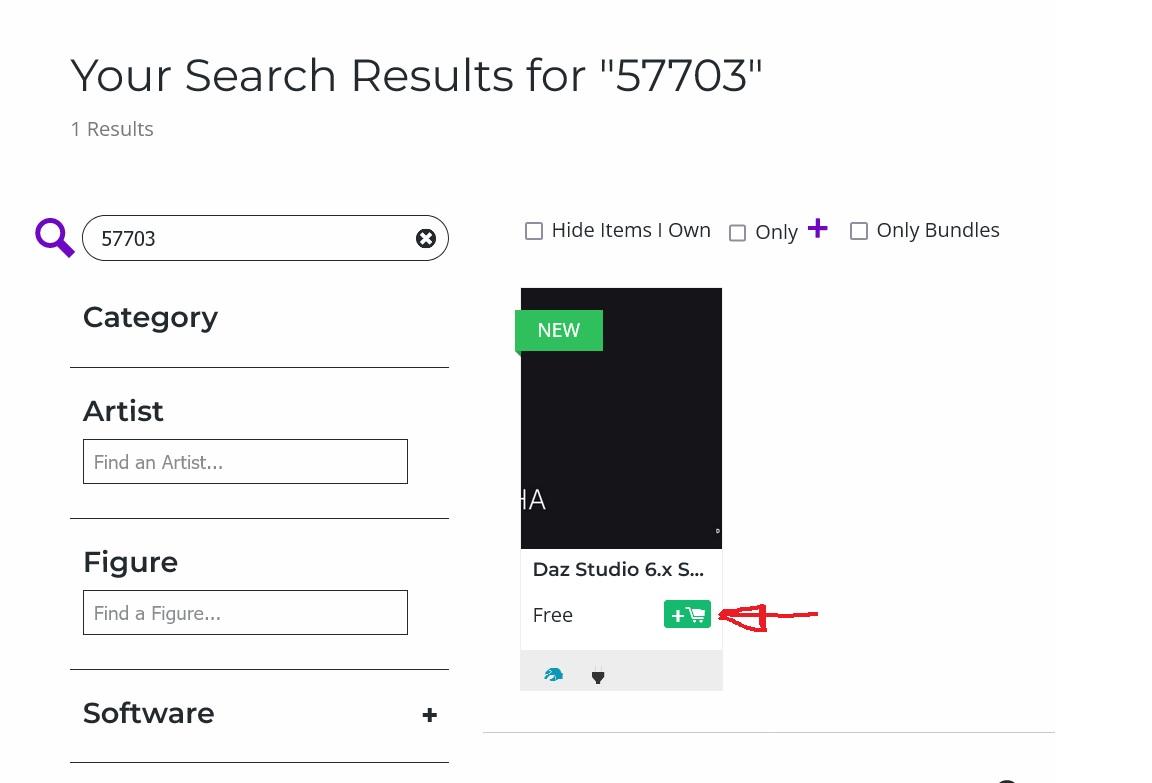
In the Store page, search for 57703
In the result page, click on the "Add to Cart" icon (NOT the thumbnail or title, which just take you to the Store page).
"Buy" it as usual (it is $0), and it will appear in your Product Library and in DIM.
 Dirty Dishes: Fantasy Food and Drinks [Commercial]
gcjellyfish said:
Thanks for linking the product page, Barbult. Shoulda thought of that myself :)
You could still add it, in the first post, so that anyone new coming to this thread can see it right away. I don't know about others, but in the past, I'd discover a product on the forum, and I always appreciated when it was linked in the first post.
Daz Studio 6.25[.0.x], General Release!meaznet said:
I'm having some issues with MikeD's Icon Creator Pro after installing Studio 6, and I understand that there may be some updates needed from them for it to work properly, but where should I be finding a related Forum? Would that be here or is there a way to look directly at the particular Creator's Forum?
Whata re you wanting? Icon Creator is a script rather than a plug-in, so what it requires is harder to know. I am sure the author is aware of the ssues, though he usually has a support thread in the Daz PA Commercial forum here if you want to check for other reports or add your own.
Daz Studio 6.25[.0.x], General Release!I'm having some issues with MikeD's Icon Creator Pro after installing Studio 6, and I understand that there may be some updates needed from them for it to work properly, but where should I be finding a related Forum? Would that be here or is there a way to look directly at the particular Creator's Forum?
Studio 6: No Premier plug-ins are available.I modified my filters in DIM to show Mac files and see a DS6 general release version of dForce Manager and Geometry Sculptor when I search for "premier". The others don't seem to be available as general release yet for Mac, only beta (or maybe they're tagged incorrectly so my filters don't catch them)
Studio 6: No Premier plug-ins are available.Maybe you could search for the plugin names.
Purchased Daily Dealz no longer being recognized as Daily DealzElor said:
Only items listed in the Daily Dealz section count as Daily Dealz:
https://www.daz3d.com/daily-dealz-sale#daily_dealz
Once an item is now longer named here, it's treated as any new release.
That's how the cart is currently treating those items, but that's not what the promotion says.
The sale page states "Buy or Own X Daily Dealz". It doesn't say "currently listed Daily Dealz", nor does it mention that a product stops counting once it rotates out of the Daily Dealz section.
When a promotion involves spending money to reach discount tiers, the qualifying conditions need to be clearly stated because If an item purchased as a Daily Dealz ceases to qualify later, that's a significant limitation and customers shouldn't have to discover it through trial and error or forum replies.
My concern isn't whether the system is behaving as you describe, it is that the published terms don't appear to explain that behavior anywhere, and based on the wording I think it's entirely reasonable for customers to expect previously purchased Daily Dealz items to continue counting toward the "Buy or Own X Daily Dealz" requirement.
If DAZ intends the promotion to work differently, clarifying that in the offer text would avoid confusion and set proper expectations before people make purchasing decisions.
Daz 3D is part of

Connect
DAZ Productions, Inc.
7533 S Center View Ct #4664
West Jordan, UT 84084Licensing Agreement | Terms of Service | Privacy Policy | EULA
© 2026 Daz Productions Inc. All Rights Reserved.