-
Creating a "clone" or identical model in Daz!
Ah, no, Face Transfer is presently windows. I'm on a Mac, but have a PC. Headshop has a Mac version, you'll have to check FaceGen.
I haven't set up my PC with Face Transfer yet, so can't tell you how it works. Someone started a thread on it in Art Studio. They may be able to help you there.
Ok!
Thanks so much for the help btw!
Creating a "clone" or identical model in Daz!Ah, no, Face Transfer is presently windows. I'm on a Mac, but have a PC. Headshop has a Mac version, you'll have to check FaceGen.
I haven't set up my PC with Face Transfer yet, so can't tell you how it works. Someone started a thread on it in Art Studio. They may be able to help you there.
Creating a "clone" or identical model in Daz!There is a new feature in the latest Daz Studio called Face Transfer.
Section on Face Transfer Pane: https://www.daz3d.com/forums/discussion/comment/4903221/#Comment_4903221
There are also a couple of products in the store, FaceGen and HeadShop. However all of them really necessitate good photos to be effective (even if examples show 3/4 views employed). You can also use morph packs that can help you approximate the person.

You may be able to find a skin that is close to what the DJ looks like. It will probably help if you can texture.
I'd suggest that they provide you with good front and side views of this person, at the least. Preferably good, evenly lit photos.
Cool! What exactly does the Face Transfer do? I looked at the notes and still am confused? Is it for mac? and is it a payed feature?
Creating a "clone" or identical model in Daz!There is a new feature in the latest Daz Studio called Face Transfer.
Section on Face Transfer Pane: https://www.daz3d.com/forums/discussion/comment/4903221/#Comment_4903221
There are also a couple of products in the store, FaceGen and HeadShop. However all of them really necessitate good photos to be effective (even if examples show 3/4 views employed). You can also use morph packs that can help you approximate the person.
You may be able to find a skin that is close to what the DJ looks like. It will probably help if you can texture.
I'd suggest that they provide you with good front and side views of this person, at the least. Preferably good, evenly lit photos.
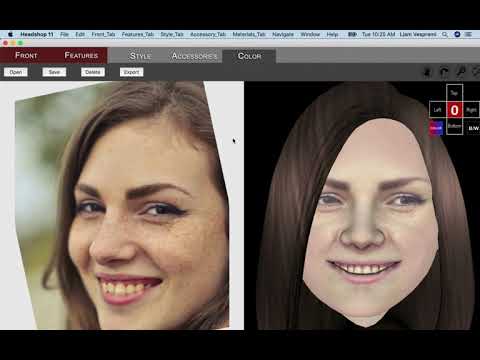
(Released) HeadShop 11 Macintosh on DAZ (Commercial)HeadShop 11 is a Standalone software used to automatically create 3D heads from a single photo. It works as a plug-in inside Daz Studio with all Genesis figures, and outputs a modified morph OBJ file and 4096 x 4096 texture files.
HeadShop 11 works with the following figures:
- Genesis 2 Male and Female
- Genesis 3 Male and Female
- Genesis 8 Male and Female
HeadShop 11 requires a Macintosh personal computer or laptop with the following minimal requirements:
System requirements:
- Required Hardware:
- 8 Gb of RAM
- Monitor with a screen of a resolution at least 1024 x 768
- 800 MB free disk space
- Required Software:
- IOS Mojave or later
- Daz Studio 4.9 or later, 64-bit version
Watch Video at: https://youtu.be/8su5584NiE8
PLEASE PLEASE PLEASE FOR THE LOVE OF GOD! HELP!!!I have mine set up to putnotbing in the default locations. What I did was install DIM first, and nothing else. Then I went into Dim and set up all of the install locations to be where I wanted them, then installed Studio, went into preferences in Studio and set up all of the library/cache/dson/etc locations I wanted, and then returned to DIM and installed everything normally. Everything went exactly where I wanted it and had worked great ever since. I do want to add that this can interfere with some scripts/apps, like headshop and the Riversoft converters. Riversoft I believe can be worked around, the older version of headshop is flat incompatible with anything that's not the default configuration. The new version is supposed to be more flexible about it, but I never heard anything that made me comfortable enough to try it.Additional Macintosh Beta Testers WelcomeWe need 5 additional Macintosh beta testers for HeadShop 11 Macintosh.
Requirements:
1. Macintosh with Mojave OS
2. DAZ Studio 4.11 64-bit Macintosh installed
3. Willing to download and speedily test HeadShop 11 Mac and share results right away.
If interested, pls. email to [email protected] right away. First come, first serve!
Watch video here:
 Daz Studio Pro BETA - version 4.12.2.60! (*UPDATED*)
This might have always been the case but I have noticed that I have a DAZStudio_Beta folder and also a DAZStudio4 Public Build folder in my Program Files/DAZ 3D/. Are they both necessary for this 4.12 Beta?
I don't have that & I've installed ever public beta since 4.9+. I have 'DAZStudio4' & 'DAZStudio4 Public Build'. I also have an associated 'PostgreSQL CMS'. For Hexagon I have 'Hexagon2' and 'Hexagon2 Public Build'. For DIM it is 'DAZ3DDIM1'.
Looking at the content of the DAZStudio_Beta folders, it seems to cater for extra plugins - Measure Metrics, for example.
I have 'Measure Metrics' though. Maybe you have HeadShop or another plugin though that has erroneously created an incorrectly DAZ Studio Public Beta install location. There are maybe a few, HeadShop, AweRenderer 3DL, FluidOS and few other plugins that I don't have. I'm not even sure if AweRenderer or FluidOS are packaged as plugins though since I don't own them.
HeadShop never works with beta Studio (different naming conventions).
Daz Studio Pro BETA - version 4.12.2.60! (*UPDATED*)This might have always been the case but I have noticed that I have a DAZStudio_Beta folder and also a DAZStudio4 Public Build folder in my Program Files/DAZ 3D/. Are they both necessary for this 4.12 Beta?
I don't have that & I've installed ever public beta since 4.9+. I have 'DAZStudio4' & 'DAZStudio4 Public Build'. I also have an associated 'PostgreSQL CMS'. For Hexagon I have 'Hexagon2' and 'Hexagon2 Public Build'. For DIM it is 'DAZ3DDIM1'.
Looking at the content of the DAZStudio_Beta folders, it seems to cater for extra plugins - Measure Metrics, for example.
I have 'Measure Metrics' though. Maybe you have HeadShop or another plugin though that has erroneously created an incorrectly DAZ Studio Public Beta install location. There are maybe a few, HeadShop, AweRenderer 3DL, FluidOS and few other plugins that I don't have. I'm not even sure if AweRenderer or FluidOS are packaged as plugins though since I don't own them.
Here's a few screenshots. I should mention that I only use DIM to install so nothing in these screens was placed there manually.
Daz Studio Pro BETA - version 4.12.2.60! (*UPDATED*)This might have always been the case but I have noticed that I have a DAZStudio_Beta folder and also a DAZStudio4 Public Build folder in my Program Files/DAZ 3D/. Are they both necessary for this 4.12 Beta?
I don't have that & I've installed ever public beta since 4.9+. I have 'DAZStudio4' & 'DAZStudio4 Public Build'. I also have an associated 'PostgreSQL CMS'. For Hexagon I have 'Hexagon2' and 'Hexagon2 Public Build'. For DIM it is 'DAZ3DDIM1'.
Looking at the content of the DAZStudio_Beta folders, it seems to cater for extra plugins - Measure Metrics, for example.
I have 'Measure Metrics' though. Maybe you have HeadShop or another plugin though that has erroneously created an incorrectly DAZ Studio Public Beta install location. There are maybe a few, HeadShop, AweRenderer 3DL, FluidOS and few other plugins that I don't have. I'm not even sure if AweRenderer or FluidOS are packaged as plugins though since I don't own them.
Hire someone to FaceShop/HeadShop two Kids 4 figuresNeither FaceGen nor Headshop can create a morph for K4. Why do you want to use K4?, I assume it is because you want to use in Poser.
FaceGen can work with Genesis and Genesis 2, and these can be bought into Poser. HeadShop can also use Genesis 2 (though not Genesis).
Hire someone to FaceShop/HeadShop two Kids 4 figuresI own Faceshop however I bought a new computer and it doesn't work right anymore.
I was hoping to pay someone to build two models, based on the Kids 4 base, using Faceshop and the photos I have. I have great hi res photos, front and both sides. I took these photos especially for use with Faceshop so they are exactly what you need. I don't need anything special done. Just the basic wizard Faceshop has. I can take it from there.
Thank you so much for considering.Is it possible to copy skin texture from a photo?Making a decent face is by hand is very difficult. Here are a few pointers:
1. You also need to create a matching shape file (OBJ) that matches the photo.
2. In case of rotated heads it is nearly impossible to get it right, since one side is missing/incomplete. Newest HeadShop works with rotated heads.
3. Open smile. Very hard to match a photo, that has open smile/teeth showing. Again, HeadShop 11 is the only software that handles open smile
headshop 9someone who knows this plug-in please?HeadShop 11 Macintosh beta testers neededMust have good DAZ Studio skills and be willing to provide fast feedback.
Please indicate in your email what Macintosh hardware and OS you have and that you are willing to turn around a review in 48 hrs.
Please email: [email protected]
Thanks!
Upgraded to Daz 4.11 and now Headshop 11 doesn't show upSounds like being paranoid is part of the problem:-) You have multiple DAZ Studio installations and have possibley installed HeadShop to the wrong DAZStudio4 folder.
We can investigate via Skype/screen share. My email is [email protected]
The Vendor
Upgraded to Daz 4.11 and now Headshop 11 doesn't show upThanks for the answers but I still have no HeadShop, Preferences are set to default. I did send a help ticket to Daz but they directed me to cotact Ah Balone claiming that problems with plugins are the vendor's problem, not a Daz problem. I'm not sure that I buy the argument but at least they got back to me and in the past I've always gotten gotten good solutions from them. I have one other computer running Studio 4.10 so I'll just load it onto that computer until someone comes up with a solution. Because I'm paronoid by nature I have backup copies of the previous versions saved on multiple computers, sticks etc so that I can always reload the old version on my new desktop computer if it comes to that.
Again, thanks to everyone for the suggestions.
Headshop 11 QuestionsNever mind. I fixed the situation. In looking in the HeadShop plugin folder created by the installer, it has another "HeadShop plugin" folder inside that has the contents that were supposed to appear in the first folder, but for some reason, the installer installs two plugin folders, one inside the other. The installer also installs a DAZStudio4 folder INSIDE the Headshop plugin folder with files that need to go in the main DAZStudio4 (or in my case, DAZStudio43) folder. The installer is causing problems because it isn't putting files where they need to go. I moved the files to their correct locations and solved the issue.
Headshop 11 QuestionsHere is the issue I am having.
I received error messages consistently when trying to install DAZ Studio 4.11 and had to install to a custom location C:\Program Files\DAZ 3D\DAZStudio43.
I tried installing HeadShop to that directory and HeadShop didn't work--didn't appear in the edit menu.
I looked at the manual. The manual has numerous errors in it. For example, Chapter 4 is supposed to have information for what to do for a non-standard install. There is no Chapter 4. Chapter 5 has installation information that is contradictory.
First, the chapter says that the HeadShop files will be installed into a DAZ 3D folder inside the DAZ 3D folder (C:/Program Files/DAZ3D/DAZ3D). There is no such folder in 4.11. I created one and installed to it. Obviously, it is empty because I had to create it and I'm not going to move Daz Studio's main files around because it was hard enough for me to get the program to work properly without moving locations that will screw it up.
Then later in the manual, in the illustrations provided, the destination folder appears to be C:Program Files/DAZ3D, where the HeadShop files will exist in a folder alongside (not inside) the DAZStudio4 folder (for me, the DAZStudio43). I installed to that location and the plugin does not appear. So I have three installations of this program, none of which work, none of which show up in the Edit menu.
https://www.daz3d.com/forums/uploads/thumbnails/FileUpload/15/4a1bc10934fcbdf0a7548fb08aff8b.jpg
HeadShop 11-Serialnumber MissingHello everyone ,
I bought recently Headshop11, but daz didnt show up the Serialnumber, what can i do , who can help ?
Thanks
Tom
Daz 3D is part of

Connect
DAZ Productions, Inc.
7533 S Center View Ct #4664
West Jordan, UT 84084Licensing Agreement | Terms of Service | Privacy Policy | EULA
© 2026 Daz Productions Inc. All Rights Reserved.