-
Genesis 9 smooth expressions?
GhostofMacbeth said:
Have you turned off the HD expressions?
Actually not using HD expressions. Using the anime expression distorts the forehead and cheeks quite a bit. I was uping if there was something that can relax the mesh so the distortion is not as obhious. I am rendering in Iray and not filament, so it's not as "flat." Since I'm going for a toon look, these distortions looks ugly.
Toon Base T-Shirt textures not loading [SOLVED!!]taiuri said:
3Diva said:
taiuri said:
I installed the new 4.23 Daz Studio because I wanted to use the new G9 Toon Figures, but when I loaded the Toon Base T-shirt on the Base Anime Masculine, the materials don't load, neither the defualt blue texture (it's only black).
Any idea how to solve this issue?
First, let's find out a couple of things to make sure of, to see if we can noodle out what the issue is:
1) Are you using the Filament draw option? https://www.daz3d.com/forums/discussion/comment/9041351/#Comment_9041351
2) Do you have a Filament Draw Options Node in the scene?
3) Do you have at least one distant light in the scene?
4) Are you using a PC (and not a Mac)? (I believe that Filatoon isn't usable on Mac at the moment but they're working on fixing that.)
If those four are a yes, make sure you have these installed and UPDATED: Default Resources for Daz Studio 4.23+ (or whatever the current version of that is), Genesis 9 Starter Essentials, Genesis 9 Starter Essentials Expansion.
1.- Yes
2.- I don't know what is that? Could you explain me, please?
3.- Yes
4.- PC
5.- Where can I get the Updated Default Resources? I have installed G9 starter essentials and its expansion.
I want to add that I don't have any problem with the rest of the clothes (males and females) or hairs. Only with the T-shirt.
To load a Filament Draw Options Node go to the top menu "Create" and select "Filament Draw Options Node" (it will be near the bottom of the dropdown list):
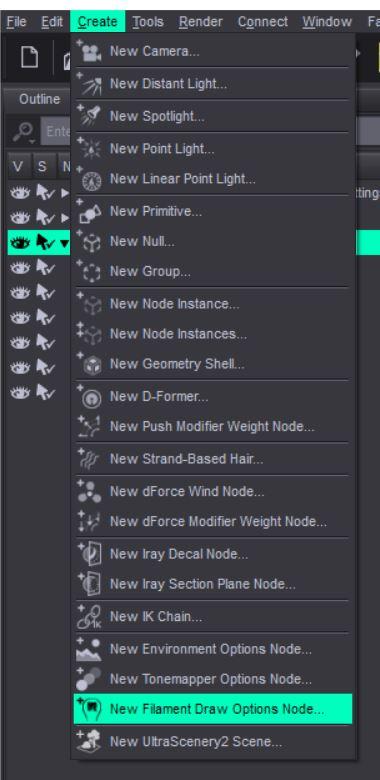
As for not having issues with the other clothing, are you sure? Could you post a render of it, because looking at the skin of the image you posted, the shaders do not look right. So I'm wondering if you just don't have all the resources installed that are needed.
Do you use DIM (Daz Install Manager)? If not I HIGHLY recommend it as it makes installing and managing products so much easier. Do a search in there for Default Resources for Daz Studio and make sure you have that updated.
Anime Toons and Filatoon Shader Q&AHas anyone been able to achieve a fog effect or fading depth effect in Filament without a fog prop? Right now I don't know if it's possible but wanted to check to see if anyone has discovered a way to do it without a prop?
Toon Base T-Shirt textures not loading [SOLVED!!]3Diva said:
taiuri said:
I installed the new 4.23 Daz Studio because I wanted to use the new G9 Toon Figures, but when I loaded the Toon Base T-shirt on the Base Anime Masculine, the materials don't load, neither the defualt blue texture (it's only black).
Any idea how to solve this issue?
First, let's find out a couple of things to make sure of, to see if we can noodle out what the issue is:
1) Are you using the Filament draw option? https://www.daz3d.com/forums/discussion/comment/9041351/#Comment_9041351
2) Do you have a Filament Draw Options Node in the scene?
3) Do you have at least one distant light in the scene?
4) Are you using a PC (and not a Mac)? (I believe that Filatoon isn't usable on Mac at the moment but they're working on fixing that.)
If those four are a yes, make sure you have these installed and UPDATED: Default Resources for Daz Studio 4.23+ (or whatever the current version of that is), Genesis 9 Starter Essentials, Genesis 9 Starter Essentials Expansion.
1.- Yes
2.- I don't know what is that? Could you explain me, please?
3.- Yes
4.- PC
5.- Where can I get the Updated Default Resources? I have installed G9 starter essentials and its expansion.
I want to add that I don't have any problem with the rest of the clothes (males and females) or hairs. Only with the T-shirt.
Toon Base T-Shirt textures not loading [SOLVED!!]taiuri said:
I installed the new 4.23 Daz Studio because I wanted to use the new G9 Toon Figures, but when I loaded the Toon Base T-shirt on the Base Anime Masculine, the materials don't load, neither the defualt blue texture (it's only black).
Any idea how to solve this issue?
First, let's find out a couple of things to make sure of, to see if we can noodle out what the issue is:
1) Are you using the Filament draw option? https://www.daz3d.com/forums/discussion/comment/9041351/#Comment_9041351
2) Do you have a Filament Draw Options Node in the scene?
3) Do you have at least one distant light in the scene?
4) Are you using a PC (and not a Mac)? (I believe that Filatoon isn't usable on Mac at the moment but they're working on fixing that.)
If those four are a yes, make sure you have these installed and UPDATED: Default Resources for Daz Studio 4.23+ (or whatever the current version of that is), Genesis 9 Starter Essentials, Genesis 9 Starter Essentials Expansion.
FilaToon / Cell shaded rendering with Filamentcain-x said:
Just wanted to verify all the testing and work done since Filatoon has been released and the new work put into Filament:
- Transparency/Opacity still has issues displaying correctly in filament (i.e. hair)
- Emissives does not cast light to any nearby objects
- Environment map only works with hdri images, unlike how Iray behaves
- Reflections only work with hdri and no 3d objectsIs there some limitation with the Google Filament engine or has it not yet been plumbed into DAZ? Some understanding of the road map will be very helpful as I do have some projects that may require these features or if I need to move this to a render engine that can support this.
The transparency/opacity issues have been solved if you use the Filatoon Shader on the hair (or anything else that has a transparency/cutout opacity map).
FilaToon / Cell shaded rendering with Filamentcain-x said:
Just wanted to verify all the testing and work done since Filatoon has been released and the new work put into Filament:
- Transparency/Opacity still has issues displaying correctly in filament (i.e. hair)
- Emissives does not cast light to any nearby objects
- Environment map only works with hdri images, unlike how Iray behaves
- Reflections only work with hdri and no 3d objectsIs there some limitation with the Google Filament engine or has it not yet been plumbed into DAZ? Some understanding of the road map will be very helpful as I do have some projects that may require these features or if I need to move this to a render engine that can support this.
While both Filament and Iray offfer a form of PBR rendering they are not the same. Filament and Iray do have documentation, and the DS chnage logs etc. tell you which versions DS is using, if you wish to compare features.
FilaToon / Cell shaded rendering with FilamentJust wanted to verify all the testing and work done since Filatoon has been released and the new work put into Filament:
- Transparency/Opacity still has issues displaying correctly in filament (i.e. hair)
- Emissives does not cast light to any nearby objects
- Environment map only works with hdri images, unlike how Iray behaves
- Reflections only work with hdri and no 3d objectsIs there some limitation with the Google Filament engine or has it not yet been plumbed into DAZ? Some understanding of the road map will be very helpful as I do have some projects that may require these features or if I need to move this to a render engine that can support this.
Artifacts with toon eyes on Iray?I am going for 3d toon style than a flat anime style as I am having trouble getting various geoshells effects to work in the filament. I did some test renders on Iray with the toon model and for the most part, it's okay but there is artifacts on the eyes. I tried changing from filatoon shader to base uber and still no different. Yes, I've fiddled around with environment weight on shaders too.I tried apply headlamp too incase low light was causing issues, still artifacts.The thing is, in one of my experiments, I did get it right without artifacts, but I forgot what I did. I am unable to reproduce it. Any advice?
Is AI killing the 3D star?@JoeQuick I agree with an earlier comment you made, that a plugin for Daz Studio that can be used to enhance Daz Studio renders would be so cool! It would only need an image to image functionality with low diffusion - just enough to enhance the image. If it could be used along side Iray (or even Filament for it's lightning fast rendering), that would be awesome!NVidia 5090Richard Haseltine said:
Which, as I wrote, is Iray, not Daz Studio itself - other GPU-enabled features (dForce, say, or Filament) do, as far as I know, work with 50x0 cards.
Fair enough, but since rendering scenes is (I assume) a big part of what folks do with Daz, I just wanted to point out that the 5090 does not yet work for that aspect of the program (until the Iray part of the software gets updated). Hopefully the NVidia update to Iray will have some goodies to help out legacy cards (like the 30xx and 40xx series) as well, since I notice that the latest driver adds new features to those cards that weren't previously available, such as frame generation.
NVidia 5090jbdiminnie said:
Richard Haseltine said:
Daz Studio works with the 50x0 series as far as I know, Iray requires an update (from nVidia, which will then need testing before release in DS).
Richard,
This was posted on February 1 in a thread asking if 5090 was supported by Daz, which indicates that 4.23 doesn't support 5090s at the moment, unless you know something different...
pocketnew said:
Unfortunately, RTX 5090 are not supported at this point, nothing renders (I'm using latest drivers).
2025-02-01 17:19:41.743 [WARNING] :: \src\pluginsource\DzIrayRender\dzneuraymgr.cpp(373): Iray [ERROR] - IRAY:RENDER :: 1.0 IRAY rend error: Cannot render: found no usable devices. Please update your NVIDIA driver (www.nvidia.com) to at least 537.13, or enable CPU rendering.
2025-02-01 17:19:41.743 [ERROR] Iray :: Invalid parameters (NULL pointer).Which, as I wrote, is Iray, not Daz Studio itself - other GPU-enabled features (dForce, say, or Filament) do, as far as I know, work with 50x0 cards.
[Released] Stylized Environment Shaders [Commercial]@scorpio I'm sorry to confuse you - they are Shader Presets (as defined by Daz Studio) and are based on the Iray Uber shader but can be used in Filament, either as is or converted to FilaToon if preferred as per the info above.
Given that Filament doesn't support displacement, if the presets are used as is but the drawstyle is switched to Filament, only the normal maps will provide simulated height information.
I've unlocked the max value of normal maps specifically for this purpose, as higher normal map values can simulate the geoshell outline effect of filatoon (obviously depending on lighting conditions, shadows etc).
I wanted to create a product that could be used in either Iray or Filament, because Mac users don't have Filament as option unfortunately.
[Released] Stylized Environment Shaders [Commercial]Hi everyone, my next product is a collection of 60 4K shaders that whilst designed for Iray (uses Iray Uber shader as height/displacement maps are included for real depth), they still look great in Filament.
Displacement maps are loaded with the shaders but not enabled by default. Most of them will look good at a strength of 1 but experiment with this to get the best result for your scene.
Depending on the resolution of the 3D models in your scene, you may also need to raise the 'subD Displacement Level'.
If a more toony/exaggerated look is preferred you can apply one of the FilaToon shaders included with Daz Studio Default Resources on top of these. 'FilaToon - Base' works particularly well.
If using the FilaToon shaders don't forget to also add the 'Basic FilaToon Environment' or a separate distant light - you may also need to set environment settings to 'Scene Only'.
I'm conscious that UHD shader packs can be very large in size - special effort has been taken to optimize each image's bit depth and colourmode to keep file sizes as low as possible, whilst minimising any perceived effect on quality.
Now released!
How to remove border lines between body parts In filament view?FilaToon / Cell shaded rendering with FilamentAnime G8F!

Just cause I wanted to see if it was hard to do, and it seems the anime figure is lacking in shapes...I made an Anime G8F (which is just the G9 Anime Toon character head on G8F's body). Since I got a TON of G8 and G3 stuff and investment, its always good to recycle, right?
A little tricky since Filament does not like visibility and transparency, but @Mada to the rescue! Conditional Grafts in Daz Studio You can make a conditional graft to hide the geometry of everything but the head of G9F, and then do the same for G8F, but hide her head, and a little Dr. Frankenstein aligning the head and body, and then parenting G9F toon to G8F head, and....BAM, you got Anime G8F.
Then the textures. I basically just changed all skin to Shader basic presets DzDefault/dzMatte and then picked a nice skin tone and added a plain white image to the base color, so the LIE still worked on the head, and hit it with the Filatoon skin shader. Of course the body is G8F and G9F textures dont align, so I lost the belly button, and other "redder" areas on the body...but not hard to paint some blurry red dots on PNG's if needed.Again, just a test, but now I can play with the character much more, since it is basically Anime G8F! It's a great anime head, well done Daz!
 Filatoon Shadow Casting & Render?
The post by theathanparable in this thread is very helpful
https://www.daz3d.com/forums/discussion/704931/filatoon-cell-shaded-rendering-with-filament/p21
Filatoon Shadow Casting & Render?Yes, certainly. The settings can be simple:
1) Shadow Caster: turn on Cast Shadows on its surface with Filatoon shader; Shadow Receiver: turn on Receive Shadows... Tweak shader settings related to shadow, like Shadow Smooth, MatCap...
2) Set Shadow Type on source of Lights: Distance Light, Spotlights, etc. Tweak Spread Angle of Spotlights to soften shadows.
3) Tweak settings related to shadow in Filament Draw Options, as well as Tone Mapping and Color Grading, etc.Then experiment more combos to get the results that satisfy you.
Filatoon Shadow Casting & Render?Is it possible to make filatoon objects & characters cast shadows & will they render? Is there a setting, technique or trick to achieve shadows with filament render engine? I love the look of & the possibilities the filatoon/PBR offers. But it would really suck if shadows go out the window with filament engine.MimicMolly's Renders & WIPsAnother surprisingly quick edit before I go into "hibernation." Probably not, because I relax with art. DAZ Galleries link [x].
This is another old AI pic that I've been wanting to fix but never got a chance until now.
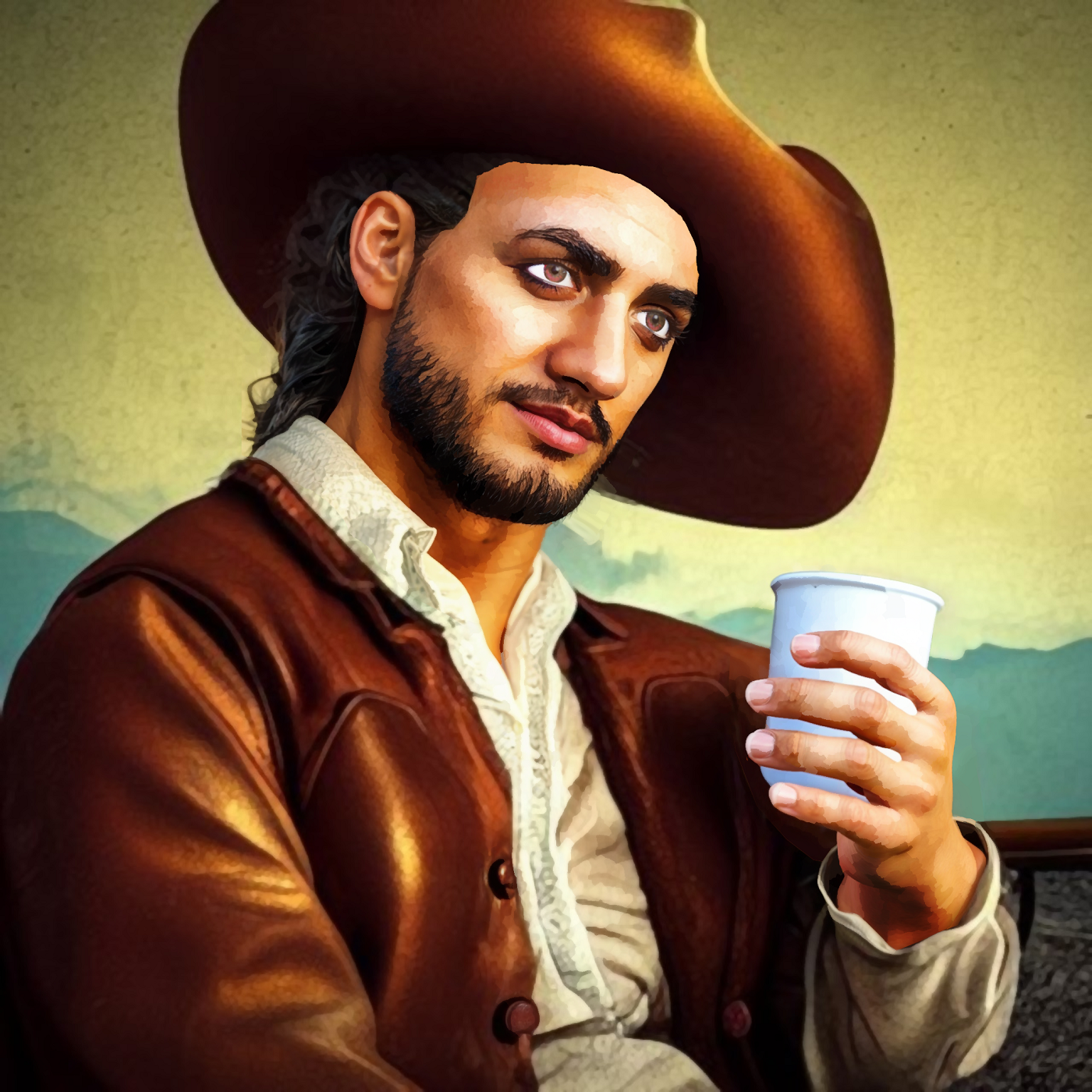
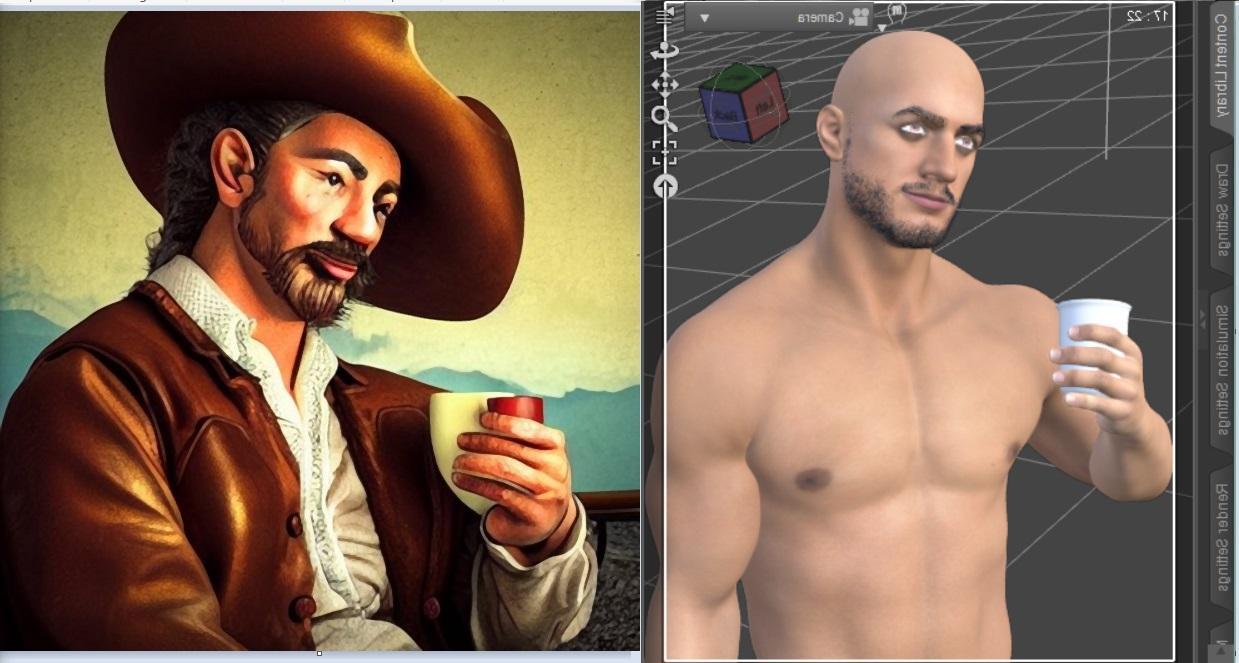
Since I believe I need to show off "presentable" work, here is the AI and the screenshot of the Filament render I used. As you can see in the screenshot, I had rendered it mirrored because it's easier to match shadows and highlights the default Filatoon enviroment lighting gives, this way. I did a bunch of "Curves" and Dodge/Burn to match the painterly coloring of the AI character.
Daz 3D is part of

Connect
DAZ Productions, Inc.
7533 S Center View Ct #4664
West Jordan, UT 84084Licensing Agreement | Terms of Service | Privacy Policy | EULA
© 2026 Daz Productions Inc. All Rights Reserved.