-
3Delight Laboratory Thread: tips, questions, experiments
Need some assistance. I'm trying to do some promos using the 3Delight engine using the Uber Environment base with some other lights. My tester is telling me on her end the scene is rendering out the hair as white. On my end it's fine. So perhaps there is a SIMPLE but thorough light set up that is Uber friendly that someone can show me how to set up to see if I can recreate her issue?
This is Dawn with my Tina morph and skin and the Hivewire Fashionista Hair with my upcoming hair Strands. You can see to the right the lights I have in the scene.
Uber Environment 2 is set to 50% - Pure White
Specular 01 is set to 100% - Pale Blue
Specular 02 is set to 50% - Pale Blue
Infinite Light is set to 76% - Pale Blue
RIM Light is set to 100% - Pure White
Posing a snake - invert "bending direction"?The only way to do it would be to export the posed snake, ona zeroed figure, as OBJ, then load that and use the Transfer Utility to rig it. Getting decent results for more than minor pose adjustments would be tricky.
Animation Club for Carrara , Week #2 - Spooky Hollow. Ready To watch..For the Carrara files that I posted, I have included the files for the morphs. Regarding the cape, there should be a file named something like capemainfile.car or similar. Open that to get the cape. Hope it works as is. But, If the morphs don't work straight, then I included the individual morph files so that they can be loaded individually. Just a precaution.
Also, diomede, what do I do with all of these various files for the cape? Are they all separate objects with one morph each? I'm not understanding what I'm seeing here.
Animation Club for Carrara , Week #2 - Spooky Hollow. Ready To watch..Okay... Mark fixed his download links - so see above for those. Awesome 3DAGE! Thanks for these!
I could swear that mmoir did a scene file, and that there was a link to his bat - but I cannot seem to find either of them. Help?
Also, diomede, what do I do with all of these various files for the cape? Are they all separate objects with one morph each? I'm not understanding what I'm seeing here.
So far I have the Moon, Hat, Cauldron, witch and cloak, plumpkin and caldron 2, am I just going to use these bat swarms and not Mike's?
How to? Custom Star Wars morphs for M4 and V4(Still keeping it on the down-low... Words like "probably" and "maybe" seem to placate the Freebie Gods and encourage them to ignore me... ;) )
Tht's the spirit! About the body morph, I can overcome that by using the Creature pack morphs. He will be clothed anyway... A naked gungan must be a vision to be reckon with tough...
Looking for a Baseball UniformI tried to use the transfer utility to reverse back from the Garen shape to base G2M for the uniform. I think the hat can remain a static prop. See here.
http://www.daz3d.com/forums/discussion/comment/1709436/#Comment_1709436
Thanks! I'll see what I can do with it.
(wanders off humming "Go, Cubs, Go!")
Hunt or be Hunted Bundle... Wow!I got that message too, I assumed it was something I stuffed up as did a few things saving as support asset after autofitting to Genesis,
just adding for Kayleyss,
my issues are not so much with your product which is lovely, as something DAZ has possibly altered in D|S regarding autofit and how support assets are saved in particular using genesis 3, I use D|S 4.7 for stuff with the transfer utility and obj mesh because something got changed later versions and I feel it is related to the new weightpainting system as opposed to triax, generally I avoid doing any fitting of clothes in D|S 4.9 beta if wanting to use the duf file in Carrara or with the DSON loader in Poser.
Its pretty much a waste of time discussing such things I learnt, I just find ways to do stuff that works keeping older versions of my software.
I really think what I must do is learn to use legacy rigging in Poser 7 and just redo all the new lovely Genesis 3 only stuff for older figures which I use, in the long run will cause me less grief because sadly I am not fond of animating in DAZ studio at all esp with Genesis 3 where all the stuff needs converting, no aniblocks work, powerpose is a mess etc.
The problem is that the belt got extra bones which are not translate when using the autofit :(
But I will put an unparented scabbard for the sword into the props selection. So people who wishe to export the should not have trouble with it.
Hunt or be Hunted Bundle... Wow!Here's a closer render of Gwenbleiz in the mountains... this is the scar version, with normal eyes. I'm currently rendering the version without the scars. For some reason, the shape morphs for "scars off" and "eyes back to normal" don't seem to work for me and I have to manually dial them back. Does anyone else have that problem? Using 4.8 here.
The Scar and the eyes are Linked to the head morph (same for the body). I will do an update to correct that. Sorry if you encounter issues
Thank you for looking into this! For some reason, the separat "Remove" icons don't work when using on the pre-loaded character. I haven't tried using them on the character if I used the insert morphs before on a "neutral" G3M.
This is really a beautiful character, and ´versatile clothing set.

I have submit the corrections to DAZ, just have to wait until they release the patch.
Yes, if you use a neutral G3M the inj and the remove works without trouble :)
Thank you!

Here's another render of Gwenbleize.
Nice :)
Hunt or be Hunted Bundle... Wow!Here's a closer render of Gwenbleiz in the mountains... this is the scar version, with normal eyes. I'm currently rendering the version without the scars. For some reason, the shape morphs for "scars off" and "eyes back to normal" don't seem to work for me and I have to manually dial them back. Does anyone else have that problem? Using 4.8 here.
The Scar and the eyes are Linked to the head morph (same for the body). I will do an update to correct that. Sorry if you encounter issues
Thank you for looking into this! For some reason, the separat "Remove" icons don't work when using on the pre-loaded character. I haven't tried using them on the character if I used the insert morphs before on a "neutral" G3M.
This is really a beautiful character, and ´versatile clothing set.
I have submit the corrections to DAZ, just have to wait until they release the patch.
Yes, if you use a neutral G3M the inj and the remove works without trouble :)
Thank you!
Here's another render of Gwenbleize...
 Novica & Forum Members Tips & Product Reviews Pt 7
Just checking out some hair- and I opened studio 4.8 by mistake instead of 4.9 (Iray renders a bit differently.) So just look at the character morphs, not the skin, as I think she may be a bit "flatter." This is out of the box (in 4.8) and she needs some gloss/adjustments in 4.8.
This is Arianna for Karen 7 wearing Anny Hair (Gen3F, Gen2F, Vict 4) I couldn't find in Anny Hair a movement option to get the really sticking out piece brought in closer to the head, I (see fourth image below) even went in to Scene>(the hair) and broke it down.) Wearing Cailin Dress. (available in a bundle too, with the character.) The second outfit was Summer Star Outfit (Gen3)
I also had to turn smoothing way up (30) as I wanted to smooth the strands in the back- the ones at the top. I just personally don't like them at all. The best way I would put it is the other strands are more razor sharp, and those are a bit too wide and blobby. But 30 is too high, you can see (I beieve it is) the skull cap and the hair thinned too much. So experiment and see what the sweet spot is, I remember doing 10 and it didn't do much.The hair is rather cute from the front, with just slight smoothing to ease the crinkles.
I think the promos make her seem a bit cartoony, she's actually quite nice. Good teeth too!
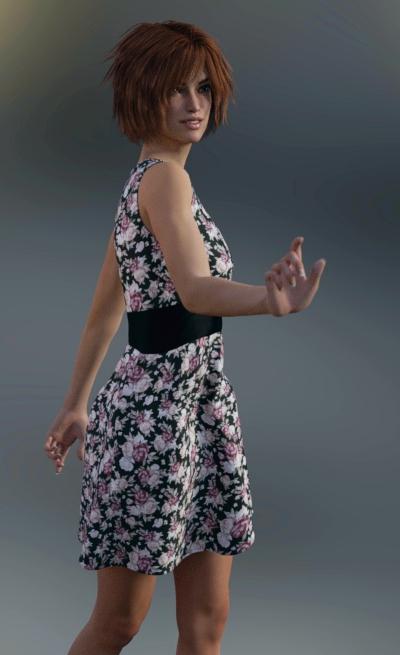
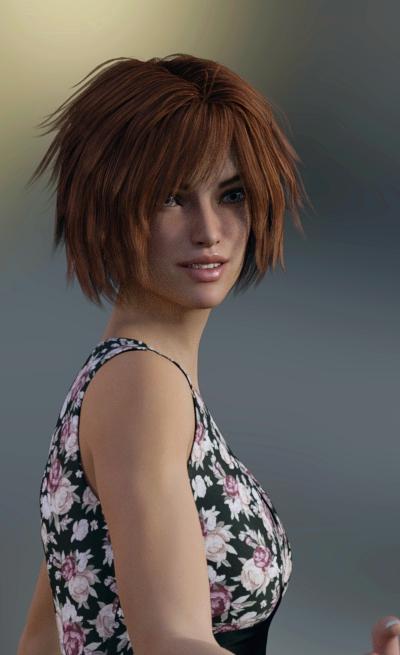
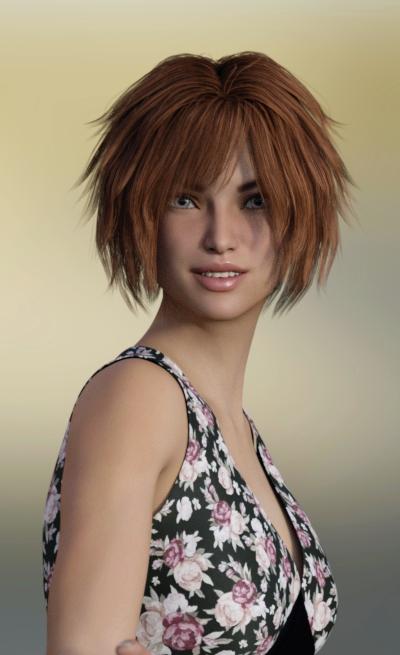
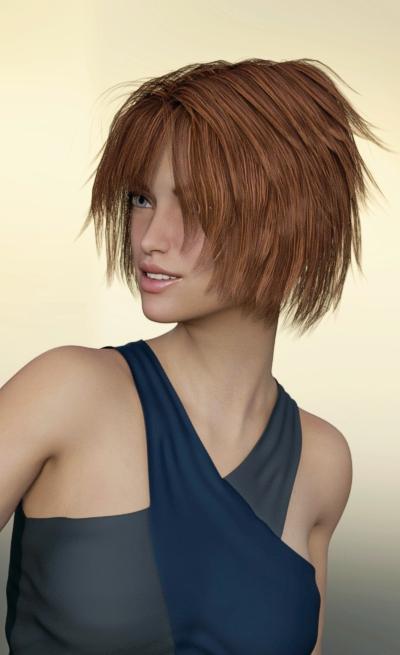
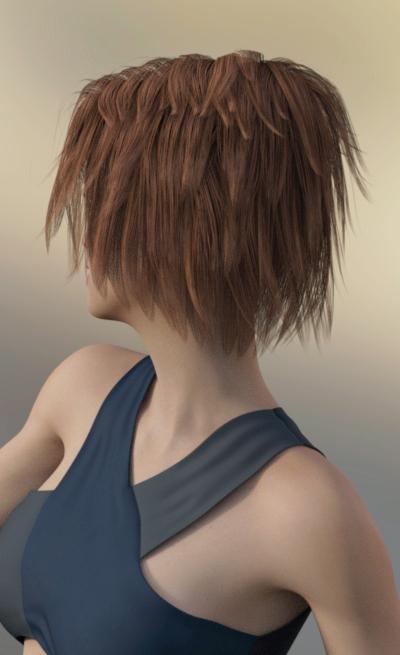
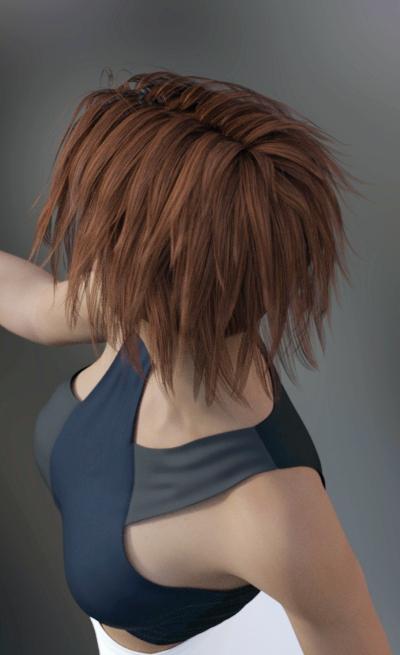
Seeing this on Anny hair reminds me of an accidental discovery I made using it with Zev0's Fit Control. It has probably been noted elsewhere, but I've found it's ability to modeify hair useful. The real of Anny hair is overly high for my taste and I was looking for a control to see if I could reduce it. One existed and it did exactly what I wanted. Later I was trying the same thing on a figure where I had not applied fit Control to deal with clothing. The morph was gone. Applying Fit Control to the character with just hair brought it and several others ranging from useful to useless.
Hunt or be Hunted Bundle... Wow!I got that message too, I assumed it was something I stuffed up as did a few things saving as support asset after autofitting to Genesis,
just adding for Kayleyss,
my issues are not so much with your product which is lovely, as something DAZ has possibly altered in D|S regarding autofit and how support assets are saved in particular using genesis 3, I use D|S 4.7 for stuff with the transfer utility and obj mesh because something got changed later versions and I feel it is related to the new weightpainting system as opposed to triax, generally I avoid doing any fitting of clothes in D|S 4.9 beta if wanting to use the duf file in Carrara or with the DSON loader in Poser.
Its pretty much a waste of time discussing such things I learnt, I just find ways to do stuff that works keeping older versions of my software.
I really think what I must do is learn to use legacy rigging in Poser 7 and just redo all the new lovely Genesis 3 only stuff for older figures which I use, in the long run will cause me less grief because sadly I am not fond of animating in DAZ studio at all esp with Genesis 3 where all the stuff needs converting, no aniblocks work, powerpose is a mess etc.
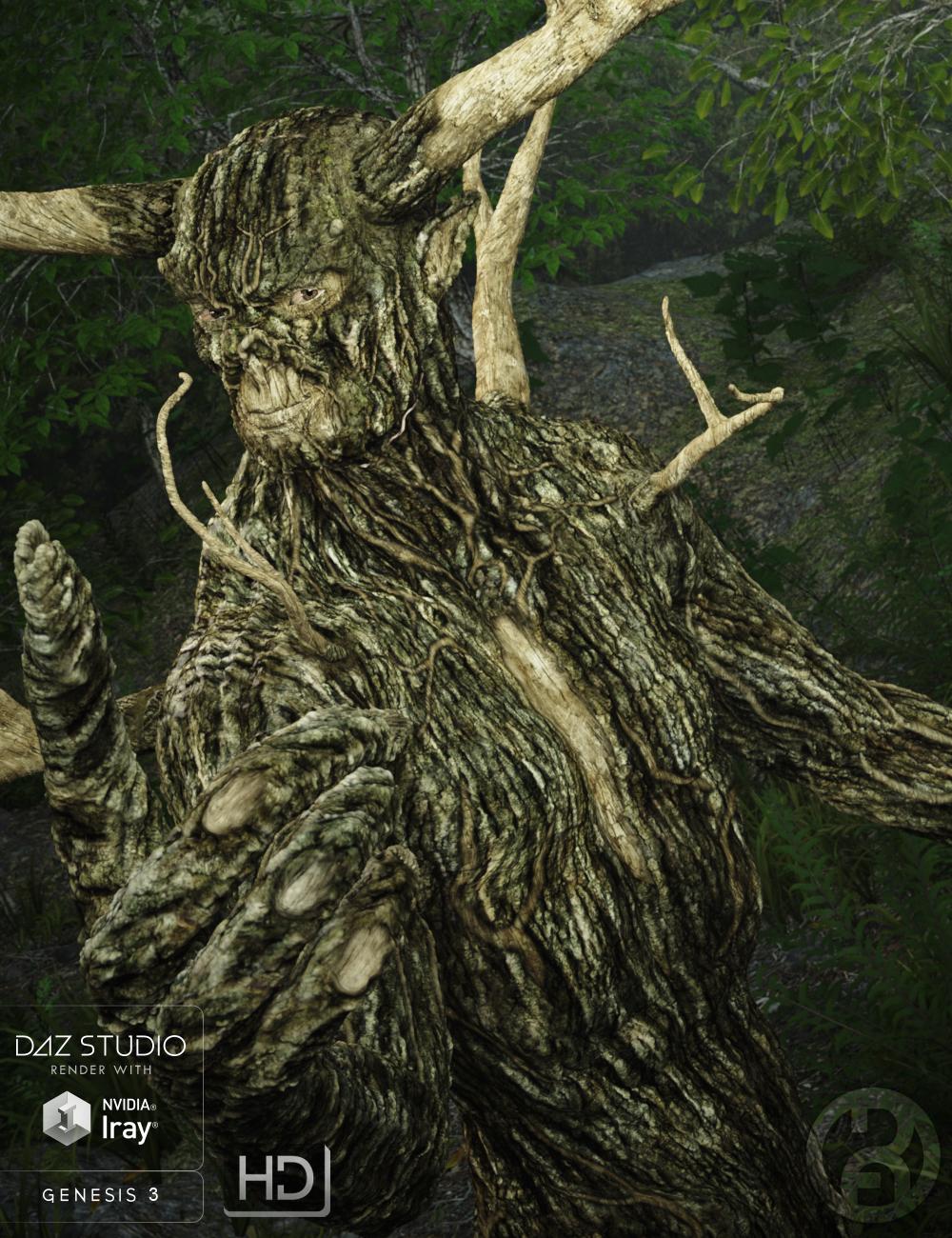
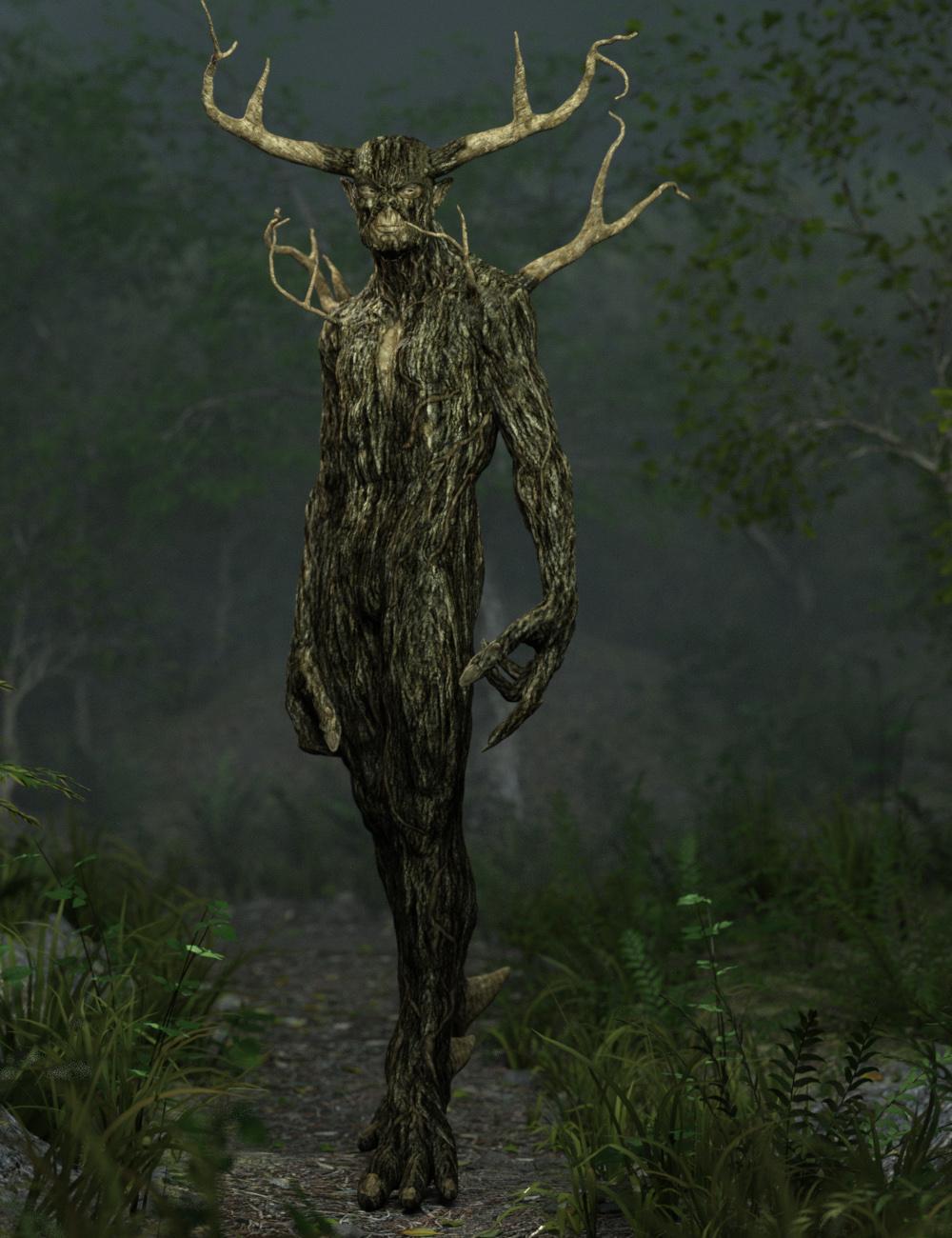
Forest King G3M [commercial]Forest King for G3M
http://www.daz3d.com/forest-king-for-genesis-3-male
Where does the heart of the forest lay?
It can be found by no man, for it belongs to the Forest King.
He is an ancient elemental spirit who dwells deep within the forest keeping all of nature in harmony.
The set comes complete with custom crafted High Definition Morphs, and highly detailed texture sets, suitable for Iray and 3DL
Product Includes:
One Forest King Character Preset
One Forest King Morph Preset
One Forest King Full Material Preset
Two Forest King Eye Material Presets
One Antler Smart Prop
Two Shoulder Branch Smart Props
Also includes IRAY and 3DL MAT files
 Looking for a Baseball Uniform
I tried to use the transfer utility to reverse back from the Garen shape to base G2M for the uniform. I think the hat can remain a static prop. See here.
http://www.daz3d.com/forums/discussion/comment/1709436/#Comment_1709436
Baseball UniformHere is my attempt to use the transfer utility to reverse from the Garen shape back to G2M. See if that works. There is a little poke through.
Baseball UniformI was modeling a baseball uniform to fit G2M Garen character. It is not finished on a lot of dimensions (wrinkles, folds, transfer utility,JCMs, etc.). You would have to texture the uniform yourself. It was originally done with a procedural shader in Carrara. With the Cubs advancing to the World Series, thought a few people from America's heartland might want it even in its present state. I won't finish before the World Series. If you have G2M Garen, you can use the transfer utility to work it back to G2M, and then if you have clones, you can convert to other figures.
I may update if I get the chance, but no promises.
Hunt or be Hunted Bundle... Wow!Here's a closer render of Gwenbleiz in the mountains... this is the scar version, with normal eyes. I'm currently rendering the version without the scars. For some reason, the shape morphs for "scars off" and "eyes back to normal" don't seem to work for me and I have to manually dial them back. Does anyone else have that problem? Using 4.8 here.
The Scar and the eyes are Linked to the head morph (same for the body). I will do an update to correct that. Sorry if you encounter issues
Thank you for looking into this! For some reason, the separat "Remove" icons don't work when using on the pre-loaded character. I haven't tried using them on the character if I used the insert morphs before on a "neutral" G3M.
This is really a beautiful character, and ´versatile clothing set.
I have submit the corrections to DAZ, just have to wait until they release the patch.
Yes, if you use a neutral G3M the inj and the remove works without trouble :)
Looking for a Baseball UniformI started to make one for G2M. It is just an obj right now. It does not have socks or shoes. It does not have shaders. If you don't mind using the transfer utility yourself, I can post the mesh as a freebie.
EDIT: Note - it is modeled to Garen's G2M shape.
EDIT2 - I posted a G2M base compatible file in the freebies thread. Linked in post below.
3D Art Freebie Challenge -- October: Double Bubble Toil and Trouble -- Entries ThreadToil and Trouble
Not counting: Genesis Child, Sally Mae Hair, Michael 4 (x2), Victoria 4, RDNA Scatters, Shrunken Head
# = requires free registration
1) Zelte und Rucksack (campfire) #
2) Rose's Western V4/A4/S4 #
3) Western Textures Set 2 For Rose's Western V4 #
4) Witch Hat #
5) Monster High Edition for Vic4 (witch's skin) #
6) d-jpp-morphing baton #
7) Old Trees for Daz 4.6 and Poser 10 #
8) F3D_Ruins Elven Portal #
9) Shadow Serpent Figure (2nd item from the top)
10) Stonehenge #
11) Disparate Morphing Broom #
12) Pumpkin Free #
13) A Skeleton #
14) Shape Magic Halloween Kit (cauldron) #
15) SCoM #
16) faerie door #
17) FX Daz Studio #
18) Fennja's Mushrooms #
19) Skull #
20) AAL Plasmaball #
21) Love Fairy Outfit #
22) Love Fairy V4 #
23) Wrist-Neck Restraints #
24) 10ft Easy Pose Chain #
25) Second Earth Ogre #
26) Ogre's Club #
27) AllenArt Drinking Glass prop for Iray with shaders (bubbles prop was used) #
28) Witchy Face Morph For V4 #
29) Indian outfit for M2 (ogres' loincloth) #Paid:
* Millennium Cat #
* Liquid Pack #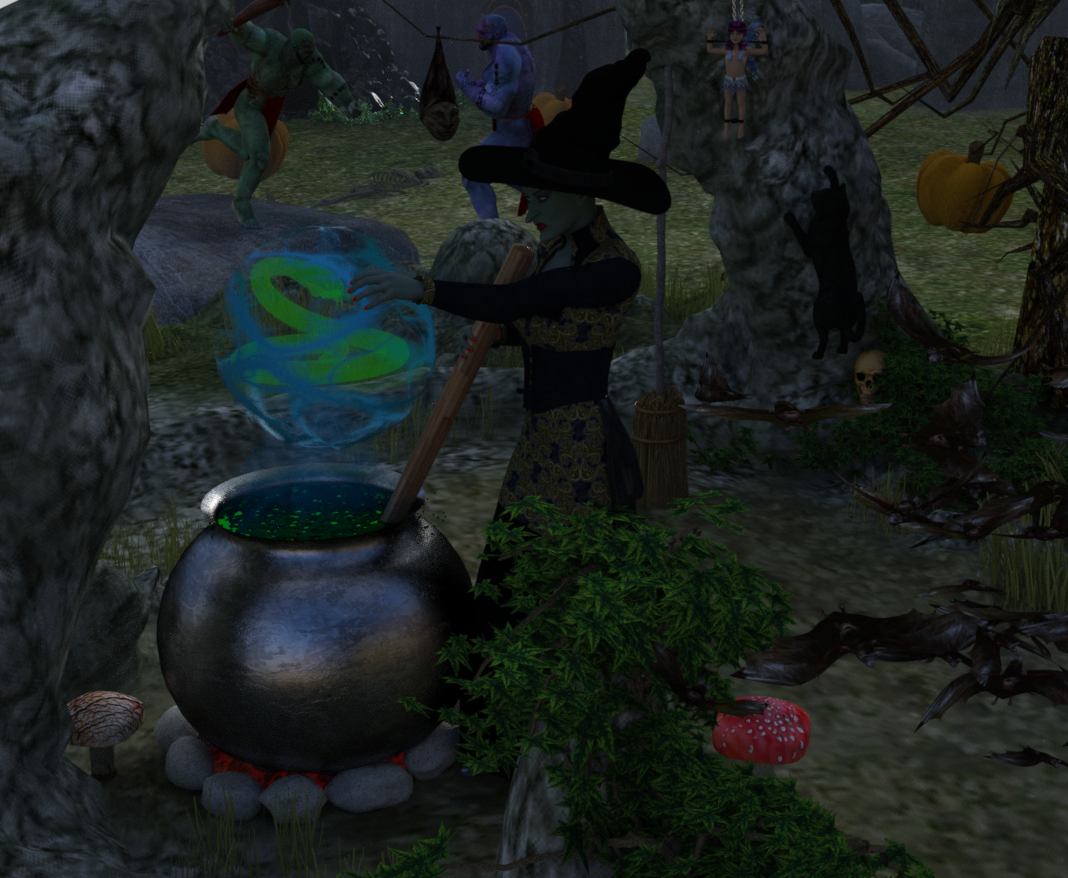 Hunt or be Hunted Bundle... Wow!
Here's a closer render of Gwenbleiz in the mountains... this is the scar version, with normal eyes. I'm currently rendering the version without the scars. For some reason, the shape morphs for "scars off" and "eyes back to normal" don't seem to work for me and I have to manually dial them back. Does anyone else have that problem? Using 4.8 here.
The Scar and the eyes are Linked to the head morph (same for the body). I will do an update to correct that. Sorry if you encounter issues
Thank you for looking into this! For some reason, the separat "Remove" icons don't work when using on the pre-loaded character. I haven't tried using them on the character if I used the insert morphs before on a "neutral" G3M.
This is really a beautiful character, and ´versatile clothing set.
virtual penny 4 yor carrara thoughts ?Oh I found the clothes match the maps but not the figures and there is lots of duplicate mesh, the witcher 2 model converter does not export all the shading domains.
I can clean it up so only the clothes remain.
Not sure where I am going though as limited use for fan art anyway but could prob use transfer utility and fit that to a DAZ figure after using temp bones in Carrara to tpose it.
Daz 3D is part of

Connect
DAZ Productions, Inc.
7533 S Center View Ct #4664
West Jordan, UT 84084Licensing Agreement | Terms of Service | Privacy Policy | EULA
© 2026 Daz Productions Inc. All Rights Reserved.