-
Show Us Your Iray Renders. Part V
...that used the old Wanted DOA set which I saved as a Genesis wearable preset (there is not M4 to G2F transfer) Also used the hat and gloves from Outlaw for G2M. The big nasty gun is a freebie Colt Anaconda I picked up up off of Turbosquid and retextured (the character uses a huge futuristic revolver which this comes the closest to in appearance). The Tin Cup is from Western Bric-a-Brac (rescaled and again retextured).
The Doc Holliday reference is accident as the character has a strong interest in the old west and Tombstone is one of her favourite "classic" films.
Actually re-rendering the scene as I forgot to change the lighting model on the dumpster (default plastic) which gave it a glossy surface.
After I graduated college for my 1st job I moved to Fort Worth, Texas and on Saturday evenings at the right entertainment joints the guys would show up in that 'almost' tuxedo but with cowboy boots, a cowboy belt buckle, and a cowboy hat - sans the duster coat though. The gals would show up in a less 'bell' shaped Southern Belle type dress, sort of like a prom dress in style and color choices (think pastels) but the bell part was for practical reason more leg clinging or droppy. It was pretty neat, most places in US is t-shirt and jeans or very nearly that.
Show Us Your Iray Renders. Part V...that used the old Wanted DOA set which I saved as a Genesis wearable preset (there is not M4 to G2F transfer) Also used the hat and gloves from Outlaw for G2M. The big nasty gun is a freebie Colt Anaconda I picked up up off of Turbosquid and retextured (the character uses a huge futuristic revolver which this comes the closest to in appearance). The Tin Cup is from Western Bric-a-Brac (rescaled and again retextured).
The Doc Holliday reference is accident as the character has a strong interest in the old west and Tombstone is one of her favourite "classic" films.
Actually re-rendering the scene as I forgot to change the lighting model on the dumpster (default plastic) which gave it a glossy surface.
Nasolabial Folds?It seems a bit sad that there are many morphs to control breasts but none that deal with facial muscles. I'd love to have a pose-driven morph set for expressive eyebrows like Emelia Clarke (whose eyebrows are so fantastically emotive there are videos devoted to them, allows noses to scrunch up with the little pinch above the nostrils, etc..
Just look at how many muscles are working in Clarke's face here:

It would be wonderful to have the ability to simulate even 10% of that.
Nasolabial Folds?Marionette Lines and nasolabial folds are similar but different. Nasolabial folds are the lines that run from the corners of the nose to the corner of the mouth and are also called smile lines. Marionette Lines are the lines that run from the corner of the mouth down towards the chin (think ventriloquist doll) and are more common in older people, while smile lines are all ages.
Marionette Lines morph is a daz morph. I am pretty sure V4 had Nasolabial folds as a Daz morph, no idea about g1/g2 as I jumped from V4 to G3, I feel like having smile lines is so common it really should be a standard morph.
Nasolabial Folds?I managed to get this using the 200-Plus (and a few others). There was one morph called Marionette Lines. I'm not sure if that came from somewhere else or not but it worked well. No base characters - just G3F and morphs.
Thanks, I'd tried that one and it didn't seem to have much effect, I'll have to try again and see if I just didn't dial it in properly.
Never heard them called Marionette Lines before though!
Nasolabial Folds?sternocleidomastoid morph would be nice. never mind- found them in th HD muscular morphs.
Animation Club for Carrara , Week #2 - Spooky Hollow. Ready To watch..Oh... I was just asking... I hadn't had a chance to try it out yet. Cool... I'll check out the new download.
I got home from practice and had to check out Mike's cool bat - and is it ever Cool!
I added another morph and (there's a missing Grass texture map) added a new texture map to the shaders where it had them.
The model is beautiful and really easy to morph. I still don't have the animations quite right (using too many morphs). On my PC, the timing is as I created it, but it looks really slow right now in this GIF. Not sure if it's just an internet issue and it needs to warm up or what. We'll see ;)
Is it possible to save the results of smoothing as a morph.If you want to save this morph for future use, do File>Save As>Support Asset>Morph Asset(s) when you are done. Check only the box for the morph you created.
Tiny Petite G3Fs?...thanks that worked. This will save me a lot of time adjusting proportions by hand. Also won't have to bloat the base G3F by transferring all the Steph 4 morphs through GenX.
The "Youth Body Proportions" morph in Growing Up does OK to a point but I have to keep readjusting the head size afterwards.
Nasolabial Folds?I managed to get this using the 200-Plus (and a few others). There was one morph called Marionette Lines. I'm not sure if that came from somewhere else or not but it worked well. No base characters - just G3F and morphs.
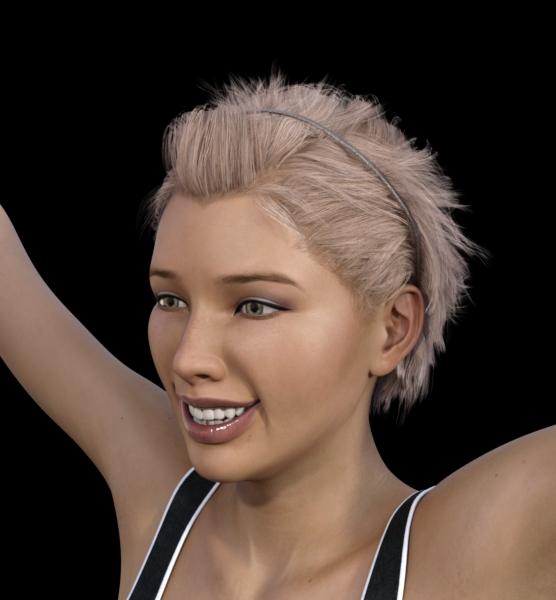 Show Us Your Iray Renders. Part V
Thanks, that's a nice looking morph. I would certainly buy any Disney-esque morphs for G3, including a Callie 7.
Show Us Your Iray Renders. Part V@nonesuch photoshop filters > camera raw > noise reduction. As you might guess from the name, also can clear up a good bit of grain. I abuse it so much. As for Star2.0's texures the only difficulty you might run into are the eyebrow textures, they can look a bit odd on non-Star figures.
@C3PO Betty Boop was definitely an influence, particularly in regards to the very low bouth and as near to a lack of chin as I could get.
@snowsultan the main base is my perpetually 75% done disneyesque morph (as seen below). One of these days I'll actually put my nose to the grindstone and finish it. A lot of the dialed tweaking is Dogz' 200 face morphs, they have a lot of general proportioning morphs wich are great for completly changing the general shape of the head.
There's also a bit of custom converted callie's body and a head morph based on decoco (pre-genesis original anime figure),
Is it possible to save the results of smoothing as a morph.If you talk about smooth modifier, yes.
1 change the figure or obj which you need to make smooth morph , as base resolution..
if your figure already posed and the item are parented, you must need un-parent the item which make morph. (keep the position)
2 check "on" "interective update" in parameter tab>meshsmoothing keep collision target,
3 export as obj, (keep default scale and axis).
4 remove smooth modifier defomation,, then import the morph.obj by morph loader pro. must set, Reverse defomation = yes.
5 it make new morph, then when you set 100% , it deform, as if it is applied smooth modifier.
you may retrun subdivide, to see better smooth effect, (if the item was sub-D and high resokution before)
it may not perfectly same (because, we need to keep base resolution,,) but almost same, and actually I often use the way.
the good thing is you can controll the strenght as morph too. (eg you can change limit, then set as 1.3, )
but at same time,, smooth modifier often fit current pose only. (then it should up-date for each pozing,,)
then mostly work about current pose and scene only.. but if you make these smooth morph with zero pose,, it may be usefulu for many purpose.
you can apply this morph with keep smoothing modifier, with different pose,, it often make more easy to fit and smooth with collision target.
=====
wuu I need to open my shop ><; good day.
Is it possible to save the results of smoothing as a morph.Is it possible to save the results of smoothing as a morph? Smoothing is nice but it slows down workflow significantly. When posing I either have to select everything which takes a minute and turn off smoothing on everything or I get a delay everytime I pose something. So is it possible to save the results of smoothing so it doesn't have to recalculate all the time.
Modeling with Lady LittleFoxI got her Hair one way back when.
She uses modo, but its not "how to model in modo" its much more "the general principles of how to model for the Daz figures" what that means is there's no "click here on the screen for what you want" but "use x tool or its equivalent in your program of choice" so you do need basic familiarity with the program you're using. (I am completely unfamiliar with carrara and hexagon personally as I am a blender user, but as long as they can do loop cuts you should be fine)
The rigging is legacy v4 style, but again because its more about the methodology and principles some of the information is still applicable (less than the modeling though) The good news is that rigging for the geneses is by and large easier than v4, a good number of things you can get away with just using the templates in transfer utility with no to minimal tweaking and this is one time the Daz wiki is actually quite useful!
So, in conclusion, If you're looking for something completely step by step for someone who's never used a modeling program, you might get a bit lost. However even if you are a beginner, as long as you're willing to supplement it with outside information and experiment a bit, theres still a lot of very useful info (particularly in regards to modelling). And at $4 its certainly not a big risk.
Novica & Forum Members Tips & Product Reviews Pt 7Okay, I may have a genius idea- or maybe not. I asked a week or so ago (and ahem, no one answered...) When doing kids from adults, the fingernails are too long. I asked how to shorten them, if there were any morphs for the nails.
So wouldn't Lune Nails work? If there's different material zones, just apply the ones with two tones, and then in Surfaces, cutout opacity the tips and you have short nails!
OR
Just use negative values (do the cog, undo the limits if needed.)
Anyone have Lune Nails and Growing up that can test on Genesis 3 females?
The only morphs for Lune Nails make them longer / round / square. And there are no additional material zones. They're just morphs for the existing nails. The idea to use negative values with the Lune Morphs, however, does work. I got the best results making the Lune Square morph negative (because that's essentially the shape of the default nail), but your mileage may vary.
Runtime DNA Merges With Daz 3DLooks like most of the "Furries for..." add-on presets and texture additions have finally appeared in the store. Of course, the "face poses" won't be of much use until the base "Furries for Melody" and "Furries for Micah" are finally listed as they contain the actual morph dials.
At least we're getting closer.
Sincerely,
Bill
Show Us Your Iray Renders. Part VAnd here's a closeup.
This is a combination of Creature morphs, the usual 'general G2M morph pack,' DieTrying's awesome freebies, and a bit of Dental Plan (namely, in making the teeth a little longer).
Selbsthilfegruppe DAZ Studio - Beispiele, Fragen, Diskussion und sonstiges GequatschePrima! Ich freu mich, dass Du jetzt loslegen kannst! (Hoffentlich reichen die 500GB Festplatte...
 )
)Die Libraries anlegen geht ganz einfach...
Du kaufst erst mal Artikel bei anderen Anbietern. Dann legst Du auf deinem gewünschten Laufwerk einen Ordner dafür an. Ich habe mit z:B. auf meinem G-Laufwerk für die verschiedenen "Kaufplätze" entsprechende Unterordner angelegt.
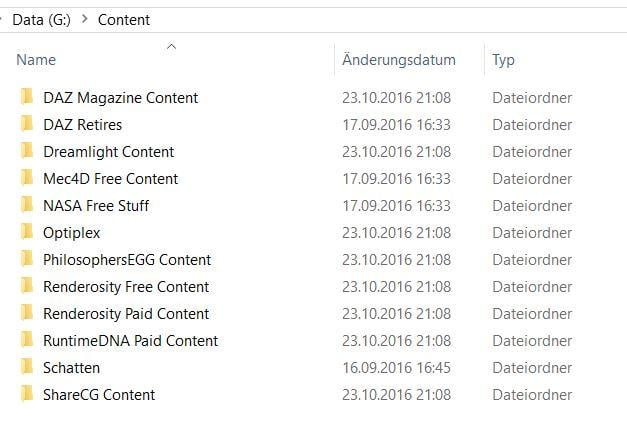
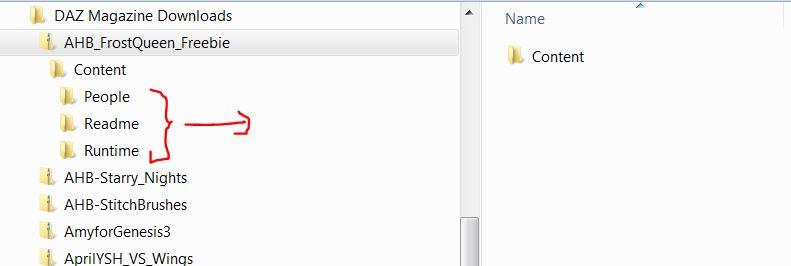
In die hinein entpackst Du jetzt deine Artikel, wobei Du darauf acten solltest, eventuelle "überordner" nicht mitzunehmen. Also, wenn das ZIP-Verzeichnis einen Unterordner "Content" enhält, wie im folgenden Beispiel, entnimmst Du nur alles was direkt darunter liegt, also hier "People/Readme/Runtime" einschließlich derer diverser Unterverzeichnisse.
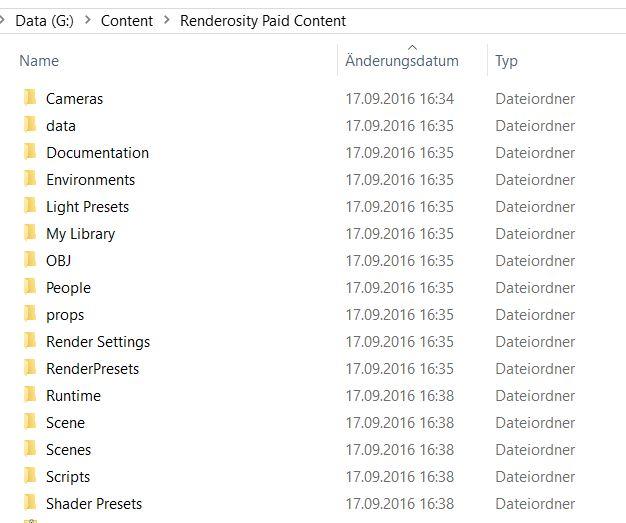
Am Ende sieht das dann ungefähr so aus, z.B. für den Renderosity-Content:
Danach musst Du dann nur noch in DS, wie weiter oben beschrieben, die Verzeichnisse im Content Directory Manager bei DAZ und Poser Format einrichten. Allerdings hat das ganze Limits - einige Morph und Anwendungen funktinionieren nur, wenn man sie im "Hauptteil", also im DAZ-Ordner installiert.
Proper tutorial to create products?Hi all, here's the situation: I have modeled some clothing, managed to transfer utility it to turn into a proper DAZ item, added morphs, but how do I turn it into a content library item? The official tutorials are very limited and not up to date, I hope to learn how to create professional items, with morphs, texture presets and all.
Thanks for your help.
Daz 3D is part of

Connect
DAZ Productions, Inc.
7533 S Center View Ct #4664
West Jordan, UT 84084Licensing Agreement | Terms of Service | Privacy Policy | EULA
© 2026 Daz Productions Inc. All Rights Reserved.