-
GOING INSANE!!! Rigging help??
Ahhh! Thank you, guys!! My big flaw was sending a MORPHED character to create the clothes around, rather than the base figure! So, with that done, I've managed to successfully use the transfer utility. The clothes now follow my figure. However...
What are the steps I follow now? I can't just use this on its own, right? While the clothes now follow the figure, surely I need to do things to - ummm, refine it? I wish I could give an example of what I meant!! Maybe skirts/dresses would be a good example, because they'd need some separate movement things, right..?
Post Your Renders - Happy New Year yallThe shading, lighting and hair are very convincing and I am almost sold on it being a photo if not for her oddly pointy cheekbones which rather disturb me, thats the morph dials not the render though so not Phill Wilkes doing as such but the PA who made those morphs which appear to be affected by the smile.
DS constantly crashes when opening my"centaur" files; error - "WARNING: libpng warning: iCCP: knownOK, to start out; my discussion title was too long; the error was, "WARNING: libpng warning: iCCP: known incorrect sRGB profile".
To my problem. I have been working on creating my own centaur using Hivewire's Horse and G3F. I have had some success but have found that, at some stage in the process, I can no longer morph G3F or HWHorse. BY this, I mean, I can dial a different character for G3F, but nothing happens to the figure. Likewise with HWHorse if I try to dial in a Mustang or Draft horse, etc - nothing happens - the figures are no longer morphable.
With the aim of trying to find when this happens, I created 2 files; one with G3F and the other with HWHorse. I then started to go through the process of modifying each figure for the resultant centaur. Using the Geometry Editor, I deleted unnecessary polygons (Legs for G3F, Head for HWHorse) - at each step, I tried several morphs to ensure everything was working. Once the changes were made and testing was done, I closed the file/s and then closed DS.
After a restart, I can no longer open either file! Both cause DS to crash with numerous "WARNING: libpng warning: iCCP: known incorrect sRGB profile" errors. Now this problem appears to be getting worse as this is the first time I haven't even been able to open the files. At other attempts, DS would crash when trying to put hair on G3F (this was once she had been modified and parented to HWHorse's chest) - but this hasn't always been the case. In my earlier attempts, I didn't have these issues.
I have used both DFormers and Zbrush via GoZ to modify both G3F and HWHorse successfully (but not as well as I wanted; hence the numerous attempts as I learnt to use DFormers and some Zbrush).
However, I have currently not even gotten to the DFormer or Zbrush stage in my centaur-creation workflow before this issue appeared.
I have attached a copy of the last startup to crash from the log file.
I'm on Win 7 64bit, 32GB RAM, 2xNvidia GTX 960 cards, DS version 4.9.2.7..........
If anyone needs additional info, lmk.
Creating Big City Scenes in DAZ StudioReally nice work on the park Rich!
 Although just skimming through the instructions, instead of doing anything with weight mapping, when I tinkered with terrain d-formers, I just created the first morph and choose not to delete it, then simply moved the field of the d-former (and can't remember exactly, think I moved the base too) and then created another morph, rinse, repeat. Goes very quickly.Gen3 Rigging Adjustment Problems
If you had already ERC freezed,, may need only remove "orientaion" ERC around eye lids rigs
1. in parameter tab, go to edit mode. then select the morph which you making.
2 r-click the morph parameter >Show in proerty hieraalchy. it open property hileralchy pane, then auto-select your morph .
3. Open sub-component.1.stage , then serch nodes from right pane. about eyelids rigs. (r and left)
4 select those,,, , ERC[DeltaAdd]: X,(Y,Z)orientation of those Eyelids nodes by click those ERC with shift,,, then "remove selected"
in my pic I already removed only about those OrientationERC about Eyelids bones, when I made this face morph. then there is no orientatioin ,,,
I usually not use "rotation" (set delta for Orientation) at all, about thoes eyelids face rigs,, when adjust rigs to the shape.
around jaws may only need to apply rotaiton(orientation) I think.
(about body morphs, you may need to set rotation, or when you check bone, fingurs nodes really ugly arranged)
GOING INSANE!!! Rigging help??First of all - you have to make clothes for the BASE Genesis 3 Female model. All morphs dialed to 0. Afterwards the figure itself will auto-generate the morphs on the figure. If you morph the figure, the Transfer Utility tool will add "another morph" on top of that, distorting your clothes.
Here's a step-by-step process for this:
1. Load the Genesis model and clothes made without the morph.
2. Use Transfer Utility.
3. As the Source, choose Genesis 3 Female.
4. As the Target choose your clothing item.
5. As the Projection Template, choose what type of item the clothes are (or the closest to its type)
6. Click Show Options>>
7. If your clothes are skin-tight or made of soft-cloth, check the "Add Smoothing Modifier" box.
8. Hit Accept.Your clothes should now be working.
In case of the clothes you sent WITH the morph active, you can try this adjustment AFTER you have done the above process.
1. If the clothes are distored after Transfer Utility, select your clothes in the Scene Tab and go to the Parameter tab.
2. There should be a sectiuon called "Actor" there that was created for the clothes.
3. Diall all of the morphs in there to 0. For example, if you morphed Genesis3 to Bethany 7, you will have to dial Bethany 7 down to 0 in the Clothes Parameter.
4. Clothes should now look normal.There is a better way of doing this, including setting up a custom morph for the clothes to fit a character. But this should be a band-aid fix.
Body Shaping Morphs for Gen 3 and Supersuitehttp://www.daz3d.com/genesis-3-female-head-morphs
http://www.daz3d.com/genesis-3-female-body-morphs
Thank you for sharing that but.. I already own all of those and I find them extremely lacking when compared to the many great morphs that Zev0 made previously for Genesis 2:
Belly Controhttp://www.daz3d.com/belly-control-for-genesis-2-female-s-and-v6
Shape Shift
http://www.daz3d.com/belly-control-for-genesis-2-female-s-and-v6
So I am hoping to see a lot more morphs for Genesis 3 which is why I specifially mentioned the pregancy morph that we only inf in "Belly Control" and why I am posting in the product suggestion catagory because I happen to already know whats available... but.. again.. thank you for your effort. Keep up the great work.GOING INSANE!!! Rigging help??You probably want "General Weight Mapping" rather than Triax.
The Transfer Utility automatically uses the weight mapping method of the parent figure, so if they follow kotkbliss's advice, they're golden - though they may wish to tweak the weight maps if they get pokethu, or apply a smoothing modifier.
Released! Malachai for Genesis 3 Male (Commercial)Malachai's Head Morphs utilize the Male Head Morph Pack for Genesis 3, while his body morphs stack: Genesis 3 Male Body Morphs, with a layer made from Merchant Resources and Hexagon, and the last is Michael 7 for Genesis 3 Male for a more defined shape. You can use just the base, the base with the custom tweaks, or all three.
Material Hierarchy settings for the model and anatomical elements as well as the separate material files, long with individual materials for arms, legs, torso, and his face along with the anatomical elements. There is a no brow optioin, 4 individual eye colors, a bloodshot sclera option and three fantasy eye materials. Two leg tattoos, two arm tattoos and a back tattoo with mix/matching for different combos and an all tattoo setting.
Materials are Iray based only.
GOING INSANE!!! Rigging help??The quick and easy way with clothes would be to use he transfer utility.
load your G3 figure
import your clothing object
select the clothing and go to edit -> object -> rigging -> convert prop to figure and choose triax (I think)
then go to edit -> figure -> transfer utility
In the transfer utility on the left upper drop down box for source, select the g3 figure
in the right dropdown choose your clothing item for target.
clith ok and when it's done, you'll have a rigged clothing item that will "fit to" your g3 figures.
Animation Club for Carrara , Week #2 - Spooky Hollow. Ready To watch..Updated cat rig
https://dl.dropboxusercontent.com/u/7907045/Cat_G6_rigged.car
rescaled the model to "roughly" cat size
Re-rigged,. with contraints,. (probably not correct limits)
Rebuilt morphs for the Eyes closed,. and individual Left / Right eyeclose / wink/blink.
changed the default model with the mouth open, and added a morph for Mouth open. and a slightly more open screamy mouth
Added morphs for eyes (look left / right / Up / Down)
Flash Sale Alerts IICool Malice and Mayhem, been contemplating em for a while; at that price, it's worth seeing if I can transfer em to G3
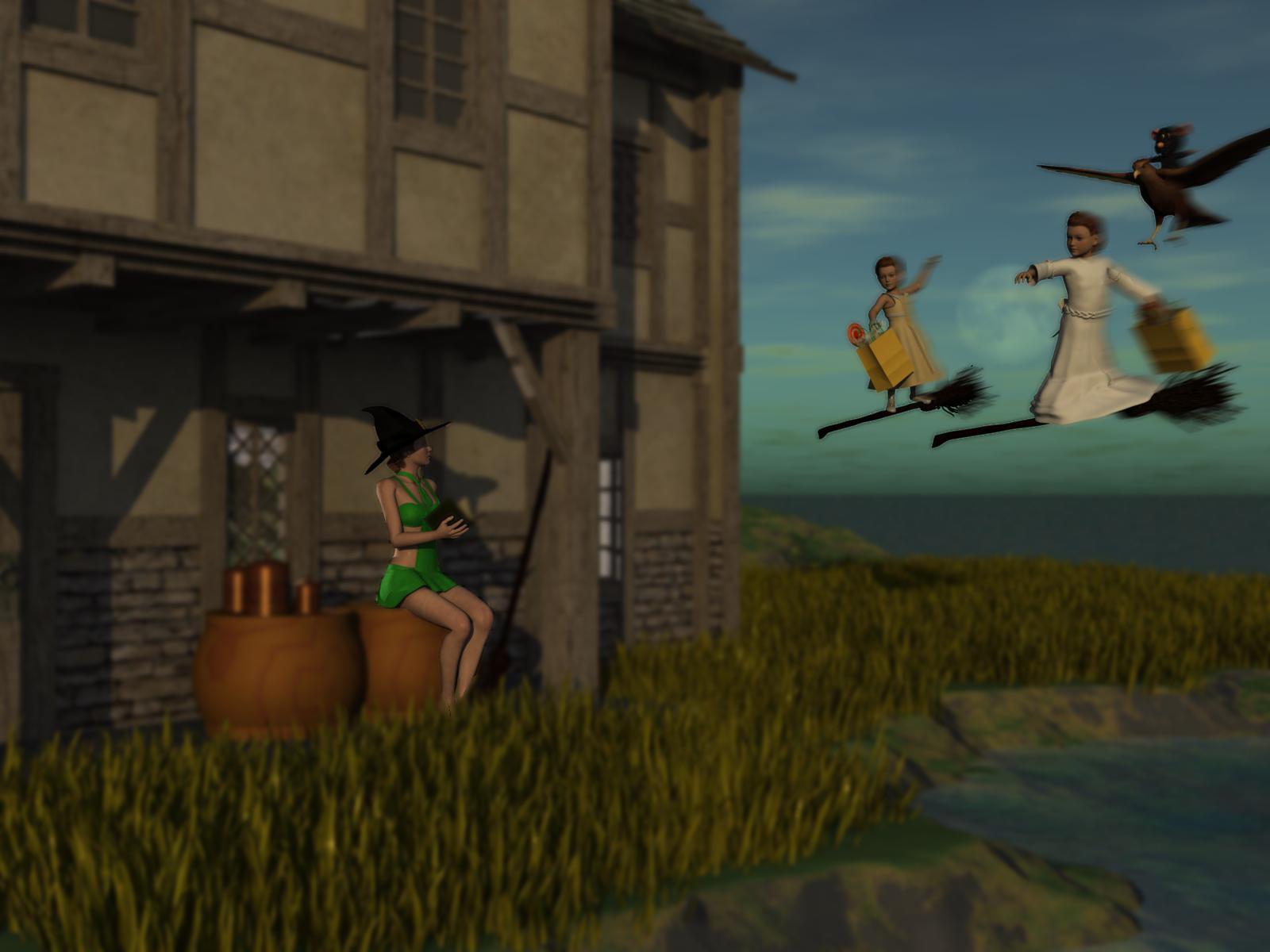
3D Art Freebie Challenge -- October: Double Bubble Toil and Trouble -- Entries ThreadWitch's Brood
Freebies from website requiring registration and sign in have an *.
*Jims Book https://www.sharecg.com/v/66786/browse/11/Poser/20-Page-Poseable-Book
*Galadrieal Dress for K4 https://www.sharecg.com/v/43305/browse/11/Poser/Kids-4-Galadriel-Outfit-Dress-or-Tunic
*Fantasy House 3 https://www.sharecg.com/v/59807/browse/11/Poser/Fantasy-House-3
*Ratty Mouse http://www.sharecg.com/v/47414/browse/11/Poser/Ratty-Mouse
*Hawk and Poses http://www.sharecg.com/v/49422/related/1/3D-and-2D-Art/3D-Hawk-Model-Still
*Endor Braids for V3 and V4 http://www.sharecg.com/v/64115/browse/11/Poser/Endor-Braids-for-V3-and-V4
*Easter Sunday Dress for K4 http://www.sharecg.com/v/61167/browse/11/Poser/Easter-Sunday-Outfit-for-Kids-4
Freebies From Daz
The Callie Outfit for V4 http://www.daz3d.com/the-callie-outfit
Cannisters and Pans http://www.daz3d.com/canisters-and-pans
From that other store's freebie section
*Witch's hat and broom https://www.renderosity.com/mod/freestuff/witchs-hat-and-broom/76676
*Helloween candy https://www.renderosity.com/mod/freestuff/hell-o-ween-candy/76585
From Most Digital Creations
V4 Halloween Head Morph http://www.most-digital-creations.com/free_poser_poses_textures_morphs_props_15.htmPurchased
Travelers Plants http://www.daz3d.com/rdna-foliage-grass-clumps-1
Edited Realistic Sky in Carrara
Edited Terrain in Carrara
Base figures
2 K4s and 1 V4.
No Counts
Primitives
 HeadShop OneClick Submitted to DAZ - Best in Class! (Commercial)
Ati said:
How do you make this a whole head? What happens to the parts that are missing the texture?
Well this is why I asked to see the character morphs with DAZ Genesis 2|3 Default textures because almost all of us have not the needed photography equipment, or the access to the person we are making a morph of in most cases. I realize that one's skin tone, eyebrows, hair colors and style, wrinkles, and blemishs are the way people instictively quickly ID each other and so the morphs will be less convincing without the photographs used to make textures but it would still be nice to see.
As far as morphs with Genesis 3 and Genesis 2, well they look almost equally good to me, with maybe a slight edge to Genesis 3.
Morphs not working after merging fitted geometryIt seems that there is no efficient solution to this problem, I will ask DAZ if they have plans to fix it in an upcoming release.
I havent tried saving it as a different figure but I will try that, for now Im in a slow process if ever I need to export again with a different morph, I have the figure saved before the merge, I then add my morphs and merge again. At this point I need to add any cloth and hair to the figure and export again as a fbx.
Im still waiting on them to respond to my ticket.
Ghastly's Ghastly Freebees. (Ghastly's Gizmo-trons)https://www.sharecg.com/v/86412/view/21/DAZ-Studio/Sholo-Sweater-Outfit-Lolo-Hai
A sweater outfit for the Sholo male morph for Lolo Hai.
Clothes with zip (G3f)Thx i have found the problem morph. It was the teen josie body morph. I just set it to 0 now.
New here :) Question about Genesis 1 & General AdviceHi I've made a mistake of purchasing the genesis 1 morph bundle and I really wanted to use it since I dont want it to be wasted, I purchased it because I thought genesis means it can be applied to both genesis 2 and genesis 3. So my question is, whenever I'm using the genesis 1 why doesnt it have skin, eyes, or the other details that make it look "human"? I mean it just looks like a mannequin and even if I render it, it still looks like a mannequin. Just side questions too, what do you guys suggest for a newbie like me to do? I mean I feel like in order to be able to create a lof good 3d art I need to purchase a lot, Ive also looked into the platinum club thing but I just want to know what you guys did when you were just starting out, what contents do you guys suggest? Genesis 2 or Genesis 3 contents? and tutorials? I know I asked a lot but I just want to ask these in one post lol
How I can pose a model that I imported as .3ds, .max, .obj etc.You can't without rigging it and it isn't easy. This will give you an idea of what is invloved
http://www.daz3d.com/forums/discussion/122171/a-rigging-tools-pdf-guide-nearly-complete#latest
You can try the transfer utility to copy an existing rig for personal use inside DS, but I find it rarely works well.
Gen3 Rigging Adjustment ProblemsI'm sorry if this toppic has already been discussed, I couldn't find it.
I've created a few custom face morphs for Genesis 3 female - eye space, size, pull up and down etc. - but I can't adjust the rigging right. Initially the bones do change their position correctly, but after I use ERC freeze, adjusting the new morph dial makes some bones go crazy, they rotate all over the place. Specifically the bones that seem to be controlling eyelid movements and squinting are causing such problems. I've searched for tutorials, but they're no help. They're all for G2, and G2 skeleton doesn't have those bones that are causing problems here. Has anyone had this problem?
Daz 3D is part of

Connect
DAZ Productions, Inc.
7533 S Center View Ct #4664
West Jordan, UT 84084Licensing Agreement | Terms of Service | Privacy Policy | EULA
© 2026 Daz Productions Inc. All Rights Reserved.