-
It's Raining Men Again! Winners Announced!!! Over in the Art Studio!
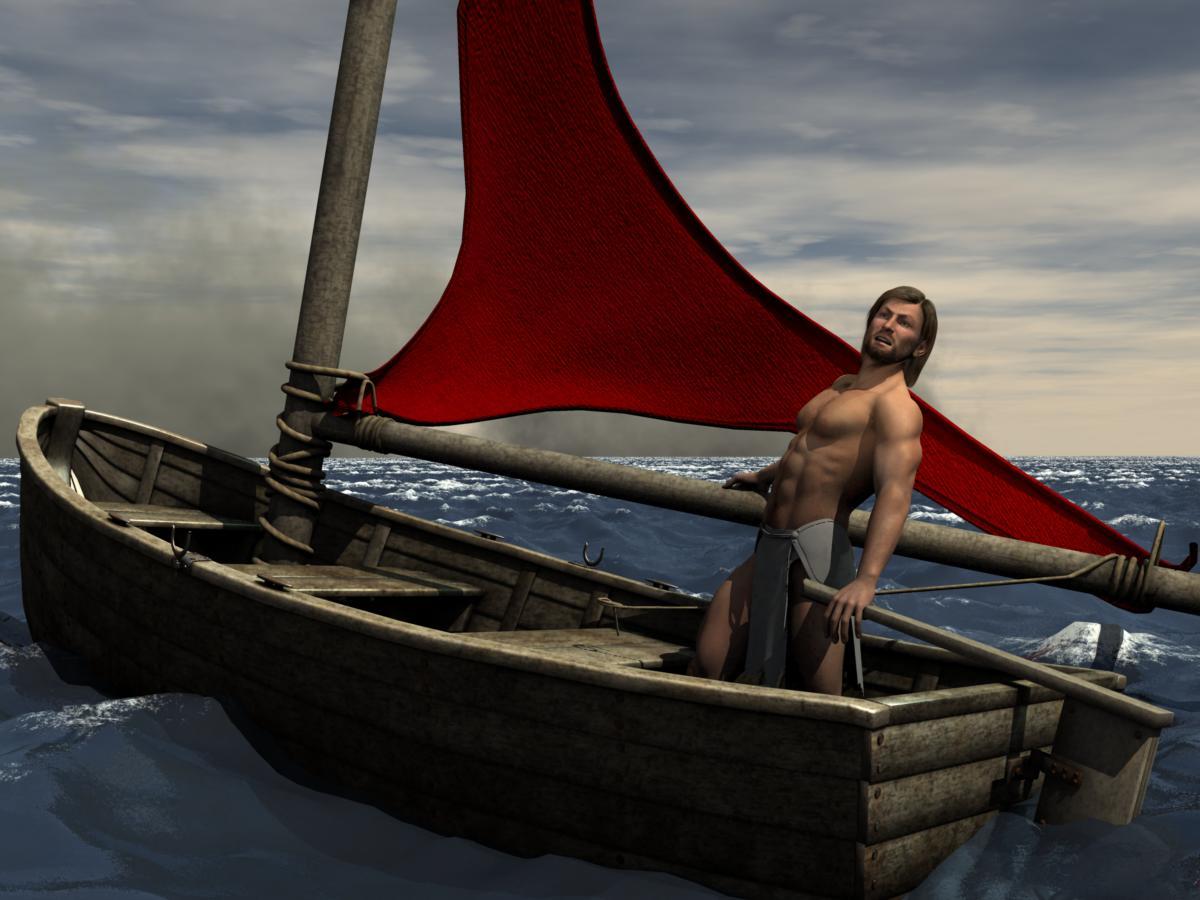
Last year, there were some images that had women in support of the main male character. For example, Disco David 5 by me. Also, last year, we were encouraged to repurpose an item designed for female figures for another use. Additional category if included repurpose. For example, Disco David 5 is wearing an outfit designed for a female character but converted with the transfer utility. Ulysses's boat is being powered by a sail that is actually a woman's panties.
I am neither recommending nor disparaging last year's rules.
.

.
 Buy Something That Doesn't Work in Carrara? Post your Questions and Workarounds here. (please)
I am having more frequent problems with the Daz Studio transfer utility. For example, I got a V4 outfit by stzham (goes with Hamelian poses) from that other store site. I loaded in Studio and used the ransfer utility to make compatible with G2F and saved as duf. The top works fine. The skirt won't load as Duf even though it loads in its default form. Didn't Jonstark or someone have a file edit solution
Sliding feet in AniMate walk cycles and movementsMy first warning is that Animate2 is barely compatible with the Genesis3 (current) character family, and none of the 'big users' of animate2 that I've seen discussing the tools in these forums will touch G3 with it. There are a few hacks to make G3 more compatible, but... that says a lot about the state of the product.
I have it, mostly like it, and happily use it with my older characters (Genesis1 and the Mil4 characters V4/M4) with the DAZ/Go-figure add-ons "keymate" and "graphmate". It also works well on non-humanoid characters and props/figures (there are aniblocks for a solar-system product in the store).
The older discussions are correct in that Animate2/aniblocks still don't have a 'nice button' (heh) solution, and no, I don't see much activity with it anywhere I've looked (and I've been watching for any news for a couple of years). A bunch of us are hoping, but not betting.
That said, the ideas, tools, and result of someone who uses animate2 with the keymate and graphmate add-ons, and knows what they're doing can build a pretty powerful library of blocks that can work to good effect. There are pinning tricks ('active pose' tool) and puppeteering recording features that make it very flexible and powerful, but it is an investment to figure out the 'DAZ way', especially grocking the interactions between the animate and Daz Studio timelines.
The existing aniblocks can be converted to the newer G1/G2 characters with add-on scripts ($), adjustment morphs (free), and strategic manual edits, and it DS can import and map BVH motion files to the new characters as well as most tools.
Personally, I do my animation work in DS because of the animate2 and puppeteering tools, but I usually export them in various formats for use in carrara, iclone, and poser, depending on what I'm doing. There are fairly decent workflow paths to and from most external tools (FBX/alembic/BVH/PZ2/collada/etc.), but it's amazing how almost every transfer requires some sort of hack/adjustment on the sending or receiving side to make it work as you'd expect (nice buttons are not so common).
Lastly, the ONLY two indications I've seen from DAZ that they are interested in animation over the long-term, is their recent set of youtube videos on DS animation and animate2. That and the plugins/tools continue to work through each DS version upgrade.
For that lack of activity (4+ years w NO DS animation function additions or plugin version updates), and the lack of G3 support, I would love to say it's a good path to take with a long life ahead, but I can't. Maybe they've got a big animation skunkworks project in the backrooms, but that's not how I'd bet.
I also use DAZ's bryce, carrara, and hexagon... Do a search on "Is XXX alive?" and you' get a feeling for how forthcoming DAZ corporate is with long-term product roadmapping transparency. I like those tools (and animate2/keymate/graphmate) as they are, but I think that's all we'll ever have from DAZ, given the information we've been given. Daz Studio is the most productive tool for them to sell content, and that is their business, so that's where they invest. I dont' begrudge them that, but I won't Rah-Rah the story, just because I use the tools. I know better than to hope for change.
Good luck with this and other feedback. Again, I like the tools, as I've invested and learned them, but with no pinning button, and no updates, and no word from the company on updates in 4 years...
It's a good question.
cheers,
--ms
Question - preferred setup for furniture props with drawersWhat is the preferred arrangement?
It is much easier to work with if the moveable items like that are individual objects instead of just individual groups of the same object. So, separate them out and parent/rig them in your chosen application.
It's generally best to never use morphs for this kind of radical movement of what are, after all, individual objects. For instance, in some applications, depending upon the rigging, morphing the object to open a drawer or cabinet will cause the application to recalculate the entire object's center. ie: Open drawer with simple morph, object jumps two feet backwards... It's also not intuitive to use morphs for this and users would probably like the ability to hide the drawer, rotate it, etc. And, for animation, having it rigged/parented as a separate object is much more desirable as well.
Egypt outfits for G3MJust a heads up, on the Anunnaki outfit, for some weird reason the left bracer doesn't seem to accept shaders or textures that are iray compatible. The right one does just fine but the left one renders as if it still has 3dl shaders on it. It's really weird, since this vendor's stuff is usually perfect and I've never had any trouble with their other stuff in iray. All the rest of the outfit is fine though.
That is because the material zones are wacked. the right bracer has seperate ones for the various parts, the left bracer is all in one which is really odd. They both will take IRAY shaders, just not specific materials for specific areas.
That's unfortunate, since I could export it has an obj and fix that in blender, but then I'd lose the rigging once I dumped it back into DAZ. The only thing I could do in DAZ was use the geometry editor to assign the appropriate surfaces the correct materials, but that won't save as a material preset. I could save it as a scene subset though.
Ah well.
You can use transfer utility to transfer rigging from the original after re-importing the fixed obj. Easiest would probably be using "replace source with target"
Selective autofollow? (beard vs. teeth - hair vs. ears)You can save the null-morphs from option 2 via File>Save as>Support Assets>Morph Asset.
It would, I think, be possible to write a script that would generate null parameters for all morphs with a set path - though the moprhs would need to be zero to start with. Not going to say I will do so, however - my list of things to be done is growing faster than I can do them.
Thanks for that info. Got me thinking:
(edited to correct speculation):
Mechanically, doing that asset 'save' as you described, of the manually created null morph properties for each that I wanted to protect, would simply create a bunch of small DSF null-ish morph property files in the item's (e.g. teeth's) existing "data/..." subdirectory (one per morph, right?), leaving the original item's morphs alone, right? I would think that same set of null 'dsf' morph files might be useable as a collection on any other item (e.g. hair) that you wanted to protect in the same way, right? Simply copy the set (or subset) of the null morph dsf files into the proper target item's morph directory? Maybe an ID-string-edit or two across the series to bind the morphs to the target item? I know D3D's DSON editor can do that sort of edit pretty easily, once the file exists. or 'sed' for the *nix savvy. hmmm.
That might also be fairly practical, because once you established which morphs you wanted autofollow to ignore, you could create a folder/library of them (generic) to copy from (and/or make some effect-specific zip collections) and not have to browse through the zillions of figure morphs using a GUI, possibly missing some, manually creating the null-morphs by hand. Add new null-morph files to your collection when you add new morph-packs, etc. I'm liking that direction, unless I'm forgetting something about those dsf files.
If my theory is viable, I could see all sorts of scripting options making the creation and management of such 'hide-me' morph-files being handy. Almost a product idea there: 'not-o-follow'... With a front-end list-picker like the GenX2 'Morphs' tab/picker, that would generate/list all possible morph-ignore dsf's in a to-the-side library, and enable/disable them per-product/figure with the chooser. Reload the figure and test/verify, etc.
(nice idea but the 'null' morph files reference parent items, which breaks my scheme)
I did a rigidify test with my teeth, and it worked for all of the standard morphs, but simonWM's expressions didn't work completely, which is weird, but I don't need those to move forward. Curious why his expression morphs could override the bounds of a 100% rigiditifide figure, but so be it.
Moving forward, Richard, I'm going to try your null/save (option2) advice on a morph that I want to hide, and see if it appears as I speculated above, and see if I can replicate the rest of the set, using the test file as a template, etc. I think I can make this work now, and hope others can use these ideas as well.
Update: per your suggestion in another thread, I tried option2: created and saved a 'null-morph' and it seems to work as expected. It's located in its own separate folder near the original item morphs folder, which is good. The new null morph file is sparse and the id/name/label fields can be edited in copies of this file to quickly create a bunch of these 'hide-me-from-autofollow' morphs if I want to.
cheers,
--ms
Morph bar helpNo, the closest you'll get is the Genesis Create Morph Bundles. That is the original Genesis, when male & female were one mesh.
http://www.daz3d.com/genesis-creature-creator-bundle
Then you could do your own morph additions and improvements once to dialed to the cat features as much as they'll go to be more like a real cat. I think probably you'd have to do a lot of additional morph modeling to get the body from human to truly cat like.
Morph bar helpIs there any way to morph a human into a cat? like some kind of slider bar for that? Is there an addon or something that can be downloaded, if so, can you post a link to it? preferably a free download link to it. I seen enough of those $100 links and such. Thank you for time.
Selective autofollow? (beard vs. teeth - hair vs. ears)You can save the null-morphs from option 2 via File>Save as>Support Assets>Morph Asset.
It would, I think, be possible to write a script that would generate null parameters for all morphs with a set path - though the moprhs would need to be zero to start with. Not going to say I will do so, however - my list of things to be done is growing faster than I can do them.
Iray revelation!Also remember that the scene file does not contain the textures or the assets (the figure and morph data, etc.) so it is a totally ineffective indicator of memory use.
No one asked me - Diomede screenshots on whatever - Warning AI Discussion OKVicky is wearing a combination of the VAL Helen and the Tanya outfits, both for V4 and converted for use with G2F using the Studio transfer utility. The G2F is 1/3 V4, 1/3 V5 and 1/3 V6. The set is DM's circle of light, which is washing out the scene as if I had ambient too high. Suggestions for the lighting most welcome. Vicky's hair is Carrara dynamic and I think it is worth posting the workflow.
Selective autofollow? (beard vs. teeth - hair vs. ears)Hi all,
Digging though the forums I've found pieces of the answers but hope someone can help bring it all together for me and future generations... this is a bit long because it also serves as a summary of options/trade-offs that may be useful to others that run into this.
Base Issue:
I don't want the teeth to autofollow the face morphs, but I do want the beard to autofollow... Fixing one seems to break the other.
Context:
DS48, Blank Genesis1 base w Evolution morphs available, Toon Amy Teeth (http://www.daz3d.com/toon-amy-for-genesis-character-hair-1) , Unshaven Beard for Genesis (http://www.daz3d.com/unshaven-beard-for-genesis).
Related Uses:
Any head related figure elements that you may wish to adjust/disable/enable the interactions w/ auto-follow, e.g. hair-vs-expressions, eye-brows, ears-vs-hair, masks, etc.
What I 'know':
To turn off the autofollow in parented/autofit children figures (e.g. teeth), I've found three ways (tnx mr. haseltine/bejaymac):
- option1: I can load a Genesis1, add the teeth, add the beard, crank up all of the offending facial morphs on the genesis1 figure, then on the teeth, unhide the hidden morphs in the prameters tab and slide the offending morphs back to zero, and somehow(?) save it for future use. (Is it possible to save the teeth-only with these zero-d settings for arbitrary future use on other characters? - so far, all of my teeth-only saving efforts lose the 'zero-ing' steps).
- option 2: On the teeth, I can create a set of 'empty' morphs as place-holders using the same 'name' (and label?) of the offending genesis1 facial morphs, that then prevent the DS auto-follow from creating its autofollowing morphs in the added item (e.g. teeth) - this is a bit cumbersome, but viable - not certain how to save this correctly, but I gather I end up creating a new set of teeth (preset and assets) in my library - I don't want to break/update the original teeth)
- option 3: On the base genesis1 character, *before* I 'attach' the teeth (parent w/ autofit?), I can disable the autofollow on all of the genesis1 figure's offending facial morphs in the parameters tab (edit mode), and then when I attach the teeth, those morphs won't transfer autofollow to the teeth. (I don't know how to best save/access a new genesis1 figure that has been tweaked this way as an 'asset' without mucking up the real genesis1 character, nor can I figure out how to save just the new non-auto-follow teeth with the desired zero'd settings)
So. If my three options are accurate (?):
The first option is OK, but I can't seem to save those teeth settings in a re-useable way. Without disabling autofollow in all of the offending base genesis1 figure's facial morphs each time I load it, any version of my saved teeth that I re-add still seem to auto-follow (bad). I would guess saving a scene (or subset) of the adjusted genesis1 with the added/zero'd teeth would work, but loading that later, and adding something like the beard to that would break the auto-follow on the beard.
The second option is probably the way I have to go - adding null-morphs - but this suffers from the possibility that any future facial morphs added to genesis1 in any of my libraries would also need to be manually added to my tweaked teeth as null-morphs as well, right? Viable, but easy to forget - is there a tool (e.g. D3D util) that makes this easier for adjusting groups of all of the face shaping morphs that I may use now or later?
The third option (disabling autofollow in some of the base figure's morphs) would work for fixing the teeth issue, but the beard or any other facial add-ons would also not inherit the desired facial morphs. Unless maybe order matters, and I 'attach' the beard *before* disabling autofollow in the genesis1 figure (beard gets auto-follow), then disable the genesis1 autofollow morphs, then add the teeth... (?) Can I save all of this character adjustment as a scene-subset (with figure, teeth, beard, etc.) and use it later...?
I could try these options and report back here, but maybe I've missed an obvious best-practices approach/tool, etc. for this, so I'm looking to any experts for guidance or pointers before hacking through the options.
Thanks in advance,
--ms
Morph editingChanges made and not saved as a morph asset should be local, affecting only that scene.
Poke Away 3 For Genesis 3Hi Daywalker03, there are indeed tools in DS which can be used to fine tune the fit of a clothing mesh to a figure mesh, each has its strengths and weaknesses:
1) Autofit: This is automatic and works well if there is not much difference between the morphed figure and the original figure that the clothing was made for. If the difference is large then autofit can cause considerable distortion to the mesh.
2) Apply a Smoothing Modifier: This is usually very good but cannot always cope with the distortions caused by Autofit. It does have two parameters which can be changed which generally improve things a bit, namely Number of Smoothing iterations and Number of Collision Iterations. Increasing these can help but also require resourses and can cause lag, so best only use them prior to render... if they achieve the desired results.
3) deformers: Useful for performing localised mesh changes. The problem here is that the region of influence is always a sphere witha fixed rate of falloff. This means that multiple adjustments (eg poke-throughs) requre multiple deformers. This is doable but time consuming and adds to the complexity of the scene which can affect the performance of DS. The deformer is limited to scale, move and twist. For most purposes this is ok, but if the mesh has been badly distorted due to "extreme" pose positions or Autofit (bless it's cotton socks) then a deformer may not help much or even make maters worse.
4) Weight maps; theoretically you could make a weightmap to correct poke-through. Good luck.
What is missing from this tool box is a set of brushes that could be used to directly paint away mesh distortion in real time. In addition to the usual "push and pull" brushes there are also a couple of brushes which could quickly solve problems that none of the above tools seem to be able to; namely a proper "smooth" brush to get rid of mesh distortion, a "shrink to target" brush to make clothing tight fitting in the places you want it to be tight fitting, a "loosen" brush which would do the opposite of shrink, that would be great for poke-through, and maybe a "Wrinkle/Crease" brush which would allow you to put wrinkles, creases or folds into clothing. Brushes would be quick and easy to apply and get instant results with no extra overhead for DS to cope with, as the brushes would create a new morph.
Morph editingThank you!
Option number 1 works independently though I understand now when you say a smooth transition might be an issue. But I notices that the modification has effect outside of the favorites scope. If I save the project, will the morph modification be permanent or just affect that scene? I'm guessing that I'll have to work on option 2 in order to make that morph stand alone a to be able to save it independently for future use? I'll look around the web for instruction on how to use the morph loaded pro.
Very helpful Richard, thanks again.
Poke Away 3 For Genesis 3A much better solution would be to make a morph in Hexagon or Blender or Zbrush and then apply that in DS. Repeat that untill all the poke throughs are gone. This works but is time consuming.
This is how PA's make fits for specific body shapes of items they sell, though they actually export specific shapes to their modeling tools, then create a slightly modified version of the original mesh that fits without poking through and import that as a "morph" for the item mesh.
An even better solution would be to have a plugin for DS which provides mesh brushes so that in real time in DS you can brush away the poke through by moving, smoothing, expanding (as appropriate) the clothing mesh. It would take seconds and provide immediately visible results. Unfortunately, neither DAZ3d nor a PA has made such a plugin. A pity really!
This is probably because the fine tuning of the mesh can already be done in DAZ Studio with existing tools, since poke-through is often a misalignment of the item's weight mapping compared to the non-standard (or unsupported) morph of the base figures.
Gen3 Rigging Adjustment ProblemsThe problem is, mostly about Gen3 facial rigs around eye. it never happen about gen2 or gen2,, because,, only genesis3 have those facial rigs.
there are group about upper and bottom , eylids rigs. then about under eyelids rigs are orientate z 180 alerady..
(I can not see any practical meanig, to set under eye rigs like that)
even though you select only about r eye (influenced node) , or l eye, those rotation often return 180 to around 0, when you adjust rigging to the shape.
then when you add morph, those rigs rotate with Z axis. maybe there are still some nodes,, z orientated 180 around,, (without clear reason) or,, about x, y. such way. then when adjust rigts to the shape,, they turn oposit.
That's pretty much it. I would also add that after fiddling with it for a while I've spotted which ones get messed up. Basically, there are eight bones around each eye: inner, upper inner, upper, upper outer, outer, lower inner, lower and lower outer. Out of these the upper trio have proper behavior after ERC freeze, other prefer to perform pirouettes every time I move the dial. I've only managed to deal with them by making manual adjustments.
Are you adjusting the eyelid bones separately? If you are adjusting those rigs with other facial bones, they are going to flip when adjusted. That's why I mentioned to do the facial bones in passes.
Runtime DNA Merges With Daz 3DYeah, the "head poses" in the add-on presets like "Fox and Wolf", "Rabbits and Mice", "Bears", etc. are rather useless without the base package Kerya referenced above. Of course, the textures will apply, but Melody and Micah will retain their base kitty/mousie features. Conversely, one can obtain the various "orders" and "families" with the base package as it comes with the morph data and a crapload of "preset" face and tail poses without needing the "add-ons". (You just don't get the textures.) that may be one reason the "add-ons" were released first, hoping to obtain a few more sales that might have been lost if the base morph set was released earlier.
Really, they kinda' need to go "hand in hand", but what is one to do?
Sincerely,
Bill
A greatly underrated DAZ creature...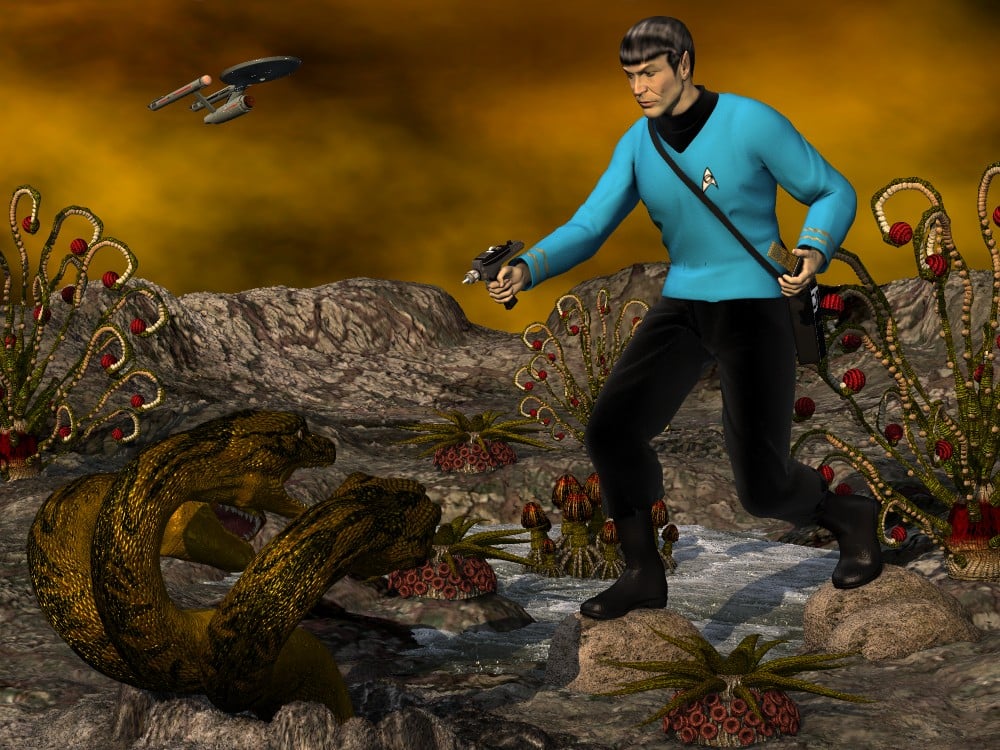
When Leonard Nimoy passed away, I felt motivated to complete a scene that had sat unfinished for quite some time. My goal was to interpret the 1974 model kit (designed by Aurora (known for its various movie monster kits) and distributed by AMT in the US), expanding upon and enhancing the elements of the kit. Yes, the original version of the assembly kit included a 3 headed space hyrda and Mallen Lane's mythological beastie proved the best choice. Funny enough, Lane's Sea Dragon would also have worked as the head and its morphs are nearly identical to those of the Hydra. Because the model kit depicted the monster's heads all springing from a central neck, I had to use three copies anyway, hiding all body parts except for the central neck and head.
Credits
Michael 2 P4...DAZ.com
Face morph...Porthos
Uniform tunic...XCalPro
Uniform pants...XCalPro
Uniform boots...XCalPro
Tricorder...XCalPro
Phaser...MechMaster
Communicator...MattyManx/Sgreco
Spock hair...Mylochka
Dragon's Keep...AntFarm
Twister sky-dome...AntFarm
RDNA XenoFlora...Traveler
Hydra...MallenLane
Enterprise...MattyManx/David Metlesits*** *** ***
Sincerely,
Bill
How to delete a morph knowing his name ?thanks Richard,
well it looks like it's more a property here that drives a morph
when I import a morph from Zbrush, Daz creates a group, let's call it Zbrush, and put inside the name of the morph
if I go in edit mode I can delete the property with Delete Selected Property
is there a way to do the same with scripting ?
thanks
Daz 3D is part of

Connect
DAZ Productions, Inc.
7533 S Center View Ct #4664
West Jordan, UT 84084Licensing Agreement | Terms of Service | Privacy Policy | EULA
© 2026 Daz Productions Inc. All Rights Reserved.












