-
An Attempt of a "Limited Time Freebie" Message Only Email Alert Thread
I got this http://www.daz3d.com/wicked-women-2-for-v4 but it doesn't work in DS. I wonder if it is only me, i used manual install and file is 2mb, everything looks good except that morphs doesn't show up on the V4 figure. I just now have noticed that it say Poser for compatible software :/.
They are likely Poser binary morph .PMD files. If you have Studio 3, there is a plugin to allow their use, but it was never updated to work with studio 4.5 and later. You would load them into V4 in Studio 3, then save V4. The plugin can be downloaded here:
http://www.4shared.com/dir/4851309/fc76215/DS_Plugins.html#dir=E03-3f7D
Infinite Insanity - There's ALWAYS Another Sale! (Daily Sale Talk)So... on the latest two day, one use only RDNA giveaway...
I saw Vanilla Sky and jumped on her...figuratively speaking of course...
Good choice! I forgot about that one. If they do the coupon again, I'll definitely grab that.
Vanilla Sky and Oxygen have been my favorite RDNA purchases. They're simply amazing, and transfer quite well to G2F.
Thanks, that's very good to know!
Reminder: Today is the last day for RDNA's store on their old site. If you've got a few things left on your wishlist that didn't migrate over, grab them today! I picked up the Kali bundle I'd been resisting, plus a few excellent pose sets by A_ that seem to go with the Art of Ballet sets. I've posted a few renders here in my RDNA Bundles thread.
Infinite Insanity - There's ALWAYS Another Sale! (Daily Sale Talk)So... on the latest two day, one use only RDNA giveaway...
I saw Vanilla Sky and jumped on her...figuratively speaking of course...
Good choice! I forgot about that one. If they do the coupon again, I'll definitely grab that.
Vanilla Sky and Oxygen have been my favorite RDNA purchases. They're simply amazing, and transfer quite well to G2F.
Hm, I hadn't given those much consideration due to the V4 component (my V4 library is plenty large enough, lol) but this might make it worth my wild. Thanks for pointing that out!
Infinite Insanity - There's ALWAYS Another Sale! (Daily Sale Talk)So... on the latest two day, one use only RDNA giveaway...
I saw Vanilla Sky and jumped on her...figuratively speaking of course...
Good choice! I forgot about that one. If they do the coupon again, I'll definitely grab that.
Vanilla Sky and Oxygen have been my favorite RDNA purchases. They're simply amazing, and transfer quite well to G2F.
Movement Morphs and Pose SetsPersonally I really like the idea of clothing and accessories with movement morphs that match specific poses sets. For instance Stonemason's Venezia Suite bed sheets match several sleeping pose sets out there which is very convenient. What I do find a bit off putting is when I get a nice set of hair or clothing geared to a pose set with non utilitarian uses (for me that is primarily modeling cheesecake sets). So in case any PA's might be browsing the forums, what are some of the pose sets out there that you Daz users would most like to have hair, or clothing morphs for?
Also understand this is just wishful daydreaming, and not intended to infer that anyone expects PA's to go through the toil of adding morph sets, but rather a suggestion that if anyone is inclined to do so, these are some of the pose sets we'd really like to see morphs for -- so nix the complaints of forum users asking for unreasonable requests. This is all in fun.Kanzashi Hair Requirements?I haven't tried every morph, because there are a lot of them. I don't see any dependency on other hairs at all. It must be an error on the product page.Geografted heads possible?A morph cannot rework the weight maps, which limits its usefulness. A GeoGraft can do anything, though as mjc notes it's a lot more work.
Expressions can, however, be worked around with a morph - the way a shapes like Aiko and the Girl do it is by having a correction morph that is slaved both to the expression and to the shape, so it comes in only to the extent needed.
Arms. legs, torso...geografts for those parts are prety easy, compared to working on a head replacement (adding parts...like horns isn't so bad).
How to transfer V4/M4 character on Genesis/Genesis 2?Yes, as long it's a morph for M4, you should be fine.
Geografted heads possible?A morph cannot rework the weight maps, which limits its usefulness. A GeoGraft can do anything, though as mjc notes it's a lot more work.
Expressions can, however, be worked around with a morph - the way a shapes like Aiko and the Girl do it is by having a correction morph that is slaved both to the expression and to the shape, so it comes in only to the extent needed.
Kanzashi Hair Requirements?just saw it's happening to other products too clicked on the new on the fringe for g3f and the box that comes up lists required products always a lady for g3f don't say that on the product page could this be happening to a few others?
oops my mistake just appeared on the page you need this though I'm positive I didn't see that before but I don't actually understand why this outfit requires a product that are poses
When I bought it last night, there was nothing about On the Fringe needing Always a lady. As far as I'm aware, the only PC+ item that says about Always a Lady, is the morphs add on for the Hinata Dress. I bought the dress but not the morphs because I don't have the poses.
So, to check it out, I've just loaded On the Fringe into Daz, and I've had no messages pop up about the Always a Lady poses.
EDIT: It's got morph dials (or are dials only in Poser?) for Always a Lady Poses. There are also morphs for the Fashion Model poses,
(Apologies for the double post)
Avoiding creating token charactersah, true, but if that is the line of reasoning we're going with, why do we need more morphs, or any more generic characters at all, since we arguably have the tools to spin many of these characters if someone wanted to?"
For the exact same reason we need multiple Modeling Apps
or image editing&Paint programs
because of the unlimited amount of variety in a humans appearance no one or two "morph sets" or "Character presets" are going cover all of the variations hence so many in the marketplace"The answer is CONVENIENCE. And some of us who render ethnic characters, or would like to, wouldn't mind having the same convenience as everybody else. "
And those who choose to depend on PA's to produce every ethnic or body type are Limited to whatever the PA's decide is worth risking for a $$Commercial product
I personally consider that a creative LIMITATION "hobbyist or not
I Prefer the CONVENIENCE. of using the tools within daz studio( Morph sliders) to get the exact looks I prefer.
For example I could Choose to scour the stores and nag the PA's for not creating this specific Mid 50's Female preset "Character" who could pass for Italian,Mizrahi Jewish or Arab,
like this one I created just yesteday with Daz studio morph sliders
https://drive.google.com/file/d/0B2TYEp536iB8QllmZzJmc0FBLW8/view
...or I could do it myself and enjoy the convenience of moving forward
with exactly what I want for the animated shot
and Not be frustrated because a well meaning talented PA Failed to imagine what I had invisioned in my head
" You're requiring them to come into Daz with skills that most people don't have to worry about."Well there is the matter of differing levels of basic talent.

But I am not aware of any special existing skill sets required to move
a Daz studio morph slider labeled "nose big" or "Belly out".
and make a decison based on the visual result as to wether you are altering the figures appearence in a manner that acheives your creative objective.+1
I'm thinking it's a cultural (as in the internet and folks predeliction for convenience, and not related to any race,ethnicity or anything i've missed) thing; you suggest folks stop doing one click, and progress to three or four. :)
Impossible to morph something breaking?Carrara, bullet physics, some bricks set up with very close collision, export a series of obj files with morphs and skinning to use as morph targets on the first one sequentially.
Poser, physics plugin, see above
Houdini if you can afford it see above
Blender if you are really keen see above
Impossible to morph something breaking?Yes, they were designed to break, from the beginning.
The truly 'impossible' is taking a mesh that wasn't designed to break and creating a morph for it so it will. Morphing something that was made with breaking in mind is pretty easy.
George is Becoming a Franchise. . .Well, my problem is the whole usability. I don't use Genesis 3,
Why? All the genesis bases are free. I still use M4 and V4 and V3 characters, right beside all three of the Genesis generations, I'll have a scene and a G3M will be talking to a G2F while a G1F will be serving them, with 3 M4s and acouple V4 are walking through the background and all using DS 4.6 3DL They're all totally usable.
Not speaking for Will, but my reason is clothing - I have not found a good reason (though George might be the exception) to invest in G3M morphs, characters and clothing. G2M is fine for most of my needs but George is posing me questions about how to clothe him. I've bought him and his hair now and am itching to use him when my computer arrives here but, at the moment, he stands naked.
I like the bends better in G3 than G2 and G1. But, I actually like the base figure better for G2F. I do think that G3 adds a bit more realism than the earlier varieties. I bought Pose Convertor for G2 - G3...It works great! And, most G2 clothing autofits just fine to G3. I also have GenX2 with the G3 option...although, I've only done a tiny bit of experimenting with it. I used to think that only G3 had the good Iray skins. But, that's changed drastically with the NGS2 shader.
Anyway, the point is that there are some reasons to try G3. It certainly won't hurt anything if you only want to use it for a few characters. :)
I had forgotten that G2 clothing should auto-fit G3 - I have Wear-it-All for G2F so I assumed that was helping with the female stuff and, as I mentioned, I have not used G3M so far.
As for skins, I have just bought the Iray Smart Converter and Advanced Skin Managers for Genesis 2 but have not seen it in action yet (don't have my DAZ computer with me). So I don't know how it compares to NGS2 but that is on my wishlist too. Still, I'm happy to limit my G3 figures to George for now, so long as I can dress him. I did buy the OOT M7 underwear for him at least.
I rarely need the DAZ AEs (I refuse to buy a Pro bundle to get them) but, so far, I've managed with the Jepe prop for M4 even on G1 and G2M and I have no reason to think I can't do the same with G3M. Otherwise, I agree with Will: the morph packs, Zev0 add-ons and clothing is too much of an investment for too little gain. I did it with the G3F and spent more than I should have so I'm not raiding my bank account again without good reason.
Impossible to morph something breaking?Yes, but it's good to know it's possible with morphs. These two products utilize morphs to break things:
http://www.daz3d.com/brick-in-the-wall
http://www.daz3d.com/shattered
And there are a couple others mentioned in similar threads that I just now stumbled upon:
http://www.daz3d.com/forums/discussion/58994/breakable-props
http://www.daz3d.com/forums/discussion/63882/i-m-looking-for-breakable-props-including-buildings
I'm curious how the authors of those two products I listed created those morphs. I'm sure they designed it that way from square one and it took a lot of time since we aren't using a physics engine. But, I'm amazed it's even possible for a single morph dial to move 2+ objects through space (as in 2 bricks flying apart). I've gotta buy them just to perhaps glimpse at how they worked the magic. :)
Avoiding creating token charactersThe one thing we lack in the world of Daz are clear-cut Latino characters.
SECOND !!
THIRD!!!!
I've been trying to learn modeling since there such a derth of latino characters - it isn't going well
Don't give up, if you become good at modeling, you could have a lucrative market pretty much all to yourself.
The idea that it's easy to use all the morphs and dials to get a Latino character is not as easy as some people make it out to be. It's the same for pre-teens and even middle age characters. I've seen the attempts and most simply aren't there yet (which is also the reason you don't see a lot of them in renders regardless of all the add ons and morph software out there). It's damn hard, which is why wanting the conveniece of a base character to start with is not something you can shrug off as people simply being lazy. It's not a beginner Daz skill. Getting a character of that quality is probably a lower intermediate skill at best.
Yeah, and if I flap my arms hard enough maybe I'll just fly away.
 Impossible to morph something breaking?
Hmm, so if I designed the brick wall myself with 'breaking' in mind...sounds like it might be possible. As for geografts, I'll have to read more about them (I picked up bot genesis today and I think it uses them).
I googled some more and found "If I want to do anything that involves destruction of something or uses particles, Poser and Studio are out and I fire up Houdini." I watched a youtube Vid on Houdini 'basic destruction' which does exactly what I'm looking for [1]. I'll look further into Houdini, but I'm not giving up on Daz for 'destruction'. Worst case scenario I create 1000 primitive 'bricks' and move them individually for each key frame.
But if there were a way to create a morph...or an 'effect' (perhaps effect is a better word), it would be cool because it coudl be packaged and sold and I think a lot of folks would like destructible stuff. :)
Thanks for your response mjc!
[1]
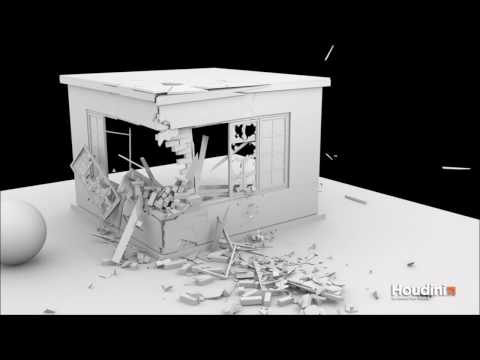 Impossible to morph something breaking?
Nope...for a morph to work the basic number of vertices and their order needs to remain the same. Morphing the wall to 'break' would add extra vertices for the flying bricks.
To 'break' the initial mesh needs to be designed to do it, from before it is turned into a prop or figure.
For the severed limb...that can be done with geografts.
Impossible to morph something breaking?Is it possible for a morph to 'break' the object? Every morph I've seen pushes or pulls the object like putty. That's great, unless you're dealing with something solid, like a brick wall. If my superhero punches the bad guy through a wall, I want it to 'break' (see attached). Or if an arm gets severed. Or if clothing rips.
Is it possible to achieve a 'break' effect with morphs (assuming I learned ZBrush or some tool to create the morph itself of course)? I'd prefer to use morphs because I like how easily they interact with animate2...and stuff breaking would make for some really cool animations. If there is some other way to animate stuff breaking in daz without morphs, that would be great too, just looking for some general direction.
Thanks!
Avoiding creating token charactersThe one thing we lack in the world of Daz are clear-cut Latino characters.
SECOND !!
THIRD!!!!
I've been trying to learn modeling since there such a derth of latino characters - it isn't going well
Don't give up, if you become good at modeling, you could have a lucrative market pretty much all to yourself.
The idea that it's easy to use all the morphs and dials to get a Latino character is not as easy as some people make it out to be. It's the same for pre-teens and even middle age characters. I've seen the attempts and most simply aren't there yet (which is also the reason you don't see a lot of them in renders regardless of all the add ons and morph software out there). It's damn hard, which is why wanting the conveniece of a base character to start with is not something you can shrug off as people simply being lazy. It's not a beginner Daz skill. Getting a character of that quality is probably a lower intermediate skill at best.
Daz 3D is part of

Connect
DAZ Productions, Inc.
7533 S Center View Ct #4664
West Jordan, UT 84084Licensing Agreement | Terms of Service | Privacy Policy | EULA
© 2026 Daz Productions Inc. All Rights Reserved.