-
Import export animation for genesis3 (edit)
I played quite a bit with G3F and BVH files a few months ago. I tried retargetting BVH files to her in blender, DanceForms and DS. While the retargetting worked great, importing the results of that into DS as BVH files didn't produce anything useable.
I think there are two problems involved here. The first is that it doesn't look like DS honors the rotation order of the bones when it exports BVH, it just uses an assumed order. This is easily verifiable if you export a T-Pose and load it into another app the supports BVH. You'll notice a lot of bones don't have the proper orientation.
So, I wrote my own BVH exporter that resulted in the bones properly oriented when I imported the BVH into blender, DanceForms and BVHacker. I used blender and DanceForms to retarget BVH animations to the correct G3F skeleton and got good results in those programs.
However, exporting from those programs and importing those good BVH files in DS gave me bad results, the wonky arms and legs with messed up zombie like movements. IIRC, it didn't matter how you mapped the BVH import, it never really imported the BVH animation correctly. This is the second problem, BVH import doesn't work correctly.
More experiements with blender lead me to creating my own primitive export format to export from blender and writing a DS script to import that format. That gave me good results. So, I hacked together a basic BVH import script and was then able to import BVH files that had been retargeted in blender and DanceForms, as well as BVH files from Mixamo, CMU and other sources.
About the same time, I noticed rsg's scripts in my runtime which lead me to look at making the "Pose and Animation Conversion" script. I haven't done much with the BVH scripts since then as I normally have the option to import an animation onto a skeleton that works and then transfer it to the skeleton I want it on. That work flow is much more efficient for me than retargetting in blender or DanceForms and then exporting and importing again.
I believe that animation import and export, at least for BVH, is broken for the Genesis 3 line. It may also be broken, or les than optimal, for other than BVH. As animation tools appear to have a low priority and I've resolved most of the issues for myself, as well as released the most useful parts of that work for everyone to use, I haven't taken the time to put together a bug report.
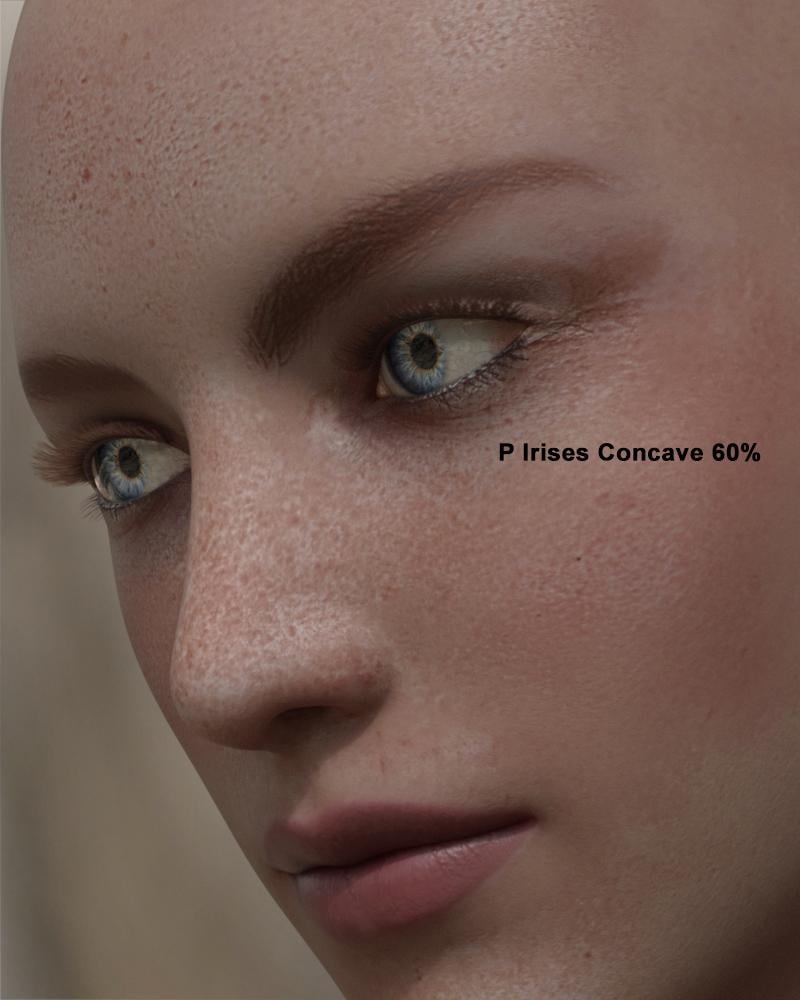
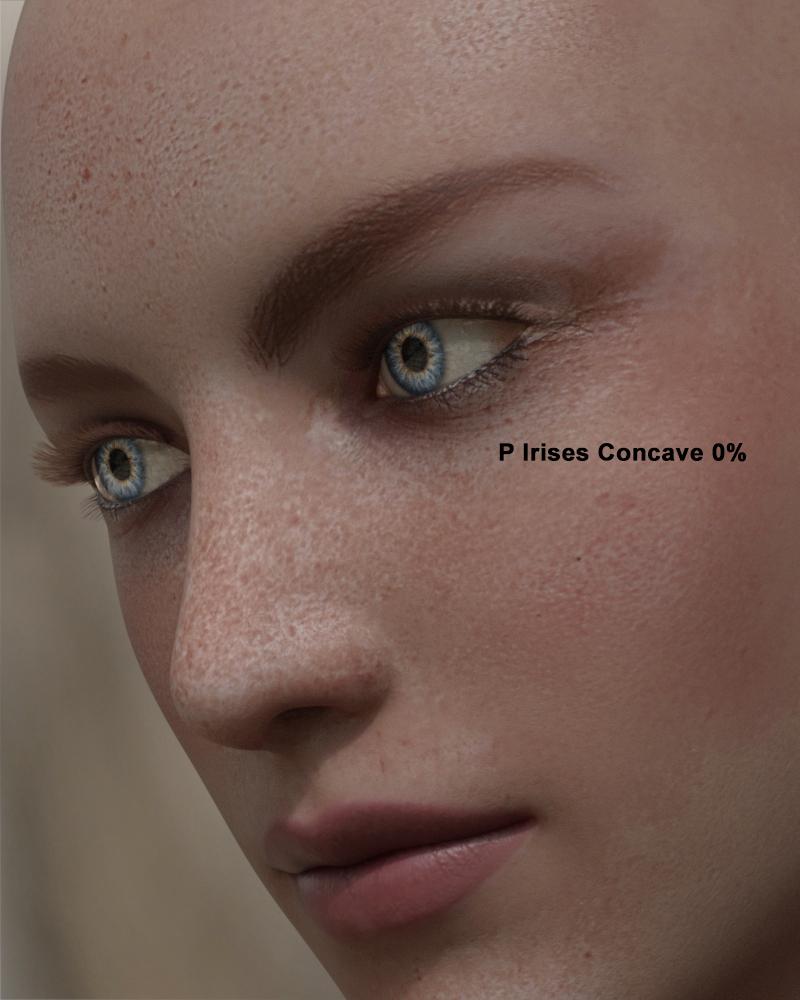
Macro Eyes for IrayAlso, I would add that what you are seeing is caused by the way that the sclera geometry overlaps the iris. If you do a Google image search for "eyes close up" and look at a view of a similar angle you should see photo examples of the dark edge being faint or completely covered on the near side. But don't let this worry you. Adjust the Concave morph to what you feel looks right.
Edit: Ooops, crossposted with AllenArt.
 Macro Eyes for Iray
When the camera angle is looking somewhat from the side, the macro eyes look strange to me. The iris looks real thin on the near side and very dark on the far side. In this example, I only applied Macro 02 GreyEmber. I didn't use any of the other Macro Eyes shaping or surface settings. The cornea bulge morph was not used either. The only morph applied to G3F is P Irises Concave at 60%, which was set by the Macro 02 GreyEmber preset. It looks to me like that morph is moving the whole iris back into the eye rather than changing the shape to concave.
I tried to look at my husband's eye to see what an iris really looks like from that angle, but I couldn't get him to pose correctly; he kept looking to see what I was looking at. So, I'm looking for some advice. What should the iris look like from this angle and how should I use the Macro Eyes presets to achieve that?
 How to do a head morph in DAZ Studio?
You can do that in DS, though you have to export the whole figure mesh. However, that trick removes any linked correction morphs for things like expressions that may be triggered by the original constituent morphs (and of course the result cannot be shared with others). A better solution may be to put the Parametrs pane in Edit mode (right-click menu), create a new property (your morph - again right-click menu), then with the new proeprty set to 100% and your morphs at the values you want right-click on the new property and select ERC Freeze to make a controller that will set your shape, but using the original morphs. If this is a Daz weight-mapped figure you can save the new controller as an asset - File>Save as>Support Assets>Morph Asset.
Nasolabial fold morphSuch morphs already exist for genesis 2
But since I have probably every morph pack for genesis 2 installed
it is difficult to remember from which pack they actually came ( 200 plus perhaps??)
They are a must have realistic depictions of middle aged and older Characters such as this one I created for the genesis 2 femalehttps://drive.google.com/file/d/0B2TYEp536iB8VW1BelBxQm8wZ0U/view ;
i messed up with genx!In Genx you have a tab where you have the list of Genx generated morph where you can delete them .
i messed up with genx!ok i has trying to add morphs to gen3 male and it somehow i messed up the figure becuase it takes up to a hour to load! if at all
so in the prosses of tryint to take out the morphs i messed up gen3 female too!!!! daz just locks up! why! help! and please tell me what im doing whorng?
also i looked online and on this forum for a fix but everthing it says does not match what my computer has, i mean they say you can just delete the morph
files that genx makes and that will take it back to normal but the problem is the file path they post dose not match mine, or dosen't even excist! please please help
im using the latest daz studio and the latest version of genx. im in the middle of a comission and need this fixed fast! thanks guys.
Post Your Renders - Happy New Year yallUsed the headshop oneclick plugin to create the Stezza morph..

Stezza goes to the Arctic
 Animal Paw Gloves
Hi there. I'm making a fantasy outfit that is cat-based, and I would really like some kind of glove that looks like an animal paw. A morph is fine too I guess, but I would just prefer a clothing item as it would be less post work. This is for Genesis 3 if we're talking morphs, but any generation of clothing is fine.
3D Rigging? WeightMapping?Above is my answer, which you asked me,, then You seems try to make new original JCM beliong to Liliframes answer. good luck
if you could make original JCM , you just need to save the new JCMs as morph assets, with same name which auto-transfered with fit pose.
No worries if that was your advice then due credit goes to you. Please do not take this the wrong way but I have a hard time understanding your notes and I suspect English isn't your first language - my apologies if I offended.
Save
3D Rigging? WeightMapping?Above is my answer, which you asked me,, then You seems try to make new original JCM beliong to Liliframes answer. good luck
if you could make original JCM , you just need to save the new JCMs as morph assets, with same name which auto-transfered with fit pose.
can you actually animate clothing in Daz to make it look like its being removed?Is this only do-able with dynamic clothing? I want to try and do an animation clip of a woman removing her top but I am really struggling to find out if it can be done or not. Is this something that is too hard to do or can only be done in certain ways? please ANYONE who has done this somehow let me know as I am itching to know how! thanks.
You can use deformer on about any peice of clothing to morph it to bend the item into a morph and depending on the characters type your using there is the fit control too for genesis2, & fit control for genesis 3 female it will give you a few morphs for like pulling pants down, bending bra straps exposing breasrt. etc etc. etc. I try to find clothing that already has deformers & morphs already made in them for animation. and even dynmaic clothing takes some fooling around with to make it look right & just not like its falling off.
Also to animate clothing being taken off in a action scene its best if you do it in short segments with diffrent camera angles and tie the scenes together in a film editor to make it look like one complee scene.
3D Rigging? WeightMapping?I am happy to report that lilflame answered my message and it felt like I was talking with a rockstar!
Lilflame's answer:
"The problem is that you will need to do new and overwrite the old JCM, that are made with transfer for Genesis 3. There is few different ways to make shoes for G3, I just took the way to do completely new JCM, so the shoes look nice, with or without G3.."
So my next question would be, how do I overwrite the JCM that comes with the transfer utility?
RenderGuyNY's Freebies (latest freebie updated 5-24-20)This shirt and pant set for G3M is ready just in time for the holidays. There are five texture sets per item. You can mix and match or create a full body color scheme. Both the shirt and pants come with a number of morph options to help with fits.
I want to thank everyone who has downloaded my endeavors this year. Your feedback and encouragement has been awesome!

 How to do a head morph in DAZ Studio?
I used to be able to do a trick in Poser that I can not figure out how to do in DAZ Studio 4.9.
I used to make a face in Poser for a V4 by turning dials, then kick out an obj of the head and read it back in as a morph. This let me reduce the overall settings some or increase them. I often found I wanted a little bit less of a character I had spent a day creating. You can also zero all the morphs and just spin that one dial as a starting point. I think I'm basically asking how you kick out a morph for just the head, but I want it to be reloaded as a just one dial to spin.
Any help is appreciated.
virtual penny 4 yor carrara thoughts ?Great examples, Dart - and Josh does good youtube tutorials. I also recommend tutorials by SickleYield. I think that many Carrara users will have very little difficulty converting meshes for use with the transfer utility, the real hassle is adjusting bones, weightmaps, and JCMs from the default, especially if the differences in figure proportions are significant. I also recommend some tutorials by SickleYield. These are amazing. SY is the PA who offers the ghost rigging to fix tunics, the breast area, etc. SY has many tutorials, some on her DA site. Here is SY's youtube channel.
https://www.youtube.com/user/SickleYield/videos
3D Rigging? WeightMapping?if you just color weight map more weak, and adjust shoes not bend much,, . maybe abouot some stuff it work well, but it means,, the weight map of the shoes not
much as same as genesis3 foot. after all, with posing more, , it show more clear defomation.
Are you suggesting just using the basic weightmap that gets transferred with the Transfer Utility and not paint weight to the heel solidly or do you mean use the smoothing brush more?
virtual penny 4 yor carrara thoughts ?Very cool!
 I've bought this Genesis 2 Cross-Figure Resource Kit so that I can convert Genesis clothing to Genesis 2 Female clothing.
Converting meshes from one male to another can be really easy in Carrara, then exporting the OBJ to bring into Daz Studio and using those fun Content Creation Tools to make it work with the intended figure.
Where I was having difficulty, however, was trying to get Genesis (Victoria 5) clothing to work with Genesis 2 Female - since Genesis started by making everything fit a male figure while also having breaks in the cage for other shapes afterwards - but they all begin as a basic male.
With this thing, I can add a Genesis 2 Male to Genesis 2 Female morph dial right onto the figure!
I could also see a lot of other potential with the tool, but the biggest reason I bought this was to get HongYu's "Shirt for Victoria 5" to work on my Genesis 2 Female figure - and it worked very well!
Once I had the morph to convert it from Genesis 2 Male to Female, I took it a step further by exporting that result as a separate OBJ and redid the whole thing in Daz Studio for Genesis 2 Female base - which works better for me in the end.
Here, Josh explains how it works
 Genesis: Olimpia, Gia, Mei Lin, Ninive... I can't understand!!
Another thing to keep in mind:
With the invention of Daz Studio 4.0 and Genesis came the ability (in Daz Studio) to swap UV Mapping layouts for the actual mesh - better termed: a SubDivision 3D Cage.
Without getting too heavy into the technology of that - basically it allows the mesh shaping (Morph) artists to remap the UV coordinates of the mesh to better fit the shape they've made, which helps to eliminate stretching and shrinking of the texture maps for a more accurate looking model in the end.
This is what made it possible of Genesis to become a child and/or a Mountain Gorilla, a Troll, a Giant Behemoth Monster - and still look real at render time.
Just know that Carrara doesn't have the UV Swapping abilities like that - so we would need to load in the correct Character for the maps we intend to use.
Example:
I really liked the base texture that came with The Girl 6 and wanted to use that.
Even though I'm not using the Girl 6 shape, I begin with the Girl 6 Character preset to get the proper UVs for those maps on my Genesis - so I don't get strange oddities showing up on her.
Once I have my Girl 6 Character into Carrara, I can remove all Girl 6 morphs and build my shape from scratch using any of the shape dials I have.
==================================================
It helps to pick a texture map collection whose character shape resembles the final shape we want to create to help eliminate texture stretching and so on - but we don't really have to if we don't want to.
For some of my Genesis creatures I'll load in the Troll preset for Genesis 1 and remove the Troll shape by dialing down the Troll morphs and build my own Orc or Goblin from there, knowing that the maps will follow the mesh properly - even if I stretch or shrink it in places.
I hope this makes sense.
That all said - that's why Daz3d had to create more names than Victoria.
Genesis 2 Female has her Base UV mapping
Victoria 6 has her own, and so do all of the other "Named" characters.
They all have optimized UV Mapping coordinates which make their own texture maps fit perfectly, as if their shape is the Base shape of the mesh - if that helps make any sense.
So each named character attempts to fill a Role from the realms of people. Victoria has always been their Cover Girl as well as their every day woman. So she often gets two versions - a base woman and a super model. Aiko is a Action Hero and Girl is a stylized pin-up art girl. Olympia is a Fantasy Heroine while Lillith has more of a dark under-current.
All of these different names are made to identify the base shape - even though the true base for the People 6 characters is Genesis 2 Male or Female.
Legacy UVs for Genesis 3 [Commercial]Wow, this was a treat for sure!
Does this work well enough with any of the Stephanie 3 or Laura 3 textures? How about Aiko 3? Are you doing anything for M3/D3? :)If you look at the thread in Commons where this product was announced, I posted a pic of Aiko 3's texture and morph moved to G3F. All the other Generation 3 textures (ie M3, H3 etc) should work as well, as they all use the same UV. I have attached the same scene below as I did in the other thread, only with the IRay shader tweaked a fair bit to improve them (the originals rendered too bright if you just use the default settings).
Daz 3D is part of

Connect
DAZ Productions, Inc.
7533 S Center View Ct #4664
West Jordan, UT 84084Licensing Agreement | Terms of Service | Privacy Policy | EULA
© 2026 Daz Productions Inc. All Rights Reserved.