-
Show Us Your Iray Renders. Part V
Lots of nice images. I've seen a few in the gallery and commented. It looks like I have a couple more to track down in the gallery. I finally did an Iray render that I can actually post here. Actually, kind of two renders in one. Workflow was something like - Iray>Gimp>LIE>Iray>Gimp again.
How much for a t-shirt? ;)
- Greg
@algovincian Hah! I'm actually looking into that. I've definitely decided to get one of my own printed. I'm actually rendering a higher quality of Nuggets now. After I take him into Gimp for the postwork I did, I'm taking it to Zazzle to see what I can do. So far, it looks like the cheapest shirt is $17.95 for a basic T. I want to see how good a job they do with it. I've never had one of my images done up on shirt by a professional company. I've always done the home style way of print it on transfer paper and iron it on a shirt yourself type a thing. But, I've heard good things about Zazzle and it might be interesting to see if anyone else is interested in purchasing anything with my prints on them. Not holding my breath, mind you. :)
Black ring around iris...HELP!If you view your model in one of the draw styles that shows the wireframe, do you see any part of the eye changing size disproportionately as you dial your morph slowly from 0% to 100%?
Way out on a limb now - Could it be anything with the surface settings of the sclera, cornea or iris? Maybe try setting each surface to a solid opaque color to see which surface (if any) the black ring is associated with. Try changing opacity of some surfaces to 0 isolate each part to see if anything looks wrong.
Folded Clothes OptionIt is possible to find a number of morphs that turn human figures into different kinds of beasts/deamon/zombies.
What if someone made a morph that gave the figure a flat chest with adjustable thickness and curved shoulders (to match many chairs) and a strange shoulder/neck morph (to match a wardrobe hanger).
Auto fit the clothes to this figure and make the figure invisible in the render.Does http://www.daz3d.com/make-a-mess . work with g3f and g3m clothes?
That's actually an interesting experiment to try.
Using real life products in commercial renders... Anyone get in trouble with it?Of course I'm no legal expert, nor claim to know what companies are willing to ignore/pursue but I think someone wearing a Mickey Mouse shirt in a scene or two is easily overlooked compared to a main or supporting character closely resembling Mickey Mouse.
I've been wondering about this one - it's pretty close to Donald Duck. How do you know where to draw the line?:
The way I see it, since the product can be used to create a wide variety of toon duck/bird people (most of which that look nothing like Donald) that's probably why it's ok.
However, if someone were to dial in the morph that looks a lot like Donald and tried to publish an animation or comic of that character, Disney might take notice and have something to say about that.
I imagine something like that. In that case DAZ' general claim that all products can be used for commercial renders and animations is invalid, sort of.
Using real life products in commercial renders... Anyone get in trouble with it?Of course I'm no legal expert, nor claim to know what companies are willing to ignore/pursue but I think someone wearing a Mickey Mouse shirt in a scene or two is easily overlooked compared to a main or supporting character closely resembling Mickey Mouse.
I've been wondering about this one - it's pretty close to Donald Duck. How do you know where to draw the line?:
The way I see it, since the product can be used to create a wide variety of toon duck/bird people (most of which that look nothing like Donald) that's probably why it's ok.
However, if someone were to dial in the morph that looks a lot like Donald and tried to publish an animation or comic of that character, Disney might take notice and have something to say about that.
how to transfer DAZ to a new PCSo I have a new PC and all of my DAZ is on another HDD. Is there a tutorial on transfering everything over to the new PC?
Thanks
ZDG random Daz Studio discoveries and questions.I think I had seen that boot fit thing many years ago before I had Hexagon, and it was not much use to me as a n00b end user of just Daz Studio. After fussing with the hex Studio morph bridge a bit, it may be of some help. Tho if you are going to that extent, you may as well just rig it from scratch with G3F/G3M JCM things and rigging. you've already redone the mesh in a model program any way, it would be a waste not to finish the work and have a fully working item.
Nice looking squirrel Kettu, I'd be tempted to adjust the tufts on the tips of the ears a tad, I still like it.
I read the paragraphs about the 'vy' verses 'v' prefixes, I'm going to need to read it again. I have Linus going on the other screen and most of the paragraph just flew past my mind instead of soaking in. I presume 'vy' is akin to 'out' in outbound, except the prefixes are more structured then conjunctions in English. (OK, finished watching the wan show I missed, I'm reading the rest of that post again).
Oh, by the way, been fussing a bit more with dials.


Somewhere between a wip and just fussing around.
Black ring around iris...HELP!That doesn't look like the typical ring to me (that one is fixed by using an iris correction morph and it's just a little dark color poking out of a ring of white)...it looks like either the iris shrank or the eyeball was scaled up. I'm guessing that there may be a correction morph dialed in, somewhere that is being doubled on bringing it back into Studio.
Go to the Parameters tab and click on Currently Used...zero any morphs that show up there before using GoZ or exporting.
I did...nothing else was under currently used...one of the first thing I checked. I am clueless
But thanks for trying to help me out MJC, I really appreciate!
 Black ring around iris...HELP!
That doesn't look like the typical ring to me (that one is fixed by using an iris correction morph and it's just a little dark color poking out of a ring of white)...it looks like either the iris shrank or the eyeball was scaled up. I'm guessing that there may be a correction morph dialed in, somewhere that is being doubled on bringing it back into Studio.
Go to the Parameters tab and click on Currently Used...zero any morphs that show up there before using GoZ or exporting.
I did...nothing else was under currently used...one of the first thing I checked. I am clueless
Black ring around iris...HELP!That doesn't look like the typical ring to me (that one is fixed by using an iris correction morph and it's just a little dark color poking out of a ring of white)...it looks like either the iris shrank or the eyeball was scaled up. I'm guessing that there may be a correction morph dialed in, somewhere that is being doubled on bringing it back into Studio.
Go to the Parameters tab and click on Currently Used...zero any morphs that show up there before using GoZ or exporting.
The Doctor Appreciation thread
I remembered JoeQuick had offered a David Tennant morph for Michael 3 so last night and this afternoon I morphed, dressed, posed and illuminated him within Arjin's "coral" themed TARDIS control room. I used the M3 3-piece suit, substituting the included shirt for a "partial" shirt from the free Casablanca suit. It has controls to loosen the tie and unfasten the collar, giving it the somewhat "rumpled" appearance Tennant usually had. The trench coat is the "Alligator" coat with a flat woolen procedural instead of the scaly texture. I didn't have one of the spikey, unkempt haistyles, so I opted for the Rievel. There doesn't seem to be anything akin to Converse hightop trainers for Mike 3, so I "cheated" with a more contemporay athletic shoe. Finally, I made the console room a bit more "grungy" by blending in "cloudy" prpcedurals with the base textures.
Sincerely,
Bill
Black ring around iris...HELP!As Im trying to create custom morphs, I run into a serious problem that keeps me from going any further.
Before I export G3F as OBJ (or send directly to Zbrush via GoZ) I set Resolution level to BASE and SubDivision level to zero and also set both Mouth HD Realism and Navel morphs to 0%.
Every time I import G3F back to Daz Studio, with GoZ or through Morphloader Pro, a black ring appear around G3F irises as soon as I dial the newly imported morph. (see picture).
I browsed internet through and through for an answer, without success.
Please help!
Dear content authors: Please continue to support 3delightWell, basic tips:
Opacity maps aren't going to transfer right. So be sure to have copies or something to set Opacity properly.
I recommend US or US2, if you have it. Keep an eye on bump and displacement values, since those tend to default to -.1 - +.1
Metals are easily captured by looking at Raytraced reflections.
If you are stumped by specular (which I've gotten weird results with), I'd recommend finding a shader that's in the same ballpark and looking at it's settings. Like, you want glossy wood? Apply glossy wood to something and check the values. Or apply glossy wood and switch the maps back.
Skin is another story. I'm still struggling to get consistently decent skin.
Also 3DL seems to like really weirdly high lighting values. Again, struggling with it. 3DL seems to require a bit more unintitive learning than, IMO, Iray has.
Iray and CoolingIf you're worried about cooling, and have two monster graphics cards like the GTX 1080, I probably wouldn't place them next to each other. One card would just be sucking in the hot air of the other. If your motherboard has 3 or more x16 slots, then you could space them apart, giving them some air.
That's a really good idea. I notice that one of my cards runs hotter than the other, and they are next to each other. I don't know it that's becasue the 970 is newer and faster than the 780. Now, what is the deal when one slot is PCIexX16, the next is X8, the last X4? are they differences that effect performance?
When dealing with GPUs, the PSU is the most important concern followed by cooling. If the PSU is marginal or providing noisy power then the GPU performance will suffer. Noisy power will increase heat as well as cause the circuitry to throttle back power usage to get a stable source. It isn't necessarily about the size of the PSU, but how clean the output is. Also a good PSU will create less ambient heat of its own and may actually pull excess heat from the system if its cooling setup is good.
Fluid cooling will not guarantee better cooling than forced air. There are lots of variables. The amount of time that the fluid spends in the exchanger versus the amount of airflow past the exchanger and other concerns. Too much air velocity past the exchanger can actually ADD heat to the system (from friction and the air not having enough time to absorb enough heat) instead of removing it. Too little airflow and not enough heat is removed. The velocity of the air needs to change based on the amount of heat being generated as well as the ambient temperature outside the system. Read the design specs CAREFULLY to determine if you can maintain the ambient room temperature necessary for the fluid cooler to actually function efficiently. For every degree above nominal that the room's (or computer's enclosure -- ie under desk) temperature rises the amount of removed heat will decrease on a curve. As the temperature rises in the environment the amount of heat retained in the fluid system increases non-linearly (the exact curve is determined by the design) causing the fluid to cumulatively gather heat to the point where the coolant starts to boil. This creates voids in the system that can cause the pump to fail.
It is also entirely possible to draw heat INTO your system FROM the environment. Once the ambient temp crosses a specific point (which is different for each design) the fluid will draw heat from the environment and introduce it into the computer's case. This happens when the additive airflow from other fans in the case cause a draw approaching the output fans on the exchanger. The temperature in the case becomes lower than the temperature in the external environment. This leads the exchanger to gather heat rather than exhaust it. The heat is then transferred into your components for the airflow in the case to try to remove.
The above is a very abbreviated explanation of the situation. There is a reason that datacenters containing racks and racks of huge servers use air cooling (and are extremely loud). It is more efficient to maintain the environment at a temperature where direct air cooling can be used than to try to compensate for all of the variables introduced by fluid cooling.
Kendall
Makes sense. My rig isn't in an enclosure. So if I plan on doing an animation, that looks like it would take 3 days, if water cooled the water would get hotter and hotter? I would have thought a radiator would take care of that, in a custom water cooled rig. Of course, the hybrid cards don't have a radiator, just what looks like a self contained resevoir and a fan.
As I wrote, it depends on the design. A radiator is a type of exchanger. Very few systems use straight H20, with a majority using a coolant like Ethylene Glycol or similar. Whether the coolant gets 'hotter' will depend on a number of factors (variables). Each additive system and/or heat source added to the cooling system adds more variables. For instance, an exchanger external to the enclosure is more likely to perform better than one mounted inside the enclosure, but is not guaranteed. For instance, if the heat from the exchanger somehow gets recycled into the airflow into the enclosure and/or back through the exchanger then residual heat will accumulate into the system. An example: Lets say that the radiator is in the same room as the system itself. If the room is small or not well ventilated, then the heat from the exchanger will increase the temperature of the air in the room, thus causing the system to draw in that heated air. Now the air pulled into the system is (nominal+x degrees). This air is subsequently used to push through the exchanger and heated another y degrees which heats the room another x degrees. Eventually, the heat in the room will exceed the point where the fluid can exude heat and the fluid starts to approach the boiling point. This will happen first in the tubing carrying the coolant, followed by the exchanger. Even if the coolant doesn't boil causing voids, the residual heat remains in the system causing the heat in the components to not be removed. There are also issues of pressure rises and degraded performance of mechanical parts (fans for the exchanger slowing down due to age) that must be monitored.
This is VERY much like an automobile overheating on a hot day. When the temperature outdoors gets into the 90's F, vehicles start overheating even though 90F is far below the boiling point of the coolant. However, the heat produced by the engine accumulates to the point where the coolant can no longer transfer the heat to the air and the coolant boils, the pump loses prime, and things go horribly bad. The same thing can happen in a computer using fluid cooling especially in a situation where there are multiple sources of heat.
Soooooo..... what this says is that if you intend on using fluid cooling, then you must take into consideration that the coolant adds an additional complexity to the planning. In the end, you are still using forced air from the environment to remove the heat. What fluid cooling is SUPPOSED to do is allow the removal of the heat from the environment that the equipment is in by embedding it into a more dense meduim that can be more easily transported to a location away from the equipment. If, however, you are dumping the heat right back into the same environment that the equipment is in, then you are doing no better than using the air to cool the parts directly. Mainframes that are fluid cooled have the fluid transported to the outside of the building where the heat is dumped into the air via convection (ponds) or large evaporative exchangers. The main advantage to using fluid cooling in a PC/Workstation is to allow the heat to be drawn away from the components to where a more efficient heat removal setup can be utilized. If you can maintain the environment at nominal temps and the system has no occlusions that would prevent the use of efficient heat sinks, then the additional costs/headaches of a fluid cooling system may not be worth it. However, if you have a situation where the position of your CPU/GPU's is not conducive to using "large" sinks and/or fans, or you have a desire to try to reduce the noise created by multiple fans, then the additional cost/maintenance may be worth the effort.
Kendall
I had thought about ethylene glycol, but the how-to videos I've seen all talk about using distilled water. My temp readings inside the box tend to hover around 40 c under load, so that seems pretty good. I'm thinking that as the system is stable, and from what you're telling me, air cooling is the way to go. Now, what effect would having a faster processor have? I mean, if the rendering is going through the GPU's, does upgrading form a 4790 give me any significantly faster rendering times? Also, when I chose the motherboard, I basically was looking for the cheapest one that would hold the processor and cards. Is there any advantage to a costlier one? I currently have a Gigabyte Z97.
I know those aren't cooling questions, but you seem pretty well versed.
I have an I7-5930; 6 core 3.5 GHz cpu. I also have a scene that takes 57 minutes to render with my 980ti. If I add the cpu the render time drops to 52 minutes and all 12 cores are 100% busy for that 52 minutes. You may draw your own conclusion.
 My system is completely air cooled and during that render the cpu temp peaks at 56 C and the 980ti at 59 C.
57 minutes? I thought it would go a little faster with a 980 Ti. The cooling is about the same as my 970. The 780 runs a bit hotter.
I've found ways to speed it up, but I keep this version handy as a maximum stress test. FWIW, with both the 1080 and the 980ti it runs in 26 minutes.
Iray and CoolingIf you're worried about cooling, and have two monster graphics cards like the GTX 1080, I probably wouldn't place them next to each other. One card would just be sucking in the hot air of the other. If your motherboard has 3 or more x16 slots, then you could space them apart, giving them some air.
That's a really good idea. I notice that one of my cards runs hotter than the other, and they are next to each other. I don't know it that's becasue the 970 is newer and faster than the 780. Now, what is the deal when one slot is PCIexX16, the next is X8, the last X4? are they differences that effect performance?
When dealing with GPUs, the PSU is the most important concern followed by cooling. If the PSU is marginal or providing noisy power then the GPU performance will suffer. Noisy power will increase heat as well as cause the circuitry to throttle back power usage to get a stable source. It isn't necessarily about the size of the PSU, but how clean the output is. Also a good PSU will create less ambient heat of its own and may actually pull excess heat from the system if its cooling setup is good.
Fluid cooling will not guarantee better cooling than forced air. There are lots of variables. The amount of time that the fluid spends in the exchanger versus the amount of airflow past the exchanger and other concerns. Too much air velocity past the exchanger can actually ADD heat to the system (from friction and the air not having enough time to absorb enough heat) instead of removing it. Too little airflow and not enough heat is removed. The velocity of the air needs to change based on the amount of heat being generated as well as the ambient temperature outside the system. Read the design specs CAREFULLY to determine if you can maintain the ambient room temperature necessary for the fluid cooler to actually function efficiently. For every degree above nominal that the room's (or computer's enclosure -- ie under desk) temperature rises the amount of removed heat will decrease on a curve. As the temperature rises in the environment the amount of heat retained in the fluid system increases non-linearly (the exact curve is determined by the design) causing the fluid to cumulatively gather heat to the point where the coolant starts to boil. This creates voids in the system that can cause the pump to fail.
It is also entirely possible to draw heat INTO your system FROM the environment. Once the ambient temp crosses a specific point (which is different for each design) the fluid will draw heat from the environment and introduce it into the computer's case. This happens when the additive airflow from other fans in the case cause a draw approaching the output fans on the exchanger. The temperature in the case becomes lower than the temperature in the external environment. This leads the exchanger to gather heat rather than exhaust it. The heat is then transferred into your components for the airflow in the case to try to remove.
The above is a very abbreviated explanation of the situation. There is a reason that datacenters containing racks and racks of huge servers use air cooling (and are extremely loud). It is more efficient to maintain the environment at a temperature where direct air cooling can be used than to try to compensate for all of the variables introduced by fluid cooling.
Kendall
Makes sense. My rig isn't in an enclosure. So if I plan on doing an animation, that looks like it would take 3 days, if water cooled the water would get hotter and hotter? I would have thought a radiator would take care of that, in a custom water cooled rig. Of course, the hybrid cards don't have a radiator, just what looks like a self contained resevoir and a fan.
As I wrote, it depends on the design. A radiator is a type of exchanger. Very few systems use straight H20, with a majority using a coolant like Ethylene Glycol or similar. Whether the coolant gets 'hotter' will depend on a number of factors (variables). Each additive system and/or heat source added to the cooling system adds more variables. For instance, an exchanger external to the enclosure is more likely to perform better than one mounted inside the enclosure, but is not guaranteed. For instance, if the heat from the exchanger somehow gets recycled into the airflow into the enclosure and/or back through the exchanger then residual heat will accumulate into the system. An example: Lets say that the radiator is in the same room as the system itself. If the room is small or not well ventilated, then the heat from the exchanger will increase the temperature of the air in the room, thus causing the system to draw in that heated air. Now the air pulled into the system is (nominal+x degrees). This air is subsequently used to push through the exchanger and heated another y degrees which heats the room another x degrees. Eventually, the heat in the room will exceed the point where the fluid can exude heat and the fluid starts to approach the boiling point. This will happen first in the tubing carrying the coolant, followed by the exchanger. Even if the coolant doesn't boil causing voids, the residual heat remains in the system causing the heat in the components to not be removed. There are also issues of pressure rises and degraded performance of mechanical parts (fans for the exchanger slowing down due to age) that must be monitored.
This is VERY much like an automobile overheating on a hot day. When the temperature outdoors gets into the 90's F, vehicles start overheating even though 90F is far below the boiling point of the coolant. However, the heat produced by the engine accumulates to the point where the coolant can no longer transfer the heat to the air and the coolant boils, the pump loses prime, and things go horribly bad. The same thing can happen in a computer using fluid cooling especially in a situation where there are multiple sources of heat.
Soooooo..... what this says is that if you intend on using fluid cooling, then you must take into consideration that the coolant adds an additional complexity to the planning. In the end, you are still using forced air from the environment to remove the heat. What fluid cooling is SUPPOSED to do is allow the removal of the heat from the environment that the equipment is in by embedding it into a more dense meduim that can be more easily transported to a location away from the equipment. If, however, you are dumping the heat right back into the same environment that the equipment is in, then you are doing no better than using the air to cool the parts directly. Mainframes that are fluid cooled have the fluid transported to the outside of the building where the heat is dumped into the air via convection (ponds) or large evaporative exchangers. The main advantage to using fluid cooling in a PC/Workstation is to allow the heat to be drawn away from the components to where a more efficient heat removal setup can be utilized. If you can maintain the environment at nominal temps and the system has no occlusions that would prevent the use of efficient heat sinks, then the additional costs/headaches of a fluid cooling system may not be worth it. However, if you have a situation where the position of your CPU/GPU's is not conducive to using "large" sinks and/or fans, or you have a desire to try to reduce the noise created by multiple fans, then the additional cost/maintenance may be worth the effort.
Kendall
I had thought about ethylene glycol, but the how-to videos I've seen all talk about using distilled water. My temp readings inside the box tend to hover around 40 c under load, so that seems pretty good. I'm thinking that as the system is stable, and from what you're telling me, air cooling is the way to go. Now, what effect would having a faster processor have? I mean, if the rendering is going through the GPU's, does upgrading form a 4790 give me any significantly faster rendering times? Also, when I chose the motherboard, I basically was looking for the cheapest one that would hold the processor and cards. Is there any advantage to a costlier one? I currently have a Gigabyte Z97.
I know those aren't cooling questions, but you seem pretty well versed.
If you're using Iray exclusively and you have lots of CUDA cores and more VRAM than you will need, then a "higher performance" CPU will be of limited utility. HOWEVER, if you are going to run into a situation where a scene will exceed the VRAM on your GPUs, then you'll be glad to have a more powerful CPU when the render falls back to it. There are still plenty of computations that occur on the CPU, but if you are already happy with the responsiveness of your system then the Return-On-Investment for a newer CPU may be low to zero.
It sounds like you've already provided a good cooling situation. If your PSU is good, then I'd say spend your money on other things.
Kendall
Well, I have a 1200 w PSU. I struggle to keep my scenes small enough to go through the cards and not the CPU. If thy're too big, I cut all non-essential objects. My next investment will be a GTX 1080 ti when it comes out. Then another one. It's projected to have 12 gig of ram, and that should be big enough for any scene. My biggest card now only has 4 gig, but since the smaller one has 3 gig, that's my scene limit. Typically, that's no more than 4 characters plus scenery.
It's not the "objects" that cause the problem, but the large textures. The best way to stay "on card" is to lower the texture sizes on items that are not "in focus" or are not visible (skin textures covered by clothing for instance, or displacement on fabric too far from the camera to be seen). Polygons are mostly not a problem. There are long discussions on this subject in the commons.
Kendall
ZDG random Daz Studio discoveries and questions.OK, one more Shape Shift experiment, using Paloma's mats this time.

I think there is potential there, needs more work tho.
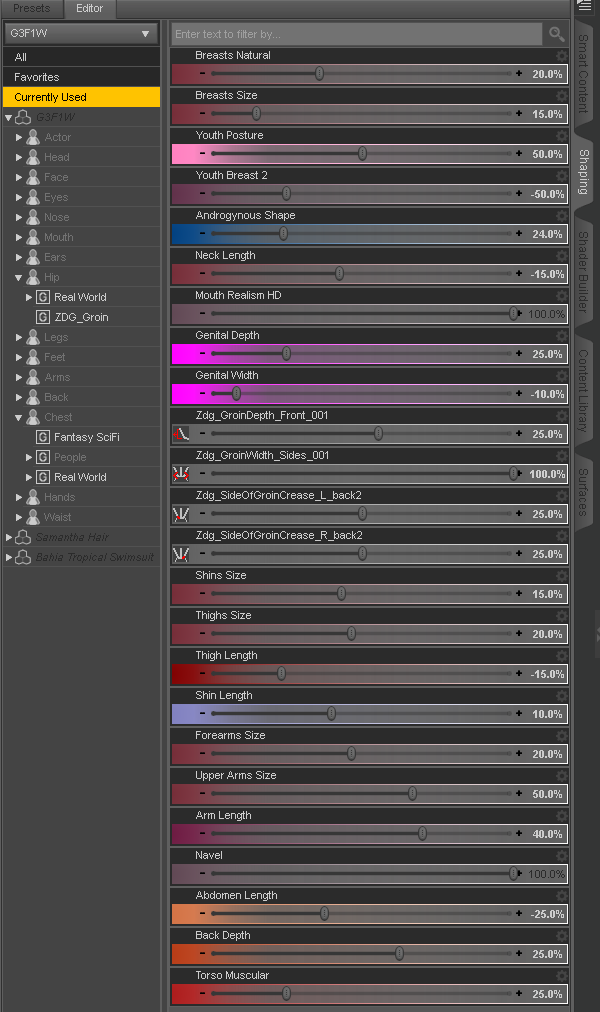
Oh, I got a wrong dial there, let me fix that, lol... OK that's fixed, lol.
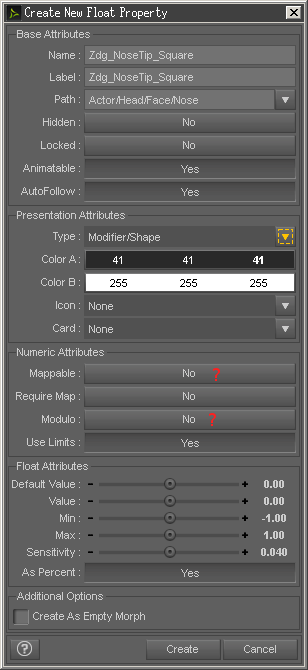
I'm looking at one of the pop-up windows from that bridge import as morph thing, and wondering If I selected the wrong thing there yesterday.
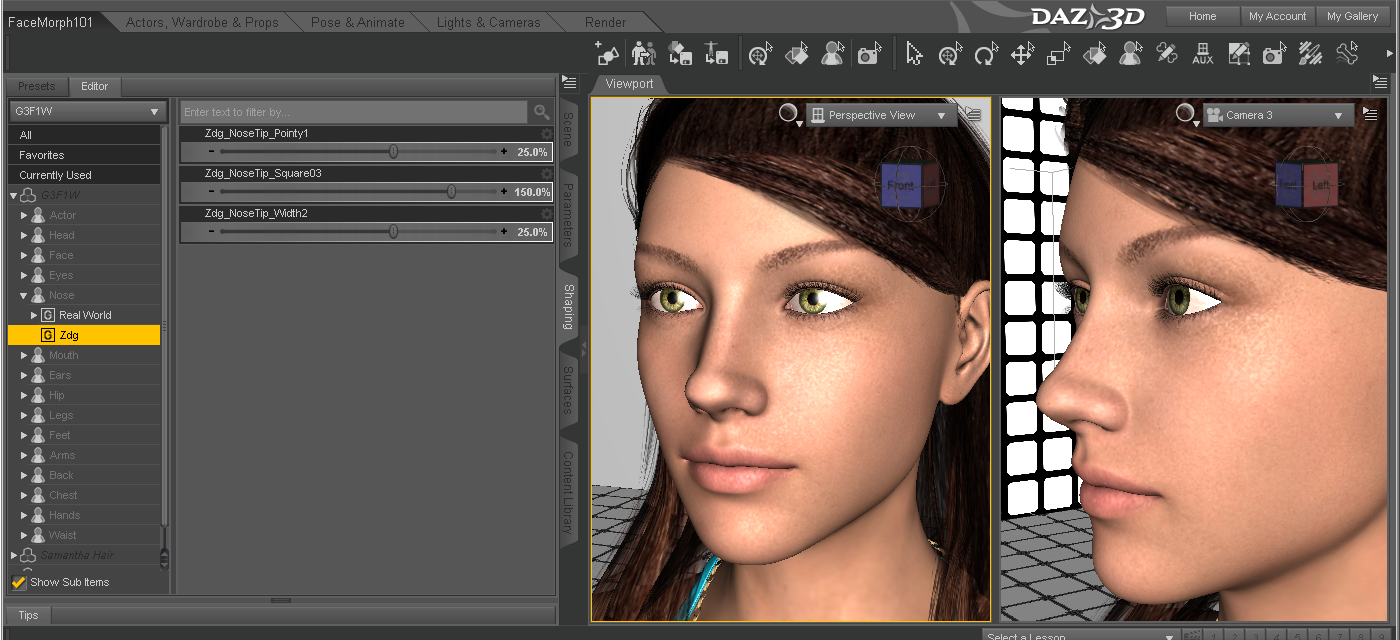
Just three new dials so far, I think most of the others have already been done. I have no idea about packing it up yet to share, I may need more, time will tell.
Iray and CoolingIf you're worried about cooling, and have two monster graphics cards like the GTX 1080, I probably wouldn't place them next to each other. One card would just be sucking in the hot air of the other. If your motherboard has 3 or more x16 slots, then you could space them apart, giving them some air.
That's a really good idea. I notice that one of my cards runs hotter than the other, and they are next to each other. I don't know it that's becasue the 970 is newer and faster than the 780. Now, what is the deal when one slot is PCIexX16, the next is X8, the last X4? are they differences that effect performance?
When dealing with GPUs, the PSU is the most important concern followed by cooling. If the PSU is marginal or providing noisy power then the GPU performance will suffer. Noisy power will increase heat as well as cause the circuitry to throttle back power usage to get a stable source. It isn't necessarily about the size of the PSU, but how clean the output is. Also a good PSU will create less ambient heat of its own and may actually pull excess heat from the system if its cooling setup is good.
Fluid cooling will not guarantee better cooling than forced air. There are lots of variables. The amount of time that the fluid spends in the exchanger versus the amount of airflow past the exchanger and other concerns. Too much air velocity past the exchanger can actually ADD heat to the system (from friction and the air not having enough time to absorb enough heat) instead of removing it. Too little airflow and not enough heat is removed. The velocity of the air needs to change based on the amount of heat being generated as well as the ambient temperature outside the system. Read the design specs CAREFULLY to determine if you can maintain the ambient room temperature necessary for the fluid cooler to actually function efficiently. For every degree above nominal that the room's (or computer's enclosure -- ie under desk) temperature rises the amount of removed heat will decrease on a curve. As the temperature rises in the environment the amount of heat retained in the fluid system increases non-linearly (the exact curve is determined by the design) causing the fluid to cumulatively gather heat to the point where the coolant starts to boil. This creates voids in the system that can cause the pump to fail.
It is also entirely possible to draw heat INTO your system FROM the environment. Once the ambient temp crosses a specific point (which is different for each design) the fluid will draw heat from the environment and introduce it into the computer's case. This happens when the additive airflow from other fans in the case cause a draw approaching the output fans on the exchanger. The temperature in the case becomes lower than the temperature in the external environment. This leads the exchanger to gather heat rather than exhaust it. The heat is then transferred into your components for the airflow in the case to try to remove.
The above is a very abbreviated explanation of the situation. There is a reason that datacenters containing racks and racks of huge servers use air cooling (and are extremely loud). It is more efficient to maintain the environment at a temperature where direct air cooling can be used than to try to compensate for all of the variables introduced by fluid cooling.
Kendall
Makes sense. My rig isn't in an enclosure. So if I plan on doing an animation, that looks like it would take 3 days, if water cooled the water would get hotter and hotter? I would have thought a radiator would take care of that, in a custom water cooled rig. Of course, the hybrid cards don't have a radiator, just what looks like a self contained resevoir and a fan.
As I wrote, it depends on the design. A radiator is a type of exchanger. Very few systems use straight H20, with a majority using a coolant like Ethylene Glycol or similar. Whether the coolant gets 'hotter' will depend on a number of factors (variables). Each additive system and/or heat source added to the cooling system adds more variables. For instance, an exchanger external to the enclosure is more likely to perform better than one mounted inside the enclosure, but is not guaranteed. For instance, if the heat from the exchanger somehow gets recycled into the airflow into the enclosure and/or back through the exchanger then residual heat will accumulate into the system. An example: Lets say that the radiator is in the same room as the system itself. If the room is small or not well ventilated, then the heat from the exchanger will increase the temperature of the air in the room, thus causing the system to draw in that heated air. Now the air pulled into the system is (nominal+x degrees). This air is subsequently used to push through the exchanger and heated another y degrees which heats the room another x degrees. Eventually, the heat in the room will exceed the point where the fluid can exude heat and the fluid starts to approach the boiling point. This will happen first in the tubing carrying the coolant, followed by the exchanger. Even if the coolant doesn't boil causing voids, the residual heat remains in the system causing the heat in the components to not be removed. There are also issues of pressure rises and degraded performance of mechanical parts (fans for the exchanger slowing down due to age) that must be monitored.
This is VERY much like an automobile overheating on a hot day. When the temperature outdoors gets into the 90's F, vehicles start overheating even though 90F is far below the boiling point of the coolant. However, the heat produced by the engine accumulates to the point where the coolant can no longer transfer the heat to the air and the coolant boils, the pump loses prime, and things go horribly bad. The same thing can happen in a computer using fluid cooling especially in a situation where there are multiple sources of heat.
Soooooo..... what this says is that if you intend on using fluid cooling, then you must take into consideration that the coolant adds an additional complexity to the planning. In the end, you are still using forced air from the environment to remove the heat. What fluid cooling is SUPPOSED to do is allow the removal of the heat from the environment that the equipment is in by embedding it into a more dense meduim that can be more easily transported to a location away from the equipment. If, however, you are dumping the heat right back into the same environment that the equipment is in, then you are doing no better than using the air to cool the parts directly. Mainframes that are fluid cooled have the fluid transported to the outside of the building where the heat is dumped into the air via convection (ponds) or large evaporative exchangers. The main advantage to using fluid cooling in a PC/Workstation is to allow the heat to be drawn away from the components to where a more efficient heat removal setup can be utilized. If you can maintain the environment at nominal temps and the system has no occlusions that would prevent the use of efficient heat sinks, then the additional costs/headaches of a fluid cooling system may not be worth it. However, if you have a situation where the position of your CPU/GPU's is not conducive to using "large" sinks and/or fans, or you have a desire to try to reduce the noise created by multiple fans, then the additional cost/maintenance may be worth the effort.
Kendall
I had thought about ethylene glycol, but the how-to videos I've seen all talk about using distilled water. My temp readings inside the box tend to hover around 40 c under load, so that seems pretty good. I'm thinking that as the system is stable, and from what you're telling me, air cooling is the way to go. Now, what effect would having a faster processor have? I mean, if the rendering is going through the GPU's, does upgrading form a 4790 give me any significantly faster rendering times? Also, when I chose the motherboard, I basically was looking for the cheapest one that would hold the processor and cards. Is there any advantage to a costlier one? I currently have a Gigabyte Z97.
I know those aren't cooling questions, but you seem pretty well versed.
I have an I7-5930; 6 core 3.5 GHz cpu. I also have a scene that takes 57 minutes to render with my 980ti. If I add the cpu the render time drops to 52 minutes and all 12 cores are 100% busy for that 52 minutes. You may draw your own conclusion.
My system is completely air cooled and during that render the cpu temp peaks at 56 C and the 980ti at 59 C.57 minutes? I thought it would go a little faster with a 980 Ti. The cooling is about the same as my 970. The 780 runs a bit hotter.
Iray and CoolingIf you're worried about cooling, and have two monster graphics cards like the GTX 1080, I probably wouldn't place them next to each other. One card would just be sucking in the hot air of the other. If your motherboard has 3 or more x16 slots, then you could space them apart, giving them some air.
That's a really good idea. I notice that one of my cards runs hotter than the other, and they are next to each other. I don't know it that's becasue the 970 is newer and faster than the 780. Now, what is the deal when one slot is PCIexX16, the next is X8, the last X4? are they differences that effect performance?
When dealing with GPUs, the PSU is the most important concern followed by cooling. If the PSU is marginal or providing noisy power then the GPU performance will suffer. Noisy power will increase heat as well as cause the circuitry to throttle back power usage to get a stable source. It isn't necessarily about the size of the PSU, but how clean the output is. Also a good PSU will create less ambient heat of its own and may actually pull excess heat from the system if its cooling setup is good.
Fluid cooling will not guarantee better cooling than forced air. There are lots of variables. The amount of time that the fluid spends in the exchanger versus the amount of airflow past the exchanger and other concerns. Too much air velocity past the exchanger can actually ADD heat to the system (from friction and the air not having enough time to absorb enough heat) instead of removing it. Too little airflow and not enough heat is removed. The velocity of the air needs to change based on the amount of heat being generated as well as the ambient temperature outside the system. Read the design specs CAREFULLY to determine if you can maintain the ambient room temperature necessary for the fluid cooler to actually function efficiently. For every degree above nominal that the room's (or computer's enclosure -- ie under desk) temperature rises the amount of removed heat will decrease on a curve. As the temperature rises in the environment the amount of heat retained in the fluid system increases non-linearly (the exact curve is determined by the design) causing the fluid to cumulatively gather heat to the point where the coolant starts to boil. This creates voids in the system that can cause the pump to fail.
It is also entirely possible to draw heat INTO your system FROM the environment. Once the ambient temp crosses a specific point (which is different for each design) the fluid will draw heat from the environment and introduce it into the computer's case. This happens when the additive airflow from other fans in the case cause a draw approaching the output fans on the exchanger. The temperature in the case becomes lower than the temperature in the external environment. This leads the exchanger to gather heat rather than exhaust it. The heat is then transferred into your components for the airflow in the case to try to remove.
The above is a very abbreviated explanation of the situation. There is a reason that datacenters containing racks and racks of huge servers use air cooling (and are extremely loud). It is more efficient to maintain the environment at a temperature where direct air cooling can be used than to try to compensate for all of the variables introduced by fluid cooling.
Kendall
Makes sense. My rig isn't in an enclosure. So if I plan on doing an animation, that looks like it would take 3 days, if water cooled the water would get hotter and hotter? I would have thought a radiator would take care of that, in a custom water cooled rig. Of course, the hybrid cards don't have a radiator, just what looks like a self contained resevoir and a fan.
As I wrote, it depends on the design. A radiator is a type of exchanger. Very few systems use straight H20, with a majority using a coolant like Ethylene Glycol or similar. Whether the coolant gets 'hotter' will depend on a number of factors (variables). Each additive system and/or heat source added to the cooling system adds more variables. For instance, an exchanger external to the enclosure is more likely to perform better than one mounted inside the enclosure, but is not guaranteed. For instance, if the heat from the exchanger somehow gets recycled into the airflow into the enclosure and/or back through the exchanger then residual heat will accumulate into the system. An example: Lets say that the radiator is in the same room as the system itself. If the room is small or not well ventilated, then the heat from the exchanger will increase the temperature of the air in the room, thus causing the system to draw in that heated air. Now the air pulled into the system is (nominal+x degrees). This air is subsequently used to push through the exchanger and heated another y degrees which heats the room another x degrees. Eventually, the heat in the room will exceed the point where the fluid can exude heat and the fluid starts to approach the boiling point. This will happen first in the tubing carrying the coolant, followed by the exchanger. Even if the coolant doesn't boil causing voids, the residual heat remains in the system causing the heat in the components to not be removed. There are also issues of pressure rises and degraded performance of mechanical parts (fans for the exchanger slowing down due to age) that must be monitored.
This is VERY much like an automobile overheating on a hot day. When the temperature outdoors gets into the 90's F, vehicles start overheating even though 90F is far below the boiling point of the coolant. However, the heat produced by the engine accumulates to the point where the coolant can no longer transfer the heat to the air and the coolant boils, the pump loses prime, and things go horribly bad. The same thing can happen in a computer using fluid cooling especially in a situation where there are multiple sources of heat.
Soooooo..... what this says is that if you intend on using fluid cooling, then you must take into consideration that the coolant adds an additional complexity to the planning. In the end, you are still using forced air from the environment to remove the heat. What fluid cooling is SUPPOSED to do is allow the removal of the heat from the environment that the equipment is in by embedding it into a more dense meduim that can be more easily transported to a location away from the equipment. If, however, you are dumping the heat right back into the same environment that the equipment is in, then you are doing no better than using the air to cool the parts directly. Mainframes that are fluid cooled have the fluid transported to the outside of the building where the heat is dumped into the air via convection (ponds) or large evaporative exchangers. The main advantage to using fluid cooling in a PC/Workstation is to allow the heat to be drawn away from the components to where a more efficient heat removal setup can be utilized. If you can maintain the environment at nominal temps and the system has no occlusions that would prevent the use of efficient heat sinks, then the additional costs/headaches of a fluid cooling system may not be worth it. However, if you have a situation where the position of your CPU/GPU's is not conducive to using "large" sinks and/or fans, or you have a desire to try to reduce the noise created by multiple fans, then the additional cost/maintenance may be worth the effort.
Kendall
I had thought about ethylene glycol, but the how-to videos I've seen all talk about using distilled water. My temp readings inside the box tend to hover around 40 c under load, so that seems pretty good. I'm thinking that as the system is stable, and from what you're telling me, air cooling is the way to go. Now, what effect would having a faster processor have? I mean, if the rendering is going through the GPU's, does upgrading form a 4790 give me any significantly faster rendering times? Also, when I chose the motherboard, I basically was looking for the cheapest one that would hold the processor and cards. Is there any advantage to a costlier one? I currently have a Gigabyte Z97.
I know those aren't cooling questions, but you seem pretty well versed.
If you're using Iray exclusively and you have lots of CUDA cores and more VRAM than you will need, then a "higher performance" CPU will be of limited utility. HOWEVER, if you are going to run into a situation where a scene will exceed the VRAM on your GPUs, then you'll be glad to have a more powerful CPU when the render falls back to it. There are still plenty of computations that occur on the CPU, but if you are already happy with the responsiveness of your system then the Return-On-Investment for a newer CPU may be low to zero.
It sounds like you've already provided a good cooling situation. If your PSU is good, then I'd say spend your money on other things.
Kendall
Well, I have a 1200 w PSU. I struggle to keep my scenes small enough to go through the cards and not the CPU. If thy're too big, I cut all non-essential objects. My next investment will be a GTX 1080 ti when it comes out. Then another one. It's projected to have 12 gig of ram, and that should be big enough for any scene. My biggest card now only has 4 gig, but since the smaller one has 3 gig, that's my scene limit. Typically, that's no more than 4 characters plus scenery.
Poke Away 3 For Genesis 3Hi Daywalker03, I'm sure you'll correct me if I'm wrong
 but surely smoothing the weight map is not the same and does not have the same effect as smoothing the mesh. If verticies in the mesh have become distorted due ,for example, to autofit trying to fit clothing to a morphed figure, smoothing the weight map can only level the mesh to some extent and not remove polygon shape distortion which results in eventual distortion of the textures applied to the mesh.
As an example, I apply GaoDan's dress 18 for G3f to a G3f figure with a Youth morph. This results in autofit causing considerable distortion to the mesh and therefore to the texture, as shown in the attached image. Can changing the weight map smooth out this kind of distortion? I do know that a mesh smoothing brush can go a long way towards correcting the problem.
Hello again; yes, the weight map smoothing does something similar to what directly editing the mesh with a smoothing brush does.It takes longer to do because it's also modifying the way the underlying rigging is affected by the weight map.
Iray and CoolingIf you're worried about cooling, and have two monster graphics cards like the GTX 1080, I probably wouldn't place them next to each other. One card would just be sucking in the hot air of the other. If your motherboard has 3 or more x16 slots, then you could space them apart, giving them some air.
That's a really good idea. I notice that one of my cards runs hotter than the other, and they are next to each other. I don't know it that's becasue the 970 is newer and faster than the 780. Now, what is the deal when one slot is PCIexX16, the next is X8, the last X4? are they differences that effect performance?
When dealing with GPUs, the PSU is the most important concern followed by cooling. If the PSU is marginal or providing noisy power then the GPU performance will suffer. Noisy power will increase heat as well as cause the circuitry to throttle back power usage to get a stable source. It isn't necessarily about the size of the PSU, but how clean the output is. Also a good PSU will create less ambient heat of its own and may actually pull excess heat from the system if its cooling setup is good.
Fluid cooling will not guarantee better cooling than forced air. There are lots of variables. The amount of time that the fluid spends in the exchanger versus the amount of airflow past the exchanger and other concerns. Too much air velocity past the exchanger can actually ADD heat to the system (from friction and the air not having enough time to absorb enough heat) instead of removing it. Too little airflow and not enough heat is removed. The velocity of the air needs to change based on the amount of heat being generated as well as the ambient temperature outside the system. Read the design specs CAREFULLY to determine if you can maintain the ambient room temperature necessary for the fluid cooler to actually function efficiently. For every degree above nominal that the room's (or computer's enclosure -- ie under desk) temperature rises the amount of removed heat will decrease on a curve. As the temperature rises in the environment the amount of heat retained in the fluid system increases non-linearly (the exact curve is determined by the design) causing the fluid to cumulatively gather heat to the point where the coolant starts to boil. This creates voids in the system that can cause the pump to fail.
It is also entirely possible to draw heat INTO your system FROM the environment. Once the ambient temp crosses a specific point (which is different for each design) the fluid will draw heat from the environment and introduce it into the computer's case. This happens when the additive airflow from other fans in the case cause a draw approaching the output fans on the exchanger. The temperature in the case becomes lower than the temperature in the external environment. This leads the exchanger to gather heat rather than exhaust it. The heat is then transferred into your components for the airflow in the case to try to remove.
The above is a very abbreviated explanation of the situation. There is a reason that datacenters containing racks and racks of huge servers use air cooling (and are extremely loud). It is more efficient to maintain the environment at a temperature where direct air cooling can be used than to try to compensate for all of the variables introduced by fluid cooling.
Kendall
Makes sense. My rig isn't in an enclosure. So if I plan on doing an animation, that looks like it would take 3 days, if water cooled the water would get hotter and hotter? I would have thought a radiator would take care of that, in a custom water cooled rig. Of course, the hybrid cards don't have a radiator, just what looks like a self contained resevoir and a fan.
As I wrote, it depends on the design. A radiator is a type of exchanger. Very few systems use straight H20, with a majority using a coolant like Ethylene Glycol or similar. Whether the coolant gets 'hotter' will depend on a number of factors (variables). Each additive system and/or heat source added to the cooling system adds more variables. For instance, an exchanger external to the enclosure is more likely to perform better than one mounted inside the enclosure, but is not guaranteed. For instance, if the heat from the exchanger somehow gets recycled into the airflow into the enclosure and/or back through the exchanger then residual heat will accumulate into the system. An example: Lets say that the radiator is in the same room as the system itself. If the room is small or not well ventilated, then the heat from the exchanger will increase the temperature of the air in the room, thus causing the system to draw in that heated air. Now the air pulled into the system is (nominal+x degrees). This air is subsequently used to push through the exchanger and heated another y degrees which heats the room another x degrees. Eventually, the heat in the room will exceed the point where the fluid can exude heat and the fluid starts to approach the boiling point. This will happen first in the tubing carrying the coolant, followed by the exchanger. Even if the coolant doesn't boil causing voids, the residual heat remains in the system causing the heat in the components to not be removed. There are also issues of pressure rises and degraded performance of mechanical parts (fans for the exchanger slowing down due to age) that must be monitored.
This is VERY much like an automobile overheating on a hot day. When the temperature outdoors gets into the 90's F, vehicles start overheating even though 90F is far below the boiling point of the coolant. However, the heat produced by the engine accumulates to the point where the coolant can no longer transfer the heat to the air and the coolant boils, the pump loses prime, and things go horribly bad. The same thing can happen in a computer using fluid cooling especially in a situation where there are multiple sources of heat.
Soooooo..... what this says is that if you intend on using fluid cooling, then you must take into consideration that the coolant adds an additional complexity to the planning. In the end, you are still using forced air from the environment to remove the heat. What fluid cooling is SUPPOSED to do is allow the removal of the heat from the environment that the equipment is in by embedding it into a more dense meduim that can be more easily transported to a location away from the equipment. If, however, you are dumping the heat right back into the same environment that the equipment is in, then you are doing no better than using the air to cool the parts directly. Mainframes that are fluid cooled have the fluid transported to the outside of the building where the heat is dumped into the air via convection (ponds) or large evaporative exchangers. The main advantage to using fluid cooling in a PC/Workstation is to allow the heat to be drawn away from the components to where a more efficient heat removal setup can be utilized. If you can maintain the environment at nominal temps and the system has no occlusions that would prevent the use of efficient heat sinks, then the additional costs/headaches of a fluid cooling system may not be worth it. However, if you have a situation where the position of your CPU/GPU's is not conducive to using "large" sinks and/or fans, or you have a desire to try to reduce the noise created by multiple fans, then the additional cost/maintenance may be worth the effort.
Kendall
I had thought about ethylene glycol, but the how-to videos I've seen all talk about using distilled water. My temp readings inside the box tend to hover around 40 c under load, so that seems pretty good. I'm thinking that as the system is stable, and from what you're telling me, air cooling is the way to go. Now, what effect would having a faster processor have? I mean, if the rendering is going through the GPU's, does upgrading form a 4790 give me any significantly faster rendering times? Also, when I chose the motherboard, I basically was looking for the cheapest one that would hold the processor and cards. Is there any advantage to a costlier one? I currently have a Gigabyte Z97.
I know those aren't cooling questions, but you seem pretty well versed.
I have an I7-5930; 6 core 3.5 GHz cpu. I also have a scene that takes 57 minutes to render with my 980ti. If I add the cpu the render time drops to 52 minutes and all 12 cores are 100% busy for that 52 minutes. You may draw your own conclusion.
My system is completely air cooled and during that render the cpu temp peaks at 56 C and the 980ti at 59 C.Daz 3D is part of

Connect
DAZ Productions, Inc.
7533 S Center View Ct #4664
West Jordan, UT 84084Licensing Agreement | Terms of Service | Privacy Policy | EULA
© 2026 Daz Productions Inc. All Rights Reserved.