-
Elebeast
Ah - thank you - have it working now.
I think I may not have had Troll for Genesis 'installed' the first time I tried Elebeast (I had it in my content library, but may not have right click installed - so didn't work that first time i simply tried the EleBeast morph.
Thanks for the help.
ElebeastI do have 'Troll for Genesis' and that works fine. (also looks to be a permanent morph built into the Genesis figure, where I can either adjust a slider to set 'Troll' up to 100% or I can navigate to Troll for Genesis and apply the morph.No, the "Requirement: Troll" doesn't mean you manually apply the Troll shape, the Elebeast preset does that automatically — you only need to have the Troll installed. That might be part of your problem, if you end up with the wrong amount of the Troll shape (the Elebeast might not need it at 100%) the head shape will be wrong and the tusks and trunk might not fit properly. Always start from a base Genesis, then add the Elebeast (or any other) morph preset.
BTW, the "permanent morph" thing is how all Genesis shapes work; they are all permanently installed on the Genesis figure, but they don't actually get loaded into any Genesis you have in your scene unless the parameter is set to a non-zero value. This saves loading time, and reduces the amount of memory needed to hold the figure in your scene.
[SOLVED]Transfer K4 textures to V4Sickleyield has a tutorial on how to use the Map Transfer Utility in her DA account...it could be used (I believe Genesis has both the K4 and V4 UVs included) to do it.
[SOLVED]Transfer K4 textures to V4I noticed I have some K4 textures, any way to transfer them to V4?
ElebeastHi SpottedKitty -
Yes, this is the correct EleBeast Character (the one for Genesis not Genesis 3)
I do have 'Troll for Genesis' and that works fine. (also looks to be a permanent morph built into the Genesis figure, where I can either adjust a slider to set 'Troll' up to 100% or I can navigate to Troll for Genesis and apply the morph.
Once I do that, I can apply the Mat files to make Genesis Troll pink, blue, or tan. I can also attach the trunk - which gets grafted in the right place, and leaves an empy area (or invisible polygons) at the attachment point if I hide the trunk. The trunk appears too small, however, maybe 1/2 to 1/3rd size shown in promo images.And the tusks are set a small ways away from the face, though in roughly the correct position.
When I double click or drag the EleBeast morph onto Genesis/Troll nothing seems to happen. have tried both the .duf and .pz2
Not sure what to try next.
Thanks.
Help wit DAZ TreantNot sure if I had - but I now see a Morph option at the bottom (which works fine) as well as the All category at the top, which works fine too.
Thank you.
Genesis 2 Male conforming figureYou keep saying Transfer Utility but I'm still unclear which one that is in Studio. Too bad there's not a parametric version of G2M. Or maybe if I added the bones to Genesis 2 Male and saved as a new figure and used that to AutoFit my antennae figure. Just thinking out loud here.
Genesis 2 Male conforming figureYes, you need - for Genesis 2 male - to use TriAx rigging, ideally by using the Transfer Utility and then adding extra bones as required.
Daz Game Developer License: required use of online storeGood points but for Unity they need to learn C#. As a programmer I find C# in Visual Studio with Unity has to be the easiest programming environment ever and it's just getting easier. It does have a massive set of libraries and different APIs that are a moving target but for all intent and purposes if one considers quality on quantity a lone hobbyist and make a better game than a AAA game company. How many best selling books have more than one author? Making an intriguing game is the same type of endeavor.
UE4 uses C++ though.
You can make 3D games and 2D games both easily in Unity and like DAZ 3D renders using DAZ Store products, plenty of games are made using Unity Store game frameworks and other products. There are a few really good game frameworks and modeled game levels that almost remove the need to do any programming or modeling at all - for real - you just have to be judicious at how you reskin & present the game 'theme'.
It's a fun hobby that is getting easier and easier for complete non-programmers to learn & use and it's free. Really free. You'll find the most expensive part is the same as for any hobby - buying hobby materials to use in the Unity game engine.
The complaint we hear about DAZ Studio being lacking in tutorials and documentation is non-existant for Unity hobbyists. Their manual is extensive online & offline and they have extensive video tutorials on everything from simple scripting in C# to making games in 3D & 2D and making multiplyer games and on and on. For those DAZ hobbyists that want a better way to animate and use their DAZ content in games and such Unity is ideal but of course if you publish you need the relevant licenses but no one says you have to publish. I've only bothered publishing one (free) game in 5 years and helping a couple of others program their games and publish their games.
As far as the money making aspects I've yet to try to but of course most game makers don't make any money. It's more rewarding making a game than buying lottery tickets and truthfully of course you stand a better chance then playing the lottery to 'win' a lot of money by making games but still the chance is not a very big chance.
It is much easier to use content explicitly created for the games, like the Morph3D items.
They already have proper license for using them in the games and you can morph them too.
They are just the derivatives of Genesis 2 items, similar to Genesis 2 items sold at Daz3D for rendering purposes.
That way you save a lot of time, efforts and/or costs of lawyer consulting.
I have also purchased the game license for Daz originals,
but realised, that it will be very hard to complain with the license requirements,
to actually use Daz originals in the games. It's a pity, because Genesis 3 transfers pretty well to game engines.
Morph3D seems an interesting alternative but honestly I would like to exercise my free will while choosing something as important as a game engine and not have it dictated by the character system alone. Not that I do not like Morph3D or Unity but I don't want to be restricted by it even though it may provide many of the functionalities that may improve the chances of succeeding with smaller teams while not delaying time-to-market. I would say its more of a personal choice.
On EULA front, Morph3D also seem to have similar restrictions on in-game-purchases of characters in addition to a few additional restrictions like number of Morph3D 'pieces of Content' allowed and number of unique user using that content. Exceeding those imposed limits would require 'additional rights'. At least the Daz EULA does not impose those additional restrictions.
Animate Lite and age morphsAnimate Lite works perfectly with unmorphed Genesis models. But I need to draw parents walking with their child - and when I apply the age morph the movement of the model becomes wrong... It "jumps" to a beginning of the next walking cycle and it looks absolutely unnatural... :((( Please help and give me advice how to change the animate walking cycle to fit to a kid figure? :(((
Post Your Toon Generations 2 renders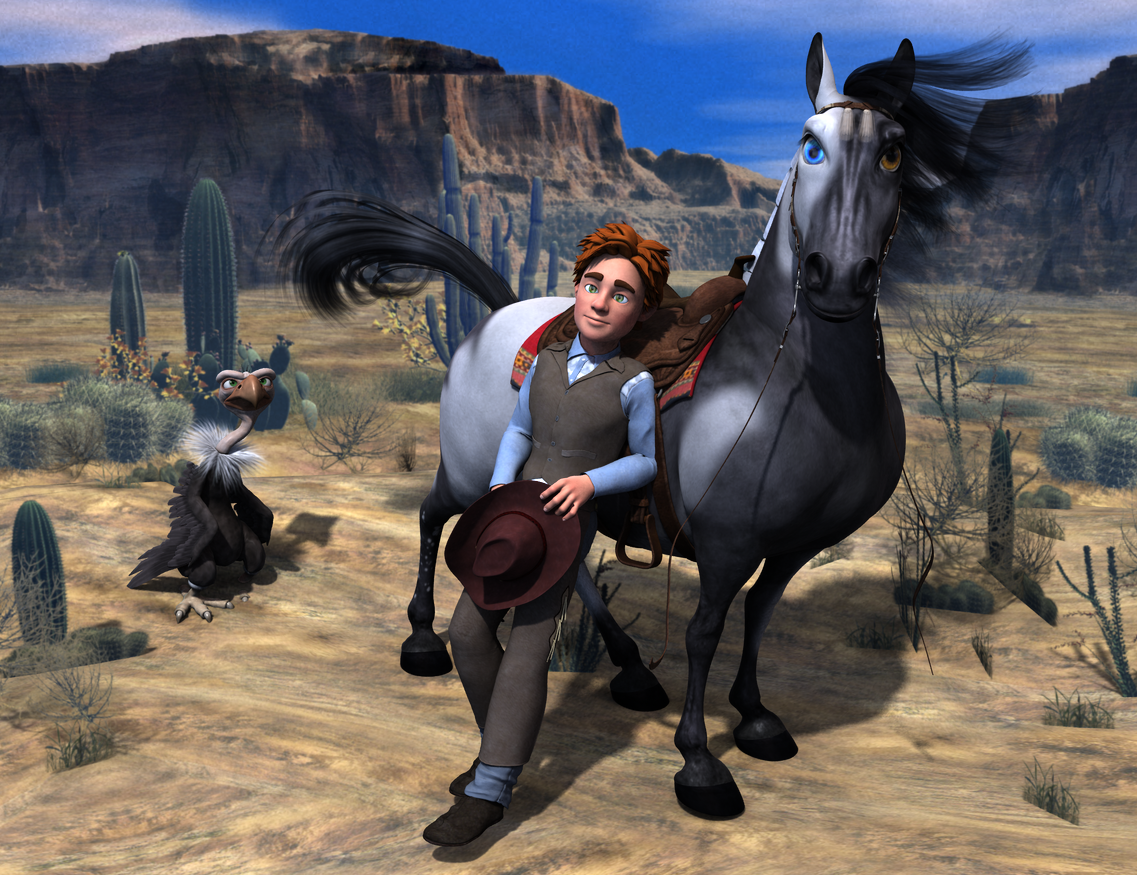
Soo TG2 is wearing all M4 Cowboy outfit ,HiveWire horse with the Toon Morph by 3DU and 3DU's Vulture
THAT is epic! Nice work!
ElebeastIf I don't have genesis in the scene, then
Clicking 1 EleBeast_MOR_duf gives "An error occurred while reading the file, see the log file for more details'
Yes, that's right, the MOR file assumes you're wanting to apply the character morph preset to a Genesis figure already in the scene. That's the typical error you get when you run a preset (usually a morph or texture) with no figure to apply it to.
If I do have Genesis in the scene and selected,cicking EleBeast_MOR_duf or EleBeast_MOR.pz2 don't seem to do anything (no morphs are made and don't see new option to morph genesis into elebeast)Are you sure you're using the right Elebeast character and the right Genesis figure? There's an Elebeast for the original Genesis, and there's the new Elebeast for Genesis 3 Male. Also note that the original Elebeast needs the Troll for Genesis character, the new one doesn't need anything extra.
Post Your Toon Generations 2 rendersSoo TG2 is wearing all M4 Cowboy outfit ,HiveWire horse with the Toon Morph by 3DU and 3DU's Vulture
This is wonderful!
ElebeastIf I don't have genesis in the scene, then
Clicking 1 EleBeast_MOR_duf gives "An error occurred while reading the file, see the log file for more details'
Clicking Help >Troubleshooting>View LogFile does NOT bring up a log file for me.
If I do have Genesis in the scene and selected,cicking EleBeast_MOR_duf or EleBeast_MOR.pz2 don't seem to do anything (no morphs are made and don't see new option to morph genesis into elebeast)
Any suggetsions?
Post Your Toon Generations 2 rendersSoo TG2 is wearing all M4 Cowboy outfit ,HiveWire horse with the Toon Morph by 3DU and 3DU's Vulture
Great scene!
M4 Anatomical Elements as a Genesis 1/2/3 propOk, I was under the impression that you wanted textures for Genesis 2 or Genesis 3 that could work with M4 genital starting with base M4 textures. Texture Converter will only work for converting Main M4 skin that has a genital matching skin already created. It will make you a Genesis 2 or 3 torso conversion but not a genital conversion. This program does not work in reverse. If you want to use G3 and G2 skins and have M4 genitals you will have to use the torso and face texture to create the genital textures from scratch in either Photoshop or GIMP.
I'm probably not explaining myself well so I'll try once again:
1. I have a prop based on the M4 genitals which I usually parent to G1/G2 and possibly G3 in future.
2. The prop comes with skin tone textures ranging from very light to very dark but it is difficult to match perfectly.
3. Genesis 1 Male, G2M and G3M all have several characters which provide AE textures.
So,
4. I want to be able to transfer those AE textures on to the prop. They are already AE textures so I would not need to use the face or other body parts.
As I mentioned in the OP, I don't have access to my computer at the moment so all I'm asking is whether it is possible and perhaps a tip on how to do it in either Photoshop or Blender.
Using this method, you can bake textures between a pair of similar objects...it's just a matter of setting up the object pair to bake from/to. Some things are easier than others.
http://www.daz3d.com/forums/discussion/59665/tutorial-converting-textures-from-gen2-to-gen3/p1
Wow that does look daunting but I'll read it carefully and have a go when I get the chance. Thanks for pointing out this tutorial, it could come in useful again for other issues.
Anime/Manga CharatcersKioki works pretty good as a anime character check my gallery here:
http://www.daz3d.com/gallery/#users/29485
most of the character were aiko 3 with kioki morph.
Post Your Toon Generations 2 rendersSoo TG2 is wearing all M4 Cowboy outfit ,HiveWire horse with the Toon Morph by 3DU and 3DU's Vulture
Daz Game Developer License: required use of online storeIt is much easier to use content explicitly created for the games, like the Morph3D items.
They already have proper license for using them in the games and you can morph them too.
They are just the derivatives of Genesis 2 items, similar to Genesis 2 items sold at Daz3D for rendering purposes.
That way you save a lot of time, efforts and/or costs of lawyer consulting.
I have also purchased the game license for Daz originals,
but realised, that it will be very hard to complain with the license requirements,
to actually use Daz originals in the games. It's a pity, because Genesis 3 transfers pretty well to game engines.
M4 Anatomical Elements as a Genesis 1/2/3 propOk, I was under the impression that you wanted textures for Genesis 2 or Genesis 3 that could work with M4 genital starting with base M4 textures. Texture Converter will only work for converting Main M4 skin that has a genital matching skin already created. It will make you a Genesis 2 or 3 torso conversion but not a genital conversion. This program does not work in reverse. If you want to use G3 and G2 skins and have M4 genitals you will have to use the torso and face texture to create the genital textures from scratch in either Photoshop or GIMP.
I'm probably not explaining myself well so I'll try once again:
1. I have a prop based on the M4 genitals which I usually parent to G1/G2 and possibly G3 in future.
2. The prop comes with skin tone textures ranging from very light to very dark but it is difficult to match perfectly.
3. Genesis 1 Male, G2M and G3M all have several characters which provide AE textures.
So,
4. I want to be able to transfer those AE textures on to the prop. They are already AE textures so I would not need to use the face or other body parts.
As I mentioned in the OP, I don't have access to my computer at the moment so all I'm asking is whether it is possible and perhaps a tip on how to do it in either Photoshop or Blender.
Using this method, you can bake textures between a pair of similar objects...it's just a matter of setting up the object pair to bake from/to. Some things are easier than others.
http://www.daz3d.com/forums/discussion/59665/tutorial-converting-textures-from-gen2-to-gen3/p1
Daz 3D is part of

Connect
DAZ Productions, Inc.
7533 S Center View Ct #4664
West Jordan, UT 84084Licensing Agreement | Terms of Service | Privacy Policy | EULA
© 2026 Daz Productions Inc. All Rights Reserved.