• Daz 3D
  • Shop
  • 3D Software
    • Daz Studio Premier
    • Daz Studio
    • Install Manager
    • Partnerships
    • AI Training data
    • Exporters
    • Daz to Roblox
    • Daz to Maya
    • Daz to Blender
    • Daz to Unreal
    • Daz to Unity
    • Daz to 3ds Max
    • Daz to Cinema 4D
  • 3D Models
    • Genesis 9
    • Genesis 8.1
    • Free 3D Models
  • Community
    • Gallery
    • Forums
    • Blog
    • Press
    • Help
  • Memberships
    • Daz Premier
    • Daz Plus
    • Daz Base
    • Compare
  • Download Studio
ADVANCED SEARCH
  • Menu
  • Daz 3D
ADVANCED SEARCH
Add image
  • Shop
  • 3d Software
    • Daz Studio Premier
    • Daz Studio
    • Install Manager
    • Partnerships
    • AI Training data
    • Exporters
    • Daz to Roblox
    • Daz to Maya
    • Daz to Blender
    • Daz to Unreal
    • Daz to Unity
    • Daz to 3ds Max
    • Daz to Cinema 4D
  • 3D Models
    • Genesis 9
    • Genesis 8.1
    • Free 3D Models
  • Community
    • Our Community
    • Gallery
    • Forums
    • Blog
    • Press
    • Help
  • Memberships
    • Daz Premier
    • Daz Plus
    • Daz Base
    • Compare

Notifications

You currently have no notifications.

Loading...
Daz 3D Forums > Search
  • Alien-X for Genesis 3 Male

    I had the finger bone issue in Daz Studio 4.9.2.70 with the AlienX character preset, applying AlienX Wearable preset to Genesis 3 Male and applying the AlienX full body morph to Genesis 3 Male

    My Genesis 3 Male Starter Essentials is installed via Daz Connect.  I'll uninstall and re-install via DIM and will report back.

    Edit:
    My Genesis 3 Male Starter Essentials is installed via Daz Connect.  I'll uninstall and re-install Genesis 3 Male Starter Essentials via DIM and will report back.
    1. Uninstalled via Daz Connect Genesis 3 Starter Essentials (includes female/male)  and re-installed via Daz Connect and short finger bones still exists.
    2. Uninstalled via Daz Connect Genesis 3 Starter Essentials (includes female/male)  and re-installed Genesis 3 Male Starter Essentials via DIM and the short finger bones still exists.

    In Daz Studio Public Beta 4.9.3.128 now AlienX is showing the short finger bones in both Daz Connect and DIM installed Genesis Male Starter Essentials.  Weird.  

    I'll restore the Daz Connect cloud folder 1_21630 (Genesis 3 Starter Essentials) from yesterday's backup and see if I can get AlienX working in the Beta again..

    EDIT EDIT:
    When I restored my 1_21630 Daz Connect Genesis 3 Starter Essentials from Yesterday's backup I expected to get a working AlienX with elongtated hand bones back in DS Beta, but I didn't.  Then I remembed the picture I posted with the elongated hand bones in DS Beta was not from loading an AlienX character preset, but from reloading a Scene I had saved in 4.9.2.70.  That scene loaded with the elongated hand bones in BOTH 4.9.2.70 and Beta 4.9.3.128.

    As a test in 4.9.2.70, I loaded a fresh AlienX character preset resulting in with short finger bones, saved it as a scene and re-loaded said scene back into 4.9.2.70 and the hand bones are now elongated.... Also saved AlienX as a Scene Subset showing short finger bones and reload the Scene Subset and now it has elongated finger bones.  Loading AlienX from a saved Scene Subset is the work-around that works for me.


    By

    Lindsey Lindsey November 2016 in Product Suggestions
  • HeadShop OneClick Submitted to DAZ - Best in Class! (Commercial)

    OK, another comparison of Facegen Pro with OneClick. I still get the RH.OneClick error when I export the morph but if you have the right picture and it's focused picture then OneClick gives as almost good results as FaceGen Pro. You have to get good, unblurry pictures though and it's better to use one focused picture instead of a focused & a blurry picture(s).

    Famous Person - Left to Right - FaceGen Pro & Genesis 3 Female | OneClick & Genesis 2 Female | OneClick & Genesis 3 Female

    All use the same frontal picture and no profile pictures. I had to manually place to dots on FaceGen pro but OneClick autoselected the dots. I did not check the autoselected dots on OneClick or make other adjustments besides using DAZ Genesis 2 & Genesis 3 Female default textures.

    All that said though, it's the FaceGen picture is the one I look at and go, 'That looks like her.' One thing I should add though, is how much of FaceGen's very good likeness of this famous person is copying her expression which seemed to be neutral but actually she does seem to habitually purse her lips. 

    Does FaceGen give different results between Genesis 2 and 3? I didn't splurge on the FG Pro because the difference was quite steep. But if it works better on G3, I may think about making that plunge.

    For everyone: It would be helpful to see the source pictures people are using, if that's ok. The reason why is because of how important the quality and pose of the source pic is for these products. Maybe we could even test each other's pics to see how each of us compare!

    I really, really wish One Click/Headshop could blend the created face texture into the skin. It stands out a lot so much. These forehead seems are crazy.

    One more thing...I read a response from one user that moving all of their Daz content to one location solved their install problem. But I cannot do that. I have Daz content spread over 2 hard drives because I cannot fit it all on one hard drive. My C drive is a 500GB SSD and it is crammed full. Does that mean One Click will not install for me?

    I will generate FaceGen Pro morphs of the prior tests tomorrow using Genesis 2 & Genesis and then post but if memory serves right they looked pretty much identical to me.

    From what I've read elsewhere you can use GenX2 to transfer morphs between V4/M4/Genesis/Genesis 2/Genesis 3 so whather you get FaceGen Pro to generate Genesis 3 morphs depends on if you think GenX2 transfers a FaceGen Pro Genesis or Genesis 2 morph exactly to Genesis 3. I think it would be the case that FaceGen Pro would do the better job but I don't own GenX2 to test that guess out.

    I have GenX2, but I've had lots of trouble getting it to port my Genesis 2 characters. It works great for V4/M4/G1, though. I think its due to my file structure, but I haven't really looked into to much. Porting the skin from G2 is another thing, too, and I've only been successful with base G2. With that in mind, it might be a good thing if FG makes nearly identical results for G2/3 until I get that figured out.

    If you happen to have a skin that is the same between G2/3, that might make the comparison between the One Click morphs a bit more fair. Taking a closer look at your pics, I think they might be a closer match to each other than they appear to be because of how the different skins.

    OK, well I have a product to move V4 textures to Genesis 2 Female but none to move to Genesis 3 Female. I also own no products to move Genesis 2 textures to Genesis 3 textures because my collection of characters is not big enough. Maybe with future sales my collection will grow.

    Anyway, I did redo the texture in my famous actress comparison to make them look alike as possible. The 1st & 3rd character are both Genesis 3, the 1st is FaceGen Pro & the 3rd OneClick so those should theorectically look nearly identical. The middle is Genesis 2 & OneClick with the same eyes but I had to use a Genesis 2 texture instead. They both use the same looking straight ahead expressionless professional picture that is over 1000x1000 pixels.

    So compare and pick the one that you like best.


    By

    nonesuch00 nonesuch00 November 2016 in The Commons
  • HeadShop OneClick Submitted to DAZ - Best in Class! (Commercial)

    OK, another comparison of Facegen Pro with OneClick. I still get the RH.OneClick error when I export the morph but if you have the right picture and it's focused picture then OneClick gives as almost good results as FaceGen Pro. You have to get good, unblurry pictures though and it's better to use one focused picture instead of a focused & a blurry picture(s).

    Famous Person - Left to Right - FaceGen Pro & Genesis 3 Female | OneClick & Genesis 2 Female | OneClick & Genesis 3 Female

    All use the same frontal picture and no profile pictures. I had to manually place to dots on FaceGen pro but OneClick autoselected the dots. I did not check the autoselected dots on OneClick or make other adjustments besides using DAZ Genesis 2 & Genesis 3 Female default textures.

    All that said though, it's the FaceGen picture is the one I look at and go, 'That looks like her.' One thing I should add though, is how much of FaceGen's very good likeness of this famous person is copying her expression which seemed to be neutral but actually she does seem to habitually purse her lips. 

    Does FaceGen give different results between Genesis 2 and 3? I didn't splurge on the FG Pro because the difference was quite steep. But if it works better on G3, I may think about making that plunge.

    For everyone: It would be helpful to see the source pictures people are using, if that's ok. The reason why is because of how important the quality and pose of the source pic is for these products. Maybe we could even test each other's pics to see how each of us compare!

    I really, really wish One Click/Headshop could blend the created face texture into the skin. It stands out a lot so much. These forehead seems are crazy.

    One more thing...I read a response from one user that moving all of their Daz content to one location solved their install problem. But I cannot do that. I have Daz content spread over 2 hard drives because I cannot fit it all on one hard drive. My C drive is a 500GB SSD and it is crammed full. Does that mean One Click will not install for me?

    I will generate FaceGen Pro morphs of the prior tests tomorrow using Genesis 2 & Genesis and then post but if memory serves right they looked pretty much identical to me.

    From what I've read elsewhere you can use GenX2 to transfer morphs between V4/M4/Genesis/Genesis 2/Genesis 3 so whather you get FaceGen Pro to generate Genesis 3 morphs depends on if you think GenX2 transfers a FaceGen Pro Genesis or Genesis 2 morph exactly to Genesis 3. I think it would be the case that FaceGen Pro would do the better job but I don't own GenX2 to test that guess out.

    I have GenX2, but I've had lots of trouble getting it to port my Genesis 2 characters. It works great for V4/M4/G1, though. I think its due to my file structure, but I haven't really looked into to much. Porting the skin from G2 is another thing, too, and I've only been successful with base G2. With that in mind, it might be a good thing if FG makes nearly identical results for G2/3 until I get that figured out.

    If you happen to have a skin that is the same between G2/3, that might make the comparison between the One Click morphs a bit more fair. Taking a closer look at your pics, I think they might be a closer match to each other than they appear to be because of how the different skins.

    OK, for the male figures I tested with OneClick & FaceGen I did use the same Caleb for M4 / Genesis on the FaceGen Pro & OneClick results.

    For the famous actress I didn't but I will try to get my products working that allow that as goodness knows I paid enough money for all that and I'll repost the actress comparison.

    For your request to see the FaceGen Pro results with Genesis, Genesis 2, and Genesis 3 I did so for both a male figure and female figure. The male figure has the same skin texture in all three but not yet the female. I need to find the Genesis or V4 texture I think works best with her but even without the matching textures you can pretty easiliy see geometrically the face is the same. At least to my untrained non-artist eye.

    To see those 2 tests (the last two images in my 'DAZ Driver's License Gallery') since it is not a review or bug report about OneClick I will not post it here, follow the link to my Gallery & the comparison is there.


    By

    nonesuch00 nonesuch00 November 2016 in The Commons
  • Novica & Forum Members Tips & Product Reviews Pt 7


    Just consider... I've been a PA here since 2003, and a customer since 2001 or so... now imagine MY library, not even counting my own products. :D

    Oh my. you must have a lot of stuff... Fo you have that alien morph for millenium dog? I admit I've always wanted that, and they gave it out as a freebie before removing it from the library.

    By

    Serene Night Serene Night November 2016 in Art Studio
  • HeadShop OneClick Submitted to DAZ - Best in Class! (Commercial)

    OK so the two errors I get are

    1. One or more of the files had no effect

    2. An unexpected error while creating the morph

    By

    nmargie_d65db43582 nmargie_d65db43582 November 2016 in The Commons
  • HeadShop OneClick Submitted to DAZ - Best in Class! (Commercial)

    OK, another comparison of Facegen Pro with OneClick. I still get the RH.OneClick error when I export the morph but if you have the right picture and it's focused picture then OneClick gives as almost good results as FaceGen Pro. You have to get good, unblurry pictures though and it's better to use one focused picture instead of a focused & a blurry picture(s).

    Famous Person - Left to Right - FaceGen Pro & Genesis 3 Female | OneClick & Genesis 2 Female | OneClick & Genesis 3 Female

    All use the same frontal picture and no profile pictures. I had to manually place to dots on FaceGen pro but OneClick autoselected the dots. I did not check the autoselected dots on OneClick or make other adjustments besides using DAZ Genesis 2 & Genesis 3 Female default textures.

    All that said though, it's the FaceGen picture is the one I look at and go, 'That looks like her.' One thing I should add though, is how much of FaceGen's very good likeness of this famous person is copying her expression which seemed to be neutral but actually she does seem to habitually purse her lips. 

    Does FaceGen give different results between Genesis 2 and 3? I didn't splurge on the FG Pro because the difference was quite steep. But if it works better on G3, I may think about making that plunge.

    For everyone: It would be helpful to see the source pictures people are using, if that's ok. The reason why is because of how important the quality and pose of the source pic is for these products. Maybe we could even test each other's pics to see how each of us compare!

    I really, really wish One Click/Headshop could blend the created face texture into the skin. It stands out a lot so much. These forehead seems are crazy.

    One more thing...I read a response from one user that moving all of their Daz content to one location solved their install problem. But I cannot do that. I have Daz content spread over 2 hard drives because I cannot fit it all on one hard drive. My C drive is a 500GB SSD and it is crammed full. Does that mean One Click will not install for me?

    I will generate FaceGen Pro morphs of the prior tests tomorrow using Genesis 2 & Genesis and then post but if memory serves right they looked pretty much identical to me.

    From what I've read elsewhere you can use GenX2 to transfer morphs between V4/M4/Genesis/Genesis 2/Genesis 3 so whather you get FaceGen Pro to generate Genesis 3 morphs depends on if you think GenX2 transfers a FaceGen Pro Genesis or Genesis 2 morph exactly to Genesis 3. I think it would be the case that FaceGen Pro would do the better job but I don't own GenX2 to test that guess out.

    I have GenX2, but I've had lots of trouble getting it to port my Genesis 2 characters. It works great for V4/M4/G1, though. I think its due to my file structure, but I haven't really looked into to much. Porting the skin from G2 is another thing, too, and I've only been successful with base G2. With that in mind, it might be a good thing if FG makes nearly identical results for G2/3 until I get that figured out.

    If you happen to have a skin that is the same between G2/3, that might make the comparison between the One Click morphs a bit more fair. Taking a closer look at your pics, I think they might be a closer match to each other than they appear to be because of how the different skins.

    By

    outrider42 outrider42 November 2016 in The Commons
  • HeadShop OneClick Submitted to DAZ - Best in Class! (Commercial)

    OK, another comparison of Facegen Pro with OneClick. I still get the RH.OneClick error when I export the morph but if you have the right picture and it's focused picture then OneClick gives as almost good results as FaceGen Pro. You have to get good, unblurry pictures though and it's better to use one focused picture instead of a focused & a blurry picture(s).

    Famous Person - Left to Right - FaceGen Pro & Genesis 3 Female | OneClick & Genesis 2 Female | OneClick & Genesis 3 Female

    All use the same frontal picture and no profile pictures. I had to manually place to dots on FaceGen pro but OneClick autoselected the dots. I did not check the autoselected dots on OneClick or make other adjustments besides using DAZ Genesis 2 & Genesis 3 Female default textures.

    All that said though, it's the FaceGen picture is the one I look at and go, 'That looks like her.' One thing I should add though, is how much of FaceGen's very good likeness of this famous person is copying her expression which seemed to be neutral but actually she does seem to habitually purse her lips. 

    Does FaceGen give different results between Genesis 2 and 3? I didn't splurge on the FG Pro because the difference was quite steep. But if it works better on G3, I may think about making that plunge.

    For everyone: It would be helpful to see the source pictures people are using, if that's ok. The reason why is because of how important the quality and pose of the source pic is for these products. Maybe we could even test each other's pics to see how each of us compare!

    I really, really wish One Click/Headshop could blend the created face texture into the skin. It stands out a lot so much. These forehead seems are crazy.

    One more thing...I read a response from one user that moving all of their Daz content to one location solved their install problem. But I cannot do that. I have Daz content spread over 2 hard drives because I cannot fit it all on one hard drive. My C drive is a 500GB SSD and it is crammed full. Does that mean One Click will not install for me?

    I will generate FaceGen Pro morphs of the prior tests tomorrow using Genesis 2 & Genesis and then post but if memory serves right they looked pretty much identical to me.

    From what I've read elsewhere you can use GenX2 to transfer morphs between V4/M4/Genesis/Genesis 2/Genesis 3 so whather you get FaceGen Pro to generate Genesis 3 morphs depends on if you think GenX2 transfers a FaceGen Pro Genesis or Genesis 2 morph exactly to Genesis 3. I think it would be the case that FaceGen Pro would do the better job but I don't own GenX2 to test that guess out.

    By

    nonesuch00 nonesuch00 November 2016 in The Commons
  • Anyone Working On A Caped Dracula Costume?

    We've recently had a complimenting vampiric morph set for G3M and, now, finally a hair product which allows both genders to have a widow's peak, so... It seems like now all we need is a cloaked costume in the style of Dracula and/or Count Orlok. Is anybody creating one? Seems strange that the last attempt seems to be from the M4 era!

    Also, in regards to the Undead Creature Creator sets, a word of warning: If you apply the talon morphs for G3M, the nail for the thumb noticeably unnaturally intersects through the flesh on either side (the other fingers seem fine). It's less so for the G3F edition, but also exists there. Am surprised that wasn't noticed during the testing of it, since this happens with just the base figures.

    By

    Xenomorphine Xenomorphine November 2016 in The Commons
  • HeadShop OneClick Submitted to DAZ - Best in Class! (Commercial)

    OK, another comparison of Facegen Pro with OneClick. I still get the RH.OneClick error when I export the morph but if you have the right picture and it's focused picture then OneClick gives as almost good results as FaceGen Pro. You have to get good, unblurry pictures though and it's better to use one focused picture instead of a focused & a blurry picture(s).

    Famous Person - Left to Right - FaceGen Pro & Genesis 3 Female | OneClick & Genesis 2 Female | OneClick & Genesis 3 Female

    All use the same frontal picture and no profile pictures. I had to manually place to dots on FaceGen pro but OneClick autoselected the dots. I did not check the autoselected dots on OneClick or make other adjustments besides using DAZ Genesis 2 & Genesis 3 Female default textures.

    All that said though, it's the FaceGen picture is the one I look at and go, 'That looks like her.' One thing I should add though, is how much of FaceGen's very good likeness of this famous person is copying her expression which seemed to be neutral but actually she does seem to habitually purse her lips. 

    Does FaceGen give different results between Genesis 2 and 3? I didn't splurge on the FG Pro because the difference was quite steep. But if it works better on G3, I may think about making that plunge.

    For everyone: It would be helpful to see the source pictures people are using, if that's ok. The reason why is because of how important the quality and pose of the source pic is for these products. Maybe we could even test each other's pics to see how each of us compare!

    I really, really wish One Click/Headshop could blend the created face texture into the skin. It stands out a lot so much. These forehead seems are crazy.

    One more thing...I read a response from one user that moving all of their Daz content to one location solved their install problem. But I cannot do that. I have Daz content spread over 2 hard drives because I cannot fit it all on one hard drive. My C drive is a 500GB SSD and it is crammed full. Does that mean One Click will not install for me?

    By

    outrider42 outrider42 November 2016 in The Commons
  • Need v4.6.1.17 x64 win installer

    If it still not work for you,, check this.  because  I know "currently used" may not work when the morph.dsf are saved with different values. 

    because once saved with value = 1,  not zero,,  as morphA. dsf,, it just keep current morph value as default value too. (at least about  most of DS 4.5 version)


    then each character.DUF (load character) not care at all,,when  there is no discribe about the morphA in the file. usually most of character duf, never record

    other morph values which not used for.   it just load all morphs  with recorded value + other morphs with default value = usually it should be zero..

    then morphA will load the recoreded default value too.    But currently used only show us when the morphs which change  value from default values.

    see my pic , I tweaked FHMAiko7.dsf , now all genesis3female character should load Aiko7 face (though it is not bad for me ,,;) , I load genesis3female from dafault character.duf.    but "currently used" tell you nothing.   you can not find FHMAiko7.    

    to remove this problem,, you need to  "zero  figure" first.  then move another section in parameter tab, then  check "currently used" again..    it may show you the problem morph.  because now the value change to "zero" from default values.

    But still there is limitation,, if the morph are hidden parameter,,  ds zero figure, or zero shape not turn those parameter value to zero. it is ignored.

    about this case,,(worst case)  you actually need to check all morph value carefully with "show hidden parameter".  then need to find the problem morph (or hidden controlelr).

    I may suggest,, re-install all product morphs. after un-install all morphs. (though i know it is terrible) 

    By

    kitakoredaz kitakoredaz November 2016 in Daz Studio Discussion
  • Infinite Insanity - There's ALWAYS Another Sale! (Daily Sale Talk)

    I'm familiar with it, and unfortunately the problem is what I stated ... the entire morph is in one dial, no separate ears.


    Try unselecting 'autofollow' for the hair, (hidden properties) then manually adjusting the hair to the head-shape (should be easy enough with scaling)

    By

    Silent Winter Silent Winter November 2016 in The Commons
  • HeadShop OneClick Submitted to DAZ - Best in Class! (Commercial)

    is there a video to show how to do the profile... it's not user friendly enough for me to work out!

    Hmmm. Have your looked under the Help menu? (logical place to find help). Yes, there's a how to video for profile.

    OK.. I have checked out the help but it doesn't match what the program is showing and the profile morph doesn't work.. either that or I'm a reptilian! surprise

    and it doesn't recognise a lot of faces in my photos still.. there should be a manual overide when auto doesn't detect an obvious face.

    If OneClick works, profile should work, too. Please watch profile tech help and video under the Help menu. About auto detect: it really works when you have a decnt size photo (1000x1000 or larger). 

    By

    info_b3470fa520 info_b3470fa520 November 2016 in The Commons
  • Hair style & choker request

    Yep I am making multiple types of styles there is also (not shown yet) a morph that makes the side bangs longer without changing the width of the bangs at all... So I will also make a morph that resembles your request :) I will post more pics soon

    By

    KixiePixie13 KixiePixie13 November 2016 in Product Suggestions
  • Smoothing character's geometry

    To be honeslty it take you more time than export and reduce problem by another 3d aprication,,

    but If you hope to use smooth modifier, and limit influence,, you need to export " smoothed mesh "as morph at first. 

    ( keep smooth modifier "on",, then   set mesh geometry as "base resoluion," and need to set "interective up-date on",  then you can export current  smoothed shape as morph.obj)

    unfortunately,, there is no option,  to limit influece of smooth modifier,, at current,,  but you can use  morph loader "attenuate  option",. with D-former weight map.

    (or you can  select node as attenuate option,, but not limit as you like I think),


    apply D-former on to genesis2female,, then select D-former base (filed as you like) ,,  apply new D-former weight,, in Node wegith map tool,

    then  color influence weight manually.. (you can use smooth weight too),  remember,,  it is not for D-former, just make "map" to attenuate smooth morph.

    then import the "smooth morph" by morphloader,,, with attenuate option, as "D-former" weight map. (which you made) .

    after that the import  morph can be used without smooth modifier.  though it may only work well about current posing and shape. 

    By

    kitakoredaz kitakoredaz November 2016 in Technical Help (nuts n bolts)
  • HeadShop OneClick Submitted to DAZ - Best in Class! (Commercial)

    is there a video to show how to do the profile... it's not user friendly enough for me to work out!

    Hmmm. Have your looked under the Help menu? (logical place to find help). Yes, there's a how to video for profile.

    OK.. I have checked out the help but it doesn't match what the program is showing and the profile morph doesn't work.. either that or I'm a reptilian! surprise

    and it doesn't recognise a lot of faces in my photos still.. there should be a manual overide when auto doesn't detect an obvious face.

    If OneClick works, profile should work, too. Please watch profile tech help and video under the Help menu.

    About auto detect: it really works when you have a decnt size photo (1000x1000 or larger). 

    By

    info_b3470fa520 info_b3470fa520 November 2016 in The Commons
  • Infinite Insanity - There's ALWAYS Another Sale! (Daily Sale Talk)

    I'm familiar with it, and unfortunately the problem is what I stated ... the entire morph is in one dial, no separate ears.


    By

    Oso3D Oso3D November 2016 in The Commons
  • Infinite Insanity - There's ALWAYS Another Sale! (Daily Sale Talk)

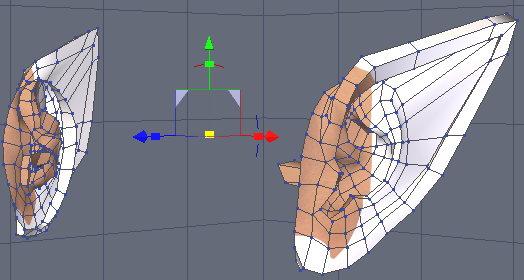
    If I have a single dial morph that affects ears, and don't want the hair to follow the ears, any way to make that happen?


    Elf ears problem ? 

    This topic may be a help to you.

    http://www.daz3d.com/forums/viewthread/50236/

    By

    pawpaw pawpaw November 2016 in The Commons
  • HeadShop OneClick Submitted to DAZ - Best in Class! (Commercial)

    is there a video to show how to do the profile... it's not user friendly enough for me to work out!

    Hmmm. Have your looked under the Help menu? (logical place to find help). Yes, there's a how to video for profile.

    OK.. I have checked out the help but it doesn't match what the program is showing and the profile morph doesn't work.. either that or I'm a reptilian! surprise

    and it doesn't recognise a lot of faces in my photos still.. there should be a manual overide when auto doesn't detect an obvious face.

    By

    Stezza Stezza November 2016 in The Commons
  • Infinite Insanity - There's ALWAYS Another Sale! (Daily Sale Talk)

    If I have a single dial morph that affects ears, and don't want the hair to follow the ears, any way to make that happen?


    By

    Oso3D Oso3D November 2016 in The Commons
  • Post Your Renders - Happy New Year yall

    Currently working on a SnowMan... still needs a couple arms, carrot nose and morph for hat. Thought I'd put it in Howies Snow scene to test out... the Snow Man I'm modeling is for a different scene.

    By

    wgdjohn wgdjohn November 2016 in Carrara Discussion
Previous Next
Adding to Cart…

Daz 3D is part of Tafi

Connect

DAZ Productions, Inc.
7533 S Center View Ct #4664
West Jordan, UT 84084

HELP

Contact Us

Tutorials

Help Center

Sell Your 3D Content

Affiliate Program

Documentation Center

Open Source

Consent Preferences

JOIN DAZ

Memberships

Blog

About Us

Press

Careers

Bridges

Community

In the Studio

Gallery

Forum

DAZ STORE

Shop

Freebies

Published Artists

Licensing Agreement | Terms of Service | Privacy Policy | EULA

© 2026 Daz Productions Inc. All Rights Reserved.