-
Convert V4 pose to G8?
I want to convert some V4 / M4 poses to G8F / G8M.
I have a free script that converts G1 poses to G8.
Is Victoria 4 the same as Genesis 1? And can I use that script to convert V4 poses to G8?
Or is there an appropriate tool to do this?
Buy Something That Doesn't Work in Carrara? Post your Questions and Workarounds here. (please)WendyLuvsCatz said:
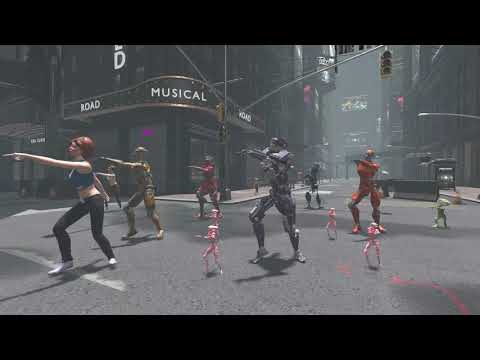
the clips with the Victoria 4 hookers were rendered in Carrara, the other clips including that spirit of punk train and airship were rendered in Twinmotion
 Buy Something That Doesn't Work in Carrara? Post your Questions and Workarounds here. (please)
the clips with the Victoria 4 hookers were rendered in Carrara, the other clips including that spirit of punk train and airship were rendered in Twinmotion
Celebrity Look-a-Likes for 3D figures part 3I've Id some of the mousso characters.
- Caramel - Already Identified as Cara Delevigne
- Chanel - Analeigh Tipton
- Dior - Miranda Kerr
- Juniper - Michel Pfieffer
- Marne - Anne Hathaway
- Gail - Natalie Dormer
- Revel - Sigourney Weaver
- Melanthe - Heidi Klum
Others I'm less sure abut
- Lilianna Emily - Di Damato?
- Flavia -Candice Swanpool?
- Rei - Doutzen, Kroes?
- Ryleigh - Kate Moss?
Anyhow Aside from famous actresses, I think he uses the modeling world a lot. Expecially SI swimsuit, and Victoria's secret. Names Like Revel, Chanel, Dior also indicate this connection.
Sweat it Out Fitness Bundlejd641 said:
Luckily I bought FC during the holiday sale, so far it's been a really helpful tool in smoothing out chest conforming issues and it makes me really think that I should have bought it much sooner.

How are the pants fitting and how well do they take to bending beyond typical standing poses? Thanks!
Well, another weird thing about this outfit is that smoothing is turned Off by default. The outfit works better with it turned on. It's one more thing that makes it unsuitable for new Daz Studio users. In this pose, the Top (bra) doesn't fit Victoria 8 without pokethrough at the top of the breasts, even with smoothing turned on and the Move Chest Front morph maxxed, which makes it poke through the Shirt with the Breast Size morph maxxed. It's a pretty exhausting outfit.
Anyway, the leggings are okay, as long as you turn Smoothing On.
Sweat it Out Fitness BundleSevrin said:
jd641 said:
Sevrin said:
The AJC Workout Style Outfit and Dumbbells for Genesis 8 Female(s) | 3D Models and 3D Software by Daz 3D isn't great. It's the first item I've purchased from this vendor and probably the last. I was discouraged with the others because of their high poly count, but this one's got a lot lower poly count. The whole outfit is 28k faces at base resolution.
I first tried it on Keyana, and saw the Shirt needs a lot of adjustment. Then I loaded it on vanilla G8F, and even there the Shirt has issues under the breasts. Keyana's a busty custom morph, so yeah, but if the item doesn't fit smoothly on the base figure, there's something amiss. The Shirt is also not symmetrical. And if you try to add dForce, the Shirt enters the void upon simulation. When I went to chase it, my camera ended up in a place DS calls "nan".
The Top, at SubD 2 (G8F also at SubD 2) looks only slightly less blocky around the breasts than a World of Warcraft character. On checking, I saw it loads with Bilinear SubD instead of the usual Catmark for some odd reason. The reason, I found, was that when you switch to Catmark, the main fabric looks all jaggedy where it meets the trim. The leggings use the same Bilinear SubD, but look smoother.
Anyway, thanks to Fit Control, I got the Shirt sorted out on Keyana well enough for a render without too many issues. Keyana would have shown her belly button, but in the end I gave up on that adventure due to fitting issues, so she's sad. In fairness, the outfit does come with documents marked "warning", so I should have expected this wouldn't be easy.
That's a shame, the promo images make the outfit look really good. I guess I'll pass on it and consider the Easy Going Outfit instead.
It still has really nice 4k textures, and the PA has some good ideas, but it will take a bit of work to look right.
Edit: You really need Fit Control to deal with this garment. It doesn't have enough morphs for a conforming garment that can't be dForced, as you can see from the clipping of the sleeve cuffs on Victoria 8 into the forearms. If not the top and leggings which fit tightly, the shirt is the type of garment for which dForce would have been appropriate.
Luckily I bought FC during the holiday sale, so far it's been a really helpful tool in smoothing out chest conforming issues and it makes me really think that I should have bought it much sooner.
How are the pants fitting and how well do they take to bending beyond typical standing poses? Thanks!
Sweat it Out Fitness Bundlejd641 said:
Sevrin said:
The AJC Workout Style Outfit and Dumbbells for Genesis 8 Female(s) | 3D Models and 3D Software by Daz 3D isn't great. It's the first item I've purchased from this vendor and probably the last. I was discouraged with the others because of their high poly count, but this one's got a lot lower poly count. The whole outfit is 28k faces at base resolution.
I first tried it on Keyana, and saw the Shirt needs a lot of adjustment. Then I loaded it on vanilla G8F, and even there the Shirt has issues under the breasts. Keyana's a busty custom morph, so yeah, but if the item doesn't fit smoothly on the base figure, there's something amiss. The Shirt is also not symmetrical. And if you try to add dForce, the Shirt enters the void upon simulation. When I went to chase it, my camera ended up in a place DS calls "nan".
The Top, at SubD 2 (G8F also at SubD 2) looks only slightly less blocky around the breasts than a World of Warcraft character. On checking, I saw it loads with Bilinear SubD instead of the usual Catmark for some odd reason. The reason, I found, was that when you switch to Catmark, the main fabric looks all jaggedy where it meets the trim. The leggings use the same Bilinear SubD, but look smoother.
Anyway, thanks to Fit Control, I got the Shirt sorted out on Keyana well enough for a render without too many issues. Keyana would have shown her belly button, but in the end I gave up on that adventure due to fitting issues, so she's sad. In fairness, the outfit does come with documents marked "warning", so I should have expected this wouldn't be easy.
That's a shame, the promo images make the outfit look really good. I guess I'll pass on it and consider the Easy Going Outfit instead.
It still has really nice 4k textures, and the PA has some good ideas, but it will take a bit of work to look right.
Edit: You really need Fit Control to deal with this garment. It doesn't have enough morphs for a conforming garment that can't be dForced, as you can see from the clipping of the sleeve cuffs on Victoria 8 into the forearms. If not the top and leggings which fit tightly, the shirt is the type of garment for which dForce would have been appropriate.
Gianni 8.1I don't think there's currently anything in the store that will allow you to use Gianni 6 textures on G3/G8M without doing the intermediate map transfer step.
The problem is that the Gianni 6 UV was used by Gianni 6 himself, Hector for Gianni 6, Svengar for Gianni 6 and Atticus for Gianni 6 ... and that's it. The UV wasn't even used for the other two characters in Gianni's pro bundle, which was strikingly unusual for that time; Ryze and Taric are both G2 Base Male UV. I can't imagine there was a whole lot of demand for whatever it was. (I'm kind of amazed there was demand for RedzStudio's similar product for G3, given that for pretty much every character but Michael and Victoria, there was one and only one character with the named UV for each pro bundle ... and not a huge number of characters using M7/V7 UVs.)
When I transferred Gianni's texture, I had to use map transfer to get him to G2 Base Male, then Texture Transformer (from elsewhere) to completely rewrite the G2 Base Male texture to G3/G8 Base Male. I hated doing it -- that sort of two-step means that there will be unavoidable detail loss, since the source textures are JPG -- but it was the only way I could think to make it work.
Technically, you'd probably also want to replace Gianni 6 normal maps with the normal maps of whatever HD you decide to use. (The closest one I can imagine is Brute, actually; even though he's a stylized character, he's also the only character with anything like the body shape that Gianni had, and the HD and normal maps won't bring things like the oversize hands and feet and head along for the ride.) That way the HD and the normal maps, which are meant to work together, should match. Also, as I understand it, Daz normal maps got MUCH better after G2.
Hair in UnityOk, I have used Unity 2020.2.1f1 with URP pipeline and below is my result.
Have tried different versions of hair in URP and could not make it to look, like in Daz Studio.
Hair made by 3Dream and Mairy were always my favorites and Anemone Hair looks pretty good to me (it is on the left on Victoria 4.2).
Compare my result with the promo on https://www.daz3d.com/anemone-hair and you will see the difference.
Link to my video on YouTube, below:
 1.5.21_Anatomical Elements Deleted base mesh?
Hey all,
So I found out that when loading the Victoria 8 pro bundles genetalia, it ended up deleting the base mesh of teh G8F that was there,
is there anyway to bring it back?
I already have the character posed and everything and dont want to start anew again
Can anyone I.D. this character?Neikdian said:
Hi all,
She is a mix of Victoria (%40), Kanade 8 (%30) and Karyssa 8 (%30). I like to mix and create new looking...
thanks a ton for the reply, Neikdian!
Celebrity Look-a-Likes for 3D figures part 3JUJU said:
This new lady gives me some Victoria Beckham vibes ?
https://www.daz3d.com/galina-hd-for-genesis-8-female
I concur -- Galina does have that Spicy Posh look, to her
Celebrity Look-a-Likes for 3D figures part 3This new lady gives me some Victoria Beckham vibes ?
https://www.daz3d.com/galina-hd-for-genesis-8-female
Anybody knows which girl is this model?Definitely looks like a combo between Amira & Victoria 8 to me..
Apply Victoria 8 pro, female anatomical elements without using Vic8 materials?Richard Haseltine said:
There aren't any Victoria 8 Anatomical Elements - there is just the one set, included in most but not all adult Pro bundles, and they should work with any character that has a set of materials for them.
Right, and for the base genesis 8 model are there maps available for the anat elements?
dForce freezesIt's a thin mesh, quad, right up against Genesis 8 Female. It's a dress I purchased designed for dForce. I have everything on default settings. I have tried with various articles of clothing on both Genesis 8 male and female. All were purchased and designed for dForce.
Attached are some screenshots. I used an entirely different dForce dress and Victoria 8, then a fairly normal pose. It didn't even make it to 53% this time. Crashed at 0%. I selected just the dress portion to simulate. The screenshots have the settings.
Hope the screenshots help. :)
Apply Victoria 8 pro, female anatomical elements without using Vic8 materials?There aren't any Victoria 8 Anatomical Elements - there is just the one set, included in most but not all adult Pro bundles, and they should work with any character that has a set of materials for them.
Carrara Challenge #55 - The Seasons - Last Minute EntiresDiomede said:
For distant shots I use the base skins, close-ups I tend to use Ringo's shaders or a V4 conversion. V4 Skins Batch Converter to Genesis 2 Female(s) - https://www.daz3d.com/v4-skins-batch-converter-to-genesis-2-female-s
Note that it also needs Victoria 4 for Genesis 2 Female - https://www.daz3d.com/victoria-4-for-genesis-2-female
As I have quite a large collection of V4 items I find it worthwhile to reuse them. Will need to experiment Ringo's settings with swapped skins like you are doing.
Thanks. Great info. I have the V4 for G2F product but not the skin batch converter. Until the converter goes on sale, I will look for a different solution. The description of the batch converter says that the other product is a prerequisite so that you have the V4 for G2F UVs. Presumablly, that means I have the V4 for G2F UVs through the V4 for G2F product. There is probably a way to use Studio as a free plugin to save a version of G2F with the alternate UVs. Then I could use all those 'Elite V4' Carrara shaders on G2F. Unless differences in shader domains cause a problem. Has anyone successfully used the Elite V4 series carrara shaders on Genesis 2?
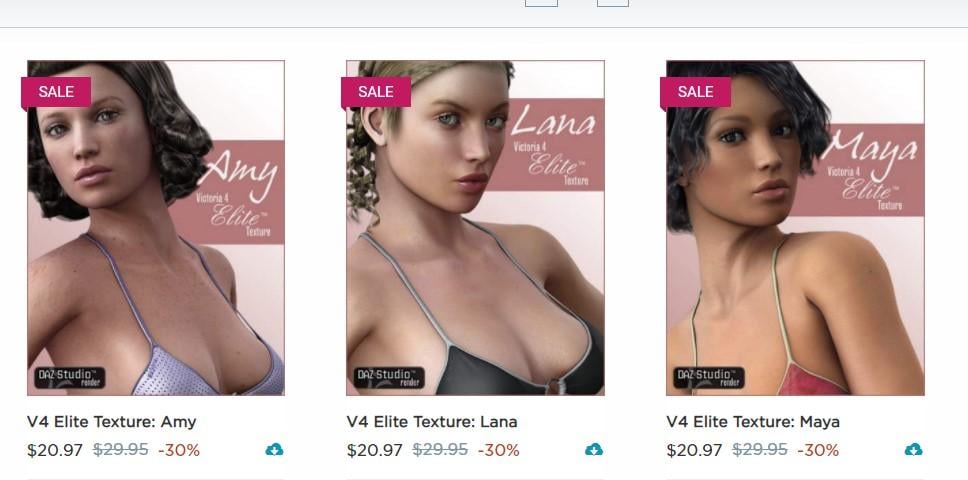
Will test the V4 Elite textures.
Ran into a problem with UVs when I used Ringo's V6 with a V4 texture, might need to setup a base V4 texture with Ringo's settings copied over.
Carrara Challenge #55 - The Seasons - Last Minute EntiresFor distant shots I use the base skins, close-ups I tend to use Ringo's shaders or a V4 conversion. V4 Skins Batch Converter to Genesis 2 Female(s) - https://www.daz3d.com/v4-skins-batch-converter-to-genesis-2-female-s
Note that it also needs Victoria 4 for Genesis 2 Female - https://www.daz3d.com/victoria-4-for-genesis-2-female
As I have quite a large collection of V4 items I find it worthwhile to reuse them. Will need to experiment Ringo's settings with swapped skins like you are doing.
Thanks. Great info. I have the V4 for G2F product but not the skin batch converter. Until the converter goes on sale, I will look for a different solution. The description of the batch converter says that the other product is a prerequisite so that you have the V4 for G2F UVs. Presumablly, that means I have the V4 for G2F UVs through the V4 for G2F product. There is probably a way to use Studio as a free plugin to save a version of G2F with the alternate UVs. Then I could use all those 'Elite V4' Carrara shaders on G2F. Unless differences in shader domains cause a problem. Has anyone successfully used the Elite V4 series carrara shaders on Genesis 2?
Carrara Challenge #55 - The Seasons - Last Minute EntiresDiomede said:
UnifiedBrain said:
What was missing for me, was a more differentiated skin texture. And it's not just your render, but instead applies to most renders that are posted on the Daz and Poser forums, including the newer G3 and G8 characters. Artists, even in promotional images, tend to use a dull grey-brown for skin, which looks like a plastic Barbie doll. Unless they are doing a toon, it distracts from the render (to me). The skin maps from V4 Elite on up are actually pretty good, so it is not the fault of Daz. Skin irregularities are pretty easy to highlight. People must just not care, or want their renders to resemble actual dolls. I guess that we all have our pet peeves. :)
Hope it is not too late to follow up on this comment. I am asking for suggestions.
For these fishing images, I did use indirect light and pay the render time penalty. That did trigger subsurface scattering. However, that is not my usual procedure because I don't usually want to wait for the render time.
Here is what I usually do. I generally load a Ringo skin texture that does not necessarily match the figure UVs, and then swap out the maps with a set that does match the UVs of the figure. The result is that settings like shininess, etc. are good as per Ringo but are not integrated with the other shader channels so not so good. Also, I generally do not use sky light, indirect light, or Gamma 2.2. Not using indirect light disables the subsurface scattering (I think). Most of these choices are to reduce render times.
Genesis 2 Skin texture choices - I have quite a few Daz G2F characters. For example, I have almost all of the ones that Ringo made Carrara sets for. In addition, I have a few other random ones, including one merchant resource by Forbidden Whispers. Also, there is a way to specify the UVs to be used in Daz Studio. Can that be used and saved out of Studio as a scene subset or something to allow G2F to use the full range of UV sets available in Studio for G2F? For example, is there a way to use V4 maps on G2F in Carrara?
For distant shots I use the base skins, close-ups I tend to use Ringo's shaders or a V4 conversion. V4 Skins Batch Converter to Genesis 2 Female(s) - https://www.daz3d.com/v4-skins-batch-converter-to-genesis-2-female-s
Note that it also needs Victoria 4 for Genesis 2 Female - https://www.daz3d.com/victoria-4-for-genesis-2-female
As I have quite a large collection of V4 items I find it worthwhile to reuse them. Will need to experiment Ringo's settings with swapped skins like you are doing.
Daz 3D is part of

Connect
DAZ Productions, Inc.
7533 S Center View Ct #4664
West Jordan, UT 84084Licensing Agreement | Terms of Service | Privacy Policy | EULA
© 2026 Daz Productions Inc. All Rights Reserved.