-
???? A ton of free stuff today. ???? NOT!!!
people asleep or at work at the time of the glitchy changeover honestly can be blissfully unaware and not every thread on the topic stays on the first page for long so even regular forum frequenters can miss them,
the ones not visiting the forum would presumably be pestering customer service so they should well and truely be aware of the problem.
I certainly don't judge people for not knowing or think them idiots, it's not user error in this case on the customers behalf.
Would it not make LOADS of sense for the changeover to be at DAZ MIDDAY instead?
yes it would since it has a worldwide customer base and that is when staff are at their computer desks, I can only presume the biggest volume of sales is to Americans and often during their lunchbreaks
Daz midnight is also pretty early for most of Europe and Africa, leaving plenty of the day for prices to settle down. Obviously it's more of an issue for those in Australasia and East or Central Asia.
Novica & Forum Members Tips & Product Reviews Pt 12I give up trying to figure out what is supposed to be a certain price, and what does what to what. Prices are varying from 51% for the New Releases, to 79%, 93% or 94%. for the other sections. Just put one of today's New Releases in your cart and shop the sections. DO NOT assume what the section says is what you're going to get. I didn't use any codes (and the one from yesterday doesn't work, I tested it.) This is as of 4:45am Central.
It was gorgeous here in the Pensacola area yesterday. Upper 70's and even around 11pm I was out walking in the back yard in a tank top! Did 7 miles total yesterday. It's really warm right now too. Hope everyone is having a great lead-up to the holidays, although the East Coast is in for more rough weather I think I read.
Edit- It's 69 degrees right now at 5am! This is crazy for December, even for Pensacola.
[Released] Aeridian Heavenly Bodies, Planets & Asteroids [Commercial]Sorry, no videos, but I think I can explain it clearly.
I called it a dome here in the thread, but not in the product description. It IS a giant sphere; there is no groundplane or horizon. I'm not sure why I used "dome" here, guess I thought that was easier to understand its usage. You will need to make sure the default groundplane in Daz Studio is turned off in render settings, or obviously it will block the lower half of the solar system and any planets that are too low on the Y axis. The solar system figure itself does not have a groundplane.
The background solar system is a massive sphere, and the sun is rigged around a central point, so the sun rotates within the solar system. The sun has multiple parts for corona, haze, etc. Sun is all Iray, which is the main source of light, and the stars are also iray emissive though the light they provide is generally too faint to light the scene. It works fine in Iray because it basically blocks any environment lighting and instead uses the lighting from the sun.
It was specifically designed for creating floating space scenes (asteroids, space ships, etc) so that you don't have to worry about special camera angles. The solar system prop is large enough that you can fly around in whatever direction or angle you want, and/or rotate the sun around to put the lighting where you want it, etc.
I strongly recommend using W-A-S-D to navigate with this set, or the "center object" button once you have a space ship/figure/etc in the scene due to the large size of the planets and solar system.
Does that clarify it?
What do you wish was more popular?- More modern clothing for men (both old and young)
- More cars/trucks with doors, hoods and trunks (boots and bonnets) that open and close.
- Roads and bridges, traffic lights, traffic signs, road signs (speed limits, no u-turns, etc), highways. this could be a construction set. These cars need places to go
- More buildings with doors that open and close (along with this, I really like Stonemasons US2 and US3 where you can add individual bldgs to a scene - I'd like to see more of this)
- Someone mentioned raiload engines and rolling stock - I'd like track to go with that. The switches, turns, bridges, tunnels, train station (something like Grand Central or Cleveland Union Terminal
What do you wish was more popular?Male clothing that is appropriate in a real-world office/business/school/casual/blue-collar/first responders/military settings for all seasons: all ages. (I would also like more for women, where I wouldn't have to tell them, they just violated the dress code as well, or they are at risk of being chewed up by a machine, or break an ankle.) Oh yeah, stop with the neon glow effect on 'stealth' 'sci-fi' 'military' clothes for women especially, that is a target focus only. I don't buy them at all, and generally make a hard pass on those PAs' work.
Age appropriate clothes for Teens, Pre-teens, Elementary ages.
Peasant or working class historical clothing. I buy what I can find in the store. But, it would be nice to have a broader spectrum, for other cultures: China, Japan, Korea, India, Africa, North-Central-Southern American First Nation Peoples, Australia, New Zealand...
Also would love more characters that represent those cultures that have not been seen that much.
Would really like some extreme cold clothing that men and women could wear hiking, camping, or just walking down a street when it is 20 degrees F and the wind is 40 mph, and there is ice and snow on the sidewalks still.
Now take those ideas, and forecaste where we might be in 50, 100, 200 years in styles, by looking back at how we changed the past 50, 100, 200 years in our history of clothing design and technology.
Kitchens that are designed that can actually be cooked in. That pay attention to cooking work flow, storage, and counters near refrigerators, stoves, sinks; instead of shoving everything together and leaving the refrigerator to occupy a wall by itself.
Same for a bathroom. Who wants a toilet without a cupboard next to it for necessities? And a place to lay down your cellphone, magazine, drink, or whatever? And a trash can next to it. And bathroom sinks should have counter space! Unless you are in a 5 x 8 tiny bathroom with no space for a decent layout.
More critters.
Sci-Fi sets that also forecast where a real home, city might evolve from where we are now. How can the Green concepts change our daily lives and homes and transportation?
Heterochromia - having two different coloured eyesThere are also a lot of characters in the store that have heterochromia-- both complete and central. Darwins Mishap(s) and I (ChangelingChick) both have several characters with different colored eyes (Kaiya and Jae are both on super sale today).
Report sales errors here. "There's Always Another Sale™"To the best of our knowledge, it's all about the flash sales tonight.
So are all Flash sale going to be mainly while europe and a lot of the world is asleep?
One just recently started, and it's now 10 in the morning in central Europe. All the other flash sales are still there, too--even though they started as "6 hours only."
I didn't even bother trying as they say 6 hours and that last one was already there when I got up, I just presumed they had expired, it really would help if it was a bit clearer.
Report sales errors here. "There's Always Another Sale™"To the best of our knowledge, it's all about the flash sales tonight.
So are all Flash sale going to be mainly while europe and a lot of the world is asleep?
One just recently started, and it's now 10 in the morning in central Europe. All the other flash sales are still there, too--even though they started as "6 hours only."
Novica & Forum Members Tips & Product Reviews Pt 12I was born and lived in downtown Chicago until I was almost 8 so we had plenty of professional & school teams there although I didn't pay any attention to any of that sports stuff although my dad would gather up a van full of neighborhood kids to go watch the White Sox play. I remember being in the Comiskey Park Stands and even then I remember the stadium poles supporting the upper decks getting in the way of my view of the field. It was always a night game and baseball fields lit up at night are surprising pretty, even to a 3 or 4 year old. As we were in downtown Chicago the Chicago Cubs were too far away in north Chicago while the old Comiskey Park was not that far. I don't even know where the new Comiskey Park is!
Couple years later and in Jacksonville, Florida and back then it had no professional sports teams and it was a very small city then although the Woodland Acres area was very nice it was more suburb than city really. I was very surprised when Jacksonville, Florida, Tampa Bay, and Orlando, Florida all wound up with pro sports franchises of one type or another. The only sports team I remember from Jacksonville was the Sandalwood Saints and the only one from Orlando was the Walker Vikings. My friends and I would walk and ride bikes for miles and miles on the road shoulders as traffic on the roads was not near as constant then as now in Jacksonville & Orlando (even here in the 11K town I live in). That's a huge change in miles drive per vehicle now as compared to back then.
Our weather in the Central Appalachians is cloudy, cool at 49F, and occasionally rainy but oddly enough that is weather I really like. In this area between 35F and 55F, with clouds and occasional light rain is what it will be from usually mid-October to mid-March with one or two Indian Summers and one or two Snow Storms thrown in for good measure.
By the way, the Marvelous Designer Holiday/Black Friday sale has already begun and runs until 31 Dec 2019. And the sales price price is a hefty $100 more than last year. I guess they feel confident that if you really want Marvelous Designer but can't justify $490 you'll still buy for $340 instead of $240. I'm not so sure because my PC I have now wasn't fast enough to do the MD tutorials. I'll have me new PC build by next year and will try the tutorial again and see if it's something I might buy.
are yoo a thread killer?...expensive though. Not quite as bad as the Bay Area yet, but getting there.
...and you have to be OK with rain and grey skies from October to May. No Hurricanes though and winters are for the most part milder with little ice or snow.
Great place if you like "good" coffee and locally craft brewed beer/ale/cider.
We also have one of the best transit systems in the nation.which is continually expanding and improving service.
The older central neighbourhoods are the best, Beaverton (on the other side of the West Hills) is more like LA just without the smog and all the freeways.
The incorrect definition of NVITWS challenge thread@ Divamakeup Thank you :)
So to understand this thread.....
Daznites are supposed to take the letters/acronym
NVITWS
and create a render that follows the letters' meaning as a theme.
This is a serious challenge.
Narcissistic Vicky in a teacup with spoon
The model Vicky- is always a central character.
https://www.daz3d.com/victoria-7-starter-bundle
https://www.daz3d.com/victoria-7-for-victoria-8
Yes, but we shouldn't exclude Victoria 5 and 6

Or Victoria 1, 2 and 3 ...
The incorrect definition of NVITWS challenge thread@ Divamakeup Thank you :)
So to understand this thread.....
Daznites are supposed to take the letters/acronym
NVITWS
and create a render that follows the letters' meaning as a theme.
This is a serious challenge.
Narcissistic Vicky in a teacup with spoon
The model Vicky- is always a central character.
https://www.daz3d.com/victoria-7-starter-bundle
https://www.daz3d.com/victoria-7-for-victoria-8
Yes, but we shouldn't exclude Victoria 5 and 6
The incorrect definition of NVITWS challenge threadWOW!!!! You are doing promos????? Super hint there.
That means you have something coming soon?!!!
Where's your commercial thread breaking the news? Another hint. lol
--------------------------
So to understand this thread.....
Daznites are supposed to take the letters/acronym
NVITWS
and create a render that follows the letters' meaning as a theme.
This is a serious challenge.
Narcissistic Vicky in a teacup with spoon
The model Vicky- is always a central character.
https://www.daz3d.com/victoria-7-starter-bundle
https://www.daz3d.com/victoria-7-for-victoria-8
The next Challenge is the 50th - any suggestions or requests about rules/theme? :)For me the postwork/no-powerwork debate always seems like gatekeeping.
It comes down to what you think the purpose of the challenge is.
For me postwork is fine because it's about having fun and showing off how Carrara can be a central part of the "art" making process. Restricting images to no-postwork makes it a more purely "technical" Carrara challenge: what do you know how to do in Carrara that your machine can handle in the time you have available?
Making something within artificial restrictions can inspire creativity, but it can also kill it because some people simply don't have the time to do endless rerenders making tweaks to shaders and poses and pokethrough when that can all be done in postwork in seconds or minutes.
A perfect example is the "foggy day" scenario - I know about six different ways to do that in Carrara and all of them slow my render times so much that most months I would not be able to use them because I don't have time. Or I can create a couple render passes from Carrara in no extra time at all and add that same fog effect in postwork in 10-15 minutes and do it much more precisely than I could reasonably do it in Carrara (Carrara is capable of it, but again, I don't have time for all the rerenders needed to tweak effects like that "in scene.").
I think that your way of looking at things is perfectly reasonable. For me, I don't see how it differentiates Carrara from any other software platform, if a lot of the final result is done in postwork. For that reason, in a Challenge I prefer doing everything in Carrara if possible, and showing its capabilities to the nth degree.. And yes, that sometimes means laboriously tweaking things that could be done in postwork much faster. If I was doing renders for something other than the Carrara Challenge - for example, a paying customer deadline - I wouldn't hesitate to do it quicker in postwork.
I find postwork in general to be awesome. For my witch render in the last Challenge, the postworked cigarette smoke really helped a bunch. There are solutions for cigarette smoke in Carrara, but nothing that looks so realistic.
As for fog, I've tried a lot of different fog effects in postwork, but the Carrara fog often looks more authentic and consistent. So, it is worth the extra trouble. Than again, you are probably more skilled at postwork than me. :)
 The next Challenge is the 50th - any suggestions or requests about rules/theme? :)
For me the postwork/no-powerwork debate always seems like gatekeeping.
It comes down to what you think the purpose of the challenge is.
For me postwork is fine because it's about having fun and showing off how Carrara can be a central part of the "art" making process. Restricting images to no-postwork makes it a more purely "technical" Carrara challenge: what do you know how to do in Carrara that your machine can handle in the time you have available?
Making something within artificial restrictions can inspire creativity, but it can also kill it because some people simply don't have the time to do endless rerenders making tweaks to shaders and poses and pokethrough when that can all be done in postwork in seconds or minutes.
A perfect example is the "foggy day" scenario - I know about six different ways to do that in Carrara and all of them slow my render times so much that most months I would not be able to use them because I don't have time. Or I can create a couple render passes from Carrara in no extra time at all and add that same fog effect in postwork in 10-15 minutes and do it much more precisely than I could reasonably do it in Carrara (Carrara is capable of it, but again, I don't have time for all the rerenders needed to tweak effects like that "in scene.").
Access problems to Daz 3D from EuropeCentral Europe here, and it was a bit slow a while ago, but not slower than it gets some other times. Now it seems to be okay.
*closed* RRRR - "Build it and they will come" Render Contest@Luci #3 With those high ceilings and central air the utility bills in those towers are going to be astronomical. Not that demons ever lack for the cash to exorcise their whims. Now we know how the other half lives.... Nice one!
My turn for system building.No VRM's do not inherently make noise at all.
Yeah, that's what I thought too until I built a zero fan noise open air system and plopped a Titan RTX into it. What I discovered is that these things generate audible (when you don't have a traditional case surrounding them to deflect primary reflections) levels of noise any time they are powered on. And I'm not talking about coil whine - at least not in the form it traditionally manifests (as, well, a noticeable whining sound coming from poorly constructed inductors whose frequency/volume is linked to workload intensity.) I'm talking about the fixed high frequency chirping (for lack of a better term) that these cards generate even at idle, that comes as a result of even a healthy SMPS-based VRM doing its job. This is a type/level of electronics noise that even the cheapest of closed cases easily masks, but that an open test bench/case design in a properly sound dampened room immediately makes clear.
If you're running audio capture system next to a computer you're always going to pick up sound.
Not with this particular case design/cooling combination. For all intents and purposes under low to moderate workloads specifically this system is sub-audible (both in terms of decibal level AND spectral frequency signature) at 18 inches. Watercooling and all.
Why you have studio level audio gear right next to a PC
This PC IS a piece of studio level audio gear. It serves as the central realtime sound engine for a room's worth of MIDI based acoustical instrument modeling controllers like this one (hence the need for proximity) while simultaneously serving as the recording hub for acoustical instruments/voices also being captured in that space in realtime. Hence the hyperfocus in design on mitigating baseline electronics noise.
The Thermaltake case has grommets from the back of the case, and the PSU, to the front. Those pass sound and air very well as well as allowing cable pass through.
Depending on how well you set it up internally and place it in your room (tempered glass windows at waist height, backside facing a wall) the Tower 900 has no direct paths for sound from internal components to travel into the room perpendicular to it (ie. the most common zone for microphone placement.) Which is actually all the sound isolation you need to effectively eliminate the electronics noises I'm talking about (again, this is only regarding the inherent levels of noise for low to moderate intensity workloads. Eg. rendering a scene in Iray is a whole different mattter.)
While I find the idea of canceling the noise of opne pump with another interesting in practice
I have no idea what you're talking about here. When I said "pumps set to harmonically unsympathetic RPMs" I was talking about whatever speed generates the least amount of sympathetic vibration noise audible from outside the case that also exhibits sufficient waterflow for effective cooling (which in this case happened to be a PWM dutycycle of 25%.) Not somehow magically canceling noise by tuning the pumps against each other.
It is also a very bad idea to build a WC system and set any fan curves to zero.
All fans/pump speeds in this machine are temperature controlled via multiple Corsair Commander Pros and are set to go to minimum/zero RPMs whenever possible. Which with this design is pretty much any time you aren't actively rendering something. That's how effective a system built around two 560mm radiator waterloops can be.
The loop will eventually saturate and with no airflow over the rad fins it will catastrophically over heat resulting, if you're lucky, in a shutdown.
For kicks, after completing the full build I decided to see what the worst case scenario for cooling would be while running an intensive GPU workload (in this case Furmark) in a poorly cooled room (ambient temp: 30c) over an extended period of time with cooling set to absolute minimum (fans: 0 RPM, pump: 1200 RPM - the lowest setting possible.) My Titan RTX reached a peak steadystate of 49c (19c above ambient) with zero system instability. Even with no directed airflow, a big enough radiator exposed to open air will dissipate enough heat to keep a component at a steadystae temperature via convection.
I have no idea what sound you're detecting but It isn't coming from the VRM's. That almost sounds like cap noise. A capacitor vibrates very slightly with each cycle. If the cycle frequency was inside the audible range I guess you'd hear it but. Since every VRM has a cap and they should be switching pretty fast I'm guessing that is the actual source of the sound but I've never actually heard it. But that shouldn't be a reason to WC a system but just have a closed case. I have open benches for testing system setups but they really aren't good for daily use.
As to passive airflow and your loops. I doubt you ever staurated the loop. A 560mm rad plus res plus your long tube runs means a lot of thermal mass. It would take a long time to satuarte the loops (and it would happen at different times for the two loops. The Titan would downclock as its heat increase and should only shutdown in a situation where the pump stops moving water at all. It's the CPU where this could be a problem and Furmark is a GPU power virus. It puts essentially no load on the CPU.
The actual cost and labor efficient way to solve your issue is simply longer cable runs to the PC. Not spending a couple of grand on WC and a show room case.
My turn for system building.No VRM's do not inherently make noise at all.
Yeah, that's what I thought too until I built a zero fan noise open air system and plopped a Titan RTX into it. What I discovered is that these things generate audible (when you don't have a traditional case surrounding them to deflect primary reflections) levels of noise any time they are powered on. And I'm not talking about coil whine - at least not in the form it traditionally manifests (as, well, a noticeable whining sound coming from poorly constructed inductors whose frequency/volume is linked to workload intensity.) I'm talking about the fixed high frequency chirping (for lack of a better term) that these cards generate even at idle, that comes as a result of even a healthy SMPS-based VRM doing its job. This is a type/level of electronics noise that even the cheapest of closed cases easily masks, but that an open test bench/case design in a properly sound dampened room immediately makes clear.
If you're running audio capture system next to a computer you're always going to pick up sound.
Not with this particular case design/cooling combination. For all intents and purposes under low to moderate workloads specifically this system is sub-audible (both in terms of decibal level AND spectral frequency signature) at 18 inches. Watercooling and all.
Why you have studio level audio gear right next to a PC
This PC IS a piece of studio level audio gear. It serves as the central realtime sound engine for a room's worth of MIDI based acoustical instrument modeling controllers like this one (hence the need for proximity) while simultaneously serving as the recording hub for acoustical instruments/voices also being captured in that space in realtime. Hence the hyperfocus in design on mitigating baseline electronics noise.
The Thermaltake case has grommets from the back of the case, and the PSU, to the front. Those pass sound and air very well as well as allowing cable pass through.
Depending on how well you set it up internally and place it in your room (tempered glass windows at waist height, backside facing a wall) the Tower 900 has no direct paths for sound from internal components to travel into the room perpendicular to it (ie. the most common zone for microphone placement.) Which is actually all the sound isolation you need to effectively eliminate the electronics noises I'm talking about (again, this is only regarding the inherent levels of noise for low to moderate intensity workloads. Eg. rendering a scene in Iray is a whole different mattter.)
While I find the idea of canceling the noise of opne pump with another interesting in practice
I have no idea what you're talking about here. When I said "pumps set to harmonically unsympathetic RPMs" I was talking about whatever speed generates the least amount of sympathetic vibration noise audible from outside the case that also exhibits sufficient waterflow for effective cooling (which in this case happened to be a PWM dutycycle of 25%.) Not somehow magically canceling noise by tuning the pumps against each other.
It is also a very bad idea to build a WC system and set any fan curves to zero.
All fans/pump speeds in this machine are temperature controlled via multiple Corsair Commander Pros and are set to go to minimum/zero RPMs whenever possible. Which with this design is pretty much any time you aren't actively rendering something. That's how effective a system built around two 560mm radiator waterloops can be.
The loop will eventually saturate and with no airflow over the rad fins it will catastrophically over heat resulting, if you're lucky, in a shutdown.
For kicks, after completing the full build I decided to see what the worst case scenario for cooling would be while running an intensive GPU workload (in this case Furmark) in a poorly cooled room (ambient temp: 30c) over an extended period of time with cooling set to absolute minimum (fans: 0 RPM, pump: 1200 RPM - the lowest setting possible.) My Titan RTX reached a peak steadystate of 49c (19c above ambient) with zero system instability. Even with no directed airflow, a big enough radiator exposed to open air will dissipate enough heat to keep a component at a steadystae temperature via convection.
The Doctor Appreciation thread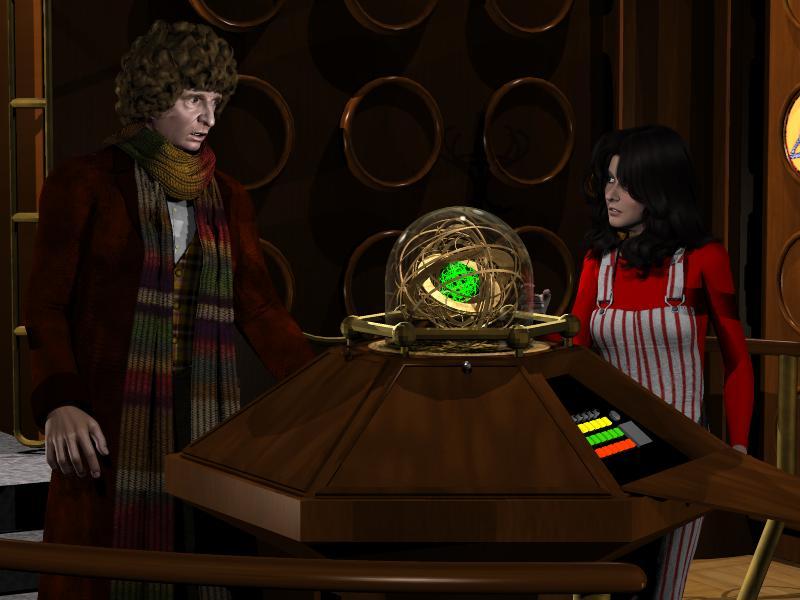
Now, a bit of Doctor Who production trivia. You remember the so called "wooden" control room, the one with the rather unassuming "writing podium" type console introduced just two stories before Sarah Jane Smith left. Well, having recently joined the TARDIS Builders' forum, I discovered a concept was, sadly, not used because of costs and time. What have all the various consoles possessed this one didn't? Right, some sort of central column. Not all have "bobbed"; not all were enclosed by glass; but all have "something" to imply the craft was traveling. All but the "Newberry" console.
Well, production memos reveal it would have had one. Now, admittedly a full on column would have overpowered the otherwise compact design, but that was not the plan. Instead, when the TARDIS was in "flight", an "iris" would open atop the podium and a transparent "dome' would emerge, one filled with "instruments" the Doctor would examine as the space/time machine traveled. Now, the exact look of this apparatus is unknown. we don't know if the dome was shallow, like a convex lens, a true hemisphere, or something more akin to a bell jar, like the ones that cover ornate brass clocks. Neither were the "instruments" described in detail. Fans have speculated they may have resembled some sort of Ptolemaic armillary, a collection of differently sized rings or gear wheels turning upon a common center. Alas, an arrangement like that would have made the assembly even more vulnerable to malfunction than the simply bobbing column it was meant to replace. So the idea was nixed, but not before a hole was made where the dome would have emerged. Certain shots of the podium reveal a thin disc that rests atop the podium, corresponding with the place where an iris mechanism would have been mounted.
It's a shame because I think the Newberry room might have been better liked (though it certainly does have its fans). Shoot, they could have compromised. the dome could have been "fixed", simply standing there, neither emerging or retracting. It need not have possessed moving parts. Instead, randomly flashing lights could have glittered within an unmoving collection of gearworks during the 'flight" scenes. When the TARDIS was at rest, the bulbs would not be illuminated. Certainly that kind of assembly would be less prone to failure.
Anyway, having read about this rejected feature inspired me to add it to Grinch's set. I found a Poser ready astrolabe model. I removed the stand and loaded two copies, shrinking one a bit and rotating it upon the vertical axis, centering it within the first. I added a flattened torus to serve as a framr for the "hole" and I used a capsule primitive for the glass dome housing. Admittedly, it's pretty much guesswork, but this is how the "Newberry" wooden console might have looked if the production went "all out" as originally planned.
Sincerely,
Bill
That looks great, Bill. Nice work! Really does add just a pinch of Gallifrey without breaking the theme of the room. And I've said it before, your Baker morph is fantastic, I know it's a combo of barious things but you put them together perfectly.
Daz 3D is part of

Connect
DAZ Productions, Inc.
7533 S Center View Ct #4664
West Jordan, UT 84084Licensing Agreement | Terms of Service | Privacy Policy | EULA
© 2026 Daz Productions Inc. All Rights Reserved.