-
3D Art FREEBIE CHALLENGE-January 2017- THE DAY AFTER HANGOVER -Entries Thread Only
Back to Work
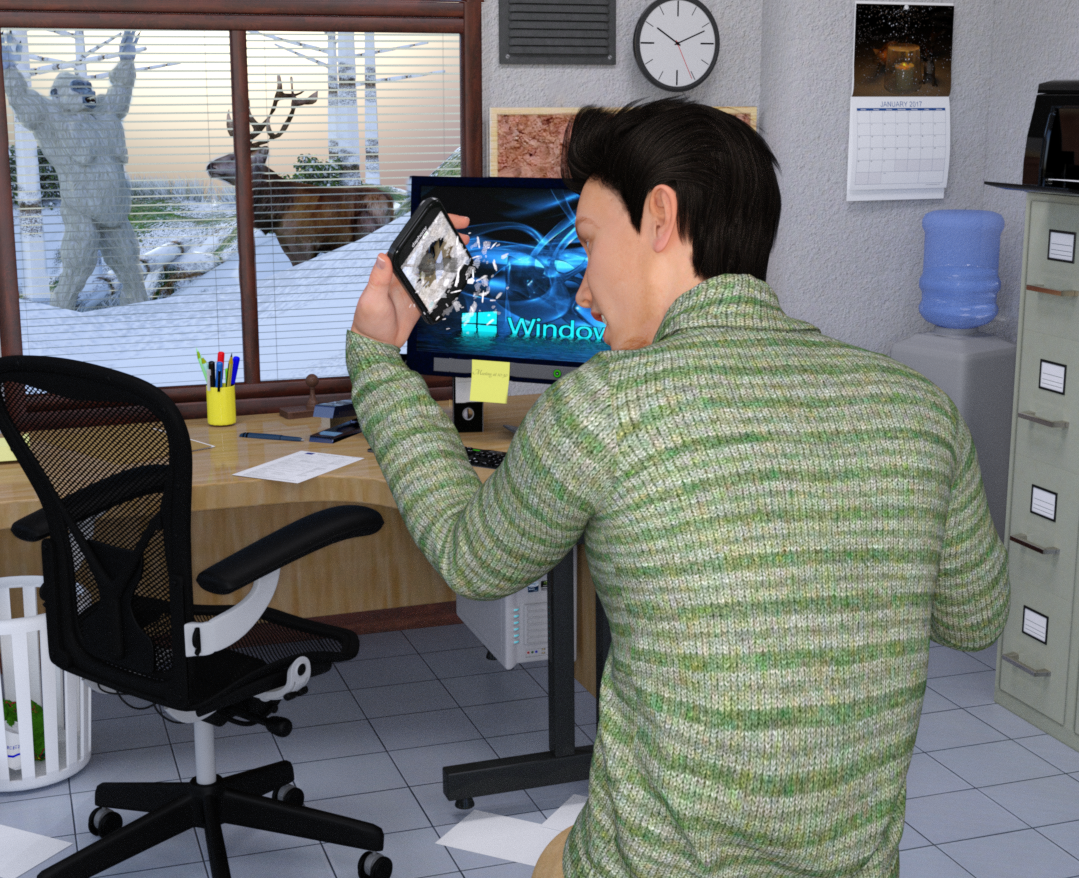
The day after the hangover should be a normal day, right?
Well, this guy soon realized something still isn't quite right after returning back to his work at the office.# = requires free registration
Not counting: Genesis 3 Male, Armani Hair
1) Geodude (posed in Blender)
2) G3M Rolled Collar Sweater #
3) G3M Casual Pants #
4) Office Chair #
5) Morphable Binder/Folder #
6) Office Scene (fie/folder) #
7) Stapler #
8) Rubber stamp #
9) Clipboard and Pen (pen) #
10) Watercooler #
11) Clock (sixth item on the right most column, Bryce object)
12) March 2005 Wall Calendar Poser Prop (retextured)
13) Pinboard #
14) Forest #
15) Beach (retextured, 3rd item from the top)
16) Window Blinds Prop #
17) Computersystem #
18) Freak Out Pose for Genesis 3 Female #
19) Vent plate
20) Printer
21) Pencil pot
22) Post-It
23) Yeti
24) Monarch Of The Glen - Stag
25) Wastepaper Bin #
26) Burger box with morph (6th item from the top)
27) Coffee cup with morphs (8th item fromthe top)
28) Desk #Paid:
* Filing Room #
* Smartphone and Tablet #
* Shattered #
* DA Let It Snow #White sheets of paper are primitives. The texture used on the one on the desk is a random picture of a form found online (http://www.schengenvisainfo.com/wp-content/uploads/2016/07/schengen-visa-application-form.png).
 Strange NLA Track problem
Hi,
Thanks. Once again: Standard Genesis Figure works perfectly. It WORKS! REALLY! BUT -> with the Konrad morph, it doesn't work. It does not matter where I place the keyframe.
--> Just found out that all my 3d universe (Jasmin, Kimberly, Jason, Konrad) morphs have the same problem. Non 3d universe Genesis characters seem to work fine.
Best wishes,
ThomasGenX2 Update / Genesis 3 Add-On [Commercial]Serene Night: Strictly speaking, copyright questions can be answered only by lawyers, so the following is just my personal opinion. From my point of view, GenX transfers morphs only, which is not a creative act, so GenX doesn't add any copyright itself. If you have a legal license for a morph, transferring the morph for your own use should be part of the license. (At least, DAZ seems to interpret their license that way, otherwise they would not sell GenX in their store.) So, sharing a transferred morph with the copyright holder for that morph should not affect any other copyright, even if the copyright holder doesn't own GenX.
cherpenbeck: All products that are needed are listed in the required products section of the store pages. For generation 3, you need the clones from the DAZ legacy morphs for Genesis 1, but not the Sickelyield clones. Other required clone morphs are part of the Genesis products.
Dynamic cloth + related Carrara plugins - Best Practices, Tips and RendersVery nice! I am sure you know, but if you start with a thinner character (in order to keep any poke through to a minimum) and then morph to your final body shape, the material is able to stretch and so produce a good fit (provided you don't get too extreme - and even then....!)
Darwins' SchtuffAh, but see- you can use her without Genevieve 7 as well. Here she is without Genevieve 7's morphs dialed in:
Whoa! She looks SO GOOD! I kind of like her better w/o the Genevieve morph. lol That's just my opinion of course. She has such beautiful high cheekbones and face shape. And those eyes - WOW! I'm definitely looking forward to her release! :)
Gothic Hair AlopeciaI am finding that I have a problem with Gothic Hair by Daz and Goldtassel. I would have messaged Goldtassel, but can't see a way to do so here, so...
What can I do to overcome these patches? I don't actually know which figure is shown but it is a Gen2 morph. The adjustments available for the hair don't help.
If I replace the figure with another, the problem is not present, so it is presumably a character head shape problem.
Selbsthilfegruppe DAZ Studio - Beispiele, Fragen, Diskussion und sonstiges GequatscheUm ganz genau zu sein, als Target muss Genesis 3 Female ausgewählt werden. Ansonsten ist der Ablauf und die Einstellung identisch mit dem Transfer von V4 zu G2F.
Meines Wissens gibt es keine grossen Änderungen in GenX, die ein Update des Tutorials erzwingen würden. Da ich derzeit beruflich und privat ganz gut ausgelastet bin und selber wenig Zeit zum Rendern habe, ist das Update des GenX-Tutorials auf unbekannte Zeit verschoben. Ich warte noch auf Genesis4, dann lohnt es sich wenigstens. :-)
Danke für die Info. Der große Vorteil von Genesis 3 ist, dass das Weighting nicht mehr auf Tri-Ax basiert. Das neue Weighting entspricht exakt dem Spherical Weighting in Cinema 4D und damit sind die Mesh Verformungen bei Bewegung der Joints ident. Das ist ein Riesenschritt in Richtung Content für professionelle Software. Im Moment kämpfe ich lediglich mit der Angleichung der unterschiedlichen Rotationssysteme, damit die Joint Controlled Morphs richtig verknüpft werden können.
So gesehen ist Genesis 3 eine ebenso wichtige Generation, wie V4/M4 für mich. Ob hier Genesis 4 eine Verbesserung bringt ist fraglich.
Als Genesis3 eingeführt wurde, wurde das als eine der grossen Neuerungen angepriesen, der verbesserte Export zu Programmen wie Cinema4D und 3DS. Das wird auch die Richtung sein in die DAZ mit den zukünftigen Genesis Generationen gehen wird, besere Kompatibilität mit den Profi-Programmen.
Hauptsächlich rendere ich Still-Images in DAZ Studio. Deshalb bin ich relativ unbeeindruckt von Genesis3. Meine Lieblingsfigur ist immer noch Genesis1. :-)
Genesis Generation X2 - do I need clones as well?As far as I know you need the shape products as well for the transfer to work but could be wrong..
Genesis Generation X2 - do I need clones as well?I don't have this product, but I've asked about it a lot and I've had several people explain this to me, so I'm pretty sure this is right:
1) To transfer shapes from Victoria 4, Micheal 4, and Kids 4 to Genesis 1 you need this product: http://www.daz3d.com/genesis-generation-x2
(with no other product needed)
2) To transfer shapes from V4, M4, K4 and G1 to Genesis 2 you need this product: http://www.daz3d.com/genx2-addon-for-genesis-2
AND this product: http://www.daz3d.com/genesis-generation-x2
3) To transfer shapes from V4, M4, K4, G1, and G2 to Genesis 3 you need this product: http://www.daz3d.com/genx2-addon-for-genesis-3
AND this product: http://www.daz3d.com/genx2-addon-for-genesis-2
AND this product: http://www.daz3d.com/genesis-generation-x2
Genesis Generation X2 - do I need clones as well?Does the morph-transfer script Genesis Generation X2 work on its own, or do I need the clone morphs as well it I, for example, try to transfer a shape from V3 to Genesis ?
Novica & Forum Members Tips & Product Reviews Pt 8BTW, your JANUARY PC+ codes still work at the moment. I hadn't used my buy $18 one and I'll be darned if I'm going to throw it away, so I found a couple products that are 40% off and used them. One was a short jacket, one was a head scarf. Those two together were around $18. I got X Fashion Turban Scarf and Leather Jacket I think that short jacket will be adorable when layering shirts under it, it has an open front morph. Both those came to slightly over $12 so I'm good with it. Plus, using store credit from the gift card so it is that additional 18% off funds. I see posts about people not finding anything during January (not due to budget, they didn't find anything they liked) and I think there was a good variety most of the time.
The History of CarraraRingoMonfort said:
Dart,I agree with you, us Carrara PA are here to make things easier for the community and at the same time help promote Carrara. This in turn will help drive up sales and this will help with the Development of Carrara.
Like you mention Carrara has plenty of powerful features that allow users from hobbyists to Professionals created amazing images, animations etc.
Here is my suggestions to DAZ 3D:
Make Carrara the DAZ 3D all in one solutions for Content Development.
This means don't just make it load and animate DAZ 3D figures such as Victoria but develop Carrara so that any user can create a Victoria in Carrara. From modeling, rigging, texturing, morph creating... everything.
This means put all of Hexagon in Carrara and all of the DAZ Studio features in Carrara.
Improved the 3D Painting to the level that PA will use it.
Let all PA learn and use Carrara for Content development.
Promote Carrara in other venues that will bring in more high-end users that will also create more content.
It would be a win win for DAZ 3D and the community.Ringo Monfort
There's just one itsy-bitsy gigantically huge problem with this ideal. The spin is somewhat of a lie. It is my opinion that the people behind the scenes at Daz dont actually use the software they sell, aside from Daz Studio.
Why should Daz expect people to build content in Carrara when they themselves don't even use Carrara for building content? Was Genesis modeled in Hexagon or Carrara? Nope. Have ANY of the figures sold here been created in Carrara or Hexagon? Do you ever see Carrara landscapes or Bryce landscapes rendered by any of the Daz staff other than moderators who arent even staff members? Even when they have the preview threads about new characters in the Commons or Members Only, do you often see sample renders made in Bryce or in Hexagon? No. Do you see Daz making an effort to promote PA's who actively utilize Daz software for making content? No. Does Stonemason use Carrara for his models....doubt it. Does Mec4D use any Daz software for creating her amazing content? Probably not. In fact, can anyone name a single PA who exclusively uses Daz3d applications solely for creating content that will eventually be sold?
We the community members are the only ones using these applications. It would not surprise me if many of the executives haven't ever opened Bryce or Hexagon scenes. Have never ever ever used Carrara.
Many of these people have formal training and in school they dont teach Carrara, they teach Maya, Lightwave etc.....
Lack of development tells me all I need to know about how often they themselves choose their own applications for accomplishing real work. Let's be honest, if you use Carrara every day then the bugs will annoy you and you will want to fix them. Lack of cloth in Carrara would annoy you too. Lack of genuine Genesis support would truly annoy you.
If you use Bryce you know how badly it needs to be 64 bit. You know how badly it needs another development cycle to fix the yet underdeveloped instancing and broken tree mesh export. Hexagon could use some major stability upgrades. If you used these applications often enough, you would know quite well what is needed to improve the applications. And again I state the annoyance one would experience from regular use of the applications would be catalyzing enough that development would never cease as it tends to do around here.
It seems to me the only real requirement for working at Daz3d is that you familiarize yourself with Daz Studio. Period. The others are optional. That is a very big problem.
I conclude by reiterating that what Daz has yet to do is to PROVE that Carrara really can be the all in one solution. They're all such experts with Cinema 4D, Maya, Lightwave, 3DSMax, you name it and they use it. But many of them know next to nothing about using any of the daz software aside from Daz Studio itself .
I hope I am wrong about this, I just doubt it very much. This is the Daz Studio show, the rest of the applications are supporting cast members at best. There is nothing wrong with that, so long as we all know what we are really dealing with here.
Moderators: If this post is offensive or breaks TOS rules in any way please let me know and I will remove it promptly.
You just summed up why Carrara and Bryce are dead, Daz Studio is their focus now
3D Art FREEBIE CHALLENGE-January 2017- THE DAY AFTER HANGOVER -Main ThreadBack to Work
The day after the hangover should be a normal day, right?
Well, this guy soon realized something still isn't quite right after returning back to his work at the office.# = requires free registration
Not counting: Genesis 3 Male, Armani Hair
1) Geodude (posed in Blender)
2) G3M Rolled Collar Sweater #
3) G3M Casual Pants #
4) Office Chair #
5) Morphable Binder/Folder #
6) Office Scene (fie/folder) #
7) Stapler #
8) Rubber stamp #
9) Clipboard and Pen (pen) #
10) Watercooler #
11) Clock (sixth item on the right most column, Bryce object)
12) March 2005 Wall Calendar Poser Prop (retextured)
13) Pinboard #
14) Forest #
15) Beach (retextured, 3rd item from the top)
16) Window Blinds Prop #
17) Computersystem #
18) Freak Out Pose for Genesis 3 Female #
19) Vent plate
20) Printer
21) Pencil pot
22) Post-It
23) Yeti
24) Monarch Of The Glen - Stag
25) Wastepaper Bin #
26) Burger box with morph (6th item from the top)
27) Coffee cup with morphs (8th item fromthe top)
28) Desk #Paid:
* Filing Room #
* Smartphone and Tablet #
* Shattered #
* DA Let It Snow #White sheets of paper are primitives. The texture used on the one on the desk is a random picture of a form found online (http://www.schengenvisainfo.com/wp-content/uploads/2016/07/schengen-visa-application-form.png).
Poor phone! I like the Yeti outside the window! Nope, nothing out of the ordinary here.
 Good job!
Dana
Strange NLA Track problemSo... you mean you're trying to use an NLA clip that you've already made for another character, and now it's not working correctly for Konrad, or do you mean that you've made an NLA clip for Konrad closing his eyes, but they won't go all the way closed?
If it's the first one, just go to the NLA tab of Konrad and use "Load Data from Clip" and edit the morphs where they need to be edited, then Create a New Clip for Konrad.
If it's the second one, and it's a blink motion, check your tweener that's being used before making the clip. For things like Blink, I find that Linear tweener works better than Bezier for many characters. Genesis might not matter. Generation 4 would allow the morph to go far beyond a normal stopping point, so I'd see some really nasty behaviors with Bezier tweeners on some motions using facial morphs.
Hope this helps... hope you get it working properly!
Who is this model?regarding morph mixing: I have a collaborator for a graphic novella project. trying to created an original face morph from mixing such products as Josie, Aiko, Karen 7 and maybe one other. ...we are too far apart to network or share hard drives. Do we each have to own all these identical products to load a morph one of us makes and sends to the other? ....or can the morph mix just be saved into the G3 base and then be reloaded to produce the exact same new character by each of us whenever we need to use it, even though one of us doesn't own the exact set of character products the morph mix was originally made from ?
In order to comply with the licensing agreement, you both need to own the products.
3D Art FREEBIE CHALLENGE-January 2017- THE DAY AFTER HANGOVER -Main ThreadBack to Work
The day after the hangover should be a normal day, right?
Well, this guy soon realized something still isn't quite right after returning back to his work at the office.# = requires free registration
Not counting: Genesis 3 Male, Armani Hair
1) Geodude (posed in Blender)
2) G3M Rolled Collar Sweater #
3) G3M Casual Pants #
4) Office Chair #
5) Morphable Binder/Folder #
6) Office Scene (fie/folder) #
7) Stapler #
8) Rubber stamp #
9) Clipboard and Pen (pen) #
10) Watercooler #
11) Clock (sixth item on the right most column, Bryce object)
12) March 2005 Wall Calendar Poser Prop (retextured)
13) Pinboard #
14) Forest #
15) Beach (retextured, 3rd item from the top)
16) Window Blinds Prop #
17) Computersystem #
18) Freak Out Pose for Genesis 3 Female #
19) Vent plate
20) Printer
21) Pencil pot
22) Post-It
23) Yeti
24) Monarch Of The Glen - Stag
25) Wastepaper Bin #
26) Burger box with morph (6th item from the top)
27) Coffee cup with morphs (8th item fromthe top)
28) Desk #Paid:
* Filing Room #
* Smartphone and Tablet #
* Shattered #
* DA Let It Snow #White sheets of paper are primitives. The texture used on the one on the desk is a random picture of a form found online (http://www.schengenvisainfo.com/wp-content/uploads/2016/07/schengen-visa-application-form.png).
ALL LINKS CHECK OUT PLZ MOVE TO THE ENTERIES THREAD
Who is this model?regarding morph mixing: I have a collaborator for a graphic novella project. trying to created an original face morph from mixing such products as Josie, Aiko, Karen 7 and maybe one other. ...we are too far apart to network or share hard drives. Do we each have to own all these identical products to load a morph one of us makes and sends to the other? ....or can the morph mix just be saved into the G3 base and then be reloaded to produce the exact same new character by each of us whenever we need to use it, even though one of us doesn't own the exact set of character products the morph mix was originally made from ?
Get Your Encrypted Daz Connect Content Here Thread - none at the moment 2018-01-30I never had issues with DIM or manual installation that weren't directly related to the quality of the free content out there, and I've actually heard that Connect has some serious issues with certain types of content to the point that you should not install those items that way.That sounds like the problem with Generation 4 figures — V4, M4 and so on — their morph packs don't work if you install them with Connect, so they must be installed with DIM or manually. What's happening is that the morphs must be "activated" after installation, and to do that, they must be installed into the same location as the V4/M4/whatever base figure.
But that isn't how Connect works, it essentially installs each individual product into its own separate content location, so the script that does the morph activation can't find the morph files.
3D Art FREEBIE CHALLENGE-January 2017- THE DAY AFTER HANGOVER -Main ThreadBack to Work
The day after the hangover should be a normal day, right?
Well, this guy soon realized something still isn't quite right after returning back to his work at the office.# = requires free registration
Not counting: Genesis 3 Male, Armani Hair
1) Geodude (posed in Blender)
2) G3M Rolled Collar Sweater #
3) G3M Casual Pants #
4) Office Chair #
5) Morphable Binder/Folder #
6) Office Scene (fie/folder) #
7) Stapler #
8) Rubber stamp #
9) Clipboard and Pen (pen) #
10) Watercooler #
11) Clock (sixth item on the right most column, Bryce object)
12) March 2005 Wall Calendar Poser Prop (retextured)
13) Pinboard #
14) Forest #
15) Beach (retextured, 3rd item from the top)
16) Window Blinds Prop #
17) Computersystem #
18) Freak Out Pose for Genesis 3 Female #
19) Vent plate
20) Printer
21) Pencil pot
22) Post-It
23) Yeti
24) Monarch Of The Glen - Stag
25) Wastepaper Bin #
26) Burger box with morph (6th item from the top)
27) Coffee cup with morphs (8th item fromthe top)
28) Desk #Paid:
* Filing Room #
* Smartphone and Tablet #
* Shattered #
* DA Let It Snow #White sheets of paper are primitives. The texture used on the one on the desk is a random picture of a form found online (http://www.schengenvisainfo.com/wp-content/uploads/2016/07/schengen-visa-application-form.png).
Daz Cow Share and Learn ThreadHi Roman. Allow me to explain the difference between extruding and tacking something on. While Liana did a pretty good of explaining it, she didn't cover the importances of having the mesh welded. Extruding the mesh to create the ear, for example, would mean that the ear part is integral to the mesh of the entire model. Tacking on another part means that the new add-on part isn't welded, or an actual part of the original mesh.
For basic intents and purposes, there's no reason why you can't just tack something on to another. However if you plan on doing morphs for said figure, or you even plan to do a 3D print of your creation, if the mesh isn't welded, then you will have some serious isses that will impair your final project.
That's not to say you can't still tack something on, as long as you weld the mesh, and leave no gaps. Then that would be fine, as the section then becomes part of the whole, and you won't have the gapping that would occur in morphing or printing or rendering weird artifacts.
Does that make sense?
The thing about making digital things is that you have to kind of divorce your mind from thinking about making it in real world terms, like your clay creations. Sometimes, the concepts work and in some cases work very well, but in other situations there are better ways of making 3D models that go against intuition. :) It's a process to learn which works best and to be open to trying to do things in a different manner than you would normally approach them.
Now, to address mesh density. Where to begin? Lol. OK, so there are low poly meshes and high poly meshes and sometimes they're from the same figure. In certain situations you want a low poly mesh - video games for one example. Another would be lack of resources on your computer. The higher the poly count the more your computer has to work to compute how it looks when its rendered. In most situations you want to start out with a lower poly mesh (more space between the lines) because then you've got your low poly mesh that you know looks good on a slow machine and doesn't take up much in the way of resources. Then you move up to things like in DS where you want a certain amount of realism. So you use LOD (levels of density) and SubD (sub-division). What happens is that when you add sub-division/LOD, each square in your initial low poly model gets divided into four squares. So each level you go up, your entire poly count goes up by a factor of four, exponentially (I believe that is the math-speak here). In addition to breaking each face into four smaller faces, the spaces between the points gets recaculated and smoothed out. This is why higher LOD meshes look more rounded, or polished. I think you can get away with a LOD of 4 in DS before things start to go wonky. But other programs like Z-Brush can take a mesh to insane levels of mesh density to get really amazing details.
The HD line of products in the store are all high density meshes that have been brought into DS via a special means so that DS doesn't explode. What's really going on is that a high resolution model with a LOD of maybe 2 - 4 has been made to accept a HD (high definition) morph (usually made in ZBrush, but I know it can also be made in other modelers, Hex even) via a Daz special plug-in that gets DS's high resolution mesh to basically handshake with the HD morph in such a way that it doesn't overload the system. It's actually quite ingenious.
But anyway. That's a long-winded way of explaining that low polys are for meshes with little to no detail (or good as a base to start for making more details on higher density meshes) and high polys are for meshes with more realistic detailing. And HD morphs are for the crazy insane details like individual hairs or wrinkles on a character's face.
Does that explain it a bit better?
Daz 3D is part of

Connect
DAZ Productions, Inc.
7533 S Center View Ct #4664
West Jordan, UT 84084Licensing Agreement | Terms of Service | Privacy Policy | EULA
© 2026 Daz Productions Inc. All Rights Reserved.