-
Genesis 3 Female Belly Button PROBLEM
Are you sure there were no morphs applied? That looks very like the effect of making your morph with the Navel morph already on.
Scintillant Portrait Lights for Iray (commercial)@Khory, I'm always late to the new products parties.
 I just bought this light set and I so appreciate how easy you have made it to illuminate a character: add a camera preset, add render settings preset, add a light preset, add light render settings preset, add your background prop and choose a color. Render and done! I'll be using this set whenever I can!
I have a dumb question though. The light sets I've purchased in the Daz store have provided both a left side light and right side light, depending on what side you want to illuminate. Unless my download was corrupt, I only see a left side light and it's corresponding render setting, but no right side light with it's render setting. Am I missing something? If not, what is the easiest way to tweak your lights and render settings to illuminate the right side of the figure? Do I just rotate the focus 90 degrees?
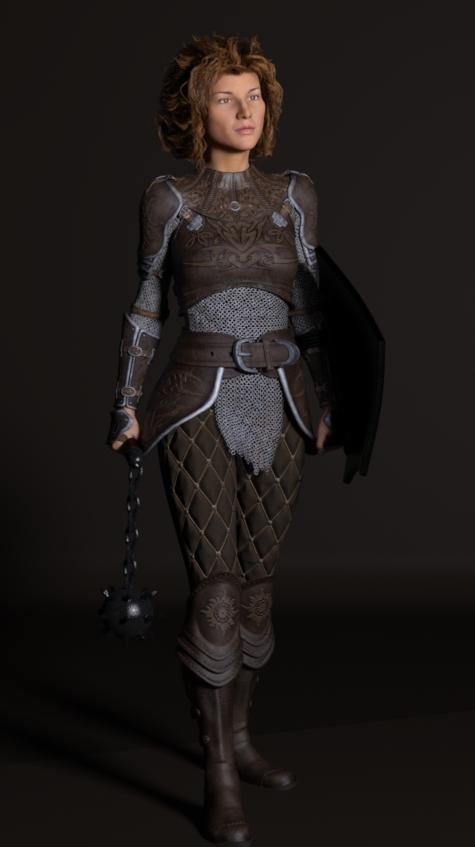
Full body camera, G3F with Charlotte face morph from Faces of Europe, Beautiful Skin material, Defender props and poses, Alicia armor. Rendered in 31 min. (CPU only):
 Novica & Forum Members Tips & Product Reviews Pt 8
Just grabbed Alieta from FastGrab. Was unsure whether to buy but happy I did. I might splash out on one of the others while they are still in FG. Any preferences. Here's Alieta with a touch of Zev's youth morph.
LOL, she looks downright devious! Or fake-innocent, you know, like "Oh, that wasn't ME. I didn't do it. It was Marble."
So far as Fast Grab, Rich showcased Hemlock Folly if I recall, and that's a nice set. Medieval Hall and Garden is a big set, with a lot of opportunities, and for that price is a steal. Even if you don't do medieval, it's good for tourist scenes.
Please make better jeans/pants for menThe line on the bum of those pants looks odd. It almost looks like visible panty line.
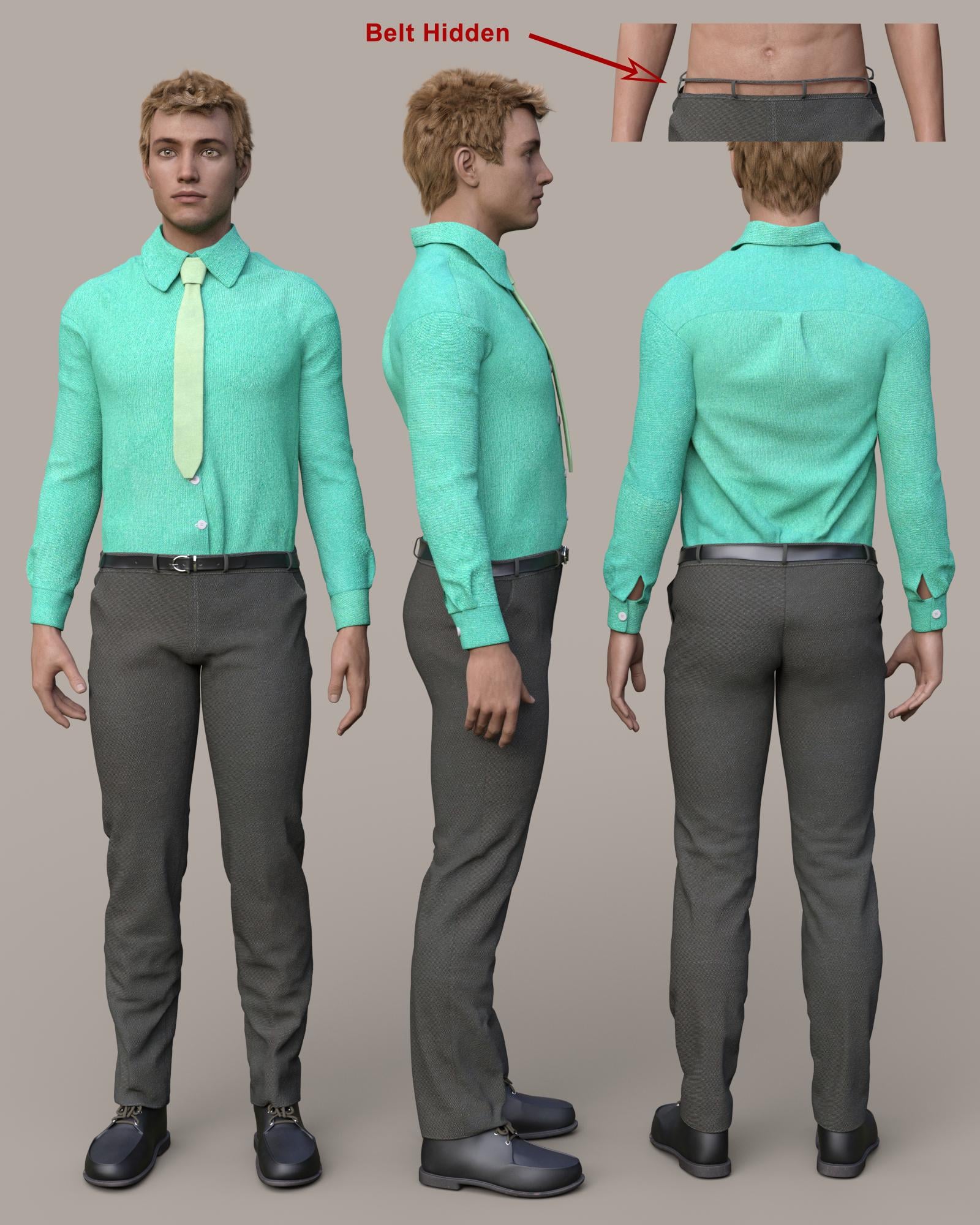
Classic Trenchcoat for Genesis 3 Male(s)
This is an interesting set. At first, I didn't even realize the trenchcoat came with pants, shirt, and shoes. The pants look realistic to me. Is that even a bit of tightness across the glutes at the bottom of the pockets, or is that a texture issue? I like these pants. The only thing is, the belt is part of the pants and not loaded separately. I can hide it with the Surfaces pane, but there is no waistband under it, so it leaves holes at the top of the pants. The only morph is Loosen Fit.
 Flash Sale Alerts II
I ended up buying Alieta - mainly because I like freckles. I'm not sure how I will get on with the L.I.E. brows though - L.I.E. and me don't get on too well and even when I do use it, the load times for characters jumps from seconds to minutes.
Well, I like Alieta so now I'm tempted to buy one of the others while they are still there. Any preferences?
SC Alieta with a touch of Youth Morph.
Novica & Forum Members Tips & Product Reviews Pt 8Just grabbed Alieta from FastGrab. Was unsure whether to buy but happy I did. I might splash out on one of the others while they are still in FG. Any preferences. Here's Alieta with a touch of Zev's youth morph.
Stereotypical Japanese Twintail hairstyleHi Kerya, thanks for the links. Indeed Jerry hair is quite close. The tails have bones... yay. The side bangs have morphs...woohoo. The front bang... alas, no square cut morph. The tails also have some morphs which allow the size shape to be changed.... I must have a look at Jerry Hair again, I've had it in my library for some time.
Swirly Pigtails (yep got that one too), seems to be similar to Penny Hair. Unfortunately the tails need several more bones and the tail morphs do not seem to act independantly which makes for limited posing possibilities. Still, a fun Hair item.
The first freebie (nm_FLtwintail) is actually quite good, a bit low rez, but not bad for a freebie. The tails have bones. The side bangs have some morphs. Unfortunately, no square front bang. BTW if you do install it in DS, you will need to type the full name into the search engine to find it! At least I did!
The second freebie (Pigtails) not bad for a freebie, the tails need one or two more bones and I could not find any morphs. Alas, no square front bang. Both freebies lack good textures.
Picky aren't I :)
Here are some more cute twintail styles with square front bangs. Have fun!
Why I hate video tutorialsWell, now I'm hitting a 100% crash rate on a step with no clue why. sigh
( http://www.daz3d.com/forums/discussion/145721/geograft-transfer-utility-crash#latest )
Geograft transfer utility crash?So I'm attempting a rather simple geograft, a ball on the end of someone's wrist.
I've done all the steps fairly decently. I have a bit of forearm.
I'm going off of Sickleyield's video tutorial ( https://www.youtube.com/watch?time_continue=1&v=Zm-QCFKowCw )
When I attempt to use the transfer utility, following her options... crash. 6 times in a row.
And, like a lot of delightful Daz crashes, no information to suggest why.
Has anyone successfully done this with latest version of Studio? If so, any tips on something that might be going wrong?
Please make better jeans/pants for menClassic Trenchcoat for Genesis 3 Male(s)
This is an interesting set. At first, I didn't even realize the trenchcoat came with pants, shirt, and shoes. The pants look realistic to me. Is that even a bit of tightness across the glutes at the bottom of the pockets, or is that a texture issue? I like these pants. The only thing is, the belt is part of the pants and not loaded separately. I can hide it with the Surfaces pane, but there is no waistband under it, so it leaves holes at the top of the pants. The only morph is Loosen Fit.
Critters and beasties?It's fair to inform people about the difficulties with doing various things. I'm thinking of doing some of this stuff, too, and... some of it is pretty hard.
Like 'lobster claws geograft'... that's a great idea, except that a geograft needs to have the same mesh as whatever it's replacing. So then you have the issue of... if you stretch a hand into a lobster claw, you have to make sure people don't try to pose it or shards of the claw are going to go all over the place.
Hmm. Maybe it should be a 'glove'? I think there's this Plant man model that uses this approach, because the head is just too weirdly different.
Or the Dragon... I've seen some really interesting, creative distortions of the dragon, but then you get UV weirdness. Particularly in the back of the neck.
At least in my early poking around, it actually seems easier to make a whole new creature than to make some of these changes to an existing model.
A GeoGraft is not like a morph - it needs to share the ring of vertices around any welded areas (presumably at the wrists or forearms here) but can then do what it likes, and can have unique bones of its own.
Strange NLA Track problemThis Konrad morph seems to be for DAZ Studio users only. I just wanted to create an Alembic file via Octane for a cloth simulation in Houdini. Big FAIL! Throws me an error right away. All other Genesis figures are working like a charm! If you use Carrara, don't buy 3d universe stuff

I'll keep trying!
can you convert dynamic clothing into conforming clothing?Hide everything but the dynamic clothing, export as OBJ, import using the same preset (to keep the scale correct) and rig using the transfer utility. For best results work with the figure zeroed (no pose or morph applied) though it is possible to compensate for those.
Newspaper/Magazine PropsA quick note on opening newspapers.
I'm going to make one, but I haven't decided how to go about it yet. A morph is the easiest way, but the problem with any morph which rotates the object is that it only looks good at 100%. So I may end up with a 2-piece prop instead.
GenX2 Update / Genesis 3 Add-On [Commercial]Well, I finally found the search tab, located on a drop down tab. I tried transferring Belle 6 to G3F. But when I attempted the transfer, I got a new error:
After Applying shapes to the target... it says "Error loading clone morph for joint adjustment".
And it just stopped after that, with no indicator of finishing or failing.
Post Your Toon Generations 2 rendersYes, I agree with carrie58.
I have found that 50% is the absolute limit you can take the 3DU Toon Generations 2 slider too and not absolutely loose almost all the morphs of your original character. I found that for like FaceGen Artist Pro and other morphs 25% - 33% works best with TG2 and then you can use the G3M / G3F Face and Body morphs to dial in more toon exaggerations that suit your character better so they all don't look alike. And of course it helps if you have the Guy 7/Girl 7 and Aiko 7/Kenji 7 and Star 2 characters all available to add more toon style exagerations to the mix for you too choose from.
Thanks, nonesuch00. And thanks too, Carrie58. I'll try your suggestions. I'm quite sure I have the Toon morph at a lot more than 50%.
Novica & Forum Members Tips & Product Reviews Pt 8Luci45's Picks for January
Low Poly Lightning Bugs
Legacy UVs for Genesis 3: Michael 4
Fantasy Creature Creator HD Morph Pack for Genesis 3 Female and here
Wild BordersGenX2 Update / Genesis 3 Add-On [Commercial]The list only shows the actors with morphs. The basic Michael 4 CR2 contains only head morphs. You need to inject the morphs you want to transfer using the according morph injection poses. Or you load Michael 4 in Poser, inject all the morphs, and save it to the library as a new CR2 with all morphs.
GenX2 Update / Genesis 3 Add-On [Commercial]The "Some morphs were not found in the figure." warning is from the "Get Values from Figure in Scene" feature. The message means, that GenX has morphs listed that it could not find in the figure in the scene, not the other way around. This should not happen if you load the same figure in GenX and in the scene.
To load a Genesis figure as source in GenX, you select it directly from the "Source" button. Unlike Poser figures, you don't have to locate them in the library, and you can't inject morphs. This is all handled automatically.
After loading a figure, selecting the morph in the morph list is the simplest way to transfer it. Use the search feature if you are not sure for which bone it is listed.
Post Your Toon Generations 2 rendersspuffy if you keep the Toon morph to about 50% you can blend it better with the other figures
Daz 3D is part of

Connect
DAZ Productions, Inc.
7533 S Center View Ct #4664
West Jordan, UT 84084Licensing Agreement | Terms of Service | Privacy Policy | EULA
© 2026 Daz Productions Inc. All Rights Reserved.