-
Coming soon: Mesh Grabber 4.0 [Commercial]
ManFriday said:
Loony said:
Mart1n71 said:
This looks like such a great update. Will I be able to save any edits to strand based hair as a morph? Something I think is currently a PA only tool.
When you can edit it, this should be possible. Btw. @MF why is it still not released? Does Daz3d plan to include it into a bigger announcement or are you still working on it?All I know is that it's in the queue at Daz. The queue is rather long at the moment, so I don't know when it will be released. Might be another couple of weeks.
Today, May 26, my last product was released. I submitted it on April 25th and had no issues. So, it's about one month to wait
Genesis 8 model without facestem_athome said:
Per request. G8 female no_face morph.
Where do I paste this file in my daz library? I tried in gen8/male/ morph. But its not showing
LIVE! In the store NOW!! LowPi - the Low Poly Figure, and Crowd Creator ScriptsLyrra Madril said:
well I know that I corrected the left side to side bend at least twice. Feel sorry for my tester becasue we went through QA about six times just for Lowpi. I think he got very tired of us. I'll go check my archive version of Lowpi adn the store version and send in a patch.
I did try very hard to put the morphs in the same place, but DS got very stubborn. It does make no change to function, just a tiny bit messy.
LM
It's a very complex product bundle. There are bound to be some mistakes along the way. Users always find things that the most diligent PAs and testers don't notice. The important thing to me is that errors get fixed, so thanks for sending in a patch.
I looked at the DIM package to be sure I didn't accidentally delete the missing left thigh morph, but no, it is not in the DIM package. When searching the DIM package for that morph, I think I see other missing morphs. Please look at this list from the DIM contents. Dress Template and Dress have left thigh morphs but no corresponding right thigh morphs. I only searched for "88" so it is possible that other things got left out, too.
Line 94: /data/Lyrra Madril/LM LowPi/LP Dress Template/Morphs/Lyrra Madril/Base/CBS_body_lThigh_p88.dsf
Line 105: /data/Lyrra Madril/LM LowPi/LP Dress/Morphs/Lyrra Madril/Base/CBS_body_lThigh_p88.dsfI'm trying to understand the LowPi ecosystem and create my own LowPi clothing and poses, wear kits, pose kits, etc, so I am probably digging deeper into the product details than many casual users. I can tell that a tremendous amount of thought and work went into this! Thank you.
Back on G8 geoshells on G9AndrewJJP said:
...If I'm understanding correctly:
- Neither product (the Material Suit and the Legacy UVs) would support HD maps. (The material suit at would do the nipple and navel.morphs but nothing else.)
It's HD morph not HD map... Material Suit doesn't support to show HD morphs that you dial. Legacy UV products can show HD morphs but not flawless.
- The material suit would limit me to using G8 textures.
No, it doesn't limit you to using G8's textures no matter they're are G8 skin textures or G8 shell textures, with either the suit itself, or a geo-shell or LIE layers on the suit surfaces.
- It is possible to alter Legacy UVs to do it without restricing it to G8 textures, but you need to make alterations to the product.
Yes, sort of remaking the Legacy graft to support both G8 and G9's UV sets.
- There would be issues with Legacy UVs if I used geografts on Genesis (although I don't think I've ever done that).
That depends on the graft you use but more or less... and Legacy UV itself is a geo-graft. Some flaws are shown in the attached screenshot.
...[Released] RSSY Character And Material Conversion Bundle Genesis 8 to Genesis 9 [Commercial]Edit.
The script works OK for characteras other than those I have customized, which is the only reason why I bought it ... to transfer the morphs of those characters. I am also getting the folding phenom, but I have nothing contacting any part of the face, so I am puzzled.
Why Does It Take So Long To Load Figures? ("Solved", with GUIDE)tonyjas46_1cccd9144e said:
Everything stays the same....
Basic problem that is always ignored by the programmers at Daz. Daz Studio needs an algorithm written into the program that 1. does not load mophs by default (to says that it dosen't makes a lie of Turboloader, which is the best current option) 2. Checks the .duf file on loading to see what morphs are actually required for that character and then only loads those morphs (this alone would same endless hours of frustration with genesis 8 and 9 long loading times and odd deformations that occur when content providers can't get their [act] together and insist on all their morphs loading and affecting every character that is loaded into the scene). 3. Unloads the morphs if the figure is deleted or the file/program is closed.
Checking the .duf file for a morph that was being applied would identify only links created for and saved with that morph, it would not identify other morphs with links to or from it where the link is saved in the other morph's file.
Carrying out the link-building at load-time, even ignoring the previously noted issue, would make morph application slower in order to speed character loading - but character loading affects only the initial load of the figure, and can be waited out fairly easily, while delaying morph loadign would impact evey manual adjustment or preset application, likely to be much mor disruptive for users.
Some "morphs" need to load with non-zero values. When something that should load zeroed doesn't then that is a bug, and should be fixed.
Unloading a figure is already done - when it is no longer needed (don't forget the undo stack). But clearing up all that data is not an instant process, so this would certainly not be a way to improve speed if it wasn't already implemented.
Modesta Promo Socks/Sneakers IDFaeryl Womyn said:
I own both the toon bundle and the chungdan sneakers, so would love to know how it turns out.
Fail. I tried my usual geometry editing / smoothing modifier trick to no avail. Socks geometry edited fine, but the chungdan sneakers' shoelace freaked out when I added smoothing modifier to it 3x in a row with nothing but G8.1F and the socks in the scene. Short of a Blender morph, this won't be happening. Suddenly the TG sneakers don't look that toony.
Why Does It Take So Long To Load Figures? ("Solved", with GUIDE)Lates DS versions bring 50~60% time saving in terms of assets loading, so we're pretty happy with that.
Besides, with the latest DS version, when creating a morph asset, DS generates a unique Uniform Resource Indicator for it. So, as long as the vendors / users don't wrongly edit the urI in DSF file(s), there shouldn't be any new "duplicatre formulas".
Back on G8 geoshells on G9A while back, I did an alteration of Cayman's geografts to give them full support for the standard G9 UVs meaning you could have any combination of textures or geoshells as long as they were on the standard UVs. (Additionally, a further modification can then be done to make it possible to use Map Transfer to permanently bake over textures far more conveniently than via Blender).
Unfortunately though, I've not yet worked out a way to make that modification redistributable, and I've only been able to share it with anyone else by walking them tediously through the process of doing the alteration themselves.
Back on G8 geoshells on G9I would like to remind you of the cons of using Material Suit... If you need HD morph on the G9 character you use, Material Suit won't show any of HD detail when rendering 'cause it's a conformer using the technique of Auto-Hide Faces of underlying G9's geometry...
Besides, the prerequisites of using all of these "suit" and "geo-graft" products (Material Suit, Legacy series from Cayman Studios, etc.) is that you have to apply G8's skin texture on them... If you want to use G9's skin texture + G8's shell textures at the same time, it's not achievable. You still have to go for the "real conversion of texture maps".
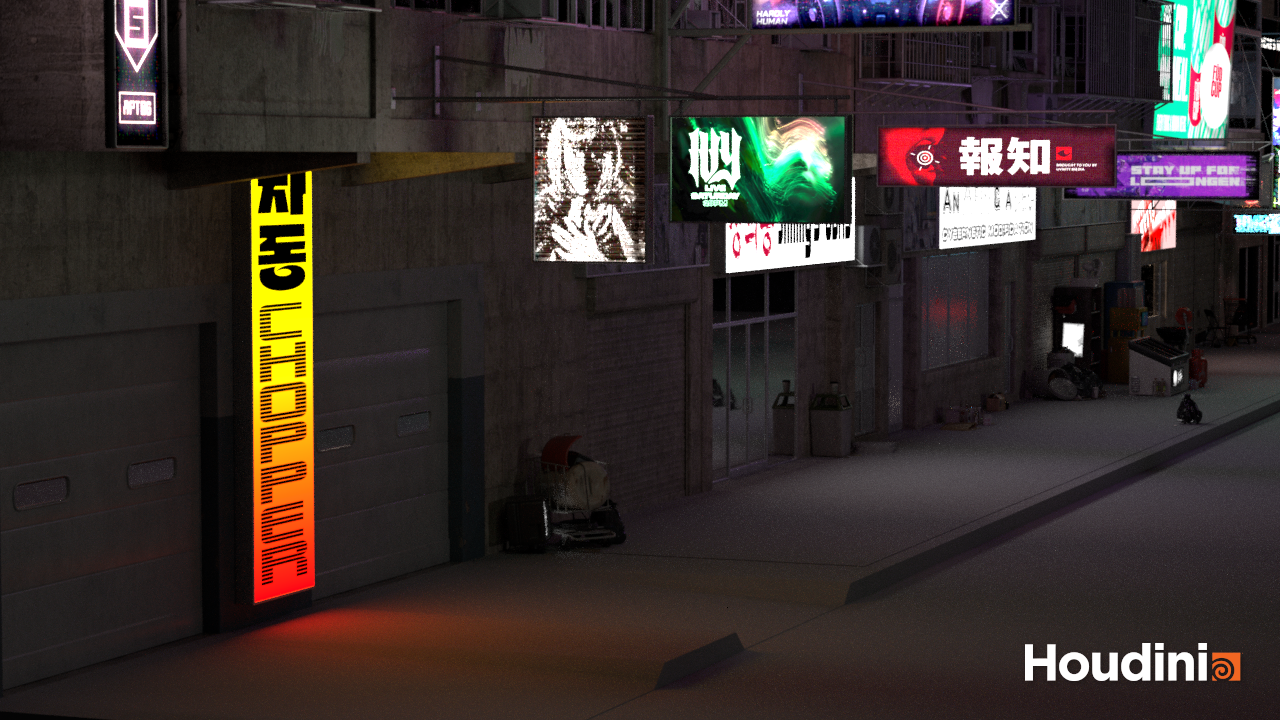
What the hell is Gordig doing now?I started playing around in Unreal, and because I am a lunatic, I started with the entire city block scene I posted earlier. I built the scene in C4D with Arnold materials, which didn't transfer over, and there were various other frustrations from not exercising enough hygiene on the scene; anyway I started the arduous process of rebuilding the shaders, which involved the arduous process of figuring out how Goddamn ANYTHING works in Unreal editor. It literally took me over half an hour to figure out how to add an image texture to a material. Since Houdini also uses MaterialX shaders, I thought I'd set it up in Houdini first and export USD from there, because as tedious as I find it to texture things in Houdini, it's a cakewalk compared to my brief dalliance with Unreal's material system. That said, I've still been dealing with many of the same frustrations as in Unreal.
I first started with USD, and I'm not sure why I moved on from that, because looking at it again it seems fine.
After that, I tried GLTF, which for no reason I can figure out imported all the buildings rotated 180° on the X axis, but in such a way that the tops of the buildings were lined up with the ground and the bottoms were staggered, so I couldn't even rotate the whole block upside down at once. Zooming in, all the objects in each individual room were also upside-down.
After that, the obvious choice was OBJ, and again, I've lost sight of why I didn't pursue that further. It's possible that I wanted to focus on FBX so that I could hopefully retain the rigging on individual components. Throughout the process I've had to re-export multiple times to correct some surfaces being incorrect because a material on an object was assigned to a polygon selection that no longer existed, so it overwrote all surfaces after it, and it's possible that doing so would have fixed the issues that steered me away from USD.
Anyway, here's as far as I've got with the scene so far. I haven't textured the sidewalk and street yet because, as previously mentioned, procedural materials are not Houdini's forte. I also need to remember how atmospheric rendering works in Karma. I've got a Karma Fog Box in the scene, but it might be in the wrong position in the hierarchy.
 No more "Young adult" shapes available for core figures...why???
Venomisbeauty said:
If we are talking about dialing morphs, you can also achieve your "muscular", "curvy", "slim" figure as you want. But they are still producing and selling them...."young adult" and "elder" morphs look like discontinued by Daz. Maybe someone, like me, would like an original shape made by creator for his purposes and not another dial :) Plus, I own the Growing up set for G9 and the results are not top notch, in my opinion.
I have the GU for G9 morphs, anything past 20% if I'm dailing in the main morph starts to look a bit odd imho. But even that little bit helps to add a bit of variation so not everyone is the same exact age.
LIVE! In the store NOW!! LowPi - the Low Poly Figure, and Crowd Creator ScriptsI think the LowPi corrective morphs are misorganized, and at least one corrective morph is missing entirely. Most LowPi corrective morphs are in "data\Lyrra Madril\LM LowPi\LM LowPi\Morphs\Lyrra Madril\LM LowPi", but two of them are in "data\Lyrra Madril\LM LowPi\LM LowPi\Morphs\Lyrra Madril\Base". This probably causes no harm other than confusion. They still seem to get activated when bones are rotated.
However there is no LowPi corrective for left thigh side-side. There is a corresponding corrective morph for the right thigh. The missing corrective morph makes LowPi look lopsided with a notch in his hip when his hips are rotated side to side. See screenshot. Can this be updated, please?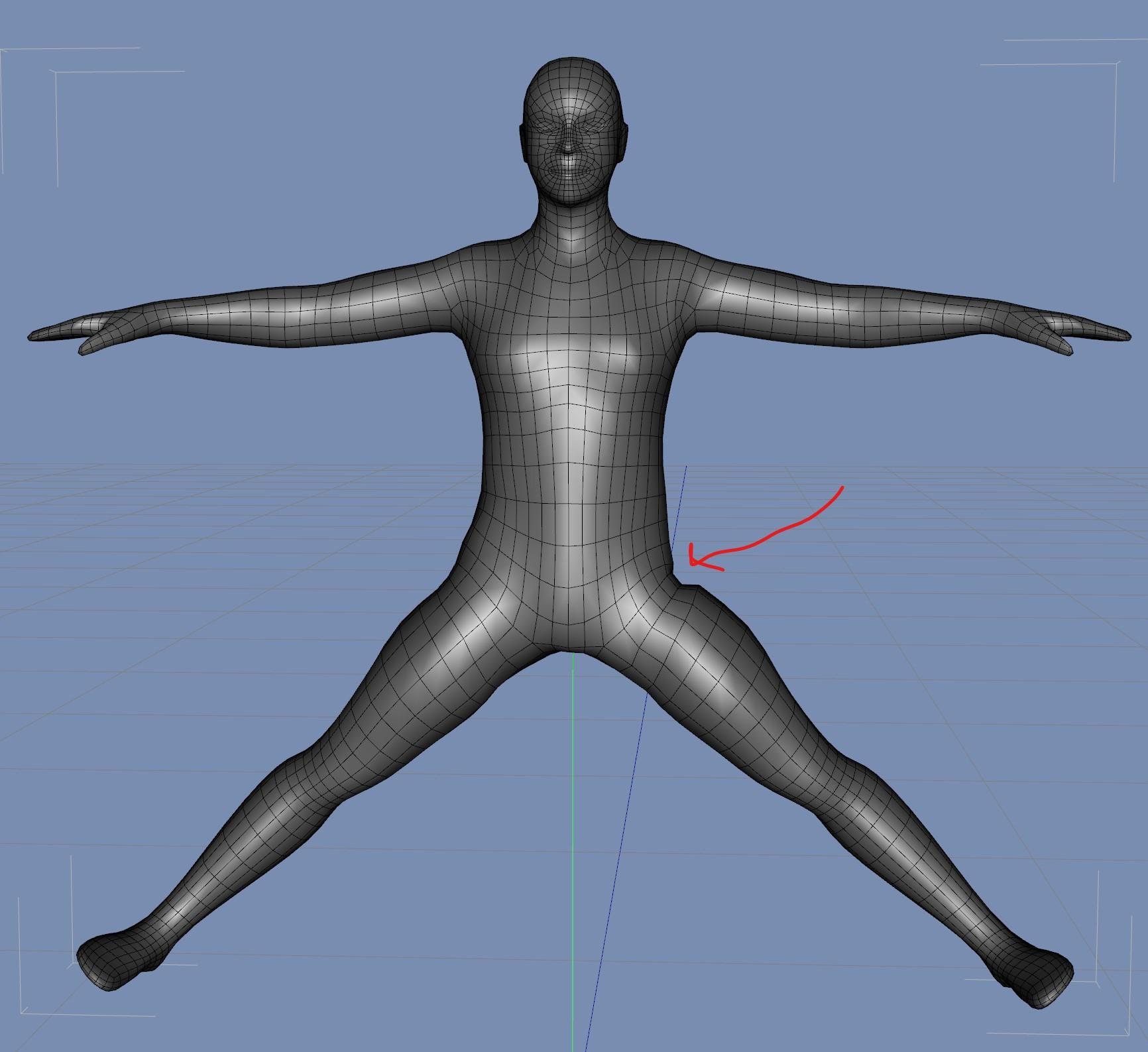 XTransfer - Genesis 3 to Genesis 8 problems
I've seen quite a few folks ever complained about this product or reported issues from time to time... It seems that you have to fix a few things after running the conversion...
However, no pose is there, so it should not be an issue related to adjust rigging to shape. Since you said DS crahsed when the process was nearly completed, I assume the script failed to completely and correctly write geometry data to the morph file(s). Better re-run the conversion... if the crash as well this issue persists, try it with the latest DS Public Build. And send a ticket if they both fail you... for requesting support or refund as you wish...
Actually you may not need such a product... Jay's "fit suit method" can convert these figures across the generations... - https://youtu.be/jROlY34tNNU?si=diIa3nr850Q8y1Y8
everyday clothes that drape nicely over pregnant G9?Another trick for dforce is that the morphs on the clothing don't have to match the ones on the figure. If your clothing item has a morph for a large, heavyset figure, try dialing it up and draping. In combination with this, you can also undial the pregnant morph.
everyday clothes that drape nicely over pregnant G9?SilverGirl said:
crosswind said:
Actually, as long as the clothing product are not poorly-made, they all could well fit on a pregnant figure with proper settings / simulations. The trick is always "tweaking".
Like the Olivine dress you mentioned, if go for static simulation with its default settings on a pregnant figure, you won't get good result. But if we use a timeline to make the pregnant morph(s) change from 0 to 100, make better settings on the dynamic surface of the dress, as well as adjust the weight on the dForce modifier weight node that the vendor originally made. We may get much better draping result, as the attached ss.
So try these tricks... you can make every garment well fit on a pregnant character...
Thank you for pointing me in a helpful direction. Looks like I have some learning to do. :)
No problem ~ Just take it easy.
 Poser >>> DS " Article "
Richard Haseltine said:
Summoner said:
Richard Haseltine said:
Summoner said:
Richard Haseltine said:
DS 4 has always used a single skin with modifiers, that is how all of the Genesis figues work, and Genssi 3+ use a single weight map for each joint (Genssi 1 and 2 used the TriAz system, with separate maps for each axis). Although FBX import of rigged figures has been limited until now (though it did support FBX files that matched the Motion Builder spec) the latest beta version has seen it greatly improved.
Verry Interesting, I was aware that DS is using single weight looking at the tecnical specs. Note I only run a DS that is totally empty, just loading building folders until now to test if Poser models load, that just use mechanical functions, now there is an additional folder for creation of individual DS assets. So no Genessis installed !
May I ask, Has Genesis 3+ been fully rigged in external applications or manually WM painted in Daz Studio ?
Would be interesting to know as I barely see standalone creatures, humans, animals released by 3rd party. There are a few but it might be a case of 1:1000 the rest is rather based on Genesis Morphs. I tried FBX import but in most cases the model will blow up, secondarly is that it is causing the model to be in compatible mode controlled through only the bones like in 3D apps and not by selecting body Parts. This might all be due my inexperience with DS and I missed something specific to activate the bodypart selection after Import.
Even that these Models are now Imported fully compatible into DS with all specs Incl all morphs, single skinned in Blender. I could not find any way importing these models in FBX into Daz studio that sure would be a great advantage for other options.
I might have to try installing Genessis and make a reversed setup like I use to load my models into DS if they are also single skinned , reversing the process I use would generate a fully working Genessis for poser ( In Theory ) this If Genessis is using the common single skinning.
As far as I know the figures were rigged in DS, though I suppose it is possible Motion Builder was used. The improved FBX import iss till only in the beta branch, the General Release has not yet been updated to a build including that. Still, the DS rigging tools are geneally quite well regarded by those with more, and more serious, hands-on experience than me so I don't think that would have been a great hardship.
Genesis 1 and 2 use single-skinning (groupin is just for bone selection) but they use the triAx rigging system, similar to Poser's rigging, rather than the more common single bend modifiers (as found in Genesis 3+, which is why those have separate bend and twist bones).
ok Woow this is sure allot of workmanship now day's, Painting articulations all by hand " Remembering me the storry of Gepetto making the wooden doll that is getting alive " He crafted it also all by hand. Considering all the advanced technology that is already since decades on the market. So a real piece of Art I would say.
I had a look at the rigging options in DS and yes they are quiet advanced if I compare them with Poser basic ones, not talking about the setup room, but both are not compareable with tools on Figure creation programs like Blender with optional plugins. All this is actually not relevant as DS does not grant a direct Import "Officially". Each is totally Individual and naturally a case of preferences for the end User.
For me I do not use the Poser Riging tools I Plainly use external rigging tools and now the same with DS no matter what type of model it would be . In Poser there is just the need to use these tools for slight fixes and the joint editor, In DS after a little more then 48h there is no more need of any Paint tools it takes "my new format" as if it were part of the Programm with all built in options, I just need to encode it into DS format with the standart DS import tools and the model is ready to go.
Important to know is that my Poser models are totally incompatible with DS, when loading a CR2 into Daz studio they break and Joints are cut, because they are rigged in simple weights and not in the traditional poser triax or unimesh way. The main reason why I searched over 5 years for a solution and the right format.
you made me really curious, so as soon as I get a little time and finished my whole setup I will have to Install these Genessis, allot of renders and options that come with them sure look amazing and advanced, I am not really the one who is playing with these dolls but I love to look at the technical specs, giving me a good opportunity to learn a little more.
They break because DS does not attempt to import Poser weight maps. Daz did try to suport Poser's external morph system, with limited success as the format of the load command seemed to chnage with every sevice release; quite possibly that was at least part of the reason for not trying to read Poser weight maps (DS can write them when exporting CR2s, however).
Well this is certanly understandable, just what I thought. Poser basically still is using Triax Weight Paint with a mix of capsules, really confusing, the simple skinning was an attempt of Smith Micro giving the artist the posibility to evolve, but they never did. None of the creators ever used the features, they are stuck on the Triax even with La Femme. The key solution for DS would of been using the CR2 import option with Simple skinned CR2 models but a difficult task if none of the creators ever crafted these models. So for Daz there sure is no need to add a support for models formats that are not generally generated especially not if just one makes them :)
However bringing crafted models like complex creatures into DS fully articualted and ready to go from Blender or other 3D apps is only possible through Poser as far as I figured out. There seems not to be any alternative shortcut, unless one is willing to WM paint all the bendings and setup the bone structure manually with the DS tools from a static Import, witch would be the alternative but for a creator not very productive and quiet timeconsuming.
Poser >>> DS " Article "Summoner said:
Richard Haseltine said:
Summoner said:
Richard Haseltine said:
DS 4 has always used a single skin with modifiers, that is how all of the Genesis figues work, and Genssi 3+ use a single weight map for each joint (Genssi 1 and 2 used the TriAz system, with separate maps for each axis). Although FBX import of rigged figures has been limited until now (though it did support FBX files that matched the Motion Builder spec) the latest beta version has seen it greatly improved.
Verry Interesting, I was aware that DS is using single weight looking at the tecnical specs. Note I only run a DS that is totally empty, just loading building folders until now to test if Poser models load, that just use mechanical functions, now there is an additional folder for creation of individual DS assets. So no Genessis installed !
May I ask, Has Genesis 3+ been fully rigged in external applications or manually WM painted in Daz Studio ?
Would be interesting to know as I barely see standalone creatures, humans, animals released by 3rd party. There are a few but it might be a case of 1:1000 the rest is rather based on Genesis Morphs. I tried FBX import but in most cases the model will blow up, secondarly is that it is causing the model to be in compatible mode controlled through only the bones like in 3D apps and not by selecting body Parts. This might all be due my inexperience with DS and I missed something specific to activate the bodypart selection after Import.
Even that these Models are now Imported fully compatible into DS with all specs Incl all morphs, single skinned in Blender. I could not find any way importing these models in FBX into Daz studio that sure would be a great advantage for other options.
I might have to try installing Genessis and make a reversed setup like I use to load my models into DS if they are also single skinned , reversing the process I use would generate a fully working Genessis for poser ( In Theory ) this If Genessis is using the common single skinning.
As far as I know the figures were rigged in DS, though I suppose it is possible Motion Builder was used. The improved FBX import iss till only in the beta branch, the General Release has not yet been updated to a build including that. Still, the DS rigging tools are geneally quite well regarded by those with more, and more serious, hands-on experience than me so I don't think that would have been a great hardship.
Genesis 1 and 2 use single-skinning (groupin is just for bone selection) but they use the triAx rigging system, similar to Poser's rigging, rather than the more common single bend modifiers (as found in Genesis 3+, which is why those have separate bend and twist bones).
ok Woow this is sure allot of workmanship now day's, Painting articulations all by hand " Remembering me the storry of Gepetto making the wooden doll that is getting alive " He crafted it also all by hand. Considering all the advanced technology that is already since decades on the market. So a real piece of Art I would say.
I had a look at the rigging options in DS and yes they are quiet advanced if I compare them with Poser basic ones, not talking about the setup room, but both are not compareable with tools on Figure creation programs like Blender with optional plugins. All this is actually not relevant as DS does not grant a direct Import "Officially". Each is totally Individual and naturally a case of preferences for the end User.
For me I do not use the Poser Riging tools I Plainly use external rigging tools and now the same with DS no matter what type of model it would be . In Poser there is just the need to use these tools for slight fixes and the joint editor, In DS after a little more then 48h there is no more need of any Paint tools it takes "my new format" as if it were part of the Programm with all built in options, I just need to encode it into DS format with the standart DS import tools and the model is ready to go.
Important to know is that my Poser models are totally incompatible with DS, when loading a CR2 into Daz studio they break and Joints are cut, because they are rigged in simple weights and not in the traditional poser triax or unimesh way. The main reason why I searched over 5 years for a solution and the right format.
you made me really curious, so as soon as I get a little time and finished my whole setup I will have to Install these Genessis, allot of renders and options that come with them sure look amazing and advanced, I am not really the one who is playing with these dolls but I love to look at the technical specs, giving me a good opportunity to learn a little more.
They break because DS does not attempt to import Poser weight maps. Daz did try to suport Poser's external morph system, with limited success as the format of the load command seemed to chnage with every sevice release; quite possibly that was at least part of the reason for not trying to read Poser weight maps (DS can write them when exporting CR2s, however).
Poser >>> DS " Article "wolf359 said:
Would be interesting to know as I barely see standalone creatures, humans, animals released by 3rd party. There are a few but it might be a case of 1:1000 the rest is rather based on Genesis Morphs.
There have been a few” standalone” humans but they all have been withdrawn from the markets both here and Renderosity
except for non human Mechs & Robots.
Each iteration of Genesis is a figure platform built to a uniform standard that makes it far easier for third party content developers to support it with genesis based products.
This strategy has been very successful for Daz inc compared to the literal Crowd sourcing approach by
the various owners of poser.
Resulting an eclectic hodge podge of various figures over the years with alot of Nerdy Mcnerd techno babble about exotic rigging schemes and supposed “Vicky killers” but nothing in the way of standardization that could unite third party vendors.
Resulting in factional figures that were only used by the respective “fans” of the various figures creators
before taking their place in the forgotten ash bin of poser history..Yes the strategy trying to replace a flag ship doll with a new one is totally the wrong way, "Killing Vicky" was sure the wrong descision unless bringing out something top notch ! in every instace a total marketing fail just for a few to get some attention " do not want to start ranting about these as I am quiet pissed off " But reality shows that Vicky still is the flagship for Poser for the few remaining users. La Femme is just a desperate scream of a hand full with big attention disorders. ( Just my personal opinion )
Intentions mentioned are soley to bring standalones into DS that can not be made out of base Morphing humanoid figure, that already have there place as flagships with all the needs, not in good interests replacing a Morph doll with a new one, this would be just a waste of time and efforts.
everyday clothes that drape nicely over pregnant G9?crosswind said:
Actually, as long as the clothing product are not poorly-made, they all could well fit on a pregnant figure with proper settings / simulations. The trick is always "tweaking".
Like the Olivine dress you mentioned, if go for static simulation with its default settings on a pregnant figure, you won't get good result. But if we use a timeline to make the pregnant morph(s) change from 0 to 100, make better settings on the dynamic surface of the dress, as well as adjust the weight on the dForce modifier weight node that the vendor originally made. We may get much better draping result, as the attached ss.
So try these tricks... you can make every garment well fit on a pregnant character...
Thank you for pointing me in a helpful direction. Looks like I have some learning to do. :)
Daz 3D is part of

Connect
DAZ Productions, Inc.
7533 S Center View Ct #4664
West Jordan, UT 84084Licensing Agreement | Terms of Service | Privacy Policy | EULA
© 2026 Daz Productions Inc. All Rights Reserved.












