-
Facegen now on sale...get it!
The new Head Morphs should show up either under "Real World" like it does on my home PC...or under "Universal" like it does on my laptop. I have no idea why...maybe because one was upgraded from a demo...not sure.
To export a new morph is the same as always. Export the figure with only the FG head dialed in to an obj file. Then reimport it using Morph Loader Pro to create your distributable morph. I haven't tried just copying out the FG morph directly. When I transfer shapes back and forth on my laptop, I usually just transfer the obj's and textures, then do a new MLP import to make the morphs.
At that last part... once I have stuff imported with Morph Loader Pro, I end up with something only attached to my current figure. How do I move/copy that to somewhere all my figures can get to?
Go to your new morph in Parameters
Click on Parameters & change the paths/names to the ones you like
Set the Morph to 0 & resave the it under File - Save As - Morph Asset (just tick off your new morph in the list & accept )
That works for me to put things where I want them
Facegen now on sale...get it!I think, overall, we will get some very useable characters, but if you want that top quality level, you'll have to stick to the professional 'people makers' on here.
Worth it, at any rate. I don't want to "wa$te" my top level characters on background human fodder.
And I'm not fond of re-using the same people in too many different contexts.
And...and...I wouldn't buy a Walmart shopper.
But this, makes them pretty easily.
-----And to be honest, I probably WOULDN'T want to buy a character generated with something (a program) I already use/own.
Somewhere I guess there's a silly idea like "I could have done this" buried in my sub-conscious.
BUT! I could see the possibility for bundles- several characters created with this sold as a set. You'd get the Morph and the Skin Textures....
And if not for sale, these would make some great freebies. Depending on how much work went into creating them.
Facegen - could someone explain how it worksYou cannot export to G2 via the demo. It only works on the paid program. It's very simple to do in the paid versions. There is a tab that allows you to save the face file and another tab that lets you pick which Genesis version to export. It works very well. :) Also, you don't really need a tutorial. The program is pretty much self explanatory. It took me about 10 minutes to make my first face and export it.
Incorrect, I have several FG demo heads saved in Daz from before I bought it. The demo simply adds the "FG" to them. If you know how, it is even possible to edit out the FG from the texture and head morph.
The older versions of FG restricted this more, but when "Artist" was made, it became possible to export in the demo. The demo only has G1 and G2, however, not G3.
Facegen now on sale...get it!The new Head Morphs should show up either under "Real World" like it does on my home PC...or under "Universal" like it does on my laptop. I have no idea why...maybe because one was upgraded from a demo...not sure.
To export a new morph is the same as always. Export the figure with only the FG head dialed in to an obj file. Then reimport it using Morph Loader Pro to create your distributable morph. I haven't tried just copying out the FG morph directly. When I transfer shapes back and forth on my laptop, I usually just transfer the obj's and textures, then do a new MLP import to make the morphs.
At that last part... once I have stuff imported with Morph Loader Pro, I end up with something only attached to my current figure. How do I move/copy that to somewhere all my figures can get to?
Facegen now on sale...get it!It's possible to add the morph to favourites, go to geometry editor vertex mode and select the left and right eye, then right click and remove the influence of those vertices from the morph. You may need to alter the eye position manually, but it generally doesn't take much. Then export at base res and reimport as a new morph.
Silly question... once I have a morph as I like it, how/where do I copy/save/?? it to be a regular morph dial, rather than just in Morph loader on the specific figure?
Facegen now on sale...get it!I remember trying some face generation software a couple of years ago and it used to always distort the iris and pupils of the eyes for some reason. Does FaceGen have this problem?
Unfortunately that distorsion problem is existing and in my opinion it makes the program almost useless. It is clear that the main task for Facegen is to create a morph (and a texture...) from a photo. Maybe the strenght of the distortion will depend from the shape of the source - but it is significant. I tried the demo version before I purchased the product, and I didn't notice the problem on the first look because the figure was in the default pose and I immediatly loaded the generated eyes texture. But if you don't have a very high-resolution source photo you certainly cannot use that texture. After I applied the eyes materials from another model the problem was clear - it is even worse if you have a face expression and a movement of the eyes, f.e. "look at the camera". If there is no solution for the problem I will ask for a refund. I have attached examples for Genesis 2 and Genesis 3 Female.
This is a yes and no. The eyeball distortion does exist, but in varying increments. Sometimes, it is completely unnoticeable and other times, it is unusable. Generally, it is best to try the generator several times before giving up. A bit of tweaking of the points often fixes things.
Facegen now on sale...get it!As an aside, how do you copy morphs to new locations (where are they?).
I made a morph from somewhere else, and just curious how I can use it/distribute it.
The new Head Morphs should show up either under "Real World" like it does on my home PC...or under "Universal" like it does on my laptop. I have no idea why...maybe because one was upgraded from a demo...not sure.
To export a new morph is the same as always. Export the figure with only the FG head dialed in to an obj file. Then reimport it using Morph Loader Pro to create your distributable morph. I haven't tried just copying out the FG morph directly. When I transfer shapes back and forth on my laptop, I usually just transfer the obj's and textures, then do a new MLP import to make the morphs.
Facegen now on sale...get it!I love Facegen. Had it for years. Just be sure to rig your imported head morph or it won't behave properly when using expressions etc. EG the face bones need to match the new head shape. Best part of the app is the Interactive tab. You can further match the shape to the photo ref manually just by dragging the mouse:)
Rig it? Thats bad news because I dont know how to rig :(
Easy Peezy...:) Just go under "Edit, Figure, Rigging" and select "Adjust rigging to shape." Then hit "Accept." This works almost every time.
Facegen now on sale...get it!I think my biggest frustration is the eyes. Almost every result warps the eyeballs a bit.
I can work around it, but ... eh
It's possible to add the morph to favourites, go to geometry editor vertex mode and select the left and right eye, then right click and remove the influence of those vertices from the morph. You may need to alter the eye position manually, but it generally doesn't take much. Then export at base res and reimport as a new morph.
V4.2 with morphs++ does not work properlyHi, Holger. Welcome to the forums.
In Poser, when you load a figure such as Victoria 4, only the base figure loads. If you wish to use any of the morph packages that you may have, including the base morphs that come with the figure as well as Morphs++, those morph packages have to be loaded manually into the figure. Make sure you have the figure (V4) selected when you load the morphs. It is also important to understand that the Poser content library will not only show the injection files used to load the entire morph package (such as Morphs++), but also will show the individual morphs contained within that package which can be loaded individually if you wish. If you want to load the entire package, you can scroll down in the content library pane under Pose - DAZ's Victoria 4 - Morph Injections, and you should see the list of entire morph packages you have for V4. Those are what you want to inject to have access to everything. (see attached screenshot) Double clicking on Morphs++ with Victoria 4 selected in the viewport should load the package and when you expand Morphs++ in the parameters pane, you should see the spinners for applying the morphs for various body parts. Note that some of the morphs only show if the correct V4 body part is selected in the viewport, i.e. the head.
There may be times when you might wish to only inject specific morphs from a package, but most of the time I simply load the entire package and then I can access any ones I want to use from the parameters pane below.
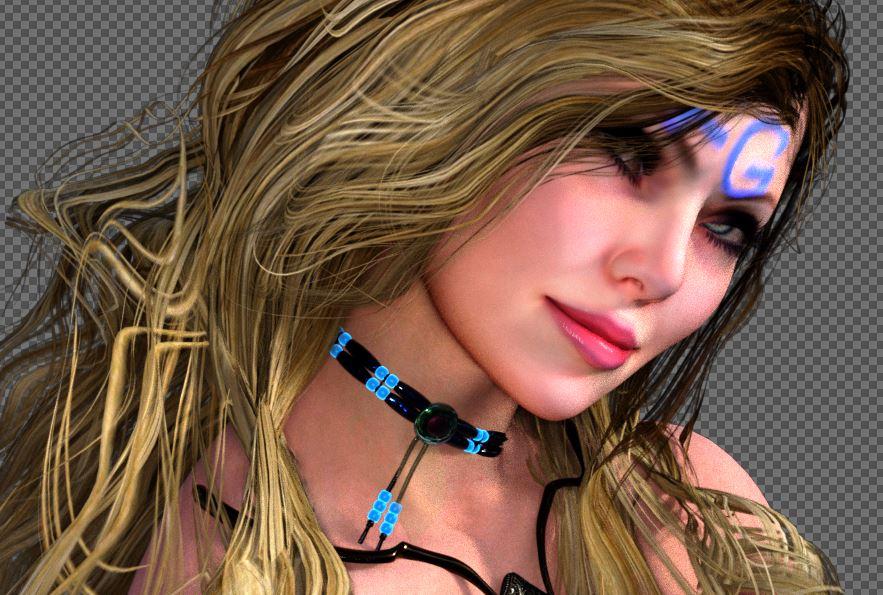
Facegen now on sale...get it!So now I tried creating a female, and not as impressed... A lot less variety in skin and morphs if you want to create someone who is actually attractive. I had to tweak the morphs a lot in DS too with regular dials because you only see the front of the face in FaceGen and have no idea how the nose, chin, etc... are going to turn out. It's GREAT for male characters, not so much with female characters unless you want to create extreme characters or old or unattractive ones. I may try using celebrity photos for morph approximation but not the photographer's skin texture.
Anyway, here's a half baked screenshot. FaceGen skin, my morph...It would probably look a lot better after Anagenesis but still, I don't think she stands out as anything new or special that hasn't been done before...
 Is facegen worth it?
I'm just curious if facegen is worth it? Like does it create "quality" looking characters like what's being sold here in the Daz store?
From what I can see, no.
The character in the demo was unusually "easy", with especially flat lighting and a neutral expression. FaceGen did nothing to compensate for the flaws in the lighting: for example, it "baked in" a wide highlight across the eyebrow ridges, as easily seen in the rendering of the new character. This means that lighting the resulting figure with any sort of soft lighting, or hard lighting from any direction other than that which created the original image, would look totally unnatural.
And I've heard only the face is created so how do you adjust the body skin from the face skin? And can you guys post like your final polished and edited renders using characters created by this program?
You use then a replacement texture preconstructed with neutral lighting. DAZ character model textures still have baked in lighting if you pay attention. It also can supply textures to DAZ that are neutral from FaceGen's generic stock.
Bottom line is if you have even complained about a lack of diversity in DAZ Store's available characters this is a cheaper solution and it is available now. Although I expect with Genesis 4 there will be another upgrade fee to a new version of FaceGen but then people do that without question for the DAZ models and Gen2 and clothing and hair and iRay already so just because you can't see all the incredible amount of work and testing and planning that goes into the software product, only a face morph, that doesn't mean as much or more work went into making it as the DAZ models themselves.
Cant wait until June :D
Is facegen worth it?I'm just curious if facegen is worth it? Like does it create "quality" looking characters like what's being sold here in the Daz store?
From what I can see, no.
The character in the demo was unusually "easy", with especially flat lighting and a neutral expression. FaceGen did nothing to compensate for the flaws in the lighting: for example, it "baked in" a wide highlight across the eyebrow ridges, as easily seen in the rendering of the new character. This means that lighting the resulting figure with any sort of soft lighting, or hard lighting from any direction other than that which created the original image, would look totally unnatural.
And I've heard only the face is created so how do you adjust the body skin from the face skin? And can you guys post like your final polished and edited renders using characters created by this program?
You use then a replacement texture preconstructed with neutral lighting. DAZ character model textures still have baked in lighting if you pay attention. It also can supply textures to DAZ that are neutral from FaceGen's generic stock.
Bottom line is if you have even complained about a lack of diversity in DAZ Store's available characters this is a cheaper solution and it is available now. Although I expect with Genesis 4 there will be another upgrade fee to a new version of FaceGen but then people do that without question for the DAZ models and Gen2 and clothing and hair and iRay already so just because you can't see all the incredible amount of work and testing and planning that goes into the software product, only a face morph, that doesn't mean as much or more work went into making it as the DAZ models themselves.
what is the most common modelling program to create daz content?I haven't rebuilt my computer (yet, other than a new video card), it was one step down from top of the line about 4 1/2 years ago. I had Win 7 on it, I had to put Win 10 on it about 9 months ago. So far less Hex instability with Win 10. And I've never had it crash from the 32 bit limit either.. lots of other reason over the years but not that. If I'm trying to work on a G3 morph at Sub-D 2 it is very slow, especially with symmetry on, but it doesn't crash - just lags. But then I almost never work in Hex with textures applied, I have textureless material presets for all the Genesis** people (DZ Default shader makes Hex the happiest) and when I'm making morphs I keep my clothing/accessories textureless. If I need to see where material zone borders are I'll change the diffuse colors, but no textures.
There are things I've just learned over the years that Hex doesn't like.. selecting polygons and making them into material zones dirrectly off the UV view it doesn't like.. if getting the selection is easiest to do that way right click on main view and then click on the edge somewhere to get rid of the pop-up menu to get the focus back on the main view without losing the selection before making the new material zone. It doesn't like flipping normals, always save before doing that. There are other little things that I've internalised so much over the years that I can't even remember them to tell you, and somethings got better in the few updates they did do years back. Right now it seems to most dislike turning smoothing on and then rotating the view too quickly afterwards.. when I really get into the groove I'm just a little too fast for it and it'll crash. Oh! It also doesn't like working with the surface sculpting tools on a mesh created or imported dirrectly into Hex, it will crash almost every time, but it never seems to have a problem when the mesh is brought in via the bridge from DS (thank god).
Morph injectionI agree, Mocap works really well. The animated pose (PZ2) files that Posermocap does in his products are really good and match with M4 and V4 really well. But if you like BVH better... then go for it. The motions are the same.
Yeah, Poser figures have always used "morphs" instead of the extra controllers for muscles and expressions. I got used to using morphs before ever even seeing how the Pro's do it.
The Genesis line for Daz Studio are now getting closer, yet still use morphs for most things, but the newest one that doesn't work in Carrara, Genesis 3, has many more bones, especially in the face, to help with that.
Using M4 and V4, if I need a specific shape to occur, I make a morph especially for that and save it to my character. This is easy for V4 - she's the only one in that family who is not 'locked' from having full body morphs added by individual artists. So for her clothes and hair and M4 and others, I use the Daz Studio/Hexagon bridge to add a new "Official" morph target to the whole figure, so that in Carrara I can make and save these new morphs.
Genesis 2 male clothes to genesis 3...and if you have all the GenX plugins you can make your own clones for everyone.
exporting the shapes as obj for morphloader
then editing the properties of the imported saved morph to clone in edit mode
My genesis, G2M&F and G3M&F all have M4, V4, K4, and clones of each other, I also did M3 and V3 but they did not work well, still trying to get them right as the genesis clone needed to do them and somehow it doubles the values.
the meshes appear to match but the clothes do not fit.
as for V4 and M4 I use XD4 on the exported Genesis cr2 Poser companion files
Knittingmommy's LaboratoryI know what you mean. There are still a lot of things I need to learn about the software and using all of the tools. I'm hoping knowing how to do my own shader presets will help with the models I've been making. I have a few done that I haven't gotten into DS yet. The material zones are set, but no textures as of yet. I have not figured out the complicated texturing in Blender yet. I think learning how to make my own shader presets will make it easier to texture my models inside DS and then I can just save them as DS files including DS textures. That way I just skip the texture in Blender part because the textures don't transfer very well anyway. At least, none of the ones I've done have.
Between what I learned about textures from @DestinysGarden and shader presets from @Esha, I should be good for all of my texturing needs in the future, hopefully. At least for Iray, I haven't tried doing any texturing or shader presets for 3Delight.
I made a conscious decision not to dive into texturing in blender. Given that I'm building stuff with DS in mind or rendering in Daz, I didn't see the need to complicate things. I've managed to pick up a fair amount from reading web sites and playing around in that I have a good feel as to the technical aspects of texturing. It's the artistic portion that I still need to practice with.
Yeah, Blender's node system is really complicated. Making shader presets inside DS is so much easier because I don't have to actually go into the shader mixer. So far, I like what I've managed to make so far. I'm still playing with it. I have to finish my homework for the making shaders in ds webinar I took. The bonus session is on Saturday and I haven't finished yet. Still working on one or two shaders. Making shaders is fun when you don't have to worry about the actual bricks.
Facegen now on sale...get it!I remember trying some face generation software a couple of years ago and it used to always distort the iris and pupils of the eyes for some reason. Does FaceGen have this problem?
Unfortunately that distorsion problem is existing and in my opinion it makes the program almost useless. It is clear that the main task for Facegen is to create a morph (and a texture...) from a photo. Maybe the strenght of the distortion will depend from the shape of the source - but it is significant. I tried the demo version before I purchased the product, and I didn't notice the problem on the first look because the figure was in the default pose and I immediatly loaded the generated eyes texture. But if you don't have a very high-resolution source photo you certainly cannot use that texture. After I applied the eyes materials from another model the problem was clear - it is even worse if you have a face expression and a movement of the eyes, f.e. "look at the camera". If there is no solution for the problem I will ask for a refund. I have attached examples for Genesis 2 and Genesis 3 Female.
V4.2 with morphs++ does not work properlyHi everone,
maybe somebody can help me, solving the following issue. I am using Poser 11 Pro. After injecting the morph++ to Victoria 4.2 things do not work as they should (or as I think they should - I am quite a newbie):
- When injecting morphs for figures, all head morphs work , but
- most the body morphs do not work (although some do I am referring to ones that are supposed to work with V4.2 / morph++)
- None of the morphs in the library at Pose: Poser11/Daz's Victoria 4/Morph Injections/ does seem to do anything (although I do not know, how they are supposed to work) at the same time, I do find some morphs in the parameter tabs for the various body parts.
It took me hours of trying, without getting that fixed. Any ideas what to do?
Cheers Holger
Evolution Morphs: Dials not showing in shaping editorYeah I have the same problem too, especially when i have to pay for both genesis male and female morph and even when i downloaded free morphing dson support file it doesnt show on my daz studo. Hell why dont they make genesis morph free or hell install a morphing tool for daz studios next time? In my opinion, it would make things alot easier and not confussing to anyone thats new at this.
Daz 3D is part of

Connect
DAZ Productions, Inc.
7533 S Center View Ct #4664
West Jordan, UT 84084Licensing Agreement | Terms of Service | Privacy Policy | EULA
© 2026 Daz Productions Inc. All Rights Reserved.