-
aeon soul Model
I have made an attempt at another dial-spun version of Alice, but with less morph packages. I used G8.1F, with Noska 8.1 as the base and the DAZ Originals Head Morphs. (Should've tried mixing her with Bonnie, as suggested earlier.) As in the other previous attempt, the rounded eyes are usually what I struggle to recreate. (And I feel that a lot of Alice's distinct look is in the overly-plucked eyebrows and her heterochormia eyes.) I'm sharing this less morphs recipe that uses DAZ Originals products, in case any of you reading my comment would like to try it for yourselves and make any adjustments.
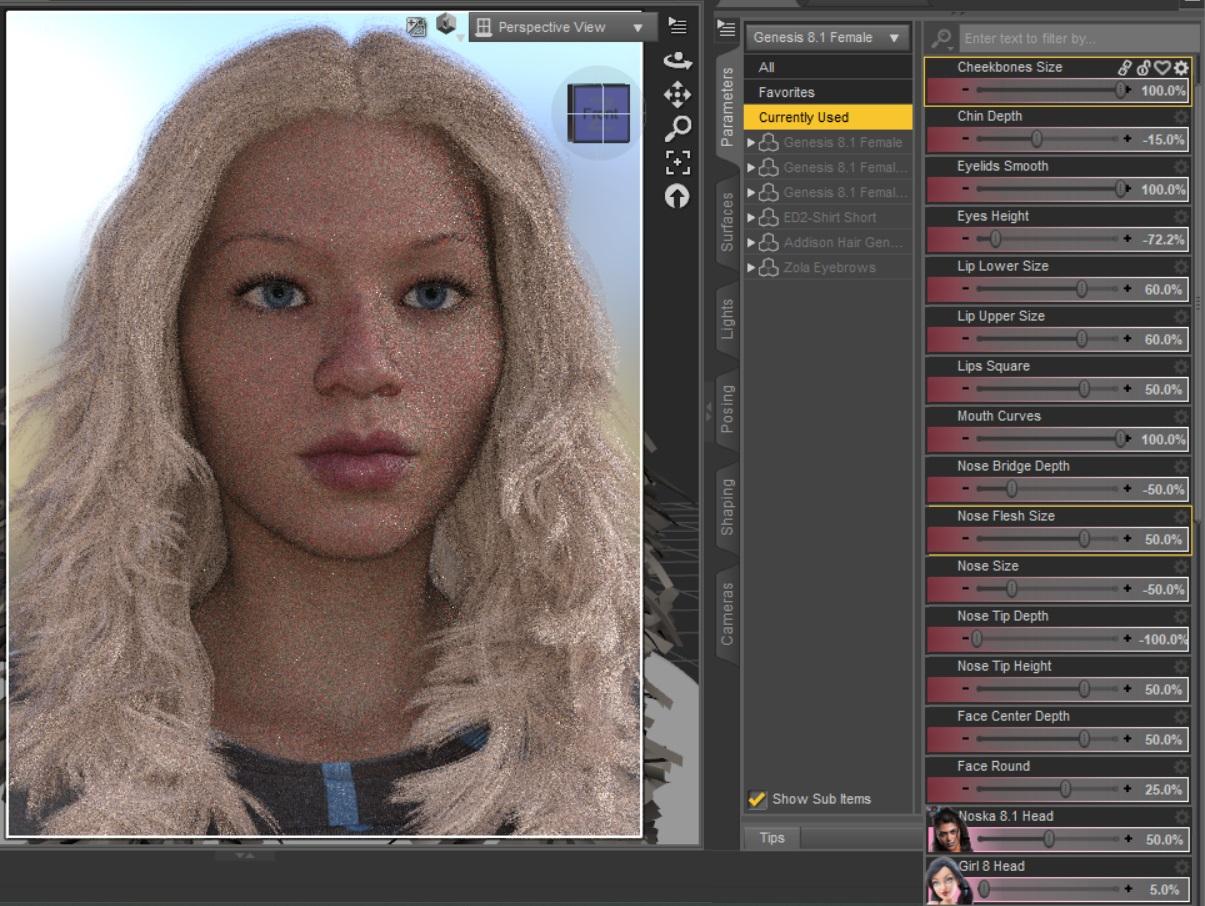
Instead of Noska, a freebie character called "Ki for Genesis 8 Female" by emotionaldreams can also be used as a base. But the other morphs I used would need to be tweaked. I was recently doing some G8F to G9 transfers and found these similar enough in shape.
Lekkulians for G9 [commercial]nabob21 said:
Nice! But I do have a question. The male version has normal looking human like feet which fits into the boots in one of the promo renders. The female version has alien type feet which obviously won't work with footwear. Is there a way to get the human like feet on the female version? Or some way to get footwear to work without distortion?
see my above post ;)
but short answer is yes, the legs morph is optional
Lekkulians for G9 [commercial]The patterns on the tentacles are applied using the make up channel on the surfaces, so they can be easily turned on and off and new ones can be made using masks appled to that channel, so it should be really flexible that way.
Also the distinctive leg morphs I make for the lekkulians is a seperate morph this time, so it can be dialed up or off depending on your desires.
Inverted G8F feet Morphs (need help)crosswind said:
Yes, you're right, I forgot it's inverted on your side.
Okay, then, in your 4th ss, the last controller seems really weird ~ There shouldn't be a multiply ERC as the controller, I doubt there might be a negatvie value is multiplied to the Bend value.
Check this page of Dolly Heels - http://docs.daz3d.com/doku.php/public/read_me/index/49187/start There was a fix related to some "bad morph" used to do something bad... I have this product but I don't have the bad morphs as well as that Controller either...
You may check them in : your Daz Liberary\data\DAZ 3D\Genesis 8\Female\Morphs\Eagle99\Dolly Heels , see if you can find some "bad morphs", seems to be E99_DollyHeelsToeControl.dsf or something. With the fixed package installed, there shoud be only one file : Dolly Heels Pose.dsf in that folder.
If there're bad morphs, go to DIM, uninstall this product firstly, then presse F2 in Daz Studio, Clear DSON cache. Then reload G8F for a test. If everything is fine then, download the latest package of Dolly Heels for installation.
Yes! This was it. I updated the product. Years-long problem gone. Thanks for helping me out crosswind. I appreciate it. I also learned several troubleshooting steps on the way. Also, thanks Richard for brainstorming with us :)
How to load custom UVs to Genesis 8?crosswind said:
I'm not 100% sure of what you need... Do you mean you want to convert texture maps from other model with different UV to G8 figures (or vice versa...), not in external application like Blender but just in DS ?
I want to make the G8 figure use a completely different UV. Not just transferring UVs or textures from G3 or another Daz figure, but a completely custom UV. That way, I can edit the G8 figure as normal from within Daz and it's ready to be exported into other games that use different UVs without having to transfer it to Blender or another program for UV remapping. That way, it will work with skins and other textures without having to manually convert them to work with the Daz G8 mesh every time. It's intended to be a modding/character creation shortcut.
DAZ To Unreal - Characters importing into Unreal 5.1 rotated 90 degrees offsssxxx_78b7a16f46 said:
Hello,
Just wanted to share some information which might be helpful. I was using the newest vesion of DAZToUnreal from here: https://github.com/David-Vodhanel/DazToUnreal/releases
I am using UE5.4 version. To transfer the DAZ Genesis 9 model to Unreal I am unchecking "Zero root rotation in import" in Unreal engine project settings->DazToUnreal plugin settings, keeping the Fix Twist Bones and Rotation checked. In DAZ application while using DAZ to Unreal plugin to export the character I unchek "Import facing right" and leave the "Fix Twist Bones" checked. In this way i get my DAZ character transferred in Unreal facing the correct way to front (facing the camera).
By doing this I was getting the problem to retarget the animations to may DAZ character. The provided IK and retarget assets by the plugin were not aligning the charracter correctly. The character was skewed and almost laying on the ground by side. Automatic retargeting (new feature in UE5.4 - checkbox in retargeting window) was not working corrctly as well: left hand pulled to left side and all body leaned a bit to the left side. I do not know why byt started to think it was because I transferred the character facing to the camera and not to side as by default (also be default the plugin rigs are facing to the side and not to the front).
Then I copied the original G9IKRig and G9Retargeter from plugin folder to my new created character folder to make experimenting. First I opened G9Retargeter and made the target character (DAZ) auto aligning to source (Quin character) by entering to edit mode and selecting root and pressing the button AutoAlign->Align All Bones. This made my character aligned correctly and seems was very happy to see all animations working correctly. Meaning "almost correctly) untill I spoted some weird head movements on some animations. I spend 3 days to find out what was wrong still. Did not find any information neither in Google nor in Youtube. I started to check everything from the skeletons - all the chain to the retargeter. And I hope I found a problem (at least for now). What I found thet the G9IKRig provided by plugin uses retarget chain for neck1->neck2->head as Head but Quin/Manny has 2 chains for neck and head. So I made correction (splitted) G9IKRig neck chain into 2 correct chains: neck1-neck2 into chain Neck and head to chain head.
This made my day very happy. As all problems dissapeared. I hope this will help someone having same issues like me because nobody before reported these problems and how to solve them.
I love you bro, you are a life saver. i was giving up when found your comment. The same daz model i was converting it to actor core, and I was about to give up on the Daz model and use the converted model. Thanks bro, you are the best for sharing this information.
How to fix Genesis 9 teeth on custom character.I think you want to tweak the rigging of mouth cavity rather than teeth themselves. I found no big issue on the teeth at least in your screenshot.
If your answer is yes, check this thread - https://www.daz3d.com/forums/discussion/comment/8783396/#Comment_8783396 in which I gave a tutorial how to tweak eyes. The workflow also applies for the case of tweaking mouth.
Reminders :
1) in your case, Zero Figure Pose before adjust rigging;
2) dial an FACS expression to check if the mouth cavity is in right place after adjustment;
3) if it's still not in right place, finetune its Transforms and updae the AutoFollow head morph on Genesis 9 Mouth, just like the steps of updating Head Morph on Genesis 9 Eyes in the tutorial.
4) if you find the mouth cavitiy's is still not pefectly positioned with some specific expressions, you have to further make corrective morphs for them and set that Head Morph as the 2nd stage controller on the corrective morphs in Property Hierarchy.How to fix Genesis 9 teeth on custom character.Make the change and then call it the exact same name as the internal morph and it should automatically adjust
Genesis 8.1 - Power Pose dots for face are missingPerttiA said:
Making the G8 base expressions (and any expressions that are using them) work on G8.1 requires removing dummy/placeholder expressions that are installed to G8.1 morph folders - These dummy/placeholder expression files have no other function than to prevent the base G8 expressions from loading.
The dummy/placeholder files are located in;
...\Data\DAZ 3D\Genesis 8\Female 8_1\Morphs\Daz 3D\Base Pose Head\ (255 files)
...\Data\DAZ 3D\Genesis 8\Female 8_1\Morphs\Daz 3D\Expressions\ (24 files)
...\Data\DAZ 3D\Genesis 8\Male 8_1\Morphs\Daz 3D\Base Pose Head\ (255 files)
...\Data\DAZ 3D\Genesis 8\Male 8_1\Morphs\Daz 3D\Expressions\ (24 files)Please make sure you are removing the files from G8.1 morph folders and not G8 morph folders.
If you are logging in to DS and allowing DAZ Connect within DS to install/update the content, these same files may be found also in whereever DAZ Connect installs content, in ...\Data\Cloud\1_xxxxx\ (xxxxx is the SKU number of the product)
Yes this Works and only Down side is G8.1 Face control will not work but instead G8 Face control will work on G8.1 Figures btw G8 Face control is not free.
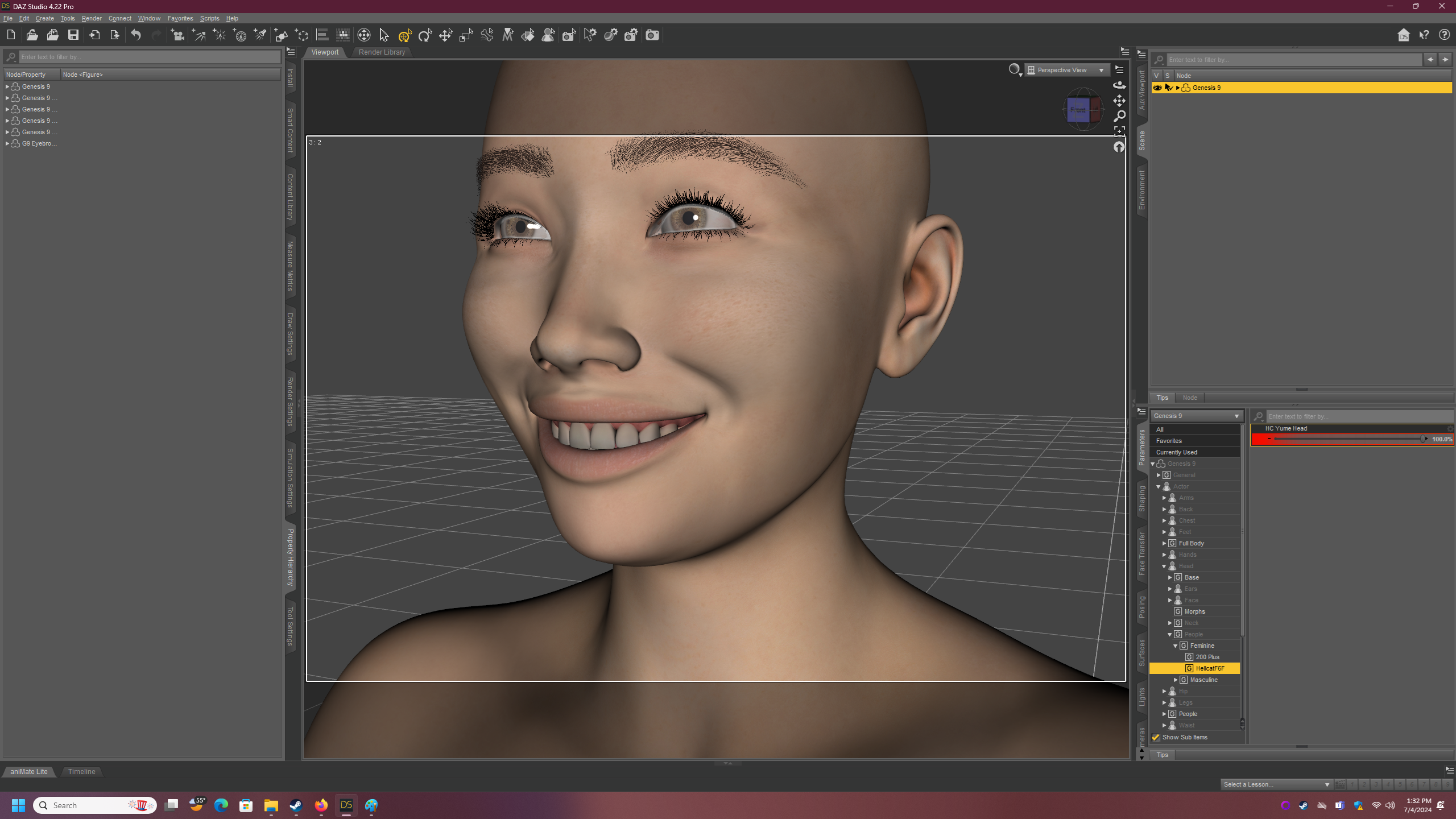
How to fix Genesis 9 teeth on custom character.I sculpted a new character and even some corrective morphs to help with the bending, but the one thing I can't figure out how to fix is the positioning of her teeth when she smiles, since they are a separate figure. How do I reposition her teeth in such a way that the repositioning only triggers when I have her morph selected?
 DIM installing some stuff to cloud?
Richard Haseltine said:
barbult said:
If a file is already in the cloud folder from a previous Daz Connect installation, it is always used, even if there is a more recent DIM installation.
DS uses the relative path within the \data\cloud\1_SKU\ folder, otherwise the prsets would need to be different deepnding on installation method. So a scene or preset saved with the content installed through DS will work with the same content installed through DIM, and vice versa. If you mean that a Connect installation will be used over a DIM, then yes - if the database still knows about it (which is why I asked about moving the database over in my previous reply - if not then the files will be invisible to DS, and if there is no DIM install they will simply not be found).
What I did was transfer the runtime folder over to the new computer (so that the 3rd party stuff would be installed already and not need to be hand-installed again) - then I used DIM to reinstall all the DAZ files. At first it was putting them into my OneDrive cloud; so I tried to uninstall that and reinstall it again once I figured out how to sinc DIM up with the new computers main storage drive. MOST stuff was installing there, but the things originally mentioned kept being installed into OneDrive. Despite DIM being linked to my HD. I THINK I got it, but I'm not 100% sure. I pulled all the DAZ files off of OneDrive and saved them to a folder in case I needed them still.
Daz Install Manager (DIM) 1.4.1.87, Now Available! (*UPDATED*)Yeah Robert, I am tired of this. Maybe one of the wonderful script writers could come up with a program for DIM that would transfer all your runtime from one drive to another when you outgrow your existing one? I don't know how many folks I have seen on the forums ask about this over the years. Often from when it was accidentally set-up on the C: drive or on a 1Tb drive. But with files getting larger all the time, drives are being filled up faster now. Of course it may not be possible.
MimicMolly's Renders & WIPsI have almost remade one of my OCs with G9, thanks to Wagner 9! Here is a comparison of a digitally-colorized sketch I did, and the G9/DAZ version. However, I am "missing" some components to make him more accurate:
- Round eyes morph. The DAZ version, even with the toon bits, has the eyes not round enough. (But a large majority of my drawn characters have round eyes.)
- The "Spock" eyebrows. My OC has straighter/flatter eyebrows that curve up a bit at the ends. None of the included G9 eyebrows fit this.
- Short curly hair with a volume morph. Bonus points if there is a Titian red version included. (I colored it too dark, but it was too light before.) I found this cosplay hair at Renderhub and recolored it to my liking, but it is a prop hair. AprilYSH's Portia Hair comes close too and was what I used before. It just didn't have the random little whisps like the cosplay hair.
- Adam's apple morph. I saw one in some package. One of the morphs to make his G9 preset was a feminine morph I transferred from G8F, so that reduced the size of his Adam's apple. So I need to dial it back up.
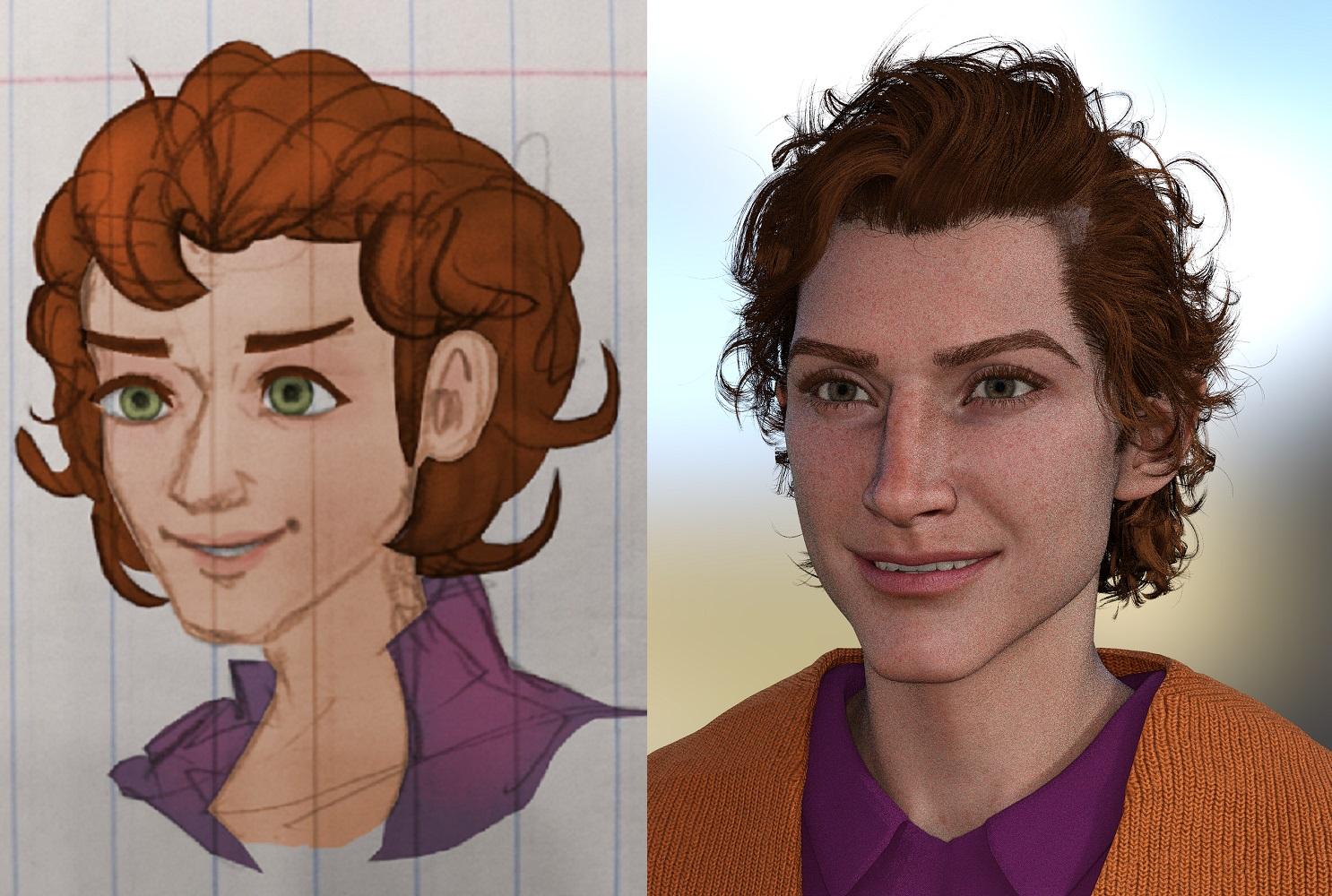
The eyes are probably the most important, since I plan to use this character preset for drawing than rendering.
I should probably do a comparison render with the previous G8.1M who used a mix of Ollie 8 and Torment 8.1, because this character is supposed to look like a "young jester." So he has a longish face with a long aquiline/Roman nose. I could never get the G8 version to look young like this G9 version.
Let's appreciate/discuss today's new releases - ongoing threadPerttiA said:
xyer0 said:
tsroemi said:
PerttiA said:
Looks promising, with 9 new items out of 17 in the cart, the cart is already at 90% off.
The Presidential bundle is instabuy, even with the car looking like it does
Really? Because of the Oval Office? I
The car? The Oval Office looks pretty decent. It's oval because it's the egg from which Horus/Apollo will be born; his dad's symbol is outside the window in front of the rising sun. Fortunately, the plane package has a short stairs morph, since someone kept falling on the long stairs.
Yeah, even though the "Beast" has bigger tires than normal, the ones in the promo renders look like oversized donuts, but at least it looks more believable than other vehicles from the same creator.
Ah, I see, would never have guessed that. I thought the car looked rather clumsy, and as to the interior, I felt like, If I were president, I would surely start with a thorough redecoration right here ...
 Actually, I only looked inside because I was hoping for a sweet liquor storage department. We only have one of these in a car I reckon, in the Polish stretch limo. Would have loved to see something like this in another type of car, but alas. Everything else (except oval office) I already own in one or other iteration: luxury car, VIP plane, over-the-top office space / plane interior ... But I understand that it's about this specific car that you guys are interested in.Let's appreciate/discuss today's new releases - ongoing thread
xyer0 said:
tsroemi said:
PerttiA said:
Looks promising, with 9 new items out of 17 in the cart, the cart is already at 90% off.
The Presidential bundle is instabuy, even with the car looking like it does
Really? Because of the Oval Office? I
The car? The Oval Office looks pretty decent. It's oval because it's the egg from which Horus/Apollo will be born; his dad's symbol is outside the window in front of the rising sun. Fortunately, the plane package has a short stairs morph, since someone kept falling on the long stairs.
Yeah, even though the "Beast" has bigger tires than normal, the ones in the promo renders look like oversized donuts, but at least it looks more believable than other vehicles from the same creator.
pJCM Poses using 3Dcoat softwareI found no issue with the mesh file you attached there was no problem either after I fixed some geometry in Blender and sent the morph back.
I know nothing about 3DCoat but it seems to me an issue of vertex order change. When you import / export OBJ in 3DCoat, is there any settings related to keeping vertex order ?
DIM installing some stuff to cloud?More likely they were already in the cloud folder, which DIM won't (can't) touch from the old system - in which case, assuming you didn't transfer the database too, you might as well just delete those files.
[Released! HD Face Burns for G8F + Add-On] FenixPhoenix's Commercial ProductsUthgard said:
Just as a general piece of advice, if you need to use things with an irregular UV on a geograft, assuming that geograft has access to the base UVs (which I imagine a belly would need to have if it can use regular skins), you can load the textures with irregular UVs on a figure without the geograft loaded and use DAZ Studio's Map Transfer utility to get a copy of the textures that uses the regular UVs. You can then manually slot those new maps on the geograft and, if needed, save them as a texture preset.
Thanks for the advice. I work a lot with shells and that works very well with the graft due to the supported UV. I can see why the HD Burn package uses different UVs because I imagine it makes the product a lot easier to work with on its own.
@FenixPhoenix @esidworks Thanks a lot for looking into the subject! Shows you really care for your product. :) Tbh, I would not be trying to get the morphs across. My goal would be mainly to use a shell with your diffuse/displacement maps/etc. and so I guess my question is in fact much more simple: Are the textures provided only for the new UVs included in the package or is there something like bonus variations of the textures for the standard UVs as well?pJCM Poses using 3Dcoat softwareYou should've updated the corrective morph: pJCMCollarUp_55_L on the shirt... rather than creating a new morph in Morph Loader Pro. Check the attached screenshot ~
- Show Hidden Properties in Parameters pane, select the shirt, you'll see the corrective morph.
- Click the Gear icon on the right of the corrective morph - Parameters Settings..., copy the morph name from Name: field.
- When export shirt from 3DCoat, save it as pJCMCollarUp_55_L.obj
- Import OBJ file with Morph Loader Pro...Inverted G8F feet Morphs (need help)Yes, you're right, I forgot it's inverted on your side.
Okay, then, in your 4th ss, the last controller seems really weird ~ There shouldn't be a multiply ERC as the controller, I doubt there might be a negatvie value is multiplied to the Bend value.
Check this page of Dolly Heels - http://docs.daz3d.com/doku.php/public/read_me/index/49187/start There was a fix related to some "bad morph" used to do something bad... I have this product but I don't have the bad morphs as well as that Controller either...
You may check them in : your Daz Liberary\data\DAZ 3D\Genesis 8\Female\Morphs\Eagle99\Dolly Heels , see if you can find some "bad morphs", seems to be E99_DollyHeelsToeControl.dsf or something. With the fixed package installed, there shoud be only one file : Dolly Heels Pose.dsf in that folder.
If there're bad morphs, go to DIM, uninstall this product firstly, then presse F2 in Daz Studio, Clear DSON cache. Then reload G8F for a test. If everything is fine then, download the latest package of Dolly Heels for installation.
Daz 3D is part of

Connect
DAZ Productions, Inc.
7533 S Center View Ct #4664
West Jordan, UT 84084Licensing Agreement | Terms of Service | Privacy Policy | EULA
© 2026 Daz Productions Inc. All Rights Reserved.