-
Getting on the 9 train, or not
Like this. Sclera map from dimensiontheory (which is not darker around the edges) and iris from your MR. I darkened and enlarged the iris when making the final eye map because it makes that bright ring surrounding the iris less obvious. It's definitely not a problem of the texture whatsoever.chevybabe25 said:(4) The eyes. Eyeballs as a prop which is not affected by the character morph is a plus, giving you more precise scaling/position control to eliminate the space between the eyeball and eye rims. But the shaping/transition from the iris to the sclera gives the illusion of a bright ring around the iris and than from there the sclera quickly becomes much darker towards the edge of the eyes, even if I use chevybabe and dimensiontheory's products. I don't think this is better than that infamous visible separation of the iris and sclera on G8. And I actually think that under the same lighting, G8 eyes reacts to light better than G9.
Could you post a photo of this please? Id like to see exactly what you are explaining here.
Combining Daz art with AI MusicThis is made with one of my Face Transfer 2 characters, with a Suno song, run through Hedra (which produces about 30-second chunks) and spliced together:
Getting on the 9 train, or not(4) The eyes. Eyeballs as a prop which is not affected by the character morph is a plus, giving you more precise scaling/position control to eliminate the space between the eyeball and eye rims. But the shaping/transition from the iris to the sclera gives the illusion of a bright ring around the iris and than from there the sclera quickly becomes much darker towards the edge of the eyes, even if I use chevybabe and dimensiontheory's products. I don't think this is better than that infamous visible separation of the iris and sclera on G8. And I actually think that under the same lighting, G8 eyes reacts to light better than G9.
Could you post a photo of this please? Id like to see exactly what you are explaining here.
[Released] Character Converter from Genesis 3 Female to Genesis 8 Female(Now Conv JCMs) [Commercial]I have a few questions about restore vs zero
1. Which is prefered for transfering a custome character, one with morphs from multiple base characters. I assume restore, but I'm trying to grasp this...
I don't really see the point in having a zero option, as restore would keep this value if it was already set at such.
2. Can we get a "do this for all selected" check box ? So we don't have to make this choice for every character one at a time. That way we don't have to sit by the computer while a batch of these is going.
3. If you have not already transfered all your base characters from G3 to G8 can you transfer a custom character. My experience says no. the results are not correct in every attempt I've made. Horrific results.
JD
Saving prop with strand based hair? (solved - kind of)I put a coment for the one who stil looking about solution for that,
you have to make you SBH on a an object having the same shape as the head-or watever you put hair on i am not juging you :) ) ,, make sur you use the transfer utility to apend your object to your figur,
after you made a satisfying hair stile on this object you create a groupe you put the object and the sbh on the groupe, and you select the figure and save weareable preset , and the select the groupe and save as wearable preset, load it normaly
that the way to do it you craft a wigG9F Individual Glute Lift?Checked my morphs and found two LR sets. I believe Sickleyield's are from this package: https://www.deviantart.com/sickleyield/art/SY-Free-Morphs-Merchant-Resource-G9-942186079
The other is from this one: Vinme Morphs for Genesis 9 - https://www.daz3d.com/vinme-morphs-for-genesis-9
Sickleyield's is by default for lifting the glutes only, but if you uncheck limits, it also seems to work fine for lowering them. In both cases each morph affects the other glute a bit though, in a way that doesn't seem quite natural to me. Vinme's do not do that, each morph only affects the glute it's supposed to. Otherwise the two sets seem quite similar.
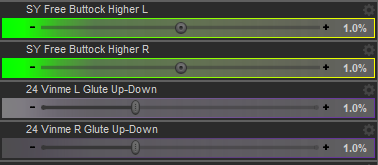 Getting on the 9 train, or not
Been on the 9 Train for some time and have the following rants:
(1) Translucency weight of G9 affects the skin way more than G8. Too high I got skin like that poor girl who got sucked into the pillar in Hellraiser. Too low I got a ghost.
(2) A transmitted color which is not leaning towards cool tone gives strong yellow/orange tint to the figure especially around the eye rims and the philtrum, even if your diffiuse and translucency skin maps are nowhere leaning towards yellow/orange. In order to compensate for this I had to use a cool toned pink (almost magenta) as transmitted color which my common sense kept telling me that's not quite biologically correct.
(3) If you use the clone method to transfer G8M characters to G9, the underb**b area will give you nightmare. G9M has nipples lower than G8M, combining with that infamous G9M underb**b crease the chest of the transferred character looks crazy. Also don't get me started on those cone-shaped nipples...
(4) The eyes. Eyeballs as a prop which is not affected by the character morph is a plus, giving you more precise scaling/position control to eliminate the space between the eyeball and eye rims. But the shaping/transition from the iris to the sclera gives the illusion of a bright ring around the iris and than from there the sclera quickly becomes much darker towards the edge of the eyes, even if I use chevybabe and dimensiontheory's products. I don't think this is better than that infamous visible separation of the iris and sclera on G8. And I actually think that under the same lighting, G8 eyes reacts to light better than G9.
There's Always Another Sale Thread -- Discussions Only Pt 3
don't have it yet, but it is in my wishlist. There really are so many things in my wishlist, I need to trim out many of the old characters since I am mostly using gen 9 now. Currently I have over 2k items in my wishlist. Lol Since I first started with Daz I have narrowed my focus mostly towards specific artist who allign with a realistic focus, the pro bundles, and tools. At first, my purchases were a bit more all over the place.memcneil70 said:XiousDs said:
memcneil70 said:
For everyone who has been upset by G9's breast areas, especially the males', what do you think about https://www.daz3d.com/sfd-breast-and-chest-morph-kit-for-genesis-9--merchant-resource?
I ask because I am not a male and have not had issues with G9's breasts.
There are quite a few different tools for making different adjustments, but that one (to me) looks like it could simplify some adjustments folks would want to make. I have not bought it, but I was interested enough to add it to my wish list. I like making characters like this. If Victoria and Harlow had a kid, as an adult what would he/she look like? I then mix the morphs leaning heavy towards the gender the kid is, then use other morphs to make corrections pushing back towards masculine or feminine. Then for the character as a kid, leverage the youth morph sets, and make adjustments. I wish instead of just head and body morphs they were broken down into regions like eyes, nose, jawline, ears, etc so it would be easier to do something like he has mostly his father's features, but his mom's nose and ears.Thank you @XiousDs. I have it in my cart.
Have you bought or looked at Code66's https://www.daz3d.com/shapes-randomizer-for-genesis-9? It has the option to morphs from both male and female shapes together. Or with using on your parents, maybe adjust them with morph packages, save and then use the Base 9 shape and merge the shapes manually together. And of course, some features jump generations, so a child may have something that harkens back to something neither parent shows. And of course there is always the 'milkman' to explain away weirdness.
There's Always Another Sale Thread -- Discussions Only Pt 3XiousDs said:
memcneil70 said:
For everyone who has been upset by G9's breast areas, especially the males', what do you think about https://www.daz3d.com/sfd-breast-and-chest-morph-kit-for-genesis-9--merchant-resource?
I ask because I am not a male and have not had issues with G9's breasts.
There are quite a few different tools for making different adjustments, but that one (to me) looks like it could simplify some adjustments folks would want to make. I have not bought it, but I was interested enough to add it to my wish list. I like making characters like this. If Victoria and Harlow had a kid, as an adult what would he/she look like? I then mix the morphs leaning heavy towards the gender the kid is, then use other morphs to make corrections pushing back towards masculine or feminine. Then for the character as a kid, leverage the youth morph sets, and make adjustments. I wish instead of just head and body morphs they were broken down into regions like eyes, nose, jawline, ears, etc so it would be easier to do something like he has mostly his father's features, but his mom's nose and ears.Thank you @XiousDs. I have it in my cart.
Have you bought or looked at Code66's https://www.daz3d.com/shapes-randomizer-for-genesis-9? It has the option to morphs from both male and female shapes together. Or with using on your parents, maybe adjust them with morph packages, save and then use the Base 9 shape and merge the shapes manually together. And of course, some features jump generations, so a child may have something that harkens back to something neither parent shows. And of course there is always the 'milkman' to explain away weirdness.
There's Always Another Sale Thread -- Discussions Only Pt 3
There are quite a few different tools for making different adjustments, but that one (to me) looks like it could simplify some adjustments folks would want to make. I have not bought it, but I was interested enough to add it to my wish list. I like making characters like this. If Victoria and Harlow had a kid, as an adult what would he/she look like? I then mix the morphs leaning heavy towards the gender the kid is, then use other morphs to make corrections pushing back towards masculine or feminine. Then for the character as a kid, leverage the youth morph sets, and make adjustments. I wish instead of just head and body morphs they were broken down into regions like eyes, nose, jawline, ears, etc so it would be easier to do something like he has mostly his father's features, but his mom's nose and ears.memcneil70 said:For everyone who has been upset by G9's breast areas, especially the males', what do you think about https://www.daz3d.com/sfd-breast-and-chest-morph-kit-for-genesis-9--merchant-resource?
I ask because I am not a male and have not had issues with G9's breasts.
There's Always Another Sale Thread -- Discussions Only Pt 3For everyone who has been upset by G9's breast areas, especially the males', what do you think about https://www.daz3d.com/sfd-breast-and-chest-morph-kit-for-genesis-9--merchant-resource?
I ask because I am not a male and have not had issues with G9's breasts.
There's Always Another Sale Thread -- Discussions Only Pt 3daveso said:
I've seen 3 sets so far and went ahead and bought all 6. A couple were iffy, but at $2 it feels a bit better to buy something that may or not get used. One thing that bothers me a little bit, buying characters..I already have tons plus its possible to churn out your own with all the morph sets. Never ending characters.
True, although for me, it's worth it to not have to spend the time on customizing a billion sliders and making up new textures. I'd rather spend that time putting together the render. (I absolutely did it for my mains, because they needed to look a certain way, and no store-bought character would ever do that. But Random Serving Staff #12? Not so much.)
There's Always Another Sale Thread -- Discussions Only Pt 3I've seen 3 sets so far and went ahead and bought all 6. A couple were iffy, but at $2 it feels a bit better to buy something that may or not get used. One thing that bothers me a little bit, buying characters..I already have tons plus its possible to churn out your own with all the morph sets. Never ending characters.
[Released] Character Converter from Genesis 3 Female to Genesis 8 Female(Now Conv JCMs) [Commercial]kyoto kid said:
...apologies for bringing this thread out of hibernation
I just watched the video with this product and wonder when converting a "scene character" does that include on you cerate yourself using the various G3 morphs? I also use morph based merchant resources as well to create more unique custom characters of my own . Trying to recreate them from scratch using G8 (even with utilities lie Zev0s XTransfer which transfers G3 morphs to G8 tends to be a real headache and doesn't quite come as close to the original. Part of the reason s I'd like to use the improved base and add on expression sets which are not available to G3.
A few years ago I had lost everything in a drive crash and had to painstakingly ebuild all my characters from scratch again, not a pleasant situation.(I almost gave up on working with Daz tafter hat happened).
Back to the current situation, I finally have refo verd most of the characters of my own that I custom created using Daz3D morph resources. .For example, one of these is the major character for stories I am working on named "Leela". Even after noting down all the parameter settings from the G3 version and appluing them them to the base G8, something still seemed a bit "off" (a process that was farily tedious). So my question is, can I actually transfer the G3 version of her as a shaping parameter for G8 using this converter?
Probably? If it is an HD morph, no, it will become a standard morph so you will lose high resolution details (this is a limitation that Daz imposes). Otherwise, it should work for G3 to G8.
Marahzen's Musings on Creating Characters (and other matters)This was a four-day weekend for me (rather to my pleasant surprise, as I didn't realize that my company was also giving "the day after July 4th" as a holiday this year until I was in a meeting on Wednesday) and it gave me the opportunity to work on several things. I finally finished re-reading the first book of my story series and set off into the unfinished territory of the second book and also created a second new character who - like the last characters I shared - is specific to the second book. This is Mira and unlike the rather fanciful image I posted above, this is actually pretty much how I envisioned this character.
I'm still streamlining my new set of instructions, but essentially, what I'm doing at the moment is creating the character as a G9 character with Face Transfer 2, then I save all the files and create a shape dial. Of late, I've been doing that with Dial Fusion 9, which saves the Face Transfer shape as a persistent dial. What's weird is that the Dial Fusion dial itself only contains the other shape settings (which, in a newly created FT2 character, is just the Base Masculine/Feminine at 100%). But what it makes possible is that I can load a stock G9 figure in a new scene, select that Face Transfer shape and recreate the character anywhere I want it.
For now, I'm still doing materials by applying a mat file from a commercial character, then replacing the Base Color with with the textures for my character, created by FT2 or FaceGen. Yeah, yeah, will get back to doing it all myself one day, but for now, I'm just glad to be back in business of even trying to create real characters.

I will spare you all the video I made of Mira and the first 27 seconds of one of my Suno songs.
 Midnight Bones for Genesis 9 doesn't accept standard hand poses
Okay, I got what you meant. You were checking and comparing the pose. Yes, after testing, it's an issue of wrong rigging... You may fill a ticket.
Then if we want to fix it, we can rerig it ~
- export standalone MB Skeleton to OBJ with Base Resolution and import OBJ. Rig it to G9 with Transfer Utility.
- transfer all morph properties / corrective morphs from MB Skeleton to MB Rerigged with Transfer Utility
- activate Geometry Editor, select All surface of G9, Set AutoHide Faces for Attachment > select MB Rerigged.
- convert MB Rerigged to SubD and apply a Material Preset to it.Done ~ The result will be correct. Then save G9 as a Subset, or a Figure Asset with your Vendor Name.
[Released] Character Converter from Genesis 3 Female to Genesis 8 Female(Now Conv JCMs) [Commercial]...apologies for bringing this thread out of hibernation
I just watched the video with this product and wonder when converting a "scene character" does that include on you cerate yourself using the various G3 morphs? I also use morph based merchant resources as well to create more unique custom characters of my own . Trying to recreate them from scratch using G8 (even with utilities lie Zev0s XTransfer which transfers G3 morphs to G8 tends to be a real headache and doesn't quite come as close to the original. Part of the reason s I'd like to use the improved base and add on expression sets which are not available to G3.
A few years ago I had lost everything in a drive crash and had to painstakingly ebuild all my characters from scratch again, not a pleasant situation.(I almost gave up on working with Daz tafter hat happened).
Back to the current situation, I finally have refo verd most of the characters of my own that I custom created using Daz3D morph resources. .For example, one of these is the major character for stories I am working on named "Leela". Even after noting down all the parameter settings from the G3 version and appluing them them to the base G8, something still seemed a bit "off" (a process that was farily tedious). So my question is, can I actually transfer the G3 version of her as a shaping parameter for G8 using this converter?
eyeball issues after converting G8 -> G9With manfriday's script, there should be no issue of AutoFollow... Anyway, select G9 figure, click on the Gear icon on the converted Head Morph property to open Parameter Settings dialogue... can you see AutoFollow is checked ? If it is not checked, check it. Then delete Genesis 9 Eyes sub-node, and reload Genesis 9 Eyes from G9 Starter Essentials to the figure. You should see the hidden head morph on Genesi 9 Eyes...
You have to have the hidden property of AutoFollow head morph on Genesis 9 Eyes, otherwise all fix will be eventually in vain...
eyeball issues after converting G8 -> G9Repeated the process.
I think my issue is not saving the autofollow head morph on the eyes in the hidden properties, as the eyes keep coming out too small, still. I have hidden turned on, but I don't see the autofollow head morph.
G8F model resembling the now-forgotten Elexis Sinclaire?feldarzt said:
Nice! A few tweaks here and there, and we'll get a perfect G8F Elexis.
So Pretty Base it is, then.
Thank you for a good visualization, @Quasar!
I'm glad it helps. I think I did it all with the Daz G8F head morph set. Here are the dial settings I used:
Eyes Angle = -100%
Cheeks Depth = -17%
Cheeks Size = -50%
Chin width = -26%
Jaw Define = 100%
Jaw Size = 28%
Jawline Depth = -36%
Nose Bridge Depth = 60%
Nose Bridge Slope = -26%
Nose Depth = 20%
Nose Flesh Size = 42%
Nose Height = -24%
Nose Pinch = -16%
Nose Ridge = 100%
Nose Ridge Width = 30%
Nose Septum Height = -100%
Nostril Wing Size = -100%
Nostril Wing width = -10%
Lips Thin = 94%
Mouth Curves = -100%
Mouth Height = 10%
Mouth Size = 34%
Mouth Width = 20%
Hopefully it gets you a close starting point for what you want.
Daz 3D is part of

Connect
DAZ Productions, Inc.
7533 S Center View Ct #4664
West Jordan, UT 84084Licensing Agreement | Terms of Service | Privacy Policy | EULA
© 2026 Daz Productions Inc. All Rights Reserved.













