-
How Do I Make My Own Morphs For Genesis Figures
I have tried changing an existing mesh with a simple morph, not changing the amount or anything technical, just moving the existing ones about a bit to creat a fold or similar, but always got the problem of not being able to save the new morph because it didn't recognise the original morph or something.
I would love to be able to amend or adjust existing meshes, just that little bit, to improve my models and scenes. Any help or advice would be greatful.
Sorry to hijack this thread. I will start a new one if necessary.
What tools are you using? How are you saving? What, if any, errors do you get?
How Do I Make My Own Morphs For Genesis FiguresI have tried changing an existing mesh with a simple morph, not changing the amount or anything technical, just moving the existing ones about a bit to creat a fold or similar, but always got the problem of not being able to save the new morph because it didn't recognise the original morph or something.
I would love to be able to amend or adjust existing meshes, just that little bit, to improve my models and scenes. Any help or advice would be greatful.
Sorry to hijack this thread. I will start a new one if necessary.
Greek God Outfit for Genesis 3 Male(s)No there's no morph to shorten the skirt but it can be done quite easily with a Dformer.
DS Bridge not working for meWhen you export the OBJ file you import it into Daz Studio, then you import the texture via the Surface tab.
Daz Studio's new Iray materials do not work with Hexagon, just change the textures to 3Delight, use the bridge to send your prop to Hexagon and change it back to Iray afer you've created the morph.
Glad to hear you got it to work though - Its nice when a plan comes together :)
Genesis and HexagonAfter watching it a couple times, I followed the tutorial step by step and did not have any problems.
Setting Genesis 3 to the base level means you are lowering the polycount, makes it more blocky but helps a little bit if you have an older machine. You should not see any difference once you transfer it in Daz Studio (as far as I know).
How Do I Remove A Figure's Chin Cleft? (Solved!)You can also use mesh manipulation brushes to remove the chin cleft feature in programs such as Zbrush (expensive) or Blender (free); essentially you make a new morph which removes the feature. Or you could ask DAZ3d to include simple mesh manipulation brushes as standard in DS or via a plugin, then you could make such minor changes on the fly to any character or clothing or hair.
Keep Calm : There's always another Sale (Daily Sale Talk)Well... that *was* mad...
I had i13's Dreams and the V3/M3 head and body morph's bundle in my cart... and I added the Tamara Bundle and Dale for G3M.
I wasn't happy with the discounts... so I pulled out the V3/M3 morphs... and the price on Tamara and Dale both dropped.
So then I pulled out i13 Dream's content, and the price on both of them dropped AGAIN.
So I bought them.
Weirdest Shopping Cart Jenga reverse stacking deal I've seen so far at DAZ. "The less you buy, the more you save! The more you buy, the more it costs!"
@Novica I just realized I should have just dropped you a note about it... but I didn't think about the fact that it seems to be some kind of glitch until just now.
Genesis and HexagonWhat happens if you don't set resolution to base level?
I just went through the Classic Bikini tutorial
https://www.daz3d.com/classic-bikini
And I had a tight fit on the Genesis model in Hexagon, and when I load the .obj it fits tight... but once I use the transfer utility to turn it into clothing that auto-follows, it expands and gets a huge gap around the legs and waist. I'm wondering if this is addressed in later portions of the tutorial - or if I'm going to have to start over from scratch.Ready ! Strappy shoes for Genesis 3Thanks again.
Nice with AllentArts pearl shaders..
Nice surprise Looks great !
a heel-length morph will be available once i understand how to make them survive the save process
also platform height
though today i update the mcjGenSummer top
there's also some poke-through issues under the feet, most of all when an Aiko5 body is dialed in
and my attempt at using a push modifier didnt get glorious results :)
 Facegen now on sale...get it!
Can you recognize a face created by FaceGen with no skin texture applied? It's probably very hard to do. I think this is because it doesn't create HD morphs. With the lower quality morph, as soon as you swap out the skin texture, the face is no longer recognizable, because a lot of the detail is baked into the texture, and not the geometry. Just my observation. I think users should request HD morphs from FaceGen to get the ball rolling.
In some case yes, and other cases no, but it's fairly simply to find a texture that is good for that person but not a texture made from their own photos. It's mostly a matter of getting skin & eye coloration, and hair color & styles correct.It is a hassle to find those textures though in the DAZ or Rendo stores but there is plenty of variation, especially if you go back to V4/M4 textures and buy the Texture Transformer and it's addons at Rendo.
Dante 7I wanted to do a straight up, mostly, render of Dante. Here he is in the Ugly David outfit. He has Buzzed Hair, and Oh My Body Hair (face and arms). Two problems arose: one - the vest didn't fit right. It was sort of floating above his shoulders, the built in morphs didnt help - I'd get poke-through before the shoulder or back morph bought it down enough. I ended up using a D-former. Not major, but annoying. Second: look at the shoulder, I see a mesh pattern there. I almost rememer what causes that.. subdivision?
Anyway, here he is. I'm happy I got the pro bundle - at least at that sale price

 Daz Studio Nvidia Iray Interactive & Photoreal Animation Tests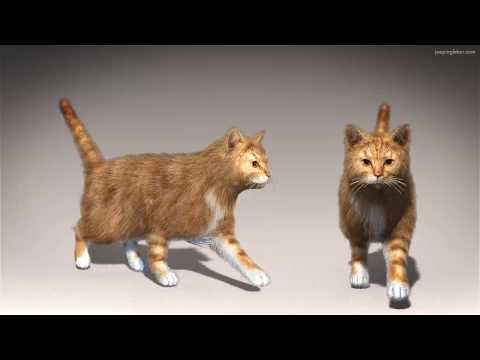
This is another quick experiment with animating "Look at my Hair" fur in DAZ Studio using Iray. I was able to animate the hair by converting the "Look at my Hair" hair for DAZ Millennium Cat to an obj and then used the DAZ Studio's Transfer Utility to make that object a conforming figure. I used the DAZ Millennium Cat Long hair Look at my Hair preset [ http://www.furrythings.com/presets-animals/ ]
DAZ Millennium Cat is not weightmapped, it uses parametric rigging. I needed to convert the figure to weightmapping to use Transfer utility with it. I also had to make sure the cat's pose is zeroed when I exported the hair OBJ.
I used an walk cycle aniblock to see if the fur worked on a moving figure. I also tried a string of aniblocks (forward to sit, lick, stand to forward) to explore how it worked on a more complex animation.
It is rendered at 1920x1080 @ 30fps using 50 iterations with Iray in "Photoreal" mode and averaged 20 sec per frame to render.DS Bridge not working for meNancy, it works fine for me. I go the manual install rather than the DIM, not sure if that makes any difference. Have you tried turning off your firewall, not sure if installing things as Admin would help ?
Sorry I could not be more help :(
I'm going through the back posts to find a solution, I know there have been quite a few posts on this subject. I have my Bridge Icons in my shortcuts tabs, so may-be Richard's solution works.
Richard H. Said to - Edit>Preferences>Interface should have an option for the bridge. If you go to Window>Workspace Customise then you should be able to find the command for launching the Bridge under Bridges in the list on the left - if it isn't there that's certainly indicative, if it is try dragging the command into a menu or toolbar in the right-hand half of the dialogue and see if it is then available, and working, there. You might also try simply reloading your layout -Window>Workspace>Select Layout.
PedroC Suggestion - Try open first DAZ Studio Send "nothing" to Hexagon. Then in the new opened Hexagon windows open your model file, select the model and send it to DAZ.
@PedroC 's suggestion worked for me - although the color textures I had set in Hexagon did not transfer using the transfer bridge in Hexagon, while exporting to .obj then importing the .obj file did work.
Go figure.Problem with Aspen for Gia and gia morph not savingI saved it both as scene and as subscene. Neither of them holds the morph. But I tested gia before I went to bed and it is also not saving the morph. This is how I tested. I opened daz. Loaded gia from the smart menu. Saved as scene 'testing gia' without moving or touching her. Closed daz. Clicked on the duff 'testing gia' to open it. Clicked save again without touching it. Closed daz. Clicked on 'testing gia' again and the morphs were gone. It still had the skin on it but was the standard genesis 2 body. Same thing happens with Aspen.
Im no expert by any means, but if I were to wager a guess, id say that Gia is not installed correctly, re-install. How are you installing? DIM, Connect?
T-shirt and shorts shouldn't be that hardWhile testing to see if K4 clothes would fit to G2, I discovered something I hadn't noticed before. I found morphs for the K4 boxers that could be useful, but when I fit them to my figure, the morph sliders disappeared. There are a number of ways to implement autofit, and if they do it by modifying the clothing geometry to match the new mesh, it makes some sense that the morphs wouldn't work anymore. But.... I observed the same thing fitting the lifeguard female trunks to G2F, but the morph sliders wouldn't necessarily disappear right away. They would eventually, such as if I selected another object, but for a while I sometimes had access to them. Does anyone really understand what's happening here under the hood? Fat chance getting one's hands on the source code. Regardless, it looks like I'll still be having to make morphs in Blender.
AutoDFit should preserve morphs, as long as they are actual morphs and not controls driving one or more transforms on bones that are lost in the fitting (that is, bones that don't occur in the figure being fitted to).
Need head only for aspen for giaUnfortunately it goes over my head as well. I've tried to get into Blender but I'm getting lost. I guess if I REALLY want a separate head morph I'll give it another shot but now it's just a big headache.
I'm pretty sure I can do it with genx by just choosing the head morphs. But not with Aspen or Gia. They are currently broken and were before I even tried. I just did not realize I was failing because they were broken.
Problem with Aspen for Gia and gia morph not savingI saved it both as scene and as subscene. Neither of them holds the morph. But I tested gia before I went to bed and it is also not saving the morph. This is how I tested. I opened daz. Loaded gia from the smart menu. Saved as scene 'testing gia' without moving or touching her. Closed daz. Clicked on the duff 'testing gia' to open it. Clicked save again without touching it. Closed daz. Clicked on 'testing gia' again and the morphs were gone. It still had the skin on it but was the standard genesis 2 body. Same thing happens with Aspen.
T-shirt and shorts shouldn't be that hardWhile testing to see if K4 clothes would fit to G2, I discovered something I hadn't noticed before. I found morphs for the K4 boxers that could be useful, but when I fit them to my figure, the morph sliders disappeared. There are a number of ways to implement autofit, and if they do it by modifying the clothing geometry to match the new mesh, it makes some sense that the morphs wouldn't work anymore. But.... I observed the same thing fitting the lifeguard female trunks to G2F, but the morph sliders wouldn't necessarily disappear right away. They would eventually, such as if I selected another object, but for a while I sometimes had access to them. Does anyone really understand what's happening here under the hood? Fat chance getting one's hands on the source code. Regardless, it looks like I'll still be having to make morphs in Blender.
Are there G3M/G3F morphs that give three or four fingers on a hand?RawArt's Lekkulion dials in a morph that hides one finger on each hand. However, I'm not sure the head and body morphs are separate, so you may have to dial in the entire character just to change the hands. I'm afraid that I don't know of any morphs that change only the hands. Someone else might know better, though.
Low Ponytail G3F HairThis may be more trouble than its worth, but what if PAs began including a "tied-back" morph with loose, long-hair models?
I doubt this will happen soon; with current mesh handling technology that would mean the PA needing to do two hair figures in practice, one for each style. Until the time when hair is made of actual strands of mesh, it will not be realistic to expect stylable hair figures.
I know very little about modeling, however, I saw a product in the store today that seems to come close to what I envision. Dolly Changeable Hair for Genesis 3 Female(s) seems to morph long hair into a tight bun. That should require a lot more rigging than my suggestion. By tied-back, I'm seeing "All Back" (which is currently done) then a "Pinch All" at a given point (likely at or slightly above the shoulders). A smart-prop ribbon or band can be added.
@Etrigan. I don't think the tail is morphing into a bun, but rather the tail is replaced by a bun. This is a halfway example as I described; one main hair for the head with two (some hair figures have even more than two) alternative attachments, such as a tail and a bun. Once the tail/bun is in place several morphs can be applied to change it's shape etc.
@chris. I also frequently opt for just parenting the hair to the figure. This solves all sorts of problems caused by autofit, including scaling. Often PAs don't bother to put a head size morph on to their hair or include a Scale dial. The only downside is that hair that has built in morphs that are parented to the head/neck of the figure will not work and so long hair does not auto adjust to the figure movement. On the whole this is not such a big deal, especially since the auto adjustment often does not work very well anyway.
Daz 3D is part of

Connect
DAZ Productions, Inc.
7533 S Center View Ct #4664
West Jordan, UT 84084Licensing Agreement | Terms of Service | Privacy Policy | EULA
© 2026 Daz Productions Inc. All Rights Reserved.