-
ATLAS Armored Suit for Genesis 8 [Commercial]
Does anyone have any ideas about helmets to use with the ATLAS SUIT, I have been looking for ages with no success, I was looking for a full head helmet with visor, so it can be used as a breathing aid in dangerous conditions, as I said although there are loads out there, nothing so far compliments the suit and looks like it was ments to be used with it, hopefully someone has some ideas, I just hope the expansions mentioned in this forum land on the site soon.
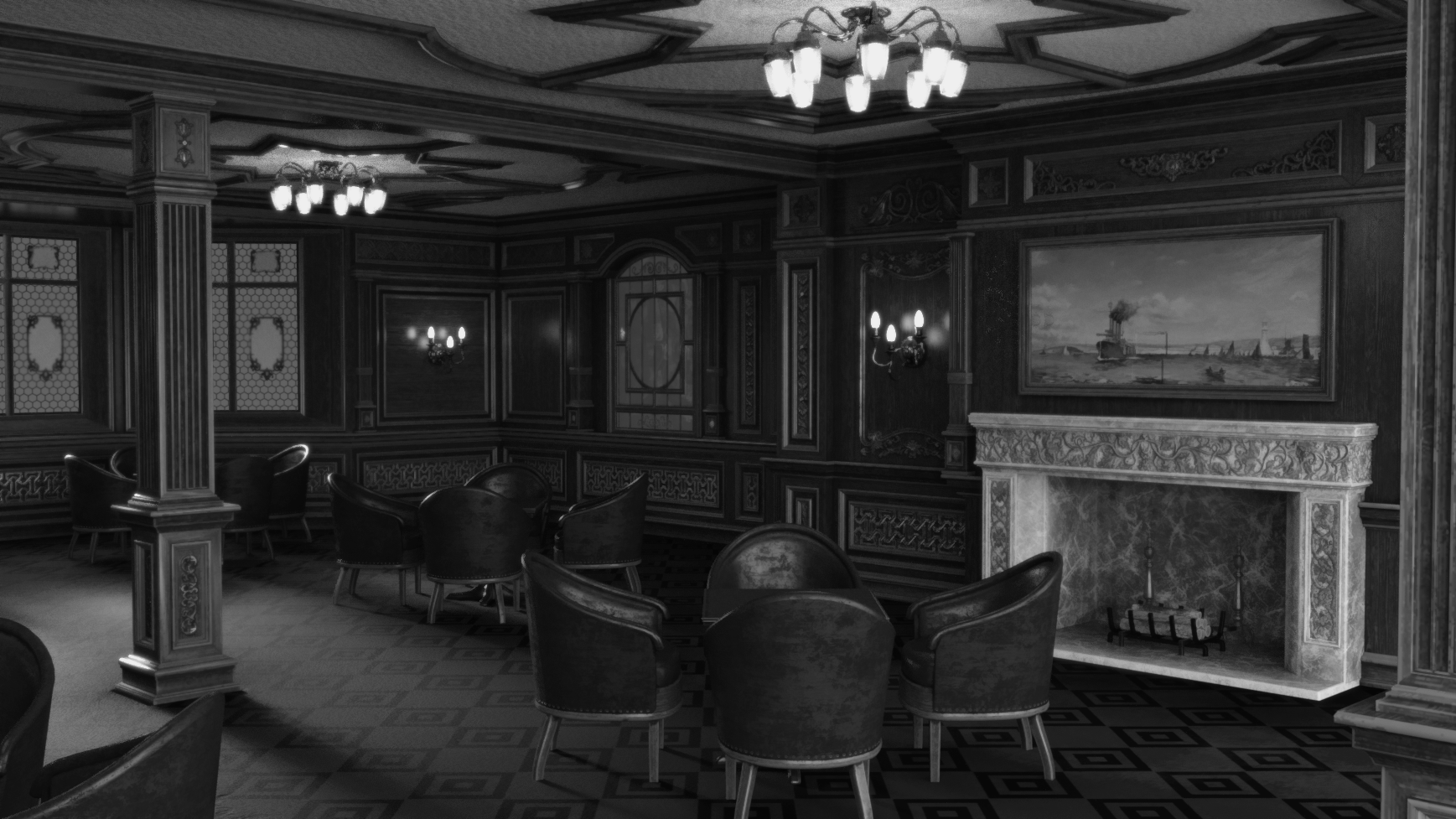
Render your buys! Use buys from the current month and the previous month of salesI've sat on buying Smoking Room 2020 since, well, probably 2020. Picked it up for very cheap recently. Seems nice! Could be useful for some historic-themed renders. I'll have to search my library for cigars, ashtrays, and ferns.
A bit of a tweak in this one, courtesy of the Geometry Editor, to swap out the generic painting over the fireplace for the historically correct Norman Wilkinson version.
 ISO Hidden Blade/claw -and- outfits with thorns or brambles for Feminine G9
Working on bringing my blood and thorn magic Victorian era vampire assasin character in TTRPG to life in Daz Studio. RawArt's female Nosferatu https://www.daz3d.com/nosferatu-female-for-genesis-9 takes care of the vampire figure and the Arrival of Death outfit https://www.daz3d.com/dforce-arrival-of-death-outfit-for-genesis-9 covers the assassin vibe. Now I'm looking for a hidden blade or claws for a hand-to-hand weapon. For example, the claws in https://www.daz3d.com/absenthes-reign could work, but they're a real pain to use with G9, plus I used them with a different character. Harmony Claws https://www.daz3d.com/harmony-claws-and-rings-for-genesis-9 are close, but I'm really looking for something more like a weapon. FOr anyone that played Assassin's Creed 3 (the one set during the American Revolution) -- I had a lot of fun going into outposts and fighting off the redcoats with just the hidden blade, deflecting with it, attacking, etc. and that's the vibe I'm going for.
Also, while Arrival of Death works well, my character has a bunch of thorn and blood related spells, so any outfits or props that tie- in to those themes could be a big plus. The back part of Briar Princess https://www.daz3d.com/briar-princess-for-genesis-2-female-s could fit the theme. On the other hand, Game of Thorns Helmet https://www.daz3d.com/game-of-thorns-helmet-for-genesis-9-81-8 feels a bit over the to and tonally off with the skulls.
Hoping there may be some stuff out there that the search hasn't found! Thanks in advance!!
Adding tags to items only work in smart content, not in content library?Tags work in both Smart Content and Content Library. After you giving Tag(s) to user-facing File(s), you type " + Tag in filter field and choose Database as the search option, as shown in SS attached.
It also works for the product items from 3rd-party sites no matter you install them into Smart Content or just direcly dump the files in your Daz Libs.
Adding tags to items only work in smart content, not in content library?Tags are a separate thing, you can add them to items via the Smart Content pane in the (collapsed, usually) section at the bottom of the pane - which also has tabs for file info and other things.
The Content Library search is much more limited in features than that in Smart Content (after all, not every file in the Content Library will have any metadata), so yes that is the expected behaviour.
What hair is this?Ah, I started a thread in the 'Product Suggestions' forum yesterday asking the same question! No answer though :(
I have scanned through Genesis 8 and 9 hair and cannot identify it anywhere.
If anyone knows what it is there's a few of us here that would really appreciate the answer!
Adding tags to items only work in smart content, not in content library?I've added a tag to an item in smart content when I then search in smart content with this tag the search result shows this item. Unfortunately in content library this does not work. When I search here with the same tag the item from the smart library is not shown. Additionally when I add a tag to an item in content library which is stored in "My Library" as I have downloaded from another platform the tag is not working neither.
Is there a way to use tags in content library?
more....Wacky Modelling ~ In Carrara ~Stezza said:
oh.. ok... sure

Alrite then + Thanx ~
which hair comes free with g8m, g2f and geneses m and f?which hair comes free with g8m, g2f and geneses m and f?
if there is a free hair that coemes with m4 and v4 please let me know which ones those are too
as for materials , aside from tyhat comes in daz uber are there any free materials, im looking for wood or concrete plaster or wall material
Im trying to make a file to send to someone so they can open it with no missing files but cant get an answer through the search which hair comes free with each character
No RESPONSE!While it is understandable that you wish a response to your specific thread it is important to remember that oen of the benefits of forums over many social media platforms is that previous discussions and answwers remain readily available (though, granted, the forum search is very poor).
help finding files in/datahelp finding files in/data
can someone help me find these by giving me the full address to search for finding the folder/s these are in
this is all I have, i need the part that goes in front of them
/data/DAZ 3D/Built-in Content/Simple OpenVDB MDL Volume/Simple OpenVDB MDL Volume.dsf
/data/Daz 3D/Built-in Content/OmniSurface/OmniHair Root-Tip Blend.dsf
March 2024 - DAZ 3D New User Challenge - Posing and Puppeteer/PowerPoseAgitatedRiot said:
Did you use Emmission on the Fog? If so, turn Emissions off.
You mean like an emissive ghost light? The fog is not a selectable object so it's not something I can toggle emissions on or off...
I have my ghost lights, and the environment itself has a few emissive objects like switches and the like, but yeah there's no way for me to actually toggle the fog itself.
... I did manage to figure it out partially though. I didn't have much time to look once I saw your post asking about emissives, but I loaded it up and did the following:
- Removed unnecessary HDRI because indoor environment only (not sure why PA set that)
- Removed all my ghost lights
- Found floor to have glossy properties and removed all those
Surprisingly there was nothing in Tone Mapping to remove, that was the first place I looked after The Dark Forest fiasco.
Not sure yet which one of the above did the trick, but I'm leaning towards the glossy floor. I only turned on one glossy setting of the three I disabled while my one and only spotlight in the room was sorta shining at the floor and then the floor just suddenly lit up. Soooo yeah, glossy floors and fog apparently don't play well with one another. It didn't quite light up as badly as it was before I turned all those things off, so I can't say for certain until I have more time to come back and test each thing individually.
I can't really point my finger at the PA and blame them for this one, I doubt they even considered someone may try to use fog in a strictly indoor environment....until I came along, and broke the mold with all my nooby methods of going about things, heh. *touches the Save button and Studio explodes* Yup, saw that one coming.... :)
edit... the new daily problem for me to figure out now is why the website keeps throwing errors at me everytime I post something in the forum. This began yesterday, and is super annoying.
more....Wacky Modelling ~ In Carrara ~[Released] LIE Makeup Manager [Commercial]I purchased this very recently. I've found the PDF documentation included in the product to be inadequate for me. I'm frustrated.
The section on Post Load Script doesn't tell me where to find the script. It is not in the Content Library or Smart Content. It doesn't tell me how to use the script, if I could find it. I don't even understand what it is for.
The section on Converting Unsupported Makeups does not really tell me how to do the conversion. It mentions a Makeup Template, but I don't see anything that tells me what to do with that template. Where do I load it? Then what do I do with it? This section mentions a script in /data/Silas3d.... Is this the Post Load Script mentioned in the Post Load Script section?
The first product I tried to use LIE Makeup manager with was Untidy Makeup for Genesis 9. The makeup is LIE based, but it doesn't work with LIE Makeup Manager, which says no makeup found. My first inclination was that I would have to choose one product to keep and one to return, since they seem incompatible. But I thought maybe I could convert the Untidy Makeup. That's where the documentation let me down. I couldn't comprehend how to do a conversion.
I see that there are a couple videos linked here in the forum that I will try to watch. I hope they help. We are always told that only a small minority of customers use the forums. I think the product itself should contain enough documentation to use the product, even if that is just links to supporting videos.
Depth of Field Tutorials?https://youtu.be/BB2DSfbif2A?si=H5oiASg-YlIo2Yff Is a really nice tutorial. There is a whole series of these. You can also search YouTube for daz3d tutorial dof to find more. =)
G9 L.I.E. creation - compared to G8In the freebies section over at Rendo are some G9 material templates. I am not sure if I am allowed to link them but a search for
Templates for G9 base UV Set
by PetuniaPetals
should bring up the correct result
but you look so stiff, my dear. You pose like a rockI see a ton of very good images here in the gallery, on forum pages, and different sites, but one of the things that pops out to me is that the characters look so stiff, unrealistic in the images. They don't sink into a mattress, their legs are not relaxed, everything appears tight. No bulging, spreading, sinking, no relaxation.
How are we to make the poses realistic looking. I think a lot of it is just small movement of the fingers, a slight different angle of an ankle, stuff like that, but some of it cannot be accomplished without some sort of add on that can create bulge, spread, and sinking on solids, dents, etc. Like a head on a pillow doesn;t just sit up there like on concrete, and even on concrete a head will exhibit certain movement of flesh or the hair gets spread, dented, and so forth.
What are some products or even techniques that can accomplish realistic appearance for poses in a scene?What’s the name of this outfit in Caprica?mding said:
When you search for the outfit and stumble upon https://www.daz3d.com/warrior-nun-poses-for-genesis-81-female and for a moment really believe you found it, lol.
If I had to mix 'n' match to create it, for some of the belts I 'd use:
https://www.daz3d.com/iron-wasp-outfit-for-genesis-8-males or
https://www.daz3d.com/sky-jumper-outfit-for-genesis-8-female-s
Edit: impressive belt buckle: https://www.daz3d.com/cowgirl-sci-fi-outfit-for-genesis-8-females
Thanks! I appreciate your looking for that. I have two of those outfits. :)
What’s the name of this outfit in Caprica?When you search for the outfit and stumble upon https://www.daz3d.com/warrior-nun-poses-for-genesis-81-female and for a moment really believe you found it, lol.
If I had to mix 'n' match to create it, for some of the belts I 'd use:
https://www.daz3d.com/iron-wasp-outfit-for-genesis-8-males or
https://www.daz3d.com/sky-jumper-outfit-for-genesis-8-female-s
Edit: impressive belt buckle: https://www.daz3d.com/cowgirl-sci-fi-outfit-for-genesis-8-females
Looking for a staff with an AnkhThere are several free ankh models at SketchFab...
https://sketchfab.com/search?features=downloadable&q=ankh&type=models
...as well as this colection at ShareCG.
https://sharecg.com/v/72954/browse/5/3D-Model/Ankh
Just stick it to the end of a long, thin cylinder and Bob's your uncle.
Oh, and there's this product, "The Spear of Life", right here at DAZ.
https://www.daz3d.com/anubis-spear-of-life
Yes, it's a weapon by default, but it contains morphs for the symbol and the spear point can be turned invisible, making it a staff. (I nearly forgot about this one.)
Daz 3D is part of

Connect
DAZ Productions, Inc.
7533 S Center View Ct #4664
West Jordan, UT 84084Licensing Agreement | Terms of Service | Privacy Policy | EULA
© 2026 Daz Productions Inc. All Rights Reserved.