-
Purple Reptilian 6
I'm beginning to wonder if there's a problem with my computer or my DAZ install. It's been fighting me about every little thing I try to do for the past week, and freezing up for long periods before responding; even just while scrolling my content library. I really can't afford a new computer right now.
*SIGH*
Maybe I'll just reinstall DAZ.
Wait. You are sure you arent changing any other settings? Youre on the most recent daz version?
No, I hadn't changed any settings, until after I noticed the purpleness in my test render. And my futsing neither helped nor made it worse. And I am still using 4.8, but I suppose grudgingly I shall install 4.9 when I get to the reinstalling portion of this exercise. I have the installers for both versions so maybe I'll just install both and see which one works better for me.
Did you load the default character or did you apply the morph then materials? Did you apply more than one material before ubering?
I loaded the default character, and applied the uber shader.
Credit card securityAfter having four cards compromised since late December I now have one non-networked, clean-installed PC just for internet banking and one debit card for online shopping. I never shop from the banking PC and keep the balance of the DC at around $5.00 or less ($US 3.50ish).
Just before hitting purchase, I go to my banking machine and transfer the amount. Still expect to have cards comprised but not to lose anything.Router is still a weak point.
Edit: Bloody spelling.
I've installed Ubuntu alongside Windows, and use Ubuntu for all my browsing and card payments. It's a far more secure operating system, and with such a comparitively small user base there is little incentive for anyone to write any malware for it. The great thing about it is that it can also run off a flash drive, so every time you need to do a payment, you can just plug it in, restart your computer and you're set.
Ubuntu isn't the best choice security wise, you would be better with Debian.
Purple Reptilian 6I'm beginning to wonder if there's a problem with my computer or my DAZ install. It's been fighting me about every little thing I try to do for the past week, and freezing up for long periods before responding; even just while scrolling my content library. I really can't afford a new computer right now.
*SIGH*
Maybe I'll just reinstall DAZ.
Wait. You are sure you arent changing any other settings? Youre on the most recent daz version?
No, I hadn't changed any settings, until after I noticed the purpleness in my test render. And my futsing neither helped nor made it worse. And I am still using 4.8, but I suppose grudgingly I shall install 4.9 when I get to the reinstalling portion of this exercise. I have the installers for both versions so maybe I'll just install both and see which one works better for me.
Did you load the default character or did you apply the morph then materials? Did you apply more than one material before ubering?
GENERAL FREEBIE REQUESTS Part 2I am looking for any Ball Gown/ Evening dress that looks wonderful when using floor poses and I dont mind paying, I just need one to sit pretty on the floor thank you for any help.
Would this freebie work for you. It comes in 3 parts:
https://www.wilmapsdigitalcreations.co.uk/view_product.php?id=155
https://www.wilmapsdigitalcreations.co.uk/view_product.php?id=156
https://www.wilmapsdigitalcreations.co.uk/view_product.php?id=157
Or maybe check Wilmaps other dresses.
These are beautiful but I am looking for the dress to spread out more when on floor
To get a dress to do that will require a special morph, or you'll have to use dynamic clothing.
Thank you :)
GENERAL FREEBIE REQUESTS Part 2I am looking for any Ball Gown/ Evening dress that looks wonderful when using floor poses and I dont mind paying, I just need one to sit pretty on the floor thank you for any help.
Would this freebie work for you. It comes in 3 parts:
https://www.wilmapsdigitalcreations.co.uk/view_product.php?id=155
https://www.wilmapsdigitalcreations.co.uk/view_product.php?id=156
https://www.wilmapsdigitalcreations.co.uk/view_product.php?id=157
Or maybe check Wilmaps other dresses.
These are beautiful but I am looking for the dress to spread out more when on floor
To get a dress to do that will require a special morph, or you'll have to use dynamic clothing.
feet poke through shoes, need help fixing this...Well, I think I'd start by finding out why shoes intended for G3F don't properly fit even V7. I understand that some characters are morphed so out of shape that clothes, especially heels, don't fit properly. But most any shoe you buy from an experienced vendor like OOT really should fit.
Here's what I'd do:
1. Test the shoes with G3F -- no character applied. Do they fit?
2. Now try the base V7, no other morphs. Just turn the body shape dial to 100%, and no other morph dials. Do they fit?
If the answer to #1 is no, I'd contact the vendor or marketplace. G3F shoes should definitely fit G3F. If the answer to #2 is no, then it's a shame that the shoes won't fit the most popular G3F-based character. I'd still contact the vendor and inquire. Perhaps it was an oversight in not supporting the V7 body morph shapes.
Of the above suggestions, of course hiding the toes won't help as you said these are open-toed shoes. It doesn't always help with closed-toed heels, as the toe geometry is often a larger than what fits into the shoe. Your character looks like she's wearing a prosthetic.
There was a product for, I think, V4 called XAway that would sometimes work in these instances. I'm not sure if it's available for G3F. If you have it, or can get it, and you have GenX with the G2/G3 addons, you might try converting the morphs. What they do is shrink the geometry in a way that's not auto-followed. The shoes stay the same size and shape.
All figures loading with the same morphs pre-loaded. Help pleaseDon't zero G3F, rather go through your parameters to see which morphs are turned on when you load her. For each of those morphs, zero it, then click on the gear symbol in the top right corner and select parameter settings.
In that panel you should be able to see if the "Default" value is non-zero. If this is the case, set the default to zero, then save as support asset-morph asset- and drill down through G3F to find the morph you want to reset. Do this for each morph that's causing a problem and it should fix it.
I know this is an old thread, but I wanted to thank you RedZ. Actually thank you to the original poster and to all who contributed. I don't know what happened but I had this issue last night when I opened Daz Studio and loaded G3M. Haven't used him in a while. I don't understand why it would do this. It had set RawArt's Prince Albane II as 100% auto-load. I thought I was going to have a complete meltdown I was so angry and frustrated. I knew G3M looked different, but definitely knew something was off when I went to dial in another character and it looked horrible. I never mess with these kinds of hidden files, morphs, etc. I refuse to believe I did something. It's like it got confused when I installed Prince Albane via DIM. I don't know why else it would happen. Again, thanks to all. I'm glad I found this thread.
Josh Crockett Suggestion Page for Monster Characters!There seem to be a lot of calls for insectoid creatures.
If I ever manage to get my hands on 3d coat (anyone have a spare hundred dollars or two?), I want to try a morph like that, but obviously it'd be better from Crockett (since he has access to HD morph tools)
3d coat is great. I prefer Zbrush for morph sculpting. You don't necessarily need HD morph technology to make a really nice morph, though it helps. Normal maps usually suffice for seconday sculptural detail if you don't have access to HD. Or, better yet, become a PA and get access to it :) Would love to have you on board with the PA family Will
Credit card securityAfter having four cards compromised since late December I now have one non-networked, clean-installed PC just for internet banking and one debit card for online shopping. I never shop from the banking PC and keep the balance of the DC at around $5.00 or less ($US 3.50ish).
Just before hitting purchase, I go to my banking machine and transfer the amount. Still expect to have cards comprised but not to lose anything.Router is still a weak point.
Edit: Bloody spelling.
I've installed Ubuntu alongside Windows, and use Ubuntu for all my browsing and card payments. It's a far more secure operating system, and with such a comparitively small user base there is little incentive for anyone to write any malware for it. The great thing about it is that it can also run off a flash drive, so every time you need to do a payment, you can just plug it in, restart your computer and you're set.
What human figure do you tend to use the most and why?@dbdigital2 I came to the DAZ setup just about the time Genesis was released, so I only had done a a few in V4/M4. Even now, I do not have a lot of characters and because they are prehistoric people, I needed to try to morph their features as correctly as I could for archaeological illustrations. I won't be animating, so that's not an issue. I am happy that I have been able to convert and re-purpose even V3 clothing items to work on G2 before now. But G2, like the ones before, had awkward hands and fingers to pose manually. Forearms, too. The G3's have extra controls in the limbs and extremities not to mention all those face bones. YAY! I think that QQ was a bear for Misty to overcome to the level she did. If DAZ ever pull the finger out and sort it properlly some day, the potential is huge.
Some of the clothing shapes back in the V3-V4 days were more basic and not full of buckles, bling and hardware on steroids. I also do not need skimpy porn clothes for my figures. For that reason I don't have many recent clothing pieces, but the few I did try out during Mistry's trials worked easy-peasy. Most of my custom clothing has dynamic hair on it, so they are saved in the Carrara browser and include G2 stuff as well. I have been able to get many of them onto my G3s without changing anything as they don't have proper sleeves or long legs so far. Will cross that bridge when I come to it concerning footwear and other items. To date I have also had very good luck with G2 figures and clothing thanks to the help here, and I will continue to use them and move on with new characters in G3, except for my Neanderthals which I am re-doing in G3.
So it is not really time lost and I can get a better result. The hand and finger posing are much much better. Fingers do what fingers are meant to do! Better facial expressions. I think it depends on what you want to do with your characters. Mine are only for illustrations for young people, so I want them to be pleasing to look at, but realistic when posed in action.
Thanks again, Misty!

 SileneNovica & Forum Members Tips & Product Reviews Pt 8
Definitely a lot of items in fast grab today that are geared more towards the older content. Having started with all new content G3 Not sure how mush of the older content to get if any at all.
One tip that may help- try to see the morphs (facial shape) and the materials (skin) as two different entitites when you look at a character. Why?
1. Because with the different utilities, some transfer specific aspects of it (such as the morphs) so if you like the morphs, you can transfer it to the generation you like2. Because you don't have to like the materials- if you like the look of the face structure, slap someone else's materials on there.
It takes a bit of thought to remember to separate the two when you're looking at a new release, you know me, the first thing I look at are the eyebrows (and now, frankly, the lip lines. Does it blend smoothly into the face?) So if I like the character's appearance but not the materials, I have to hit the pause button and remember the materials don't matter. This is, of course, for figures that are on sale. I have to like BOTH the materials and morphs if it's 50% or less (and I rarely do those now. I have a ton of characters and don't need anymore.)
I remember testing the products by 3DVigitimes for tweaking skin materials. Does anyone have any samples for this generation 4 converter? I tried it a long time ago and I liked it. I don't remember what I rendered/ can't find it. Which reminds me:
TIP: When using conversion tools, make separate folders for your change-overs or do it per tool. Wish I had done that for all my experiments. DUH. I guess it can be done by tool (which if you have a Genesis 3 Converter for a Generation 4, you know everyone in there is a Generation 4) or you could do it by generation. So here's a question- how do you file your conversions?
Can I make Clone (Alias) of Rig rotation properties?just to confirm why I planed it,, About genesis 3 , it use many Alias for usuall rig rotation, to set different weight map for twist and bend( side-side)
(it is part of double quartanion rigging I think), with out it,, all three way weight map is same , then not deform well. when user try to rotate bend node.
eg there is many boneset compose by two node, parent bend node, and child twist node.
then daz restrict, BendA bone onry use for Bend (side-side) rotaiton, with lock and hide, real twist parameter of the node, . but offer "twist" dummy property, as Ailas of "twistA bone" twist property,, then ,twist A bone lock and hide Bend and side-side parameter, but offer Alias of BendA bone bend proeprty .
After all, BoneA set (twist node and bend node) can use different weight map for bend and twist.
Only about Foot toes node, daz add another trick to controll all small toes bones by toe bone,,controller, (ithough t is really annoying when transfer genesis3 to other aprication, and pose as same as daz studio,,, )
body morph vs. shape shiftwhat is the difference and which is better for making a custom body type? are they equal or does one have more control and options?
why is my properties preset not saving the morph dial?Most of case, save as preset can not save morph geometry values. you need to save your custom morph as morph assets, then property or shape or character preset
can load those morph with saved value.
or you can save it as subset with your custom morph (or saved aa scene), but nowdays it is not recommended much.
you may better if you often use the morph , just save it as morph asset first.
Josh Crockett Suggestion Page for Monster Characters!There seem to be a lot of calls for insectoid creatures.
If I ever manage to get my hands on 3d coat (anyone have a spare hundred dollars or two?), I want to try a morph like that, but obviously it'd be better from Crockett (since he has access to HD morph tools)
get delta value of node center point (when fit to) ?Hi when figure A (eg Hair) fit to Actor, nodes of Hair are connect to Actor rigs which have same name. (may need keep hieralchy) then if Actor deformed by morph or controller then change rig, figureA rig change too.
Eg,, now I change genesis3 size, by HeightMorph . which have ERC to change genesis head rig center point and end point location to much with current morphed shape.
then head node of Hair , it center point and end points will follow current genesis3 head node position. It is reasonable. But Is there way to get those current node cenrter and end points position delta, about figure which fit to and changed by Actor morph, as actuall parameter value, in daz studio?
I think, when figure (hair or clothing) fit to another figure, and morph change Actor rig center points, end points, follower (hair) rig center point value seems not change as visuall value in parameter tab. (though I can clear see, hair head node center point ,end point follow the genesis head rig, anc change location,,)
But in parameter tab, it seems keep default value. then is there way to get those node (rig) position delta value which deformed another figure morph with fit to?
Of course I can check the delta value to see how head node center point change with morphs, by parameter of genesis3 , but it is not so useful, when I need to set ERC with those delta value of current Follower figures.
eg I hope to set morph for ghost bones child of head node of hair, then I hope to set ERC with current head rig center point, and end point, then auto move those ghost bone too. without it,, hear ghost bone not follow current head node position.
Hand poses Genesis 3 male. to dial or not to dial?Damn. Thanks for the heads up,
The good news is, the dials I already have sorta work to move from the fixed pose to the new pose.....
I just need to remember to put THESE poses in first an then morph away from them.....
Dante 7Dante 7 seems to have a nasty bug. If you click on the gear icon for the "navel" morph (as if you were going to alter the limits) it will crash DAZ Studio 4.8 immediately. Can someone using 4.9 confirm if this is the case as well in DS 4.9.
I'm using 4.9.3.166 on a Mac and there's no crashing for me when accessing the parameter settings "gear" icon for any of the morphs, including the navel. Tried it by loading the full character directly as well as loading G3M and dialing in the shape then accessing the gear. No crashes here.
[EDIT] Your DS logs may tell you what went horribly wrong during the crash.
No log is created, it crashes immediately when clicking on "Parameter Settings..." which is under the gear icon for "Navel", its actually fine to click on the gear icon itself. Its an unusual type of crash.
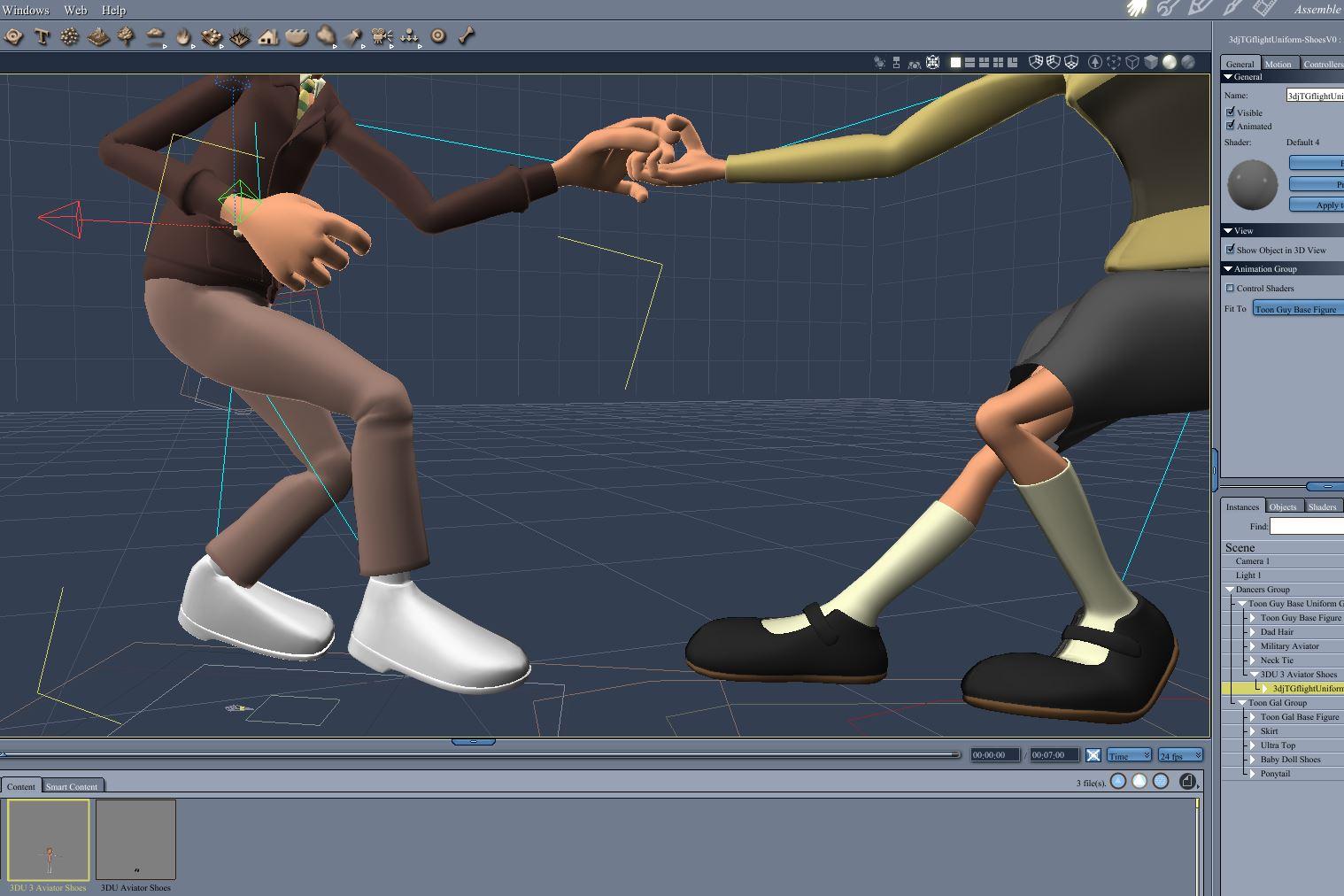
Buy Something That Doesn't Work in Carrara? Post your Questions and Workarounds here. (please)I was having trouble with some of the items for 3DUniverse toon base figure. The aviator shoes were not conforming correctly and I could not use Carrara's weightmapping tools effectively to address it. I solved it by going in Studio, converting the base figure to triax weights, loading the problem shoe geometry, and using the transfer utility to convert the shoe mesh to a conforming figure. The steps are here.
https://www.daz3d.com/forums/discussion/comment/2312921/#Comment_2312921
Carrara Challenge #32 They Only Come Out At Night - WIP Thread - Meet Our PA Sponsor, GKDantas!Victory is mine!
As per the discussion at the link provided by Headwax, the 3DU rigging is part of the problem. Here is a workaround that worked in this case, but you would lose joint control morphs and similar extras. I loaded the shoes geometry in Studio and did the rigging through the transfer utility. However, I had to load the 3DU base figure first and convert it to triax rigging.
Steps.
- Open studio.
- Load the figure to which the content is to be conformed to. In this case, it is the 3DUniverse toon base figure. Zero the pose.
- Use the rigging tool to convert the weightmap to Triax.
- Import the geometry of the figure that is not working, in this case the 3DUniverse aviator shoes. The aviator shoes obj file is found in the vendor's folder in the runtime\geometries folder where Studio is installed. Make sure the scale is correct. Check that the mesh seems to fit the figure in the zero pose.
- Use the transfer utility to convert the shoe mesh to a conforming figure. Source is the base figure and target is the shoes.
- Select the base figure (not the shoes) and use Save As : Wearable Preset and save to your presets.
- Close Studio without saving the base figure as a triax.
- Open Carrara. Load the base figure as normal. Load the converted shoes from the wearable presets.
- Conform as normal.
Daz 3D is part of

Connect
DAZ Productions, Inc.
7533 S Center View Ct #4664
West Jordan, UT 84084Licensing Agreement | Terms of Service | Privacy Policy | EULA
© 2026 Daz Productions Inc. All Rights Reserved.