-
feet poke through shoes, need help fixing this...
Many of the better shoes -- and you'd think this would include any from OOT -- should have a fit morph. It may be a preset, shown as an icon somewhere with the shoe asset (sometimes in a Pose subfolder), or it may be a dial you have to locate.
Beyond that, G3F supports some toe morphs for scrunching things up. You need to fiddle to find the right combinations. I don't recall if these come with the free base, or if you have to get the body morphs package. The body and head morphs add-ons are worth it, for this and other reasons.
Finally, some shoes themselves have additional morphs, though you'd think shoes for G3F would not need these if you haven't changed anything in the shape of the model. I assume you've clicked on the asset in the Scene tab and looked.
Facegen now on sale...get it!After some more morph dial work, a couple of quick tests. Any better?
Much easier to see the resemblence now. I think the back corners of her jaw are still just a bit too wide in the frontal shot, the angle shot is dead on.
Facegen now on sale...get it!Rowdy Yates is getting old.
I have to admit I am not getting that one. Not anywhere near as good as most of your previous ones.
I still use a very old Poser morph (no longer available)
Credit card securityThanks for the replys!
 As I said earlier I didn't meen to accuse Daz or Renderosity, it's just that I have only been shopping at theese sites for the last months. I haven't made any other purchases either in real stores I meen, since I haven't been feeling so well lately I have been at home mostly, my boyfriend has made all the shopping, so I have only made purchases here and at Renderosity. I did make a purchase a few days ago at Renderosity.
ChangelingChick, Thanks for the advice, I will use paypal in the future,and I am changing banks. I heard of a bank witch lets you create a virtual creditcard for every purchase that has only the money needed and only works that time. If I use that to transfer money to paypal and then buy a big giftcard I should be safe, I think
 Dante 7
Dante 7 seems to have a nasty bug. If you click on the gear icon for the "navel" morph (as if you were going to alter the limits) it will crash DAZ Studio 4.8 immediately. Can someone using 4.9 confirm if this is the case as well in DS 4.9.
BollywoodCorrection: until Daz gives us proper dynamic tools you probably won't get one. If they do ever give us proper dynamics you'll very likely get one from me, and an ao dai and hanbok are also on my list. I make what I like, not what popular culture decides I should like. There is an Indian female main character in a video game (Uncharted), she even made the front page of Game Informer magazine which made me very happy. Not wearing a sari as far as I know, probably for the same reason I haven't made one yet.. absolute hell to rig properly. I'm anal retentive about rigging, if I don't think I can rig something with near perfection I don't do it. It took me 3 solid weeks to rig one little mid-thigh length egyptian skirt.. 47 custom JCMs just for the thighs. Now make that floor length and with flowing cloth across the most lumpy and morph-changing part of a woman's body.. Could I model one? Sure, would only take me a couple days to make one that worked nicely in Marvelous Designer.. However rigging it would take way more time than I would ever get compensated for (like litterally more than a month) if I priced it low enough to actually sell (IE: not more than about $20 before sales)
Thanks Fisty, I should put a disclaimer in my footer. I am not, nor have I ever been a gamer. I couldn't even master Mario Cart back in the 90s.
 My issue around the frequency with which models offered are heavily inspired by a game, movie, or graphic novel (or, all of the above, often). A case in point, I spent over a week creating a mock-up of a National Geographic cover using a lovely alien girl (Dariofish's product). It garnered no, 0, zilch, notice because it was basically a piece of fan art to everyone else. I only found out when I Googled the Dariofish's race-name for it and found all the game references. Obviously, this is not always the case, but happens often with characters and vehicles. My rambling point is, I wish more PAs created original works or more obviously stated from where they were inspired.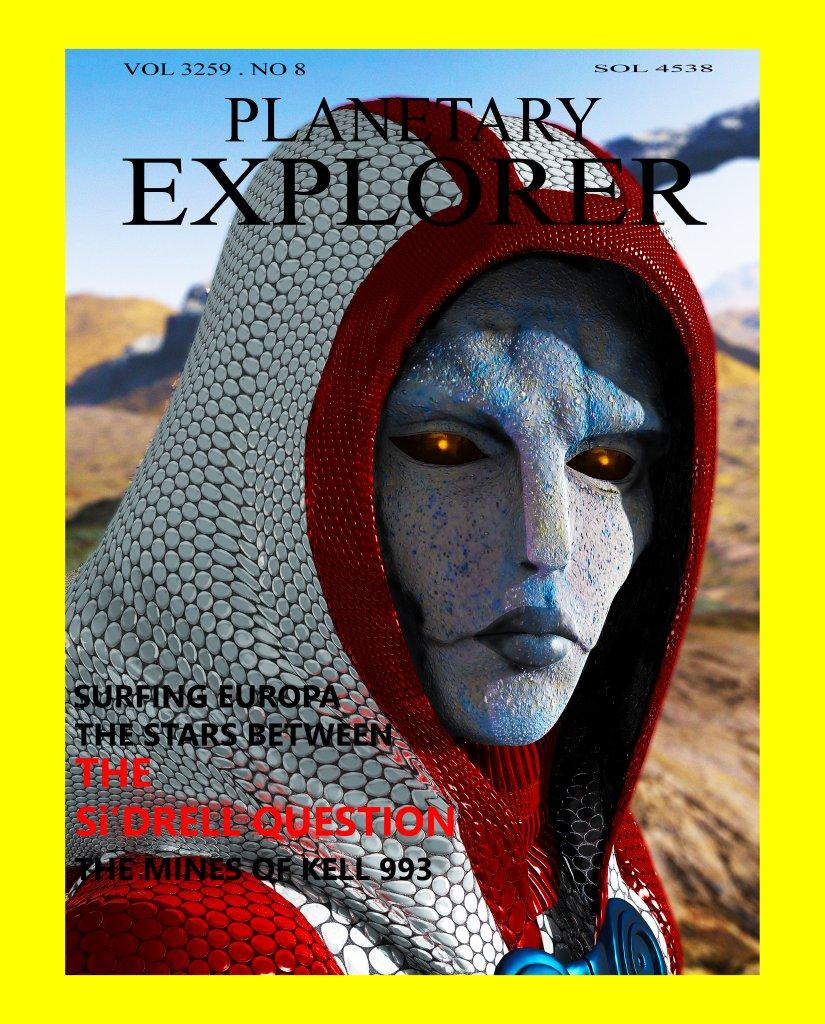
Funilly enough, stuff like this is exactly the sort of thing I love to place out as room-clutter and floor-clutter. I've grabbed several different mock magazine covers from online, such as Playbeing covers (with anime characters and video game characters as the featured beauty), or bizzare space-travel book covers, and then turned them into props and placed them out in my virtual world home on one of the opensim worlds. Basically, I took the cover image, applied it to a plank-prim (flattened cube-primitive) of the right size and shape, doctored up a spine title for it and maybe a different image for the back, applied those, rezzed it on a table or shelf, and away we are to the races.
Credit card securitynonesuch00: I need to link the paypal to my credit card to transfer money to paypal right? how do they get money from me otherwise?
L'Adair: Is the entire site secure now? Have they changed the site to be more secure? if so then perhaps more people have had the same problem, here at Daz I meen. I hope that it will be more secure in the future.
I have my Paypal account set up to take money out of my bank account. In the many years I've had Paypal, it's never been compromised. DAZ started changing over to a secure site a couple weeks ago. There were quite a few complaints in the forums about the Add To Cart button not working. Turns out those pages weren't secure. You can only get to the insecure pages via old bookmarks and such now. The change would be not noticable for most customers.
Credit card securitynonesuch00: I need to link the paypal to my credit card to transfer money to paypal right? how do they get money from me otherwise?
L'Adair: Is the entire site secure now? Have they changed the site to be more secure? if so then perhaps more people have had the same problem, here at Daz I meen. I hope that it will be more secure in the future.
Yes, but don't link it to other online accounts to do this so called 'one-click' shopping type thing.
Credit card securitynonesuch00: I need to link the paypal to my credit card to transfer money to paypal right? how do they get money from me otherwise?
L'Adair: Is the entire site secure now? Have they changed the site to be more secure? if so then perhaps more people have had the same problem, here at Daz I meen. I hope that it will be more secure in the future.
GenX2 Update / Genesis 3 Add-On [Commercial]It does actually make a difference where V4 and other Generation 4 figures are installed; because of the way those ExP morphs work, the base figure and all morph sets must always be installed to the same content location. And this is why ExP figures don't work if they're installed with Connect — the nice shiny new installation system works by essentially installing each individual product into its own individual content location. The script we're supposed to run after installing new morph sets can't find the morph data, so the morphs are never properly installed and won't work.
Note that this is only a problem with Generation 4 figures. Everything before and after used different morph setups, so they work just as well with Connect as they do with DIM or manual installation.
New Gigalien for G3M - Sharpening textures.Wow, I thought those plates were clothing from another figure.
Anyone know if this beastie can wear clothes? Or is there something that stops that from working?
Any anyone play with the morph settings to mix him and other Genesis 3 beasties- like who wants to mix him with exile alien?
Daz Studio Nvidia Iray Interactive & Photoreal Animation TestsThanks for putting up this thread, interesting to see the excellent results received with such few iRay iteration for each frame.
In regards to the aging tests you did, do you have to keyframe each age morph or can the age morphs be tweened between very young and very old without setting each age keyframe?
Thank you,
I wanted a place where we could make mistakes and sucesses and collectively learn from them.
I simply created a keyframe for the with the child morphs preset on the first frame and the old presets onthe last frame. The animation is the default tweened results between the two keyframes.
Is export FBX with morphs broken with GF3 / V7 ?Hi Asymptote
So you are getting this when you animate in DS, then export everything, including animations, to 3ds Max?, and are you using G3F/Victoria only, have you tried with others?
I don't use 3ds max, but I do use Motionbuilder a lot.. and I don't see any of these issues, however, I only export the character then animate in MB. I'll have to test to see if I get the same thing. I know that as morphs are used, they automatically get baked, and might be that they are getting interference with your export list..
I'll do a test and report back
Ok, I believe that animation export is broken, I didn't try with Victoria, but with one of the characters I'm working with, Tamara for G3F by 3d Universe.. here's my animation in Studio (by exporting the fbx character, no animation to MB, then animate face and body, then importing fbx back into Studio and saving as a .duf properties preset)
https://bryan_steagall-hotmail.tinytake.com/sf/MTUwNTMxN181MjU4MzE2
and here's the same file, exported from Daz studio with animation and everything, to MB.. I didn't see the extra morphs or files, but the animation is hilariously broken
https://bryan_steagall-hotmail.tinytake.com/sf/MTUwNTMyNl81MjU4MzI1
and, when exported without morphs, everything works ok.. interesting. I did know that the morphs in G3F, especially the facial morphs, get written back to the facial bone rigging, but hadn't actually tested it.. (all the animation originally was done on the morphs themselves in MB, then applied to the morph channels when saving the fbx as a .duf), the file that I exported without morphs actually wrote the animation on the bones when exported..
Daz Studio Nvidia Iray Interactive & Photoreal Animation TestsThanks for putting up this thread, interesting to see the excellent results received with such few iRay iteration for each frame.
In regards to the aging tests you did, do you have to keyframe each age morph or can the age morphs be tweened between very young and very old without setting each age keyframe?
M4 legs too muscularI can't seem to find a morph or parameter to tone down the muscles in the M4 legs, especially the thighs. I have a 60 year old history scholar character who looks like a star athelete from the waist down. Any suggestions?
-d. vyd
How do I delete an animation Time Line?If you export the base item as OBJ, then the final shape as OBJ (hide everything else in the scene) you should be able to load as a morph with Morph Loader (Advanced or Pro). I'm not sure if that is what you want.
Exporting to Max for Morphs Issues.Normals are a polygon property and have no bearing, other than visibility, on morph creation since morph creation cares only about vertices. What exactly are your import/export settings in DS and in Max? How are your scene axes and units set in Max (I'm not sure if axes can be configured, but make sure of that)?
Request to improve hair product with ERC ghost bone (Top model hair etc)Hi as same as many users I really like out of touch hair product . then I got Top model hair in sale. Out of touch hair mats is very good, and It has many morph with individual ghost bone for hair to pose easy.
then I really like this hair style with many variation.
Today I use this hair for my characetr, which adjust body size by height morph (it is default shape morph, which change character height)
I try to pose hair by bone rotation (tail bones) and I found it deform somehow strange way. then I check current joint, and found
those ghost bone seems have no ERC with generated height morph. (FBMheight)
I know, it is difficult to apply ERC about all hair ghost bone for all shape morphs, but I really hope to set ERC about height morph.
because Height morph (FBMheight) is basic morph to adjust character height. We use it many times. do not you?
But if ghost bones have no ERC to adjust nodes position, hair pose with ghost bone rotate, not work well. (pivot point do not work correctly)
I do not hope perfect auto adjust hair with ghost bone,, but if vendor plan to offer hair with ghost bone,, I expect there should be some ERC for basic morphs. or make erc for head joint postion, then auto adjust ghost bone positon to head node postion. (maybe it is more useful to work with many morph)
This is request for vendors who plan to offer hair with ghost bone.( I really like the way)
Released- Evan for Genesis 3 Male (Commercial)I've been a bad creator- I had thought I made this thread alread! XD
Anywho...
I am intro'ing Evan for Genesis 3 Male-
Be Elven, Human, Fae- whichever you want to use him for, he's ready.
His set includes:
Full Human/Elven Presets, as well as each head/body base (which needs no additional morph packs) and Full (which uses Genesis 3 Male Head/Body Morph Packs), as well as Elven ears, cornea bulge and sharp teeth separate presets.
I've included two presets; Head and a set for his hands/feet from the Fantasy Creature Creator Morphs for a little added extra detailing, but it is not necessary to use them for the figure itself.
His base skin presets include the complete Base Preset along with separated arms, torso, and legs, along with 3 Brow options and a No Brow Option. With these, there are Displacement Presets; Off, Low, Medium, and Higher with anatomical displacement settings to match.
8 Eye Material Presets, with 2 Lashes and an additional 4 Scleara Presets to choose from.
His scars (face-all brow options, hand, arm, chest/torso, leg and back) are available individually and various combinations, as are his tattoos (chest, back, arm) with a mixing of both tattoos and scars added in.
Anatomical Elements are included, material settings are Iray only.


 Exporting to Max for Morphs Issues.
This is slowly driving me insane,
When I export GF3 obj using the default 3ds Max preset, it comes in Max back to front, the "Y" axis is reversed, instead of seeing the front of the model I'm seeing her behind.
Not only does the model come in the wrong way round but the normals are also flipped, when I check "Flip Normals" in Max's obj import options it still comes in with flipped normals and what looks like broken smoothing.So then I export from DS again, this time with "Invert Positive Direction" on the "Y" axis, now when I import to Max all is as it should be, the model is facing the right direction and the normals are fine.
I export back out of Max and go to load in the morph with Morph Loader Pro, but when I apply the morph the model is warped and reversed on the Y axis.
In Morph Loader Pro checking invert positive direction on ANY axis has no efffect at all, the morph still warps and flips.
So I go back to DS, export again with the default 3ds max preset, I edit the mesh in Max, re-export, load up the morph in DS and this time the morph is mirrored, completely the opposite of what I just did in Max.
I try again, this time I flip the normals in Max before editing, but the same thing happens all morphs are mirrored.
Even when I import and export a morph making no edits at all, the mesh still moves on the base of the hands and the lower back when I scrub the morph.
I've tried in Max 2014, 2016, and 2017 all with the same result, I also tried with GF2, same thing.
I tried this a few years ago and never had these issues, has something drastically changed in the process?
Is the required process documented anywhere ?Why do zBrush users have it so easy ?
Daz 3D is part of

Connect
DAZ Productions, Inc.
7533 S Center View Ct #4664
West Jordan, UT 84084Licensing Agreement | Terms of Service | Privacy Policy | EULA
© 2026 Daz Productions Inc. All Rights Reserved.