-
[Released] Turbo Loader for Genesis 9 [Commercial]
fullerdb said:
I've been having trouble with Turbo Loader for G9. It used to work and I have many disabled morphs. When I search for new morphs, though, it stops working. The morph list updates, but, if I try to uncheck any item, Daz Studio crashes. When I try to click any button, like Save Config, nothing happens. I tried to click Execute and I saw this message in the log:
2025-11-17 23:14:20.101 [DEBUG] :: Delete Products: Genesis 2 Male Body Morphs,Genesis 2 Starter Essentials,Genesis 3 Developer Kit,Genesis 3 Female Body Morphs,Genesis 3 Female Expressions,Genesis 3 Female Head Morphs,Genesis 3 Male Body Morphs,Genesis 3 Male Expressions,Genesis 3 Male Head Morphs,Genesis 3 Starter Essentials,Genesis 8 Male Body Morphs,Genesis 8 Male Body Morphs Pre-Release PA Build,Genesis 8 Male Expressions,Genesis 8 Male Expressions Pre-Release PA Build,Genesis 8 Male Head Morphs,Genesis 8 Male Head Morphs Pre-Release PA Build,Genesis 8 Male Pre-Release PA Build,Genesis 8 Starter Essentials,Genesis 9 Body Shapes,Genesis 9 Expressions (DO NOT ENABLE),Genesis 9 Head Shapes (DO NOT ENABLE),Genesis 9 Starter Essentials,Genesis Starter Essentials,Mouth Realism
2025-11-17 23:14:20.272 [WARNING] :: \src\sdksource\general\dzscript.cpp(1192): Unhandled error while executing script.
2025-11-17 23:14:20.272 [WARNING] :: QScriptEngine::popContext() doesn't match with pushContext()When I reopen Turbo Loader, the list has not been updated.
I also saw, in the log, this message repeated a few times among the AddRelPathToListView entries:
2025-11-17 23:14:19.771 [INFO] :: Loaded image: TurboLoader Missing Product.jpg
I have tried to uninstall some products listed around the Missing Product warnings, but that made no difference.
Any suggestions about what the issue could be?
First, it has nothing to do with the TurboLoader Missing Product, so we can ignore that. What version of DS are you using? What version of TL? What are the directories in your Content Directory Manager?
[Released] Blender to Daz Studio Plugin released!!! Official support thread [Commercial]oskar03154 said:
Can I, for example, make a boot in Blender and transfer it to DazStudio along with a weight map for Genesis 9? (I use GoogleTranslator)
If you mean some kind of shoes, it should work.
I do not know if weight maps from Blender are transferred to Daz Studio.
Art, the arts, CGI comics, Graphic Arts, AI and everything else.Corrections. Part of the clean-up process for CG artists using 3D models (and the CG environment) is checking for errors.
These are some of the common errors to look for.
Floating feet - It can be difficult to see where your character's feet meet the ground. There is a function to move your character's feet to the ground.
Edit/Figure/Move to Floor
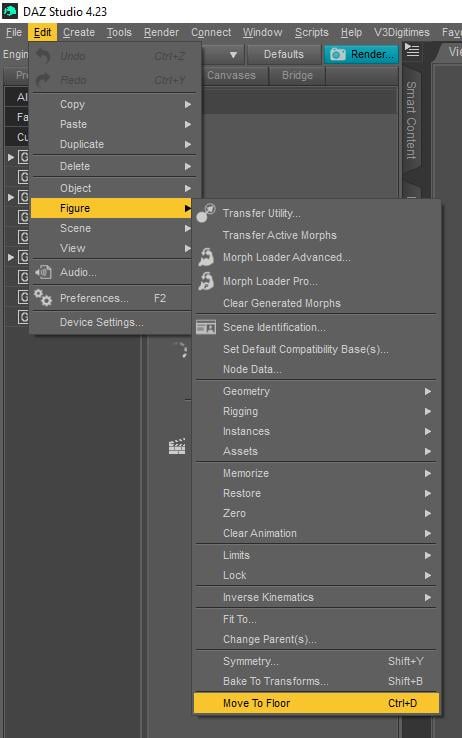
You can make adjustments and re-render or move the shadow under the feet using post work.
Arched feet/Flat Feet- Many pose presets place the character's feet in a high heeled foot position. It's a giveaway when your character is standing flatly but the feet are still in the high-heeled pose. Also happens in reverse. Character wearing heels and a non-matching foot pose. Fixes include choosing the ankle and ...
Edit/Figure/Zero/Zero Selected Item(s) Pose
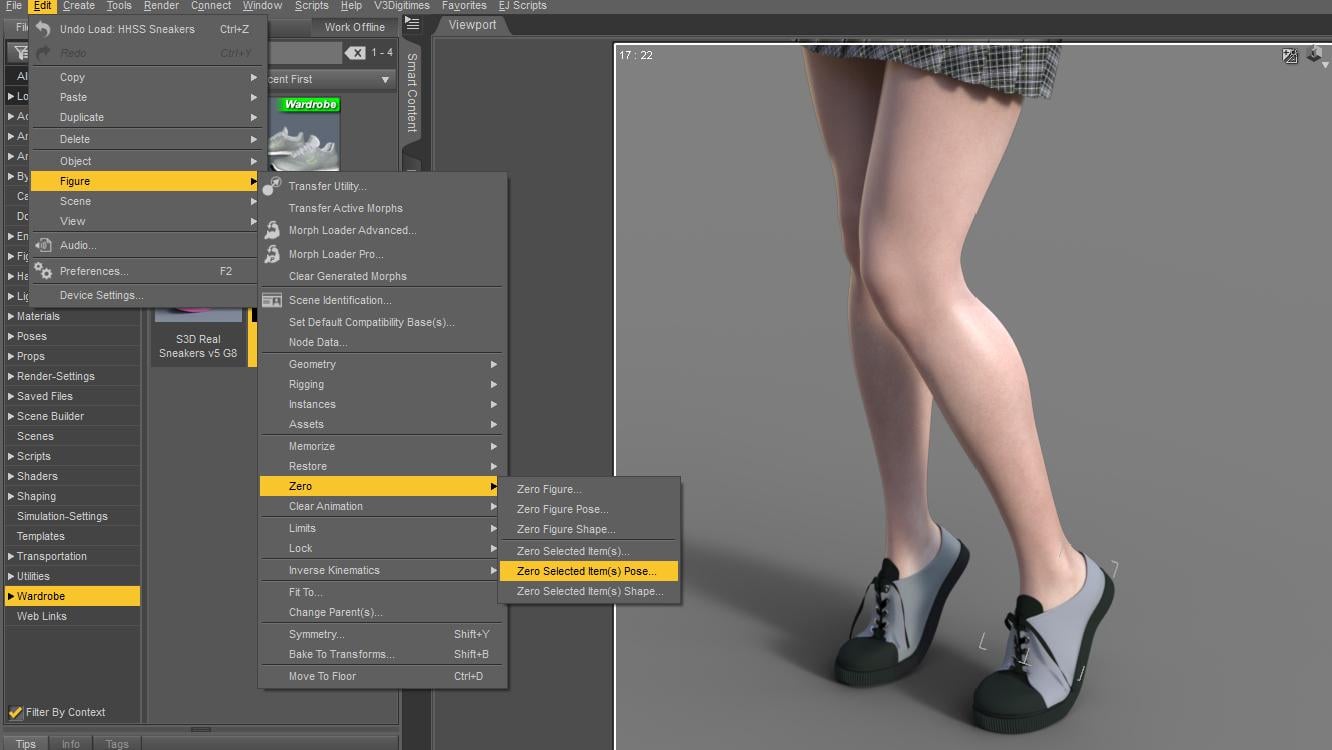
* You can also choose Zero Poses from your library and add them to favorites to reset hands and feet for fast edits.
(Most pose products in the store will have a Reset or Zero pose included among the poses) OR just pick a foot pose matching the wear of the character.
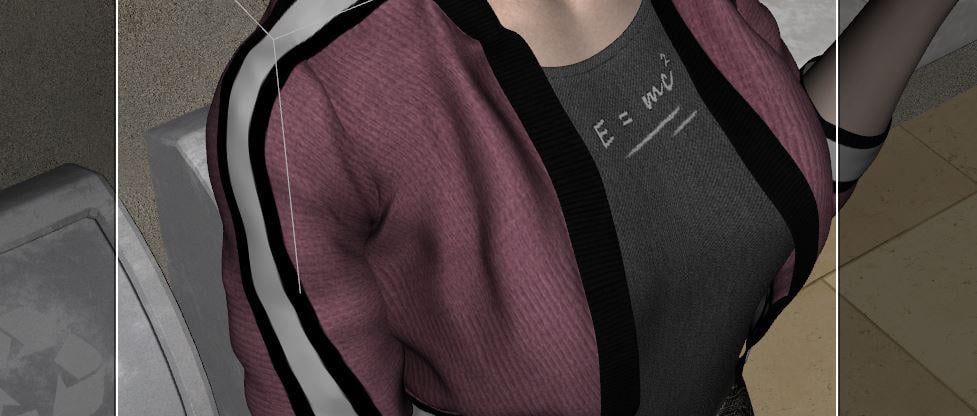
Poke Through- Occurs when overlapping clothing layers 'poke through' in certain places. A shirt sleeve may poke through a jacket. A foot or sock may poke through a shoe. There is usually an adjustment morph on the two items which can be adjusted to pull the shirt tighter and make the jacket "looser" by expanding. Sometimes it makes the outer clothing item balloon out and not fit nicely. This can be fixed in Post or, if all else fails -a drastic measure for the advanced is to make a second copy of the shirt (add it twice) and use the Geometry editing tool to cut out the poking polygons. Always SAVE before you try this. lol The reason you'd make a duplicate of the worn shirt is, once you cut the shirt you can't undo the edit. One shirt is made invisible and is still there in case you need to show the shirt later on. Almost NEVER cut the polygons of figures as they are high-poly and will almost always tax your system.
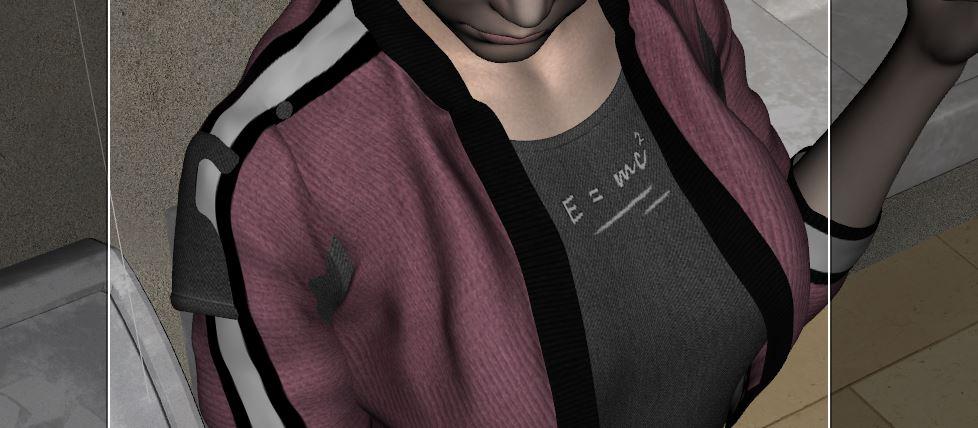
Using Tool/Geometry Editor (Marquee selection to choose the shirt parts the poke through), then right click to...
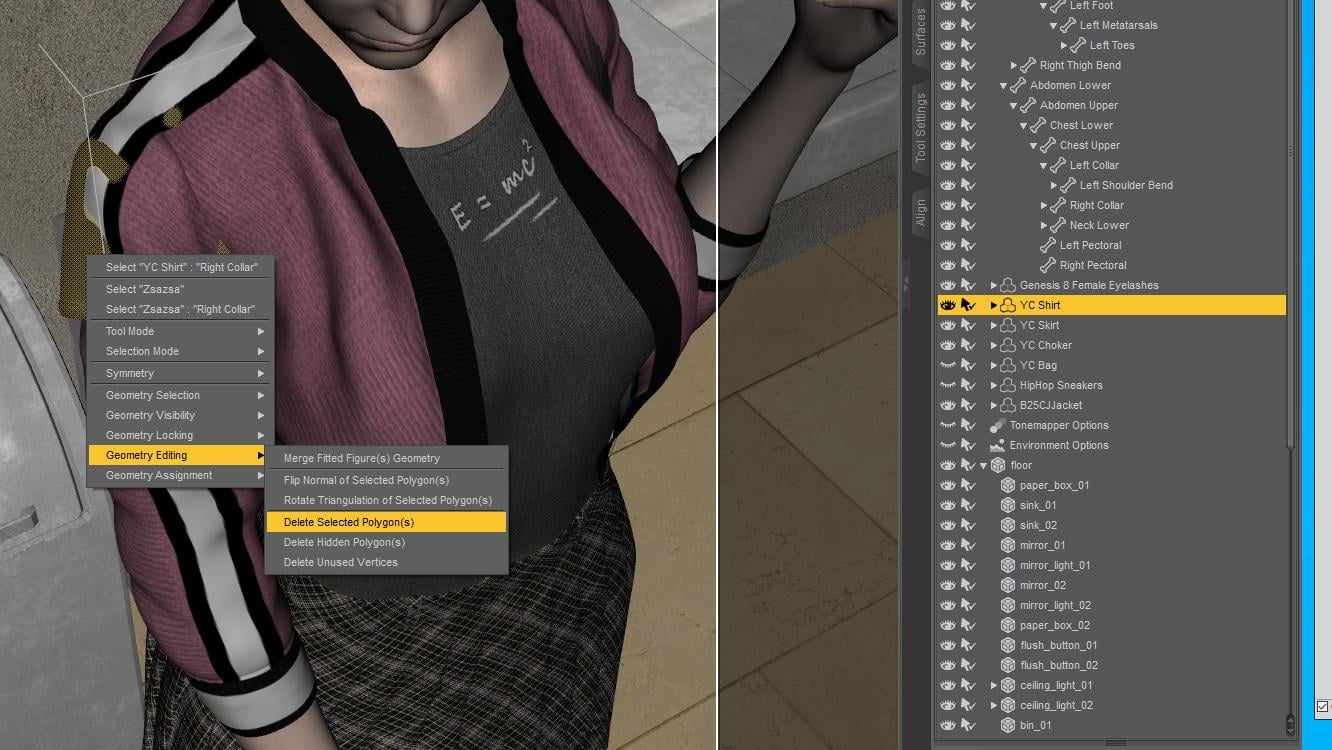
Shirt parts are cut away.
Eye Sore - Characters not looking at each other or the right object. I've used two products to sort this out over the years.
https://www.daz3d.com/look-at-me-ii-pose-control
https://www.daz3d.com/eye-clock-pose-control-for-genesis-3-and-8-male-s-and-female-s
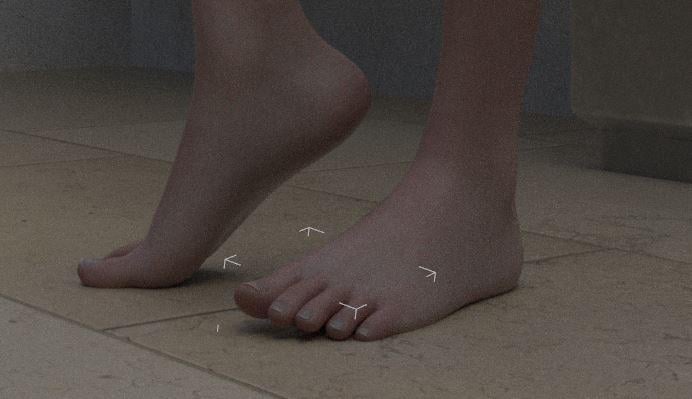
Intersecting Objects - Getting hand poses (holding things) correct and getting characters to sink into objects. Body parts squish on impact. There are morph products to flatten and compress. At worst, sink your character into the surface a small amount (usually feet flatten when supporting weight) . Make sure fingers, feet and items do not overlap.
Feet are sunk a little into the floor.
More later.
Genesis 9 geometries don't matchno geografts at all. just regular base resolution with morphs exported and then morphs loaded with morph loader. No teeth or eyes or brows . This is something happening recently. I don't know how to fix this.
[Released] Turbo Loader for Genesis 9 [Commercial]I've been having trouble with Turbo Loader for G9. It used to work and I have many disabled morphs. When I search for new morphs, though, it stops working. The morph list updates, but, if I try to uncheck any item, Daz Studio crashes. When I try to click any button, like Save Config, nothing happens. I tried to click Execute and I saw this message in the log:
2025-11-17 23:14:20.101 [DEBUG] :: Delete Products: Genesis 2 Male Body Morphs,Genesis 2 Starter Essentials,Genesis 3 Developer Kit,Genesis 3 Female Body Morphs,Genesis 3 Female Expressions,Genesis 3 Female Head Morphs,Genesis 3 Male Body Morphs,Genesis 3 Male Expressions,Genesis 3 Male Head Morphs,Genesis 3 Starter Essentials,Genesis 8 Male Body Morphs,Genesis 8 Male Body Morphs Pre-Release PA Build,Genesis 8 Male Expressions,Genesis 8 Male Expressions Pre-Release PA Build,Genesis 8 Male Head Morphs,Genesis 8 Male Head Morphs Pre-Release PA Build,Genesis 8 Male Pre-Release PA Build,Genesis 8 Starter Essentials,Genesis 9 Body Shapes,Genesis 9 Expressions (DO NOT ENABLE),Genesis 9 Head Shapes (DO NOT ENABLE),Genesis 9 Starter Essentials,Genesis Starter Essentials,Mouth Realism
2025-11-17 23:14:20.272 [WARNING] :: \src\sdksource\general\dzscript.cpp(1192): Unhandled error while executing script.
2025-11-17 23:14:20.272 [WARNING] :: QScriptEngine::popContext() doesn't match with pushContext()When I reopen Turbo Loader, the list has not been updated.
I also saw, in the log, this message repeated a few times among the AddRelPathToListView entries:
2025-11-17 23:14:19.771 [INFO] :: Loaded image: TurboLoader Missing Product.jpg
I have tried to uninstall some products listed around the Missing Product warnings, but that made no difference.
Any suggestions about what the issue could be?
New Year, New Sales Thread: Report Issues Here 3 "Reporting Only"The sale slider on the SHOP page and the title on the day's promo page both say "Incredible New Tools Morph tool, skin randomizer, FONTS, Marble skin & More" but there doesn't seem to be a FONT PRODUCT among the debut products on the sale page for today. Many, many times 1 or more debut products do not show up for me on the day's sale page, but if i go to the SHOP page, I can usually see the missing new product that doesn't show on the sale page. Today, though, even on the SHOP page, I don't see a new FONT product. Does anyone know what the new FONT product is, or is there actually no such new product and Daz has just screwed up the texts blurbs ('cause that almost never happens, right?!) ?
Is there a product like Xtransfer to transfer Genesis 3 & 8 morphs to 9.You don't have to need any product... You can transfer Morph targets from G8 to G9 by using Transfer Utility + clones (G8 clones on G9 or G9 cloneS on G8 in Item Shapes...)
1) Load a G8, Favorite the morphs you want to transfer (screen shot 1)
2) Load a G8 G9, Edit > Figure > Transfer Utility... Transfer Morph Targets by using the settings in (screen shot 2)
3) Dial the transferred morphs on G9 (screen shot 3)Then create Head / Body morphs by using G9 HeadSplit DFormer... as usual ~~
Edit: If you do need converter products:
1) https://www.daz3d.com/rssy-character-converter-genesis-8-and-81-female-to-genesis-9 or https://www.daz3d.com/rssy-character-converter-genesis-8-and-81-male-to-genesis-9
2) Shape Transfer plugin by upgrading to Premier tier;Is there a product like Xtransfer to transfer Genesis 3 & 8 morphs to 9.Is there a product like Xtransfer to transfer Genesis 8 morphs to 9.
Face transfer questionHow can I save just the files for the Face Transfer results so I can reinstall it on any computer? So if I need to restart my content folder for whatever reason, I can reinstall it.
Daz Studio 4 Scene Tools 4 - Morph ToolsRAMWolff said:
Daz Studio 4 Scene Tools 4 - Morph Tools. Do we finally have advanced morph tools in DS without having to be Premier members? Can this really be so?
https://www.daz3d.com/daz-studio-4-scene-tools-4--morph-tools
From what I understand from the previews and description is that this is not a morph tool at all. It simply selects certain vertices and/or polygons in the Geometry editor for you to use in that tool, or (I think) to influence the weight map brush tool. It could be used to preselect the polygons to be used in the Geometry Scultptor tool available to premier members, but any movement of those polygons would have to be done in the tool.
Daz Studio 4 Scene Tools 4 - Morph ToolsRAMWolff said:
Daz Studio 4 Scene Tools 4 - Morph Tools. Do we finally have advanced morph tools in DS without having to be Premier members? Can this really be so?
https://www.daz3d.com/daz-studio-4-scene-tools-4--morph-tools
It's just a set of tools for Morph creation not for geometry scultping. At least I don't see any hint of such ability in the description.
Daz Studio 4 Scene Tools 4 - Morph ToolsNO overlap but ManFriday's morph tool system is behind the Premier paywall that I'm not willing to go for. So just wondering if this tool set from 3D Universe is just as complete and useful. I have ManFriday's set before the update that ended up behind that Premier paywall.
SaveGuard: Ultimate Scene Saver for Daz Studio Win 64 v1.2matew said:
Artini said:
Saxa -- SD said:
Since no Wearables Manager thread, will post this here again :)
Wearables Manager makes sending a character to Hexagon for morph-making an absolute breeze.
Just did it.
Have scripts on toolbar of your choice, select undress script, send figure to Hex, make morph in Hex, back to DAZ and save new morph, click script to dress and Viola!
Before was always a groaner removing all items inorder to send to Hex.
With this and the raw power of Hexagon (it's not perfect but pretty darn good for morphs), that program so tightly bound with DAZ, can't even imagine using DAZ GeomEditor even with it's improvements.
Anyway, just wanted to pass on how much of a time-saver this was.
Been focussed on other 3d things, so this is why just doing & posting now.
Thks Matew.Great to know, that it is working for you.
https://www.daz3d.com/wearables-manager
I was wondering what is the difference between Wearables Manager and personality in Daz Studio.
I guess you meant Personas, right?
Wearables Manager doesn’t use or replace Personas.
Personas are a very old DAZ feature that defines metadata for interactive tools (like PowerPose handles). It has nothing to do with clothing or managing outfits.
Wearables Manager is specifically for organizing, fast putting on / taking off outfits, handling materials when geografts are present, and some toggling some material states — completely separate from the Persona system.Persona prsets are a newish feature https://www.daz3d.com/forums/discussion/comment/8999416/#Comment_8999416
Daz Studio 4 Scene Tools 4 - Morph ToolsDaz Studio 4 Scene Tools 4 - Morph Tools. Do we finally have advanced morph tools in DS without having to be Premier members? Can this really be so?
https://www.daz3d.com/daz-studio-4-scene-tools-4--morph-tools
Genesis 9 geometries don't matchIs there any geo-grafts on the figure ?
If there is, you can either export / import OBJ with Geometry Editor tool activated, or use the Load Morph option > Primary Figure from Graft (Facet Order) in Morph Loader Pro.
Genesis 9 geometries don't matchSo I morphed my genesis 9 develeper figure and exported as obj, when everytime I used morph loader it says geometry doesn't match. No eyes or mouth or lashes were loaded and base resolution too, but still get the same results never had that problem before have a few morphs I created for G9 and G8. Can't figure this out.
Skin Randomizer (Commercial)Find it here : https://www.daz3d.com/skin-randomizer
Lack of inspiration? Want your characters to feel fresh again?
Skin Randomizer is designed to instantly add variation and bring new life to any figure’s skin. (all generations)What’s inside
• Three dedicated scripts:
– Base Color Randomizer
– Volume Randomizer (translucency, transmission, subsurface)
– Gloss Randomizer (bonus)• A simple, flexible interface:
Define or reset the amplitude of each random variation in a few clicks.
Hue, Saturation, and Value ranges are controlled separately, giving you precise and safe control over how far colors can drift.
Lower amplitudes keep results in realistic human tones, higher amplitudes open the door to stylized or fantasy skins.Universal Partial Presets
Skin Randomizer includes a set of scripted partial presets:
– 34 Base Color (Diffuse) presets
– 13 Volume Color presets
– 11 Base/Volume ratio presetsThey let you instantly restore solid, reliable skin bases if your exploration goes too far — or serve as new starting points for further randomization. They will work on all generations and with many initial shaders (Iray Uber, PRBSkin but much more).
Compatibility
• Works with every Genesis figure (down to Victoria 4)
• Optimized for PBRSkin and Iray Uber
• Partial support for older standard shaders
• Fully compatible with both Daz Studio 4 and Daz Studio 6Integration with other products
Skin Randomizer works on its own, but also integrates seamlessly with:
– Ultimate Iray Skin Manager
– Ultimate PBRSkin Manager
– Texture Booster and Shader ConverterWhich were also all updated to be compatible with DS 6. When any of these are installed (DS 4 or DS 6), you can enjoy safe randomization directly from within their interfaces (no color ever pushed above 1).
Additional Tools
• Full PDF documentation
• A Geograft Transfer Tool to preserve shader coherence on figures using anatomical geografts (including Genesis genitalia)
In short:
Skin Randomizer can be your quick way to add variety when inspiration is low, a playground for discovering new skin ideas, and a complementary tool supporting the free DS 2025 updates of the main skin-related products it connects to. Characters Deforming
This is still valid today (November 2025) Had a bad morph with a G9 character (Vo Suzu) that hosed the default G9 base character. Just look under currently used in peramiters and you will find the offending morph.
SaveGuard: Ultimate Scene Saver for Daz Studio Win 64 v1.2Artini said:
Saxa -- SD said:
Since no Wearables Manager thread, will post this here again :)
Wearables Manager makes sending a character to Hexagon for morph-making an absolute breeze.
Just did it.
Have scripts on toolbar of your choice, select undress script, send figure to Hex, make morph in Hex, back to DAZ and save new morph, click script to dress and Viola!
Before was always a groaner removing all items inorder to send to Hex.
With this and the raw power of Hexagon (it's not perfect but pretty darn good for morphs), that program so tightly bound with DAZ, can't even imagine using DAZ GeomEditor even with it's improvements.
Anyway, just wanted to pass on how much of a time-saver this was.
Been focussed on other 3d things, so this is why just doing & posting now.
Thks Matew.Great to know, that it is working for you.
https://www.daz3d.com/wearables-manager
I was wondering what is the difference between Wearables Manager and personality in Daz Studio.
I guess you meant Personas, right?
Wearables Manager doesn’t use or replace Personas.
Personas are a very old DAZ feature that defines metadata for interactive tools (like PowerPose handles). It has nothing to do with clothing or managing outfits.
Wearables Manager is specifically for organizing, fast putting on / taking off outfits, handling materials when geografts are present, and some toggling some material states — completely separate from the Persona system.SaveGuard: Ultimate Scene Saver for Daz Studio Win 64 v1.2Saxa -- SD said:
Since no Wearables Manager thread, will post this here again :)
Wearables Manager makes sending a character to Hexagon for morph-making an absolute breeze.
Just did it.
Have scripts on toolbar of your choice, select undress script, send figure to Hex, make morph in Hex, back to DAZ and save new morph, click script to dress and Viola!
Before was always a groaner removing all items inorder to send to Hex.
With this and the raw power of Hexagon (it's not perfect but pretty darn good for morphs), that program so tightly bound with DAZ, can't even imagine using DAZ GeomEditor even with it's improvements.
Anyway, just wanted to pass on how much of a time-saver this was.
Been focussed on other 3d things, so this is why just doing & posting now.
Thks Matew.Thank you! I am glad my script is useful for you.
Daz 3D is part of

Connect
DAZ Productions, Inc.
7533 S Center View Ct #4664
West Jordan, UT 84084Licensing Agreement | Terms of Service | Privacy Policy | EULA
© 2026 Daz Productions Inc. All Rights Reserved.