-
SketchUp Importer for Daz Studio
Hi, everyone. I'm new here, so please bear with me as I try to get my bearings.
I come here from the Trainz Railroad Simulator world, where I am the author of several software tools that community members have found useful over the past several years. One of these is a plugin for SketchUp that allows models to be easily ported into the Trainz environment with just a few mouse clicks. This tool works by creating an XML file that is then passed to a Trainz import utility, which in turn creates the necessary Trainz-format geometry files. My plugin also creates all the other files needed by Trainz (configuration and so on). After exporting from SketchUp, the user switches to Trainz Content Manager and imports the generated files directly, where they become immediately usable in the Trainz world-building application. The models that transfer into Trainz are very high-fidelity and carry all the original textures, transparencies, and so on.
I am interested in doing something similar for Daz. To that end I am considering writing a script in Daz that will read the XML files produced by my SketchUp Ruby plugin, and render the geometry and materials directly in Daz, after which they could be saved in a native Daz format and become useful in that environment. I found the geometry pipeline example, which seems to show most of the functionality needed to do this, but I am having a hard time with what seems to be a lack of comprehensive documentation for Daz scripting. I have consulted the Scripting API web pages, but have also found that many of the functions used in the pipeline example do not appear to be documented at all.
I am a professsional software engineer by trade, 33 years in the business, so writing the code is not the issue. What I would kindly request is some pointers to places where I can find more information related to what I am trying to accomplish, and/or some script examples that might send me in the right direction.
Any help would be appreciated, and of course comments on the idea of a SketchUp-to-Daz pipeline are welcome.
Thanks for your attention. If anyone would like to see what I've been able to accomplish for Trainz, please feel free to visit the relevant page of my web site at http://www.dhobh.net/trainz/GoogleSketchUp/RubyTMIX.htm.
Regards,
MikeWhat features would you like to see appear in dazstudio 5?Dynamic Clothing and Hair..... It really is tme, guys.
Morph Brush
IN SYSTEM automatic update so that any new figure would autofit clothes from previous figures AT LEAST fron Genesis up without having to pay for any other products.
The ability to pin rotation and location from the Scene Tab (Minor and I know it can be done elsewhere, but....reasons)
The ability to lock ALL Parameters on an item, firgure or figure part from the Scene Tab (Not individual locks in the Parameters tab which are already there but something that will lock ALL those parameter locks so I go click and move on without fear of screwing anything up when I got it "just right.")
3D Art FREEBIE CHALLENGE-MAY 2017- WINNERS ANNOUNCED-Entries Thread OnlyHere's my entry:
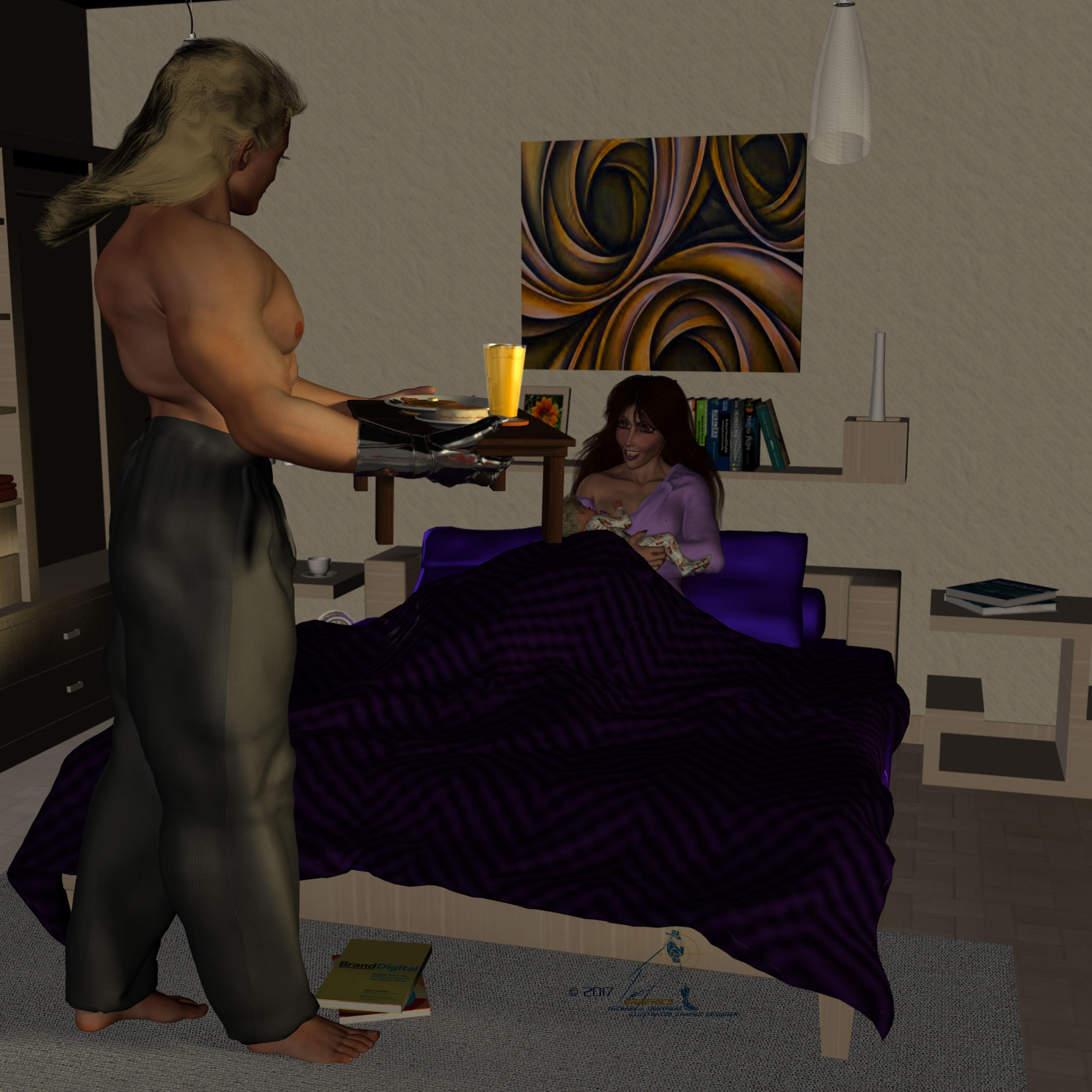
It's Marc and Maria's first Mother'sday, and Marc surprises Maria with breakfars while she's feeding baby Chris.
Breakfast in Bed
All figures Genesis
Freebies:
Die Trying’s 182 V4 morphs for Genesis (all characters)*
Ramwolf's Genesis Morph Pack (third row second column) (Jesse, Grandpa Tom, Rev. Braggart)
Ultimate Shader pack: (Chrome on Marc’s cyber hand, Maria's Earings)*
Rosalie Rose (Maria)*
Kwerki Outfit (Maria)*
Hoop Earings for #Dream's Lusitana (Maria's Earrings)*
Ashlan for M4 (Marc's and Baby Chris' skin texture)*
HFS EVAN Expansion set with custom trans maps (Marc's Cyberhand)*
Baby Genesis (Chris)*
Babygrow for Genesis (Baby Chris)
Mama & Baby poses (Maria and Baby Chris)*
Late Night Fantasic Beadspreads (Bed Spread)*
Paid-For Items:
Marja Hair for Genesis (Maria)
In Bed (bedroom)
Diner Food 1 (breakfast)
Diner Tableware (dishes)
No-Count Items:
Genesis Mullet: No Longer Available (Marc)
Wildmane Hair for Geneisis comes with DZ Studio 4 (Chris)
Ghostman's table: Can't find link (Tray)
Drinking Glass: Can't find link (Orange Juice)
 Does instances to objects do what I hope it does...?
The promo description is all about exporting. What I was wondering was, can you just turn an instance into a seperatly poseable copy and use the converted figure in the scene.? In Poser you can copy a figure and it becomes just another figure. I haven't found a way to do that in Studio, all I can do is create instances that follow the pose, morph and textures of the original.
Edit -> Duplicate -> Duplicate Node Hierachies in DS does just that. (Can be in some other menu depending och which theme is used,)
Does instances to objects do what I hope it does...?The promo description is all about exporting. What I was wondering was, can you just turn an instance into a seperatly poseable copy and use the converted figure in the scene.? In Poser you can copy a figure and it becomes just another figure. I haven't found a way to do that in Studio, all I can do is create instances that follow the pose, morph and textures of the original.
"Victoria 7 Attitude Expressions" problem - need helpedited: moved quotes to the proper locations
The product pages says "Additionally, you'll have 15 others poses files that will mix the Attitude unique morphs and Victoria 7 basic face parameters to give you truly unique expressions." I wonder what "basic face parameters" are. Is that an unlisted required product?
barbult had the right idea!:
-> On the laptop I installed as well
Genesis 3 Female Expressions
https://www.daz3d.com/genesis-3-female-expressions
and now "Victoria 7 Attitude Expressions" also work on the laptop.
I was under the impression the basic face parameters were the ones that ship with G3F/V7. In any case, I also have the Expression morphs product for G3F (blanking on the name, but it's the standard daz original one that is for sale that came out iwth the body and the head morphs)
That expression product can be very hard to find in the Smart Content tab because it does not show up when a Genesis 3 female figure with "Filter by context on" is selected.
Additional Explanation:
-> Some of the first "Morph only products" for G3 did not contain any preset files. Therefore they do not show up in the categorisations.
To remedy this most new morph only products now contain presets which have categories set as well...
To find that product in the smart content tab
- make sure filter by context is OFF -> NOT selected
- enter "expression" in the smart content tab filter bar
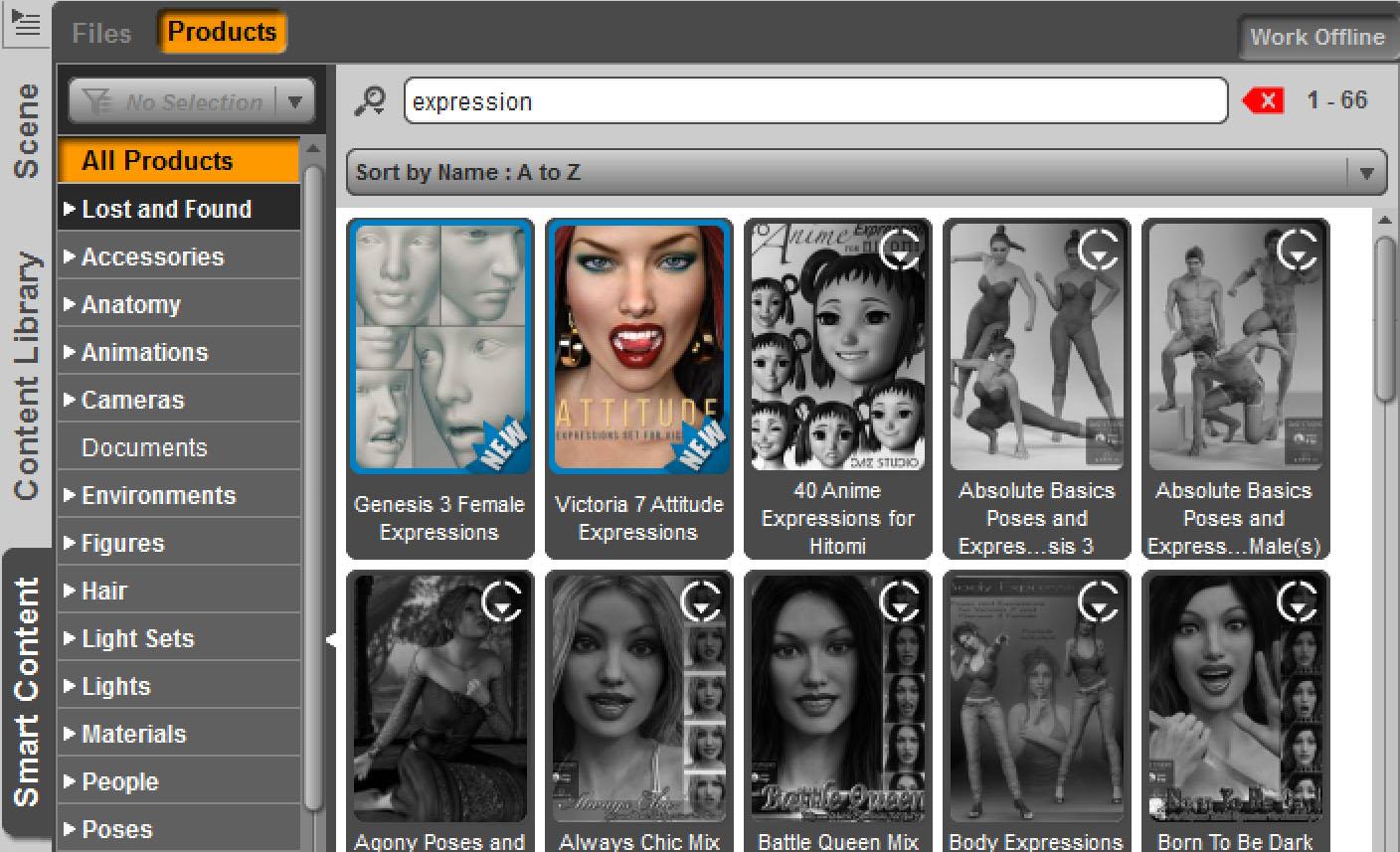
Side Note:
I also made the reverse test on the pc.
- Uninstalled the DAZ Connect version of "Genesis 3 Female Expressions" in the smart content tab
-> Then "Attitude Expressions" stoped working properly
V4 Muscle Morphs and Victoria Alive Morphs won't load into charactersGeneration 4 figures use ExP morph system that require morphs to initialized for the figure, this updates the figure so it has the necessary channels for the morphs. New morphs cannot be applied to old scene characters because that version of the figure lack the channels. You will need to save a character preset and pose preset from the old character and apply then to a new updated version of the figure.
Blender .obj to DAZ Studio Export/ImportDoes anyone have a reference that explains the details of how to export and import an .obj from Blender to D|S? I keep getting issues with incorrect orientation when it comes in to D|S, and it appears the textures/materials don't come thru. And I'd especially be thrilled if someone had advice for exporting Archimesh objects out of Blender. It appears the auto-hole objects come thru, and I'm wondering if there's some way to exclude them from the transfer. I tried selecting every mesh but them, but that doesn't work.
Thanks.
Why selection tool and weight brush thorough out opositte side?Now I see - pictures say more than words.

I was hoping Hidden Line will let you select only front faces - I tested it a moment ago - but yes you are right it dosnt help.
DAZ should definitely add a project through ON OFF switch for Lasso and Marque selection mode and maybe also for drag selection because for now it looks like a poor function or a bug.
I also got problems with the DazStudio polygon selection in the Geometry Editor it is simply not that easy to use.
As a workaround I use Blender to create polygon face groups if it gets to difficult in DS
If I have to create polygon face groups I use Blender because I can make more pecise selections and even use the UV-Image-Editor to do selections on that view.
But you have to be careful because in blender a polygon can be assigned in more than one group. Also there is or was a bug in v2.77 with the group assignment that seems to add or remove one more polygon loop than it should - so I hit the assign button then Ctrl+I to invert selection and hit remove again to have the right polygon selection saved to the group.
Back in DS you can import the OBJ-geometry file and use the Transfer Tool to update the face groups of the figure / prop in the scene that also is of the same shape. Or maybe it should be an update for the material surfaces - then first use the imported geometry and copy paste the face groups to surfaces on that one and use the transfer tool with only surfaces checked to transfer it over. I used this method once or twice and it worked for me.
How to move a wristband from one arm to the other?As I check the product page, the wristband seems rigged (not static prop). then it may need to re-rig to work as same as original. If you use anotehr 3d aprication, it make easy x mirroer and return to ds as obj, then rig it by transfer utility,, but if I only use daz studio,
1. load original, with zero pose genesis3male, then select the wristband , go to top menu > edit>figure>rigging>convert figure to prop. select the prop, then , in parameter tab, apply X scale as negative 100%, usually it can X mirroer the current prop.
2 export and re-import it as obj.with default ds option, now parameter should be reset. (zero scale) .
3 check surface group, name. if it has been changed , set it as same as original one with geometry editor.. (to use mat preset correctly)
4. If you use it without rig, save it as new porp then use it by parent to the arm. as same as ohter accessory props. though you may need to make morph, when Actor change shape, you can still use same mat preset of original .
(it will lost all meta-data, then you need to find orignal mat presets from content library)
5 if you hope to rig it (then fit to Actor) , after step 3, use transfer utility. soruce genesis3male , target the new imported obj, , and use projection template as glove. bracelet or wristband are easy to color weight, then transfer utiility work well,, you may need not many adjusting weight map etc. then save it as new figure.
I may lost some step, or may need more tweak, but basically it work. (or if htere is more easy way, to flip x for rigged figure, but I do not know)
Teeth: Individual Manipulation?You could wait for that genesis 3 dental plan or you could try to create your own teeth morphs in DS - this is shurly possible with D-Formers. Also there is the plugin GenX to transfer morphs from the predecessors to genesis 3.
How I would try to do a teeth morph:
0. To see the teeth while working on it use the morph Mouth Open Wide - then go to the Surface pane select the skin also lips and mout inside and maybe tongue (Ctrl+click to add to selection) and make it transparent with the opacity strength slider found at the right side even better if you simply enter "op" in the text box search field on top.
1. Select the figure and create a D-Former and switch it to weight map influence.
2. Use the Geometry Editor and make a selection on the teeth - better let the teeth root inside the gums unselected. Right click the viewport and choose Selection > Grow Selection or press Ctrl+[Numpad+] a few times.
3. Switch to Node Weight Map Brush right click the viewport and choose Fill Selected with 100% then invert the selection and fill with 0% - so only the teeth gets red influence weight map.
4. Now select the D-Former itself and make adjustments in scale / rotation / translation whatever. Now you can see what the DFormer weight map will actually deform maybe make adjustments to the map with WM / smooth brush.
5. Finaly go to the DForm tab and click Spawn Morph - teeth morph done.
6. Save the morph to make it available with every new genesis 3 figure in other scenes. Go to File > Save As > Support Asset > Morph Asset enter a product name and check only your new morph in the parameters list.
Before you run in to trouble with the DFormers better read this thread Using D-formers on figures.
There is my post in this thread DForm + Face = Sad that descripes the D-Former method the other way around - excluding all inside the mouth.
Using DFormers with Weight Map (Influence Weights)
You have to select the DFormer Influence Field go to Parameters pane look for "Influence" and switch the "Influence Mode" from "Sphere" to "Weight Map". Then go to "Tool Settings" > "Node Weight Map Brush" and under "Unused Maps" you will find the "Influence Weights" channel you can now add with the button "Add Map". The new weight map gets the initial gradient of weight paint we have seen as shpere influence before.
Genesis Evolution Morph Not FoundAs of last night I realized they were in the Parameters section rather than the Shaping... for some reason. I don't suppose these are ''the best'' ones around when it comes to shaping overall either way.
Do you have recommendations for a good overall morph kit for say Genesis 2 or 3?
3D Art FREEBIE CHALLENGE-MAY 2017- MAY FLOWERS BRINGS MOTHER'S DAY CELEBRATIONS-Main ThreadHere's my entry:
It's Marc and Maria's first Mother'sday, and Marc surprises Maria with breakfars while she's feeding baby Chris.
Breakfast in Bed
All figures Genesis
Freebies:
Die Trying’s 182 V4 morphs for Genesis (all characters)*
Ramwolf's Genesis Morph Pack (third row second column) (Jesse, Grandpa Tom, Rev. Braggart)
Ultimate Shader pack: (Chrome on Marc’s cyber hand, Maria's Earings)*
Rosalie Rose (Maria)*
Kwerki Outfit (Maria)*
Hoop Earings for #Dream's Lusitana (Maria's Earrings)*
Ashlan for M4 (Marc's and Baby Chris' skin texture)*
HFS EVAN Expansion set with custom trans maps (Marc's Cyberhand)*
Baby Genesis (Chris)*
Babygrow for Genesis (Baby Chris)
Mama & Baby poses (Maria and Baby Chris)*
Late Night Fantasic Beadspreads (Bed Spread)*
Paid-For Items:
Marja Hair for Genesis (Maria)
In Bed (bedroom)
Diner Food 1 (breakfast)
Diner Tableware (dishes)
No-Count Items:
Genesis Mullet: No Longer Available (Marc)
Wildmane Hair for Geneisis comes with DZ Studio 4 (Chris)
Ghostman's table: Can't find link (Tray)
Drinking Glass: Can't find link (Orange Juice)
ALL LINKS CHECK OUT PLZ MOVE TO ENTERIES THREAD
Carrara Non Photo Realistic Works? Oh... do you have all the necessary morph packs they call for? If we have all of those (I still don't have the international morphs) they will still INJ the morphs... but I don't buy them for the shapes! ;) I love the textures! I just added some more to the Cart, hopefully the current sale doesn't end before I get paid! LOL
no just some of the clothes you click the pose texture thing and they don't change - also a beard that loads up without textures.
so they need international morphs?? didnt know that, thanks for the heads up!
edit just went through my collection of MortemVetus
stuff, didnt realise I had so much!!!, i bought up big in the march sale, only a few come listed as needing international morphs, yes his/her's stuff is amazing
"Victoria 7 Attitude Expressions" problem - need helpShort Version:
I can now confirm the observed results by the jakiblue after having tested an installation with DAZ connect on a laptop.
but i don't get why yours are working as they should, when you install via connect. Mine simply won't work.
I was so far not able to figure out why an installation with DAZ connect on my pc is not showing any errors when clicking on the presets.
- - -
Longer Version:
update / edit: removed some information to focus on the most relevant points
@ Test results on the laptop
On the laptop I have only the bare minimum of products installed among them Genesis 3 Starter Essentials.
-> To test I installed Victoria 7 and Victoria 7 Attitude expressions.
- - -
-> Example Attitude expressions 12 (Preview image closed mouth)
In general some very weird things are going on. For some reason on both the pc and the laptop mouth open 100% are dialed in.
Then it seems negative values for the lips are used to close the mouth again.
Result on laptop installed with DAZ connect:
On the laptop only 5 expressions for the mouth area are dialed in under currently used. -> The pose looks wrong.
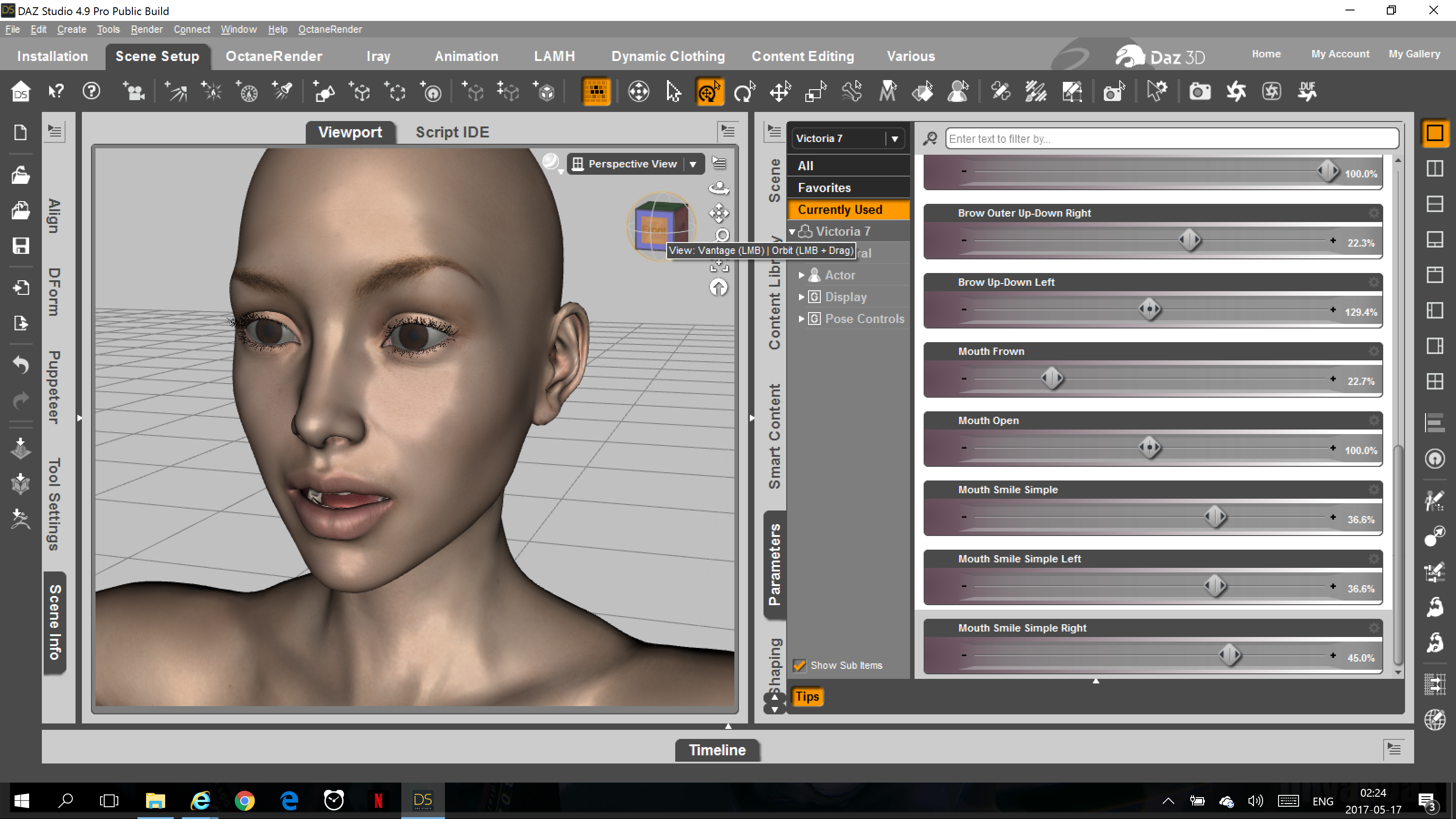
Result on pc installed with DAZ connect:
On the pc there are countless other expressions for the mouth and lips area dialed in as well. -> The pose looks as in the preview image.
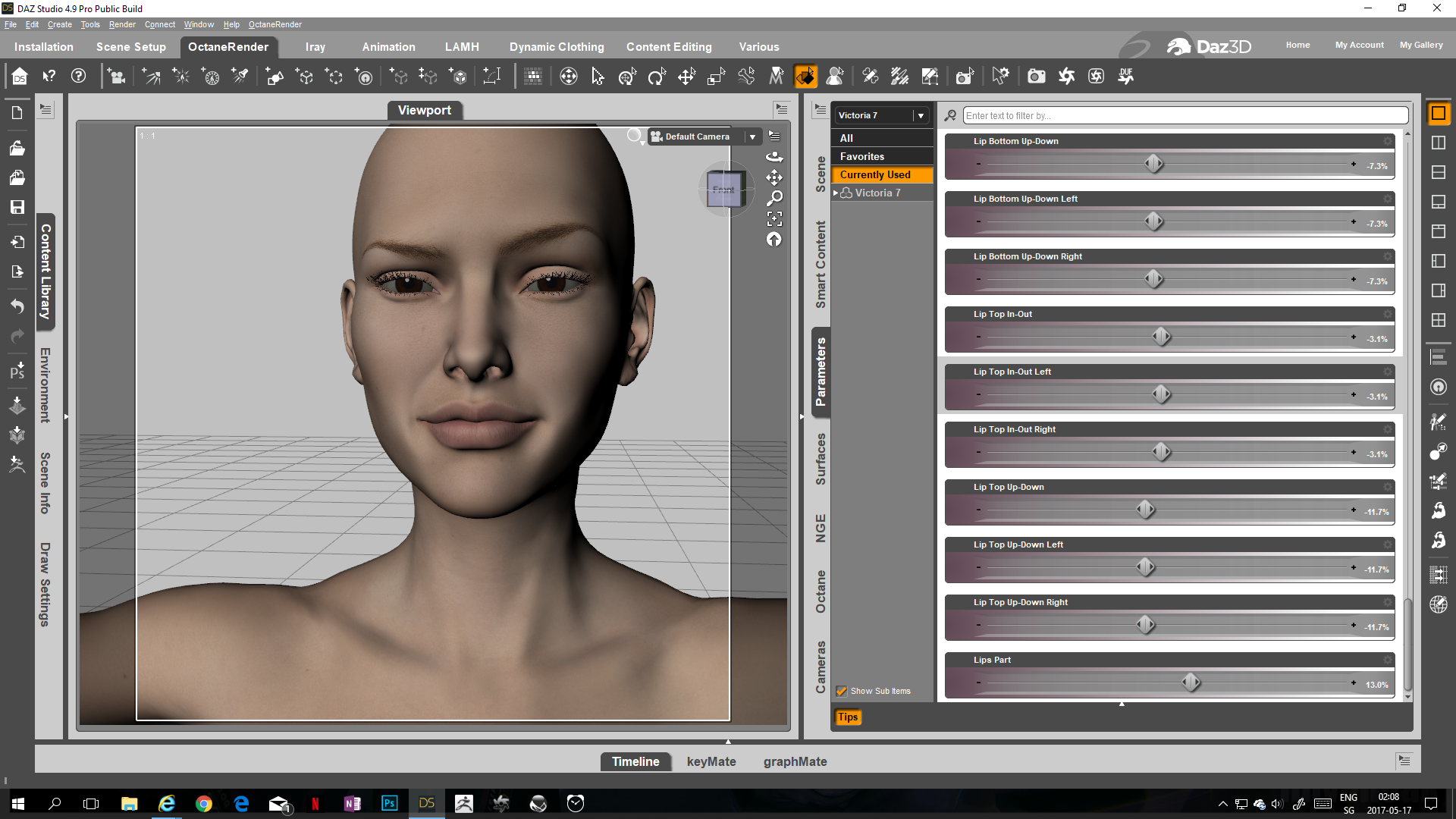
- - -
When testing this on the laptop one thing seemed very odd:
- When clicking on the preset it seems the morph is first dialed in correctly and then immediately some of the dialed in values are removed again.
- - -
Carrara Non Photo Realistic WorksVery cool work, HW! About the boot/sword thing... that's what happens when a guy steps into an edge tooo quickly, right? Slices right through if the sword owner has any love for his blade! LOL
I see you've also found Mortem Vetus' store! I love those textures! I plan to one day own them all! ;)
thanks dart, yes they are good - some things don't work as far as the textures not loading but worth the entrance price for sure
? Oh... do you have all the necessary morph packs they call for? If we have all of those (I still don't have the international morphs) they will still INJ the morphs... but I don't buy them for the shapes! ;) I love the textures! I just added some more to the Cart, hopefully the current sale doesn't end before I get paid! LOL
3D Art FREEBIE CHALLENGE-MAY 2017- MAY FLOWERS BRINGS MOTHER'S DAY CELEBRATIONS-Main ThreadHere's my entry:
It's Marc and Maria's first Mother'sday, and Marc surprises Maria with breakfars while she's feeding baby Chris.
Breakfast in Bed
All figures Genesis
Freebies:
Die Trying’s 182 V4 morphs for Genesis (all characters)*
Ramwolf's Genesis Morph Pack (third row second column) (Jesse, Grandpa Tom, Rev. Braggart)
Ultimate Shader pack: (Chrome on Marc’s cyber hand, Maria's Earings)*
Rosalie Rose (Maria)*
Kwerki Outfit (Maria)*
Hoop Earings for #Dream's Lusitana (Maria's Earrings)*
Ashlan for M4 (Marc's and Baby Chris' skin texture)*
HFS EVAN Expansion set with custom trans maps (Marc's Cyberhand)*
Baby Genesis (Chris)*
Babygrow for Genesis (Baby Chris)
Mama & Baby poses (Maria and Baby Chris)*
Late Night Fantasic Beadspreads (Bed Spread)*
Paid-For Items:
Marja Hair for Genesis (Maria)
In Bed (bedroom)
Diner Food 1 (breakfast)
Diner Tableware (dishes)
No-Count Items:
Genesis Mullet: No Longer Available (Marc)
Wildmane Hair for Geneisis comes with DZ Studio 4 (Chris)
Ghostman's table: Can't find link (Tray)
Drinking Glass: Can't find link (Orange Juice)
S.H.A.D.O.ws from the past - [WIP]I've become interested in figuring out how to make a passible Gay Ellis in DAZ G3F, along with oither UFO characters in G3.
And I'd like to document the process here on this forum.
I am a newbie. So I want to document the process for other newbies.
So the first thing I want to do is seek advice and heads-up tidbits.
I know that most of the UFO 3D development was done for Poser and earlier DAZ generations. And I know that adapting them to DAZ G3 is a special process that more advanced folk know about. So these are the things I'm seeking advice and tutorials on.
HI Lukon100,
Almost all of the head morphs here were done in Blender - Steve Jones did most of them and I added an extra Gay Ellis. If you haven't already, you really need to get familiar with a modelling package like Hexagon, Zbrush (seems lots of modellers use this) or Blender. They all have bridges to and from DAZ Studio, so it's up to you to pick the one you are comfortable with. Blender is a comprehensive free 3D program, but it is not that intuitive. The import export process between DS and the modeller you choose is well documented in many places in these forums and elsewhere, so that's where to do your initial research.
Grab as many shots of the subject from as many angles as possible. The holy grail is the full profile as they are rare, but it can be really critical to the success of an image.
More important than all the techniques and software is that you have to be prepared to put in the time to get the likeness believable and recognizable. As an example, my Sophia Loren morph took about two weeks solid. Gabrielle Drake took me 5 months. I scrapped the model at least 3 times and started afresh. Thanks to Jo and Steve on this forum, I had someone to egg me on to finish it.
This quote has inspired me since I was a schoolboy:
"Talent and all that for the most part is nothing but hogwash. Any schoolboy with a little aptitude might very well draw better than I perhaps; but what he most often lacks is the tough yearning for realization, the teeth-grinding obstinacy and saying: even though I know I'm not capable of it, I'm still going to do it." -- M.C. Escher, in a letter to his son Arthur, 12 February 1955
Gary
Thanks so much for your insights, Gary!
I have a passing acqualtence with Blender. It was the first 3D program I ever used. The learing curve is too steep. So I quit messing with it. But I did get a basic grasp of dynamic mesh sculpting. So I suspect I have adequate experience in that to get things going. I suppose I just need to look at the tutorials on the transferring of files between DS and Blender in the context of making morphs.
But now I have a question. If there are Blender-made meshes of UFO character faces made by you folks, are these meshes adaptable to Genesis 3? Or would I need to start from scratch? I see tht DS has some products that basically copy a shape from one Genesis figure iteration to another. Like from Genesis 2 to Genesis 3, and so on. Would one of these shape-mover utilities be the ticket?
I also hear of a program that can automatically sculpt a face to a mesh taking only a few 2D photos as input. Are such programs any good?
-Luke-
Teeth: Individual Manipulation?As Cho suggests, those products would be the quickest, easiest way to manipulate the teeth, assuming that the options coincide with what you are after. Natively, DAZ Studio, or rather the DAZ figure models, do not provide one with the opportunity to morph or modify individual teeth "out of the box". A modelling program could do it, but that is easier said than done, depending on what you want, specifically. Some morphs would obviously require changing not only the teeth, but the jaw, gums, etc. to accommodate the changes. Those changes, in turn, could require modification of the facial morphs. It should be hypothetically possible to isolate individual teeth in DAZ Studio using the advance tools, but that route might be even more problematic for the same reasons I stated for editing in a modelling program (which is usually going to be better suited for that kind of thing to begin with). I do not have a lot of experience using the advanced tools in DAZ Studio, and others might offer more insight if they happen by.
Josh Crockett Suggestion Page for Monster Characters!a modular morph kit bundle of fallid hybrids of alien-humans would be superawesome, some preset ideas:
1-no arms (hidden), and foots morphed with membranes, option to dial one bigger than another or dial some distortion.
2-like born in radation overinflated head like
3-anormally long neck, option to be thin or not
4-dial siamese fetuses on fetal position, shapes of very underdeveloped bodies at diferents external parts of your body..
5-supersmall hand as tongue.
6-membranes at fingers of hands
7-dial eyes together and fusionate to be a cyclope like.
8-a skin for genesis 3 male to be a viscous fish-something
9-a skin for genesis 3 female to be a vibrant color unknown insect queen like
10-face expression for the pain to exist as a failed human alien hybrid
Cool ideas :)
Daz 3D is part of

Connect
DAZ Productions, Inc.
7533 S Center View Ct #4664
West Jordan, UT 84084Licensing Agreement | Terms of Service | Privacy Policy | EULA
© 2026 Daz Productions Inc. All Rights Reserved.