-
Thank's Linday for Satine!
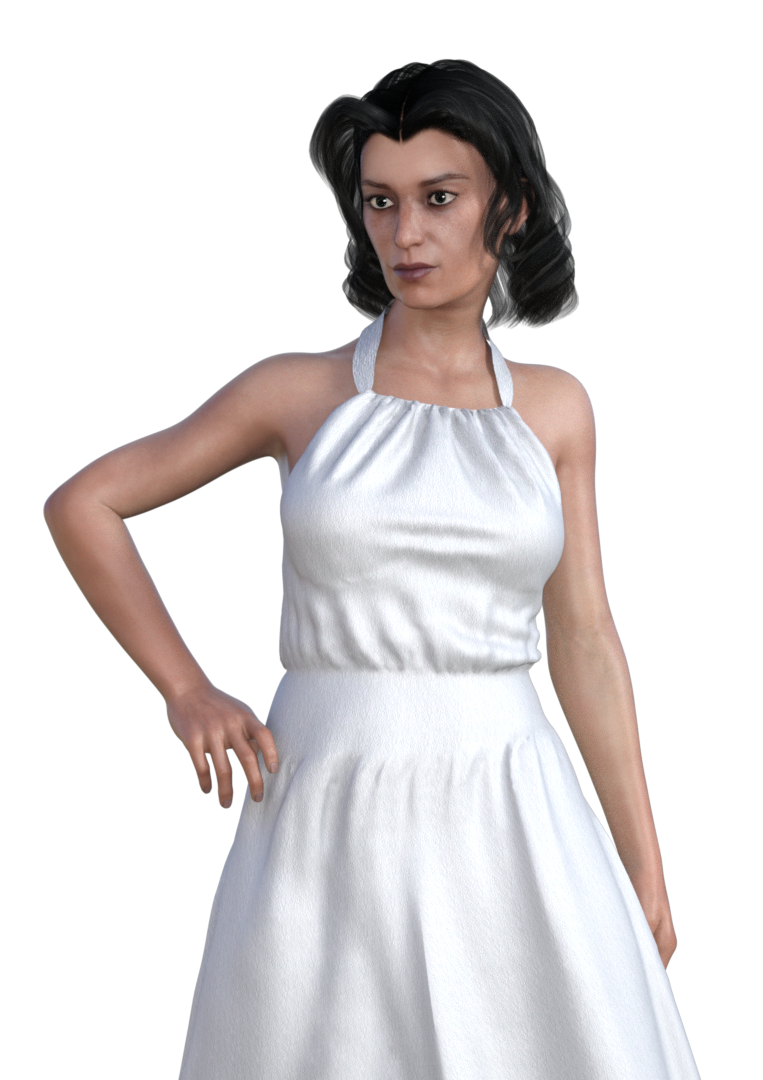
Ended up buying her...here is a test render. non-NGS2 version, default makeup, default lighting. Monika dress with the transmap turned off and Tandy Hair with UHT2 shaders.
This character comes with two versions of her physique, the more extreme one you see in the swimsuit promos, and a less extreme one that cooperates better with clothes (which I am using here). Eyeshadow makeup and lipstick are separate presets, just the way I like them, rather than dumping a full face of makeup with each preset and making you take it or leave it (or tediously hand-tweak it in surface). Freckles, as with many people IRL are not terribly obvious unless you go in for a closeup.
If I had to guess, Linday was using some very golden, outdoorsy lighting for the promos, like Skies of Iradiance.
I like her. Very convincing skin, very strong personality in the morph. She kind of looks like a cross between Elsa Lancaster and some French actress I can't place.
aniblock walk cycles for Genesis3?Hi My advice is this:
Spend $7.50 and get this bundle from Bonetech3D, it has many walk in place aniblocks
for the G2 male
https://www.daz3d.com/locomotion-pro-animation-bundle-vol-2Get the FREE script discussed in this thread:
https://www.daz3d.com/forums/discussion/109961/pose-and-animation-conversion-for-multiple-generations-of-daz-figures/p1Use that script to auto transfer your newly purchased G2 male walks to the G3 male
Save as aniblock for G3 male
I can confirm that it works great!!!!Its actually vol 3 that has the walk in place aniblocks not vol 2. Unfortunately its not on sale at the moment. (vol 2 is all different types of sprinting/ running), Within Vol 3 its subdivided into Locomotion Variety Pack vol 1, 2, 3 (the walk in place cycles are in Locomotion Variety pack vol 2 found here), but this is not the same as the separate Vol 2 which you linked to. I have all the volumes, and the labeling is very confusing. And thanks for the link to the script, I wish I had seen that sooner.
Do the animation conversion V4.2 to Genesis and Genesis 2 Female work on males?Oh, I FWIW I used initials "For What Its Worth" to describe the technique I use to transfer and adjust animation between BIPED figures. Its more tedious than running a script and only rigged bone joints are captured by BVH. It will not transfer morphs.
hi i am trying to make supergirl this pic is what she looks likeOK, so I photoshopped together my morph sliders. In the attached image, I used a blue background so that you can see the 'breaks' in the morph list where there was a separation of at least 2-3 unused morphs, in an attempt to make the 'used' morphs easier to spot. It's a pretty wide image, and is 1080 pixels in height. Where I jumped to the next columh, I tried to duplicate the last morph in the previous column if they were in sequence.
I could have sworn that there was a Genesis 3 face slider that I used along with GDN Kelly, but I'm not seeing it. The Genesis 2 Face slider is at -100%, so maybe that was it.
A number of these morphs get set along with GDN Kelly, etc. so the first place you should start is GDN Kelly (at 100%), and setting Genesis 2 Face at -100% (if not there already), and should you spot the Genesis 3 face slider, well I remember setting one by that name at +100%...As I mentioned before, I've downloaded a LOT of morph packages, so odds are slim that you'll have all of these morphs. You may be able to find other morphs that do essentially the same thing. I didn't touch Victoria 7, but it is set at 38.6%, so GDN Kelly may have dialed in that one.
I feel that I still need to tweak Melissa's face some more to get it dialed in better, but this shows how I got to where you see her in the viewport. I still haven't taken a close look at her profile/side view, that probably needs a few tweaks as well to match her side view better, but I haven't bothered to go looking for a good profile shot.
I don't think I could package this if I wanted to, due to the sheer number of morph packages involved (you'd have to have all of them), but maybe someone can simplify this a bit (use fewer, Daz product related morphs) and release their own. It's probably good to have some subtle differences anyways, so that you aren't using an exact likeness (potential copyright issues? Does Melissa own her own face and likenesses thereof? I don't really know how this part of copyright law works).
It looks like Taoz is planning to do exactly that. Looking at his pic, something seems slightly off, but I can't put my finger on it. Maybe the face is too wide? Or maybe the skull above the eyes is too short. It looks really good regardless. Mine isn't dead on either, but then that's the fun of trying to dial in faces. Also, Taoz may be working with a different reference pic, which can result in a number of differences, and different people will focus on different details even when looking at the same pic (no two people see things exactly the same way).
Hope this helps!
PS: Note that Melissa definitely does NOT have a GDN Kelly Body. Maybe a Cathy body, but bodies are usually much easier to dial in than faces, even with the 'basic' set of morphs.
Hercules Issues-SolvedWhy not just copy Herc to a new figure and not transfer or delete the nipple morph? OF course its an instant fix with ZBrush too
Hercules Issues-SolvedPMonsta! Excellent screenshot. You illustrated it to a T. It also inadvertantly shows what's going on with the armpit area on Carson. There is like a weird distortion there. I don't know if it is the nipple morph. But I've encountered that too since installing Herc.
aniblock walk cycles for Genesis3?Hi My advice is this:
Spend $7.50 and get this bundle from Bonetech3D, it has many walk in place aniblocks
for the G2 male
https://www.daz3d.com/locomotion-pro-animation-bundle-vol-2Get the FREE script discussed in this thread:
https://www.daz3d.com/forums/discussion/109961/pose-and-animation-conversion-for-multiple-generations-of-daz-figures/p1Use that script to auto transfer your newly purchased G2 male walks to the G3 male
Save as aniblock for G3 male
I can confirm that it works great!!!!Hercules Issues-SolvedI am having the same problem as described above. For now the workaround is simple enough by setting the hidden Swole 7 nipples property ("eJCMXtraSWOLE7Nipples") to 0%, but in time that will become annoying and so whatever is causing the issue needs to be resolved along with the other problems that have been pointed out.
You can view the hidden properties by right clicking on the parameters tab and ticking/enabling "Show Hidden Properties". They will now appear in the "hidden" section for each relevant G3M character. Filter the hidden section for "swole" to isolate the relevant parameter if there are a lot. Refer to the attached image.
Howdy all, this has been my first forum post!
EDIT/UPDATE (21/May/17):
From my limited testing: of the two Swole 7 morphs that are inadvertently applied to each G3M character loaded it seems to be only the FWSA Carson character that is receiving the unwanted nipples morph. The other G3M characters I checked are getting just the Swole 7 navel morph applied ("eJCMXtraSWOLE7Navel").
 Skin Builder 3 render competition - Closing Date 31st of May 2017
Title: Street Smart
SB3 settings used: Eyes, Eyelashes, Eyebrows, Skin Fine Detail, Freckles.
Character morph is 51% Ekko and 47% Ahmad, plus some tweaks to nose bridge depth and eyelash visibility.
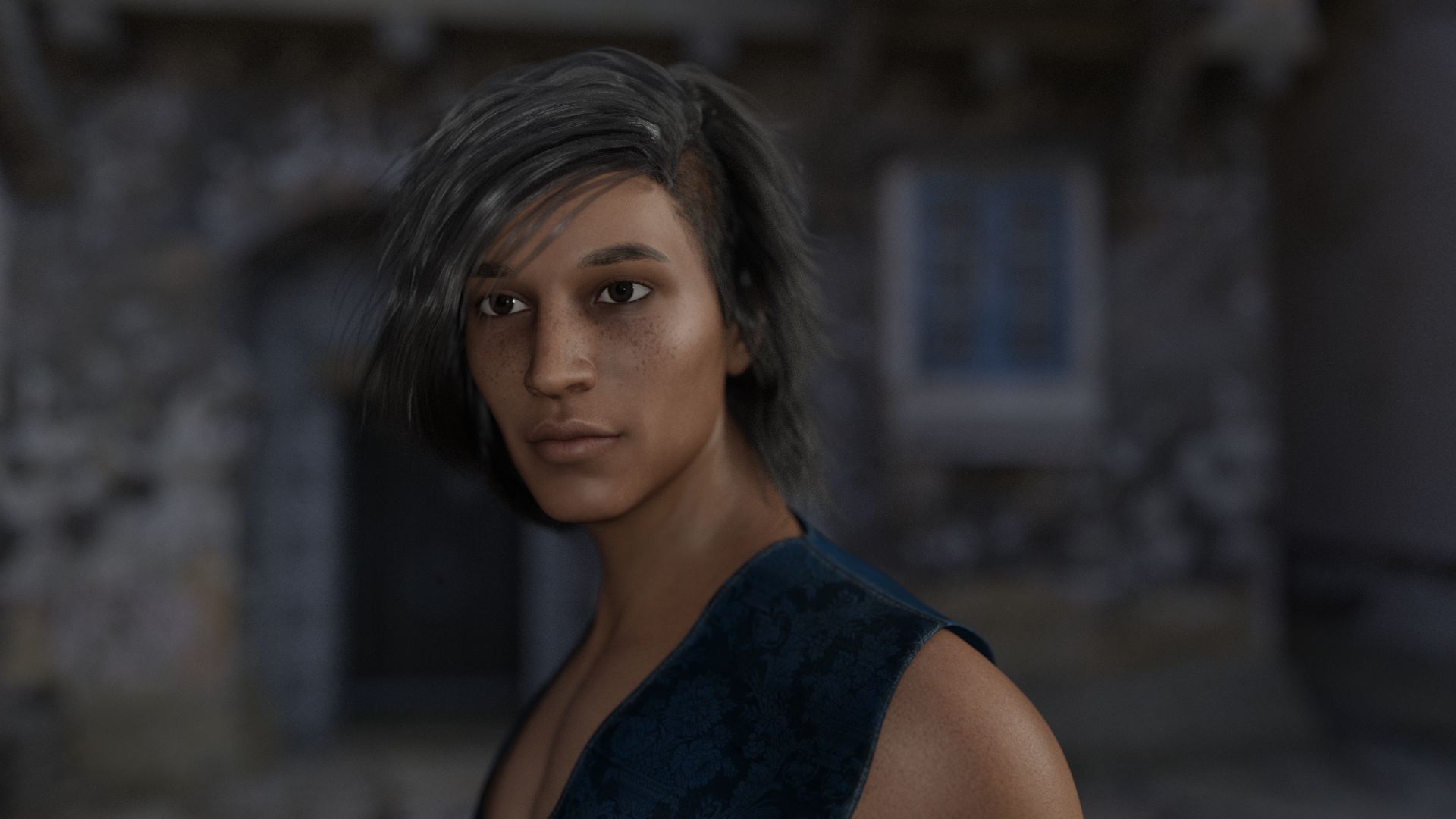 Skin Builder 3 render competition - Closing Date 31st of May 2017
Title: Street Smart
SB3 settings used: Eyes, Eyelashes, Eyebrows, Skin Fine Detail, Freckles.
Character morph is 51% Ekko and 47% Ahmad, plus some tweaks to nose bridge depth and eyelash visibility.
"Create As Empty Morph" on ERC Freeze?Hi.
When creating an ERC Controller, what is the difference between checking and unchecking "Create As Empty Morph"?
And, is there a way to "convert" to "empty morphs" controllers that I created with the option unchecked?
Thank you.
Eye Caramba for V4 and M4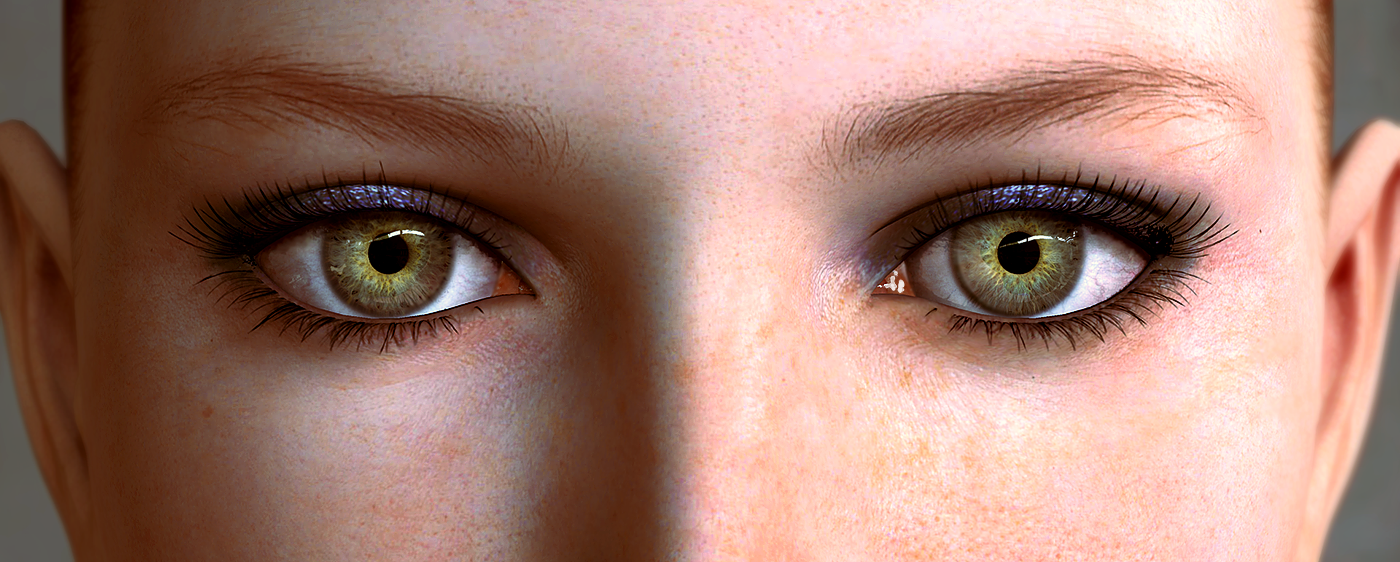
As 3D artists we all know that the eyes are the giveaway when it comes to attempting realism. Even for the major studios the challenge is the eyes. So in an attempt to make my characters eyes look a little less "painted on” I spent some time on a Google “eye macro” image search studying those crazy gobs of goo we spend our days looking through. I also spent a few hours in the Daz3D Galleries looking at some amazing renders. It turns out that DAZ characters do have the makings of great eye realism but strangely the default when loaded is not great natural eye geometry.
The eye surface has two distinctly different surfaces. The cornea and the sclera. Both are as reflective as the other but the cornea is smooth like a mirror and the sclera is quite bumpy. In addition, the cornea is like a bowl that sits on top of the sclera. This produces a different set of reflections than the sclera which is much less curved than the cornea (keep in mind that one thing that will give away the eyes is a long even reflection that crosses the over the sclera and cornea unchanged). There is also a fair amount of refraction introduced by the cornea. This magnified the iris and also causes some cool looking caustics when light hits the eye from the side.
Behind all of that is the iris. This is a crazy and fascinating structure like well chewed bubble gum stretched out; lacing the pupil to the center of the eye. The iris continues behind the sclera right where the cornea turns into the sclera.
The attached set of files is my attempt to mirror these aspects of the eye as closely as possible, Included in the ZIP files (4 in total at the bottom) are 3 morphs for each eye:
CorneaModLeft and CorneaModRight
IrisModLeft and IrisModRight
IrisModLeftNoRing and IrisModRightNoRingCorneaMod reshapes the cornea to match that of a somewhat near sighted eye. The over exaggeration helps with the appearance of realism. This morph also pulls the eye surface mesh into the middle of the head so that it’s out of the way altogether. It’s not needed when using reflections and it’s one less transparent surface that has to be calculated.
IrisMod completely flattens the surface of the iris. The outer edge of the iris is also extended and curved below the sclera. The default iris is quite large so I have set the EyeIrisSize morph (Morphs++) to -0.30 for my renders.
IrisModLeft(Right)NoRing stretched the iris mesh outward so that the outer edge of the image map is pulled out of view. This allows us to control the dark ring where the iris and the sclera meet.
These files are in a Runtime folder which needs to be added to your runtime. There is an inject and remove file to apply and remove the morphs.
In addition to these morphs there are 3 shader files.
EC_Cornea
EC_Iris
EC_Sclera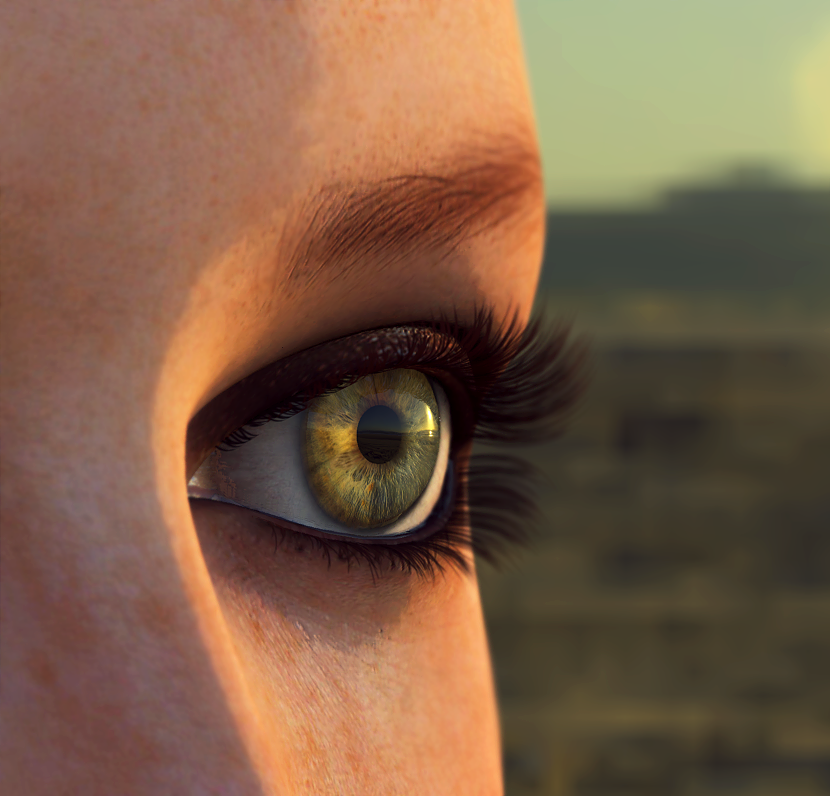
EC_Cornea is purely a procedural shader and sets the surface reflective properties of the mesh as well as the refraction that magnified the iris.
EC_Iris shader includes a started texture map but the PA’s make much better textures than I do and almost all iris textures will work with this kit. To load your own click on the color node and simply load the map you want to use. The bump map is divided between a normal map and a texture map. The texture map should be the one that comes with the color image that you loaded. The normal map is internal and helps produce the caustics when the eye is lit room the side. You can set the normal map to zero if you are lighting from the front since it will darken those areas. This shader should also be applied to the pupil.
EC_Sclera shader includes a starter texture map but once again you can load any that you like. There is also an internal alpha map which fades the inner edge of the sclera into the iris texture map behind. The bump map is internal and creates the bumpy surface of the sclera. Finally, the reflection node sets up the surface reflection. Keeping this at the same value as the cornea reflection seems to work the best. You will probably have to adjust both reflection settings to suite the lighting in your scene.
These mods are far from perfect. I am working on tear morphs that make the tear concave as opposed to round since this is how the tear forms in a real eye. I am also working on a lacrimal morph that stretches the lacrimal over the outer edge of the sclera and then adds an alpha transparency to get rid of the sharp edge between the two. Unfortunately I haven’t been able to get studio to import those so no pz delta files for those yet but I will update this post soon with an updated version that includes them.
One issue I know of is the right pupil is a little smaller than the left. to fix this i set the EyePupilDialate to 0.08. My update will fix this.
In the mean time treat this as a beta and feel free to leave suggestions and any issues you may run across.
All the files can be found below in 4 seperate zip files. For those curious, all renders were rendered with the Carrara photrealistic renderer using HDRI.
Side view showing more of a realistic cornea bulge:
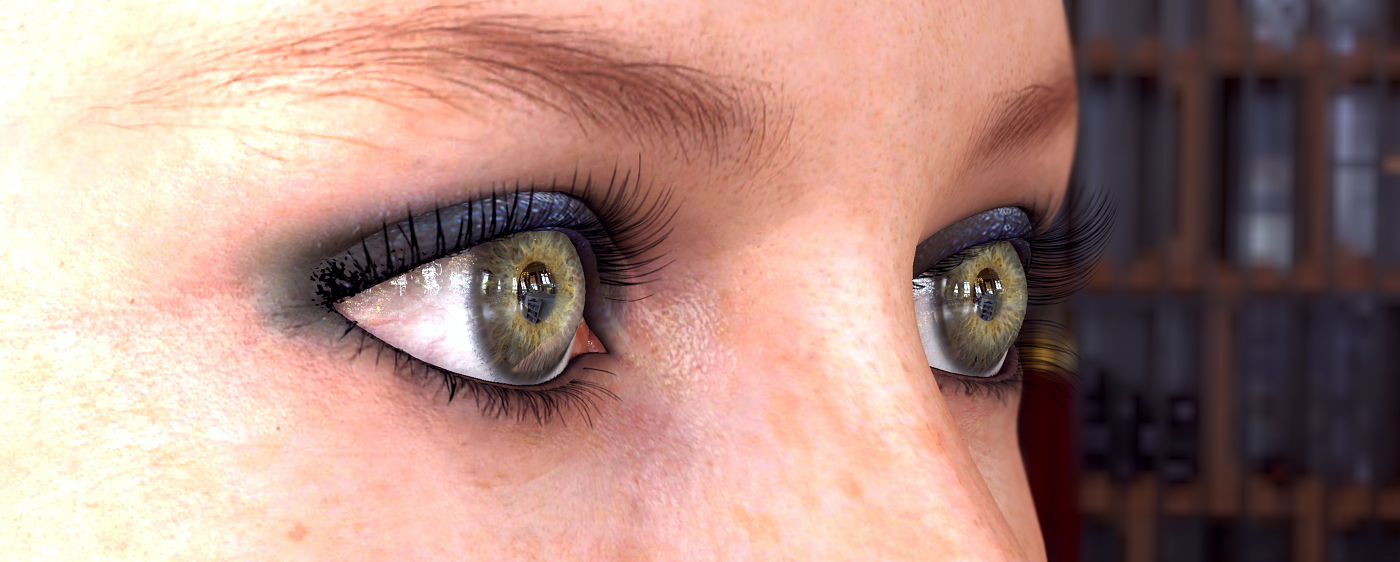
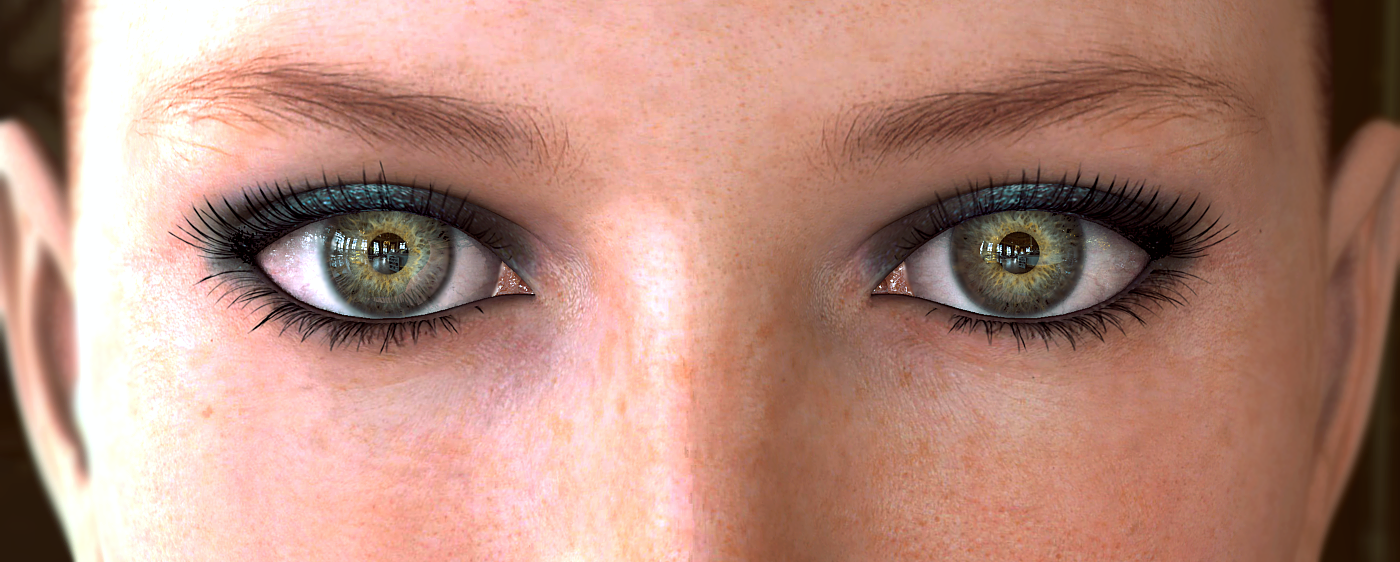 Hercules Issues-Solved
with Hercules installed I get the issue on all my guys who have the standard male nipple morph dialed in no Hercules morph at all. When I uninstall Hercules the nipples go back to how they should look. I don't have swole.
I would work a bit more to see the conditions it takes to get the issue and document that in the ticket. I'm doing renders and promos for the last two days and I don't have any of those MCMs or JCMs firing that causes the nipple to be bad.
I'm having the problem when I lode any genesis male 3 figure; installation of hercules by all the methods yield the same results. There are Swole nipple settings in the Hidden settings that are being activated for every figure.

I'm not doubting the issue, but I noted before to document what exactly you are doing to get the issue (including any other products) so they can narrow down the issue. I just loaded up 3 figures and running a render now, and I'm not getting the nipples on anything other than the Hercules morph. This information is needed so that you can narrow it down and help get your issue resolved.
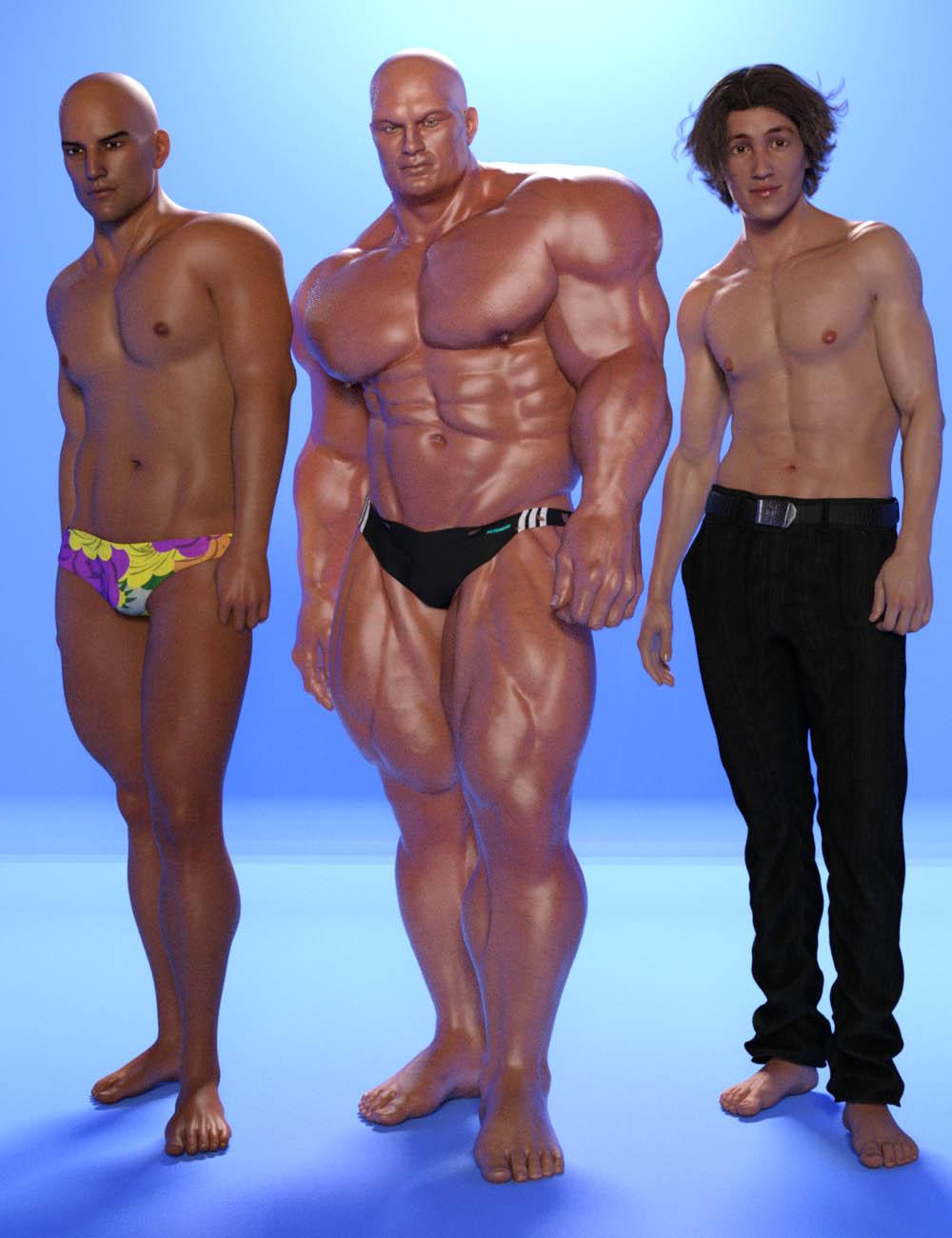
EDIT: The figure is missing one of the things that's needed for HD morphs, which is causing pokethrough on the underwear; I had to edit in Photoshop so the pelvis area passes TOS.
Hercules Issues-SolvedYep. Thats what I got too. Its the swole nipple morph. Also noticed some odd rough bits under the armpit areas of the character. Not reallly noticble but seemed to be occuring as well.
Hercules Issues-Solvedwith Hercules installed I get the issue on all my guys who have the standard male nipple morph dialed in no Hercules morph at all. When I uninstall Hercules the nipples go back to how they should look. I don't have swole.
I would work a bit more to see the conditions it takes to get the issue and document that in the ticket. I'm doing renders and promos for the last two days and I don't have any of those MCMs or JCMs firing that causes the nipple to be bad.
I'm having the problem when I lode any genesis male 3 figure; installation of hercules by all the methods yield the same results. There are Swole nipple settings in the Hidden settings that are being activated for every figure.
SketchUp Importer - Early Progress ReportThe scaling part I see as being very useful. You might want to include some kind of optimizer for the textures and/or mesh with the plugin as the majority of models in the warehouse use a ton of textures/are not UVMapped at all and are not properly modeled for other use. Looking forward to your progress.
The version of this tool for Trainz has about 5 years under its belt at this point, with almost 13,000 downloads so far, and I have indeed heard the same comments from my fellow Trainz community members. After several attempts to automate the cleanup of SketchUp models, I finally concluded there was no single good way to do that which would suit everyone, and in the end I elected to simply transfer the models as they were, without any optimizations other than those that are standard for this type of work. For example, my exporter can automatically eliminate unused faces; but you are right, there is no UV mapping and so textures are brought over in a fairly brute-force fashion. If there are a lot of textures, and the creator used large images, then the model will be inefficient. In fact the Salty Dawg Saloon is a terrible model - it has over 70 individual textures. But it looks good; and if I want it (or something equally bad) for a backdrop in my scene, and am willing to take the performance hit in Daz, then I think that should be up to me. By extension, I believe that same decision should apply to any potential user of this tool.
Bottom line, my goal is simply to provide a means of transferrring data intact from one environment to the other, in a relatively fast and painless way, and leave the optimizing up to the user (and leave the arguments about the "goodness" or "badness" of SketchUp to others as well). Hopefully that makes sense.
Regards,
Mikevalid points, I was just looking out for other DS users as many have no idea of efficient modeling or UVMappiing, or how bad warehouse models are compared to other, more standard models. i develop for the MS flightsim community and there there have been numeruos attempts at using sketchup warehouse models in that game also from users that had no modeling experience and ran into these same issues. In the past with DS, performance wasn't as much of an issue as it is now with IRAY and models could be used that incorportaed inefficient modeling, but now vendors really should be looking at DS design the same way game develpers do with resources and performance in mind, but we are a long way off from that still.
Thanks for the hard work on the plugin, looking forward to it.
Thank's Linday for Satine!Since I have the head and body morphs for both G3F & G3M, I haven't been buying any characters lately (trying to roll my own) but I think I am going to buy this bundle. Tere is just something about Satine that draws you in.
Precisely what I was thinking. She seems to have sculpted features that might be difficult to acheive with morph dials. Plus she has normal maps as well as HD. I'm very tempted.
Hercules Issues-Solvedwith Hercules installed I get the issue on all my guys who have the standard male nipple morph dialed in no Hercules morph at all. When I uninstall Hercules the nipples go back to how they should look. I don't have swole.
I would work a bit more to see the conditions it takes to get the issue and document that in the ticket. I'm doing renders and promos for the last two days and I don't have any of those MCMs or JCMs firing that causes the nipple to be bad.
Hercules Issues-Solvedwith Hercules installed I get the issue on all my guys who have the standard male nipple morph dialed in no Hercules morph at all. When I uninstall Hercules the nipples go back to how they should look. I don't have swole.
Will Morph 3D items work in DS?I am very curious about these items.
Thanks.
Daz 3D is part of

Connect
DAZ Productions, Inc.
7533 S Center View Ct #4664
West Jordan, UT 84084Licensing Agreement | Terms of Service | Privacy Policy | EULA
© 2026 Daz Productions Inc. All Rights Reserved.