-
Hercules Issues-Solved
I'm in contact with DAZ and we are trying to issue an update that will solve the morph problems some are having. There is a free upgrade ready to go out I had submitted to DAZ a week ago that further improves Hercules realistic flexions in his biceps, back and hamstrings when posed that is unrelated to the morph issues. I wasn't aware of the morph issues at the time. I'm trying to get the morph issues solved as part of that first scheduled update.
AIUTO...CHI CONOSCE L’ITALIANO? PARTE UNDICIQuel bundle è meraviglioso, non vedo l'ora di scaricare tutta quella roba.
Ma i morph di A5 e H5 posso usrli se non ho Genesis? O almeno usare le texture? Credo di no.
Centaur 7wonder what the chances are of seeing hd morph addosn for centaur/d horse2 probably slim but who knows could happen
It would only take one morph-master to come up with a basic set of body morphs for the centaur, which could also work on the horse and increase his/her market quite a bit. Maybe... I wouldn't mind vascularity morphs and/or muscularity morphs, but I suspect those will never happen...
Preview - First Look at Avalon Hair for Genesis 3 Male (& Female)Xenomorphine, here's what shrinking the tail thru the rigging looks like. For the heck of it, I'm making a length morph, too. It'll be quicker and easier to adjust one slider, as opposed to 7. Edit: The second pic shows how that turned out.
Centaur 7wonder what the chances are of seeing hd morph addosn for centaur/d horse2 probably slim but who knows could happen
Darwins' SchtuffThank you! The eyebrows are Evan's- I tossed his skin on Lennox for now. Will start working on that after I finalize his head morph completely and work out the body type.
Combining two ERC's into one that switches between?@Scavenger at your third post you start talking about the bone coordinates and asked why they are not at default values anymore as you see them in the joint editor.
Look at some Daz character morphs whith the Property Hierarchy in the FullBodyMorphs you will see all these bone joints get moved to fit to the bodyshape this could be the reason why you see no default bone joint values in the joint editor.
You can easily have DS create such joint correction propertys in an automatic way for your custom shape morph with the joint editor.
Use the Joint Editor right-click the viewport and select Edit > Adjust Rigging To Shape then you can ERC-Freeze these current bone joints to a new Property and save this as a Morph Asset.
You can keep things seperate from the head and the body morph and create a master controler property for to combine all the three or even more together.
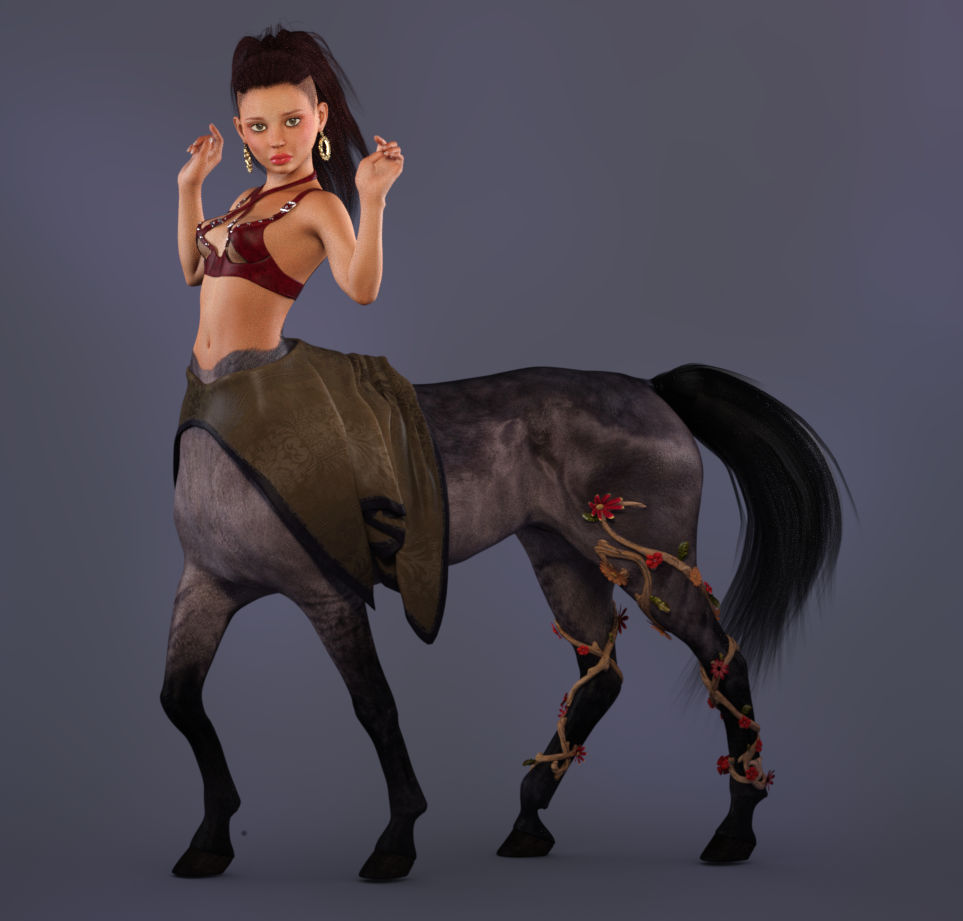
Centaur 7Yes, I tried adding the Arabian and Thoroughbred morph and a little of the Emaciated horse morph to get a less bulky horse body for the little fae and teen characters. Not bad thanks for the suggestion. Still wish there was a real morph maybe a pony or foal morph.
If you have Growing Up for Genesis 3 Females, try this: Start with the base female character, make your centaur body as "less bulky" as you can, then apply a small percentage of the Youth Morph to the "Genesis 3 Female Centaur", which will make both the G3F and the Centaur body smaller. It won't change the shape of the centaur body, just make it smaller overall. Then dial in the fae character head and body until you like the look. (Apply the materials for the fae character to the G3F Centaur at any point, of course.)
Maybe one/some of the PAs will do a morph pack for the Centaur bodies, like those we see for the base characters: Legs longer/shorter; Rump Rounder; Girth smaller/larger; etc., and for the G3M/G3F bases, a few morphs to do things like smooth out the groin, (which can be too obvious on the female after applying various morphs,) and morph the back to reflect the centaur body so clothing will flow across the centaur's back, etc.... Muscularity for Centaur 7... Aging Morphs for Centaur 7... Vascularity for Centaur 7...
 Centaur 7
Like the DAZ Horse, there are several breed morphs. I found both Arabian and Thoroughbred worked well to make the body smaller and "more lithe".
ETA: I should mention, the breed morphs come with the Pro Bundle, in the "Centaur 7 Female Hides and Breeds" product. (At least you can purchase it separately. With the horse, you had to buy the pro bundle to get additional hides and breeds.)
Yes, I tried adding the Arabian and Thoroughbred morph and a little of the Emaciated horse morph to get a less bulky horse body for the little fae and teen characters. Not bad thanks for the suggestion. Still wish there was a real morph maybe a pony or foal morph.
 Generation 3 Aiko and Hiro Appreciation Thread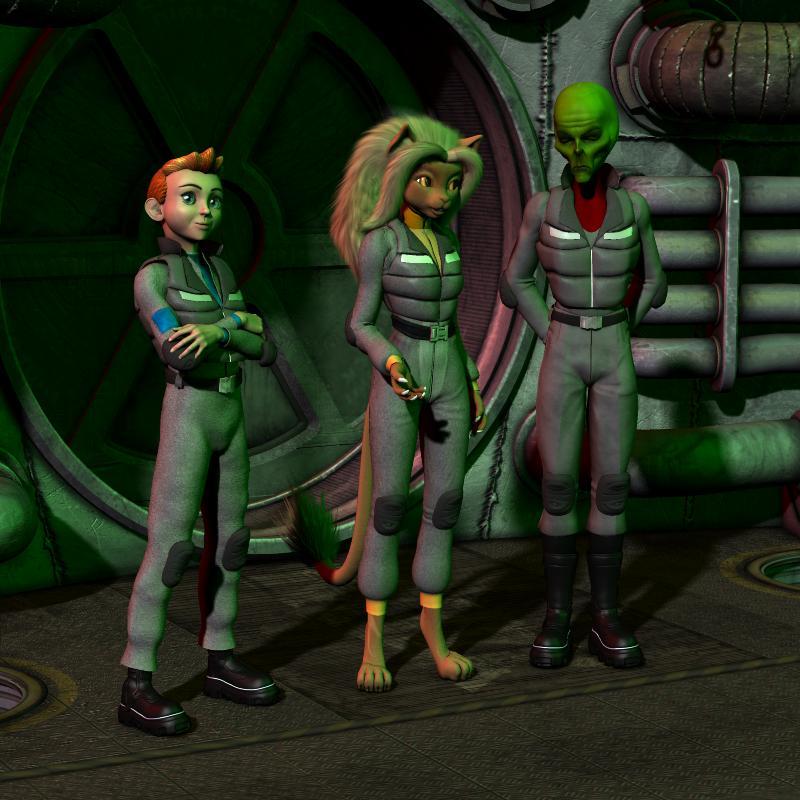
Demonstrating the range of character design that can be achieved with Beth Capsces' morphs.
Believe or not, both the Howdy Doody looking cadet and the dour faced. green skinned alien captain are both Hiro 3! Their distinct appearances were achieved with Capsces Digital Ink's "Hitoro" morph set. The package allowed me to closely capture the look of their original illustrative designs as seen in this old strip.
http://www.mzzkiti.com/log009.htm
Lt. Mzzkiti was envisioned using "Melody" and Beth Capsces' "Furries For..." morphs.
Sincerely,
Bill
[FIXED] A Problem with the Skinchangers CharacterThis is the first time I hear about Hercules messing up anything. Please let me know what it is and we will deal with it in an update if the culprit is indeed Hercules. If it is a JCM it might be me and another vendor have named morphs the same and DAZ Studio might be getting confused with the similar morph names. That is just my assumption without looking at the problem.
In search of: really long dreadlocksPretty please!
It would be awesome if someone could morph something like these:
How come DAZ does not understand this ?If you want just to save the morph and Texture map: Use Character Preset.
If you want to save the clother and hair too: Scene Subset
QED
Posemaster?Nowdays I seldom use posemaster. then I seems lost those icon in tool bar (I set icon in toolbar before with PDF document ,vendor recommended)
but it still be in my content library, and without Filter by Context, I can find posemaster scripts in utilites>script>posemaster
And it still work as same as before. (though I just test transfer pose, V4 to genesis, with document, but genesis2 and 3 may not work without rig map)
[Solved] Can I apply a pose to G3F in Zbrush?In short, yes and no.
You can make a morph in ZBrush and also Polypaint to create a UV in ZBrush and bring both into DAZ to then pose the figure.
As I understand it, you can then take the posed figure back into ZBrush and reapply the Polypaint to the posed figure (I believe) after the UV's are mapped but I am umnfamiliar with exactly how. I would consider looking at the Rendo and Zbrush forums for info as well for more leads. And Youtube is a GREAT resoure for ZBrush tuts as well.
I have a Tutorial on how to make morphs with ZBrush in the forum as well.
How to transfer a morphZero everything but the morph, export as OBJ, import as a morph with Morph Loader pro on the other figure.
Some Morph is distorting my G3 female's body - but I cannot identify it (Solved)Congraturation. then I hope to know, which d|s 4 version are you using ?
About old daz studio 4, when current value is not default (memorized) value, those parameters are shown as "currently used" . then if morph set default as 1.0, it will be loaded with the value, but not shown as currently used.
But daz changed the way, with up-date.
about recent d|s versions, (after ds 4.7) when current parameter value is not zero, the parameter will be shown as "currently used" in parameter tab (at least with "show hidden properties" , even though default value has been modified.
It is discribed like that,
"Back to Base"
Selecting the “Currently Used” filter in parameter based panes now displays properties with a value that differs from the base figure value, instead of the properties that are different than their memorized values. For example, loading the Olympia 6 Character Preset will now show the Olympia 6 shape(s) as “Currently Used” because the morph property has a value that is different than the Genesis 2 Female base.
That means if Nurwen Body.dsf are auto- applied, current value is not zero, and genesis3female.dsf do not discribe , morph values as default. there is case, genesis3female.duf (character preset) save those moprh value, (if overwrite without intention) but other g3f character preset, never load the Nurwen body.dsf with the values.
then the parameter need to be shown as "currenlty used" . if it not work about current ds version (4.7 later), there seems clear problem which DAZ need to know. (I have never seen exceptional case, then hope to know, actually there is case, "currently used" not work as daz dscribed )
I do not have the prodcut, then serch it , and I checked read me, vendor said, it made by 4.9.1.3.0 in read me,, then I think, if you overwrite genesis3female.duf without intention. if so,, you may better, re-install genesis3female essential kit, then genesis3female.duf return default. (not include the morph values).
Some Morph is distorting my G3 female's body - but I cannot identify it (Solved)I had not enough time during the last week, but now I could identify the morph which was causing the changed geometry.
I found no other way than to remove all folders in My Library 3\data\daz 3D\genesis 3\female\morphs\ folder which had been changed since my last working backup. Fortunately I realised that there is a better "narrow down" strategy than to copy them back one by one and test each time: I took one half of the folders, tested; then the half of the remaining folders, tested, and so on. And in the moment the distortion was back I removed the half of the restored folders/morphs again. So after four iterations/tests I found the "evil" morph - it was the "Nurwen" character from a well known content source.
The only little problem was that the body modification morph (Nurwen Body.dsf) of this character is loaded automatically for every G3 female with a value 1 (or 100). Of course that's a mistake from the vendor. But that active "default" morph is not shown under "Currently used" - that's a bug in Daz Studio.
Thanks to all people who posted comments to solve the problem!
Help finding a product.I was wondering if anyone knows what shirt/vest this character is wearing in this picture. The one circled in red. I had hoped it was a shirt in this product with a morph applied but no such luck. (No big deal. I wanted this outfit anyway) I recognize the hat from the Iconic outfit but don't know where the shirt/vest came from. I like the rolled up sleeves. Any help would be much appreciated.
Molly HD for Genesis 3 Females (Commercial)Hi Guys. Here is a sneak peak of Molly. I created her to showcase Growing Up but never really had the time to release her, but now I have. That incomplete folder on my desktop was working on my nerves lol.
Some of Molly's features-
- Contains her own added jcm's for corrections.
- She is a custom sculpt with separate head and body morphs with slight asymmetry in the face.
- Contains separate head and body HD morph details.
- She can be customized by adjusting the used Growing Up and Molly Morphs.
- Two skin variations, freckled and non-fleckled, both with browless or added brow texture options for Iray and 3Delight.
- Molly comes with a Morphable Fibermesh Brows set which contain morphs to create a wide variety of shapes that can also be used on any character for Genesis 3 Female and Genesis 3 Male.
Daz 3D is part of

Connect
DAZ Productions, Inc.
7533 S Center View Ct #4664
West Jordan, UT 84084Licensing Agreement | Terms of Service | Privacy Policy | EULA
© 2026 Daz Productions Inc. All Rights Reserved.