-
Reverse Source from Target broken in DAZ 4.9?
I think it seems broken. I remember, current option work with reverse defomation, even though I mix some morphs.
now I test with genesis2female with mix morphed, and target as simple mesh generate body suit,
set source = current, with reverse defomation not work, it applied all morphs again from current shape, when fit to.
I test without reverse defomation, it generate same mesh. (double deformed)
then source as ”morph” (maybe clone work too) option work with reverse defomation as same as before.
that means, we can choose only one moprh. or need to make shape as clone for mix shape, If you use this option with current daz studio.
I test with official build, but current pulbic build beta is same, then may no need test with beta.
Morph functionI have times thought as a Poser user Daz Studio to test,
Is is a conversion, poser is more easy to use.
But still I like Daz Studio, what I'm looking for is like pose the Morph function I can not find it.
Thanks in advance for your helpLook at THAT! (eye focal scripts)I usually do eyes manually, but this would be wicked.
INTERFACE
A script pane where you select the subject and then in the second pane, it chooses what the character is looking at.
FEATURES
If possible it could have a pose morph component, where the head turns (limits on, limits off)
If you pick a face, it focuses the eyes beyond the target in a straght line to avoid crossing the eyes. Or, you could have a gentle setting that isn't hyper focused
You can also pick parts (nodes?) on the same character so my character might be looking down at their feet or looking at a watch on their wrist or a phone in their hand.
If you select a camera, the character will gaze at the lens. You create or use the directional offset to have the character look slightly off in any direction.
Props
Don't know what they are called....Null objects? Shaped objects that the character can use to focus on....like a ball to simulate a face or a point to focus on. And then a utility preset in the menu to make that object disappear before rendering,.
Or just a visibility check box (or just a reminder to use the one in Scene view) The reason it's a prop is so that it can be scaled. If your character is looking at an immense door, they might be looking up at a large object and the eyes could widen. Small objects brings a squint.
Reverse Source from Target broken in DAZ 4.9?Hello
It's been a while since I've tried the Transfer Utility to rig clothing to figures that aren't the base Genesis 3 figure. The last time I did this was on DAZ 4.7 and all I had to do was select "Current Shape" and "Reverse Source from Target" and it all worked pretty well. But if I do the same on DAZ 4.9, I get large distortions in the geometry after rigging:
1. Load the OBJ modeled for custom shape figure (note the version says "DAZ 4.7 Pro"):
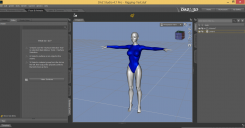
2. Use the Transfer Utility (note that "Item Shape: Current" and "Reverse Source from Target" are selected):
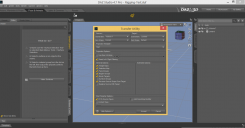
3. The rigged figure fits the custom shape very well:
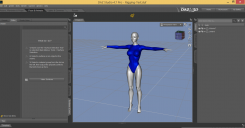
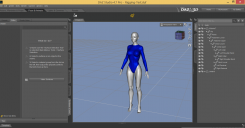
But if I repeat these same steps on DAZ 4.9, the geometry of the rigged figure gets distorted:
1. Load figure (note the version says "DAZ 4.9"):
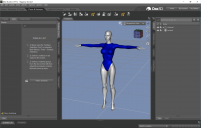
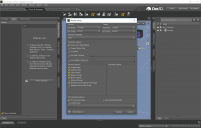
2. Transfer Utility. Select "Item Shape: Current", "Reverse Source from Target". All the other parameters are the same as in DAZ 4.7:
3. Observe the large distortions in the geometry:
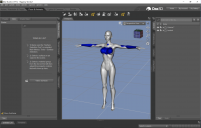
Am I doing something wrong? What else should we do to rig clothing to custom shapes in DAZ 4.9?
Preview - First Look at Avalon Hair for Genesis 3 Male (& Female)nonesuch00, the ponytail can be turned off in the scene tab, bone-by-bone, or using the material zones and cutout opacity. If there was a way to control visibility with one click, that'd be best. Hmmm. Maybe a scale-to-zero control morph? I'll see if I can do that.
...so scaling down to zero causes weird deformations. Fortunately, I figured out how to create a boolean control property set to toggle the visibility on all the ponytail bones with one click. I put it under the Display properties as "Hide Ponytail". Thanks for the suggestion!
Preview - First Look at Avalon Hair for Genesis 3 Male (& Female)You should make a morph for a detachable ponytail too or create a material zone and a preset to hide the ponytail.
Hercules Issues-SolvedHmm... I assumed everyone was having the same problem, but apparently not.
When I first installed the product, none of the JCMs were being multiplied with the Hercules Body morph, and were thus activating for every G3M figure. After adding multiply information in the Properties Hierarchy, the problem went away.
If some people are having it and some aren't, could there be a problem with Daz's installer? Come to think of it, aren't there similar issues with several newly released figures and JCMs?
Edit: This is a shot in the dark, but could this (screenshot) have something to do with it? What do you have your JCM multiply information saving with, Simon?
I saw it but no. It needs to have a multiplier when sharing morphs between two figures like in this case Hercules and Nessus Centaur torsos so it should be XtraSWOLEMultiplier. Rest assured that was my first suspect and the one we scrutinized first but everything is setup correctly.
Preview - First Look at Avalon Hair for Genesis 3 Male (& Female)Somehow, I kept messing up my rigging and weight maps, so I had to repeat a bit of work to get the first auto-fit morph done, for Michael 7. For his test renders, I switched to a new hair color (basically, I'll be matching hair color to eyebrow color based on what's available for a given character). I also rendered each test with a different hairline--low, medium and high:
Centaur 7
And another from me ...he's got draft horse morph and she is shetland pony and a touch ofdonkey to round her butt
Liv Tyler Character Development HELP!!!!Here is the .obj, you need to load it as full body morph in poser, i don't know the process in Daz Studio. Please let me know if you use her, and let me see your renders!
https://www.mediafire.com/?bmqe7mhf6my7pbrHercules Issues-SolvedHmm... I assumed everyone was having the same problem, but apparently not.
When I first installed the product, none of the JCMs were being multiplied with the Hercules Body morph, and were thus activating for every G3M figure. After adding multiply information in the Properties Hierarchy, the problem went away.
If some people are having it and some aren't, could there be a problem with Daz's installer? Come to think of it, aren't there similar issues with several newly released figures and JCMs?
Edit: This is a shot in the dark, but could this (screenshot) have something to do with it? What do you have your JCM multiply information saving with, Simon?
Genesis Quadraped: Mutts and Kitties and ...I would love a new set of morphable dogs and cats in the same vein as Genesis(1,2,3)
Maybe something like a Genesis Quadraped which can morph into most animals and perhaps a good number of monsters too but built for four legged locomotion.
Liv Tyler Character Development HELP!!!!Hi there!!
I'm just a hobbyst, but sometimes i dare to make my own contents. Unfortunately, my skills are not as good as my ambitions, so i can't make all the things i want to do. (Someday, with practice, maybe)
I'm working on a 3d Clone of Liv Tyler as Arwen, that will be released as a freebie for V4 (And maybe G3)
I need a team to make:
-Textures (I'm really bad at this topic)
-Fix mesh details.
-Comments and suggestions. (If some professional developer could give me support, i would VERY happy)
-Convertion to G3
-Any other thing i missed up or ignore.If you are interested in this project, welcome and let's start to work!
Here is the .obj, you need to load it as full body morph in poser, i don't know the process in Daz Studio. Please let me know if you use her, and let me see your renders!
https://www.mediafire.com/?bmqe7mhf6my7pbr
Some Morph is distorting my G3 female's body - but I cannot identify it (Solved)I am using the latest Beta version (4.9.3.166) and (rather seldom...) the latest regular 4.8 version; I did not yet update because I don't like the encryption/connect idea :) ... The problem (the morph is loaded by default, but not shown in "Currently used" was in both versions.
But of course it was no big work to handle the problem after identifiing the morph - I could run the "remove script" everytime, but I simply deleted the "body.dsf". It would be also possible to edit the body.dsf file and change the "1" to a "0" value.
Can someone help me with my kitbashing?I would go with the Glow-Fi armor, make a morph to pump up the collar and Smooth some of the Greeble out.
Change the materials to Destro's Colors.
Use a metal band shader (Found a nice one at Rendo - https://www.renderosity.com/mod/bcs/iray-pbr-pro-scifi-shaders-mr/117449/) for metal and banded metal for his skin and face.
I hope these suggestions help. :)
AIUTO...CHI CONOSCE L’ITALIANO? PARTE UNDICINon ho Hiro 5 e Aiko 5.
In qualche modo funzionano abbastanza bene dopo il trasferimento tramite GenX2 anche privi di figura base... Chiaramente ci saranno delle differenze, ma il morph in sè è utile per avere un pò di "varianza" sul modello.
Carnotaurus sastrei [Commercial]Got to admit, I passed based on the hands although the head and body are awesome.
I hope you do some kind of morph because - with the prevalence of fantsy renders, I just think grasping, poseable hands are a thing.
Yeah, a morph would be awesome so that giant claws could come grabbing at ya..
OOOORRRRRR maybe you make armored claws.......that go on top of the arms like gloves...oh snaps.
Hercules Issues-SolvedI'm in contact with DAZ and we are trying to issue an update that will solve the morph problems some are having. There is a free upgrade ready to go out I had submitted to DAZ a week ago that further improves Hercules realistic flexions in his biceps, back and hamstrings when posed that is unrelated to the morph issues. I wasn't aware of the morph issues at the time. I'm trying to get the morph issues solved as part of that first scheduled update.
AIUTO...CHI CONOSCE L’ITALIANO? PARTE UNDICIQuel bundle è meraviglioso, non vedo l'ora di scaricare tutta quella roba.
Ma i morph di A5 e H5 posso usrli se non ho Genesis? O almeno usare le texture? Credo di no.
Centaur 7wonder what the chances are of seeing hd morph addosn for centaur/d horse2 probably slim but who knows could happen
It would only take one morph-master to come up with a basic set of body morphs for the centaur, which could also work on the horse and increase his/her market quite a bit. Maybe... I wouldn't mind vascularity morphs and/or muscularity morphs, but I suspect those will never happen...
Daz 3D is part of

Connect
DAZ Productions, Inc.
7533 S Center View Ct #4664
West Jordan, UT 84084Licensing Agreement | Terms of Service | Privacy Policy | EULA
© 2026 Daz Productions Inc. All Rights Reserved.