-
Celebrity Look-a-Likes for 3D figures Part 2
Older Jennifer Connolley tweaks:
First get Andromeda byMRL
OLD JENNIFER CONNOLLEY-
Some of the settings are a little goofy because this was a work in progress from a year ago.
Like why even have a “heavy” body setting if I’m just taking it away again with a high “Thin” setting?
I don’t know.
This makes a FANTASTIC Wonder Woman, by the way.
Morph ++
Full head and Face
Old .364
Face long 1.324
Face full -.376
Nose depth -.600
Nose height 1.416
Nose width -.372
Lower face
Cheeks sink .376
Morphs /Expressions Base
Eyes squint .535
Eyes open-close -.016
Mouth smile simple .124
Makeup
Andromeda 5
Eyes
Andromeda 03
BODY
Fitness .116
Thin .656
Young .228
Voluptuous .492
Heavy .236
ANYBODY WHO TRIES THIS, LET ME KNOW IF IT WORKED!
Celebrity Look-a-Likes for 3D figures Part 2Hi everybody! Here are my Jenniffer Connolley tweaks I sent to a nice fellow who sent me a message, but I forgot to share them with the group.
Did I forget? I backtracked and couldn't find it.
First get MRL Andromeda
All I did was make the face more fleshy, turn the nose up, and provide an expression which helps with shaping. The mouth doesn't need to be open.
After observing young Jennifer, her mouth is often slightly open and she has a blank look which translates to sweet and innocent.
The expression tends to make the mouth a little smaller, and the nose might be a little wider in the tip and nostril area. I hope I got that in.
Tweaks for young Jennifer:
Make sure you have DAZ Morphs ++ and MRL Andromeda morph applied. I'm not sure how urgent that one is, but do it anyway.
I used DAZ Long Story hair, but you might have better idea.
Nose flesh full .580
Face full .580
Nose tip up/down .848
Expression:
Brow up-down .212
Brow outer up-down .560
Brow inner up-down -.482
Eyes squint .440
Mouth open .552
Lips part .660
Lip top up-down .448
I hope this works. I've never done this before.
Old Jennifer is also a must-have, and I'll get to it right away.
MRL Andromeda provides some expressions, but haven't used
ALMOST FORGOT!
Part 2, body tweaks-
Not usually useful if the body is clothed.
Young .228
Voluptuous .492
Heavy .236
DAZ Natural Gravity Morphs for V4 could come in handy.
Preview - First Look at Avalon Hair for Genesis 3 Male (& Female)Okay, back again. The problem I was having was in the rigging; it didn't manifest until I tried to "fit to" Victoria 7. The 7cm displacement was essentially due to a slight head height difference between G3M and G3F present in the rigging. When I tried to transfer the rigging from my original model to the G3F version, it shifted the hair from the modeled position to the G3M head position. Which meant that I had to re-rig from scratch. I'll also have to make adjustments to the morphs created for the G3M version, when I transfer them, next.
Until then, here's the rigged female version:
Need idiot proof toon shader/render tut, esp for four listed...The Noir-line shaders were envisioned as suitable to apply across one's whole scene, or in front of a relatively plain backdrop. Unfortunately, they're rather resource-heavy and thus it becomes prohibitive to use them for complex or detailed renders. There's also a bug in the Specular Color and Refractive Color so that they do not transfer properly from "standard" shaders (DAZ Default Material, UberSurface, Iray Uber, et c...) which I hope to fix this year. If you'd like color-and-style presets more specific than those in the original package, I have several that just haven't made it into the store, and one set I had taken down after a wheezingly bad year. And, of course, there's the updated versions that I haven't released to QA yet...
Josh Crockett Suggestion Page for Monster Characters!A little something just for fun today. Super quickie neomorph.
Where can I purchase this morph? ;)
Tranferring head or face morphs only?A shaping preset would work, if you go through the options menu and first unceck all, then check only the groups with head shaping morphs - as long as you aren't wanting to split the effect of a single existing morph.
Tranferring head or face morphs only?Is there a way to transfer JUST head or face morphs?
I created a face on a character with the https://www.daz3d.com/genesis-3-female-head-morphs and am hoping there's an easy way to move the result to different character with body slider morphs I've already made.
Thanks in advance :)
A quick way to save smoothing/collision results as a morph.One of the biggest slow downs in workflow is smoothing modifier when trying to pose figures. The way around this is to disable smoothing > pose then enable and wait for the smoothnig process to finish which can also take a while. If you have to pose multiple figures it slows things down more. If you have multiple smooth elements with collision like Clothes and sitting impressions on a couch you get recursive loops of smoothing that never end.
The solution would be to export the smoothed figure and then bring it back in through the morph loader but that takes too much time because you have to make the whole scnene invisble except for that one figure and export it as obj. Then you have to repeat this with multiple figures. If you try doing animation problem is worse.
What I want is a script or feature that just turns the results of smoothing into a morph, where you click on the script or button and a morph is created, smoothing is then set back to 0, baking the results into that morph.
Novica & Forum Members Tips & Product Reviews Pt 8Here's the Iray Glassworx again, I posted this in the Commons but will put it here too. The floor materials are irregular looking when you use the glass shader, which I really like (it's not render noise.) The product also did the back wall, default load. You can tile to get it to have smaller squares.
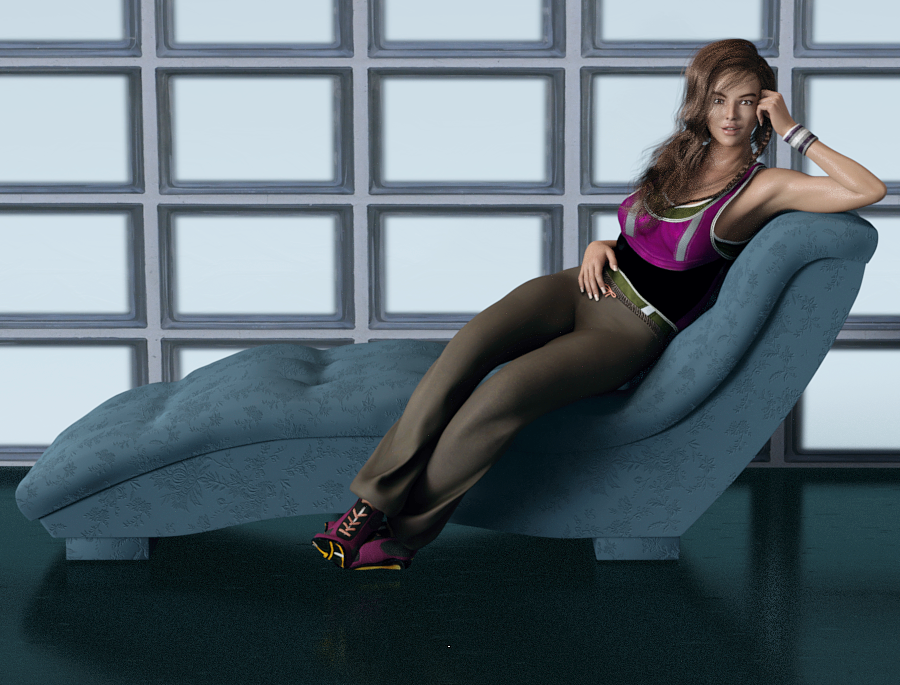
We talked about the Digital Touch characters looking a lot alike, so to be fair, I wanted to take a very close look and then pick ONE to try. For me, it was a toss up between DT-Cindy For Genesis 3 Female(s) (shown below) or Eve based on the thicker, slightly more natural eyebrows. Cindy has poofier lips, but they can be slimmed easily with the morph sliders. Yolanda has nice lips and more natural eyebrows (where they start, more individual lines) and I would simply turn the nose tip and nostrils down (I don't like noses where the nostrils are really prominent.)
Shopped for four years, and I will admit it's my first Digital Touch female, I think it backfired on the vendor to have all the women in dark hair to look alike. They look TOO much alike IMO. This is Cindy and I shrank the bottom lip 14%, and I like her! Her materials aren't ultra ruddy, they are easily lit. It's Sapphire Hair and the chaise is included in the Bella Donna Poses, Chaise, and Shaders The pose is from that product also. It's really nice, one click and she's on the chaise and in position. (Both the pose and the chaise load World Center.)
I'll do a closeup of Cindy, then I'm headed to the barn (It's 6:15 and a lovely day, nice and cool at this time of day.)
 Reverse Source from Target broken in DAZ 4.9?
Yes those step have been used, (And I know it work
 ) though I usually save as clone about current mix morphed shape when I use reverse defomation option, (because Clone have no concern about scale proplem etc, and find it easy ,when you aplly "soruce as clone" option. it may not different from your way, make one " temp FBM" for TU.
I usually model clothing first for zero shape figure, then keep the clothing obj in my 3d aprication, later make it fit to my actor shape, sometimes you may hope to overwrite auto-generated morph individually.
Then it has been recommeded for long time, even though we model clothing for morphed shape, at first transfer weight and rig to clothing with zero base figure. not morphed figure. Though there is auto-reverse option, most of case we need to re-modify and tweak a little for zero base shape. (because auto-reverse process not work perfect, it aproximately reverse and remove generated morph from Clothing to zero shape)
I really like merge many morphs for body or head , then usually I hope to re-shape clothing for each actor shape . then may not plan start with morphed shape, without I concentrate one actor shape, and hope to make best fit item for the Actor. (but I tweak body morphs frequently,,,,)
 Released: Easy Teeth - Control Dials + Morphs and Materials for Genesis 3 Female(s) +MR [commercial]
https://www.daz3d.com/easy-teeth-for-genesis-3-female-s-and-merchant-resource
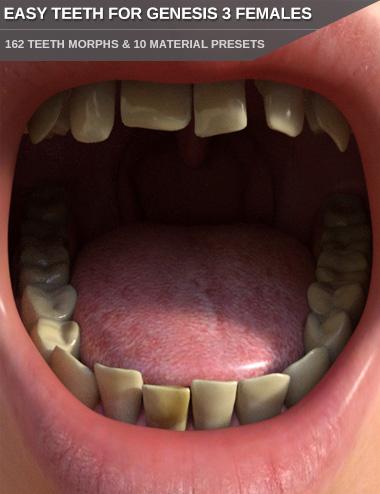
The teeth of humans never look exactly the same.
Give your Genesis 3 Female based characters some more individuality with adjusting the shape and look of their teeth.
This morph pack contains 162 morphs to adjust the shape and position of the teeth. You can adjust each tooth individually. Make them wider/smaller, longer/shorter, adjust the depth or make the tooth or several/all teeth completely gone to get a gap or loosen the teeth step-less. Great for elderly men, younger kids with tooth gaps or any other situation where a missing or loose tooth or teeth is needed. You can also move and rotate the upper incisors, lateral incisors and canines.
Included are also morphs for all teeth, like one to get childish milk teeth. Children's teeth do not look like adult ones, so this is very handy for younger characters. Morphs to make the teeth irregular are included beside morphs to make the lower and upper canines sharp (nice for vampires or other fantasy creatures) as well.
Rounded up is this product by the included 10 material presets for Iray. Unclean and yellowed teeth, different teeth tones like slightly stained or bleached white teeth, bloody teeth and one preset with gold teeth. There are also 6 shape presets included that utilize the morphs. You can of course save all your teeth adjustments as your own shape presets as well to be able to quickly apply your favorite settings later.
Overall a very versatile product to make your characters more unique.This product is also a Merchant Resource you can use to create morphs for your character products. Please refer to the ReadMe how this resource may be used.
Reverse Source from Target broken in DAZ 4.9?Kitakoredaz was right, and thanks to him I was able to find a workaround for this issue. I'll post a more detailed solution later; but here's the gist of it:
1. Load Genesis 3 Base and dial-in your custom character (in my case, this involved about 20 different dials from various morphs and vendors).
2. Save the current Shape Preset for later and model your clothing on this custom shape.
3. Set the resolution of your Genesis 3 figure to Base, Subdivision to 0 and export it as an OBJ file at 100% scale. We're going to create a morph from this OBJ.
4. Reset the shape of Genesis 3 to 0, it should look like the base figure again.
5. Use Morph Loader Pro and the OBJ created in step 3 above to create a morph for Genesis 3. Remember the name of this morph for later.
6. Dial the morph created in step 5.
7. Reset the figure to High resolution and subdivision level to 1 (or whatever it was when you modeled your clothes).
8. Load your clothes. They should fit your morphed figure.
9. Use the Transfer Utility to rig the clothing: In "Item Shape" select "Morph" and then select the morph you created on step 5 above. Also enable "Reverse Source Shape from Target".
10. Select the projection template (if applicable).
11. Run the transfer utility. Your clothes should now be rigged without distortion on the morphed figure and they should be usable now. If this is all you wanted, then you're done!
Side note: sometimes this step will create minor distortions in certain areas. At this point you might want to use the Morph Loader Pro again on the rigged clothing and load the original, un-rigged OBJ of the clothing to create a morph. Yes, what I'm saying is this: create a morph that transforms the rigged clothing back to its original modeled shape. This should eliminate all minor distortions that may have been created by the transfer utility.
12. Optional: delete the morph created in step 5 or simply reset the shape of Genesis 3 again so that it looks like the base figure (the rigged clothing should also follow this change so that it fits Genesis 3 Base), then load the Shape Preset you created in step 2 above. The rigging should now work on your Custom Shape. This has the additional advantage that you may continue to refine and tweak the Custom Shape to your liking and the rigged clothing should continue to work (to within reasonable limits).
These steps worked for me. However, I don't think the end user should jump through hoops just to get the same funcionality we had with a couple of clicks 2+ years ago. I think a bug should be filed to fix this.
Reverse Source from Target broken in DAZ 4.9?So, what you're saying kitakoredaz, is that Reverse Source from Shape only works for a single morph?Daz Studio Pro BETA - version 4.9.4.122! (UPDATED)Daz 3D is pleased to announce Daz Studio Pro BETA - version 4.9.4.122! (*UPDATED*)
!! IF YOU HAVE NOT UPGRADED TO THE 4.9 GENERAL RELEASE, IT IS HIGHLY RECOMMENDED THAT YOU BACKUP YOUR CONTENT DATABASE IN DAZ STUDIO 4.x BEFORE LAUNCHING THIS VERSION !!
How do I backup my User Data in Daz Studio?
!! IF YOU HAVE NOT ALREADY MIGRATED FROM THE VALENTINA DB BASED CMS, IT IS HIGHLY RECOMMENDED THAT YOU MIGRATE TO THE POSTGRESQL BASED CMS BEFORE LAUNCHING THIS VERSION !!
Has the Content Management Service (CMS) changed?
Highlights:
4.9.4.122 (June 30, 2017) *UPDATED*
- Auto-Fit / Transfer Utility
- Fixed a crash when using Auto-Fit or Transfer Utility
4.9.4.121 (June 23, 2017)
- PowerPose
- Fixed a crash on OS X when clicking a node point that controls a property with a range of zero; e.g., Genesis 3 & Genesis 8 twist bones, where the min and max of cetain transform properties are both set to 0
- Fixed an issue where the right-click drag vertical control label for a node point could incorrectly display the label for the left-click drag vertical control
- Fixed an issue where a change in the size/scale of a given node point's effect was not being signaled (and therefore not being applied)
- Fixed an issue where deselecting a property point did not cause all of the potential properties to be deselected; this could result in properties that should not be affected by a given property point being affected
- Fixed an issue where mapping of property points did not correctly initialize; this could result in unintended results when manipulating property ponts
- Content Loading
- Fixed an issue where holding the AltModifier key while drag-n-drop loading a Character Preset that executes a post-load script (e.g., Genesis 8) would not respect the offset defined by the load target
4.9.4.117 (June 14, 2017)
- PowerPose
- Fixed an issue where right-click drag horizontal on a property point was flipping the effect of the drag direction based on data for the left-click drag
- Fixed an issue where the left-click drag vertical size on a node point was using the size data for the right-click drag vertical
4.9.4.115 (June 13, 2017)
- PowerPose
- Now restores the specified properties of nodes in a node group point if the AltModifier is pressed when clicking a selected node group point
- No longer deselects the selected node(s) of a figure when clicking an “empty” area of the template
- No longer forces deselect of a given point in order to click and drag the same point again
- Updated styling of points
- Updated tips to reflect style changes
- Added support for enabling version 3+ templates for specific geometries
- Fixed a crash when the selected figure is missing a template node
- Fixed an issue where clicking and dragging a node group point would zero the values of properties of each node in the group before beginning to manipulate them; causing it to “pop” with each use
- Fixed an issue where holding the AltModifier while clicking a node point did not restore the properties of the node
- Fixed an issue where holding the AltModifier while clicking a point of a given type would restore the properties associated with the selected point even if the clicked point was not the selected point
- Fixed an issue when selecting a prop; selecting a prop in the hierarchy of a skeleton should NOT cause the template for the figure to be deselected; selecting a prop NOT in the hierarchy of a skeleton should cause the template for the figure to be deselected
- Fixed a crash when the 'current' node was missing
- Fixed pixelMetric (log) warnings
- Fixed paint (log) warning
4.9.4.113 (June 9, 2017)
- Uber Iray Material
- Added a "Dual Lobe Specular Reflectivity" property
- PowerPose
- Made improvements to configuration abilities; via template files
- Dynamic scaling of template data is now supported (for version 3+ templates)
- Supports scaling up to the dimensions of the background image; if the widget/pane is larger than the background image for the template, it will be centered
- Supports scaling down to a minimum of 300h x 200w
- The layout of the pane has been changed
- The encompassing tab widget has been removed; in preparation for replacing it with a combobox that provides easy access to all templates in the set
- The "Reset Pose" button has been removed; use actions in the pane's option menu and/or action accelerators (keyboard shortcuts)
- Added an InfoDivider with a Tips page
- Fixed cursor display issues
- Preset Saving
- Added support for setting a post-load script to the Character Preset Save Options dialog
- Scripting
- Made API additions and/or resolved issues in various areas; see the Change Log for more detail
- Fixed bugs and/or made improvements in various areas; see the Change Log for details
4.9.4.110 (May 26, 2017)
- NVIDIA Iray
- Integrated Iray 2016.3.2 (278300.12584); see below for more details
- Uber Iray Material
- Added support for chromatic sub surface scattering color
- Added a "Scatter & Transmit Intensity" option to the "Base Color Effect" property
- Added support for dual lobe specular
- Added support for new features in translation to Shader Mixer
- Database Driven Asset Views
- Dragging and dropping an asset onto a category when the "Filter By Context" option is checked and an object in the scene is selected will now ask whether or not the user would like to mark the asset(s) as being compatible with the compatibility base of the selected object
- Database Driven Product Views
- When the path of an icon for a product cannot be determined from a database entry (e.g., installed/imported vs created), an attempt is made to locate an icon in the mapped Daz Studio/Poser Format directories where the path/name matches the pattern ./Runtime/Support/<StoreID>_[<ProductToken>_]<Product_Name>.<Ext>; the PNG extension is attempted followed by the JPG extension if not found
- Content DB Editor
- Sending the "LOCAL USER" product to the Content DB Editor no longer displays the "Product" page within the dialog; the "LOCAL USER" product is a special case catch-all product of which the product specific details should not be modified
- The "LOCAL USER" store is now explicitly listed in the store selector on the "Product" page of the Content DB Editor dialog instead of displaying an empty value
- Content DB Editor now checks that a file is not user-facing (loadable) before it allows that file to be listed in the support files list
- Editing a file listed in the Support File(s) list of Content DB Editor and choosing a user-facing file removes the edited entry from the list
- Content DB Editor root categories now use a path combobox dialog instead of root categories menu; prevents the menu from becoming so large that it cannot fit on the screen
- Auto-Fit
- Added support for applying pose data in clones to morphs that are not removed
- Optimized pose corrective morphs
- Added support for clone asset ERC links
- Auto-Fit now provides cursor feedback while busy
- Transfer Utility
- Transfer Utility now supports clone assets with embedded pose data
- Added support for applying pose data in clones to morphs that are not removed
- Optimized pose corrective morphs
- Added support for clone asset ERC links
- Fixed a skin binding issue with the "Replace Source With Target" option
- Clone Asset Saving
- Replaced the message box and node selection behavior used by Clone Asset save with a dialog that presents options for choosing which figure represents the base and which figure represents the clone
- Clone Asset save now suggests a filename based on the clone figure name in the file save dialog
- Clone Asset save now provides an option within the dialog to select the destination base path; this is automatically set/updated when the Base Figure is selected/updated
- Clone Asset save now provides a property selection view within the dialog for selecting which properties to remove from the target figure when projecting using the clone via Auto-Fit or Transfer Utility
- PowerPose
- Fixed an issue that left selection points clickable when no figure is selected
- Fixed an issue that caused cursor feedback when no figure is selected and no selection points are displayed
- Updated the default male templates to match functionality provided by the default female templates
- Templates now support relative (to the templates file) paths
- The ability to dynamically load a template set from a figure's support asset tools folder (for non-legacy figures) has been added
- Clicking a property selection point now causes the node associated with that property to become selected; if the node is hidden, the node hierarchy is ascended until a non-hidden parent node is reached
- The label of a node is now used in tooltips instead of its name; matches display in other areas of the UI
- Pane configuration has been moved to the layout file instead of the startup script
- ActivePose tool configuration has been moved to application settings instead of the startup script
- The pane option menu has been updated
- Tool tips, status tips, and what's this text has been extracted to an inline help file
- The ability to save a template set via scripting API has been added; this feature is still in the late ALPHA phase of development - format is subject to change as the feature is completed; saved templates are not compatible with earlier versions; non-legacy vs legacy figure is handled differently based on the corresponding asset loading mechanisms
- Non-legacy figure templates can now specify a property on any node (including the skeleton) as a selection point; legacy figures are still limited to Morphforms
- Map Transfer
- The alpha channel of a texture is now supported when using GPU
- Animation Saving/Loading
- Current animation range is now saved/read to/from a scene file
- Current play range is now saved/read to/from a scene file
- FPS is now saved/read to/from a scene file; FPS is no longer written to the startup script
- Clearing the scene (e.g., File > New) now resets FPS to the default (30)
- Node
- Fixed an issues where the "Visible in Render" property was not being respected in OpenGL renders
- Group Node (3D Layer)
- The "Visible in Render" property now controls whether or not child nodes are considered visible in a render
- Fixed an issues where the "Visible in Render" property was not being respected in OpenGL renders
- General User Interface
- Updated default menus; recommend running the "Update and Merge Menus" script
- Added the ability to invoke a screen color picker from any color widget by pressing the AltModifier on the keyboard while initiating a left-click + hold from the area of the color-well between the numeric values; the cursor will change to a cross and the color will update as the cursor is moved; releasing the left-click + hold commits the color of the pixel currently under the center of the cross cursor; right-clicking while the left-click + hold is still active cancels the operation
- Added a Log Size preference (and a Default button) to the General page in the Preferences dialog
- Scripting
- Many API additions and/or resolved issues in various areas; see the Change Log for more detail
- Fixed bugs and/or made improvements in various areas; see the Change Log for details
Important Notes:
- The first time you launch Daz Studio 4.9, any data that exists in the content database is migrated so that it can be used in Daz Studio 4.9.
- The amount of time the database migration operation takes is proportional to the amount of data to be migrated.
- The database migration operation does not delete the data that it migrates from the previous location so that it remains accessible by earlier versions and other applications, such as Carrara.
- Daz Studio 4.9 uses the same PostgreSQL database as Daz Studio 4.6 and later, and/or other applications, such as Carrara.
- A portion of the data contained within the database is shared amongst versions but not entirely. For example:
- Creating a category in either Daz Studio 4.9 or 4.8 will cause that category to exist in the other version
- Assigning a file to that category in Daz Studio 4.9 will NOT cause that file to be assigned to that category in Daz Studio 4.8
- Assigning a file to that category in Daz Studio 4.8 WILL cause the file to be assigned to the category in Daz Studio 4.9
- Reseting the database in any version of Daz Studio that uses PostgreSQL (e.g., 4.6 or later) will purge all of data in the database, including any data that may be used by earlier versions or other applications, such as Carrara.
- After the initial migration operation, edited metadata in Daz Studio 4.8 will not be migrated to Daz Studio 4.9.
- A workaround is to export User Data from Daz Studio 4.8 and reimport User Data in Daz Studio 4.9.
Frequently Asked Questions:
General Release Threads:
- 4.9.3.166 (January 5, 2017)
- 4.9.2.70 (May 25, 2016)
- 4.9.1.30 (March 8, 2016)
- 4.9.0.63 (January 21, 2016)
Previous 4.9 Beta Threads:
- 4.9.3.166 (RC5)
- 4.9.3.153 (RC4)
- 4.9.3.128 (RC3)
- 4.9.3.117 (RC2)
- 4.9.3.71 (RC)
- 4.9.3.56
- 4.9.3.37
- 4.9.3.25
- 4.9.2.70
- 4.9.2.67 (RC)
- 4.9.2.60
- 4.9.2.55
- 4.9.2.44
Morph functionDo you mean the Morph Brush? DS doesn't have that - the nearest you can get, for a limited range of purposes, is a weight-mapped Push Modifier (which will move the mesh in or out as you paint on the weight map).
Yes exactly that I meant a Morph Brush, many thanks for your help.
Which DAZ Genesis 3 M and F characters are the most realistic?"I find it very hard to explain./ It's not realism but like....as if...they use a different rendering engine...if that makes sense...
Something...I can't describe, but I know it when I see it."
Good Depth of field in most of those renders and they appear to have some post "Bloom" added
nice work.Dof is huge for me. I pretty much always use it now. Sharp perfectly clean edges just *scream* CGI.
"Boudica's render may not be 100% photoreal, but I think we can agree it's closer than most of us will ever get."
Hmmm.. Must disagree respectfully
The SSS light penetration on the right bridge of the nose is wrong
to be frank.
This artist uses Blender to render his DAZ females
a more realist result on the hair IMHO.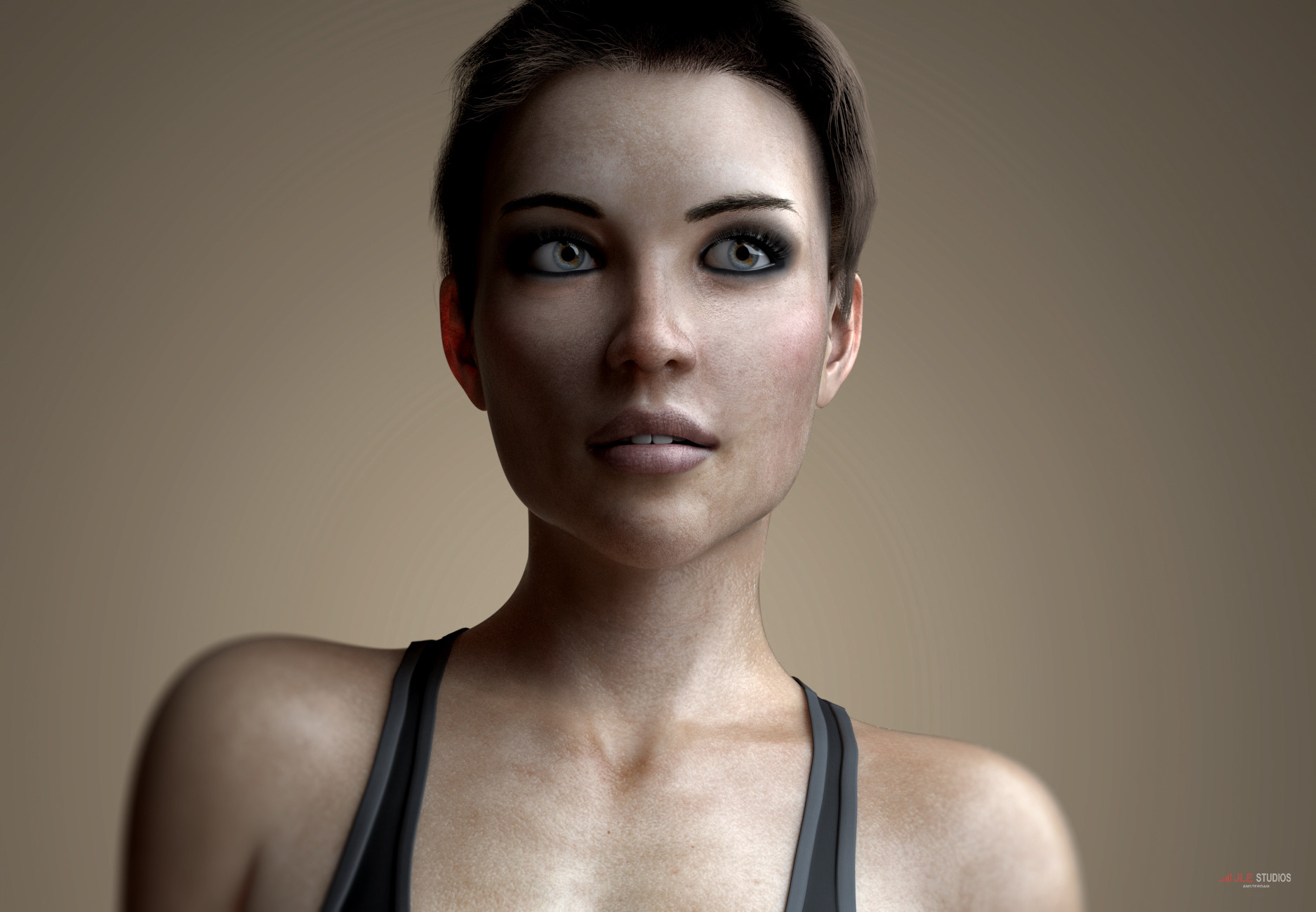
Yeah, Blender is unquestionably better on the hair front right now, she said, subtly posting one of her own renders

but until Iray implements rendering of curves DS is kind of stuck. (And I don't really consider mesh solutions like fibermesh a real alternative, they're much harder to set up a proper material for (in the above render for instance the shader chances the hair color both depending on scalp location and location along the intercept of the strand, which is trivially easy to do with strands, but nigh impossible with meshes), and there's no way I can have a 100k meshed strands without my computer dying a firey death) were it not for the fact that it takes me way, way, longer for me to set up blender renders I would probably be rendering there full time, but as it is, I can get hair 90% of the way there in Iray and everything takes maybe a quarter of the time so...
That being said I don't really find the image you posted particularly more realistic than what you posted it in response to. The hair is better certainly and the eyes about the same (both have excellent eyes), but I don't particularly find the skin more realistic, in particular the only bump in the skin appears to be baked into the diffuse which is IMHO a far more noticeable tell than a bit too much sss on the nose. (also the faked dof is noticably nonsensical, why when you have blender which honesly has one of the best defocus nodes for faking DOF would you not take advantage of it?)
@Serene Night Do you have the 200 morph pack by Dogz? it has some eyebrow positioning morphs I find pretty indispensable I use them pretty much all the time (the same set also has a ear width morph and cranium width morph, which I find likewise useful for realistic characters)
Morph functionDo you mean the Morph Brush? DS doesn't have that - the nearest you can get, for a limited range of purposes, is a weight-mapped Push Modifier (which will move the mesh in or out as you paint on the weight map).
We've been asking for ten years... where is 64 bit Bryce?I'm honestly surprised Bryce in not modernized given it's famous geographical name and made to output game environments for engines like Unity 3D and UE4 given DAZ 3D's known interest in selling models to people and Morph Character System at Morph 3D.
Some Morph is distorting my G3 female's body - but I cannot identify it (Solved)Thanks confirm and sorry take your time,, though I feel really strange, "currently used" not show the auto-applied morph,, I may get it, and see what is going on for my curiosity.
Reverse Source from Target broken in DAZ 4.9?I think it seems broken. I remember, current option work with reverse defomation, even though I mix some morphs.
now I test with genesis2female with mix morphed, and target as simple mesh generate body suit,
set source = current, with reverse defomation not work, it applied all morphs again from current shape, when fit to.
I test without reverse defomation, it generate same mesh. (double deformed)
then source as ”morph” (maybe clone work too) option work with reverse defomation as same as before.
that means, we can choose only one moprh. or need to make shape as clone for mix shape, If you use this option with current daz studio.
I test with official build, but current pulbic build beta is same, then may no need test with beta.
Daz 3D is part of

Connect
DAZ Productions, Inc.
7533 S Center View Ct #4664
West Jordan, UT 84084Licensing Agreement | Terms of Service | Privacy Policy | EULA
© 2026 Daz Productions Inc. All Rights Reserved.