-
Wear Them All
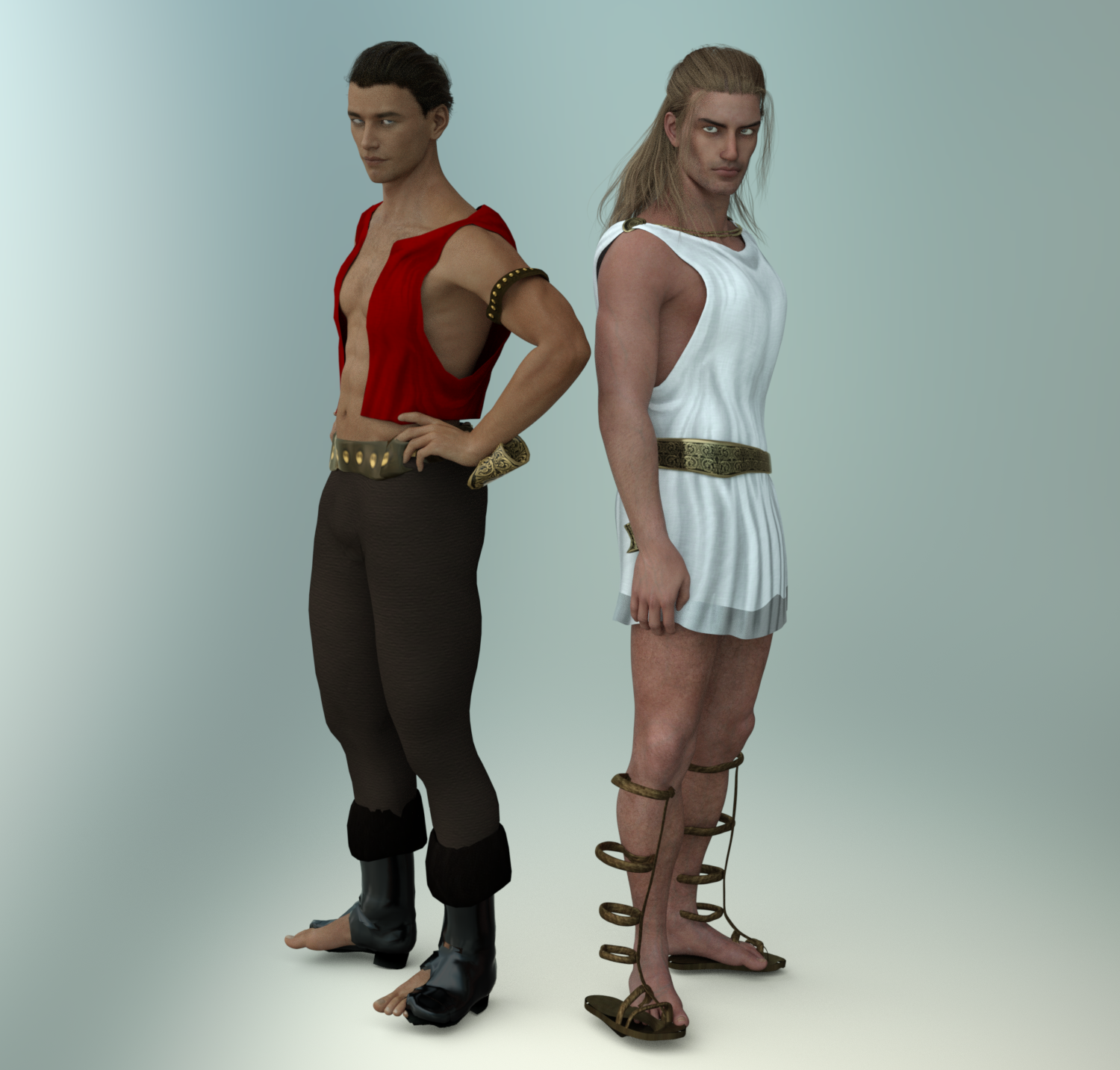
Wow, Giselle, that's an amazing render. Looks like it's from a movie! They look great in those outfits!
Thanks! I did some post-work with lightroom to get the colors just right.
Michael's Changing Fantasy Suit & Olympian Conforming Clothing
I've had a lot more luck with the women than the men. Not sure why. I would've expected the men to be easier to fit. Oh well. I can get the main parts of these outfits to fit, but not the arms and feet. The fantasy suit is a mess. I'm not sure it's worth trying to fix. The cuffs are not easily moved over. They're divided in weird places. The Olympian looks pretty good, but the cuffs and sandals don't fit there either. That's not a deal breaker on that one, since it's a simpler outfit. I'll probably use it somewhere, but I'm not even touching the fantasy suit for now. Too many issues, unfortunately, and I never did find those dials. They might get lost in the conversion or only be available in Poser.
:( Too bad about those boots. Shoes and shields are probably the hardest to transfer. Shields get destroyed, as you said, so I just parent them. Either that or a switch to a G3 version shield.
Thank you all for this thread. Because the store doesn't do reviews and I've felt burned by a handful of relatively more expensive products I bought, I've stopped buying plugins, scripts, and things whose descriptions seem to indicate they work as if by magic. Wear Them All was on my Wishlist, but I missed a recent sale because I didn't trust it. When the time came to decide whether I'd buy it at any discount, I just nuked it from my list. But now after reading this thread, I've added it back.
The product page for the male version says it comes with a Genesis clone and a Genesis 2 Female clone. That's just a typo, right?
I also use the product almost everyday. I can't recommend it enough! The fact that my female characters can wear male armor is super helpful. Especially since MOST female "armors" are pretty much... metal bikinies -_-.
Skin Builder 3 render competition - Closing Date 31st of May 2017Same for me kyoto kid, too much real life in the way but I am happy I got two of them done anyway and I am looking forward to making very good use of this in the future.
I could have written the very same. It's been such fun seeing everybody else's entries too. I don't think I've used a ready-made female texture once since acquiring SB3. One of those I've made has already become a favourite, and if she and her existing SB3 sisters are inappropriate for the job then it's quick and enjoyable to make somebody new who's more suitable. Even some of the menfolk in my runtime owe their existence to SB3 and the UV transfer product. SB3 is probably my all-time favourite DS purchase, and I don't see that changing any time soon.
Painted gravity for clothes.Carrara's soft body physics allow you to do that. (ie to apply a physics simulation to part of an item.)
I looked very quickly at the Modo video, without sound, and it seems to work the same as Carrara's soft-body-attach modifier.
In Carrara you can apply the modifier to an item and specify which vertices will be 'exempt' from the simulation - the pull of gravity. It is easy to select all vertices of the garment first of all (these will remain unaffected by the simulation) and then paint out a select few which will have the physics simulation work on them.
A morph can be created from the results of the simulation - at least in Carrara - I know nothing about morph creation for use in DAZ Studio.
A major downside to using Carrara is getting the correct physics settings - this takes trial and error. If the clothing mesh is very dense, with hems or different layers and is too close to the underlying figure then the simulation may be just one big explosion of the cloth.
Real G3 peopleI think the trick is to offer a set of regular looking characters. Check out AliveSheCried's sets at Rendo.
This is what I am talking about... why aren't these products here?
Not all PAs want to sell at every possible store?
I actually do have all of the morph packages and body shapers for G3, but to tell you the truth, it's not quite enough. Bethany is a good start to a mainline figure that's not 100% fit... where's the male equivilant?
Textures and other parts of the surface materials play an important role in how a character looks; if you're using the wrong one it will blow your target image way off.
Darwins' SchtuffSorry I've been AWOL for awhile. Wow! Lennox is awesome. I love what you did with his morph, the skin looks great and I love those tats. Nice to know you won the challenge! :)
Facegen ProThat 'swollen face' you talk of happens when there is not a high resolution image you scanned for the picture. I know as I tried pictures of my grandfather and my grandma from 1920 and the details in the photoscan weren't sufficient so I wound up with a low polygon Facegen morph that wasn't a good fit to the DAZ models. So I will make nw scans although if the picture source doesn't have the details to begin with, and a lot of very old pictures don't have those details, no matter how high a resolution you scan the picture in you won't get a good FaceGen morph out of it.
You also can get that problem by not placing the dots in good places or placing them innacurately.
SereneNight's Sci-fi FunLOL. Yes that is one thing about the Scifi bodysuit . It does have a smooth morph but it is for genesis 2 but the result is somewhat negligble. Owen doesn't wear the suit too often. But I like the way it fits everywhere else except maybe the groin clamp. It is rare for me to like the way anything genesis 2 fits on genesis 3.
I have a few more renders cooking with the siren in them. She is an interesting figure.
I like World Travels Wagon... but it needed a few improvements.This looks really good and I use this wagon and would love to be able to animate with it.
Does anybody know if there Is there any way to tell when a product has an update in my product library?
Would this be an update or a new product?
Jack created the original work. As I have said, what I have done is to disassemble Jack's wagon and reassemble it, adding new abilities in the process. I am also reusing all of Jack's original textures images. World Travels is presently a PC+ product, so Daz 3D will have to agree, as well.
If I were to guess the new undercarriage would be a new product, which requires the original, so you could get the original texture images. The extras I've created and the rebuilt undercarriage, work with the original undercarriage and Bow Top. That said, the original materials will not be compatible with the new undercarriage and vise versa, due to my breaking the original UV's when I did the disassemble.
So I see this as a set of expansions, like Morphing Fantasy Dress' expansions.
- The First Expansion: The rebuilt undercarriage and a few other bits; like the morph to apply to the original doors or one of the bodies.
- The Second Expansion: The additional upper sections, like the Flat Bed, several box wagons, other additions, made for these.
- The Third Expansion: A new Harness to work with several Horses. Charger, Millennium Horse, Daz Horse 2 and such. And Horse poses as well. Standing, pulling, pulling a heavy load. (I will be looking at some of Don Albert’s Poses and Faveral and Digital Lite Design’s Western Coaches, for ideas on how to do this part of if I can just point people to an existing product for Poses.)
- A Fourth Expansion: A set of Poses for various generations of figures, Gen3 (V3 and M3) to Genesis 3. Driving, Sitting in and out of the wagon. (Again I will be looking at various existing poses for ideas.)
- A Fifth Expansion: A set of morphs to make Romany Charms fit inside the wagons, which can be done. It is harder with Boundless Journey, where there is less side to side room, than in World Travels.
So let’s say Daz 3D or Jack to stop that I can't do anything with the original mesh, what happens then?
From what I’ve learned, I could build a completely New Undercarriage, with none of Jack’s Mesh or Textures. The resulting New Undercarriage would still work with the original Bow Top and the new bodies would work with the old undercarriage. Again the Undercarriage would be a new product, which makes use of the parts from the Original, but does not modify them. That might only change the number of expansions. I could release a collection of prsets for the changes to the doors and Romany Charm.
One other sticky bit: I am doing this exclusively in Hexagon and DAZ Studio. I am learning about parts of both these programs. So at this point this will be a DAZ Studio product. If I need to transfer everything over to Poser and recreate materials into Poser format, I am going to need help with that. Or can DSON help with that? Never used it don’t know if it will.
Wear Them AllMaharani for V3
I've been waiting for a long time to catch this incredible outfit on sale. This is Renapd's Maharani for V3 set (Rendo) and it's huge. There are free expansions and bonuses that come with it that include many pieces and textures. Even some Indian backgrounds. Here it is on CynderBlu's gorgeous Imani for G3F (click for much larger pic):
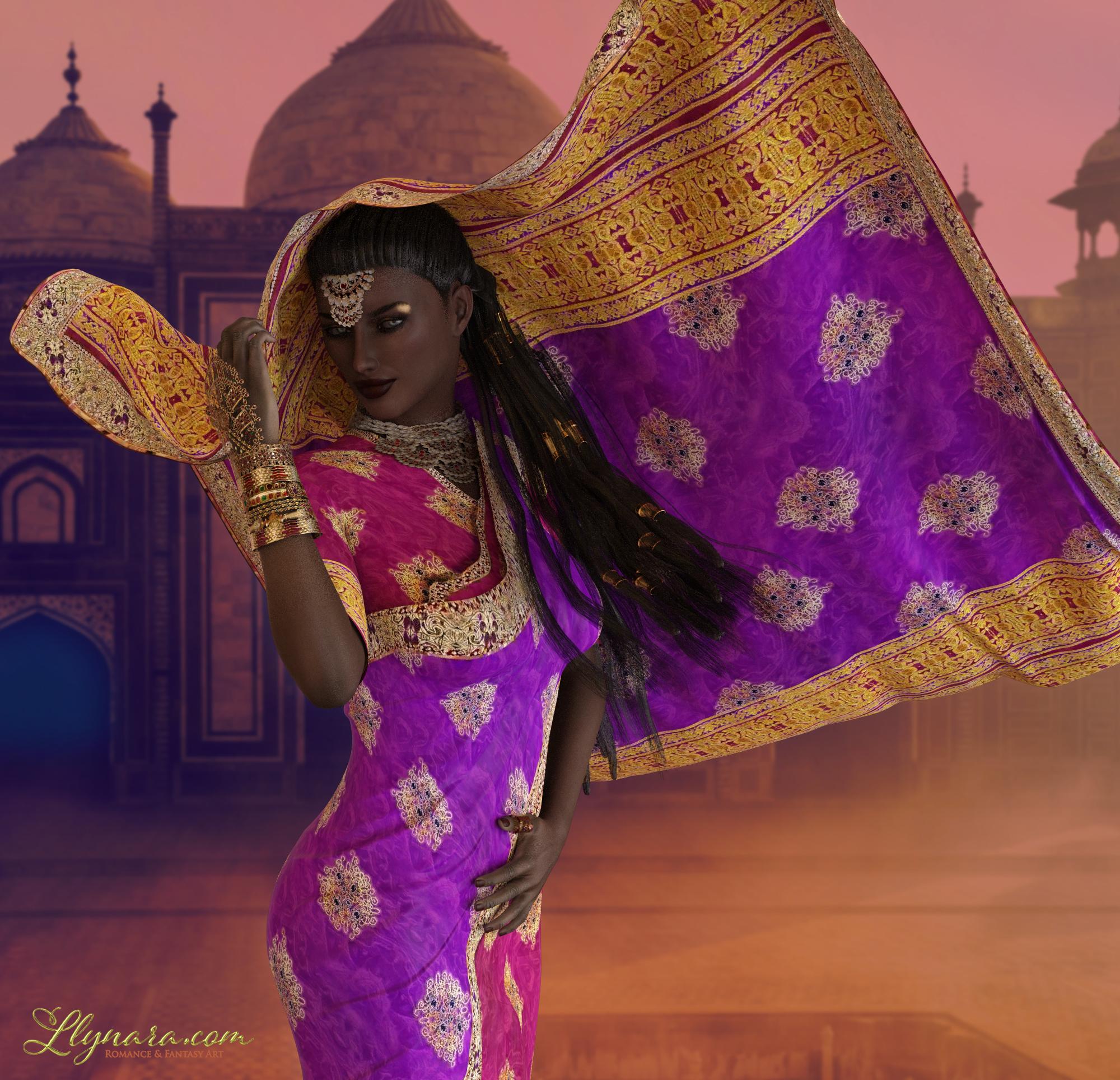
The textures and most of the meshes for the clothing render very well. I used smoothers and Sub D on it. They looked good before hand, and amazing afterward. I stopped this render early, as there are a few issues with it. The neck and head jewels are very flat. I tried adjusting the bump and just about every other trick I know, but there's no way to fix that. They're textures applied to a flat surface. I checked the original pictures and they're flat in there too. So I'll find some other jewerly for the final and fix her hair.
The dancing veil is very cool, but you can't really morph it. It does come with matching poses- for V3. I don't know how to convert those to G3F. I have converters to move poses forward for Generation 4 and up. Is there a converter for Generation 3?
So I tried applying the veil's beautiful texture to an Optitex bedsheet and draping that, but I didn't get the results I wanted. For now, the work around is to pose around the issues so it doesn't look like one. All in all, the colors and set is stunning and converts well to Iray. I'll fix the issues and do a wallpaper soon.
Llynara's Loony Bin (WIP Thread)Maharani for V3
I've been waiting for a long time to catch this incredible outfit on sale. This is Renapd's Maharani for V3 set (Rendo) and it's huge. There are free expansions and bonuses that come with it that include many pieces and textures. Even some Indian backgrounds.
Here it is on CynderBlu's gorgeous Imani for G3F (click for much larger pic):
The textures and most of the meshes for the clothing render very well. I used smoothers and Sub D on it. They looked good before hand, and amazing afterward. I stopped this render early, as there are a few issues with it. The neck and head jewels are very flat. I tried adjusting the bump and just about every other trick I know, but there's no way to fix that. They're textures applied to a flat surface. I checked the original pictures and they're flat in there too. So I'll find some other jewerly for the final and fix her hair.
The dancing veil is very cool, but you can't really morph it. I tried applying its beautiful texture to an Optitex bedsheet and draping that, but I didn't get the results I wanted. For now, the work around is to pose around the issues so it doesn't look like one. All in all, the colors and set is stunning and converts well to Iray. I'll fix the issues and do a wallpaper soon.
Darwins' SchtuffI do love the idea as well, firewarden. I can't wait to see what else you come up with. XD
Thank you, Sonja! Hopefully I'll have the second face option rendered soon to post it. Need one more brow option done, and I can start the icons/cards (and maybe a second body type morph) and get this off to the last tester before I re-start the randomizer-Ferretmania!
After Lennox, the list is re-started with vwrangler and deathbycannon added to it. :)
One of those experiences...Is there any solution here? Is there a nice plugin that makes nice shinny renders periodically?
Try C:\Users\*User Name*\AppData\Roaming\DAZ 3D\Studio4\temp\render
The directory Above is the default, if you have changed it in Preferences dialog box, then your temp render directory, won't be in that location.
I suggest moving the cache directory from the default location for several reasons:
- It will not be buried in a Hidden folder, inside your user directory
- It should not be on the same Physical Hard Drive as your System
- Doing this will speed up your rendering, as it is not competing with the rest of the system calls to the System Drive. (If you use a small and fast SSD it can have quite an impact)
- In this same location are other renders which completed, but not those you cancled. As long as you have not exited DAZ Studio the last 30 completed are still there and avaiable to you in the in your "Render Album" Tab. Right Click an image and you can save it. BUT Double clicking any of them will open them in the Render Editor, which can add some limited effects or throw two images together. But it is yet another reason to have the Cache directory out where you can get to it without a lot of digging. This will keep the last 30 Render. So you could recover more than you think.
- Also if you transfer things between Hexagon and DAZ Studio a lot, you will want to clean out the HexagonMap Cache now and then, as things go in but are never removed. (Another reason to take if off your system drive, it is a hidden point of data clutter.)
- For the same reasons I suggest moving your content Libraries to a separate drive and not the one you place your Cache folder on.
These suggestions will also saved you from data loss, due to a Catastrophic System Drive Failure, as none of your data is on the C: drive. The in scheme of things Hard Drives are cheap, data loss is expensive. Unless you have a small Laptop you are doing everything on, then you most likely have space for additional internal drives.
If you are on a laptop or have multiple machines, I suggest a NAS (Network Attached Storage) and back up your system Regularly. (Don't put your Cache on the NAS, that woudl slowdown your rendering).
If you have a Laptop with a Optical Drive (CD/DVD), you can get a Carrier for a 2.5” drive and replace your CD Drive with it and give yourself what 4TB of storage, for less then the cost of Data Loss.
Carrara CHALLENGE - Tomatoes et al #33 Chat TimeThanks, UB and Phil. OK, I admit it. I am addicted to the head of Marcello's killer tomato file. Here, I tried to create an expression morph for sadness and a gesture to wipe a tear. Not sure it worked. If you can get beyond the bad lighting, you might see a "sad tomato" whose "tears flow like wine."
Inspired by part of a classic movie, and a classic jazz standard, but not a movie poster.

.
.
 Go Z Installation
You can have only one version of the DS GoZ plug-in installed at a time - I don't know why the 4.9 version would insist on going to the C: drive, though; if this using DIM or the standalone installer?
Only one installer now, the manual one for 4.9, you are given no choice as to the installation folder, defaults to C drive.
In my attempts to do this actually created a problem with the original.
The installer uninstalled the working version on C with 4.8. It then attempted to install fresh on C where the program 4.9 did not exist
Believe it is possible to have more than one version as far as zbrush is concerned.
Have two versions of Maya, simple matter of telling zbrush which one is current
Do not wish to commit to 4.9 only at this time.
There is another thread where I mentioned creating a scene in 4.8, utilizing the Zbrush morph ability, saving, opening
in 4.9. doing basically nothing and from that point on could not return to 4.8
More and more simple scenes that somehow involve 4.9 are crashing in 4.8.
The day of reckoning is approaching, I am afraid, if could solve this problem, would be able to forestall that day for
awhile.
Will chalk this up to another "work around"
Thank you Mr. Haseltine, for your time and patience
DAZ importer for Blender ( version 1.2) By Thomas LarssonThank you so much indeed !!! It worked just fine !
What was fooling me was that the JCM morphs do not appear in the export list of the fbx panel. The export list shows just CTRL morphs instead. So I supposed the JCMs didn't exist. But, if I place their names in the export rules as you show in your example, then they export just fine. This means they are there but somewhat hidden from the list.
I got the JCM names from the Base Corrective folder shown in my previous post.
Once the JCM is imported in Blender I can just activate the morph and it bulges the elbow area as expected, so it can be used as a corrective shape.
Skin Builder 3 render competition - Closing Date 31st of May 2017"Oh, and I noticed your first item at that "other" store and was wondering if there was going to be a skin builder add on for it?"
No need for an addon. Load up Skinbuilder skin on figure then load that product after, and it will transfer skin over since that product uses the torso map loaded on the figure. In other words, it does not require specific maps because they are generated.
Real G3 peopleI think the trick is to offer a set of regular looking characters. Check out AliveSheCried's sets at Rendo.
This is what I am talking about... why aren't these products here?
I actually do have all of the morph packages and body shapers for G3, but to tell you the truth, it's not quite enough. Bethany is a good start to a mainline figure that's not 100% fit... where's the male equivilant?
Daz Studio Pro BETA - version 4.9.4.122! (UPDATED)>Richard
Could you use iit with auto-fit, when save as Clone? If you could, please tell me the way (no need to tell each step, but summarize how you use it) I may follow and try by myself.
I tried to make my character save as Clone. (I made it from G3, and with base G3 femlae)
I save as new Characterclone. I could find new character.dsf. dsj, (as same as before) then next, I export obj, which fit to my character shape. then re-import it to test new clone.
I tried to use TU, but I could not find this character clone as option. next I change the obj as figure, then try to use Auto-fit for base G3 . but I could not find option in Auto-fit as new clone, I could find all clone, which I have saved as morph and change type, as clone., with default clones.
then I do not know how We can use this saved clone. I may plan to make clone with G3 and G2 or Aiko7(G3base) with G1, but untill test those things, I really hope to know clear simple work-flow, which I can test it.
Real G3 peopleThis subject has been discussed to death and it always boils down to this
"The PA's say that regular looking characters dont sell as well"So my advice is get every morph pack you can find and dial in your own "regular" people.
Real G3 peopleWhich is why I usually morph-tweak a base figure - safe in the knowledge that anything I do is far from perfection!


Daz 3D is part of

Connect
DAZ Productions, Inc.
7533 S Center View Ct #4664
West Jordan, UT 84084Licensing Agreement | Terms of Service | Privacy Policy | EULA
© 2026 Daz Productions Inc. All Rights Reserved.