-
Facegen Pro
That 'swollen face' you talk of happens when there is not a high resolution image you scanned for the picture. I know as I tried pictures of my grandfather and my grandma from 1920 and the details in the photoscan weren't sufficient so I wound up with a low polygon Facegen morph that wasn't a good fit to the DAZ models. So I will make nw scans although if the picture source doesn't have the details to begin with, and a lot of very old pictures don't have those details, no matter how high a resolution you scan the picture in you won't get a good FaceGen morph out of it.
You also can get that problem by not placing the dots in good places or placing them innacurately.
You sure it's the resolution??
I've had varying rez's and it happens on them all.
I'm placing the points where they say and it doesn't seem to help. particularly with the nose..
Exporting morph targetsRigging in Poser is attaching Poser's "bones" to the mesh of a model so that the model can be posed and animated.
Sorry, it has been a very long time since I tried to create a model for Poser and create morphs for it. If I remember correctly, to create a model that can be posed in Poser, it needs to be rigged. For example, you could model a snake with bodypart names like segment1 and segment2. But maybe your model is not intended to be posed, maybe something like a sofa that has several cushions?
Whatever you are trying to do, the key is to have the exact same vertexes in Carrara (or any other modeler) that you are trying to morph. So, if there was a 4 segment snake, and you wanted to create a morph to inflate the 2nd segment, you need to be able to isolate the vertexes for the second segment in your modeling program. Similarly, if you have a sofa with 3 cushions, and you want to create sitting mophs for the 3rd cushion, you need to be able to isolate the vertexes of the 3rd cushion. When you bring the morph back to Poser, it is important that the position of the vertexes still match, which is why the scale matters so much. By default, Poser meshes are very tiny. The good news is that if you modeled the mesh initially in Carrara, hopefully you saved it in a way that you can start your morphs from the same file that you exported to Poser and then use the same scales. Just save an additional copy of the initial file so you don't screw it up.
So, if I were to model a sofa with the intent of exporting to Poser, I could use the "name" function in the vertex modeling room's select tab to name polygon groups for each cushion and for the sofa frame. The sofa frame and each cushion could be loaded separately in Poser and then parented to each other. In Carrara, I could make a morph for just the 1st cushion by selecting it by its polygon name, deleting the rest, and creatng my morph. In Poser, select the cushion, and load the morph. Or, if I were to create a snake with several segments, I could name each segment in a similar way. To make the snake poseable in Poser, the polygons of each segment is attached to a bone. Again, in Carrara, I could select the mesh of one segment by using its polygon name if I created one, delete the rest, morph, and save under a new name. Then in Poser, select that segment of the snake and load the saved morph.
The key is having the same scale and orientation for the element or bodypart as the morphed obj file.
Exporting morph targetsOK, was assuming that you were morphing a 3rd party rigged figure. Some more questions about your model and about its Poser rigging.
- When you modeled in Carrara, did you create named polygon groups to correspond to the Poser bodyparts?
- Is it rigged in Poser? And if so, do the rigging parts match the named parts?
For example, I could have a scifi aicraft thruster, with a handle and a case. There could be separate polygon groups for the case and the handle. When rigging in Poser, I could match the Poser bones to the named polygon groups of case and handle in a single thruster model.
Open the initial thruster model and save to a new name, such as THRUSTER_MORPHS.
Enter vertex modeler
Select by : name : polygons - and then choose the named group that you wish to morph, such as "case"
Then, under the selection tab, choose inverse. Now, everything should be selected except the case.
Delete - then save the file to a new name, such as Thruster_Case_Morphs
Now you can use the vertex modeler to make a morph for the case and save as an obj file.
In the future, to make more morphs for the case, start with the Thruster_Case_Morph file and save as separate objs.
In Poser, load the thruster figure.
Select the case bodypart.
Use the properties tab to find the load morph menu and browse to the saved morph for the case. Repeat for the additional morphs and save the figure to your Poser library.
Exporting morph targetsMy figure is an object that I modelled (with morphs) in Carrara. I exported the complete object (no morphs) as an obj. file into Poser.
In Carrara I apply a morph to one section of the object.
I then have to export only the morphed section to Poser. <•••••• this is the step that I need help with.
In Carrara's model room, I can select the morphed section but but the entire object is exported rather than the selected part.
Exporting morph targetsSomeone else will have to come along with the correct scale presets, but the basic steps are
- in Poser, load the figure, turn off all kinematics, use the joint editor and zero the joint roations
- in Poser, export the figure as an obj, check only the one single bodypart that you intend to morph, such as the head
- in the Poser export dialogue, choose the correct preset scale (sorry, don't remember)
- in Carrara, load the exported obj body part
- In Carrara, use the vetex modeler to move vertexes around without adding or subtracting vertexes
- In Carrara, export the morphed bodypart as a new obj, choose the correct export preset scale (sorry, don't remember)
- in Poser, choose the bodypart, under the properties tab, there is a dialogue to load a morph target. Use the browser to select the saved morphed obj
Hopefully, someone remembers, or has easy link to, the correct export and import preset scale dialogues. Poser objs are extremely small by default.
Geometry Construction Question - NormalsIn the export portion of my SketchUp-Daz transfer tool (the Ruby script that runs inside SketchUp), I am writing out numeric values for the normals for each face. Here's a typical triangle definition in my intermediate XML file.
      <triangle>
        <materialId>0</materialId>
        <vertex>
          <position>0.0000,304.8000,0.0000</position>
          <normal>0.0000,1.0000,0.0000</normal>
          <texcoord>0.0000,0.0000</texcoord>
        </vertex>
        <vertex>
          <position>304.8000,304.8000,304.8000</position>
          <normal>0.0000,1.0000,0.0000</normal>
          <texcoord>0.0000,0.0000</texcoord>
        </vertex>
        <vertex>
          <position>304.8000,304.8000,0.0000</position>
          <normal>0.0000,1.0000,0.0000</normal>
          <texcoord>0.0000,0.0000</texcoord>
        </vertex>
      </triangle>
In the Daz portion of the transfer tool, I am not currently doing anything with these values, because quite frankly I have not been able to determine what script functionality would be used to do so. However, since the models I import appear visually correct, I am wondering if I actually need to apply these values, or if the normals are being calculated for me by Daz?
Obviously I'd like to be sure my trasnfer tool is creating geometry correctly in Daz (appearances aside), so:
(a) Do I actually need to be applying the numeric normals values?
(b) If yes, I would appreciate a pointer as to what function to use to do so.
Apologies in advance, as I'm sure this is obvious to experienced users, but I am having a very hard time finding this information in the curent documentation.
Regards,
MikePreview - First Look at Avalon Hair for Genesis 3 Male (& Female)So, I think I've worked all the bugs out of the hair up to this point. I have created the autofit morphs for the G7 characters I own copies of. I'm working on a morph to control the scale of the ponytail, in addition to the length morph. I think I need a few styling morphs for the bangs, as well. Suggestions on that are welcome. I'll update again when I'm done with that scale morph.
Does anybody make an underwater landscape?Traveler has some underwater plants, too, that I like to use. I made a whole ocean bottom with the plants that DAZ had before the RDNA merger and it was a little bit sad and tedious because I did it before any of the instancing scripts came out. I used the Ultramarine as the base. After the RDNA merger, I picked up Traveler kelplands plants and they did really amazingly well at filling in the holes left by the coral and other plants that were already in the store. I'm still fine tuning my ocean but it's going to be great when I get it finished for future renders. Not sure what happened to Vol 1. It doesn't seem to have made the transfer. I would definitely love some more underwater plants.
https://www.daz3d.com/rdna-kelplands-vol-2
https://www.daz3d.com/rdna-kelplands-vol-3
https://www.daz3d.com/rdna-kelplands-vol-4Molly HD for Genesis 3 Females (Commercial)Yes. She is built on Growing Up so you can just dial some of those out. You might have to adjust the Youth Head Proportion morph a bit but she can be an adult if you want.
Molly HD for Genesis 3 Females (Commercial)Might be a missunderstanding. I didn't mean adult parts. I meant, if it is possible to have this character as an adult woman, e.g. by using some morph sliders.
Exporting morph targetsExporting for use in which program? You can save a changed mesh as an obj for use in another program such as Poser or Daz Studio, but you have to use the correct scales. For use entirely within Carrara, you simply have to validate the morph and save the figure. For use within Carrara, you can also save the changed mesh as an obj and use the "load" dialogue, I think.
I have an example of morphing a Daz figure and exporting to Daz Studio around here.
https://www.daz3d.com/forums/discussion/comment/2374041/#Comment_2374041
Real G3 peopleI think the trick is to offer a set of regular looking characters. Check out AliveSheCried's sets at Rendo.
This is what I am talking about... why aren't these products here?
I actually do have all of the morph packages and body shapers for G3, but to tell you the truth, it's not quite enough. Bethany is a good start to a mainline figure that's not 100% fit... where's the male equivilant?
That would be George.
https://www.daz3d.com/george-hd-for-genesis-3-male-sI've got George... he's okay, but I'm talking something in between that you don't have to mix and match...
Exporting morph targetsIs there any Carrara 8.5 documentation on exporting morph targets? The user manual under the help menu in Carrara 8.5 is actually for Carrara 7 and it explains how to export morph targets. Unfortunately the model room morph tab controls are not the same as Carrara 8.5.
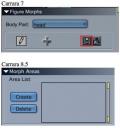 If no documentation, can anyone help?Creech Evolutiuon Characters & Kit for Genesis 3 Male & Female [Commercial]
So its a morph set or just i whole figure morph and add on fins?
And what orange banner I only have one for the Amber bundle which I'm not interested in- should thst reduce the creech products?
Creech Evolutiuon Characters & Kit for Genesis 3 Male & Female [Commercial]https://www.daz3d.com/creech-evolution-for-genesis-3-female
Creech Evolution for Genesis 3 Female
This is the female version of the character including all the textures and materials you'd expect with the hide/ show material presets for the Addon Fins. All the morphs of the male(plus a sexier human mouth morph) can be used on any Genesis 3 female character. The same goes for the addon fins and the textures. There is an Earth tone and a brilliant Green skin included here as well.
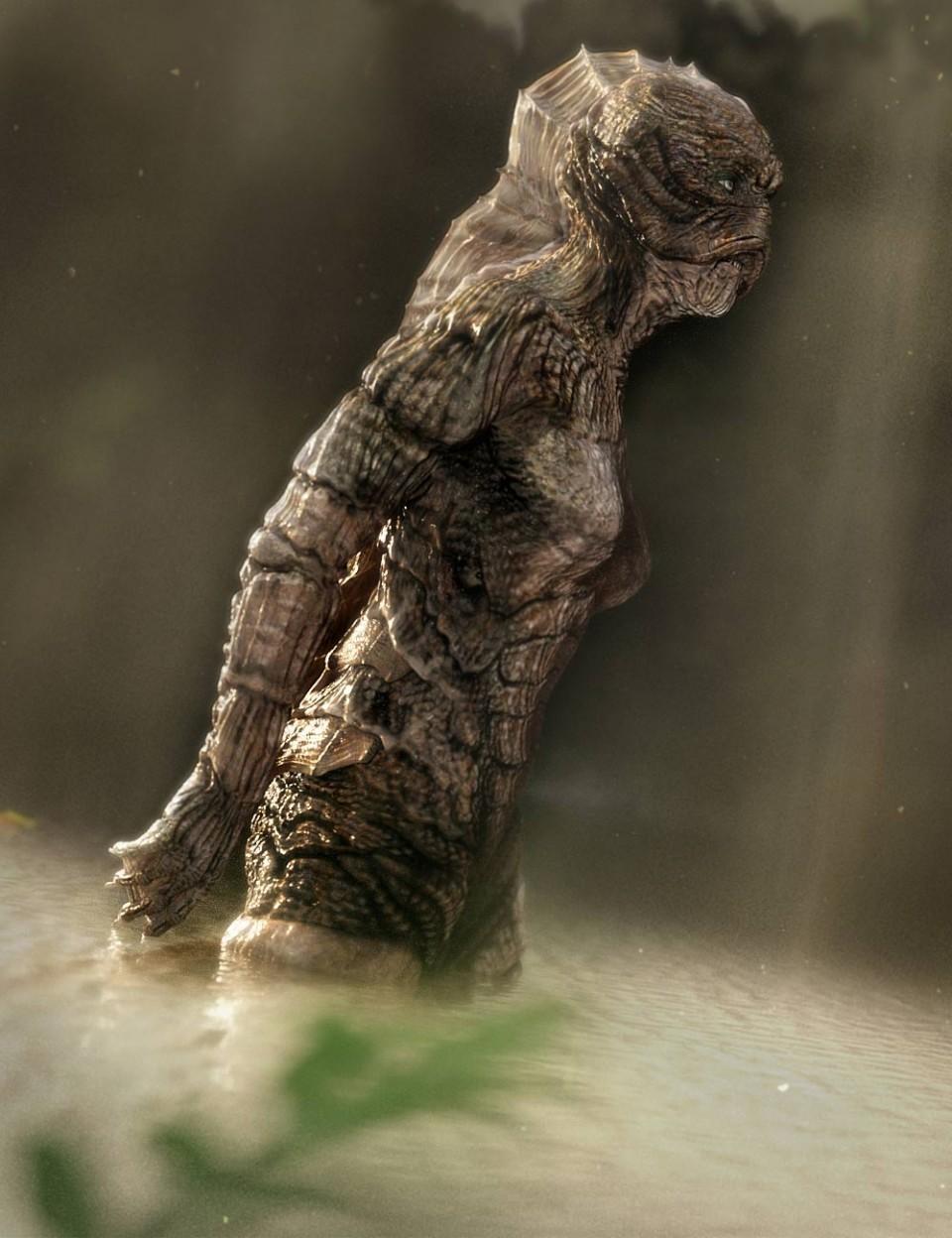 Creech Evolutiuon Characters & Kit for Genesis 3 Male & Female [Commercial]
I couldn't quite tell from the description if this is a morph and textures or a 'outfit'?
Particles from Blender to DazLong story short I couldn't find an already built prop that I liked anywhere so I decided to create my own in Blender. I have applied some nice texture along with using Blender's hair particle emitter. When I import the obj into Daz my particles go away as well as my texture.
I know this is probably newb stuff, but this newb can't seem to find any info on the web. I would love for my particles and texture to transfer over instead of just the ugly gray model.
Halp!!
Real G3 peopleI think the trick is to offer a set of regular looking characters. Check out AliveSheCried's sets at Rendo.
This is what I am talking about... why aren't these products here?
I actually do have all of the morph packages and body shapers for G3, but to tell you the truth, it's not quite enough. Bethany is a good start to a mainline figure that's not 100% fit... where's the male equivilant?
That would be George.
https://www.daz3d.com/george-hd-for-genesis-3-male-sWear Them AllHere's a render with using:
- Space Dweller Outfit for V4 (picked it up on sale for $.50)& Fox Hair for V4. The clothes transferred over perfectly, with the morphs working even after transfer.
- I did, however, use SY Ultra Templates for Genesis 3 Female(s) on the dress in order to get the extra morphs (that was before realizing the morphs the clothes came with actually work!).
- I also used Fit Control for Genesis 3 Female(s) to fix the chest area. I'm adding some screenshots down below of before and after using this wonderful product (another one that I cannot recommend enough!).

Left image is the default transfer using WearThemAll. Right image shows the tweaked chest via the fit control morphs. Basically pulling the clothes away from the breasts a bit, so the fabric pulls rather than act like latex.
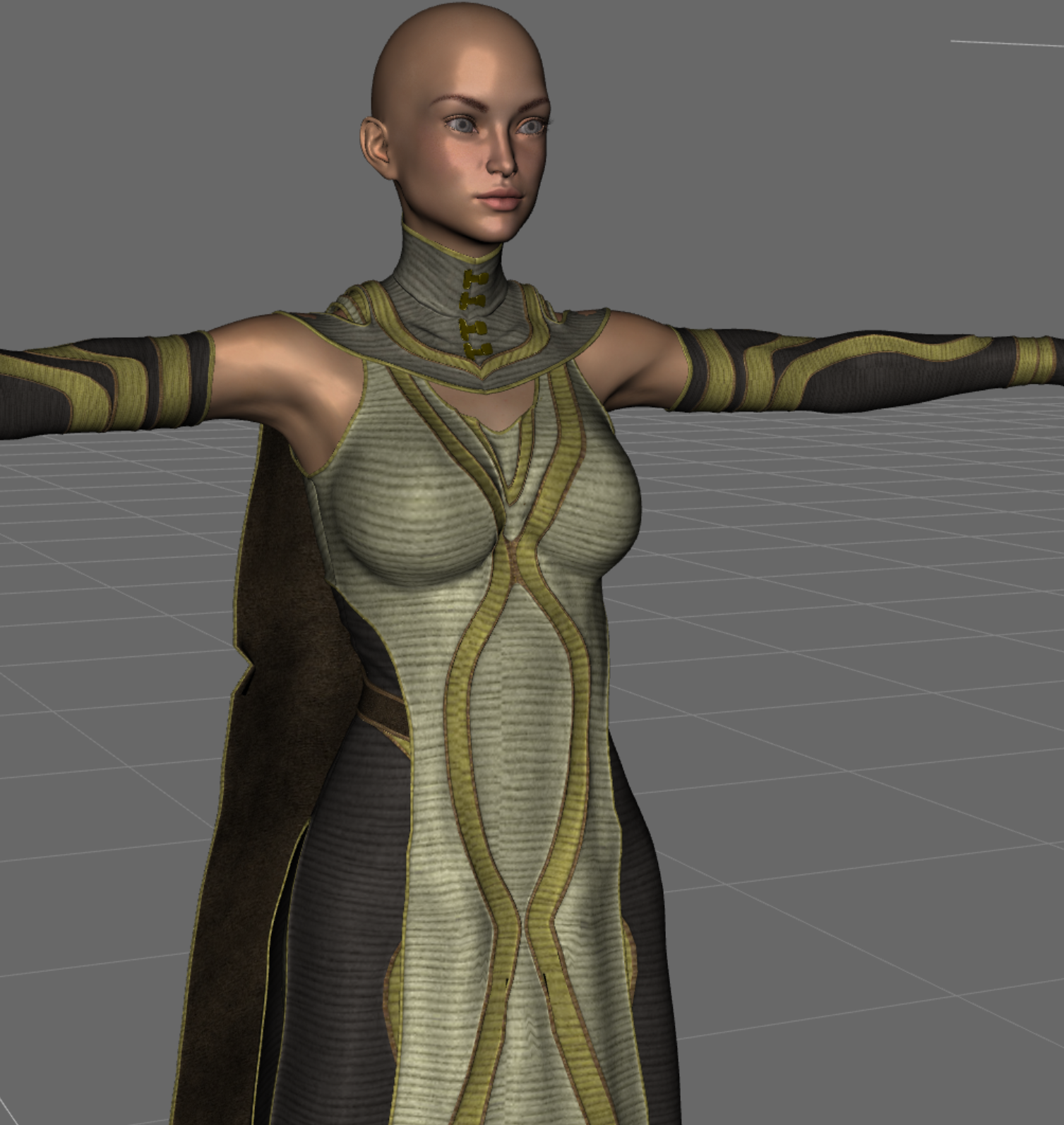
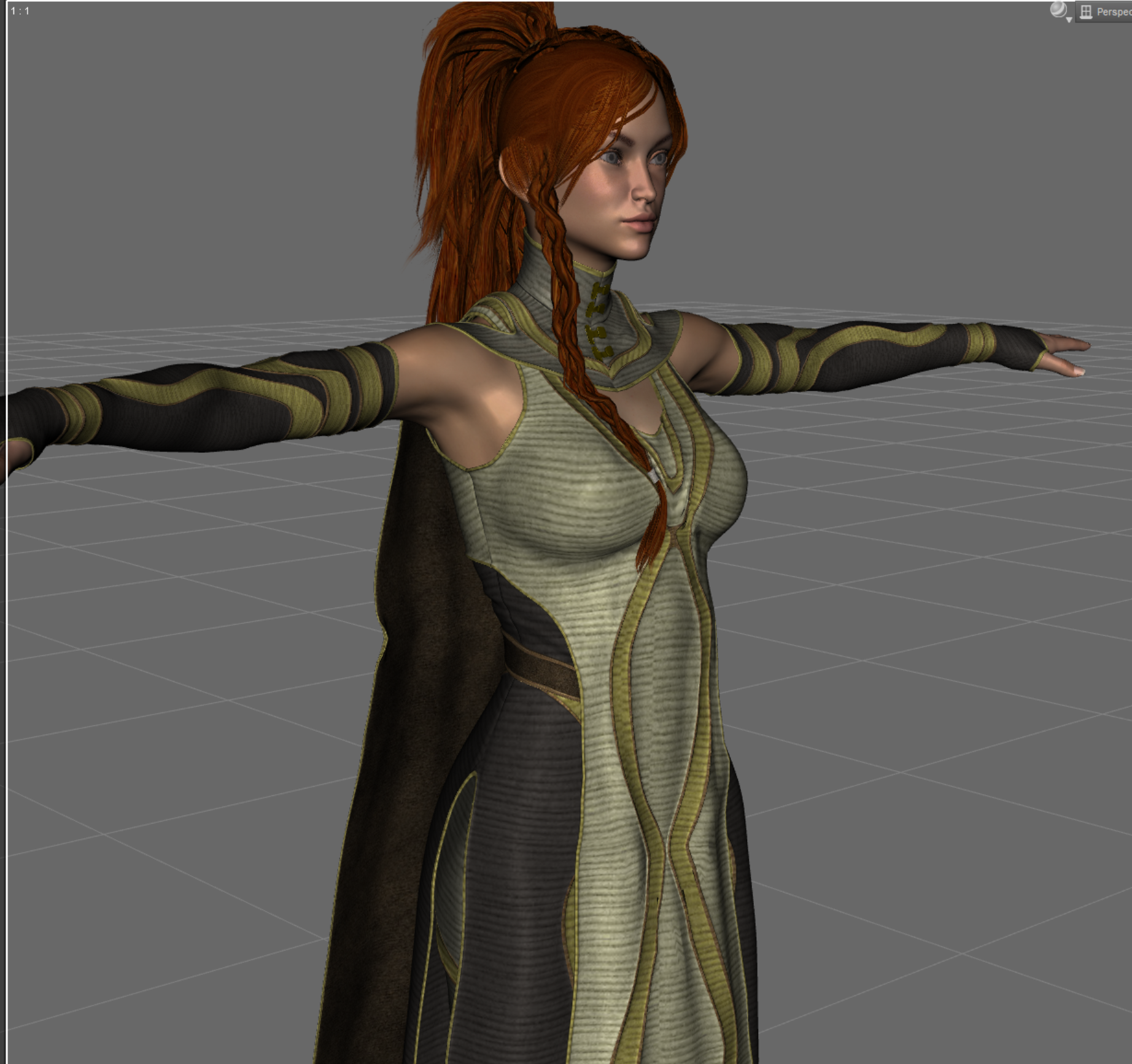 Wear Them All
Wow, Giselle, that's an amazing render. Looks like it's from a movie! They look great in those outfits!
Thanks! I did some post-work with lightroom to get the colors just right.
Michael's Changing Fantasy Suit & Olympian Conforming Clothing
I've had a lot more luck with the women than the men. Not sure why. I would've expected the men to be easier to fit. Oh well. I can get the main parts of these outfits to fit, but not the arms and feet. The fantasy suit is a mess. I'm not sure it's worth trying to fix. The cuffs are not easily moved over. They're divided in weird places. The Olympian looks pretty good, but the cuffs and sandals don't fit there either. That's not a deal breaker on that one, since it's a simpler outfit. I'll probably use it somewhere, but I'm not even touching the fantasy suit for now. Too many issues, unfortunately, and I never did find those dials. They might get lost in the conversion or only be available in Poser.
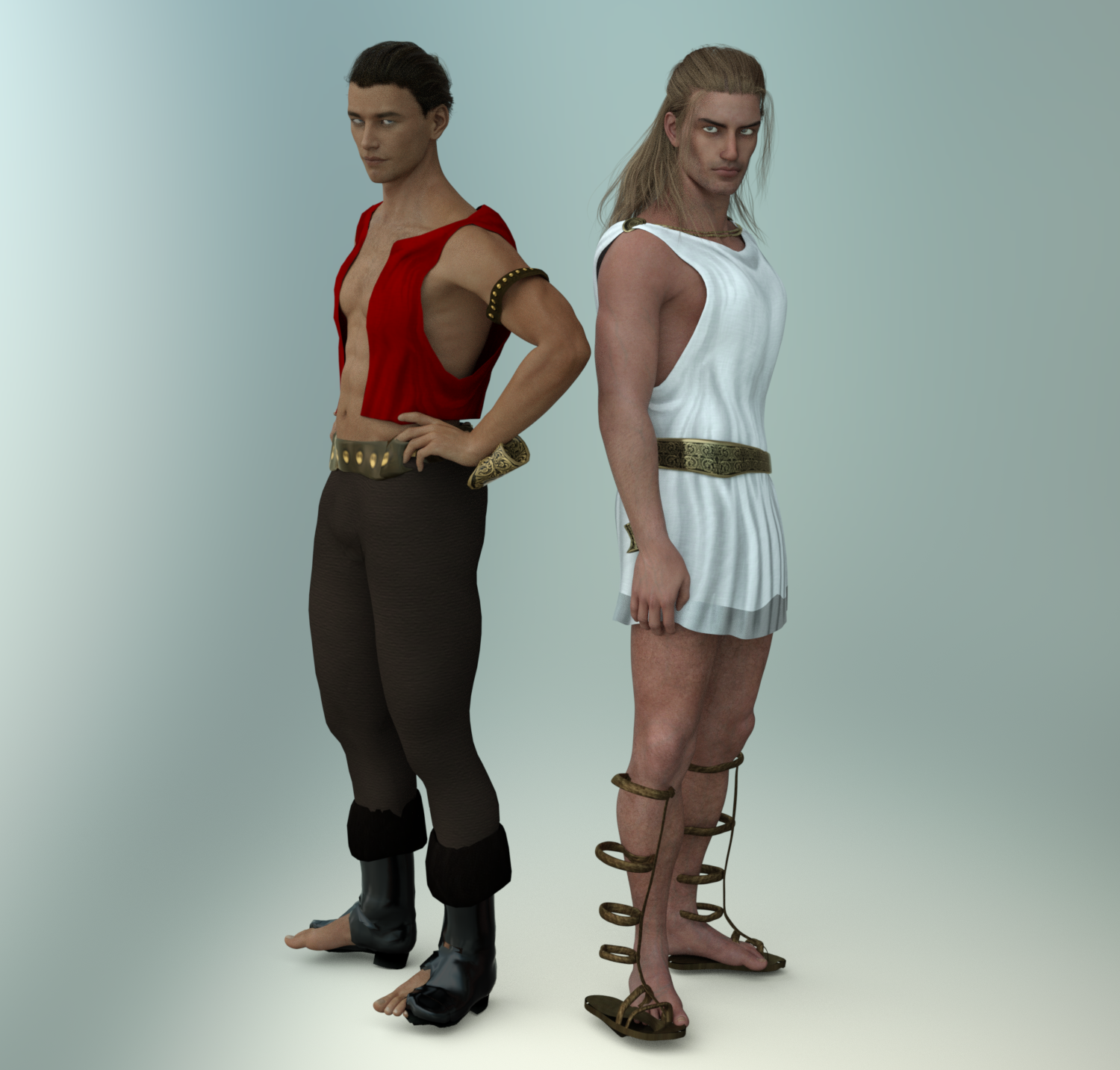
:( Too bad about those boots. Shoes and shields are probably the hardest to transfer. Shields get destroyed, as you said, so I just parent them. Either that or a switch to a G3 version shield.
Thank you all for this thread. Because the store doesn't do reviews and I've felt burned by a handful of relatively more expensive products I bought, I've stopped buying plugins, scripts, and things whose descriptions seem to indicate they work as if by magic. Wear Them All was on my Wishlist, but I missed a recent sale because I didn't trust it. When the time came to decide whether I'd buy it at any discount, I just nuked it from my list. But now after reading this thread, I've added it back.
The product page for the male version says it comes with a Genesis clone and a Genesis 2 Female clone. That's just a typo, right?
I also use the product almost everyday. I can't recommend it enough! The fact that my female characters can wear male armor is super helpful. Especially since MOST female "armors" are pretty much... metal bikinies -_-.
Daz 3D is part of

Connect
DAZ Productions, Inc.
7533 S Center View Ct #4664
West Jordan, UT 84084Licensing Agreement | Terms of Service | Privacy Policy | EULA
© 2026 Daz Productions Inc. All Rights Reserved.