-
Josh Crockett Suggestion Page for Monster Characters!
The problem is trying to get the geograft to work with any morphs the figure might have. I mean, if the monster is muscular, and everything from the neck up looks the same, that might look weird. Worse, there might be weird artifacts where the body joins with the new head.
If you morph the head, on the other hand, it's already set up how the morphs will affect the head (though it might not always work right).
Also, if you morph the head, all the rigging and other stuff is already there, plus it can be combined with other stuff (like all the facial morphs, horns, etc)
M4 Elite anatomical elements not loadingI am not too sure if I am overlooking something, but I am trying to load M4 with the Elite Gens. I have downloaded and installed the files using the installer (and again manually just in case) and when I come to load M4 it isn't an option (unlike Freak and Vladimir and the Creatures morphs that I do have available). So, with M4 selected, I go to the content library to find the inject morphs file in the POSES/MORPH TARGETS/INJ M4 ELITE GENITALIA path. When I click on that, nothing happens.
Am I being dim? Do I not have the 'elite' version of Michael loaded?
I am able to add and remove the freak/creature/vladimir morphs at will, but the Elite one doesn't appear to do anything.
Many thanks for your help in advance
OT returning to vistaBelow is a M$ link about what to do. The device not the OS is tied to your account.
https://support.microsoft.com/en-us/help/10547/microsoft-account-remove-deregister-device
Windows 10 Licence Terms section 4 Transfer for which applies to you...preinstalled or standalone...https://www.microsoft.com/en-us/Useterms/Retail/Windows/10/UseTerms_Retail_Windows_10_English.htm
Josh Crockett Suggestion Page for Monster Characters!I was actually thinking of a 'face is a big mouth' type of thing at one point. I've poked at doing it as a morph, but the usual issues of 'what do you do with the eye area' is always annoying, plus then you have to figure out how to place and scale jaws/teeth/tongue etc...
I don't know anything about modeling, so I could be completely off base, but if you made a completely unique monster head figure, couldn't you just make it so it parents to the neck and completely hide the original head? Then you don't have to worry about the eye area. Seems like it might be easier to do that instead of making morphs to the original head. I always wondered why a Cyclops was not made in that way instead of the awkward looking cyclops geograft that was made for G1.
Josh Crockett Suggestion Page for Monster Characters!I was actually thinking of a 'face is a big mouth' type of thing at one point. I've poked at doing it as a morph, but the usual issues of 'what do you do with the eye area' is always annoying, plus then you have to figure out how to place and scale jaws/teeth/tongue etc...
Skin Builder 3 Merchant Resource for Genesis 3 Female (Commercial)Just worked through creating my first skin. Amazing product!! I've alway preferred creating custom characters modeled on real life people. Being able to model a custom skin to go with the customized geometry makes the final product look dramatically better. It's especially nice to be able to get the makeup and brows more correct. I've only done one so far and I can really see the potential.
Just thinking out loud - but I think next time I will create the skin first and morph the geometry second. Should be much easier to get the geometry right with a more correct looking skin on the model.
Thanks for this great product!!
Question about Facegen files...Facegen is Windows only so I used it on an old laptop to create characters. Now I want to transfer the characters I created to my Mac. Where do I find the slider files so I can transfer those slider/morphs to my Mac? Thanks.
Removing genx morphs with tabBy default GenX puts its morphs into its own folder hierarchy, so it won't overwrite other files. But naming collisions can occur, where if you activate a morph from a top level, you could actually be applying two or even more "copies" of that morph. The strengths of the morph are additive.
You know if there's more than one morph with that name is there's a (2) or (3) or some other number beside its name. This tells you that you should drill down the tree and find the specific morph you want to apply.
I used to get fancy and put the GenX morphs into custom folders, but then next time I'd import some I'd forget where I put the originals, and I'd then get duplicate morphs. There is an option in GenX where it'll make a backup of any previous copy of that morph within the same data folder, so if you do make a mistake, you can always delete the newer file, and rename the BAK file to its original.
Morphs and injection helpNote that "installing to the same content directory" rules out using Connect, due to the way it works. All Generation 4 figures and their morph sets must be installed manually or using the DIM installer.
Question about subd and creating morphsif you never go back to D|S after sculpting you are golden.
use displacement brush in Carrara, Morph brush in Poser whatever Blender has etc on your rigged figures in your program of choice and render there.
XprssnMagic Importer Script --WHERE?I bought the XprssnMagic for M3 and V3, I found ExpressMagic importer, copy script and paste it, still have error message...
"Balling out in line/morph 54; Unrecognized morph format line; Head 0 Mouth Fl Linear 0.0000"
Somebody help me!
Centaur 7Below is my second scene with the idea of a Centauress (morphing a G3F to the Male C7 body). I do like the idea of being able to pose the two parts individually, one pose for the horse body and another (including facial expressions) to the upper human body. It was also my first scene utilizing the Growing Up bundle on a G3 avi. On this one i took both the Arabian and Thoroughbred sliders to 100% and took the male waist/hips as small on the morph scale as i could. Then manually placed the G3F and morphed her belly/waist to match. I could have moved her left arm out of the way as the blend is nice.

On the comments from others about going crazy during the last month's March Maddness...
I went back and reviewed my orders, and since downloading DAZ on Feb 20th (This March being my 1st full calendar month using DAZ) there are just under 550 items in my install listing. So yea a bit crazy. Basically, if it has a nice (non-war) like feel to the Fantasy item and is on sale, it will be in the cart.
BUT, it's all fun and i learn and ponder new things daily. For instance...
Just how do those copper cups stay attached as she gallops through the woods?
: ) Thom
Free back grounds updated 8-27Hi Ivy - Thank you for an exellent back-ground collection, fabulous indeeed. i'm quite inexperienced with DAZ, how do I locate the downloaded images and transfer them to my DAZ content folder.
Thank you.
Robert.
How to use "Bake Smoothed Morphs"So, if I understood right, it doesn't bake the effect of smoothing modifier, but it exclude some morph from this effect...
Toon Generation 2 Clothing Issues.Thanks, I'll look into it later, in the meantime I fixed the initial hood issue with a custom morph.
I'm not quite sure what you mean by "turn off scaling", I see no options for that in the Goz workflow.
This TG2M model must have a different structure to it causing the deformations.
Toon Generation 2 Clothing Issues.If you're building your clothing around the toon morph, you need to have "Reverse Deformations" checked, and you may need to turn off the scaling before exporting.
How to safely use GenX--Need helpAs far as I know, GenX never overwrites the original morphs. So, I'm not positive that your problem started there. I would suggest posting a comment about the error message in the GenX commercial thread and you might get an answer to why you would get such an error. The only reason I can think of for something like this happening is if you accidentally named a morph the same name as the original and, even then, I'm not sure that GenX would overwrite the original.
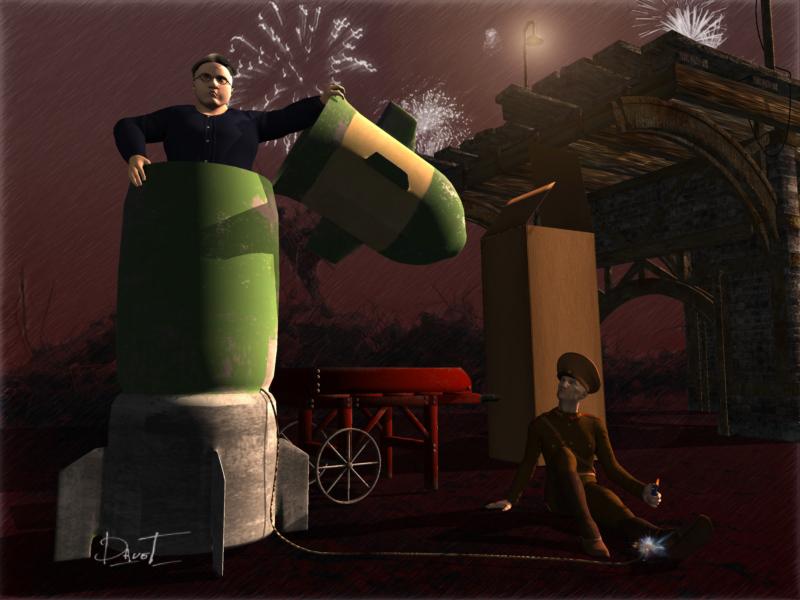
Carrara Challenge #32 They Only Come Out At Night - WIP Thread - Meet Our PA Sponsor, GKDantas!Modelled my Supreme Ruler morph in Carrara then imported to DS to save as DUF morph for Genesis.
Imported the background which I created and will share for anyone who would like to use it.
Modelled the fuse and images for a plane for the lit fuse.. made the soldiers hat bigger with magnets. Used glow shaders and light effects for the street light, lighter & fuse.
 Centaur 7 (Carrara) am not even going to speculate
used to see distortions like that in poser days when importing a morph made in Wings and the verts were out of order.
could try zeroing the figure shape, see what it snaps back to
the vertice info is in the geneses3male.dsf file in data filder,
could try dropping fresh dsf file in. like wendy suggested since is effecting all your g3m files.checklist before exporting g3 to object for morph work

check figure is totally zeroed.
watch out for that hd mouth realism morph and the navel morph >.< dont think shows on the active parameter filtered list
check mesh is totally at base resolution, sub d set to 0
in poser days used to export just the body part,
genesis one mesh, need the whole thingcant think of what else??
Default Eddie's figure was loading with the same distortions too. As for morphings, my morphings worked perfectly since I started to make them. And suddenly all the stuff around G3 male went wrong. But I have solved this problem after installing Studio Beta. When DS Beta requested for essentials installation, I did it. Standard reinstalling of essentials gave nothing.
Removing genx morphs with tabYou can delete morphs direct on your harddrive in the GenX-folder : data/DAZ 3D/ (insert Figure Name here) /Morphs /D3D Gen X
Probably you should not delete the folder itself, only the created files in there. Not sure if it is necessary to close DAZ Studio before you delete files in there. But I prefer to do so.
The second way is via the GenX tab in the morphs section. Deleting or disabeling morphs in the GenX tab can not break something nor does it effect the original morphs of the source figures. Highlight the morph and press the delete button and it will be gone.
At the bottom of the GenX/Transfer tab there are different options, to replace existing files or to keep backups of files. Thats what the Restore/Remove buttons are there for. But I have never used those. Usually I do my transfers with the option Replace existing files.
Sorry for rehashing one of my older screenshots. I will post a better one if needed.
Thanks so much for the help. I did all that but was still having problems so I ended up installing daz and all my content again. The genx stuff has been saved in another folder but I'm afraid to import it over as I'm not sure if it caused the problem. I'm on the search for how to isafely use genx. As what I did may have overwritten some base figure files.
Daz 3D is part of

Connect
DAZ Productions, Inc.
7533 S Center View Ct #4664
West Jordan, UT 84084Licensing Agreement | Terms of Service | Privacy Policy | EULA
© 2026 Daz Productions Inc. All Rights Reserved.