-
Issue with clothing that intersects the body
Make sure "Reverse Deformations" is ticked.
I don't see that option under the Transfer Utility.
Novica & Forum Members Tips & Product Reviews Pt 8I haven't had a chance to do much rendering over the past couple of months, but I promised Novica to share something here when I got the chance...

I mixed a number of G3M products to get the human half of the centaur. The body is Darius 7 at 100%, the head is Awan at 100% and Gianni 7 at 36.2%. then to really confuse things, I used the materials from Anicinabe. The body hair is RedzStudio Oh My Body Hair. The clothing is kit-bashed: Leather Warrior for G3M on the arms, and Havoc Outfit for G3M for the rest. I used d-forms to make the belt and vest expand to reach around the join to the horse body. It's not perfect, but looks good facing the camera. The forest is Forest Superior with the Iray Uber Base applied, with a stone shader on the rocks and one of DA's Stonework and Masonry shaders on the ground. The centaur body coat uses a normal map I'd created from a horse 2 texture last year. The weapons, belt and necklace received a liberal dose of Iray shaders from Mec4D's iray shaders vols 2 & 3. I used TerraDome 3 for the first time, using the Bzone to create the mountains in the background and the atmosphere prop to add the haze. The hdr lighting the scene and providing the sky is also from TD3.
ETA, the review: After all the hullabaloo over the "abrupt" transition between man and horse, I was delighted to find the transition works very well in the latest released version of Daz Studio. I started the scene on this computer, using an older beta install, and there was no transtion. I've read where others had issues with the geoshell showing up. The only time I saw the untextured geoshell, or the hidden parts of G3M, was when I had the Geometry Editor tool active. The biggest problems with Horse 2, imo, were the mane and tail. As the centaur uses the horse 2 mesh and textures, the tail has the same issues. It would have been nice if they could have redesigned the tail. It's also a shame not all the Horse 2 morphs came with the centaur. I tried unsuccessfully to add the Horse 2 Mare morph by adding it to the directory with the other morphs. I found the centaur product to be relatively easy to work with, and a lot of fun.
Issue with clothing that intersects the bodyI'm trying to create a limb cap for an amputee. I've exported Kalea 7 with the forearm invisible, and used dynamesh to close the hole in the arm. I then create a fitting cap for the limb, and export that.
I send that back into Daz studio, and use the Transfer Utility to use Kalea 7 as the source and the limb cap object as the destination. The cap then drops off the arm by about 6 inches, and stays there. It will follow the limb if I pose Kalea, but it won't stay in the correct spot and is therefore useless to me.
Can someone give me an idea of what I'm doing wrong, and how to fix it?Grimaces - Dialable & One-Click Expressions for Genesis 3 Female
This set of 30 original expressions is going to help you making funny faces and extreme expressions.
They are based on the many facial bones of Genesis 3 figure.
The expressions will work on other Genesis 3 Female based figures like Victoria7, Monique 7, Olympia 7, etc.
They are One-Click and Morph Dial expressions. So you can adjust as you like as well as you can mix them creating, even more, faces without altering your poses.
It was very fun to make it. Hope you enjoy it!
Available here: https://www.daz3d.com/grimaces-morph-dial-one-click-expressions-for-genesis-3-female
Removing genx morphs with tabWell, some users seem to have problems with distortions caused by the Beautiful Bends products: https://www.daz3d.com/forums/discussion/comment/2190171/#Comment_2190171
But thats all I know, I have never experienced GenX overwritting original V4/M4 or any Genesis Generation files.
I have seen your post in the GenX commercial thread. Hope you get your problems solved.
For future use you may find this GenX Tutorial List helpful: http://www.daz3d.com/forums/discussion/comment/2178136/#Comment_2178136
Thanks for that link. I'll be bookmarking it to look through this next week. Reinstalling everything broke most of what I had made so allmost everything I made either has to be remade or I have to find the new place the files are. I had some genx files it is looking for that have both female and male attached to them. All kind of confusing and weirding me out.
By default GenX puts its morphs into its own folder hierarchy, so it won't overwrite other files. But naming collisions can occur, where if you activate a morph from a top level, you could actually be applying two or even more "copies" of that morph. The strengths of the morph are additive.
You know if there's more than one morph with that name is there's a (2) or (3) or some other number beside its name. This tells you that you should drill down the tree and find the specific morph you want to apply.
I used to get fancy and put the GenX morphs into custom folders, but then next time I'd import some I'd forget where I put the originals, and I'd then get duplicate morphs. There is an option in GenX where it'll make a backup of any previous copy of that morph within the same data folder, so if you do make a mistake, you can always delete the newer file, and rename the BAK file to its original.
I never knew that. Good information. I did end up with duplicates and tried to delete them but that seemed to compound my problems. lol I really think this is all me not knowing what I was doing.
Useful tip for the dayIt would be cool if someone posted the next 'useful tip' to this thread. :)
The bake smooth morphs is awesome, but the way it's being saved (morph asset) makes me think it's altering the original clothing, which I'm ususally hesitant to do.
D-formers does not work on Daz Studio 4.9I can't remember the details, but there's some issue with position of objects and deformers. Like you can't move it after deforming it, or before deforming it, or something or the field isn't where you expect it. You could try a quick test with your object loaded at the default or zero position and see if that changes anything?
I was using D-Form just yesterday, in the current, 4.9.3 release. I was frustrated because the red-to-yellow dots indicating strength of the controller on the object wasn't displaying. I started moving the field around and discovered the dots were no longer centered in the field circles. They were above it. So when I moved the field below the object I was working on, I was able to position the dots where I needed them to be. Everything else worked as I expected, including spawning the morph by selecting the top level bone of the object, (i.e. Havoc Belt.)
I have no idea if this change is deliberate, in an attempt to make the tool easier to use, or if it's unintended and waiting upon a new release to be fixed. Just remember to center the field on the x and z axis then move it down (y axis) until those dots appear.
Also, I saved the scene I was working on and copied the duf file to my render computer. All the D-Form spawned morphs were right were I expected.
Carrara Challenge #32 They Only Come Out At Night - WIP Thread - Meet Our PA Sponsor, GKDantas!Modelled my Supreme Ruler morph in Carrara then imported to DS to save as DUF morph for Genesis.
Imported the background which I created and will share for anyone who would like to use it.
Modelled the fuse and images for a plane for the lit fuse.. made the soldiers hat bigger with magnets. Used glow shaders and light effects for the street light, lighter & fuse.
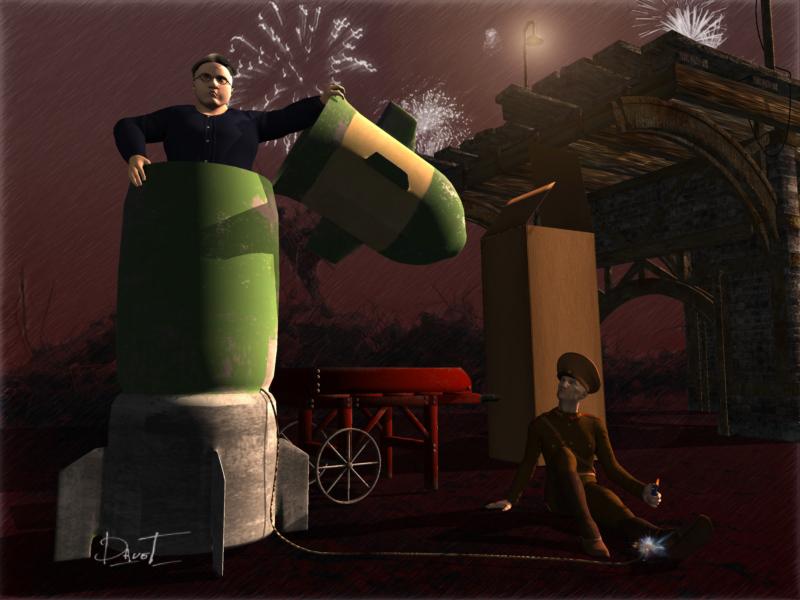
Heh heh heh!! So much for "not expecting anything good," as you wrongly predicted in the other thread.
 MilHorse textures Poser > Daz question
Yeah, I have that and enjoyed it, though the ability to transfer zebra skin to Daz Horse 2 is a bit hampered by not actually having a Daz Horse 2 zebra morph (or straight upright mane)
I was hoping to grab all those free milhorse skins and make use of them broadly, except for the aforementioned problem. (IE: many of them aren't actually that good)
Josh Crockett Suggestion Page for Monster Characters!The problem is trying to get the geograft to work with any morphs the figure might have. I mean, if the monster is muscular, and everything from the neck up looks the same, that might look weird. Worse, there might be weird artifacts where the body joins with the new head.
If you morph the head, on the other hand, it's already set up how the morphs will affect the head (though it might not always work right).
Also, if you morph the head, all the rigging and other stuff is already there, plus it can be combined with other stuff (like all the facial morphs, horns, etc)
M4 Elite anatomical elements not loadingI am not too sure if I am overlooking something, but I am trying to load M4 with the Elite Gens. I have downloaded and installed the files using the installer (and again manually just in case) and when I come to load M4 it isn't an option (unlike Freak and Vladimir and the Creatures morphs that I do have available). So, with M4 selected, I go to the content library to find the inject morphs file in the POSES/MORPH TARGETS/INJ M4 ELITE GENITALIA path. When I click on that, nothing happens.
Am I being dim? Do I not have the 'elite' version of Michael loaded?
I am able to add and remove the freak/creature/vladimir morphs at will, but the Elite one doesn't appear to do anything.
Many thanks for your help in advance
OT returning to vistaBelow is a M$ link about what to do. The device not the OS is tied to your account.
https://support.microsoft.com/en-us/help/10547/microsoft-account-remove-deregister-device
Windows 10 Licence Terms section 4 Transfer for which applies to you...preinstalled or standalone...https://www.microsoft.com/en-us/Useterms/Retail/Windows/10/UseTerms_Retail_Windows_10_English.htm
Josh Crockett Suggestion Page for Monster Characters!I was actually thinking of a 'face is a big mouth' type of thing at one point. I've poked at doing it as a morph, but the usual issues of 'what do you do with the eye area' is always annoying, plus then you have to figure out how to place and scale jaws/teeth/tongue etc...
I don't know anything about modeling, so I could be completely off base, but if you made a completely unique monster head figure, couldn't you just make it so it parents to the neck and completely hide the original head? Then you don't have to worry about the eye area. Seems like it might be easier to do that instead of making morphs to the original head. I always wondered why a Cyclops was not made in that way instead of the awkward looking cyclops geograft that was made for G1.
Josh Crockett Suggestion Page for Monster Characters!I was actually thinking of a 'face is a big mouth' type of thing at one point. I've poked at doing it as a morph, but the usual issues of 'what do you do with the eye area' is always annoying, plus then you have to figure out how to place and scale jaws/teeth/tongue etc...
Skin Builder 3 Merchant Resource for Genesis 3 Female (Commercial)Just worked through creating my first skin. Amazing product!! I've alway preferred creating custom characters modeled on real life people. Being able to model a custom skin to go with the customized geometry makes the final product look dramatically better. It's especially nice to be able to get the makeup and brows more correct. I've only done one so far and I can really see the potential.
Just thinking out loud - but I think next time I will create the skin first and morph the geometry second. Should be much easier to get the geometry right with a more correct looking skin on the model.
Thanks for this great product!!
Question about Facegen files...Facegen is Windows only so I used it on an old laptop to create characters. Now I want to transfer the characters I created to my Mac. Where do I find the slider files so I can transfer those slider/morphs to my Mac? Thanks.
Removing genx morphs with tabBy default GenX puts its morphs into its own folder hierarchy, so it won't overwrite other files. But naming collisions can occur, where if you activate a morph from a top level, you could actually be applying two or even more "copies" of that morph. The strengths of the morph are additive.
You know if there's more than one morph with that name is there's a (2) or (3) or some other number beside its name. This tells you that you should drill down the tree and find the specific morph you want to apply.
I used to get fancy and put the GenX morphs into custom folders, but then next time I'd import some I'd forget where I put the originals, and I'd then get duplicate morphs. There is an option in GenX where it'll make a backup of any previous copy of that morph within the same data folder, so if you do make a mistake, you can always delete the newer file, and rename the BAK file to its original.
Morphs and injection helpNote that "installing to the same content directory" rules out using Connect, due to the way it works. All Generation 4 figures and their morph sets must be installed manually or using the DIM installer.
Question about subd and creating morphsif you never go back to D|S after sculpting you are golden.
use displacement brush in Carrara, Morph brush in Poser whatever Blender has etc on your rigged figures in your program of choice and render there.
XprssnMagic Importer Script --WHERE?I bought the XprssnMagic for M3 and V3, I found ExpressMagic importer, copy script and paste it, still have error message...
"Balling out in line/morph 54; Unrecognized morph format line; Head 0 Mouth Fl Linear 0.0000"
Somebody help me!
Daz 3D is part of

Connect
DAZ Productions, Inc.
7533 S Center View Ct #4664
West Jordan, UT 84084Licensing Agreement | Terms of Service | Privacy Policy | EULA
© 2026 Daz Productions Inc. All Rights Reserved.