-
Step-by-Step: Using the new PBR Skin on Genesis 8
plasma_ring said:
aldoraeno said:
gerster said:
The only difference seems to be, that the old uber skin has some highlights in the shadows, which the new pbr skin is missing.Hard to tell if this is better or worse.
The only befenfit of the shader for old skin seems to be, that I can apply these micro displacement.
Or are there other benefits which I don't see. For me it looks like that just appling the new shader to old skins doesn't make the render result autmatically better.This has been my general experience so far, too. The shader looks roughly the same, but makes the skin appear either extra-wet or extra-dry, depending on specular occlusion settings and the surrounding lighting.
I would be interested to see if it looks better with an occlusion map texture (the problem may just be that the specular occlusion is too "flat"), but since I haven't purchased Victoria 8.1, I don't have a texture that was intended for this purpose.
The occlusion seems to make a real difference. While messing around in Substance I was actually wishing that I could try using AO on Daz figures, because it seems like there are some neat things you can do with it. That said, I have no expertise in this area but the AO maps don't look very different from specular maps included with some previous G8 characters.
I've enabled occulsion in my comparsion, but it didn't improve the skin. From what kind of difference are you talking?
What is AO?
Step-by-Step: Using the new PBR Skin on Genesis 8aldoraeno said:
gerster said:
The only difference seems to be, that the old uber skin has some highlights in the shadows, which the new pbr skin is missing.Hard to tell if this is better or worse.
The only befenfit of the shader for old skin seems to be, that I can apply these micro displacement.
Or are there other benefits which I don't see. For me it looks like that just appling the new shader to old skins doesn't make the render result autmatically better.This has been my general experience so far, too. The shader looks roughly the same, but makes the skin appear either extra-wet or extra-dry, depending on specular occlusion settings and the surrounding lighting.
I would be interested to see if it looks better with an occlusion map texture (the problem may just be that the specular occlusion is too "flat"), but since I haven't purchased Victoria 8.1, I don't have a texture that was intended for this purpose.
The occlusion seems to make a real difference. While messing around in Substance I was actually wishing that I could try using AO on Daz figures, because it seems like there are some neat things you can do with it. That said, I have no expertise in this area but the AO maps don't look very different from specular maps included with some previous G8 characters.
Step-by-Step: Using the new PBR Skin on Genesis 8gerster said:
The only difference seems to be, that the old uber skin has some highlights in the shadows, which the new pbr skin is missing.Hard to tell if this is better or worse.
The only befenfit of the shader for old skin seems to be, that I can apply these micro displacement.
Or are there other benefits which I don't see. For me it looks like that just appling the new shader to old skins doesn't make the render result autmatically better.This has been my general experience so far, too. The shader looks roughly the same, but makes the skin appear either extra-wet or extra-dry, depending on specular occlusion settings and the surrounding lighting.
I would be interested to see if it looks better with an occlusion map texture (the problem may just be that the specular occlusion is too "flat"), but since I haven't purchased Victoria 8.1, I don't have a texture that was intended for this purpose.
Genesis 8.1 / Victoria 8.1This is my first new Victoria and i find the whole experience to be both scary and exciting...(but mostly exciting)
Step-by-Step: Using the new PBR Skin on Genesis 8I posted these in the other thread as well, but I spent a lot of time messing with the shader last night and my converted figure's skin (RY Alison) looks very different with it on and set up. Unfortunately I'm at work so I can't do a side-by-side render, but the closest comparison I can think of is N.G.S. 2. I've increased translucency since I rendered these out, which helped with detail.
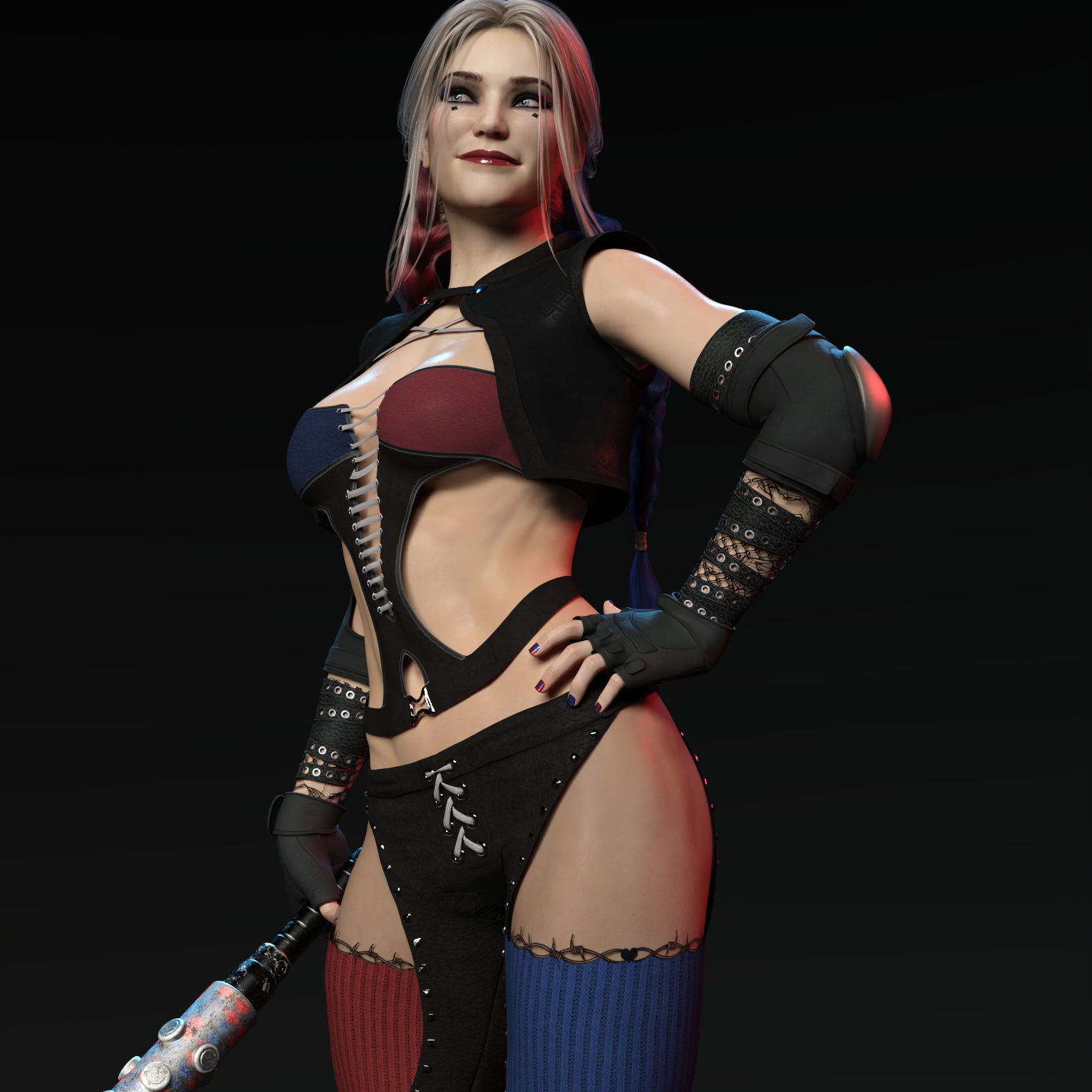
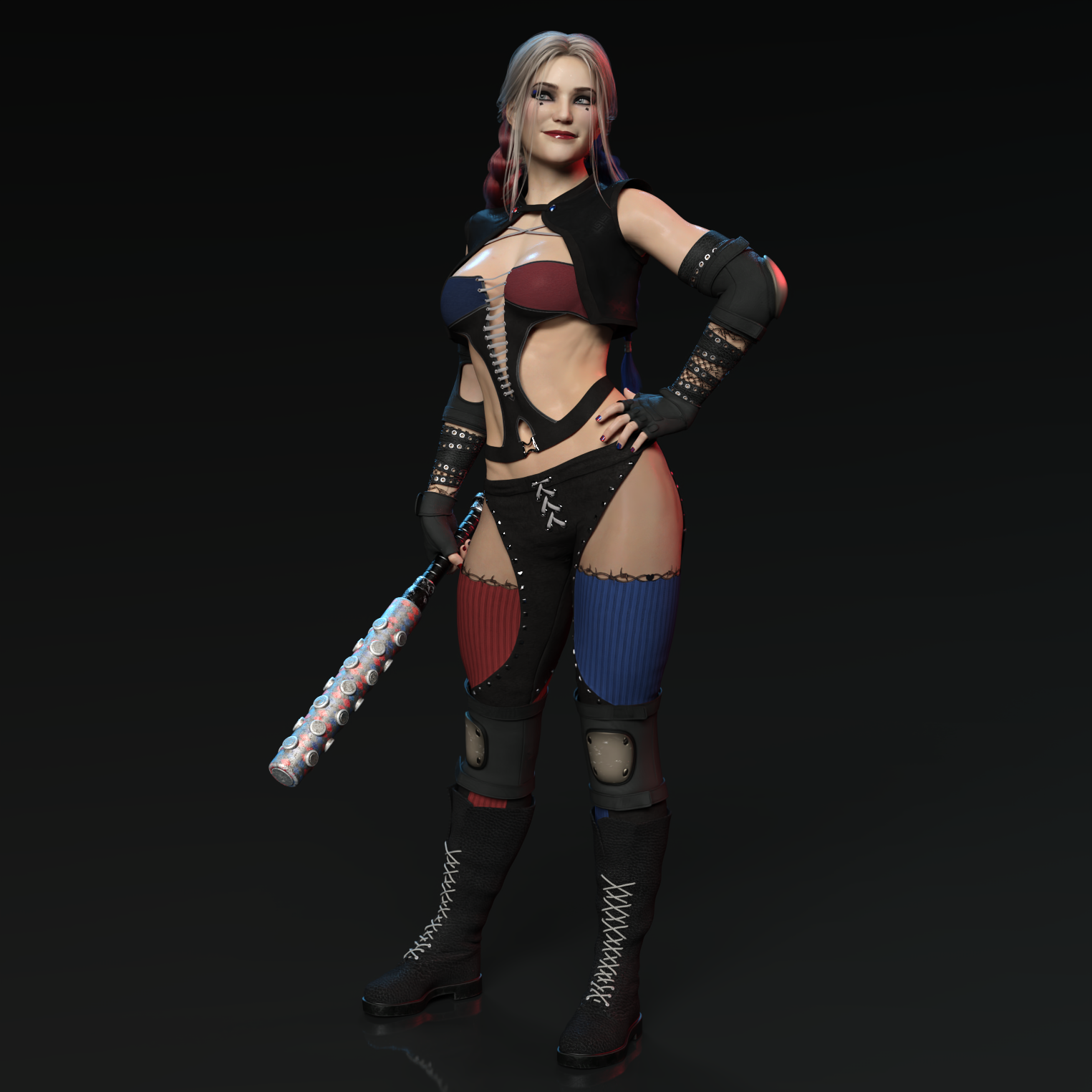
The differences didn't become super clear until I went into Victoria 8.1's texture folder and started plugging in her AO and detail weight maps. I also used the height detail map instead of the normal.
I'm not sure it's more realistic--it didn't take a figure intended to look like a video game character and make her look like a cosplayer, obviously--but it's definitely more consistent, which is a big help to me.
Genesis 8.1 Face ControlsMxD said:
Just picked up the Victoria 8.1 upgrade and started exploring. So far i am extremly unimpressed, the face controls seem to be a disaster in the making. As soon as you inadvertently touch the wong part of any control DAZ crashes instantly every time. It's just completly useless and utterly frustrating. For any one contemplating this UPGRADE??? i would suggest to wait a while and see if DAZ gets the controls working unless of course you enjoy constantly recreating what has allready been done or have the discipline to save after each and every adjustment you make.
THIS IS VERY DISAPPOINTING
works ok for me if that helps
Genesis 8.1 / Victoria 8.1Victoria 8.1 doesn't look like a woman, she looks much too young, looks like an eco-student character. Especially since Victoria should be the most beautiful character, this is rather insignificant. The notch on the tip of the nose is exaggerated and not really common in mankind. The notch looks awful on some renders. Let's see what follows.
Auto Muscle Enhancer HD [Commercial]terry_duquette said:
Well, started playing in 4.15 and G8.1F....initial assessment, don't rush. The base figure has just the Iray base map, some mouth and eye improvements with the tear addition. Lots of talk (28 pages as of today) in the Commons. The good thing was all the characters and morphs all showed up, and I was able to load G8F morphs with the morph loader pro. So below is a quick character build (crossgender morph, 75% Alistair, 15% Cartoony for Leemoon, and my HD Musculature morphs tweaking, layered with AME body and ASE) including my custom bicep morph on the G8F platform. First thing I noticed that the figure loads in SubD2 rather than 1. All the expressions show up, but a lot of them don't work. If you have D.Masters AFE, then you probably have most of the capability of the G8.1F facial enhancement rigging. Don't know if it's something in the figure or 4.15, but overall things seemed to move and react slower than before, will have to see once I go back to G8M work. There does seem to be a difference in the UV torso map rigging. Went to get a Filament render and add the beautiful skin shell, the torso faded out, so that product is useless on 8.1 for now. I could load any skin shader from the library, so for good looking Filament/PBR support looks like new product or updates required, thus Victoria 8.1. Also was led to believe from the promo descriptions that Vellus hair was defaulted, nope, guess you need V 8.1 for that feature also. Will continue to play, but again, my opinion, don't rush. TD
Just noticed on the Filament renders I should have added the hair cap, I was so focused on trying to fix the torso or find some work around! TD
Thanks for all of this information, Terry.
Daz Studio 4.16[.0.x] Pro, General Release! (*UPDATED*)patrickp78 said:
jbowler said:
Angelicpower said: Where would I find Genesis 8.1 Female base?
Smart Content, deselect "Filter by Content", Select All, search for 8.1; there are only a few things there. It's "Genesis 8.1 Basic Female".ww
Hi, I found Genesis 8.1 Female with the last upgrade. What about Genesis 8.1 Male?
See the 8.1 thread: https://www.daz3d.com/forums/discussion/466416/genesis-8-1-victoria-8-1/#latest ; It's very active :-) 8.1 male isn't here yet; I guess there will probably be a 5.15 essentials update at some point.
Genesis 8.1 Face ControlsJust picked up the Victoria 8.1 upgrade and started exploring. So far i am extremly unimpressed, the face controls seem to be a disaster in the making. As soon as you inadvertently touch the wong part of any control DAZ crashes instantly every time. It's just completly useless and utterly frustrating. For any one contemplating this UPGRADE??? i would suggest to wait a while and see if DAZ gets the controls working unless of course you enjoy constantly recreating what has allready been done or have the discipline to save after each and every adjustment you make.
THIS IS VERY DISAPPOINTING
'Default Resources for Daz Studio 4.15' ?Richard Haseltine said:
Default resources is things like the sahders, without it you won't be able to do much. It has been updated to add the new PBR Skin shader for the Genesis 8.1 updates (used by Victoria 8.1, though it will no doubt be used by other things and is available once installed for experimentation).
OK thank you Richard.
'Default Resources for Daz Studio 4.15' ?Default resources is things like the sahders, without it you won't be able to do much. It has been updated to add the new PBR Skin shader for the Genesis 8.1 updates (used by Victoria 8.1, though it will no doubt be used by other things and is available once installed for experimentation).
Questions about 8.1 items over 8.0 and there compatibility.Looking at Hurt and Injured and Pain and Hurt, I can't help but feel like they've already begun the process of taking all the 8.0 products and making them again as an 8.1 product. As a person who held on to my DVD player long after everybody else had upgraded to Blu-ray, I refuse to buy everything again just because they added a 0.1
That's not true. I already got Victoria 8.1 and already have this expression set on my wishlist. But they had better not make an 8.2 version.
Genesis 8.1 / Victoria 8.1Richard Haseltine said:
Daikatana said:
takezo_3001 said:
Daikatana said:
Well, this is interesting. While the product store page does state that the Vellus hair is included with the victoria 8.1 figure, that is apparently NOT the case. While I did put in a sales support ticket, those have been taking so long to answer recently that it just adds to my frustration. I had held off on purchasing the V8.1 figure in large part because of the somewhat misleading advertising-which I am choosing to believe was unintentional but with the statements on the forum that DAZ3D was including it with V8.1, I decided to go ahead with the purchase. Now, I find that even though the product store page states it is included, it is still apparently NOT included. I have uninstalled -and made sure to delete the download package- via DIM and still no vellus hair. Hopefully someone here can advise me?
I guess that it was delayed due to Daz needing to package the item, but that's my guess, Daz needs to confirm that, anyway it's coming soon as it's located on the V8.1 product page.
Its alreadly listed on the product page. I checked that. Its definitely NOT in my library though.
I've sent in a query on this.
Thank you SOOO much! You are HUGELY appreciated!
Genesis 8.1 / Victoria 8.1Daikatana said:
takezo_3001 said:
Daikatana said:
Well, this is interesting. While the product store page does state that the Vellus hair is included with the victoria 8.1 figure, that is apparently NOT the case. While I did put in a sales support ticket, those have been taking so long to answer recently that it just adds to my frustration. I had held off on purchasing the V8.1 figure in large part because of the somewhat misleading advertising-which I am choosing to believe was unintentional but with the statements on the forum that DAZ3D was including it with V8.1, I decided to go ahead with the purchase. Now, I find that even though the product store page states it is included, it is still apparently NOT included. I have uninstalled -and made sure to delete the download package- via DIM and still no vellus hair. Hopefully someone here can advise me?
I guess that it was delayed due to Daz needing to package the item, but that's my guess, Daz needs to confirm that, anyway it's coming soon as it's located on the V8.1 product page.
Its alreadly listed on the product page. I checked that. Its definitely NOT in my library though.
I've sent in a query on this.
Genesis 8.1 / Victoria 8.1
I imagine they use a content delivery network to serve files to DIM. It will take a little while until all servers in the network have received the updated file. Try again in a few hours.Daikatana said:
Well, this is interesting. While the product store page does state that the Vellus hair is included with the victoria 8.1 figure, that is apparently NOT the case. While I did put in a sales support ticket, those have been taking so long to answer recently that it just adds to my frustration. I had held off on purchasing the V8.1 figure in large part because of the somewhat misleading advertising-which I am choosing to believe was unintentional but with the statements on the forum that DAZ3D was including it with V8.1, I decided to go ahead with the purchase. Now, I find that even though the product store page states it is included, it is still apparently NOT included. I have uninstalled -and made sure to delete the download package- via DIM and still no vellus hair. Hopefully someone here can advise me?
Genesis 8.1 / Victoria 8.1takezo_3001 said:
Daikatana said:
Well, this is interesting. While the product store page does state that the Vellus hair is included with the victoria 8.1 figure, that is apparently NOT the case. While I did put in a sales support ticket, those have been taking so long to answer recently that it just adds to my frustration. I had held off on purchasing the V8.1 figure in large part because of the somewhat misleading advertising-which I am choosing to believe was unintentional but with the statements on the forum that DAZ3D was including it with V8.1, I decided to go ahead with the purchase. Now, I find that even though the product store page states it is included, it is still apparently NOT included. I have uninstalled -and made sure to delete the download package- via DIM and still no vellus hair. Hopefully someone here can advise me?
I guess that it was delayed due to Daz needing to package the item, but that's my guess, Daz needs to confirm that, anyway it's coming soon as it's located on the V8.1 product page.
Its alreadly listed on the product page. I checked that. Its definitely NOT in my library though.
Genesis 8.1 / Victoria 8.1Daikatana said:
Well, this is interesting. While the product store page does state that the Vellus hair is included with the victoria 8.1 figure, that is apparently NOT the case. While I did put in a sales support ticket, those have been taking so long to answer recently that it just adds to my frustration. I had held off on purchasing the V8.1 figure in large part because of the somewhat misleading advertising-which I am choosing to believe was unintentional but with the statements on the forum that DAZ3D was including it with V8.1, I decided to go ahead with the purchase. Now, I find that even though the product store page states it is included, it is still apparently NOT included. I have uninstalled -and made sure to delete the download package- via DIM and still no vellus hair. Hopefully someone here can advise me?
I guess that it was delayed due to Daz needing to package the item, but that's my guess, Daz needs to confirm that, anyway it's coming soon as it's located on the V8.1 product page.
Genesis 8.1 / Victoria 8.1Well, this is interesting. While the product store page does state that the Vellus hair is included with the victoria 8.1 figure, that is apparently NOT the case. While I did put in a sales support ticket, those have been taking so long to answer recently that it just adds to my frustration. I had held off on purchasing the V8.1 figure in large part because of the somewhat misleading advertising-which I am choosing to believe was unintentional but with the statements on the forum that DAZ3D was including it with V8.1, I decided to go ahead with the purchase. Now, I find that even though the product store page states it is included, it is still apparently NOT included. I have uninstalled -and made sure to delete the download package- via DIM and still no vellus hair. Hopefully someone here can advise me?
Can't load any Genesis 8 modelThis probably has been talked about already. If it has could someone lead me to the right thread please. I been trying to load any of my genesis 8 models and everytime i do, it takes extremely long and the program crashes. I can use any other model type like Victoria 7 and before but can't with G8 for some reason.
Daz 3D is part of

Connect
DAZ Productions, Inc.
7533 S Center View Ct #4664
West Jordan, UT 84084Licensing Agreement | Terms of Service | Privacy Policy | EULA
© 2026 Daz Productions Inc. All Rights Reserved.