-
[Released] Character Converter from Genesis 3 Female to Genesis 8 Female(Now Conv JCMs) [Commercial]
RiverSoft Art said:
jdavison67 said:
I have a few questions about restore vs zero
1. Which is prefered for transfering a custome character, one with morphs from multiple base characters. I assume restore, but I'm trying to grasp this...
I don't really see the point in having a zero option, as restore would keep this value if it was already set at such.
This was a change that Daz made to the Zero Action. I need to update all my scripts to get rid of the stupid dialog. It should be ZERO. However, with custom scene characters, as long as you loaded a vanilla G3F before customization, restore will work too. Restore resets a character to its loaded defaults (i.e., if you loaded Victoria 7 with the Victoria 7 head and body, it would reset to that). That is NOT what the script is trying to do. It is trying to turn off all morphs on the character.
2. Can we get a "do this for all selected" check box ? So we don't have to make this choice for every character one at a time. That way we don't have to sit by the computer while a batch of these is going.
Talk to Daz about the Zero action. This was their backward breaking change. I will eventually get rid of the dialog because I won't call the Zero action anymore.
3. If you have not already transfered all your base characters from G3 to G8 can you transfer a custom character. My experience says no. the results are not correct in every attempt I've made. Horrific results.
Yes, you can convert a custom character before transferring ANY base characters. For bad results, what were they? what morphs did you use? What does the Daz log say? Can we see images?
JD
OKAY, I'm not sure I understand what restore is, but I have been choosing the RESTORE option every time, which has resulted in me getting the base character as a result every time... not my custom character.
So does restore erase all the morphs, except the base morph? This would explain why none of this has been working for me.... If so, you definately need to remove that dialog.
I thought restore ment that it was copying the cusom character exactly and not making changes to the morphs, but is seems like its the same as the restore figure option in daz where it eliminates custom figure morphs, which is never what I wanted.
It looks like i Need to delete everything and start again choosing ZERO when this pops up.
JD
►►► aniMate 2 - Real aniMating Power for Daz Studio!KenYano said:
Hey Dartan/All,
Could anyone point me in the direction for a good article on interpolation and how it works with 3D animation. Whenver I make an animation I set the first frame to Linear as instructed and I don't know why Lol.
Thanks!
I use Linear because a Linear Interpolation is a straight path from point A (the key with the interpolation setting) and point B (the next key frame in the timeline).
Why is this important to me?
In animation creation, I always add extra morph dial changes as I go - say, expression changes, muscle movements... whatever. Then I go back to a point in time when I want that dial to be zeroes again - so I zero it. With a Linear Interpolation, the dial will then remain zeroed from the very first key (0) to that point when I just zeroed it. Many dials can go below 0.00, so if that first key is set to TCB, there would be changes to that value between the first key, which is zeroed, and the next key where I zeroed it - it wouldn't stay zeroed.
Now, there are times when we'd like that fluctuation - and that's when I select that specific dial's first key frame and change it to TCB.
The biggest reason, however, that we need to change that first key in the first place is because the Bake to Studio Keyframes function sets all of the first keyframes to "C", which is Constant.
The Constant interpolation hold the value firm until the next key frame - very useful for creating instantaneous change.
Now - "I" need to change that first key because I never begin my 'actual' animation starting at frame 0.
If you'd starting your animation from frame 0, rather than use the 30 buffer zone I talk about, you don't need to change the first key frame's interpolation - because the next key is on the next frame. When two keys are right next to eachother in the timeline, there is no interpolation. One key simply goes to the next.
Interpolation Types in Daz Studio:
- "C" Constant - holds value firm until the next key frame - good for abrupt changes or simply holding a value solid until the next change.
- "T" TCB - An editable Bezier curve interpolation - most common for creating our own animations from scratch because, by default, it smooths the change between the two key frames.
- "L" Linear - the values between the key frames will follow a consitent path from the first key to the next
Hope this helps. Let me know if you have any questions - always happy to help!!! :)
Morph -Geometry did not match-Hi
For the product https://www.daz3d.com/hot-work-costume-set-for-genesis-8-femaless
I wanted to create a morph for the shirt but when I did it it told me that the "Geometry did not match" already reviewed everything, from:- Geometry resolution: Base
- Extra geometries
- Parameters when exporting/importing (this should not be the problem since I used the same ones for the skirt and shoes)
(I also included the screenshots of each one)
And I still have the same problem, it is only with the shirt that I have the problem, since the skirt and shoes that are included I had no problems when creating the morphs.
If anyone can help me it would be a GREAT help.
Thanks in advanceStrange Issue with Elonganting FingersRichard Haseltine said:
the template is just the base Genesis 9 with "Feminine" slider set all the way to 100%
but it isstill the Daz slider, you haven't exported to OBJ and imported as a new morph for example?
No, it's the Daz slider--exporting and importing isn't something I've attempted as of yet. I think I have discovered the issue though. I think the problem is coming from this slider from the "Body Morph Kit for Genesis 9". As a test, I loaded a blank figure and started inputing the same characteristics as the first character line by line, checking after each change to see if it changed the clenched fist, and after changing this slider, I got the elongation effect. I'm not sure why changing changing the dimensions of the torso would change the hands. Any thoughts?
How to get this eye style on genesis 9?The pupil can be removed with a simple custom moph like I did (see the picture). Is not the shrink morph, it's a custom morph which basically make the iris flat. I used it because I needed the same effect on a character, so I know it works.
How to get this eye style on genesis 9?The best thing to use is use the outermost layer of the eye (forget if it's eye moisture or cornea) and turn off the pupil and iris (when going for a glowing eye) I had to futz with it for invictus sol and I don't even recall what I did.
Barring that u need a pupil morph to shrink it wayyy down. There is already one but it won't go very teeny. For some reason it locks even when u turn off limits.
but yeah I don't dig the pupil as a hole either. It kinna limited what we could do with eyes
Strange Issue with Elonganting Fingersthe template is just the base Genesis 9 with "Feminine" slider set all the way to 100%
but it isstill the Daz slider, you haven't exported to OBJ and imported as a new morph for example?
[Released] Character Converter from Genesis 3 Female to Genesis 8 Female(Now Conv JCMs) [Commercial]jdavison67 said:
I have a few questions about restore vs zero
1. Which is prefered for transfering a custome character, one with morphs from multiple base characters. I assume restore, but I'm trying to grasp this...
I don't really see the point in having a zero option, as restore would keep this value if it was already set at such.
This was a change that Daz made to the Zero Action. I need to update all my scripts to get rid of the stupid dialog. It should be ZERO. However, with custom scene characters, as long as you loaded a vanilla G3F before customization, restore will work too. Restore resets a character to its loaded defaults (i.e., if you loaded Victoria 7 with the Victoria 7 head and body, it would reset to that). That is NOT what the script is trying to do. It is trying to turn off all morphs on the character.
2. Can we get a "do this for all selected" check box ? So we don't have to make this choice for every character one at a time. That way we don't have to sit by the computer while a batch of these is going.
Talk to Daz about the Zero action. This was their backward breaking change. I will eventually get rid of the dialog because I won't call the Zero action anymore.
3. If you have not already transfered all your base characters from G3 to G8 can you transfer a custom character. My experience says no. the results are not correct in every attempt I've made. Horrific results.
Yes, you can convert a custom character before transferring ANY base characters. For bad results, what were they? what morphs did you use? What does the Daz log say? Can we see images?
JD
How to get this eye style on genesis 9?Or you can remove the pupil with a morph, like this:
How to get this eye style on genesis 9?I've been trying to transfer this character to g9 and can't really figure out how to accurately transfer it over.
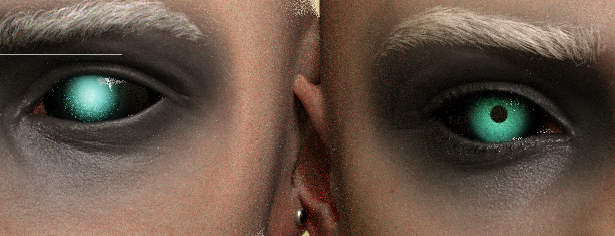
I tried putting it over a g9 eye but the pupil is really throwing me off. I tried using the rssy eye suit but it doesn't really look correct there either. If I make the pupil smaller or remove it the light disappears from the middle and makes the eye a lot duller. what can i do?
Getting on the 9 train, or not
Like this. Sclera map from dimensiontheory (which is not darker around the edges) and iris from your MR. I darkened and enlarged the iris when making the final eye map because it makes that bright ring surrounding the iris less obvious. It's definitely not a problem of the texture whatsoever.chevybabe25 said:(4) The eyes. Eyeballs as a prop which is not affected by the character morph is a plus, giving you more precise scaling/position control to eliminate the space between the eyeball and eye rims. But the shaping/transition from the iris to the sclera gives the illusion of a bright ring around the iris and than from there the sclera quickly becomes much darker towards the edge of the eyes, even if I use chevybabe and dimensiontheory's products. I don't think this is better than that infamous visible separation of the iris and sclera on G8. And I actually think that under the same lighting, G8 eyes reacts to light better than G9.
Could you post a photo of this please? Id like to see exactly what you are explaining here.
Combining Daz art with AI MusicThis is made with one of my Face Transfer 2 characters, with a Suno song, run through Hedra (which produces about 30-second chunks) and spliced together:
Getting on the 9 train, or not(4) The eyes. Eyeballs as a prop which is not affected by the character morph is a plus, giving you more precise scaling/position control to eliminate the space between the eyeball and eye rims. But the shaping/transition from the iris to the sclera gives the illusion of a bright ring around the iris and than from there the sclera quickly becomes much darker towards the edge of the eyes, even if I use chevybabe and dimensiontheory's products. I don't think this is better than that infamous visible separation of the iris and sclera on G8. And I actually think that under the same lighting, G8 eyes reacts to light better than G9.
Could you post a photo of this please? Id like to see exactly what you are explaining here.
[Released] Character Converter from Genesis 3 Female to Genesis 8 Female(Now Conv JCMs) [Commercial]I have a few questions about restore vs zero
1. Which is prefered for transfering a custome character, one with morphs from multiple base characters. I assume restore, but I'm trying to grasp this...
I don't really see the point in having a zero option, as restore would keep this value if it was already set at such.
2. Can we get a "do this for all selected" check box ? So we don't have to make this choice for every character one at a time. That way we don't have to sit by the computer while a batch of these is going.
3. If you have not already transfered all your base characters from G3 to G8 can you transfer a custom character. My experience says no. the results are not correct in every attempt I've made. Horrific results.
JD
Saving prop with strand based hair? (solved - kind of)I put a coment for the one who stil looking about solution for that,
you have to make you SBH on a an object having the same shape as the head-or watever you put hair on i am not juging you :) ) ,, make sur you use the transfer utility to apend your object to your figur,
after you made a satisfying hair stile on this object you create a groupe you put the object and the sbh on the groupe, and you select the figure and save weareable preset , and the select the groupe and save as wearable preset, load it normaly
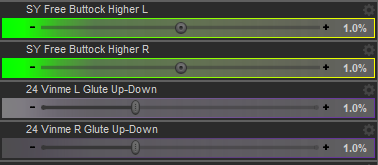
that the way to do it you craft a wigG9F Individual Glute Lift?Checked my morphs and found two LR sets. I believe Sickleyield's are from this package: https://www.deviantart.com/sickleyield/art/SY-Free-Morphs-Merchant-Resource-G9-942186079
The other is from this one: Vinme Morphs for Genesis 9 - https://www.daz3d.com/vinme-morphs-for-genesis-9
Sickleyield's is by default for lifting the glutes only, but if you uncheck limits, it also seems to work fine for lowering them. In both cases each morph affects the other glute a bit though, in a way that doesn't seem quite natural to me. Vinme's do not do that, each morph only affects the glute it's supposed to. Otherwise the two sets seem quite similar.
 Getting on the 9 train, or not
Been on the 9 Train for some time and have the following rants:
(1) Translucency weight of G9 affects the skin way more than G8. Too high I got skin like that poor girl who got sucked into the pillar in Hellraiser. Too low I got a ghost.
(2) A transmitted color which is not leaning towards cool tone gives strong yellow/orange tint to the figure especially around the eye rims and the philtrum, even if your diffiuse and translucency skin maps are nowhere leaning towards yellow/orange. In order to compensate for this I had to use a cool toned pink (almost magenta) as transmitted color which my common sense kept telling me that's not quite biologically correct.
(3) If you use the clone method to transfer G8M characters to G9, the underb**b area will give you nightmare. G9M has nipples lower than G8M, combining with that infamous G9M underb**b crease the chest of the transferred character looks crazy. Also don't get me started on those cone-shaped nipples...
(4) The eyes. Eyeballs as a prop which is not affected by the character morph is a plus, giving you more precise scaling/position control to eliminate the space between the eyeball and eye rims. But the shaping/transition from the iris to the sclera gives the illusion of a bright ring around the iris and than from there the sclera quickly becomes much darker towards the edge of the eyes, even if I use chevybabe and dimensiontheory's products. I don't think this is better than that infamous visible separation of the iris and sclera on G8. And I actually think that under the same lighting, G8 eyes reacts to light better than G9.
There's Always Another Sale Thread -- Discussions Only Pt 3
don't have it yet, but it is in my wishlist. There really are so many things in my wishlist, I need to trim out many of the old characters since I am mostly using gen 9 now. Currently I have over 2k items in my wishlist. Lol Since I first started with Daz I have narrowed my focus mostly towards specific artist who allign with a realistic focus, the pro bundles, and tools. At first, my purchases were a bit more all over the place.memcneil70 said:XiousDs said:
memcneil70 said:
For everyone who has been upset by G9's breast areas, especially the males', what do you think about https://www.daz3d.com/sfd-breast-and-chest-morph-kit-for-genesis-9--merchant-resource?
I ask because I am not a male and have not had issues with G9's breasts.
There are quite a few different tools for making different adjustments, but that one (to me) looks like it could simplify some adjustments folks would want to make. I have not bought it, but I was interested enough to add it to my wish list. I like making characters like this. If Victoria and Harlow had a kid, as an adult what would he/she look like? I then mix the morphs leaning heavy towards the gender the kid is, then use other morphs to make corrections pushing back towards masculine or feminine. Then for the character as a kid, leverage the youth morph sets, and make adjustments. I wish instead of just head and body morphs they were broken down into regions like eyes, nose, jawline, ears, etc so it would be easier to do something like he has mostly his father's features, but his mom's nose and ears.Thank you @XiousDs. I have it in my cart.
Have you bought or looked at Code66's https://www.daz3d.com/shapes-randomizer-for-genesis-9? It has the option to morphs from both male and female shapes together. Or with using on your parents, maybe adjust them with morph packages, save and then use the Base 9 shape and merge the shapes manually together. And of course, some features jump generations, so a child may have something that harkens back to something neither parent shows. And of course there is always the 'milkman' to explain away weirdness.
There's Always Another Sale Thread -- Discussions Only Pt 3XiousDs said:
memcneil70 said:
For everyone who has been upset by G9's breast areas, especially the males', what do you think about https://www.daz3d.com/sfd-breast-and-chest-morph-kit-for-genesis-9--merchant-resource?
I ask because I am not a male and have not had issues with G9's breasts.
There are quite a few different tools for making different adjustments, but that one (to me) looks like it could simplify some adjustments folks would want to make. I have not bought it, but I was interested enough to add it to my wish list. I like making characters like this. If Victoria and Harlow had a kid, as an adult what would he/she look like? I then mix the morphs leaning heavy towards the gender the kid is, then use other morphs to make corrections pushing back towards masculine or feminine. Then for the character as a kid, leverage the youth morph sets, and make adjustments. I wish instead of just head and body morphs they were broken down into regions like eyes, nose, jawline, ears, etc so it would be easier to do something like he has mostly his father's features, but his mom's nose and ears.Thank you @XiousDs. I have it in my cart.
Have you bought or looked at Code66's https://www.daz3d.com/shapes-randomizer-for-genesis-9? It has the option to morphs from both male and female shapes together. Or with using on your parents, maybe adjust them with morph packages, save and then use the Base 9 shape and merge the shapes manually together. And of course, some features jump generations, so a child may have something that harkens back to something neither parent shows. And of course there is always the 'milkman' to explain away weirdness.
There's Always Another Sale Thread -- Discussions Only Pt 3
There are quite a few different tools for making different adjustments, but that one (to me) looks like it could simplify some adjustments folks would want to make. I have not bought it, but I was interested enough to add it to my wish list. I like making characters like this. If Victoria and Harlow had a kid, as an adult what would he/she look like? I then mix the morphs leaning heavy towards the gender the kid is, then use other morphs to make corrections pushing back towards masculine or feminine. Then for the character as a kid, leverage the youth morph sets, and make adjustments. I wish instead of just head and body morphs they were broken down into regions like eyes, nose, jawline, ears, etc so it would be easier to do something like he has mostly his father's features, but his mom's nose and ears.memcneil70 said:For everyone who has been upset by G9's breast areas, especially the males', what do you think about https://www.daz3d.com/sfd-breast-and-chest-morph-kit-for-genesis-9--merchant-resource?
I ask because I am not a male and have not had issues with G9's breasts.
Daz 3D is part of

Connect
DAZ Productions, Inc.
7533 S Center View Ct #4664
West Jordan, UT 84084Licensing Agreement | Terms of Service | Privacy Policy | EULA
© 2026 Daz Productions Inc. All Rights Reserved.