-
RESOLVED: M4 Elite Ethnic Faces (where's the INJ morph?)
Hello,
I am trying to use one of my older products with DAZ Studio. I know I have to load my M4 differently than everything else. Problem is, although I purchased the above product, I can't figure out where it is located in order to use the morphs. Any direction would be appreciated. Thank you in advance.
Reinstalling Daz 3D Studio over possibly corrupted versionThanks for the suggestion but strangely the only Daz items that show up in the filters list are " Daz Studio 3 Promo Video : Map Transfer and "Interactive Lessons for Daz Studio 4.9" as well as Daz Tutorials. There is no sign of the actual Daz Studio 4.9 application anywhere in that list, 64 bit or 32 bit ????
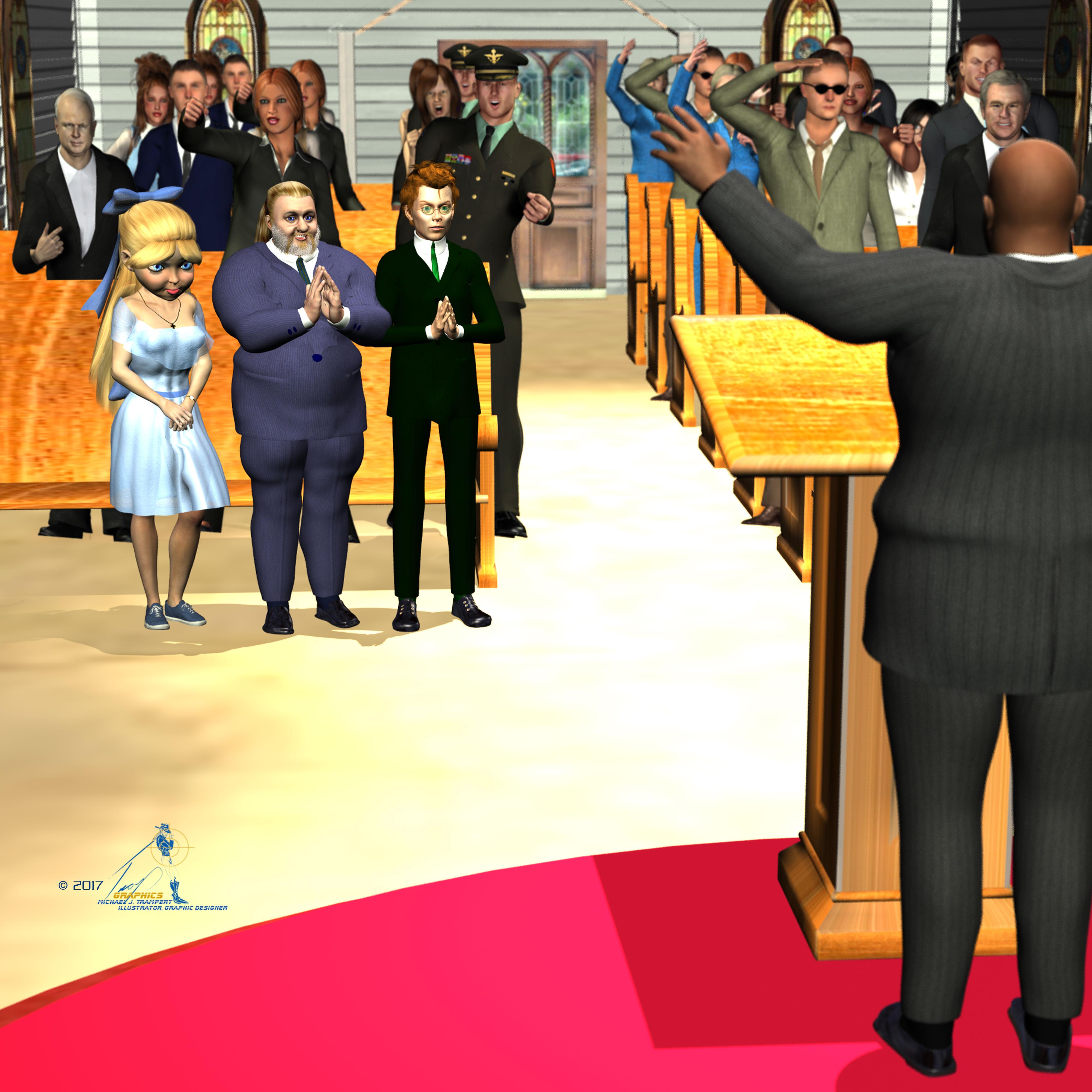
3D Art FREEBIE CHALLENGE-APRIL 2017- LET'S SPRING INTO EASTER FVOTM-Main ThreadI finally have my entry done.
Tommie's Grandpa insisited everyone get properly dresed up for Easter Sunday services at Allgood Babtist Church.
Easter Sunday
Freebies:
Die_trying's V4 morphs for Genesis (Tommie,Jesse, Grandpa Tom)*
Ramwolf's Genesis Morph Pack (third row second column) (Jesse, Grandpa Tom, Rev. Braggart)
Pin-up Girl Pack (Tommie)*
Ultimate Shader Pack (Chrome shaders—with reflection maps removed—for Tommie's wristwatch, earrings, and necklace)*
V4 Wrist Watch (Tommie)*
Ella V4 (Tommie's eyes)*
Sandra for V4* (Tommie's skin)*Stud Earrings for Poser (Tommie)*
Ella Hair for V4 (Tommie)
V4 Fae Top (Tommie)*
Genesis Evening Wear (Tommie)*
Belle of the Ball (Tommie's bow)*
Satin shaders (Tommie's dress)*
Findlay for Genesis (Jesse)*
Running shoes (Jesse)*Glasses (Jesse)*
R72 Leather shaders (Grandpa Tom's, Jesse's, and Rev. Braggart's shoes)*
M3 Pullback hair (Grandpa Tom)
Genessis Georgian Outfits (Grandpa Tom's, Jesse's and Rev. Braggart's socks and shoes)*
Genesis Pinstripe Suit (,Rev. Braggart, Jesse and Grandpa Tom[/url]*
REC Weaponry Shaders (Jesse's Gradnpa Tom's and Rev Braggart's shoe soles)
3Dtrue Pew (Pew)*
3DTrue Podium (Podium)
Paid For Items
Willow for Genesis 2 Female (Tommie)V4 Sport Trainer Shoe Pack (Tommie)
No-count Items
Genesis Evolution Head Morphs and Body Morphs (Both characters)
Wildmane Hair [Came with Daz Studio 4.0] (Jesse)
 Need Help With Kids Base 4 and other items for KIDS4
Open Question:
Did I make the right choice to go with Genesis 1 as my base? was there another potion with a Child Actor in place to select?
I did go to "My Daz 3D Library>Figures>Daz people (for the base figure) and then in other libraries for additional content & dialogue on loadign the base Kids 4 figure which will ask which morph sets you want to load" I did this the hair moved about but would not snap to fit on body there is a girl version and a woman version I have selected girl but is not working I am also unable to reach the make of this product I am unsure how no link to click if I have issues or questions or additional help needed ??? Im pulling my own hair with this really just need it to work as it was made to :(
Facegen now on sale...get it!Hi everyone,
I picked up Facegen Pro this morning and have (thus far) been unable to get it to work quite correctly. The morph does not show up in Daz. It's probably due to my non-default directory structure...
I've seen that for G3F the export path should be:
<System Drive><DAZ Studio Library Path>\data\DAZ 3D\Genesis 3\Female
However, I have no "Genesis 3/Female" directories in my Daz library. Here is my library folder structure:
G:\Libraries\DAZ Library\data
There are a few misc items in there, but nothing related to figures. In there are the following-> "3.0," "Age of Armour" and "DAZ 3D."
The "DAZ 3D" directory does not contain anything of relevance here: "built in content," "material ball" and "Nvidia MDL examples."
Rather, all my figure-related content appears to be in my DAZ Connect directories. Facegen seems to be happy to export to:
G:\DAZ Studio Related\Daz Modules\data\cloud\1_21630\data\daz 3d\genesis 3\female
Which results in:
G:\DAZ Studio Related\Daz Modules\data\cloud\1_21630\data\daz 3d\genesis 3\female\morphs\FaceGen\
I don't have any morphs show up in Studio, though.
Any ideas? I'm hoping it's something simple that I'm missing...

Thanks!
You cannot export things to a Connect Library so the path you set should be your normal daz library (where you add stuff from other stores, freebies etc)
Under the export tab in FaceGen you just need to add the path to your Non Connect Daz content Library (as attached image)
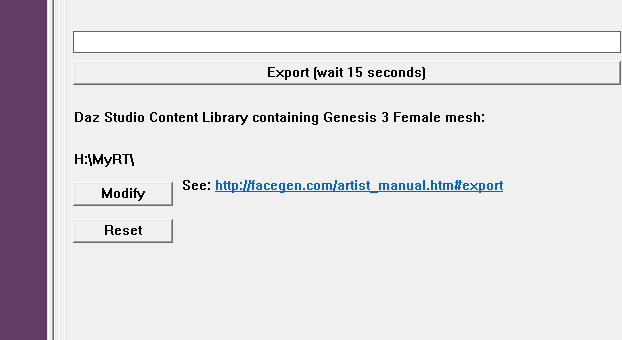
The problem is that my other libraries don't contain the G3F mesh, so Facegen gives an error when attempting to export.
Maybe I should start over and use DIM to install everything
 Facegen now on sale...get it!
Hi everyone,
I picked up Facegen Pro this morning and have (thus far) been unable to get it to work quite correctly. The morph does not show up in Daz. It's probably due to my non-default directory structure...
I've seen that for G3F the export path should be:
<System Drive><DAZ Studio Library Path>\data\DAZ 3D\Genesis 3\Female
However, I have no "Genesis 3/Female" directories in my Daz library. Here is my library folder structure:
G:\Libraries\DAZ Library\data
There are a few misc items in there, but nothing related to figures. In there are the following-> "3.0," "Age of Armour" and "DAZ 3D."
The "DAZ 3D" directory does not contain anything of relevance here: "built in content," "material ball" and "Nvidia MDL examples."
Rather, all my figure-related content appears to be in my DAZ Connect directories. Facegen seems to be happy to export to:
G:\DAZ Studio Related\Daz Modules\data\cloud\1_21630\data\daz 3d\genesis 3\female
Which results in:
G:\DAZ Studio Related\Daz Modules\data\cloud\1_21630\data\daz 3d\genesis 3\female\morphs\FaceGen\
I don't have any morphs show up in Studio, though.
Any ideas? I'm hoping it's something simple that I'm missing...
Thanks!
You cannot export things to a Connect Library so the path you set should be your normal daz library (where you add stuff from other stores, freebies etc)
Under the export tab in FaceGen you just need to add the path to your Non Connect Daz content Library (as attached image)
Need a fast external hard drive...Regardless of how fast of a hard drive or SSD you get, its not going to transfer any faster then the USB ports its going through. If your laptop only has USB 2.0 ports, then the data cannot transfer any faster than USB 2.0 speeds. WHile you could get a 1TB SSD for a few hunder dollars, the only real advantage would be access speed. Instead of waiting for it to spin it would be almost instant, though limited to the transfer speed of the port its going through.
Facegen now on sale...get it!Hi everyone,
I picked up Facegen Pro this morning and have (thus far) been unable to get it to work quite correctly. The morph does not show up in Daz. It's probably due to my non-default directory structure...
I've seen that for G3F the export path should be:
<System Drive><DAZ Studio Library Path>\data\DAZ 3D\Genesis 3\Female
However, I have no "Genesis 3/Female" directories in my Daz library. Here is my library folder structure:
G:\Libraries\DAZ Library\data
There are a few misc items in there, but nothing related to figures. In there are the following-> "3.0," "Age of Armour" and "DAZ 3D."
The "DAZ 3D" directory does not contain anything of relevance here: "built in content," "material ball" and "Nvidia MDL examples."
Rather, all my figure-related content appears to be in my DAZ Connect directories. Facegen seems to be happy to export to:
G:\DAZ Studio Related\Daz Modules\data\cloud\1_21630\data\daz 3d\genesis 3\female
Which results in:
G:\DAZ Studio Related\Daz Modules\data\cloud\1_21630\data\daz 3d\genesis 3\female\morphs\FaceGen\
I don't have any morphs show up in Studio, though.
Any ideas? I'm hoping it's something simple that I'm missing...
Thanks!
Need a fast external hard drive...[Need a fast external hard drive...]...To store Daz content. I store my content in a 1 TB external HD as my regular laptop's regular HD was becoming overfilled with Daz content. However, a spinning HD is also slllooowwwwwwwwwwwwwwwww. I man really sluggish. Is there a faster alternative for a reasonable price out there of at least 1TB in size? My budget would be a few hundred dollars. Sometimes, it takes many seconds for DAX to access all of the content, making working in DAZ often a study in waiting. Granted, anything external will likely mean a slight lag time, but I'd prefer to reduce that as much as possible.
Many thanks,
Bob
Best option is to make your own with an external USB adapter and SATA SSD hard drive. That will eliminate the spinup time of the platters in a normal SATA drive and improve transfer times.
"Brace yourself, my dear wallet! There's always another Sale - and Glitches!"you're right. since the end of last year with superb discounts on recents bundles (g2 at 11usd g3 at 12 and 17usd, and so many other amazing sales), i did not do big purchase since 2017. even march madness was a mehh for me.
But...
yes, but. to day, in a little hunt for stacking discount I found interesting thins. I for the M4V4 anatomy for 1usd, genesis morph bundle for 1 usd, many ( yes, older) things for few cents (like 11 cts).
Here is how:
stack of:
50% sales on daz
80% poser mega sale
and the best: OPEN the DARK SEAL (UP TO 70% OFF DARKSEAL ITEMS & $15 OFF A PURCHASE OF DAZ ORIGINALS!) For this one, jsut take the 3 cheapest (they are almost free in chart)
at the end, without coupon, i got many things at superb discouont
Quick note here (just tried it). If you've ALREADY redeemed the $15 off on Daz Originals using the Darkseal promo once, you don't get to use it a second time in a different transaction if you 'stack' the Darkseal stuff again. The $15 off apparently is once per customer, not per sale (see the fine print).
I already grabbed pretty much all of the Darkseal items I wanted on the first go round, but a a couple of them are showing really nice prices right now...
If you HAVEN'T used the $15 off yet, yes this is an awesome time to take advantage of it!
Novica & Forum Members Tips & Product Reviews Pt 8
Shoot, I totally misread ppl's comments in the other thread. I'm sorry :(As for the centaur itself, I found it easy to work with and the couple of centaur poses that I tried (from Capsces's set) worked fine. I didn't explore Daz's Hides options very thoroughly, just tried the materials from Raw's Rogan on it, mostly because all the griping about Rogan being an "all or nothing" option made it sound like not even the materials would work.I think the "all or nothing" complaint with Rogan comes from the fact the Rogan morph and his materials do not support G3M without the centaur body.
I haven't played with the character yet, but I assume you can use the Rogan morph on any centaur. And the Rogan materials can be used on any centaur regardless of which G3M figure/character you've dialed in. But what you can't do, and I'm sure is part of the griping, is use the Rogan "horse" materials with just any G3M materials. RawArt has overlapped the human skin onto the horse materials, and the horse transition onto the human torso material.
Although, if you're covering up the transition with wardrobe anyway, I see no reason you can't use just the horse materials from Rogan... And they are so much better than the included Horse 2 materials!
Shannara Style Elven earsKia ora
Love the Moko BTW,
I started using Kia ora as a greeting to save folk in the US greeting with "Hi Kiwi hows things in Aussie?" and getting upset when I said "how would I know" I live in New Zealand, we'er stopping Aussie slipping of the planet
E hoa, this close to what yo looken for?
Tween Ryan 7: https://www.daz3d.com/tween-ryan-7
Elf Ears 100%(Optional) Genesis 3 Male Head Morphs: https://www.daz3d.com/genesis-3-male-head-morphs-22924
Earlobes Length 50%
Earlobes Size 50%Genesis 3 Male Head Morph Resource Kit: https://www.daz3d.com/genesis-3-male-head-morph-resource-kit
Elf Ears 1 10%
Elf Ears 7 -50%
Elf Ears 7 Bend 1 -10%
Elf Ears 7 Bend 2 -10%Yep sure is, Murphy stricks again lol just run outta spending money for a bit so will need to save the links
"Brace yourself, my dear wallet! There's always another Sale - and Glitches!"you're right. since the end of last year with superb discounts on recents bundles (g2 at 11usd g3 at 12 and 17usd, and so many other amazing sales), i did not do big purchase since 2017. even march madness was a mehh for me.
But...
yes, but. to day, in a little hunt for stacking discount I found interesting thins. I for the M4V4 anatomy for 1usd, genesis morph bundle for 1 usd, many ( yes, older) things for few cents (like 11 cts).
Here is how:
stack of:
50% sales on daz
80% poser mega sale
and the best: OPEN the DARK SEAL (UP TO 70% OFF DARKSEAL ITEMS & $15 OFF A PURCHASE OF DAZ ORIGINALS!) For this one, jsut take the 3 cheapest (they are almost free in chart)
at the end, without coupon, i got many things at superb discouont
Need Help With Kids Base 4 and other items for KIDS4Look for your content, which is in Poser format, in the Content Library paen under Poser Formats>My Daz 3D Library>Figures>Daz people (for the base figure) and then in other libraries for additional content. If you installed the PowerLoader components of the figures you will get a dialogue on loadign the base Kids 4 figure which will ask which morph sets you want to load.
Shannara Style Elven earsE hoa, this close to what yo looken for?
Tween Ryan 7: https://www.daz3d.com/tween-ryan-7
Elf Ears 100%(Optional) Genesis 3 Male Head Morphs: https://www.daz3d.com/genesis-3-male-head-morphs-22924
Earlobes Length 50%
Earlobes Size 50%Genesis 3 Male Head Morph Resource Kit: https://www.daz3d.com/genesis-3-male-head-morph-resource-kit
Elf Ears 1 10%
Elf Ears 7 -50%
Elf Ears 7 Bend 1 -10%
Elf Ears 7 Bend 2 -10%With Carrara, can I add soft cloth and hair movement to DS characters, then export backto DazStudio?Hi. I would really like to apply some soft cloth and natural hair movements to my large collection of Daz Studio (DS) items. I thought I could do this in Max, Maya or Blender, but exports are not working, No FBX import seems to work, bones are off and not showing mesh. So I tried iClone next (6.5) with no export for physics, according to their techs, so even if I did come up with good hair movement and cloth, I can't bring it back into DS. Does anyone know if I can simply import my character into Carrara, as I have him or her set up in a full DS scene with hair and clothing, then take that cloth or hair and add proper weight maps or however its done in Carrara to get smooth flowing physics for cloth movement and hair, THEN export or somehow get this character back into DS where I have a ton of anibllocks and BVH files, and my own builds for moving poses, then use the tools there, as I usually do, to create my final animations? In other words, will Carrara work, by retaining the movements, OR, can I render the full moving figure with soft cloth and hair in Carrara with alpha, to bring into DS or After Effects (as I always do in DS, in addition to the full scene) so that I can at least get better looking cloth?
If anyone has done this or tried it, I just need to know if it works or its a waste of time. I spent so much time on the other programs with no real results, or what would be an extremely complex route and then DS not able to accept the fbx or other import files for the animations.
The other question is regarding FOG. Can I set up a full scene in DS, bring it into Carrara 8.5, and render it there with particle effects (fog)? This is not possible in iClone as it loads a set as a single item, with no moving parts. I've done it in Max, but it takes hours to transfer, and apparently 3D Exchange won't export the physics or particles, and I much prefer Iray renders, visually and with my current rig set up for fast renders, or Octane.
Thanks for any input!!
Need Help With Kids Base 4 and other items for KIDS4Hello My Name is Tanya
I am new here and 100% new to Daz3D
I have been looking at YouTube vids (Many) the intro Video and they all explain working on a man or a woman but not a Child this is what I am starting with for my project.
I am new but not stupid what may be common knowledge to some is not to me if explained or guided in the right direction, I’ll get it. But now I am just very frustrated.
On a side note I am starting to work in Marvelous Designer hence the reason I came here for the Child Model and wanted my Child Avatar to not look so scary so I sourced around and found here were I could customize one and it not be too costly
I have purchased the following:
Hair Conversion System II for Kids 4
RA BambiniPois Kids4
The Kids 4 Base
GiGi Garden Girl
The Kids 4 Morphs++
Kimberly Bundle K4
Melia Hair
When I start Daz3D Version 4.9 ( See below my ref images for my steps )
I look about and only find a child base in Genesis 1
So I use that and then I start to customize but something goes wrong after that,
1 - I can’t get hair for a girl on my body though I selected Girl base and a second leg to the Child base
2- The hair I do get looks like and ultra-mullet with a bad patch job and very poor nothing like the file I purchased
Please advise if anyone can, I maybe or am be missing something but I have no idea what.
Naked & bald I have seemed to get right see below but past that it’s bad what am I doing wrong ?
And Last
I want to save this little girl that I am building/customizing ( still working on terms ) as an obj file so I can import it to Marvelous Designer and proceed to work on her clothing there she does not ned to have motion of any kind.
I found out how to transfer but it is not a video is just a page -http://www.versluis.com/2015/03/how-to-import-daz-characters-into-marvelous-designer/
is there anything out there that does not speed show on how to do this with ease?
Thank you in advance for any help or advice that can be offered
Regards
Tanya
 Loretta / Lorenzo help needed
I haven't answered yet because I'm still lost as to what the issue is.
There are (if I remember correctly) two versions for each. One with morphs already injected. I don't think we can use the REM file to remove those morphs, if that's the thing.
The other has no morphs, for times when they'll be so distant or that all we want is the base shape, and we don't want or need the extra files. The INJ file is there for if we change our mind and decide to add the morphs. Does the REM actually remove the morph files from the figure? I don't know. If not, and that's what you want to do, why not just load in a fresh one that doesn't have morphs?
Yes, there are two versions. The ones without morphs have only the pose parameters. Pose and morphs are not the same, but both are listed under parameters. The INJ should inject morphs and the REM should remove the items from the parameters list. I am doing the same with Victoria 4. And this works perfect. I can add or remove any parameter I want. But somehow L & L do nor respond. I want to remove the ones I do not use to make it more workable. But more important I want to give Loretta for instance jeans. There are pz2 files for that. See also my previous reply.
The Lorenzo page says: :"Each figure comes with a blank alternative so that all the morphs can be injected if needed, thus saving on resources further if morphs are not needed." So it should be possible, but so far, no succes.
The Serena The Succubus G3F Ready to Wear (and nearly ready to wear) ThreadThe Evening Style Dress for V4/A4 by Bobbie 25 works nicely, and looks nice to boot!

It required a bit of work to dial in the fit on Serena here (fun with scaling and nudging), but that's what morph sliders are for.
Here's the main bit ofthe Molten Outfit for G2F by Nikisatez and Arien

I needed to use a morph slider to slide the 'bra strap' down (it crosses under the wings 4-6 inches avove the panties). I used a D-Former to pull it down and into the body (so it wouldn't cross at the back), scaled the x up slightly, and positioned it so that it looks like it attaches to the panty/belt area (instead of looking like it's burrowing inside the body).
That's it for the moment.
Loretta / Lorenzo help neededYeah... there's the full Alien morph! Top right, just in front of the agent in shades!
Goblin, Orc, Zombie, Elf, Dwarf... I see he doesn't show all of them in that image either. Like he says... it is an ultimate package for instantly acquiring a LOT of people in one shot!
They do alright as feature figures as well.

Daz 3D is part of

Connect
DAZ Productions, Inc.
7533 S Center View Ct #4664
West Jordan, UT 84084Licensing Agreement | Terms of Service | Privacy Policy | EULA
© 2026 Daz Productions Inc. All Rights Reserved.