-
Pose and animation conversion for multiple generations of DAZ figures
What you did should work. Off hand, I can think of two things I can think of that might cause problems like you describe.
The first is using the proper procedure for this to work. Its pretty simple, but if you're new to DS or animation in DS, there are a couple of situations that might cause problems.
- First, to eliminate some possible sources of problems, start with a new scene, File->New.
- Load a fresh Victoria 4 and assign an aniblock, or other animation on her.
- Load a fresh Genesis 3 Female.
- In your scene tab (available in Window->Panes->Scene in case it isn't visible), Left Click on Victoria 4.
- Now, CTRL->Left Click on your fresh Genesis 3 Female.
- Launch the script (double click on it or Right Click and choose Load).
- Verify that the Entire Animation radio button is chosen.
- Optionally, uncheck the Support Undo checkbox (saves memory on long, i.e. more than a few seconds duration, animations).
- Click Accept and wait for the script to complete.
If under those circumstances you get bad results, the primary thing I can think of is that you may need to do is to turn off limits for the figure.
If you've already run the script once, you can clear the animation from the Genesis 3 Female via the Parameters pane menu, the lines with the little arrow/triangle in the top right corner of the Parameters pane. Chose Parameters pane menu->Clear Animation->Clear Figure to clear the animation.
To turn limits off on the entire figure, in the Scene pane Left Click on the figure, Genesis 3 Female in this case. Now Right Click and chose Select->Select Children from the popup menu. This will select all the bones of the figure. Now, in the main menu chose Edit->Figure->Limits->Limits Off (Rotation). This turns off all the rotation limits on all the selected joints in the figure and may cause the retargetting of the animation to produce better results.
Sometimes it is important to turn limits off on both figures as the aniblocks, or other animations, can contain data that exceeds the default limits.
I just transferred the cheerpeprally aniblock, part of the Cheerleader aniblock pack for Victoria 4. It worked fine. In this case I didn't turn off the limits on either figure. It would probably have transferred better it I did turn off limits, but it looks pretty good.
Make sure you don't have any aniblocks assigned to the target figure as Animate2 takes over most of the animation of the character. That's one of the reaons I recommended starting with a fresh scene.
If you want to make an aniblock for Genesis 3 Female:
- First retarget the animation to the normal timeline, i.e. not into an aniblock.
- Save your scene, at least temporarily, as the next step is likely to give you unexpected results and has no undo support.
- In aniMate2, use the Create aniblock from Studio Keyframes feature (Right Click on your figure's name towards the bottom left of the aniMate2 pane and pick from the popup menu). I believe this is only available in the full version of aniMate2. You may need to play around with the few options to get acceptable results. Which option you need to pick are dependent on the situation.
- In the upper section, rename your new aniblock and right click it and save it somewhere if you want.
My schedule is pretty tight right now, so it may take some time for me to reply. Hopefully, the information in this post will help you, but if it doesn't we'll see what we can do.
Which aniblock(s) did you try to transfer ? I may have them and can try them on my machine to see if I see any problems.
MimicMolly's Renders & WIPsHere's another random render that I will definately be revisiting sometime in the not-so-distant future. It was practically perfect (needed a bit more saturation though) except for the reflection on the surfboard, so the stark whiteness of it bugs me...
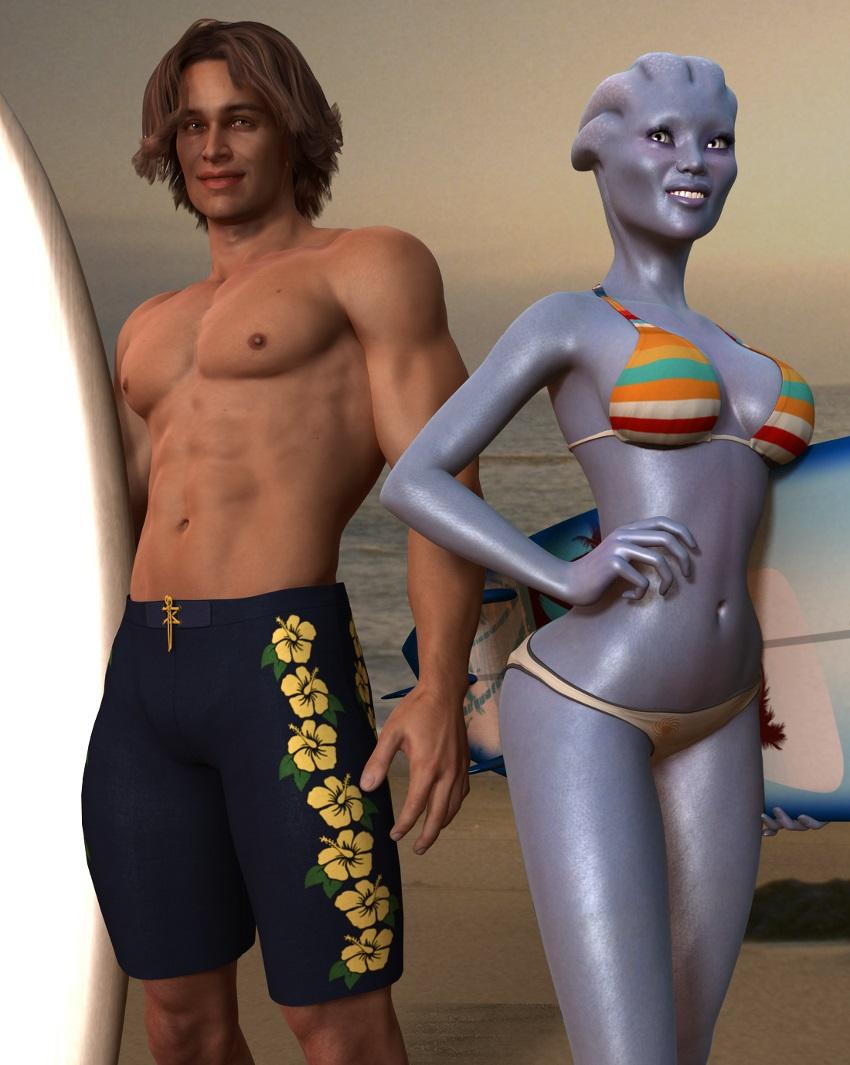
The female character is DarioFish's Asari morph for Genesis (with his V4 materials). Her face morph is my attempt at AS' Alice. Her body is 50% Nata and 50% Hitomi. She's wearing the Kimberly for Genesis Accessories. The male character is G2M Gianni 6 dialed at 100% but with Michael 6's default Nevio textures.(Originally, I wasn't going to get Gianni 6, since his preview pics didn't convince me. But then I saw this pic of him in the JM HumanShader for Iray previews and was convinced.) His hair is Glyn Hair and his outfit is from Surf's Up Outfit and Board that comes free with DS. The lights come from Kimberly for Genesis Complete.
Please note that I barely know anything about Mass Effect, except from what I've seen reblogged on my dashboard on Tumblr. (Basically, some kind of alien dating sim and the Asari is one of the races, an all-female monogendered race. You can either play as male Shepard or female Shepard. I guess this pic, the male is male Shepard. They offered ME2 on Origin for free and grabbed it, but haven't installed it to play. Okay, that was a little off-topic. XD)
Homo Erectus ClothingWhile homo erectus did not have needles, they were capable of working hides. The most likely ways for them to sew would be to bore holes in the hide and then lace them together with leather or sinew. As far as the M4 Cheyenne clothes go, they have a seperate loin cloth which would be very appropriate. In addition to the Cheyenne bundle, I found a couple of other outfits which may be appropriate.
https://www.daz3d.com/cheyenne-bundle
https://www.daz3d.com/cheyenne-boy-for-kids-4
https://www.daz3d.com/cheyenne-girl-for-kids-4
https://www.daz3d.com/zareb-bundle
https://www.daz3d.com/feral-rage-for-v4
https://www.daz3d.com/stone-age-tools-and-weapons
Feral Rage skirt and javelin look appropriate, top and bracers not so much. Cheyenne Boy has a loin cloth like Cheyenne M4.
Edit: I forgot to mention that if you get https://www.daz3d.com/genesis-generation-x2 you can transfer the morphs and textures to Genesis, which may open up a lot more clothing options.
MimicMolly's Renders & WIPsBeen busy the last couple of days. Decided to try something different and use V4 instead. I picked her up when I got the Super-Physicality Bundle for like $7.50 USD last year. Not sure if it was a store bug, or what, but sweet! I've only used V4 for GenX but it's all hit or miss (mostly miss). As you can tell from my previous renders on this thread I'm a Genesis 1 user. (Genesis 1 was my first figure and the most versatile one, IMHO. Anyway...)
Two weeks ago, I picked up the Valkaries Bundle by Road of Heroes* in that bundles Fast Grab because I've been wanting a Tony Puryear character for a while. (To transfer to Genesis, but haven't attempted to do so. Now the whole inventory is on sale. X'D) I like his characters' look.
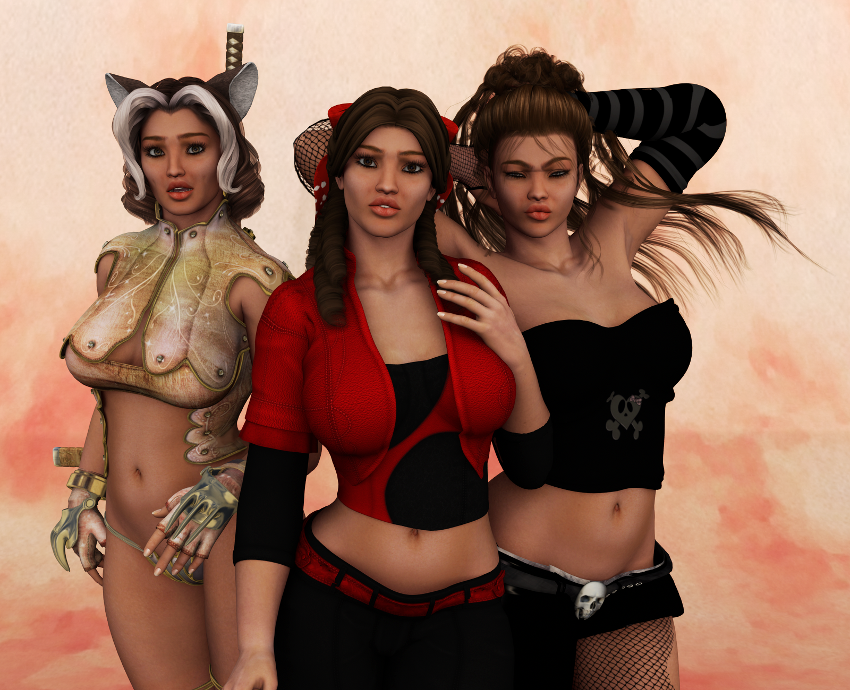
In this pic, you've got Gunnr* with Tandy Hair and Senku Kogo* armor, which is no longer available here but at Rendo (linked to the Documentation Center). In the middle is Hrist* with Bo-Peep Hair and Pampoen. Last but not least, is Mist* with Caramella Hair* and Victress for V4 from Rendo which I got in this past Halloween Grab Bag. (Caramella Hair is only available if you get the Girl 4 Pro Bundle.) Perhaps it's because I don't know how to use other figures besides Genesis 1-3, that I just don't care much for V4. Had a difficult time getting their clothes to fit right and playing around with their expressions. I can't wait to get them over to Genesis.
** EDIT: The characters are no longer available at the store, so I changed the links to the Documentation Center. So glad I managed to get them.
That time again; looking for characters to make characters (please help)I am looking for, preferably Genesis 2, a character set that looks similar to this so I can build off of it without having to make the whole thing because I've tried from scratch several times now and it never comes out right. I'm using Poser but if it's just a morph I can make it work.
I don't think I can do much to make it work if it's for Genesis 3 though

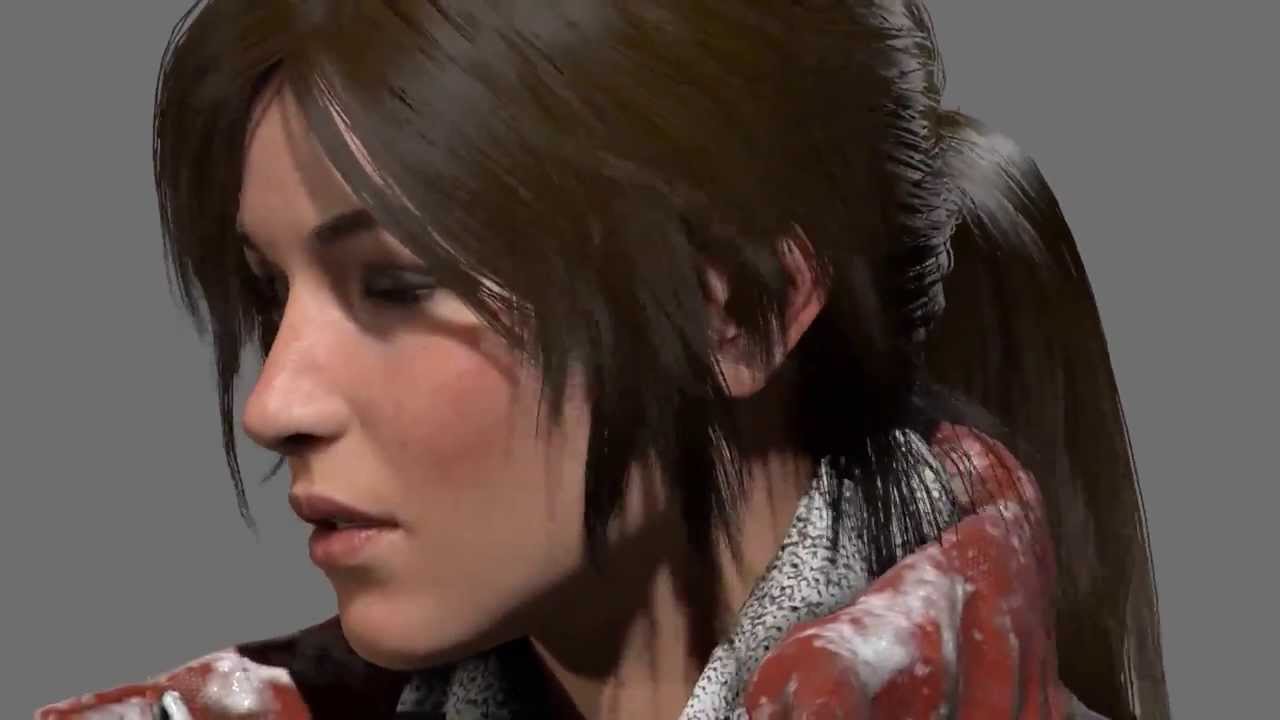 Victoria 4 is 10; Still a Looker...
M4 is also very good. I think they are both very special and keep going back to them.
Yeah but people have ignored and neglected Michael 4 too, in fact the Male Genesis figures have way more clothing than him and that's what pisses me off more than anything because I get to hardly use M4 it's the same thing with the Kids figures too, they are also neglected just as bad. And definately need more morph options. You can do way more to the Teens and Kid figures in Genesis or so it seems like, That means fitting Genesis 3 clothes on them giving them way more in terms of wardrobe ability. I have a converted that lets me put V4 and M4 clothes on my K4 figures but it sucks horribly bad, it's not always accurate, and the morphs for the clothing disappear soon as you convert them to the K4 figure.
G3 Mouth Realism HD is a PITA,Also If you want the 2 morphs to *never* load automatically you can open up the parameters for the morph (the gear) set its default value to 0
and then go to file > save as > support asset > save modified assets
This will make it never load as default ever again (or until you change it back)
Just be warned if you use save modified asset a lot you will accidentally save something unintended as default and it will be a pain to find and get back to default
G3 Mouth Realism HD is a PITA,As long as you didn't move around the teeth a ton you should also be able to fix your morph that has the unwanted mouth realism issue in most modeling software (or even right in DS)
In DS
Favorite your morph with the teeth issue
Select the geometry editor tool in the top bar and in the tool settings tab switch to vertex selection
go to the parameters tab right click and enable "edit mode"
Scroll to Mouth Realism HD
Right click mouth realism hd and select "select morph vertices"
Right click your figure in the scene and click morph editing > clear selected deltas from favorites.
This will move all the selected vertices (which we have limited to the ones effect by mouth realism) back to default for the favorited morph.
Obviously if your created morph also involved a bunch of changes effecting the mouth (or say if your morph involved scalling the full figure to a different height) there may be some manual fixing needed, but for most cases this will wok fine
Question about TerraDome 3Ummm, This is Interesting,
I once made a round water ripple many years ago, An semi flat OBJ that I wanted to use around the legs of a horse walking through shallow water. At the time, there was no such thing for this. It actualy came out pretty good. Used it in one of my scenes called Noble Beast.
What Im wondering is if I make obj footprints like I did that water ripple, If I can just place then on the ground and match the textures. Problem I wonder about is if the terrain will go through the downward slopes of the footprint. Guess I might be able to morph the terrain in that location downward so this does not happen, I just dont know, would have to be very small morphs. I just got this and not sure the dynamics of the terrain
3D Art FREEBIE CHALLENGE-APRIL 2017- LET'S SPRING INTO EASTER FVOTM-Main ThreadI finally have my entry done.
Tommie's Grandpa insisited everyone get properly dresed up for Easter Sunday services at Allgood Babtist Church.
Easter Sunday
Freebies:
Die_trying's V4 morphs for Genesis (Tommie,Jesse, Grandpa Tom)*
Ramwolf's Genesis Morph Pack (third row second column) (Jesse, Grandpa Tom, Rev. Braggart)
Pin-up Girl Pack (Tommie)*
Ultimate Shader Pack (Chrome shaders—with reflection maps removed—for Tommie's wristwatch, earrings, and necklace)*
V4 Wrist Watch (Tommie)*
Ella V4 (Tommie's eyes)*
Sandra for V4* (Tommie's skin)*Stud Earrings for Poser (Tommie)*
Ella Hair for V4 (Tommie)
V4 Fae Top (Tommie)*
Genesis Evening Wear (Tommie)*
Belle of the Ball (Tommie's bow)*
Satin shaders (Tommie's dress)*
Findlay for Genesis (Jesse)*
Running shoes (Jesse)*Glasses (Jesse)*
R72 Leather shaders (Grandpa Tom's, Jesse's, and Rev. Braggart's shoes)*
M3 Pullback hair (Grandpa Tom)
Genessis Georgian Outfits (Grandpa Tom's, Jesse's and Rev. Braggart's socks and shoes)*
Genesis Pinstripe Suit (,Rev. Braggart, Jesse and Grandpa Tom[/url]*
REC Weaponry Shaders (Jesse's Gradnpa Tom's and Rev Braggart's shoe soles)
3Dtrue Pew (Pew)*
3DTrue Podium (Podium)
Paid For Items
Willow for Genesis 2 Female (Tommie)V4 Sport Trainer Shoe Pack (Tommie)
No-count Items
Genesis Evolution Head Morphs and Body Morphs (Both characters)
Wildmane Hair [Came with Daz Studio 4.0] (Jesse)
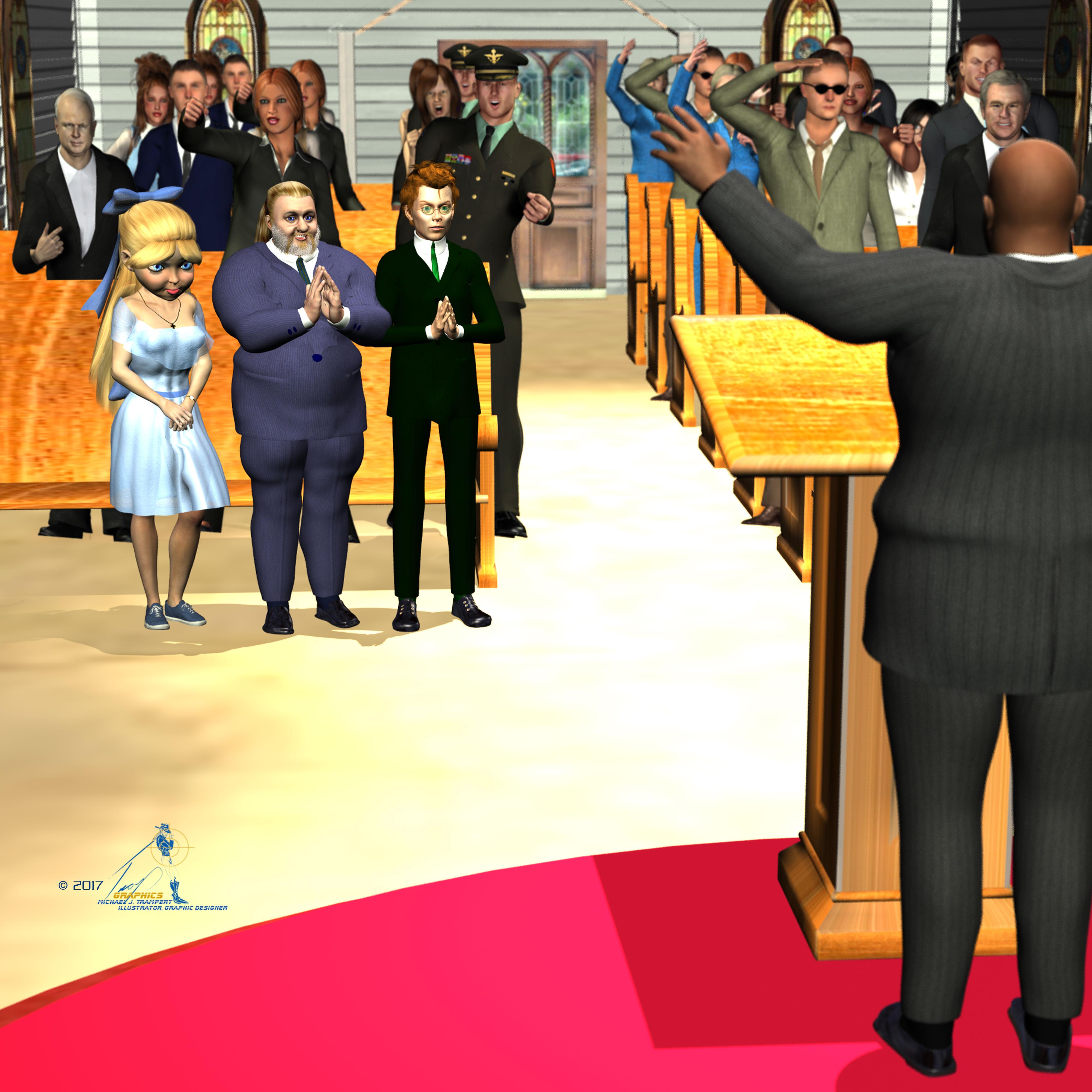
except for the running shoes all freebie links work, I believe the Podium needs registration as well so pleas add an *
I might not have gotten that right but where do come all the other people in the church come from? Or are they with the church pew (there is no image on that page and I don't entered the site, so hard to say. Would be good if you can solve the riddle so we can clear you for entries. Did you include freebies from Wilmap? sh is the spotlighted freebie creator this month
Aemi 1970 made them, but I can't find the link to them. The podium does not requre registration. It's an archived freebie, the same with the pews. That shouldn't have an astrix. Pretty much everone is wearing Wendy's clothes.
G3 Mouth Realism HD is a PITA,when creating custom morphs. How can it be zeroed for ever and ever? Same with the navel morph. Couldn't it be a least listed in the Currentley used parameter tab. One day of work just ruined. Please DAZ give us a real zero G3.
Twilight hair problemNo, that di not help either.
1 - the log say it is a warning, will it cause any nasty problems with it there or can I just ignore it ?
2 - What does it actually mean ( Duplicate formula found linking Smoothing Type & CTRLPonyCRight-Left ) I would assume the settings for each morph is local to that one ?
Classical Statue & Paintings MorphWas looking at a documentary of Versailles although 18th century stately holmes or paintings have similar. Can someone do a body morph for classical statue female shape. Typically these are slightly plump with small circular breasts.
3D Art FREEBIE CHALLENGE-APRIL 2017- LET'S SPRING INTO EASTER FVOTM-Main ThreadI finally have my entry done.
Tommie's Grandpa insisited everyone get properly dresed up for Easter Sunday services at Allgood Babtist Church.
Easter Sunday
Freebies:
Die_trying's V4 morphs for Genesis (Tommie,Jesse, Grandpa Tom)*
Ramwolf's Genesis Morph Pack (third row second column) (Jesse, Grandpa Tom, Rev. Braggart)
Pin-up Girl Pack (Tommie)*
Ultimate Shader Pack (Chrome shaders—with reflection maps removed—for Tommie's wristwatch, earrings, and necklace)*
V4 Wrist Watch (Tommie)*
Ella V4 (Tommie's eyes)*
Sandra for V4* (Tommie's skin)*Stud Earrings for Poser (Tommie)*
Ella Hair for V4 (Tommie)
V4 Fae Top (Tommie)*
Genesis Evening Wear (Tommie)*
Belle of the Ball (Tommie's bow)*
Satin shaders (Tommie's dress)*
Findlay for Genesis (Jesse)*
Running shoes (Jesse)*Glasses (Jesse)*
R72 Leather shaders (Grandpa Tom's, Jesse's, and Rev. Braggart's shoes)*
M3 Pullback hair (Grandpa Tom)
Genessis Georgian Outfits (Grandpa Tom's, Jesse's and Rev. Braggart's socks and shoes)*
Genesis Pinstripe Suit (,Rev. Braggart, Jesse and Grandpa Tom[/url]*
REC Weaponry Shaders (Jesse's Gradnpa Tom's and Rev Braggart's shoe soles)
3Dtrue Pew (Pew)*
3DTrue Podium (Podium)
Paid For Items
Willow for Genesis 2 Female (Tommie)V4 Sport Trainer Shoe Pack (Tommie)
No-count Items
Genesis Evolution Head Morphs and Body Morphs (Both characters)
Wildmane Hair [Came with Daz Studio 4.0] (Jesse)
except for the running shoes all freebie links work, I believe the Podium needs registration as well so pleas add an *
I might not have gotten that right but where do come all the other people in the church come from? Or are they with the church pew (there is no image on that page and I don't entered the site, so hard to say. Would be good if you can solve the riddle so we can clear you for entries. Did you include freebies from Wilmap? sh is the spotlighted freebie creator this month
The Serena The Succubus G3F Ready to Wear (and nearly ready to wear) ThreadOk, this one was mentioned above, just showing it off since I have it:
The Althea Outfit for G3F by LilFlame and Sveva

Confirming that this one works out of the box with no adjustments needed.
Next up, here's one that can be modified pretty easily by including wing cutouts on the back.
The Cheyenne Outfit for V4 by Ravenhair

This one takes some morphing using the existing sliders to get a good initial fit. I had some fun and scaled down the y axis on the thighs considerably, to create the short dress (it's normally extends down to the ankles). As the back is a 'full back', it's pretty easy to use a cutout opacity template to punch out a hole in the back for the wings. I went ahead and did the same for the front as well, to show some additional skin above the breasts. I'm missing a couple of the accessories for this outfit it looks like, but you get the idea here.
Finally, this one requires a bit of work:
A3 X Style, Daz Originals

I don't have this top where it needs to be yet looks wise in the render, but you can see how it might work. Getting the straps to cross above the wings is doable, but using D-Formers things get distorted pretty quickly. You'd pobably want to try editing this in another program (Hexagon?). the skirt works pretty well, with maybe a slight adjustment downward and the usual adjust to fit using existing morph sliders. I've always liked the look of this outfit, and distortion issues aside I think it stands up pretty well as a G3F outfit! I'll probably try to get this one to look purdy using Hexagon at some point.
That's it for now.
Star 2.0 for G3F fully converted to G3M?I figured out how to covert Star's textures and morphs for it can be used on G3M via Daz3d's Map Transfer tool and GenX2 with its AddOns for Genesis 3 figures. But, I can't figure out how to get Star 2.0's eyes attachments to work properly on G3M figure. Has anyone figured out how to do that, to have the eye attachments work on a G3M figure just like how it does for a G3F figure?
No one asked me - Diomede screenshots on whatever - Warning AI Discussion OKThat is it. The morph should now work. I did some tests.
First, I started a new Studio scene. I loaded default G2M. I found my morph in the morph loader pro area. I loaded a G2M clothing set and used fit to. Worked fine.
No one asked me - Diomede screenshots on whatever - Warning AI Discussion OKOK, I returned to Daz Studio's main scene area and tested out my morph. Hopefully, you can see that the figure's major muscles are enhanced as per the Carrara morph
No one asked me - Diomede screenshots on whatever - Warning AI Discussion OKVERY IMPORTANT
Looking good, but still not done. It is very important to use something called ERC freeze so that the changed skeleton does not apply to all future G2M figures. To find ERC freeze, return to the figure's parameters pane (not joint editor). Find the morph again. Because I used default, mine is sill at the top figure level under morphs, morph loader. You will now have to do two right clicks,
First, right click on the morph name and choose EDIT MODE
Second, right click again and choose ERC freeze and new box coms up with accept.
No one asked me - Diomede screenshots on whatever - Warning AI Discussion OKThe morph will work within this scene but is not saved yet for future use. First, it is good to find and test the morph in the current scene. To do so, go to the G2M figure's paramters pane. Because I left it at default, mymorph can be found in the morph area for morph loader pro. I clicked the gear icon in the upper right to edit the morph's properties. I set the minimum value to 0 because this morph is designed only to be increased. I then set the morph to 100% and observed the figure's shape adjust as expected.

Daz 3D is part of

Connect
DAZ Productions, Inc.
7533 S Center View Ct #4664
West Jordan, UT 84084Licensing Agreement | Terms of Service | Privacy Policy | EULA
© 2026 Daz Productions Inc. All Rights Reserved.


















